 Derrick Lambert
- Drekryan
- drekryan
- America/New_York
- Yes
- No
 MC-114454
![[Mojang] Georgii Gavrichev](../../../data/avatars/users/22428.png)
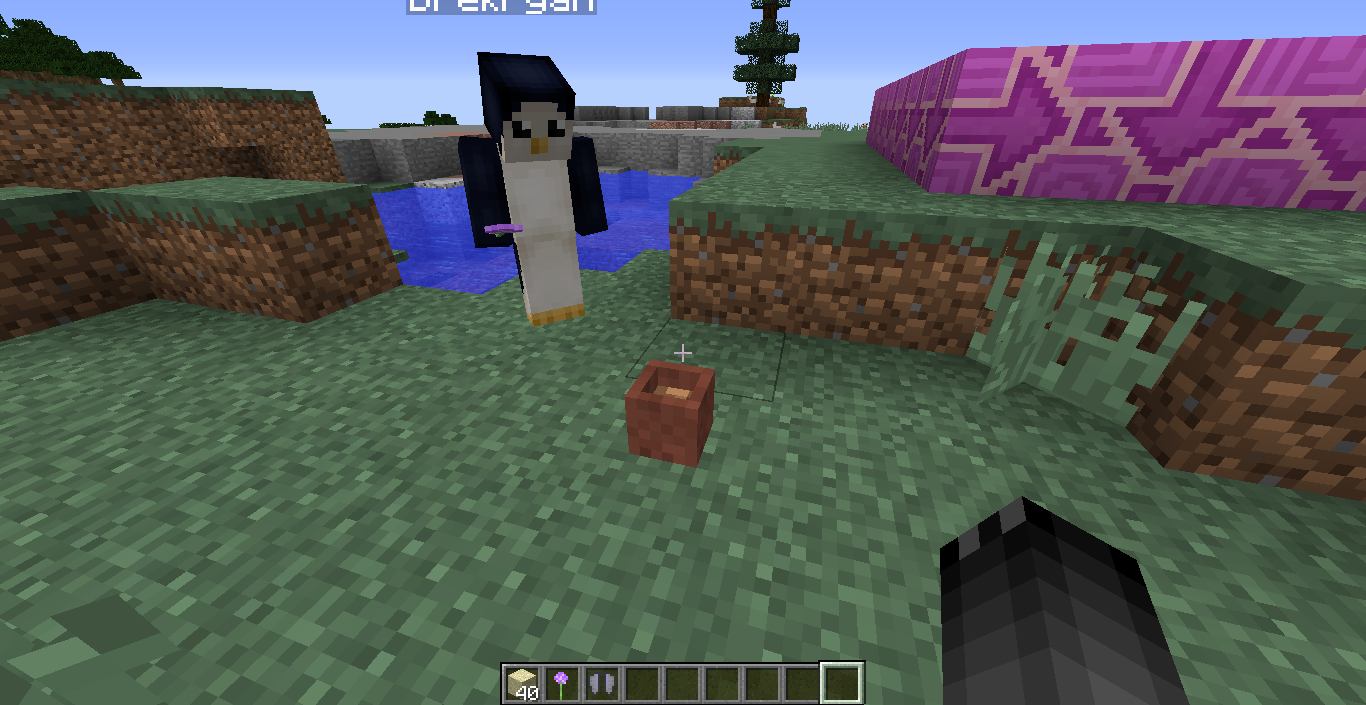


Placing a flower in a flower pot or changing the flower to a different type does not send the correct update packets for near by players.
Steps to reproduce:
1. Have two players in the world next to each other
2. Have one player place a flower pot in the world
3. Have the same player that placed the flower pot, place a flower into the pot.
4. The other player will not be able to see this flower. If this player right clicks the pot to remove the flower (even though they can see it) they will get the correct flower in their hand.The same bug happens when trying to change the flower to a different one. The correct flower doesn't show for the other player.
Note: If a grass block or another block is broken nearby it, it will immediately update the flower pot
The Bug:
Tools do not make a break sound when they break due to no durability left.
Expected Results: The tool would have a break sound when the durability runs out.
To Reproduce:
- Spawn a tool with no durability left
/give {player} minecraft:wooden_pickaxe 1 59 /give {player} minecraft:wooden_shovel 1 59 /give {player} minecraft:iron_pickaxe 1 250 /give {player} minecraft:iron_shovel 1 250 /give {player} minecraft:diamond_pickaxe 1 1561 /give {player} minecraft:diamond_shovel 1 1561- Hit another block to break the tool. Notice that no sound was played when the tool broke.
Note: This works as expected in Minecraft 1.10.2 for reference on the results expected. This bug has existed since Minecraft 1.11 and is therefore present in Minecraft 1.11.1, Minecraft 1.11.2, and the latest snapshot 17w06a.
I had a kinda similar issue.. I used /kill @e and ended up respawning with an empty world unable to move at all and a extremely weird camera angle like im upside down or backwards (F3 screen shows waiting for chunk)
Screen Shot 2018-10-31 at 12.23.09 PM.png
Using /kill or dying causes you to respawn in empty unplayable world until relog
I used /kill @e or/kill <username>andended up respawning with an empty world unable to move at all and a extremely weird camera angle likeim upside down or backwards (F3 screen shows waiting for chunk). I am unable to move in any axis and the only way to correct it is to relog. This occurs on new worlds created in 18w44a or upgraded worlds.Dying by normal survival means or using /kill <username>, I ended up respawning with an empty world unable to move at all and an extremely weird camera angle like I'm upside down or backwards (F3 screen shows waiting for chunk). I am unable to move in any axis and the only way to correct it is to relog. This occurs on new worlds created in 18w44a or upgraded worlds.
Using /kill or dying causes you to respawn in empty unplayable world until relogDying causes you to respawn in empty unplayable world until relog

Derrick Lambert I just tested it and just inserted "sign" as search term, and this bugpost also popped up under the search results.
One of many of course, but I usually also add a date filter (unsure if others do that, too though).
If it were my bugpost, I'd have added "(e.g.: signs, end gateway, enchant table book, beacon beam)" as the more common duplicate bugposts into the title as well though, so it's faster to find whilst searching a matching already-posted issue by bugpost title 
I wasn't able to make the second command in this case the Chest glow using the provided command on clients before 1.11. In terms of the glow 1.9.4, 1.10.2, and 1.11 all do not display the glow for the chest. Unless im missing something obvious it doesnt look like its done that in the past.
Yeah I am able to see that change in behavior between 1.10.2 and 1.11 using the command with the empty list. While 1.10.2 would display the glow for an empty enchantment list, 1.11 does not seem to do this anymore for items such as a Stick.
Whether that is WAI or not is debatable but it does seem like it was intended. Would be interested to hear the reasoning behind the change however.
Its a server jar from Minecraft.net on a remote Ubuntu 16.04 server (originally the 17w06a snapshot server jar, but was also observed on a released copy of Minecraft 1.11.2)
I did a start up a locally hosted Single Player LAN world and invited my friend. The bug happens there as well.
If the game is crashing are you able to attach the crash log file to the issue?
Ill be honest this issue has a very bad title... It is a title that is so bad you probably wouldn't find it in search if you didn't know the full issue.
I wasn't able to reproduce this in 17w17a...
+1 on this issue.. Experiencing it as well
I can load into a 17w43a server though. This seems to only happen when connecting to a local singleplayer world for me if that helps any.
First off you don't need to download LWJGL 3 as its already packaged with Minecraft. Second this isn't a bug and this is a bug tracker not a support forum. It is recommended if you are not experienced in reading error logs, console logs, crash reports or the like to stay away from in development snapshot versions of the game.
This is NOT the place to go to ask for help and you will most likely not get anyone to help you here unless you post an actually bug with proper crash logs attached.
Let me quote the snapshot release notes for you since reading is difficult for you... Backwards compatibility is not supported by Mojang and this "issue" most likely is a wont-fix.
"We do not officially support going back to old versions of minecraft in the same folder that you run a new version of Minecraft. If you run this snapshot then go back to an older version in the same directory, you will lose all your keybindings.
You are always recommended to run snapshots (and any other version than "the latest release") in their own folders. Incidentally, this is also why your tutorial toasts keep coming back "
"
What environment? Windows? On macOS they both work fine for me on 17w43b
How is this an issue with the latest beta of macOS High Sierra when previous versions of the game such as 1.12 work perfectly fine with both the bundled JRE provided by the game and the system provided JRE. I feel like this is caused by a change in the game and would be valid here. Why is this only an issue on Minecraft 1.13 ? Seems more like a Minecraft problem to me then an Apple problem honestly.
Yeah I was able to pickup items and take further damage upon respawning despite me not being able to see the world. I spawned Zombies at spawn and let them attack me after killing me I respawned at spawn (no chunks loaded), I picked up rotten flesh from a burning zombie while in this state and then died a second time after taking damage. I couldn’t move however so I don’t know how mobs can path find to me but I’m not properly added to the dimension or chunk?
@Philippe5425 please tell me you aren't running a hardcore world on a snapshot version...