 Gabor Kovacs
- Dynate
- dynate
- Europe/Stockholm
- Yes
- No
 MC-139529

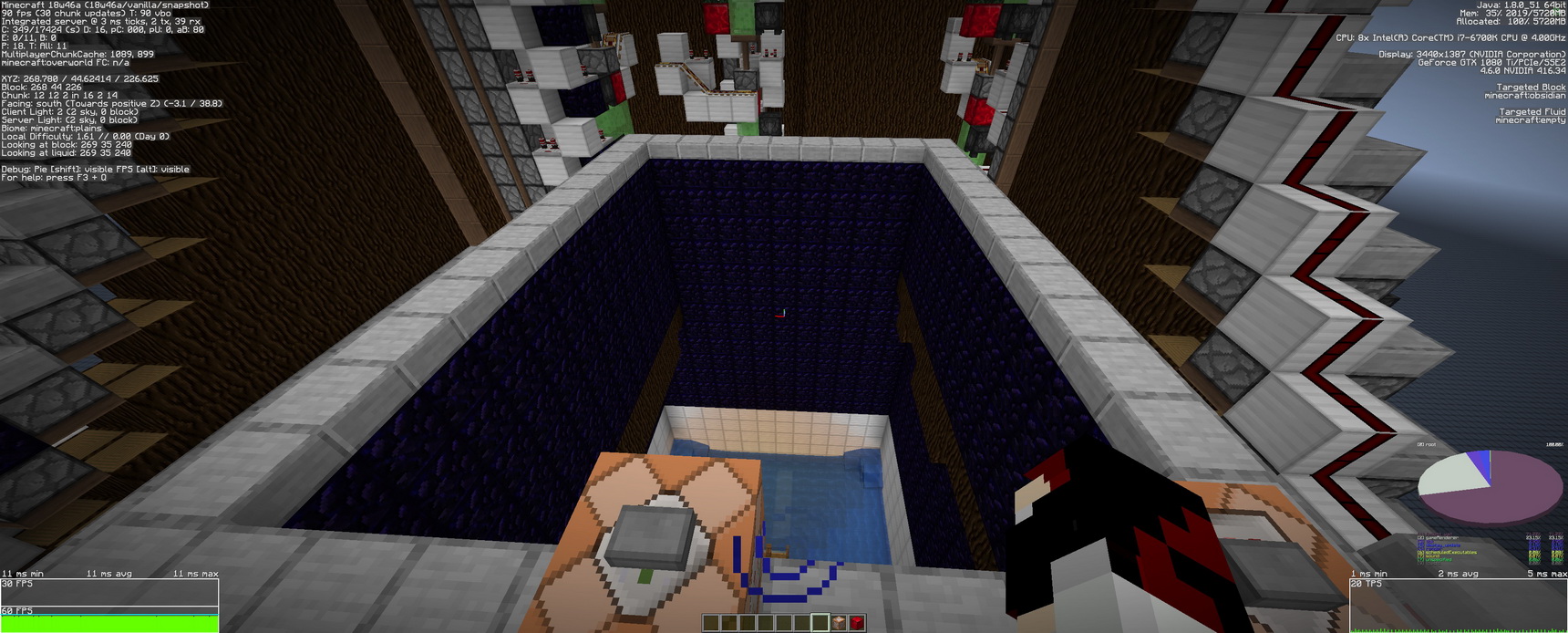

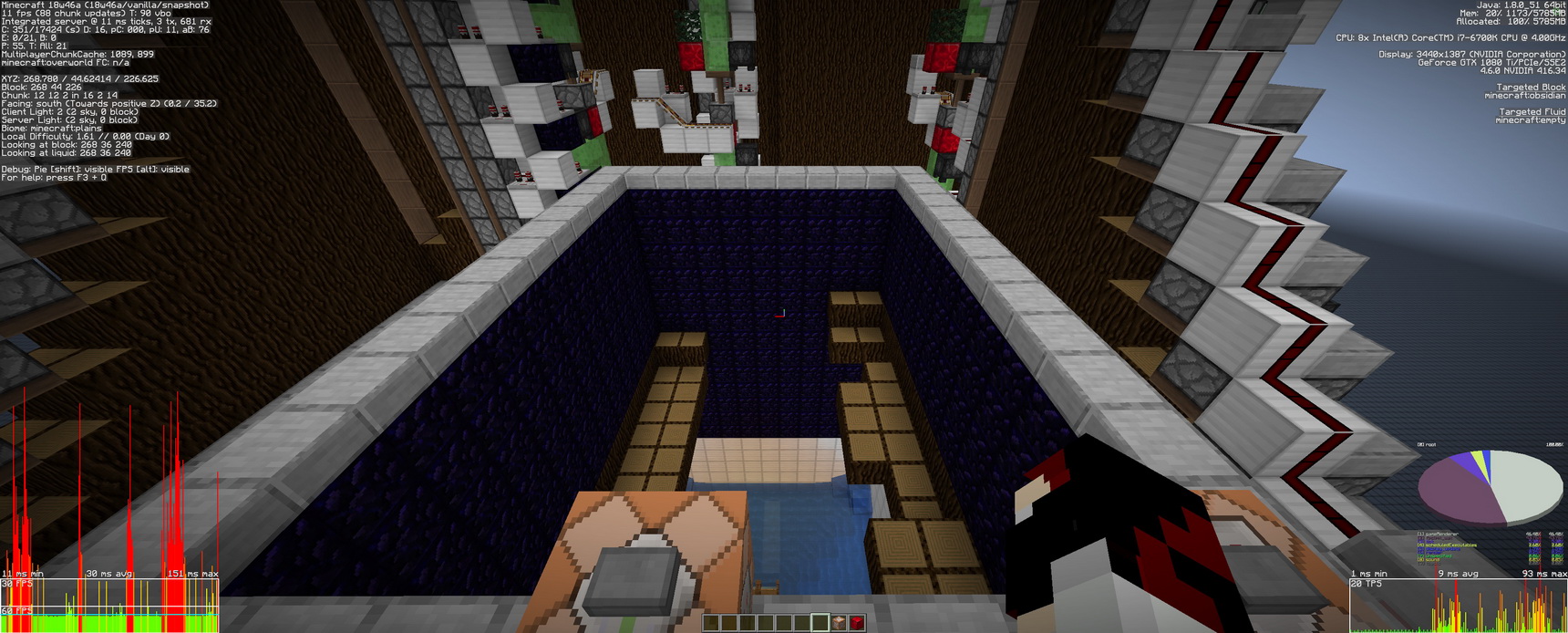


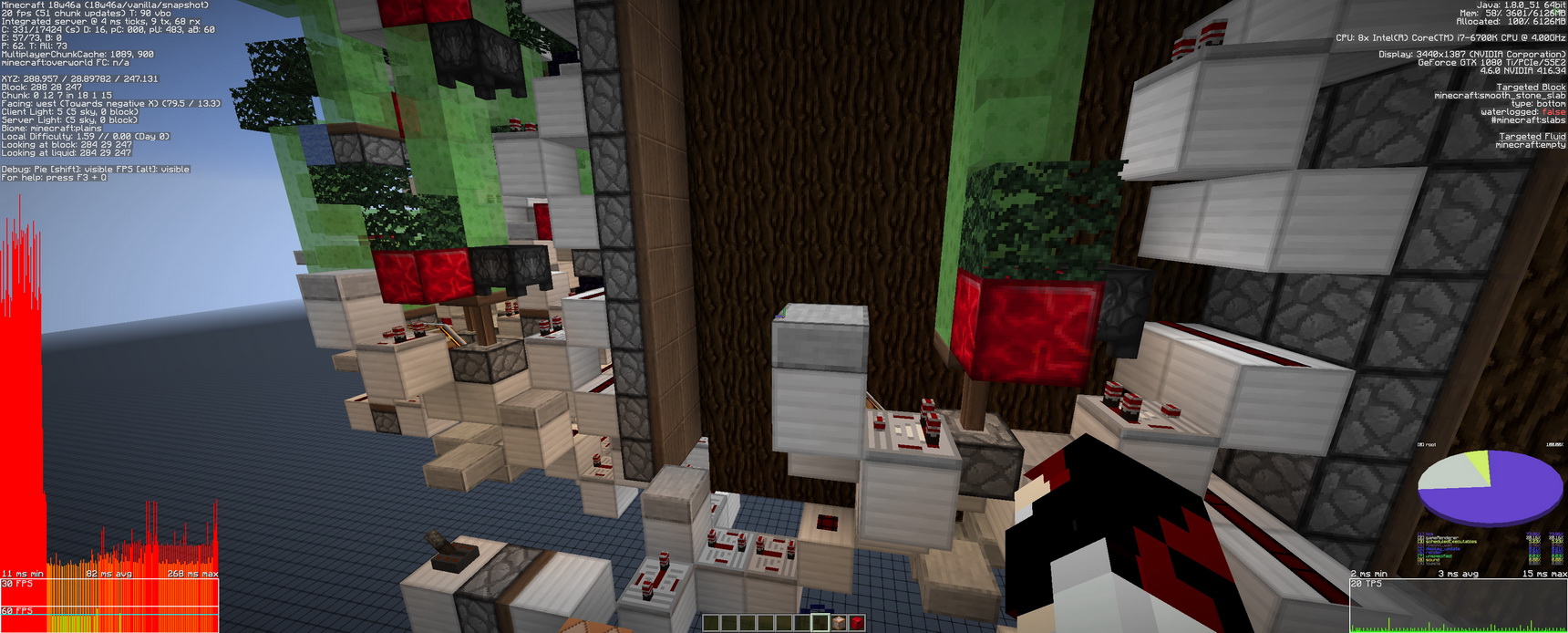





Up from the version Minecraft 1.13 the game render starts to wear down over time. I noticed this bug first under heavy redstone/block/item activity. I recently udes and older redstone contraption of mine what was designed by Ilmango (TNT Efficent 2x2 Spruce tree farm). It"s basicly a big sawmill to produce wood.
The machine has worked fine up to Minecraft 1.12.2. Now it's killing the render engine over time. Integrates server / server ticks are at a fine 20tps but the render still wears down.
I created a test world containing only the machine slightly modified to latest snapshot. I'ts still do it's render killing thing.
The test setup destroys all the wood entityes so that is not the cause of the render problems. The saplings are laying arund, but that was no problem under version 1.12.2.
To reproduse the render issues:
Jjust run the attached world in the latest (18w46a) snapshot. Switch on the lever in front of the command block placed in the side of the contraption. Then press the button. The sawmill starts to work, and the only thing is needed is time. In 1 mins the game render starts to wear down. After a short while freezes will sart, and not long after the game will die. If the sawmill was turned off before it crashes the game the frames will still suffer.
The game render suffers permanent damage. Even if the player turns away or go away the frames will not be restored. In this state , facing away from the machine causes to render more frames, but if the player looks at it again frames will drop. (regardless of the entityes)
The attached images are in a timeline presenting the occurance of the problem.
0- the settings, 1- the initial state , 2- the first TNT (or command destroy), 3-16 the developing render breakdown,
1
7- is the final resoult after turning of the sawmill and turned away and back to the farm. Whitout turning away the frramrate will never rise. After some camera turns it will be somewhat restored, but it will never be any close to the original.Up from the version Minecraft 1.13 the game render starts to wear down over time. I noticed this bug first under heavy redstone/block/item activity. I recently udes and older redstone contraption of mine what was designed by Ilmango (TNT Efficent 2x2 Spruce tree farm). It"s basicly a big sawmill to produce wood.
The machine has worked fine up to Minecraft 1.12.2. Now it's killing the render engine over time. Integrates server / server ticks are at a fine 20tps but the render still wears down.
I created a test world containing only the machine slightly modified to latest snapshot. I'ts still do it's render killing thing.
The test setup destroys all the wood entityes so that is not the cause of the render problems. The saplings are laying arund, but that was no problem under version 1.12.2.
To reproduse the render issues:
Jjust run the attached world in the latest (18w46a) snapshot. Switch on the lever in front of the command block placed in the side of the contraption. Then press the button. The sawmill starts to work, and the only thing is needed is time. In 1 mins the game render starts to wear down. After a short while freezes will sart, and not long after the game will die. If the sawmill was turned off before it crashes the game the frames will still suffer.
The game render suffers permanent damage. Even if the player turns away or go away the frames will not be restored. In this state , facing away from the machine causes to render more frames, but if the player looks at it again frames will drop. (regardless of the entityes)
The attached images are in a timeline presenting the occurance of the problem.
0- the settings, 1- the initial state , 2- the first TNT (or command destroy), 3-16 the developing render breakdown, 17- directly after turning of the sawmill
18- is the final resoult after turning of the sawmill and turned away and back to the farm. Whitout turning away the frramrate will never rise. After some camera turns it will be somewhat restored, but it will never be any close to the original.
Up from the version Minecraft 1.13 the game render starts to wear down over time. I noticed this bug first under heavy redstone/block/item activity. I recently udes and older redstone contraption of mine what was designed by Ilmango (TNT Efficent 2x2 Spruce tree farm). It"s basicly a big sawmill to produce wood.
The machine has worked fine up to Minecraft 1.12.2. Now it's killing the render engine over time. Integrates server / server ticks are at a fine 20tps but the render still wears down.
I created a test world containing only the machine slightly modified to latest snapshot. I'ts still do it's render killing thing.
The test setup destroys all the wood entityes so that is not the cause of the render problems. The saplings are laying arund, but that was no problem under version 1.12.2.
To reproduse the render issues:
J
just run the attached world in the latest (18w46a) snapshot. Switch on the lever in front of the command block placed in the side of the contraption. Then press the button. The sawmill starts to work, and the only thing is needed is time. In 1 mins the game render starts to wear down. After a short while freezes will sart, and not long after the game will die. If the sawmill was turned off before it crashes the game the frames will still suffer.The game render suffers permanent damage. Even if the player turns away or go away the frames will not be restored. In this state , facing away from the machine causes to render more frames, but if the player looks at it again frames will drop. (regardless of the entityes)
The attached images are in a timeline presenting the occurance of the problem.
0- the settings, 1- the initial state , 2- the first TNT (or command destroy), 3-16 the developing render breakdown, 17- directly after turning of the sawmill
18- is the final resoult after turning of the sawmill and turned away and back to the farm. Whitout turning away the frramrate will never rise. After some camera turns it will be somewhat restored, but it will never be any close to the original.
0_resize.jpg
Up from the version Minecraft 1.13 the game render starts to wear down over time. I noticed this bug first under heavy redstone/block/item activity. I recently u
desandolder redstone contraption of mine what was designed by Ilmango (TNT Efficent 2x2 Spruce tree farm). It"s basicly a big sawmill to produce wood.The machine has worked fine up to Minecraft 1.12.2. Now it's killing the render
engineover time. Integratesserver / server ticks are at a fine 20tps but the render still wears down.I created a test world containing only the machine slightly modified to latest snapshot.
I'ts still do it's render killing thing.The test setup destroys all the wood entityes so that is not the cause of the render problems. The saplings are laying arund, but that was
no problem under version1.12.2.To reproduse the render issues:
Just run the attached world in the latest (18w46a) snapshot. Switch on the lever in front of the command block placed
inthe side of the contraption. Then press the button. The sawmill starts to work, and the only thing is needed is time. In 1 mins the game render starts to wear down. After a short while freezes will sart, and not long after the game will die. If the sawmillwas turned off before it crashes the game the frames will still suffer.The game render suffers permanent damage. Even if the player turns away or go away the frames will not be restored. In this state
,facing away from the machine causes to render more frames, but if the player looks at it again frames will drop. (regardless of the entityes)The attached images are in a timeline presenting the occurance of the problem.
0- the settings, 1- the initial state , 2- the first TNT (or command destroy), 3-16 the developing render breakdown, 17- directly after turning of the sawmill
18- is the final resoult after turning of the sawmill and turned away and back to the farm. Whitout turning away the frramrate will never rise. After some camera turns it will be somewhat restored, but it will never be any close to the original.
Up from the version Minecraft 1.13 the game render starts to wear down over time. I noticed this bug first under heavy redstone/block/item activity. I recently used an older redstone contraption of mine what was designed by Ilmango (TNT Efficent 2x2 Spruce tree farm). It's basicly a big sawmill to produce wood.
The machine has worked fine up to Minecraft 1.12.2. Now it's killing the game render over time. Integrated server / server ticks are at a fine 20tps but the render still wears down.
I created a test world containing only the machine. It's slightly modified to the latest snapshot.
The test setup destroys all the wood entityes so that is not the cause of the render problems. The saplings are laying arund, but that was fine up to 1.12.2.
To reproduse the render issues:
Just run the attached world in the latest (18w46a) snapshot. Switch on the lever in front of the command block placed at the side of the contraption. Then press the button. The sawmill starts to work, and the only thing is needed is time. In 1 mins the game render starts to wear down. After a short while freezes will sart, and not long after the game will die. If the sawmill is turned off before it crashes the game the frames will still suffer.
The game render suffers permanent damage. Even if the player turns away or go away the frames will not be restored. In this state facing away from the machine causes to render more frames, but if the player looks at it again frames will drop. (regardless of the entityes)
The attached images are in a timeline presenting the occurance of the problem.
0- the settings, 1- the initial state , 2- the first TNT (or command destroy), 3-16 the developing render breakdown, 17- directly after turning of the sawmill
18- is the final resoult after turning of the sawmill and turned away and back to the farm. Whitout turning away the frramrate will never rise. After some camera turns it will be somewhat restored, but it will never be any close to the original.
Up from the version Minecraft 1.13 the game render starts to wear down over time. I noticed this bug first under heavy redstone/block/item activity. I recently used an older redstone contraption of mine what was designed by Ilmango (TNT Efficent 2x2 Spruce tree farm). It's basicly a big sawmill to produce wood.
The machine has worked fine up to Minecraft 1.12.2. Now it's killing the game render over time. Integrated server / server ticks are at a fine 20tps but the render still wears down.
I created a test world containing only the machine. It's slightly modified to the latest snapshot.
The test setup destroys all the wood entityes so that is not the cause of the render problems. The saplings are laying arund, but that was fine up to 1.12.2.
To reproduse the render issues:
Just run the attached world in the latest (18w46a) snapshot. Switch on the lever in front of the command block placed at the side of the contraption. Then press the button. The sawmill starts to work, and the only thing is needed is time. In 1 mins the game render starts to wear down. After a short while freezes will sart, and not long after the game will die. If the sawmill is turned off before it crashes the game the frames will still suffer.
The game render suffers permanent damage. Even if the player turns away or go away the frames will not be restored. In this state facing away from the machine causes to render more frames, but if the player looks at it again frames will drop. (regardless of the entityes)
The attached images are in a timeline presenting the occurance of the problem.
0- the settings, 1- the initial state , 2- the first TNT (or command destroy), 3-16 the developing render breakdown, 17- directly after turning of the sawmill
18- is the final resoult after turning of the sawmill and turned away and back to the farm. Whitout turning away the frramrate will never rise. After some camera turns it will be somewhat restored, but it will never be any close to the original.
EDIT / UPDATE (2019 01.10.) : 19w02a
- The Render issue is still building up in the latest snapshot 19w02a, but now it takes longer to crash the client.
- If the pre crash scenario occures and im still able to switch off the "crash machine" the framerates will somewhat normalize, but the fps will still suffer a bit.
An overall performance improvement can be confirmed, but the final solution is still a long way to go.
Permanent render performance drop caused by?heavyredstone machinery?Permanent render performance drop and crash - caused by redstone machinery (?memory leak?)
Up from the version Minecraft 1.13 the game render starts to wear down over time. I noticed this bug first under heavy redstone/block/item activity. I recently used an older redstone contraption of mine what was designed by Ilmango (TNT Efficent 2x2 Spruce tree farm). It's basicly a big sawmill to produce wood.
The machine has worked fine up to Minecraft 1.12.2. Now it's killing the game render over time. Integrated server / server ticks are at a fine 20tps but the render still wears down.
I created a test world containing only the machine. It's slightly modified to the latest snapshot.
The test setup destroys all the wood entityes so that is not the cause of the render problems. The saplings are laying arund, but that was fine up to 1.12.2.
To reproduse the render issues:
Just run the attached world in the latest (18w46a) snapshot. Switch on the lever in front of the command block placed at the side of the contraption. Then press the button. The sawmill starts to work, and the only thing is needed is time. In 1 mins the game render starts to wear down. After a short while freezes will sart, and not long after the game will die. If the sawmill is turned off before it crashes the game the frames will still suffer.
The game render suffers permanent damage. Even if the player turns away or go away the frames will not be restored. In this state facing away from the machine causes to render more frames, but if the player looks at it again frames will drop. (regardless of the entityes)
The attached images are in a timeline presenting the occurance of the problem.
0- the settings, 1- the initial state , 2- the first TNT (or command destroy), 3-16 the developing render breakdown, 17- directly after turning of the sawmill
18- is the final resoult after turning of the sawmill and turned away and back to the farm. Whitout turning away the frramrate will never rise. After some camera turns it will be somewhat restored, but it will never be any close to the original.
EDIT / UPDATE (2019 01.10.) : 19w02a
- The Render issue is still building up in the latest snapshot 19w02a, but now it takes longer to crash the client.
- If the pre crash scenario occures and im still able to switch off the "crash machine" the framerates will somewhat normalize, but the fps will still suffer a bit.
An overall performance improvement can be confirmed, but the final solution is still a long way to go.
EDIT / UPDATE (2019 01.10.) : 1.14 Pre-Relase 1
The issue is still present. It's not crashing the client anymore, but it will freeze up for infinity.
Up from the version Minecraft 1.13 the game render starts to wear down over time. I noticed this bug first under heavy redstone/block/item activity. I recently used an older redstone contraption of mine what was designed by Ilmango (TNT Efficent 2x2 Spruce tree farm). It's basicly a big sawmill to produce wood.
The machine has worked fine up to Minecraft 1.12.2. Now it's killing the game render over time. Integrated server / server ticks are at a fine 20tps but the render still wears down.
I created a test world containing only the machine. It's slightly modified to the latest snapshot.
The test setup destroys all the wood entityes so that is not the cause of the render problems. The saplings are laying arund, but that was fine up to 1.12.2.
To reproduse the render issues:
Just run the attached world in the latest (18w46a) snapshot. Switch on the lever in front of the command block placed at the side of the contraption. Then press the button. The sawmill starts to work, and the only thing is needed is time. In 1 mins the game render starts to wear down. After a short while freezes will sart, and not long after the game will die. If the sawmill is turned off before it crashes the game the frames will still suffer.
The game render suffers permanent damage. Even if the player turns away or go away the frames will not be restored. In this state facing away from the machine causes to render more frames, but if the player looks at it again frames will drop. (regardless of the entityes)
The attached images are in a timeline presenting the occurance of the problem.
0- the settings, 1- the initial state , 2- the first TNT (or command destroy), 3-16 the developing render breakdown, 17- directly after turning of the sawmill
18- is the final resoult after turning of the sawmill and turned away and back to the farm. Whitout turning away the frramrate will never rise. After some camera turns it will be somewhat restored, but it will never be any close to the original.
EDIT / UPDATE (2019 01.10.) : 19w02a
- The Render issue is still building up in the latest snapshot 19w02a, but now it takes longer to crash the client.
- If the pre crash scenario occures and im still able to switch off the "crash machine" the framerates will somewhat normalize, but the fps will still suffer a bit.
An overall performance improvement can be confirmed, but the final solution is still a long way to go.
EDIT / UPDATE (2019 0
1.10.) : 1.14 Pre-Relase 1The issue is still present. It's not crashing the client anymore, but it will freeze up for infinity.
Up from the version Minecraft 1.13 the game render starts to wear down over time. I noticed this bug first under heavy redstone/block/item activity. I recently used an older redstone contraption of mine what was designed by Ilmango (TNT Efficent 2x2 Spruce tree farm). It's basicly a big sawmill to produce wood.
The machine has worked fine up to Minecraft 1.12.2. Now it's killing the game render over time. Integrated server / server ticks are at a fine 20tps but the render still wears down.
I created a test world containing only the machine. It's slightly modified to the latest snapshot.
The test setup destroys all the wood entityes so that is not the cause of the render problems. The saplings are laying arund, but that was fine up to 1.12.2.
To reproduse the render issues:
Just run the attached world in the latest (18w46a) snapshot. Switch on the lever in front of the command block placed at the side of the contraption. Then press the button. The sawmill starts to work, and the only thing is needed is time. In 1 mins the game render starts to wear down. After a short while freezes will sart, and not long after the game will die. If the sawmill is turned off before it crashes the game the frames will still suffer.
The game render suffers permanent damage. Even if the player turns away or go away the frames will not be restored. In this state facing away from the machine causes to render more frames, but if the player looks at it again frames will drop. (regardless of the entityes)
The attached images are in a timeline presenting the occurance of the problem.
0- the settings, 1- the initial state , 2- the first TNT (or command destroy), 3-16 the developing render breakdown, 17- directly after turning of the sawmill
18- is the final resoult after turning of the sawmill and turned away and back to the farm. Whitout turning away the frramrate will never rise. After some camera turns it will be somewhat restored, but it will never be any close to the original.
EDIT / UPDATE (2019 01.10.) : 19w02a
- The Render issue is still building up in the latest snapshot 19w02a, but now it takes longer to crash the client.
- If the pre crash scenario occures and im still able to switch off the "crash machine" the framerates will somewhat normalize, but the fps will still suffer a bit.
An overall performance improvement can be confirmed, but the final solution is still a long way to go.
EDIT / UPDATE (2019 04.10.) : 1.14 Pre-Relase 1
The issue is still present. It's not crashing the client anymore, but it will freeze up for infinity.
Microsoft Windows
8.1 64bitJAVA: jre1.8.0_181 64bit
CPU: Intel Core i7-6700K, 4200 MHz,
RAM: 32704 MB,
Motherboard: STRIX Z270E GAMING,
GPU: NVIDIA GeForce GTX 1080 Ti (11 GB),
SSD: NVMe Samsung SSD 960
Microsoft Windows 10 64bit
JAVA: jre1.8.0_181 64bit
CPU: Intel Core i7-6700K, 4200 MHz,
RAM: 32704 MB,
Motherboard: STRIX Z270E GAMING,
GPU: NVIDIA GeForce GTX 1080 Ti (11 GB),
SSD: NVMe Samsung SSD 960
Up from the version Minecraft 1.13 the game render starts to wear down over time. I noticed this bug first under heavy redstone/block/item activity. I recently used an older redstone contraption of mine what was designed by Ilmango (TNT Efficent 2x2 Spruce tree farm). It's basicly a big sawmill to produce wood.
The machine has worked fine up to Minecraft 1.12.2. Now it's killing the game render over time. Integrated server / server ticks are at a fine 20tps but the render still wears down.
I created a test world containing only the machine. It's slightly modified to the latest snapshot.
The test setup destroys all the wood entityes so that is not the cause of the render problems. The saplings are laying arund, but that was fine up to 1.12.2.
To reproduse the render issues:
Just run the attached world in the latest (18w46a) snapshot. Switch on the lever in front of the command block placed at the side of the contraption. Then press the button. The sawmill starts to work, and the only thing is needed is time. In 1 mins the game render starts to wear down. After a short while freezes will sart, and not long after the game will die. If the sawmill is turned off before it crashes the game the frames will still suffer.
The game render suffers permanent damage. Even if the player turns away or go away the frames will not be restored. In this state facing away from the machine causes to render more frames, but if the player looks at it again frames will drop. (regardless of the entityes)
The attached images are in a timeline presenting the occurance of the problem.
0- the settings, 1- the initial state , 2- the first TNT (or command destroy), 3-16 the developing render breakdown, 17- directly after turning of the sawmill
18- is the final resoult after turning of the sawmill and turned away and back to the farm. Whitout turning away the frramrate will never rise. After some camera turns it will be somewhat restored, but it will never be any close to the original.
EDIT / UPDATE (2019 01.10.) : 19w02a
- The Render issue is still building up in the latest snapshot 19w02a, but now it takes longer to crash the client.
- If the pre crash scenario occures and im still able to switch off the "crash machine" the framerates will somewhat normalize, but the fps will still suffer a bit.
An overall performance improvement can be confirmed, but the final solution is still a long way to go.
EDIT / UPDATE (2019 04.10.) : 1.14 Pre-Relase 1
The issue is still present. It's not crashing the client anymore, but it will freeze up for infinity.
(The attached test setup still works fine in this relase too. Please help confirm the existence of this bug and let it to be fixed before the final relase.)
Permanent render performance drop and crash - caused by redstone machinery(?memory leak?)
A pathfinding bug for fishes that occures in cases if the "fish entity" enters into a non full, waterlogged block (fences, iron bars). This affects both solo fishes or individuals inside schools.
I think it's work like this:
- As the basic phatfinding AI leads the fish entity into a block it tries to lead it into the exact center of that block.
- If that block is a full water block there is no broblem at all.
- If the block is a waterlogged fence or iron bars, the fish can't get into the center, instead it's goes into some kind of "Im on my way there" state.
If the entity once got into such waterlogged block, it will never tryes to move again. As soon as the player destroys the fence or iron bars, the fish immediately starts to move again freely.
My opinion is: The pathfinding fish entity is getting itself stuck in a never ending "i want to go there" loop if it can't enter into or pass trough the center of a water block.
To reproduce this:
- make a pool, and create some waterlogged fences, iron bars, stairs etc. inside it.
- Put in some fish
- Wait and see.
A pathfinding bug for fishes that occures in cases if the "fish entity" enters into a non full, waterlogged block (fences, iron bars). This affects both solo fishes or individuals inside schools.
I think it's work like this:
- As the basic phatfinding AI leads the fish entity into a block it tries to lead it into the exact center of that block.
- If that block is a full water block there is no broblem at all.
- If the block is a waterlogged fence or iron bars, the fish can't get into the center, instead it's goes into some kind of "Im on my way there" state.
If the entity once got into such waterlogged block, it will never tryes to move again. As soon as the player destroys the fence or iron bars, the fish immediately starts to move again freely.
My opinion is: The pathfinding fish entity is getting itself stuck in a never ending "i want to go there" loop if it can't enter into or pass trough the center of a water block.
EDIT:
This thing occures most of the times if the player goes away and returns to the area.. As I see most of the times it affects fishes that want to go beyond the actual waterloged block cause if the block is destroyed they immediately start to move at the direction they was facing.
It's just a speculation, but I think to correctly develop the bug the player must go away from the fish (out of the fish AI proicessing range or even put the fish into a lazy cunk) once it's looks like it's stuck inside the waterlogged fence or iron bars block. When the player returns the fish AI somehow forgets to guide fishes wich are "stuck" in such blocks.
To reproduce this:
- make a pool, and create some waterlogged fences, iron bars, stairs etc. inside it.
- Put in some fish
- Wait and see.
- IF you see a fish got "stuck" in the waterloged block go away from it.
- Return and the fish will not move itself ever again until you destroy the waterlogged block it's in.
A pathfinding bug for fishes that occures in cases if the "fish entity" enters into a non full, waterlogged block (fences, iron bars). This affects both solo fishes or individuals inside schools.
I think it's work like this:
- As the basic phatfinding AI leads the fish entity into a block it tries to lead it into the exact center of that block.
- If that block is a full water block there is no broblem at all.
- If the block is a waterlogged fence or iron bars, the fish can't get into the center, instead it's goes into some kind of "Im on my way there" state.
If the entity once got into such waterlogged block, it will never tryes to move again. As soon as the player destroys the fence or iron bars, the fish immediately starts to move again freely.
My opinion is: The pathfinding fish entity is getting itself stuck in a never ending "i want to go there" loop if it can't enter into or pass trough the center of a water block.
EDIT:
This thing occures most of the times if the player goes away and returns to the area.. As I see most of the times it affects fishes that want to go beyond the actual waterloged block cause if the block is destroyed they immediately start to move at the direction they was facing.
It's just a speculation, but I think to correctly develop the bug the player must go away from the fish (out of the fish AI proicessing range or even put the fish into a lazy cunk) once it's looks like it's stuck inside the waterlogged fence or iron bars block. When the player returns the fish AI somehow forgets to guide fishes wich are "stuck" in such blocks.
To reproduce this:
- make a pool, and create some waterlogged fences, iron bars, stairs etc. inside it.
- Put in some fish
- Wait and see.
- IF you see a fish got "stuck" in the waterloged block go away from it.
- Return and the fish will not move itself ever again until you destroy the waterlogged block
it's in.
- The performance of the Framer Villager is way too lazy.
- Farmer walks aimlessly around of it's composter block, focusing it way too often.
- Farmer do nothing but walks around aimlessly most of the time / of it's working hours.
- Farmer's farmland selection(plant/harvest) is way too random and the job rotation is far to slow.
- Once a singe selected farmland is tended, the Farmer goes into an aimles walking tate for a random time.
The attached picture presents the 1,5h work of a single farmer.
Suggestion to solve:
Make a rutin for the farmer to select farmlands in priority instead of aimless waks. (It's The Farmer villager. He is the ONLY one who realy works in the game. Make it cool!)
Farmland selection should be done around the farmer's composter block in a 31x31x3 area like in the old system, but having the composter as center instead of the villager.
- Once a farmland is selected and tended to, a test shoud be made to search for adjacent farmlands for the same action (harvest or plant) in a 3x3x3 area around that block.
- In line coordinates shoud be priorized over diagonals.
- If a suitable block is found within the region for the same action(plant or harvest) carry out the action then repeat.
- If no farmland is found for the same action (harvest or plant) test blocks for the other action.
- If a suitable block is found carry out the action.
- If no suitable block is found within range (for any action), stop search and pick a random block from the composter area.
- If the block is anything but farmland, the action is wander to it or do nothing.
- Pick random action again.
- If the block is farmland but currently not tendable: wander to it or do nothing. Pick another action.
- If the block is farmland and its tendable select the correct action and go to work. Then repeat from start(3x3x3 search).
- The performance of the Framer Villager is way too lazy.
- Farmer walks aimlessly around of it's composter block, focusing it way too often.
- Farmer do nothing but walks around aimlessly most of the time / of it's working hours.
- Farmer's farmland selection(plant/harvest) is way too random and the job rotation is far to slow.
- Once a singe selected farmland is tended, the Farmer goes into an aimles walking tate for a random time.
The attached picture presents the 1
,5h work of a single farmer.
Suggestion to solve:
Make a rutin for the farmer to select farmlands in priority instead of aimless waks. (It's The Farmer villager. He is the ONLY one who realy works in the game. Make it cool!)
Farmland selection should be done around the farmer's composter block in a 31x31x3 area like in the old system, but having the composter as center instead of the villager.
- Once a farmland is selected and tended to, a test shoud be made to search for adjacent farmlands for the same action (harvest or plant) in a 3x3x3 area around that block.
- In line coordinates shoud be priorized over diagonals.
- If a suitable block is found within the region for the same action(plant or harvest) carry out the action then repeat.
- If no farmland is found for the same action (harvest or plant) test blocks for the other action.
- If a suitable block is found carry out the action.
- If no suitable block is found within range (for any action), stop search and pick a random block from the composter area.
- If the block is anything but farmland, the action is wander to it or do nothing.
- Pick random action again.
- If the block is farmland but currently not tendable: wander to it or do nothing. Pick another action.
- If the block is farmland and its tendable select the correct action and go to work. Then repeat from start(3x3x3 search).
- The performance of the Framer Villager is way too lazy.
- Farmer walks aimlessly around of it's composter block, focusing it way too often.
- Farmer do nothing but walks around aimlessly most of the time / of it's working hours.
- Farmer's farmland selection(plant/harvest) is way too random and the job rotation is far to slow.
- Once a singe selected farmland is tended, the Farmer goes into an aimles walking tate for a random time.
The attached picture presents the ~1h work of a single farmer.
Suggestion to solve:
Make a rutin for the farmer to select farmlands in priority instead of aimless waks. (It's The Farmer villager. He is the ONLY one who realy works in the game. Make it cool!)
Farmland selection should be done around the farmer's composter block in a 31x31x3 area like in the old system, but having the composter as center instead of the villager.
- Once a farmland is selected and tended to, a test shoud be made to search for adjacent farmlands for the same action (harvest or plant) in a 3x3x3 area around that block.
- In line coordinates shoud be priorized over diagonals.
- If a suitable block is found within the region for the same action(plant or harvest) carry out the action then repeat.
- If no farmland is found for the same action (harvest or plant) test blocks for the other action.
- If a suitable block is found carry out the action.
- If no suitable block is found within range (for any action), stop search and pick a random block from the composter area.
- If the block is anything but farmland, the action is wander to it or do nothing.
- Pick random action again.
- If the block is farmland but currently not tendable: wander to it or do nothing. Pick another action.
- If the block is farmland and its tendable select the correct action and go to work. Then repeat from start(3x3x3 search).
- The performance of the Framer Villager is way too lazy.
- Farmer walks aimlessly around of it's composter block, focusing it way too often.
- Farmer do nothing but walks around aimlessly most of the time / of it's working hours.
- Farmer's farmland selection(plant/harvest) is way too random and the job rotation is far to slow.
- Once a singe selected farmland is tended, the Farmer goes into an aimles walking state for a random time.
The attached picture presents the ~1h work of a single farmer.
Suggestion to solve:
Make a rutin for the farmer to select farmlands in priority instead of aimless waks. (It's The Farmer villager. He is the ONLY one who realy works in the game. Make it cool!)
Farmland selection should be done around the farmer's composter block in a 31x31x3 area like in the old system, but having the composter as center instead of the villager.
- Once a farmland is selected and tended to, a test shoud be made to search for adjacent farmlands for the same action (harvest or plant) in a 3x3x3 area around that block.
- In line coordinates shoud be priorized over diagonals.
- If a suitable block is found within the region for the same action(plant or harvest) carry out the action then repeat.
- If no farmland is found for the same action (harvest or plant) test blocks for the other action.
- If a suitable block is found carry out the action.
- If no suitable block is found within range (for any action), stop search and pick a random block from the composter area.
- If the block is anything but farmland, the action is wander to it or do nothing.
- Pick random action again.
- If the block is farmland but currently not tendable: wander to it or do nothing. Pick another action.
- If the block is farmland and its tendable select the correct action and go to work. Then repeat from start(3x3x3 search).
- The performance of the Framer Villager is way too lazy.
- Farmer walks aimlessly around of it's composter block, focusing it way too often.
- Farmer do nothing but walks around aimlessly most of the time / of it's working hours.
- Farmer's farmland selection(plant/harvest) is way too random and the job rotation is far to slow.
- Once a singe selected farmland is tended, the Farmer goes into an aimless walking state for a random time.
The attached picture presents the ~1h work of a single farmer.
Suggestion to solve:
Make a routine for the farmer to select farmlands in priority instead of aimless walks. (It's The Farmer villager. He is the ONLY one who realy works in the game. Make it cool!)
Farmland selection should be done around the farmer's composter block in a 31x31x3 area like in the old system, but having the composter as center instead of the villager.
- Once a farmland is selected and tended to, a test shoud be made to search for adjacent farmlands for the same action (harvest or plant) in a 3x3x3 area around that block.
- In line coordinates shoud be priorized over diagonals.
- If a suitable block is found within the region for the same action(plant or harvest) carry out the action then repeat.
- If no farmland is found for the same action (harvest or plant) test blocks for the other action.
- If a suitable block is found carry out the action.
- If no suitable block is found within range (for any action), stop search and pick a random block from the composter area.
- If the block is anything but farmland, the action is wander to it or do nothing.
- Pick random action again.
- If the block is farmland but currently not tendable: wander to it or do nothing. Pick another action.
- If the block is farmland and its tendable select the correct action and go to work. Then repeat from start(3x3x3 search).
- The performance of the Framer Villager is way too lazy.
- Farmer walks aimlessly around of it's composter block, focusing it way too often.
- Farmer do nothing but walks around aimlessly most of the time / of it's working hours.
- Farmer's farmland selection(plant/harvest) is way too random and the job rotation is far to slow.
- Once a singe selected farmland is tended, the Farmer goes into an aimless walking state for a random time.
The attached picture presents the ~1h work of a single farmer.
Suggestion to solve:
Make a routine for the farmer to select farmlands in priority instead of aimless walks. (It's The Farmer villager. He is the ONLY one who realy works in the game. Make it cool!)
Farmland selection should be done around the farmer's composter block in a 31x31x3 area like in the old system, but having the composter as center instead of the villager.
- Once a farmland is selected and tended to, a test shoud be made to search for adjacent farmlands for the same action (harvest or plant) in a 3x3x3 area around that block.
- In line coordinates shoud be priorized over diagonals.
- If a suitable block is found within the region for the same action(plant or harvest) carry out the action then repeat.
- If no farmland is found for the same action (harvest or plant) test blocks for the other action.
- If a suitable block is found carry out the action.
- If no suitable block is found within range (for any action), stop search and pick a random block from the composter area.
- If the block is anything but farmland, the action is wander to it or do nothing.
- Pick random action again.
- If the block is farmland but currently not tendable: wander to it or do nothing. Pick another action.
- If the block is farmland and its tendable select the correct action and go to work. Then repeat from start(3x3x3 search).
Uptade 2019 06.09. (Minecraft Java 1.14.3. Pre 2):
Farmer Villagers now working almost fine. The Key wolrd here is ALMOST.
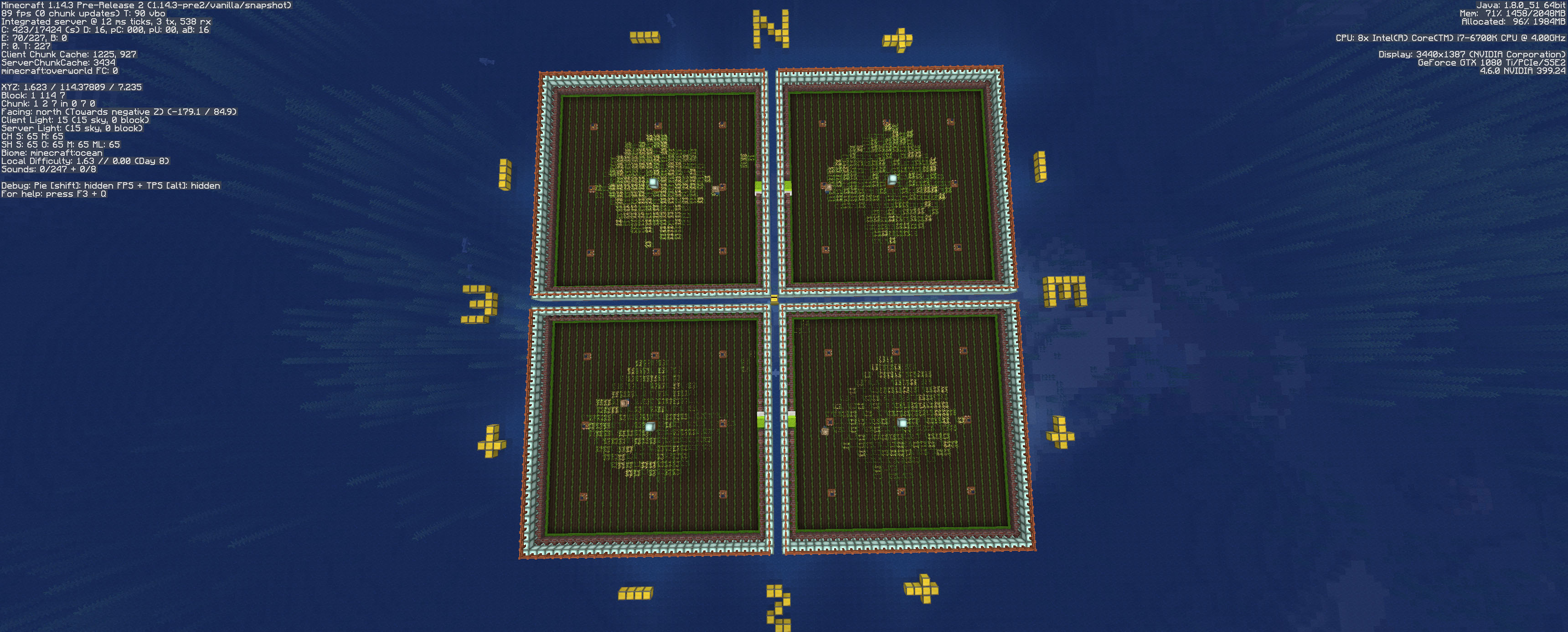
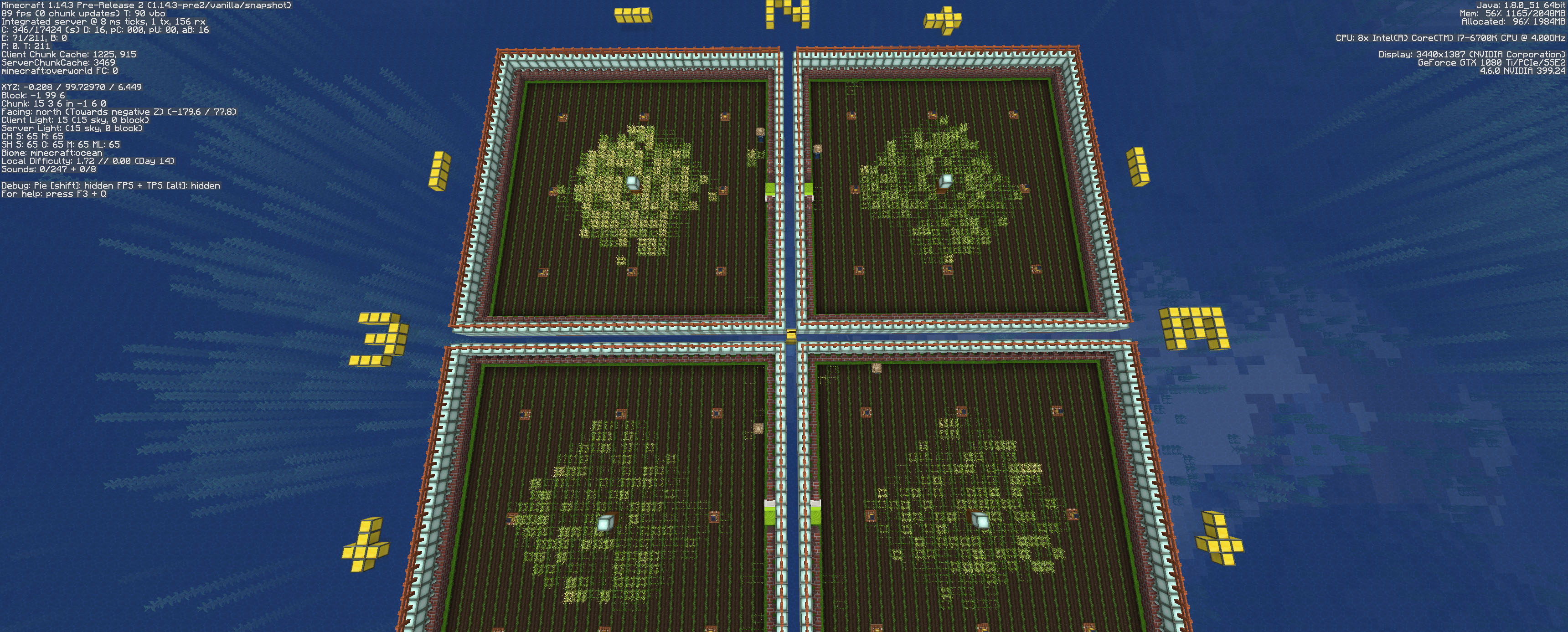
I have tested the farmers once more. Performance is indeed improved but yet still mostly ineffective. My test setup has been run for 8 minecraft day (~2,5h real). The newly attached images are presenting the work of the farmers.
Test setup:
4 separate garden (27x27) oriented towards each direction around the 0 - 0 "world center". Composter (workstatiion) at the center, bellow it a water source. In a 8x8 grid i placed water inside trapdoors, to hydrate the whole field. Light was placed above all the water sources to keep the fields more or less lit.
4 independent farmer with their own beds and workstations were added and 1 bell at the center(just for why not).
All the farmers were manually traded to the max level (just to lock their profession). Seeds was given to them. Later they were resupplied with seeds to make sure they have plenty of it.
—
Resoults / observations(yes I actually watchet them all the time):
- I assume the farming range is now 16+1"center" block "circle/diamond" around the composter. Or it's a ~17x17 square what just lost it's corners somewhere. Fair enough.
- Farmer's AI navigate between POI's somewhat better now.
- During working hours Farmers mutch better focused at the crops, less they stare at the composter. Still Farmers are hugging that workstation a bit too mutch. Running back to it too often. Plant a crop or some of it and running back. Just Why? (If they "just must" stare at it all the time to be happy, at least make them actually use it. Yes, let them put something inside the composter. Excess seeds, weed, bread. . . or i don't know. )
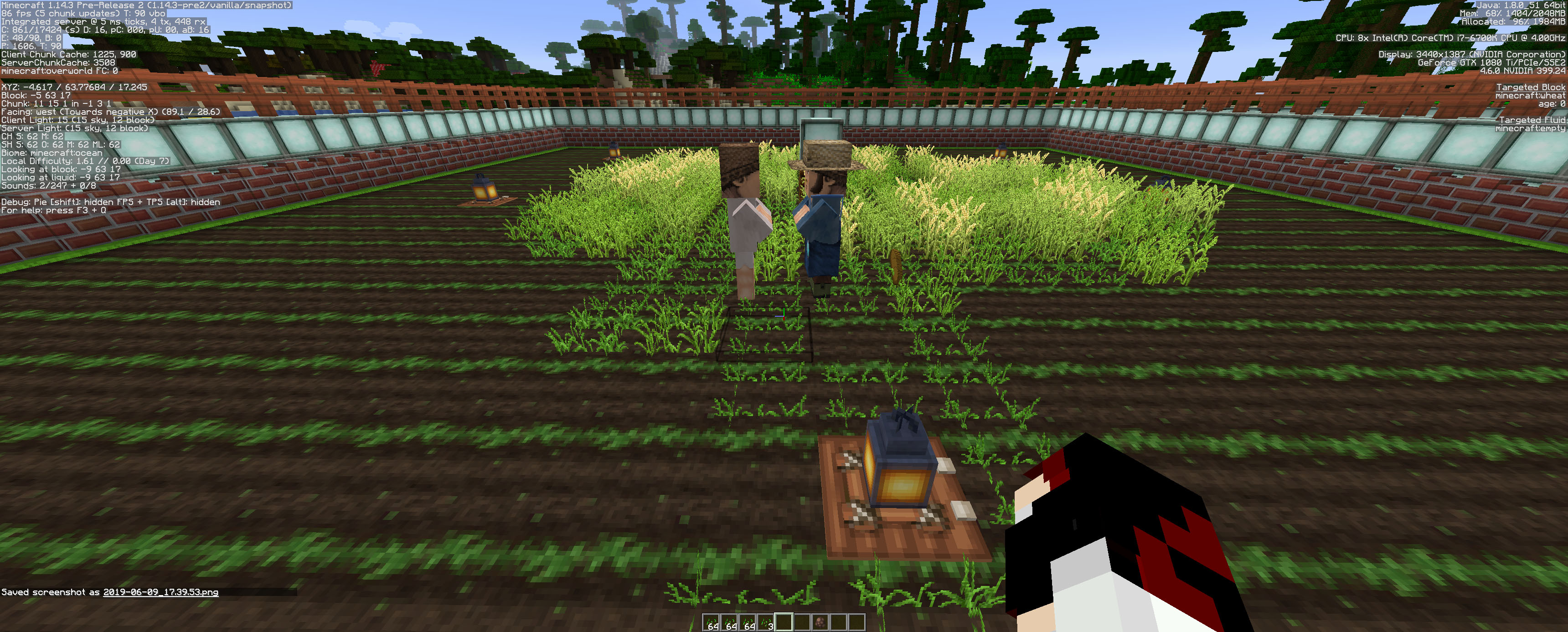
- Planting crops is just awfully designed. Farmers are basicly just vomiting crops all over the place inside the working area inefficently. [And some random outside of it (look picture 01, 02 ,03).]
- Planting crops literally takes eages at outer blocks. (I assume here it's a circle/diamond not a square but still, outer blocks need more love!
- Farmer movement planting, tending to crops focused on center blocks, outer blocks are often missed completly.
- After some time in the field Farmers are loosing interest in planting new. After the diamond shape is finally "mostly vomited full" with crops the farmer starts to tend the field somewhat okay-is. Still forgetting the outer block very often.
- Tossing food (bread in this case) is fun. At the end of the work if i spawn in some fresh villager(unemployed in this case) the farmer toses him food. The recipient almost instantly tossing it back at the farmer. They literally starting a full scale bread war. (pic: 04, 05)
- In the test setup at 14 ingame day the NW area produces way more mature crops, recieves most of the random ticks. (Farmers equally ignoring marured crops all over the place.) Bug? Pic.: 06
Summ:
Overall performance and behaviour has been improved, but I think it's still a way to go. Planting routin is painfuly slow compared to any prev. version, needs some improvements. Harvesting is somewhat okay-is. Food wars need to be stopped?
Suggestion:
If the work area is indeed a diamond/circle - all the blocks included in it need to be treated equally. If it's a square then those "lost corners" needs to be found and then treated the same as those are closer to the composter.
Light updates should be not existent as the test setup has a big, wide roof above itself.
Good question. . . I did not used this exact setup for ages (for known reasons). I can test it in the latest snapshot, but I thing from other experiences it may have gotten a fix shomwere down the line.
Yep. This issue is most likely got fixed sometimes ago. Cannot reproduce in latest snapshot (24w45a). Render works fine. Not as smooth as it once was, but runs just fine.