 Ezer'Arch
- ezerarch
- ezerarch
- America/Sao_Paulo
- Yes
- No
 MC-13141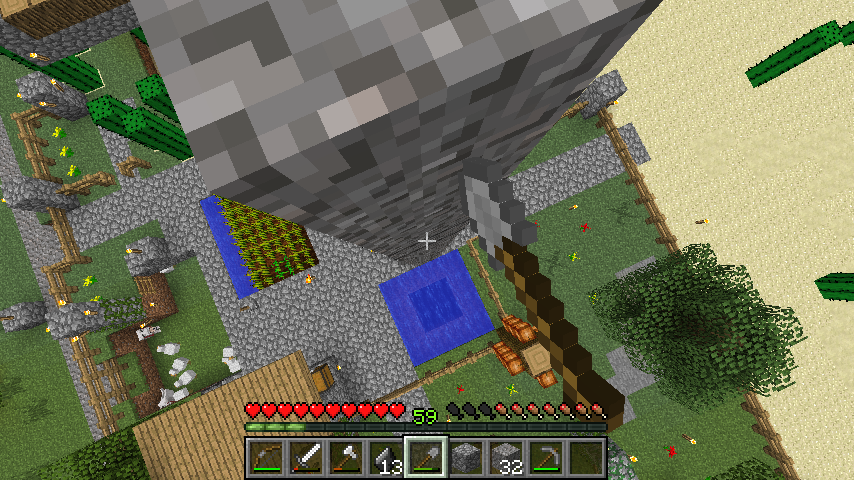


2013-04-02_00.36.31.png
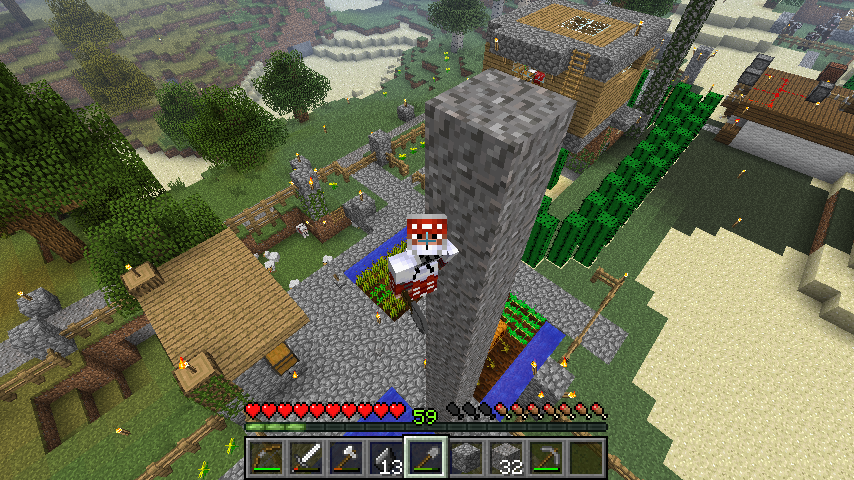
I think it's a bug exploit. It can be usedto go down a ladder made of gravel or sand blocks.How to reproduce:
- Stand on a pile of gravel or sand blocks.
- Sneak on the ledge
- Remove a block underneath you. Not the one you are standing on.
- The block you are standing on will, naturally, fall 1 block high, but you fall 2 or 3 blocks.
- Repeat the process until you get safely the ground.
Video showing the bug: http://youtu.be/_fgOQ5kM14M (1'20")
Player can use this bug to go down a "ladder" made of gravel or sand blocks.
How to reproduce:
- Stand on a pile of gravel or sand blocks.
- Sneak on the ledge
- Remove a block underneath you. Not the one you are standing on.
- The block you are standing on will, naturally, fall 1 block high, but you fall 2 or 3 blocks.
- Repeat the process until you get safely the ground.
Video showing the bug: http://youtu.be/_fgOQ5kM14M (1'20")
Player's head rotates 90º and shakes rapidly whist an inventory with player's skin is open.
Definitely the way how entities are being saved is not stable and need to be checked. Yesterday I complained that my horse with armor and saddle disappeared with no reason after I have re-logged
formmy SSP world. Today I enter my brewing room I found my only one librarian villager was duplicated. Both librarians and with the same offerings as of my last trade.It's impossible for a villager to have entered that room (underground, by iron door); the closest village is 800 m away. I got my librarian by curing a zombie villager and trapping him in that room.
Sorry, this bug is irreproducible. It happened randomly.
How to reproduce it:
1) Spectate on a mob that affects the shader;
2) Kill the mob (/kill command);
3) You're still using the same shader. You need to spectate on another mob to remove/reset the shader.Probably related with
MC-46639.
How to reproduce it:
1) Spectate on a mob that affects the shader, e.g. creeper, spider ;
2) Kill the mob (/kill command);
3) You're still using the same shader. You need to spectate on another mob to remove/reset the shader.Probably related with
MC-46639.
How to reproduce it:
1) Spectate on a mob that affects the shader, e.g. creeper, spider etc;
2) Kill the mob (/kill command);
3) You're still using the same shader. You need to spectate on another mob to remove/reset the shader.Probably related with
MC-46639.
How to reproduce it:
1) Spectate on a mob that affects the shader, e.g. creeper, spider etc;
2) Kill the mob (/kill command);
3) You're still using the same shader. You need to spectate on another mob to remove/reset the shader. Even if you change the gamemode you can't remove the shader.Probably related with
MC-46639.
How to reproduce it:
1) Spectate on a mob that affects the shader, e.g. creeper, spider etc;
2) Kill the mob (/kill command);
3) You're still using the same shader. You need to spectate on another mob to remove/reset the shader. Evenif you change thegamemodeyoucan't removethe shader.Probably related with
MC-46639.How to reproduce it:
1) Spectate on a mob that affects the shader, e.g. creeper, spider etc;
2) Kill the mob (/kill command);
3) You're still using the same shader. You need to spectate on another mob to remove/reset the shader. Even changing gamemode can't reset the shader.Probably related with
MC-46639.
How to reproduce it:
1) Spectate on a mob that affects the shader, e.g. creeper, spider etc;
2) Kill the mob (/kill command);
3) You're still using the same shader. You need to spectate on another mob to remove/reset the shader. Even changing gamemode can't reset the shader.Probably related
withMC-46639.How to reproduce it:
1) Spectate on a mob that affects the shader, e.g. creeper, spider etc;
2) Kill the mob (/kill command);
3) You're still using the same shader. You need to spectate on another mob to remove/reset the shader. Even changing gamemode can't reset the shader.Probably related to
MC-46639.
Just after I had opened my world in 14w06a, spiders ran incredible fast. It happened for a few times. Probably it happened only with the spiders that spawned before the update. I spawned new spiders and switched to survival during nighttime the bug didn't happened.
Video: http://youtu
.be/IKeuFdJ9L5UJust after I had opened my world in 14w06a, spiders ran incredible fast. It happened for a few times. Probably it happened only with the spiders that spawned before the update. I spawned new spiders and switched to survival during nighttime the bug didn't happened.
Endermen walk weirdly. Bad pathfind.
Endermen walk weirdly when chase the player
Endermen instead of walking mostly straight towards the player, they sometimes walk
ingin circles to climb up or down ledges and zig-zag.
The overlay of grass blocks are rendered white or without hue if held by Enderman. It is not snow.
Probably related to
MC-56898.
The overlay of grass blocks are rendered white or without hue if held by Enderman. It is not snow.
Video:: http://www.twitch.tv/ezerarch/b/543899962?t=46s
Probably related to
MC-56898.
Ezer'Arch: Please create a new ticket for this.
This bug still persists in 1.4.5. This bug is directly linked to stairs and happens with any mob. I made a test today in a fresh single-player world:
http://i.imgur.com/G4kFJ.png <-- an entrance with stairs
http://i.imgur.com/xILJI.png <-- mob test, skeletons
http://i.imgur.com/hJHNP.png <-- mob test, wolves
http://i.imgur.com/Pd1q1.png <-- mob test, zombies
http://i.imgur.com/MK4NS.png <-- mob test, creepers
When a non-player entity climbs up a stair, the game "forgets" to update the y-coord, the entity keeps half-clipping the floor for a few seconds and then the the bug vanishes.
Yeah, it's an actual bug, but it doesn't belong to this bug report. You might want to submit it if not reported yet.
It is crashing on 13w05a. Just tested on plain and unmodded jar. Instead of resetting the chunk, only the block where the jukebox was on gets lighting error (it becomes darker), and both the jukebox and the disc disappear.
Thank you!
EDIT:
Tested, the original bug was fixed, but a new one came up: the first jukebox you place disappears right in front of your eyes. That's what I did: 1) create a world, 2) In creative, pick a jukebox and a disc, 3) switch to survival, 4) place the jukebox — it disappears in the next tic., 5) switch back to creative and pick a new jukebox, 6) place it, it remains.
It should be a rule: animals will breed only if they are 100% healthy – hurt animals won't breed – it seems pretty logical and consistent since wolves have this behavior. First feed them to recover their health, then feed them to breed. It interests me since I constantly get in fight with mobs in middle of my farms and cows and sheep ended up getting hurt.
Now the problem: what can tell the player that an animal is ready to breed, like wolves' tails?
I was messing around with baby villagers and I noticed they sink through blocks even if they haven't stepped on a slab or stair, just after I have spawned them: http://www.youtube.com/watch?v=-LE0GeRkQUw&t=1m9s
Yes! This bug is freaking annoying, it should be top priority fixing it. I endorse what Glenn Tottman (11/Mar/13) said, if Nathan is sure he can explain what is happening, let him get his point across. While, in my opinion, Nathan acted a bit impolitely with the moderator (sorry, but I need to be frank), the moderator was pretty much like "shut up, we know what we're doing", he'd better let him explain all once and for all and stop this unnecessary argument or it's going to drag forever.
As for "different issues": mobs check the collision with the environment along the Y-axis (floor and ceiling) and X/Z-plane (walls), this procedure is executed every tic by the engine. Although bad collision with vertical surfaces and bad collision with horizontal are visually different, they're caused by the same bug located in a specific piece of code. Am I right? People that are used to reading the code could help us. Let's be civil.
This bug still occurs in 13w24b. It happens in any situation when you open, in the 3rd person view both front and back views, any inventory that have a thumbnail with player's model. You don't need to be ridding a horse, this just makes the bug more noticeable since the inventory window covers a big portion of the screen.
In 1.5.2 and 13w24b, the player's head rotates 45-90º towards the mouse pointer and it's likely to shake rapidly depending on the distance between the camera and the player. Upon closing the inventory window, you'll see the head rotating back to its normal position. If you install ShoulderSurfing mod, you can move the camera sideways a bit so you'll be able to see clearly the issue.
It's not something that could harm the gameplay, but it's an issue for those who record videos: it seems the player is having seizure.
My guess is that, there's a conflict between the "preview" model in the inventory and the in-world player's model. Either they should disable any movement of the in-world player's model whist the inventory is open or make both in-world and inventory player's model synchronize with each other. The latter is a more elegant solution, in my opinion.
Added a screenshot taken with ShoulderSurfing mod which was used to displace the camera/view sideways so that it's easier to see the bug occurring.
This is the same of
MC-1545.Thank you for fixing it. This bug was screwing up my videos.
Happened with me 5 minutes ago. I tied my horse with saddle and armor in a fence post. Close MC and reopened it a few minutes later. Disappeared. Probably it got suffocated. If so, does it drop the armor/saddle on dying?
I'm now playing 1.6.2 and that bug never happened again. In fact, this kind of bug has taken place 3 times since I purchased the game two years ago, it happened when I re-logged after a crash. But this very one, I got no crash and it happened just after I had updated the game to 1.6.1, so I thought it was worth reporting.
Finally I got a video: http://youtu.be/ApzJjifqbuA?t=18m2s
Ray Herring, I think the zombie social behavior was toned down a bit in 13w38a (at least for the 1st night test). It was causing a lot of troubles even in SSP, slowing down the pace of all mobs. For example: in a frame, a creeper moves towards me 3 or 4 block away; next frame, "You're dead" screen. It happened because there was a pack of zombies nearby slowing down the pathfinder of all mobs.
But still, I'd like the zombie duplication behavior were removed or improved (if not yet): a zombie approaches, you hit or kill it with a sword, another zombie spawns at the same spot where the 1st one was, when not right in front of your face or behind you catching you off guard. I don't mind if a zombie calls for help and a new zombie spawns as long as it happens at different spot outside the 24m-safe range.
Confirmed in 13w39b.
Interesting what I would expect most is sand with small patches of gravel and exposed rock (http://www.youtube.com/watch?v=x2X6H1llkb0 and http://youtu.be/HA1I-yyuoPQ?t=2m16s) and ironically clay, especially in the deep oceans:
http://en.wikipedia.org/wiki/Pelagic_sediment#Red_and_brown_clays
Needlessly to say, the most hated block is gravel, and most of the players complain the oceans are boring and lack content. In my opinion, making the seafloor gravel covered will not help. Exposed dirt blocks should go away though.
But, why should all 4 Extreme Hills biomes have snowfall? I mean, if we are getting 4 kinds of EHs, why not keep one or two snow free? It seems all tall mountains will have snow with no snow-free option left.
My concern is, what will happen with people that have build structures on EH and now will have to deal with snow?
http://www.reddit.com/r/minecraftsuggestions/comments/1nn81n/extreme_hills_should_be_kept_snowfree_while/
Why not keep Extreme Hills and EH+ snow-free while Extreme Hills M and EH M + could be snowcapped?
People who like to build on top of mountains would like to have snow-free mountains as option: http://redd.it/1nn81n
Confirmed in 1.7 pre-release.
In my opinion, gravel made ocean look worse and more boring. It would be better if gravel were replaced with sand, which has more uses and it's more realistic. At least, players can dive of aid of Aqua affinity and Respiration to mine out the sand to build big glass structures... why should I go to the oceans and dive if all oceans can offer is gravel and squids?
Confirmed in 1.7.1 pre-release.
I don't mind about the oceans no longer generating clay. You can mine plenty of clay from Mesa biomes and rivers.
If this is a bug, it's a simple one: all they need to do is to replace gravel block ID with sand ID in the wgen code. If it's a design decision, it's a bad one for the previously-called "ocean update" IMHO, or perhaps there's a reason behind it. Let's see how 1.7.2 will turn out, if it will.
14w04b: just tested, confirmed.
It's not a big issue for vanilla set as the chestplate sleeves are short and you can barely notice this "glitch", but it's an issue for resource packs that have more detailed armors.
This bug is more noticeable when using a resource pack that contains chestplates whose sleeves were supposed to cover whole arm.
Only with endermen? It happens with any mob that affects the shader. Try spiders and creepers.
The animation appears in 3rd person and in the inventory window. We still need a test on multiplayer.
I think the burning animation should be removed altogether as the player on spectator mode is supposed to have zero interaction with the world and vice-versa.
Also, if you press F4, the shader is removed but you can't bring it back unless you "de-spectate" the mob and "re-spectate" it.
Should the shader be turned off whilst in 3rd person view? I think it should since the camera is outside the head, but It won't kill me if not. (EDIT: Ignore this paragraph, shaders can be useful even in 3rd person view for videos, if you don't want it, use F4)
Could you rename the issue? Something like "Spectator mode shows shader name after exiting the mob"?
EDIT: probably this is related to
MC-46645.Instead of a new box to check if the entity is off-screen or not, I'd suggest that if entity's boundary box is off-screen more than 1 or 2 meters then make it invisible.
Comment moved to
MC-46596.Maybe this video helps as proof: http://www.youtube.com/watch?v=SjUzLEFbyBg
Comment moved from
MC-46820as that was marked as duplicate:I'd like to add this bug affects mostly every event that produces sounds. Examples:
It seems there's a desynch between the event and the sound or the latter is being executed twice. The sound was supposed to be played only within the duration of the event (run, open, hit) but it's noticeable the sound is being played a tic further.
I think this is duplicate of
MC-1207, but this ticket covers not only pig riding.This can be marked as duplicate of
MC-1207, which was reopened recently.This bug is still present in 1.7.10-pre2, but fixed in 14w21b. It would be great if 1.7.10 were released with this fix.
Yes, just tested in 14w27b. Enderman once it started its chase mode, it zig-zags and spins a little to step down blocks, sometimes stopping in middle of the slope.
Video: http://www.twitch.tv/ezerarch/b/543899962
(Moved from
MC-57957)The hurt and death animations are 2x slower than those in 1.7.10. It's just the speed of the animation: slower knock-back and slower falling-over death animation. It is more noticeable on hostile mobs.
Not game-breaking, but it is very anti-climatic and hurts immersion.
Video: http://www.twitch.tv/ezerarch/b/543899962?t=4m45s
The title and description are not that descriptive. I recommend improving them.
Nothing with "gravity".
(Part of this comment was moved to
MC-58120. Just noticed that the older issue - this - was marked as duplicate of a newer issue. Sorry.)Confirmed, it's a dupe. I searched for "Endermen+Grass", not "Endermen+Grass".
Surely not fixed in 14w28b: http://www.twitch.tv/ezerarch/b/546712944 (bug occurs after 1:00)
EDIT: http://redd.it/2af8m3
I think this is solved under normal conditions. Enderman walks very fast when you have just loaded the world or if there's some after-death lag, and when you hit them their hurt animation is 2x slower than in 1.7.x. That's all.
@Chris K, you can "fix" that with a resource pack, this is what I did.
This video shows how annoying this clicking sound can be and has the download link of my resource pack. If you just want to keep the sound fix only, delete everything except sounds.json and "\assets\minecraft\sounds\mob\chicken" folder.
This is the sound of an actual chicken walking: http://www.freesound.org/people/Dann93/sounds/192035/.
I would like to add extra info:
This bug still happens in 1.8.7.
And I would add to the description the helmet translucency only works in the End dimension as well. Pics: https://twitter.com/EzerArch/status/617227535588433920 and https://twitter.com/EzerArch/status/606990257901445120.
Sorry for reviving this ticket, I had to because I tried to use the said sound via resource pack but the game can't play it.
This is what I have in my 1.7.10 and 1.8 json files in \.minecraft\assets\indexes:
"minecraft/sounds/random/breath.ogg":
{ "hash": "dd2f7209c2a58b0886beb34d49b0512b49adbb7e", "size": 14331 },
Then I added this piece of "code" in sounds.json of my resource pack:
"random.breath":
{ "category": "neutral", "sounds": [ "random/breath" ] }It didn't work. Then I added the breath.ogg (which I found in an ancient directory in minecraft) in my resource pack's minecraft\assets. Still didn't work.
@FVbico
> How about transparant "armor" layer on skins on arms, legs and chest, do they also work now?
The translucency feaure is for the head part only, and it works as long as you don't use any enchanted armor piece. (Tested in 15w49b)