 William Karnavas
- fencefoil
- fencefoil
- Europe/Stockholm
- Yes
- No
 MC-81
MC-81![[Mojang] Grum (Erik Broes)](../../../data/assets/gravatar/grum.png)
Windows 7 x64, Java 7 x64
When writing a book, pressing enter only appears move the cursor down one line, no matter how many times you press enter.
Having played with books in mods, I have found multiple "\ n" characters can be created by pressing enter, and they are saved, the only problem being the book GUI not showing the blank line.
EXPECTED:
Pressing enter twice creates a blank line in a book between previous text and any text added.BROKEN BEHAVIOR:
Pressing enter twice does not create a blank line between previous text and any text added, but only breaks the current line without adding the blank line.TO REPRODUCE:
1. Open a book and quill
2. Write a line of text
3. Press enter twice
4. Write more textResult with bug is that there is no blank between lines.
ATTACHMENTS:
Import is done by copying the contents of a file directly into the page tag of a book.
When writing a book, pressing enter only appears move the cursor down one line, no matter how many times you press enter.
Having played with books in mods, I have found multiple "\ n" characters can be created by pressing enter, and they are saved, the only problem being the book GUI not showing the blank line.
EXPECTED:
Pressing enter twice creates a blank line in a book between previous text and any text added.BROKEN BEHAVIOR:
Pressing enter twice does not create a blank line between previous text and any text added, but only breaks the current line without adding the blank line.TO REPRODUCE:
1. Open a book and quill
2. Write a line of text
3. Press enter twice
4. Write more textResult with bug is that there is no blank between lines.
ATTACHMENTS:
Import is done by copying the contents of a file directly into the page tag of a book.
When writing a book, pressing enter only appears move the cursor down one line, no matter how many times you press enter.
Having played with books in mods, I have found multiple "\ n" characters can be created by pressing enter, and they are saved, the only problem being the book GUI not showing the blank line.
EXPECTED:
Pressing enter twice creates a blank line in a book between previous text and any text added.BROKEN BEHAVIOR:
Pressing enter twice does not create a blank line between previous text and any text added, but only breaks the current line without adding the blank line.TO REPRODUCE:
1. Open a book and quill
2. Write a line of text
3. Press enter twice
4. Write more textResult with bug is that there is no blank between lines.
ATTACHMENTS:
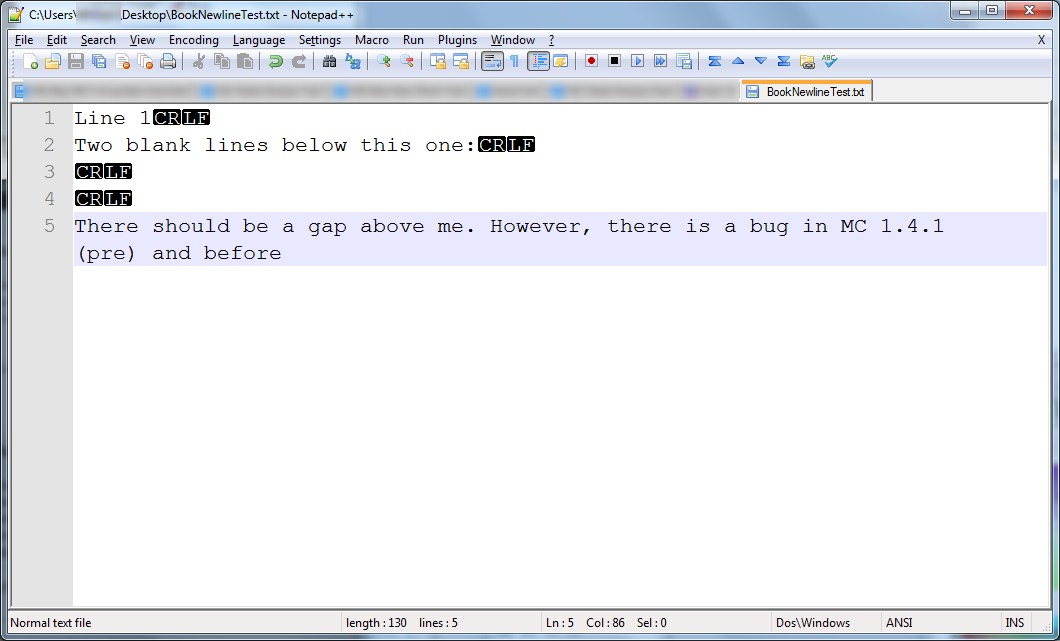
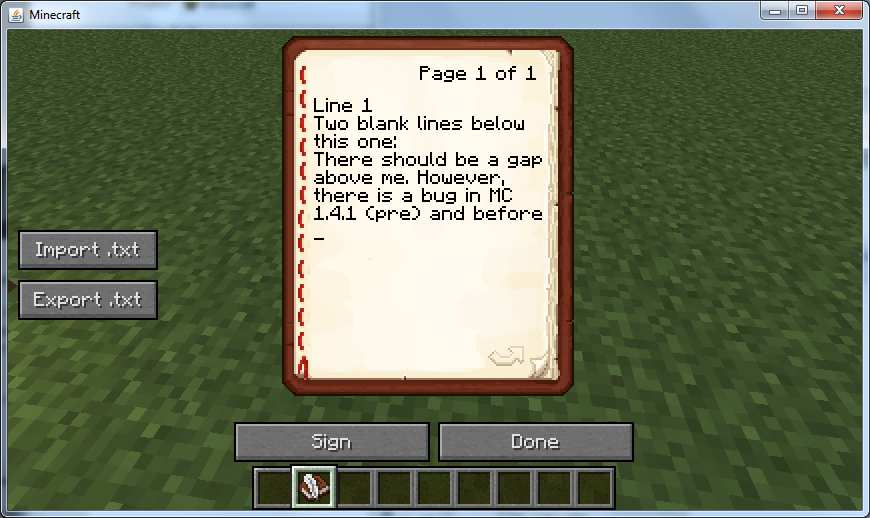
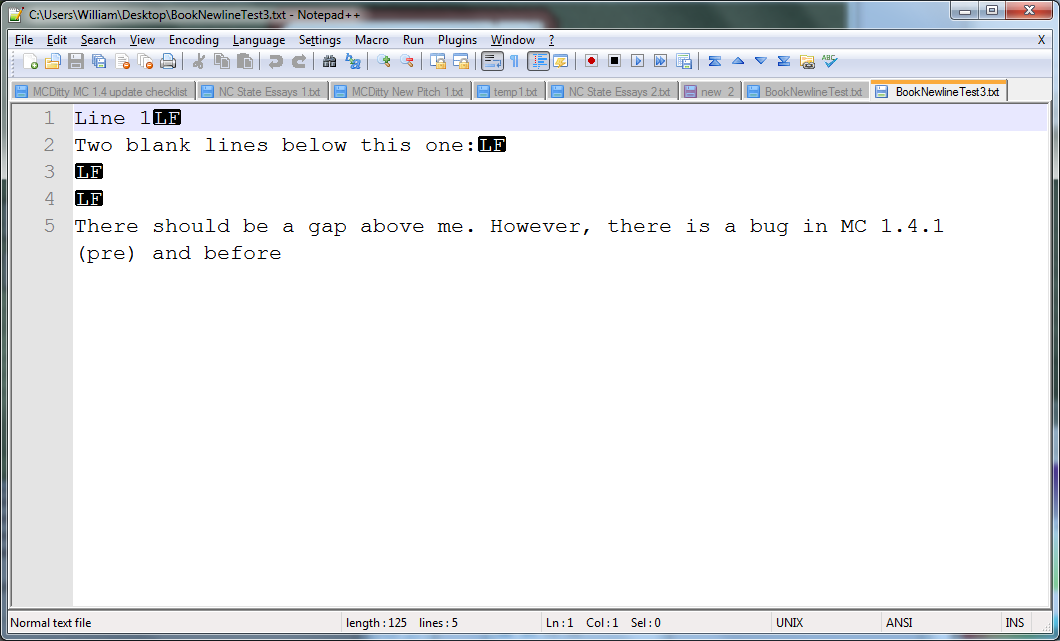
USES CUSTOM MOD TO ILLUSTRATE BUG BY DIRECTLY IMPORTING A FILE WITH MULTIPLE NEWLINES
1: A page is written in Notepad++, showing newline characters.
2: The page is imported into a book to show that multiple consecutive newlines are ignored.
3: The page is exported from Minecraft, and the newlines from Figure 1 are preserved.
When writing a book, pressing enter only appears move the cursor down one line, no matter how many times you press enter.
Having played with books in mods, I have found multiple "\ n" characters can be created by pressing enter, and they are saved, the only problem being the book GUI not showing the blank line.
EXPECTED:
Pressing enter twice creates a blank line in a book between previous text and any text added.BROKEN BEHAVIOR:
Pressing enter twice does not create a blank line between previous text and any text added, but only breaks the current line without adding the blank line.TO REPRODUCE:
1. Open a book and quill
2. Write a line of text
3. Press enter twice
4. Write more textResult with bug is that there is no blank between lines.
ATTACHMENTS:
USES CUSTOM MOD TO ILLUSTRATE BUG BY DIRECTLY IMPORTING A FILE WITH MULTIPLE NEWLINES
1: A page is written in Notepad++, showing newline characters.
2: The page is imported into a book to show that multiple consecutive newlines are ignored.
3: The page is exported from Minecraft,and the newlines from Figure 1 are preserved.When writing a book, pressing enter only appears move the cursor down one line, no matter how many times you press enter.
Having played with books in mods, I have found multiple "\ n" characters can be created by pressing enter, and they are saved, the only problem being the book GUI not showing the blank line.
EXPECTED:
Pressing enter twice creates a blank line in a book between previous text and any text added.BROKEN BEHAVIOR:
Pressing enter twice does not create a blank line between previous text and any text added, but only breaks the current line without adding the blank line.TO REPRODUCE:
1. Open a book and quill
2. Write a line of text
3. Press enter twice
4. Write more textResult with bug is that there is no blank between lines.
ATTACHMENTS:
USES CUSTOM MOD TO ILLUSTRATE BUG BY DIRECTLY IMPORTING A FILE WITH MULTIPLE NEWLINES
1: A page is written in Notepad++, showing newline characters.
2: The page is imported into a book to show that multiple consecutive newlines are ignored.
3: The page is exported from Minecraft, showing that the multiple newlines are preserved, but not shown in Minecraft.
When writing a book, pressing enter only appears move the cursor down one line, no matter how many times you press enter.
Having played with books in mods, I have found multiple "\ n" characters can be created by pressing enter, and they are saved, the only problem being the book GUI not showing the blank line.
EXPECTED:
Pressing enter twice creates a blank line in a book between previous text and any text added.BROKEN BEHAVIOR:
Pressing enter twice does not create a blank line between previous text and any text added, but only breaks the current line without adding the blank line.TO REPRODUCE:
1. Open a book and quill
2. Write a line of text
3. Press entertwice
4. Write more textResult with bug is that there is no blank between lines.
ATTACHMENTS:
USES CUSTOM MOD TO ILLUSTRATE BUG BY DIRECTLY IMPORTING A FILE WITH MULTIPLE NEWLINES
1: A page is written in Notepad++, showing newline characters.
2: The page is imported into a book to show that multiple consecutive newlines are ignored.
3: The page is exported from Minecraft, showing that the multiple newlines are preserved, but not shown in Minecraft.When writing a book, pressing enter only appears move the cursor down one line, no matter how many times you press enter.
Having played with books in mods, I have found multiple "\ n" characters can be created by pressing enter, and they are saved, the only problem being the book GUI not showing the blank line.
EXPECTED:
Pressing enter twice creates a blank line in a book between previous text and any text added.BROKEN BEHAVIOR:
Pressing enter twice does not create a blank line between previous text and any text added, but only breaks the current line without adding the blank line.TO REPRODUCE:
1. Open a book and quill
2. Write a line of text
3. Press the enter key four times.
4. Write more textResult with bug is that there is no blank between lines.
ATTACHMENTS:
USES CUSTOM MOD TO ILLUSTRATE BUG BY DIRECTLY IMPORTING A FILE WITH MULTIPLE NEWLINES
1: A page is written in Notepad++, showing newline characters.
2: The page is imported into a book to show that multiple consecutive newlines are ignored.
3: The page is exported from Minecraft, showing that the multiple newlines are preserved, but not shown in Minecraft.
When writing a book, pressing enter only appears move the cursor down one line, no matter how many times you press enter.
Having played with books in mods, I have found multiple "\ n" characters can be created by pressing enter, and they are saved, the only problem being the book GUI not showing the blank line.
EXPECTED:
Pressing enter twice creates a blank line in a book between previous text and any text added.BROKEN BEHAVIOR:
Pressing enter twice does not create a blank line between previous text and any text added, but only breaks the current line without adding the blank line.TO REPRODUCE:
1. Open a book and quill
2. Write a line of text
3. Press the enter key four times.
4. Write more textResult with bug is that there is no blank between lines.
ATTACHMENTS:
USESCUSTOM MOD TO ILLUSTRATE BUG BY DIRECTLY IMPORTING A FILE WITH MULTIPLE NEWLINES1: A page is written in Notepad++, showing newline characters.
2: The page is imported into a book to show that multiple consecutive newlines are ignored.
3: The page is exported from Minecraft, showing that the multiple newlines are preserved, but not shown in Minecraft.When writing a book, pressing enter only appears move the cursor down one line, no matter how many times you press enter.
Having played with books in mods, I have found multiple "\ n" characters can be created by pressing enter, and they are saved, the only problem being the book GUI not showing the blank line.
EXPECTED:
Pressing enter twice creates a blank line in a book between previous text and any text added.BROKEN BEHAVIOR:
Pressing enter twice does not create a blank line between previous text and any text added, but only breaks the current line without adding the blank line.TO REPRODUCE:
1. Open a book and quill
2. Write a line of text
3. Press the enter key four times.
4. Write more textResult with bug is that there is no blank between lines.
ATTACHMENTS:
A MOD IS USED TO ILLUSTRATE THE BUG BY DIRECTLY IMPORTING A FILE WITH MULTIPLE NEWLINES.
1: A page is written in Notepad++, showing newline characters.
2: The page is imported into a book to show that multiple consecutive newlines are ignored.
3: The page is exported from Minecraft, showing that the multiple newlines are preserved, but not shown in Minecraft.
Multiple consecutive newlines in books do not create a space between lines in editor
When writing a book, pressing enter only appears move the cursor down one line, no matter how many times you press enter.
Having played with books in mods, I have found multiple "\ n" characters can be created by pressing enter, and they are saved, the only problem being the book GUI not showing the blank lines.
EXPECTED:
Pressing enter twice creates a blank line in a book between previous text and any text added.BROKEN BEHAVIOR:
Pressing enter twice does not create a blank line between previous text and any text added, but only breaks the current line without adding the blank line.TO REPRODUCE:
1. Open a book and quill
2. Write a line of text
3. Press the enter key four times.
4. Write more textResult with bug is that there is no blank between lines.
ATTACHMENTS:
A MOD IS USED TO ILLUSTRATE THE BUG BY DIRECTLY IMPORTING A FILE WITH MULTIPLE NEWLINES.
1: A page is written in Notepad++, showing newline characters.
2: The page is imported into a book to show that multiple consecutive newlines are ignored.
3: The page is exported from Minecraft, showing that the multiple newlines are preserved, but not shown in Minecraft.
When writing a book, pressing enter only appears move the cursor down one line, no matter how many times you press enter.
Having played with books in mods, I have found multiple "\ n" characters can be created by pressing enter, and they are saved, the only problem being the book GUI not showing the blank lines.
EXPECTED:
Pressing enter twice creates a blank line in a book between previous text and any text added.BROKEN BEHAVIOR:
Pressing enter twice does not create a blank line between previous text and any text added, but only breaks the current line without adding the blank line.TO REPRODUCE:
1. Open a book and quill
2. Write a line of text
3. Press the enter key four times.
4. Write more textResult with bug is that there is no blank between lines.
ATTACHMENTS:
A MOD IS USED TO ILLUSTRATE THE BUG BY DIRECTLY IMPORTING A FILE WITH MULTIPLE CONSECUTIVE NEWLINES.
1: A page is written in Notepad++, showing newline characters.
2: The page is imported into a book to show that multiple consecutive newlines are ignored.
3: The page is exported from Minecraft, showing that the multiple newlines are preserved, but not shown in Minecraft.
When writing a book, pressing enter only appears move the cursor down one line, no matter how many times you press enter.
Having played with books in mods, I have found multiple "\ n" characters can be created by pressing enter, and they are saved, the only problem being the book GUI not showing the blank lines.
EXPECTED:
Pressing enter twice creates a blank line in a book between previous text and any text added.BROKEN BEHAVIOR:
Pressing enter twice does not create a blank line between previous text and any text added, but only breaks the current line without adding the blank line.TO REPRODUCE:
1. Open a book and quill
2. Write a line of text
3. Press the enter key four times.
4. Write more textResult with bug is that there is no blank between lines.
ATTACHMENTS:
A MOD IS USED TO ILLUSTRATE THE BUG BY
DIRECTLYIMPORTING A FILE WITH MULTIPLE CONSECUTIVE NEWLINES.1: A page is written in Notepad++, showing newline characters.
2: The page is imported into a book to show that multiple consecutive newlines are ignored.
3: The page is exported from Minecraft, showing that the multiple newlines are preserved, but not shown in Minecraft.When writing a book, pressing enter only appears move the cursor down one line, no matter how many times you press enter.
Having played with books in mods, I have found multiple "\ n" characters can be created by pressing enter, and they are saved, the only problem being the book GUI not showing the blank lines.
EXPECTED:
Pressing enter twice creates a blank line in a book between previous text and any text added.BROKEN BEHAVIOR:
Pressing enter twice does not create a blank line between previous text and any text added, but only breaks the current line without adding the blank line.TO REPRODUCE:
1. Open a book and quill
2. Write a line of text
3. Press the enter key four times.
4. Write more textResult with bug is that there is no blank between lines.
ATTACHMENTS:
A MOD IS USED TO ILLUSTRATE THE BUG BY IMPORTING A FILE WITH MULTIPLE CONSECUTIVE NEWLINES INTO A BOOK.
1: A page is written in Notepad++, showing newline characters.
2: The page is imported into a book to show that multiple consecutive newlines are ignored.
3: The page is exported from Minecraft, showing that the multiple newlines are preserved, but not shown in Minecraft.
Summary
In single player.
After placing a sign, sometimes the text you write on it disappears after closing the sign editor. Additionally, the text sometimes flickers visibly once after closing the editor. Often the problem only happens in some blocks: you can try editing a sign in one spot ten times, and get nothing, while a sign in the next block over edits just fine.
Expected Behavior
After writing something on a sign, the sign does not flicker or become blank.
Actual Behavior
After writing something on a sign, the text on the sign sometimes appears to flicker, and sometimes it does not reappear, leaving the sign blank.
To Reproduce:
1. Place a sign
2. Write something
3. Close editorThere is a chance that the text on the sign will appear to flicker and/or blank out. Happens unpredictably, but rather often for me, and in some arbitrary block locations more often than others.
(Obsolete) Modding Workaround:
"PlayerInstance" (MCP) or "il.class" (Minecraft 1.4.4) sends a sometimes blank Packet130UpdateSign after a sign is done being edited.
If you block all sign packets created by "PlayerInstance" or "il" (as determined in the Packet's constructor with a stack trace), the bug disappears and signs are still edited, saved, and displayed as normal.
EDIT: This workaround used to work in 1.4.2, but does not now.
Summary
In single player.
After placing a sign, sometimes the text you write on it disappears after closing the sign editor. Additionally, the text sometimes flickers visibly once after closing the editor. Often the problem only happens in some blocks: you can try editing a sign in one spot ten times, and get nothing, while a sign in the next block over edits just fine.
Expected Behavior
After writing something on a sign, the sign does not flicker or become blank.
Actual Behavior
After writing something on a sign, the text on the sign sometimes appears to flicker, and sometimes it does not reappear, leaving the sign blank.
To Reproduce:
1. Place a sign
2. Write something
3. Close editorThere is a chance that the text on the sign will appear to flicker and/or blank out. Happens unpredictably, but rather often for me, and in some arbitrary block locations more often than others.
(
Obsolete) Modding Workaround:"PlayerInstance" (MCP) or "il.class" (Minecraft 1.4.4) sends a sometimes blank Packet130UpdateSign after a sign is done being edited.
If you block all sign packets created by "PlayerInstance" or "il" (as determined in the Packet's constructor with a stack trace), the bug disappears and signs are still edited, saved, and displayed as normal.
EDIT: This workaround used to work in 1.4.2, but does not now.
Summary
In single player.
After placing a sign, sometimes the text you write on it disappears after closing the sign editor. Additionally, the text sometimes flickers visibly once after closing the editor. Often the problem only happens in some blocks: you can try editing a sign in one spot ten times, and get nothing, while a sign in the next block over edits just fine.
Expected Behavior
After writing something on a sign, the sign does not flicker or become blank.
Actual Behavior
After writing something on a sign, the text on the sign sometimes appears to flicker, and sometimes it does not reappear, leaving the sign blank.
To Reproduce:
1. Place a sign
2. Write something
3. Close editorThere is a chance that the text on the sign will appear to flicker and/or blank out. Happens unpredictably, but rather often for me, and in some arbitrary block locations more often than others.
(1.4.4) Modding Workaround:
"PlayerInstance" (MCP) or "il.class" (Minecraft 1.4.4) sends a sometimes blank Packet130UpdateSign after a sign is done being edited.
If you block all sign packets created by "PlayerInstance" or "il" (as determined in the Packet's constructor with a stack trace), the bug disappears and signs are still edited, saved, and displayed as normal.
EDIT: This workaround used to work in 1.4.2, but does not now: flicker disappears, but signs save just as inconsistently.
Summary
In single player.
After placing a sign, sometimes the text you write on it disappears after closing the sign editor. Additionally, the text sometimes flickers visibly once after closing the editor. Often the problem only happens in some blocks: you can try editing a sign in one spot ten times, and get nothing, while a sign in the next block over edits just fine.
Expected Behavior
After writing something on a sign, the sign does not flicker or become blank.
Actual Behavior
After writing something on a sign, the text on the sign sometimes appears to flicker, and sometimes it does not reappear, leaving the sign blank.
To Reproduce:
1. Place a sign
2. Write something
3. Close editorThere is a chance that the text on the sign will appear to flicker and/or blank out. Happens unpredictably, but rather often for me, and in some arbitrary block locations more often than others.
(1.4.4) Modding Workaround:
"PlayerInstance" (MCP) or "il.class" (Minecraft 1.4.4) sends a sometimes blank Packet130UpdateSign after a sign is done being edited.
If you block all sign packets created by "PlayerInstance" or "il" (as determined in the Packet's constructor with a stack trace), the bug disappears and signs are still edited, saved, and displayed as normal.
EDIT: This workaround used to work in 1.4.2, but does not now: flicker disappears, but signs save just as inconsistently.
Having made a mod that fixes the problem (it plays music on signs), I'll note that the issue is present in single player 1.3.2 as well (maybe worse).
Signs' texts are always sent to the client as one would expect, but other blank sign texts are sent as well (randomly?). My workaround is (basically) to only accept packets that specify non-blank text, and ignore blank texts sent in close sequence. I have used this workaround for months and never seen the bug again.
That is a separate bug, though still annoying. This bug exists in vanilla, both single and multiplayer.
I am sincerely impressed with how quickly this was fixed. Someday soon I shall have a fitting home for my lovely cyan trousers.
This bug is difficult to reproduce, and seems to only occur randomly. The last time I saw it often was in 1.3.2, and I've only used my mod since then. Therefore, without playing vanilla for a few days I can't be sure that the situation has improved.
However, There is a very similar bug in 1.4.2 vanilla that is easily reproducible and likely related.
Symptoms: In SSP, placing a sign, writing on it, and closing the editor results in the sign's text flickering. Sometimes, the sign's text will "stick" during the flicker and stay blank.
Cause: Packet130UpdateSign packets sent within a SSP game from the "server", and specifically a class called "PlayerInstance" (or ic.class in 1.4.2), after editing a sign are sometimes blank.
A Solution: In the Packet130UpdateSign constructor, ignore (set x, y, and z to infinity) any packets that are constructed by classes ending in "PlayerInstance" or "ic" as determined by a stack trace.
This bug has been resolved: thanks Mojang! Keep up the whack-a-bug!