 MC-154
Multiple consecutive newlines in books do not create a space between lines in editor
When writing a book, pressing enter only appears move the cursor down one line, no matter how many times you press enter.
Having played with books in mods, I have found multiple "\ n" characters can be created by pressing enter, and they are saved, the only problem being the book GUI not showing the blank lines.
EXPECTED:
Pressing enter twice creates a blank line in a book between previous text and any text added.
BROKEN BEHAVIOR:
Pressing enter twice does not create a blank line between previous text and any text added, but only breaks the current line without adding the blank line.
TO REPRODUCE:
1. Open a book and quill
2. Write a line of text
3. Press the enter key four times.
4. Write more text
Result with bug is that there is no blank between lines.
ATTACHMENTS:
A MOD IS USED TO ILLUSTRATE THE BUG BY IMPORTING A FILE WITH MULTIPLE CONSECUTIVE NEWLINES INTO A BOOK.
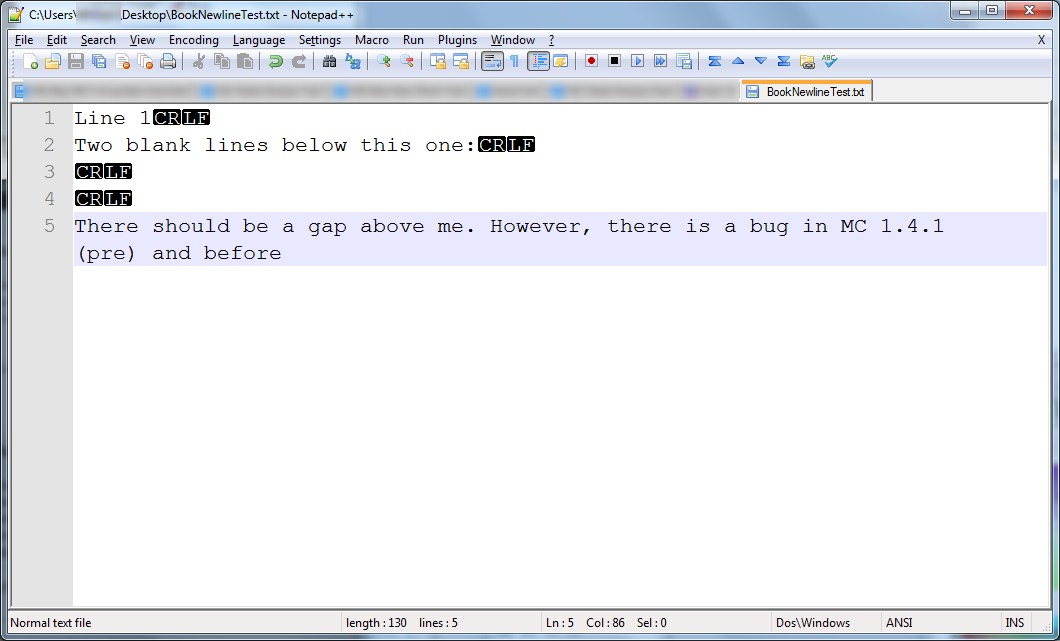
1: A page is written in Notepad++, showing newline characters.
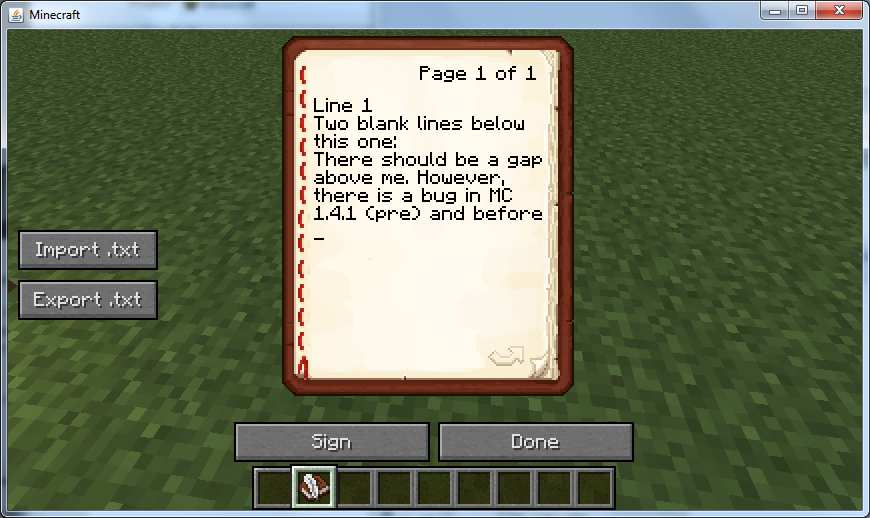
2: The page is imported into a book to show that multiple consecutive newlines are ignored.
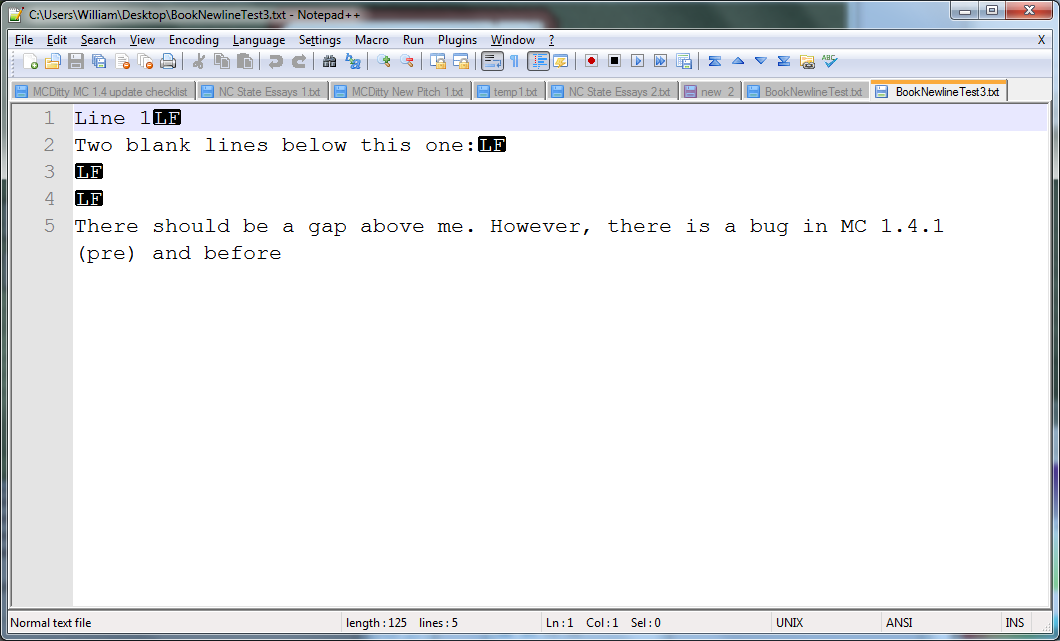
3: The page is exported from Minecraft, showing that the multiple newlines are preserved, but not shown in Minecraft.
Environment
Java 7 (x64) under Windows 7 (x64)
Linked Issues

Created Issue:
Multiple consecutive newlines in books do not create a space between lines
When writing a book, pressing enter only appears move the cursor down one line, no matter how many times you press enter.
Having played with books in mods, I have found multiple "\ n" characters can be created by pressing enter, and they are saved, the only problem being the book GUI not showing the blank line.
EXPECTED:
Pressing enter twice creates a blank line in a book between previous text and any text added.BROKEN BEHAVIOR:
Pressing enter twice does not create a blank line between previous text and any text added, but only breaks the current line without adding the blank line.TO REPRODUCE:
1. Open a book and quill
2. Write a line of text
3. Press enter twice
4. Write more textResult with bug is that there is no blank between lines.
Environment
Java 7 (x64) under Windows 7 (x64)
Attachments3
When writing a book, pressing enter only appears move the cursor down one line, no matter how many times you press enter.
Having played with books in mods, I have found multiple "\ n" characters can be created by pressing enter, and they are saved, the only problem being the book GUI not showing the blank line.
EXPECTED:
Pressing enter twice creates a blank line in a book between previous text and any text added.BROKEN BEHAVIOR:
Pressing enter twice does not create a blank line between previous text and any text added, but only breaks the current line without adding the blank line.TO REPRODUCE:
1. Open a book and quill
2. Write a line of text
3. Press enter twice
4. Write more textResult with bug is that there is no blank between lines.
ATTACHMENTS:
Import is done by copying the contents of a file directly into the page tag of a book.
When writing a book, pressing enter only appears move the cursor down one line, no matter how many times you press enter.
Having played with books in mods, I have found multiple "\ n" characters can be created by pressing enter, and they are saved, the only problem being the book GUI not showing the blank line.
EXPECTED:
Pressing enter twice creates a blank line in a book between previous text and any text added.BROKEN BEHAVIOR:
Pressing enter twice does not create a blank line between previous text and any text added, but only breaks the current line without adding the blank line.TO REPRODUCE:
1. Open a book and quill
2. Write a line of text
3. Press enter twice
4. Write more textResult with bug is that there is no blank between lines.
ATTACHMENTS:
Import is done by copying the contents of a file directly into the page tag of a book.
When writing a book, pressing enter only appears move the cursor down one line, no matter how many times you press enter.
Having played with books in mods, I have found multiple "\ n" characters can be created by pressing enter, and they are saved, the only problem being the book GUI not showing the blank line.
EXPECTED:
Pressing enter twice creates a blank line in a book between previous text and any text added.BROKEN BEHAVIOR:
Pressing enter twice does not create a blank line between previous text and any text added, but only breaks the current line without adding the blank line.TO REPRODUCE:
1. Open a book and quill
2. Write a line of text
3. Press enter twice
4. Write more textResult with bug is that there is no blank between lines.
ATTACHMENTS:
USES CUSTOM MOD TO ILLUSTRATE BUG BY DIRECTLY IMPORTING A FILE WITH MULTIPLE NEWLINES
1: A page is written in Notepad++, showing newline characters.
2: The page is imported into a book to show that multiple consecutive newlines are ignored.
3: The page is exported from Minecraft, and the newlines from Figure 1 are preserved.
When writing a book, pressing enter only appears move the cursor down one line, no matter how many times you press enter.
Having played with books in mods, I have found multiple "\ n" characters can be created by pressing enter, and they are saved, the only problem being the book GUI not showing the blank line.
EXPECTED:
Pressing enter twice creates a blank line in a book between previous text and any text added.BROKEN BEHAVIOR:
Pressing enter twice does not create a blank line between previous text and any text added, but only breaks the current line without adding the blank line.TO REPRODUCE:
1. Open a book and quill
2. Write a line of text
3. Press enter twice
4. Write more textResult with bug is that there is no blank between lines.
ATTACHMENTS:
USES CUSTOM MOD TO ILLUSTRATE BUG BY DIRECTLY IMPORTING A FILE WITH MULTIPLE NEWLINES
1: A page is written in Notepad++, showing newline characters.
2: The page is imported into a book to show that multiple consecutive newlines are ignored.
3: The page is exported from Minecraft,and the newlines from Figure 1 are preserved.When writing a book, pressing enter only appears move the cursor down one line, no matter how many times you press enter.
Having played with books in mods, I have found multiple "\ n" characters can be created by pressing enter, and they are saved, the only problem being the book GUI not showing the blank line.
EXPECTED:
Pressing enter twice creates a blank line in a book between previous text and any text added.BROKEN BEHAVIOR:
Pressing enter twice does not create a blank line between previous text and any text added, but only breaks the current line without adding the blank line.TO REPRODUCE:
1. Open a book and quill
2. Write a line of text
3. Press enter twice
4. Write more textResult with bug is that there is no blank between lines.
ATTACHMENTS:
USES CUSTOM MOD TO ILLUSTRATE BUG BY DIRECTLY IMPORTING A FILE WITH MULTIPLE NEWLINES
1: A page is written in Notepad++, showing newline characters.
2: The page is imported into a book to show that multiple consecutive newlines are ignored.
3: The page is exported from Minecraft, showing that the multiple newlines are preserved, but not shown in Minecraft.
When writing a book, pressing enter only appears move the cursor down one line, no matter how many times you press enter.
Having played with books in mods, I have found multiple "\ n" characters can be created by pressing enter, and they are saved, the only problem being the book GUI not showing the blank line.
EXPECTED:
Pressing enter twice creates a blank line in a book between previous text and any text added.BROKEN BEHAVIOR:
Pressing enter twice does not create a blank line between previous text and any text added, but only breaks the current line without adding the blank line.TO REPRODUCE:
1. Open a book and quill
2. Write a line of text
3. Press entertwice
4. Write more textResult with bug is that there is no blank between lines.
ATTACHMENTS:
USES CUSTOM MOD TO ILLUSTRATE BUG BY DIRECTLY IMPORTING A FILE WITH MULTIPLE NEWLINES
1: A page is written in Notepad++, showing newline characters.
2: The page is imported into a book to show that multiple consecutive newlines are ignored.
3: The page is exported from Minecraft, showing that the multiple newlines are preserved, but not shown in Minecraft.When writing a book, pressing enter only appears move the cursor down one line, no matter how many times you press enter.
Having played with books in mods, I have found multiple "\ n" characters can be created by pressing enter, and they are saved, the only problem being the book GUI not showing the blank line.
EXPECTED:
Pressing enter twice creates a blank line in a book between previous text and any text added.BROKEN BEHAVIOR:
Pressing enter twice does not create a blank line between previous text and any text added, but only breaks the current line without adding the blank line.TO REPRODUCE:
1. Open a book and quill
2. Write a line of text
3. Press the enter key four times.
4. Write more textResult with bug is that there is no blank between lines.
ATTACHMENTS:
USES CUSTOM MOD TO ILLUSTRATE BUG BY DIRECTLY IMPORTING A FILE WITH MULTIPLE NEWLINES
1: A page is written in Notepad++, showing newline characters.
2: The page is imported into a book to show that multiple consecutive newlines are ignored.
3: The page is exported from Minecraft, showing that the multiple newlines are preserved, but not shown in Minecraft.
When writing a book, pressing enter only appears move the cursor down one line, no matter how many times you press enter.
Having played with books in mods, I have found multiple "\ n" characters can be created by pressing enter, and they are saved, the only problem being the book GUI not showing the blank line.
EXPECTED:
Pressing enter twice creates a blank line in a book between previous text and any text added.BROKEN BEHAVIOR:
Pressing enter twice does not create a blank line between previous text and any text added, but only breaks the current line without adding the blank line.TO REPRODUCE:
1. Open a book and quill
2. Write a line of text
3. Press the enter key four times.
4. Write more textResult with bug is that there is no blank between lines.
ATTACHMENTS:
USESCUSTOM MOD TO ILLUSTRATE BUG BY DIRECTLY IMPORTING A FILE WITH MULTIPLE NEWLINES1: A page is written in Notepad++, showing newline characters.
2: The page is imported into a book to show that multiple consecutive newlines are ignored.
3: The page is exported from Minecraft, showing that the multiple newlines are preserved, but not shown in Minecraft.When writing a book, pressing enter only appears move the cursor down one line, no matter how many times you press enter.
Having played with books in mods, I have found multiple "\ n" characters can be created by pressing enter, and they are saved, the only problem being the book GUI not showing the blank line.
EXPECTED:
Pressing enter twice creates a blank line in a book between previous text and any text added.BROKEN BEHAVIOR:
Pressing enter twice does not create a blank line between previous text and any text added, but only breaks the current line without adding the blank line.TO REPRODUCE:
1. Open a book and quill
2. Write a line of text
3. Press the enter key four times.
4. Write more textResult with bug is that there is no blank between lines.
ATTACHMENTS:
A MOD IS USED TO ILLUSTRATE THE BUG BY DIRECTLY IMPORTING A FILE WITH MULTIPLE NEWLINES.
1: A page is written in Notepad++, showing newline characters.
2: The page is imported into a book to show that multiple consecutive newlines are ignored.
3: The page is exported from Minecraft, showing that the multiple newlines are preserved, but not shown in Minecraft.
Multiple consecutive newlines in books do not create a space between lines in editor
When writing a book, pressing enter only appears move the cursor down one line, no matter how many times you press enter.
Having played with books in mods, I have found multiple "\ n" characters can be created by pressing enter, and they are saved, the only problem being the book GUI not showing the blank lines.
EXPECTED:
Pressing enter twice creates a blank line in a book between previous text and any text added.BROKEN BEHAVIOR:
Pressing enter twice does not create a blank line between previous text and any text added, but only breaks the current line without adding the blank line.TO REPRODUCE:
1. Open a book and quill
2. Write a line of text
3. Press the enter key four times.
4. Write more textResult with bug is that there is no blank between lines.
ATTACHMENTS:
A MOD IS USED TO ILLUSTRATE THE BUG BY DIRECTLY IMPORTING A FILE WITH MULTIPLE NEWLINES.
1: A page is written in Notepad++, showing newline characters.
2: The page is imported into a book to show that multiple consecutive newlines are ignored.
3: The page is exported from Minecraft, showing that the multiple newlines are preserved, but not shown in Minecraft.
When writing a book, pressing enter only appears move the cursor down one line, no matter how many times you press enter.
Having played with books in mods, I have found multiple "\ n" characters can be created by pressing enter, and they are saved, the only problem being the book GUI not showing the blank lines.
EXPECTED:
Pressing enter twice creates a blank line in a book between previous text and any text added.BROKEN BEHAVIOR:
Pressing enter twice does not create a blank line between previous text and any text added, but only breaks the current line without adding the blank line.TO REPRODUCE:
1. Open a book and quill
2. Write a line of text
3. Press the enter key four times.
4. Write more textResult with bug is that there is no blank between lines.
ATTACHMENTS:
A MOD IS USED TO ILLUSTRATE THE BUG BY DIRECTLY IMPORTING A FILE WITH MULTIPLE CONSECUTIVE NEWLINES.
1: A page is written in Notepad++, showing newline characters.
2: The page is imported into a book to show that multiple consecutive newlines are ignored.
3: The page is exported from Minecraft, showing that the multiple newlines are preserved, but not shown in Minecraft.
When writing a book, pressing enter only appears move the cursor down one line, no matter how many times you press enter.
Having played with books in mods, I have found multiple "\ n" characters can be created by pressing enter, and they are saved, the only problem being the book GUI not showing the blank lines.
EXPECTED:
Pressing enter twice creates a blank line in a book between previous text and any text added.BROKEN BEHAVIOR:
Pressing enter twice does not create a blank line between previous text and any text added, but only breaks the current line without adding the blank line.TO REPRODUCE:
1. Open a book and quill
2. Write a line of text
3. Press the enter key four times.
4. Write more textResult with bug is that there is no blank between lines.
ATTACHMENTS:
A MOD IS USED TO ILLUSTRATE THE BUG BY
DIRECTLYIMPORTING A FILE WITH MULTIPLE CONSECUTIVE NEWLINES.1: A page is written in Notepad++, showing newline characters.
2: The page is imported into a book to show that multiple consecutive newlines are ignored.
3: The page is exported from Minecraft, showing that the multiple newlines are preserved, but not shown in Minecraft.When writing a book, pressing enter only appears move the cursor down one line, no matter how many times you press enter.
Having played with books in mods, I have found multiple "\ n" characters can be created by pressing enter, and they are saved, the only problem being the book GUI not showing the blank lines.
EXPECTED:
Pressing enter twice creates a blank line in a book between previous text and any text added.BROKEN BEHAVIOR:
Pressing enter twice does not create a blank line between previous text and any text added, but only breaks the current line without adding the blank line.TO REPRODUCE:
1. Open a book and quill
2. Write a line of text
3. Press the enter key four times.
4. Write more textResult with bug is that there is no blank between lines.
ATTACHMENTS:
A MOD IS USED TO ILLUSTRATE THE BUG BY IMPORTING A FILE WITH MULTIPLE CONSECUTIVE NEWLINES INTO A BOOK.
1: A page is written in Notepad++, showing newline characters.
2: The page is imported into a book to show that multiple consecutive newlines are ignored.
3: The page is exported from Minecraft, showing that the multiple newlines are preserved, but not shown in Minecraft.
![[Mojang] Grum (Erik Broes)](../../../data/assets/gravatar/grum.png) [Mojang] Grum (Erik Broes)
[Mojang] Grum (Erik Broes)

relates to
Fixed for the future.
This actually seems like a bug that mojang would just leave without fixing (i know its fixed now)