 Flipkaboom
- Flipkaboom
- flipkaboom
- Europe/Stockholm
- Yes
- No
 MC-261199
![[Mojang] SystemInvecklare](../../../data/avatars/users/83597.png)


Edit: Duplicate of MC-158169 , I didn't see because it wasn't marked for 1.17 or the pre-release
When a minecart drives over a slope and there is another rail under the block the slope goes up to (see attachments), the minecart will visually teleport to the rail underneath the block. The hitbox does not teleport with it. This happens both when the rail underneath is a corner pointing into the block under the slope and when it's straight.
When dripstone is hung from a block with a waterlogged block above it, it will fill a cauldron but it won't grow.
Steps to reproduce:
Hang a pointed dripstone from a dripstone block
Place a water source on top of the dripstone block
Place any waterloggable block inside of the water source
Set randomtickspeed to 10000 and wait (also tested with lower tickspeed)
Expected behaviour:
When having a cauldron placed under the pointed dripstone it will fill
The pointed dripstone will grow
Actual behaviour:
When having a cauldron placed under it it fills up
The pointed dripstone does not grow
Attachments are a comparison of dripstone with a water source and with a waterlogged block above it, this is with the tickspeed at 10000 and after waiting ~5 minutes wich is more than enough for the dripstone to grow.
Also wanted to make clear this is not a duplicate of MC-227104, I am placing the waterlogged block 2 blocks above the dripstone not directly above it.
When dripstone is hung from a block with a waterlogged block above it, it will fill a cauldron but it won't grow.
Steps to reproduce:
Hang a pointed dripstone from a dripstone block
Place a water source on top of the dripstone block
Place any waterloggable block inside of the water source
Set randomtickspeed to 10000 and wait (also tested with lower tickspeed)
Expected behaviour:
When having a cauldron placed under the pointed dripstone it will fill
The pointed dripstone will grow
Actual behaviour:
When having a cauldron placed under it it fills up
The pointed dripstone does not grow
Attachments are a comparison of dripstone with a water source and with a waterlogged block above it, this is with the tickspeed at 10000 and after waiting ~5 minutes wich is more than enough for the dripstone to grow.
Also wanted to make clear this is not a duplicate of MC-227104, I am placing the waterlogged block 2 blocks above the dripstone not directly above it.
When dripstone is hung from a block with a waterlogged block above it, it will fill a cauldron but it won't grow.
Steps to reproduce:
- Hang a pointed dripstone from a dripstone block
- Place a water source on top of the dripstone block
- Place any waterloggable block inside of the water source
- Set randomtickspeed to 10000 and wait (also tested with lower tickspeed)
Expected behaviour:
- When having a cauldron placed under the pointed dripstone it will fill
- The pointed dripstone will grow
Actual behaviour:
- When having a cauldron placed under it it fills up
- The pointed dripstone does not grow
Attachments are a comparison of dripstone with a water source and with a waterlogged block above it, this is with the tickspeed at 10000 and after waiting ~5 minutes wich is more than enough for the dripstone to grow.
Also wanted to make clear this is not a duplicate of MC-227104, I am placing the waterlogged block 2 blocks above the dripstone not directly above it.
When my launcher is set to latest snapshot the game loads into a version of the game without any 23w12a features (so the same features as 1.19.4) but the home screen says snapshot and the F3 menu says snapshot 23w12a.
When selecting 23w12a in the launcher it launches into 23w12a properly
As far as I know this is the launcher from minecraft.net, not from the microsoft store (idk if there's even a difference)
Images:
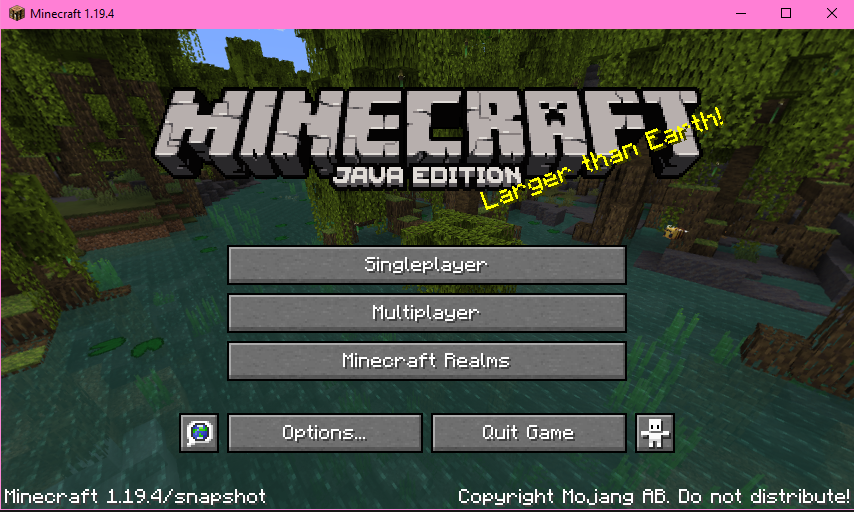
Title screen with 1.19.4/snapshot (says 1.19.4 without the snapshot part on actual 1.19.4 and says 23w12a/snapshot on actual 23w12a)
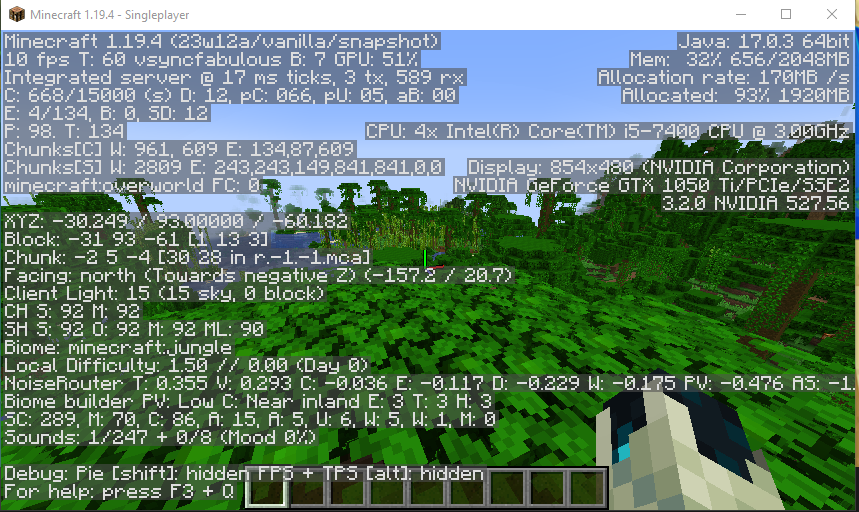
F3 menu that says both 1.19.4 and 23w12a (says only one of the two on the working versions)
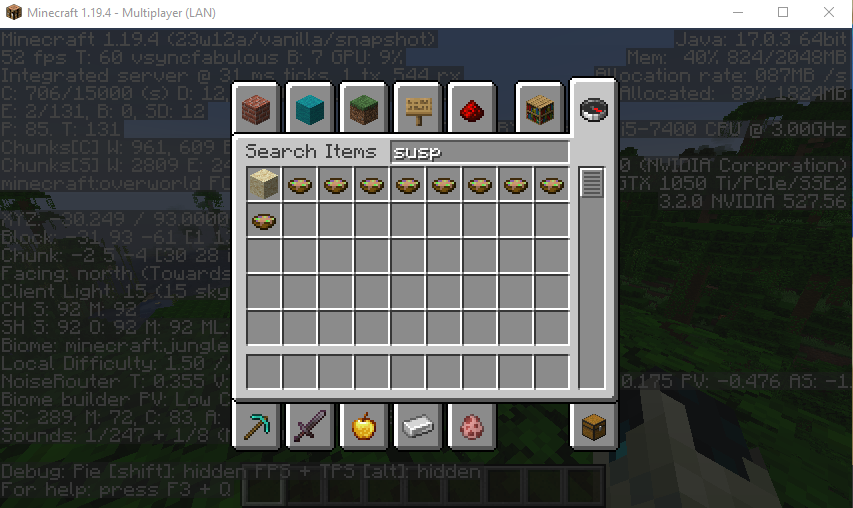
No 23w12a features (I had to turn on experimental features to even get the suspicious sand and experimentail features don't even exist anymore in 23w12a)
After giving a banner a pattern and then washing the pattern away using a cauldron, the banner no longer stacks with a blank banner, even though their pattern is exactly the same
Relates to MC-251509
How to reproduce:
- Craft two white banners
- Give one of them any pattern
- Wash away the pattern using a cauldron with water
- The banners no longer stack
Causes
A banner that was just crafted has no NBT data.
When applying a pattern the banner item is given a Patterns and an id tag in the BlockEntityTag.
BlockEntityTag of a banner with one pattern:
{Patterns: [{Pattern: "bl", Color: 6}], id: "minecraft:banner"}
When the banner is washed it removes the Patterns tag but not the id.
BlockEntityTag of a banner that was given a pattern and then washed:
{id: "minecraft:banner"}
The NBT doesn't match a freshly crafted banner making them not stack, even though both are a completely blank banner.
If the washed banner is placed and then broken, the dropped item will no longer have the id tag and it will regain the Patterns tag but with an empty list.
BlockEntityTag of a banner that was given a pattern, then washed, then placed and picked up again:
{Patterns: []}{}The empty banner stacks with neither a fresh banner nor the washed banner because it now has an empty list of patterns, despite all three being the exact same banner. Normally a blank banner should have no patterns list, instead of the empty list we see here.
The disappearance of the id tag when placing and breaking the banner is also the cause of MC-251509 but in this scenario not only does the id tag disappear, the banner also gains the empty patterns list.
Extra info
The only way the banner stacks with a freshly crafted one after being washed is through the following steps:
- Give blank banner a pattern (banner gains id and patterns tags)
- Place and break the banner (banner loses id tag)
- Wash the banner (banner loses patterns tag)
- The banner now has no NBT tags and will stack with a freshly crafted banner
Possible fixes
If the banner never gains the id tag when adding a pattern to it, none of these issues should ever occur. Seeing how the banner already loses this tag when it is placed and picked up it seems like the banner still works fine without it. This would most likely also be a fix for MC-251509.
Alternatively the banner could always retain the id tag when placing and breaking it. The banner would then also need to gain the id tag when it is crafted to avoid stacking issues with newly crafted banners. The only issue that would then potentially remain is blank banners gaining an empty patterns list after being placed and broken again, as this seems to happen to any banner that has an id tag but no patterns tag (see last section of Causes).
After giving a banner a pattern and then washing the pattern away using a cauldron, the banner no longer stacks with a blank banner, even though their pattern is exactly the same
Relates to MC-251509
How to reproduce:
- Craft two white banners
- Give one of them any pattern
- Wash away the pattern using a cauldron with water
- The banners no longer stack
Causes
A banner that was just crafted has no NBT data.
When applying a pattern the banner item is given a Patterns and an id tag in the BlockEntityTag.
BlockEntityTag of a banner with one pattern:
{Patterns: [{Pattern: "bl", Color: 6}], id: "minecraft:banner"}
When the banner is washed it removes the Patterns tag but not the id.
BlockEntityTag of a banner that was given a pattern and then washed:
{id: "minecraft:banner"}The NBT doesn't match a freshly crafted banner making them not stack, even though both are a completely blank banner.
If the washed banner is placed and then broken, the dropped item will no longer have the id tag and it will regain the Patterns tag but with an empty list.
BlockEntityTag of a banner that was given a pattern, then washed, then placed and picked up again:
{Patterns: []}The empty banner stacks with neither a fresh banner nor the washed banner because it now has an empty list of patterns, despite all three being the exact same banner. Normally a blank banner should have no patterns list, instead of the empty list we see here.
The disappearance of the id tag when placing and breaking the banner is also the cause of MC-251509 but in this scenario not only does the id tag disappear, the banner also gains the empty patterns list.
Extra info
The only way the banner stacks with a freshly crafted one after being washed is through the following steps:
- Give blank banner a pattern (banner gains id and patterns tags)
- Place and break the banner (banner loses id tag)
- Wash the banner (banner loses patterns tag)
- The banner now has no NBT tags and will stack with a freshly crafted banner
Possible fixes
If the banner never gains the id tag when adding a pattern to it, none of these issues should ever occur. Seeing how the banner already loses this tag when it is placed and picked up it seems like the banner still works fine without it. This would most likely also be a fix for MC-251509.
Alternatively the banner could always retain the id tag when placing and breaking it. The banner would then also need to gain the id tag when it is crafted to avoid stacking issues with newly crafted banners. The only issue that would then potentially remain is blank banners gaining an empty patterns list after being placed and broken again, as this seems to happen to any banner that has an id tag but no patterns tag (see last section of Causes).
Can confirm this bug also occurs with dark oak signs (in multiplayer, but assuming it's no different for single player). The crash only occurs when the sign is actually visible on the map, when the sign is covered with a block everything seems to be fine.
Affects 1.17.1-pre2
Update: My launcher just got an update and I can no longer reproduce the bug so It's probably been fixed already
I don't think this is a duplicate of
MC-151793. I just checked some ominous banners in my survival world, all obtained in 23w12a from both patrols and raids, none of them have the RepairCost that is causing my bug. It seems thatMC-166329was incorrectly marked as a duplicate because the issues look very similar but are actually caused by different NBT tags not working as intended. In this case a tag that only shows up when manually renaming something.Can confirm in 25w02a
Can confirm in 25w03a. I would also like to request ownership of this report to be able to maintain it
Can confirm in 25w03a. I would also like to request ownership of this report to be able to maintain it