Various Ominous Banner stacking issues
Ominous Banners from previous versions do not stack with ones from the current version.
Additionally, banners dropped from captain Illagers will not stack from banners that have been broken from the ground, including if you place and break a captain banner.
Linked Issues
is duplicated by14
 MC-152035Ominous banners does not stack from 1.14.1 with banners from 1.14.2 Pre-release 1DuplicateMC-153321onminus banner not stackingDuplicateMC-154508Ominus Banner prerelease 1.14.3 version 3 is not stacking with Ominus banners from previus VersionsDuplicateMC-155184Ominous banners not stacking properly with ones collected in previous versionsDuplicateMC-156500Ominous banners not stackingDuplicateMC-166329banners are not stack DuplicateMC-167078Ominous banners not stackingDuplicateMC-173317Ominous banners don't stack. DuplicateMC-190025Ominous Banners not stackingDuplicateMC-191261Ominous Banners earned before 1.16 don't stack with 1.16 Ominous BannersDuplicateMC-201070Ominous Banner Stacking IssueDuplicateMC-204913Ominous Banner NBT problemsDuplicateMC-229059 Ominous Banner changes NBT tags after placing & breaking/pickupDuplicateMC-248923Banners have a weird stock limit. Different everytimeDuplicate
relates to5
MC-251509Patterned banners not stacking properly / banner loses "banner" ID when minedFixedMC-63010Placing a Banner and breaking it in Survival causes them to not stack (as they have NBT data)FixedMC-140565Patrol leaders with banners can drop 2 different types of banners which don't stackFixedMC-153879Raiders ignore ominous banners that was saved in the Saved Toolbars from a different versionFixedMC-189760When a banner is pick-blocked, it does not stack with other banners with the same design created before 1.16Cannot Reproduce



 Normal
Created Issue:
Ominous Banners from 1.14.1 do not stack with Ominous Banners from 1.14
Ominous Banners from previous versions do not stack with ones from the current version.
Environment
Java
![[Mod] violine1101](../../../data/avatars/users/92858.png)
![[Bot] Arisa](../../../data/assets/gravatar/mustek2.png)
![[Mod] tryashtar](../../../data/avatars/users/41963.png)
relates to
is duplicated by
is duplicated by
MC-153785
relates to
Ominous Banners from1.14.1do not stack withOminous Banners from 1.14Ominous Banners from different versions do not stack with each other
is duplicated by
relates to
![[Mod] Asteraoth](../../../data/avatars/users/92886.png)
is duplicated by
![[Mod] Michael Wobst](../../../data/avatars/users/37868.png)
relates to
is duplicated by
relates to

is duplicated by
Ominous Banners from previous versions do not stack with ones from the current version.
Ominous Banners from previous versions do not stack with ones from the current version.
Additionally, banners dropped from captain Illagers will not stack from banners that have been broken from the ground, including if you place and break a captain banner.
Ominous Banners from different versions do not stack with each other/Captain banners not stacking with ones from the structure
Ominous Banners from different versions do not stack with each other/Captain banners not stacking with ones from the structureOminous Banner stacking issues
Various Ominous Banner stacking issues
![[Helper] Johnibur](../../../data/avatars/users/28381.png)
is duplicated by
is duplicated by
![[Bot] Arisa](../../../data/avatars/users/43007.png)

is duplicated by

is duplicated by
is duplicated by
![[Mojang] Adrian Östergård](../../../data/assets/gravatar/nighter.jpeg)
is duplicated by
is duplicated by

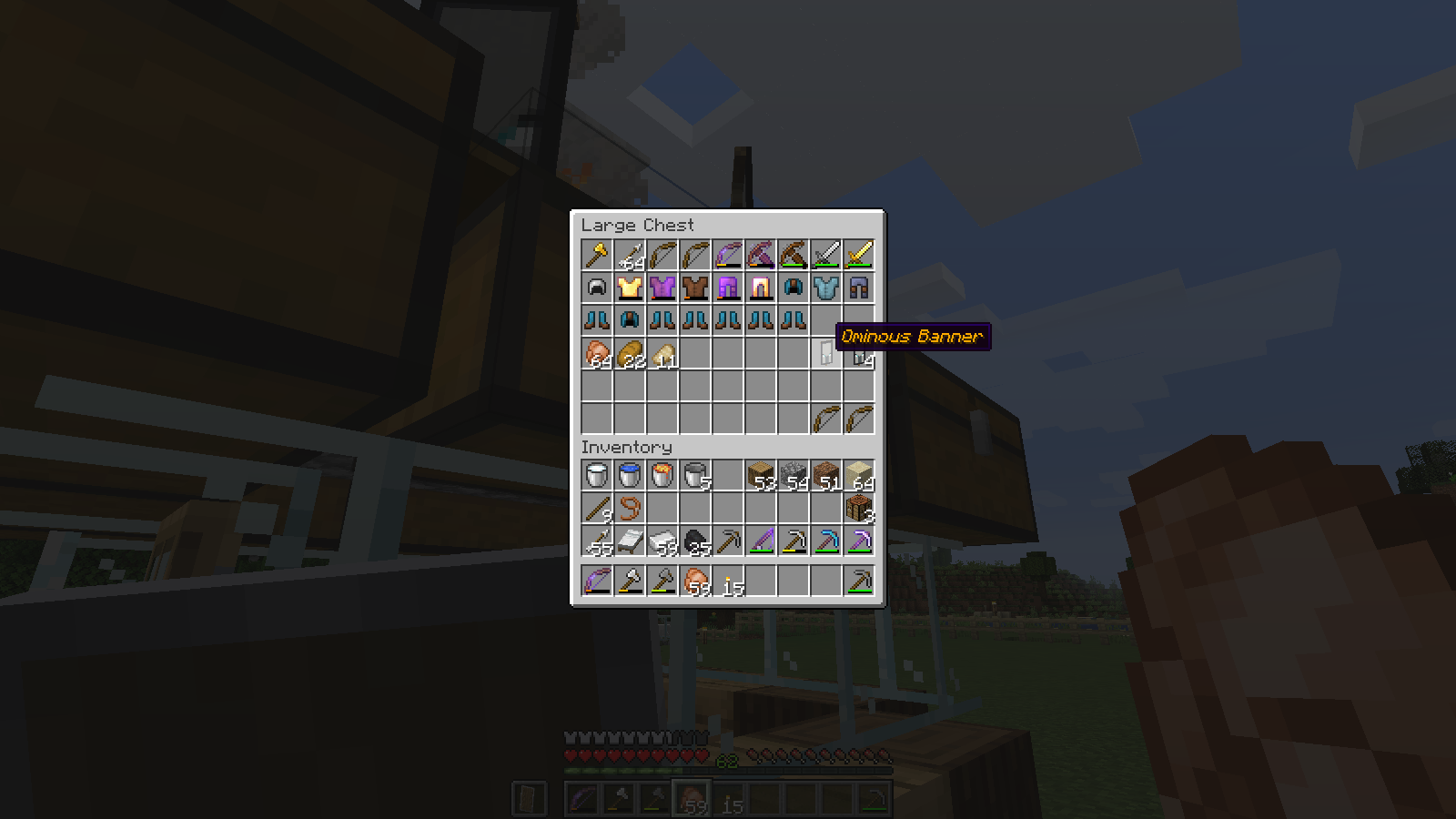
minecraft bug - illager banners not stackable.png
![[Mod] ampolive](../../../data/avatars/users/18949.svg)
relates to
![[Mojang] slicedlime](../../../data/assets/gravatar/slicedlime.jpeg)
This sounds a lot like MC-151793
Ominous banners saved in the Saved Toolbars will not get picked up by raiders as the banner could have existed in a different version before the full release of 1.14.2. As shown in the attachment video, 2 ominous banners also didn't stack. One of the banners were in the Saved Toolbars while one was pick block after I placed the banner (from the toolbars) down and dropped the original one from my toolbars and picked up the one that was pick block.
Could possibly be related (or duplicate) to: MC-140565, MC-152035, and MC-151793.
Merged into MC-151793
Duplicate of MC-151793

Thank you for your report!
We're actually already tracking this issue in MC-151793, so I resolved and linked this ticket as a duplicate.
If you would like to add a vote and any extra information to the main ticket it would be appreciated.
If you haven't already, you might like to make use of the search feature in the future to see if the issue has already been reported.
Quick Links:
📓 Issue Guidelines – ☃D83D? Community Support – 📧 Customer Support – 📖 Game Wiki
Thank you for your report!
We're actually already tracking this issue in MC-151793, so I resolved and linked this ticket as a duplicate.
If you would like to add a vote and any extra information to the main ticket it would be appreciated.
If you haven't already, you might like to make use of the search feature in the future to see if the issue has already been reported.
Quick Links:
📓 Issue Guidelines – 💬 Community Support – 📧 Customer Support – 📖 Game Wiki
Thank you for your report!
We're tracking this issue in MC-151793, so this ticket is being resolved and linked as a duplicate.
If you would like to add a vote and any extra information to the main ticket it would be appreciated.
If you haven't already, you might like to make use of the search feature in the future to see if the issue has already been reported.
Quick Links:
📓 Issue Guidelines – 💬 Community Support – 📧 Customer Support – ✍️ Feedback and Suggestions – 📖 Game Wiki
Thank you for your report!
However, we are already tracking this issue, and this report is a Duplicate of MC-151793, which is a report that has not been resolved yet.
If you want, you can upvote the parent ticket, and enable watching to receive any updates about it - if you believe you have any information that may be important for this issue, please leave a comment on the parent. Please also use the search function in the future to prevent duplicate reports.
Quick Links:
📓 Issue Guidelines – 🛠 Community Support – 📧 Customer Support – ✍️ Feedback and Suggestions – 📖 Game Wiki
💬 Mojira Subreddit – 💬 Mojira Discord
Thank you for your report!
We're tracking this issue in MC-151793, so this ticket is being resolved and linked as a duplicate.
If you would like to add a vote and any extra information to the main ticket it would be appreciated.
If you haven't already, you might like to make use of the search feature to see if the issue has already been mentioned.
Quick Links:
📓 Issue Guidelines – 💬 Community Support – 📧 Mojang Support – ✍️ Feedback and Suggestions – 📖 Game Wiki
– I am a bot. This action was performed automatically! Please report any issues in Discord or Reddit
![[Mod] Avoma](../../../data/avatars/users/86198.png)
Hey there!
Just to let you know, this issue has already been reported and is a duplicate of MC-151793
Thank you for your report!
We're tracking this issue in MC-151793, so this ticket is being resolved and linked as a duplicate.
If you would like to add a vote and any extra information to the main ticket it would be appreciated.
If you haven't already, you might like to make use of the search feature to see if the issue has already been mentioned.
Quick Links:
📓 Bug Tracker Guidelines – 💬 Community Support – 📧 Mojang Support
📓 Project Summary – ✍️ Feedback and Suggestions – 📖 Game Wiki

Hey, thanks for the report but this is either a duplicate of or similar to
Thank you for your report!
We're tracking this issue in MC-151793, so this ticket is being resolved and linked as a duplicate.
If you would like to add a vote and any extra information to the main ticket it would be appreciated.
If you haven't already, you might like to make use of the search feature to see if the issue has already been mentioned.
Quick Links:
📓 Bug Tracker Guidelines – 💬 Community Support – 📧 Mojang Support
📓 Project Summary – ✍️ Feedback and Suggestions – 📖 Game Wiki
Still present in 1.18.1; I think I was mistaken or confused in my testing methodology when I thought it had been fixed before. Should either this or MC-151793 be closed as duplicate, since it seems like it's the same core issue?
To summarize: any banner with a pattern (not just ominous banners) that has not yet been placed seem to erroneously have an additional NBT tag that is lost when it's placed in the world, which prevents them from stacking. I think this is most easily seen by reproducing the bug and running /data get entity @p
To reproduce: craft two blank banners of any color. Use a loom and some dye to add a pattern to one, then use a crafting interface and the blank banner to copy it. They will stack. Place and break one of them, and they will no longer stack. If the banner does not have a pattern, they will still stack, and if the banner is placed and broken before copying it, they will still stack.

Duplicate of MC-151793.
Thank you for your report!
We're tracking this issue in MC-151793, so this ticket is being resolved and linked as a duplicate.
If you would like to add a vote and any extra information to the main ticket it would be appreciated.
If you haven't already, you might like to make use of the search feature to see if the issue has already been mentioned.
Quick Links:
📓 Bug Tracker Guidelines – 💬 Community Support – 📧 Mojang Support
📓 Project Summary – ✍️ Feedback and Suggestions – 📖 Game Wiki
– I am a bot. This action was performed automatically! The ticket was resolved by one of our moderators, and I left this message to give more information to you.

Relates to MC-151793?
Are you checking ominous banners by any chance? (MC-151793)

I don't think this is a duplicate of MC-151793. I just checked some ominous banners in my survival world, all obtained in 23w12a from both patrols and raids, none of them have the RepairCost that is causing my bug. It seems that MC-166329 was incorrectly marked as a duplicate because the issues look very similar but are actually caused by different NBT tags not working as intended. In this case a tag that only shows up when manually renaming something.
Do the banners have different names?
They do not, same NBT and everything as well.
Where did you get the banners from?
All are from patrol captains
Confirmed. The only difference is that the 1.14 banner has a redundant id:"minecraft:banner" inside of BlockEntityTag.
I'm experiencing this too bewteen 1.14.2pr3 & 4 ominous banners and 1.14.2 ominous banners
Had this bug, but for some reason manually placing banners and destroying them made them stack again.
After examining the NBT in hexadecimal, I also confirm the redundant id:"minecraft:banner" inside of BlockEntityTag.
This is a bug with all banners, not just the Ominous Banner.
This difference occurs when a banner is placed. A freshly-crafted banner has this redundant tag, whereas a banner that is placed, broken and picked up will be missing this tag.
Here is an example of an identical banner extracted from a player's inventory.
Fresh banner
The redundant "id" tag is on the fifth line.
Banner that has been placed and broken
Has no "id" tag.
Hex dumps for Ominous Banners from a player's inventory.
Ominous Banner with redundant id tag
01 00 04 53 6C 6F 74 04 08 00 02 69 64 00 16 6D . . . S l o t . . . . i d . . m 69 6E 65 63 72 61 66 74 3A 77 68 69 74 65 5F 62 i n e c r a f t : w h i t e _ b 61 6E 6E 65 72 01 00 05 43 6F 75 6E 74 10 0A 00 a n n e r . . . C o u n t . . . 03 74 61 67 0A 00 0E 42 6C 6F 63 6B 45 6E 74 69 . t a g . . . B l o c k E n t i 74 79 54 61 67 08 00 02 69 64 00 10 6D 69 6E 65 t y T a g . . . i d . . m i n e 63 72 61 66 74 3A 62 61 6E 6E 65 72 09 00 08 50 c r a f t : b a n n e r . . . P 61 74 74 65 72 6E 73 0A 00 00 00 08 08 00 07 50 a t t e r n s . . . . . . . . P 61 74 74 65 72 6E 00 02 6D 72 03 00 05 43 6F 6C a t t e r n . . m r . . . C o l 6F 72 00 00 00 09 00 08 00 07 50 61 74 74 65 72 o r . . . . . . . . P a t t e r 6E 00 02 62 73 03 00 05 43 6F 6C 6F 72 00 00 00 n . . b s . . . C o l o r . . . 08 00 08 00 07 50 61 74 74 65 72 6E 00 02 63 73 . . . . . P a t t e r n . . c s 03 00 05 43 6F 6C 6F 72 00 00 00 07 00 08 00 07 . . . C o l o r . . . . . . . . 50 61 74 74 65 72 6E 00 02 62 6F 03 00 05 43 6F P a t t e r n . . b o . . . C o 6C 6F 72 00 00 00 08 00 08 00 07 50 61 74 74 65 l o r . . . . . . . . P a t t e 72 6E 00 02 6D 73 03 00 05 43 6F 6C 6F 72 00 00 r n . . m s . . . C o l o r . . 00 0F 00 08 00 07 50 61 74 74 65 72 6E 00 02 68 . . . . . . P a t t e r n . . h 68 03 00 05 43 6F 6C 6F 72 00 00 00 08 00 08 00 h . . . C o l o r . . . . . . . 07 50 61 74 74 65 72 6E 00 02 6D 63 03 00 05 43 . P a t t e r n . . m c . . . C 6F 6C 6F 72 00 00 00 08 00 08 00 07 50 61 74 74 o l o r . . . . . . . . P a t t 65 72 6E 00 02 62 6F 03 00 05 43 6F 6C 6F 72 00 e r n . . b o . . . C o l o r . 00 00 0F 00 00 0A 00 07 64 69 73 70 6C 61 79 08 . . . . . . . . d i s p l a y . 00 04 4E 61 6D 65 00 3D 7B 22 63 6F 6C 6F 72 22 . . N a m e . = { " c o l o r " 3A 22 67 6F 6C 64 22 2C 22 74 72 61 6E 73 6C 61 : " g o l d " , " t r a n s l a 74 65 22 3A 22 62 6C 6F 63 6B 2E 6D 69 6E 65 63 t e " : " b l o c k . m i n e c 72 61 66 74 2E 6F 6D 69 6E 6F 75 73 5F 62 61 6E r a f t . o m i n o u s _ b a n 6E 65 72 22 7D 00 00 00 n e r " } . . .Ominous Banner without redundant tag
01 00 04 53 6C 6F 74 01 08 00 02 69 64 00 16 6D . . . S l o t . . . . i d . . m 69 6E 65 63 72 61 66 74 3A 77 68 69 74 65 5F 62 i n e c r a f t : w h i t e _ b 61 6E 6E 65 72 01 00 05 43 6F 75 6E 74 10 0A 00 a n n e r . . . C o u n t . . . 03 74 61 67 0A 00 0E 42 6C 6F 63 6B 45 6E 74 69 . t a g . . . B l o c k E n t i 74 79 54 61 67 09 00 08 50 61 74 74 65 72 6E 73 t y T a g . . . P a t t e r n s 0A 00 00 00 08 08 00 07 50 61 74 74 65 72 6E 00 . . . . . . . . P a t t e r n . 02 6D 72 03 00 05 43 6F 6C 6F 72 00 00 00 09 00 . m r . . . C o l o r . . . . . 08 00 07 50 61 74 74 65 72 6E 00 02 62 73 03 00 . . . P a t t e r n . . b s . . 05 43 6F 6C 6F 72 00 00 00 08 00 08 00 07 50 61 . C o l o r . . . . . . . . P a 74 74 65 72 6E 00 02 63 73 03 00 05 43 6F 6C 6F t t e r n . . c s . . . C o l o 72 00 00 00 07 00 08 00 07 50 61 74 74 65 72 6E r . . . . . . . . P a t t e r n 00 02 62 6F 03 00 05 43 6F 6C 6F 72 00 00 00 08 . . b o . . . C o l o r . . . . 00 08 00 07 50 61 74 74 65 72 6E 00 02 6D 73 03 . . . . P a t t e r n . . m s . 00 05 43 6F 6C 6F 72 00 00 00 0F 00 08 00 07 50 . . C o l o r . . . . . . . . P 61 74 74 65 72 6E 00 02 68 68 03 00 05 43 6F 6C a t t e r n . . h h . . . C o l 6F 72 00 00 00 08 00 08 00 07 50 61 74 74 65 72 o r . . . . . . . . P a t t e r 6E 00 02 6D 63 03 00 05 43 6F 6C 6F 72 00 00 00 n . . m c . . . C o l o r . . . 08 00 08 00 07 50 61 74 74 65 72 6E 00 02 62 6F . . . . . P a t t e r n . . b o 03 00 05 43 6F 6C 6F 72 00 00 00 0F 00 00 0A 00 . . . C o l o r . . . . . . . . 07 64 69 73 70 6C 61 79 08 00 04 4E 61 6D 65 00 . d i s p l a y . . . N a m e . 3D 7B 22 63 6F 6C 6F 72 22 3A 22 67 6F 6C 64 22 = { " c o l o r " : " g o l d " 2C 22 74 72 61 6E 73 6C 61 74 65 22 3A 22 62 6C , " t r a n s l a t e " : " b l 6F 63 6B 2E 6D 69 6E 65 63 72 61 66 74 2E 6F 6D o c k . m i n e c r a f t . o m 69 6E 6F 75 73 5F 62 61 6E 6E 65 72 22 7D 00 00 i n o u s _ b a n n e r " } . . 00.
Does this issue still happen in 1.15-pre1? I tried to reproduce with bdm68's description of the issue, but wasn't successful.
I could not reproduce in 1.15 pre-3 using the following steps in a 1.15 test world:
1. Give player some blank banners, dyes and an axe
2. Switch to survival mode
3. Craft one banner with a pattern using a loom
4. Copy banner using crafting table
5. Place one banner
6. Break banner using axe
7. Pick up banner -> the dropped banner stacked correctly with unplaced banner in inventory
However, these steps are incomplete and do not take into account the actual cause of the issue. Banners created before 1.13 had the id:banner tag. When worlds are upgraded from pre-1.13 worlds, this tag is not removed. This causes the bug. For some reason, some of the Ominous banners also have this tag.
The following reproduces the issue in 1.15 pre-3:
1. Create a new creative mode world using version 1.12.2.
2. Give player some blank banners, dye and an axe
3. Switch to survival mode
4. Craft one banner with a pattern using a crafting table
5. Copy banner using crafting table
6. Quit the game
7. Load the game up in 1.13 or any newer version (1.15 pre-3 can be used)
8. Place one banner with the pattern
9. Break banner using axe
10. Pick up banner -> the dropped banner does not stack with unplaced banner in inventory
This does not work if the banner is blank. The banner must have a pattern.
For convenience, I have created a 1.12.2 world with some banners for testing purposes. This world is in "BT1122.zip".
BT1122.zip
Still an issue in 1.15 pre-4. See my previous comment for instructions on how to reproduce the issue.
Still an issue in 1.15.1. Confirmed using BT1122 world.
Still an issue in 1.15.2
It's not just banners from previous versions. Here's steps to reproduce my end of the banner stacking, bdm68.
1. Kill a captain Illager to get his banner. It can be any type of captain, to my knowledge all of the captain banners will stack together.
2. Collect some of the banners from an outpost.
Despite the fact they're supposed to be the same exact banner, ones that are dropped from captains, and broken blocks are different in that the block drop versions do not stack because they don't have their banner info hidden, whilist captain banners do.
Another thing to note; if you place a captain banner and break it, it will stack with banners from the outposts.
If the original submitter of this is no longer active, I'd like to request ownership of this issue.
This happened to me when I upgraded my world from 20w06a to 20w08a, ominous banners that were generated in the previous version didn't stack with ominous banners from the new version. Both banner stacking issues are still present.
Still an issue in Snapshot 20w13a. banners dropped by captains are different than ones made or taken from outposts.
Thank you for posting. Due to moving process I recently haven't been able to post updates.
I killed 3 patrols it gave me 3 Ominous Banners in total and they could be stacked.
It doesn't show the patterns until you place the banner, but then you can't stack that banner with the other 2 which haven't been placed. If you place these down, you can stack the 3 banners again.
On 1.16 Pre-release 7
Similar issue:
1. Make a custom banners and duplicate to a stack of 16
2. Batch rename in an anvil
3. Place one banner on a block
4. Right click with map (so the custom banner appears on the map)
5. Break the banner
6. The banner will not stack with the rest of the banners similarly named...
Comment: Also banner labels are not uniform in that shorter text appears larger (too large) on maps... I don't know if its intended or not...
Still an issue in 1.16.2
Easy fix: just make minecraft:ominous_banner a distinct block from the others.
In 1.16.4 I killed a captain, took his omnious banner, attempted it to stack with omnious banners I had captured, placed and broken. I noticed, it did not stack and in the chest gui the list of colors differed. The color list of the captured banner listed no colors, while for the broken omnious banners, the listed colors are: Cyan Lozenge, Light Gray Base, Gray Pale, Light Gray Bordure, Black Fess, Light Gray Per Fess. See attached screenshots.
As soon as I placed and broke the captured banner, the color list was changed from empty to the color list of the other broken banners and stackable. So placing and breaking is an in-game workaround.
Update. I just captured another ominous banner, and noticed it does not stack with the other unplaced banner, nor the broken.
Update 2. I just captured 3 ominous banner from consecutive raids, which stack together, but not with the already stored ones: the unplaced and broken ones. I am getting the impression that properties, that I am not aware of, the different captured banners somehow differ.
Also sometimes they just don't stack from the same version for no reason at all. It seems that raid banners and outpost banners are different in some way?
The ones from the outpost were placed in the world before, that's the second case mentioned here.
They indeed are different. Ones on outposts show their banner patterns while ones dropped by captains havw it hidden.
Can confirm in 1.17.1.
Affects 1.19.0
Banners from Outpost also do not stack with creative inventory ones.
Placing, breaking and collecting them doesnt appear to cause any issues.
Not tested with banners from multiple versions, only 1.19.0.
Affects 1.19.10.
Just went through a lot of hassle trying to configure a wandering trader to buy illager banners just to discover that he won't accept those from the creative inventory while testing.
Glad to know now that this is a bug and not something that I am doing wrong.
(attached capture).
See: minecraft bug - illager banners not stackable.png
Jay Sirrom This bug tracker is for Java Edition only.
Like
MC-140565, this issue was fixed in 24w09a.