 Grave
Grave
- Grave
- grave
- Europe/Stockholm
- Yes
- No
 MCL-1450
 MC-30479
![[Mojang] Nathan Adams](../../../data/assets/gravatar/dinnerbone.png)







I lost my internet about 2 weeks ago for a few days, and I was playing Minecraft offline. I went to switch to a different profile on the launcher, and it logged me out for verification or something. I click 'play' and it says "We couldn't log you back in as [username]. Please try to log in again.". I cannot access Minecraft at all at that point. Closing out the launcher doesn't do anything.
It has something to do with the launcher_profiles.JSON recognizing profiles that you've played on with the last Mojang account to have logged in.
I could delete the launcher_profiles.JSON and that would guarentee the problem would come back. Test it yourself in launcher version 1.1.2 to 1.2.1 (haven't tested any earlier than 1.1.2).I lost my internet about 2 weeks ago for a few days, and I was playing Minecraft offline. I went to switch to a different profile on the launcher, and it logged me out for verification or something. I click 'play' and it says "We couldn't log you back in as [username]. Please try to log in again.". I cannot access Minecraft at all at that point. Closing out the launcher doesn't do anything.
It has something to do with the launcher_profiles.JSON recognizing profiles that you've played on with the last Mojang account to have logged in. You would think that if you just loaded Minecraft on all your profiles before losing internet connectivity, this wouldn't happen. However, it still happens regardless of that.
Test it yourself in launcher version 1.1.2 to 1.2.1 (haven't tested any earlier than 1.1.2). Just modify/delete the launcher_profiles.JSON in .minecraft and then load a single profile in the new launcher, then take out your ethernet cable/whatever you use for internet. Once you try to swap profiles, you'll see what I mean.
I lost my internet about 2 weeks ago for a few days, and I was playing Minecraft offline. I went to switch to a different profile on the launcher, and it logged me out for verification or something. I click 'play' and it says "We couldn't log you back in as [username]. Please try to log in again.". I cannot access Minecraft at all at that point. Closing out the launcher doesn't do anything.
It has something to do with the launcher_profiles.JSON recognizing profiles that you've played on with the last Mojang account to have logged in. You would think that if you just loaded Minecraft on all your profiles before losing internet connectivity, this wouldn't happen. However, it still happens regardless of that.
Test it yourself in launcher version 1.1.2 to 1.2.1 (haven't tested/had it happen any earlier than launcher version 1.1.2). Just modify/delete the launcher_profiles.JSON in .minecraft and then load a single profile in the new launcher, then take out your ethernet cable/whatever you use for internet. Once you try to swap profiles, you'll see what I mean.
I lost my internet about 2 weeks ago for a few days, and I was playing Minecraft offline. I went to switch to a different profile on the launcher, and it logged me out for verification or something. I click 'play' and it says "We couldn't log you back in as [username]. Please try to log in again.". I cannot access Minecraft at all at that point. Closing out the launcher doesn't do anything. This is not the first time it's happened, either. I only found out what caused it those few days.
It has something to do with the launcher_profiles.JSON recognizing profiles that you've played on with the last Mojang account to have logged in. You would think that if you just loaded Minecraft on all your profiles before losing internet connectivity, this wouldn't happen. However, it still happens regardless of that.
Test it yourself in launcher version 1.1.2 to 1.2.1 (haven't tested/had it happen any earlier than launcher version 1.1.2). Just modify/delete the launcher_profiles.JSON in .minecraft and then load a single profile in the new launcher, then take out your ethernet cable/whatever you use for internet. Once you try to swap profiles, you'll see what I mean.
Edit: Protip for anyone experiencing this problem: try to find your old launcher .exe. You may not be able to play 1.6 on it but at least you'll be able to play still if you lose your internet and this happens.
I lost my internet about 2 weeks ago for a few days, and I was playing Minecraft offline. I went to switch to a different profile on the launcher, and it logged me out for verification or something. I click 'play' and it says "We couldn't log you back in as [username]. Please try to log in again.". I cannot access Minecraft at all at that point. Closing out the launcher doesn't do anything. This is not the first time it's happened, either. I only found out what caused it those few days.
It has something to do with the launcher_profiles.JSON recognizing profiles that you've played on with the last Mojang account to have logged in. You would think that if you just loaded Minecraft on all your profiles before losing internet connectivity, this wouldn't happen. However, it still happens regardless of that.
Test it yourself in launcher version 1.1.2 to 1.2.1 (haven't tested/had it happen any earlier than launcher version 1.1.2). Just modify/delete the launcher_profiles.JSON in .minecraft and then load a single profile in the new launcher, then take out your ethernet cable/whatever you use for internet. Once you try to swap profiles, you'll see what I mean.
Edit: Protip for anyone experiencing this problem: try to find your old launcher .exe. You may not be able to play 1.6 on it but at least you'll be able to play still if you lose your internet and this happens.
I lost my internet about 2 weeks ago for a few days, and I was playing Minecraft offline. I went to switch to a different profile on the launcher, and it logged me out for verification or something. I click 'play' and it says "We couldn't log you back in as (insert username). Please try to log in again.". I cannot access Minecraft at all at that point. Closing out the launcher doesn't do anything. This is not the first time it's happened, either. I only found out what caused it those few days.
It has something to do with the launcher_profiles.JSON recognizing profiles that you've played on with the last Mojang account to have logged in. You would think that if you just loaded Minecraft on all your profiles before losing internet connectivity, this wouldn't happen. However, it still happens regardless of that.
Test it yourself in launcher version 1.1.2 to 1.2.1 (haven't tested/had it happen any earlier than launcher version 1.1.2). Just modify/delete the launcher_profiles.JSON in .minecraft and then load a single profile in the new launcher, then take out your ethernet cable/whatever you use for internet. Once you try to swap profiles, you'll see what I mean.
Edit: Protip for anyone experiencing this problem: try to find your old launcher .exe. You may not be able to play 1.6 on it but at least you'll be able to play still if you lose your internet and this happens.
I lost my internet about 2 weeks ago for a few days, and I was playing Minecraft offline. I went to switch to a different profile on the launcher, and it logged me out for verification or something. I click 'play' and it says "We couldn't log you back in as (insert username). Please try to log in again.". I cannot access Minecraft at all at that point. Closing out the launcher doesn't do anything, can't swap profiles or even go to the profile selector screen for the launcher. This is not the first time it's happened, either. I only found out what caused it those few days.
It has something to do with the launcher_profiles.JSON recognizing profiles that you've played on with the last Mojang account to have logged in. You would think that if you just loaded Minecraft on all your profiles before losing internet connectivity, this wouldn't happen. However, it still happens regardless of that.
Test it yourself in launcher version 1.1.2 to 1.2.1 (haven't tested/had it happen any earlier than launcher version 1.1.2). Just modify/delete the launcher_profiles.JSON in .minecraft and then load a single profile in the new launcher, then take out your ethernet cable/whatever you use for internet. Once you try to swap profiles, you'll see what I mean.
Edit: Protip for anyone experiencing this problem: try to find your old launcher .exe. You may not be able to play 1.6 on it but at least you'll be able to play still if you lose your internet and this happens.
I lost my internet about 2 weeks ago for a few days, and I was playing Minecraft offline. I went to switch to a different profile on the launcher, and it logged me out for verification or something. I click 'play' and it says "We couldn't log you back in as (insert username). Please try to log in again.". I cannot access Minecraft at all at that point. Closing out the launcher doesn't do anything, can't swap profiles or even g
o to the profile selector screenfor the launcher. This is not the first time it's happened, either. I only found out what caused it those few days.It has something to do with the launcher_profiles.JSON recognizing profiles that you've played on with the last Mojang account to have logged in. You would think that if you just loaded Minecraft on all your profiles before losing internet connectivity, this wouldn't happen. However, it still happens regardless of that.
Test it yourself in launcher version 1.1.2 to 1.2.1 (haven't tested/had it happen any earlier than launcher version 1.1.2). Just modify/delete the launcher_profiles.JSON in .minecraft and then load a single profile in the new launcher, then take out your ethernet cable/whatever you use for internet. Once you try to swap profiles, you'll see what I mean.
Edit: Protip for anyone experiencing this problem: try to find your old launcher .exe. You may not be able to play 1.6 on it but at least you'll be able to play still if you lose your internet and this happens.
I lost my internet about 2 weeks ago for a few days, and I was playing Minecraft offline. I went to switch to a different profile on the launcher, and it logged me out for verification or something. I click 'play' and it says "We couldn't log you back in as (insert username). Please try to log in again.". I cannot access Minecraft at all at that point. Closing out the launcher doesn't do anything, can't swap profiles or even get past the login page for the launcher. This is not the first time it's happened, either. I only found out what caused it those few days.
It has something to do with the launcher_profiles.JSON recognizing profiles that you've played on with the last Mojang account to have logged in. You would think that if you just loaded Minecraft on all your profiles before losing internet connectivity, this wouldn't happen. However, it still happens regardless of that.
Test it yourself in launcher version 1.1.2 to 1.2.1 (haven't tested/had it happen any earlier than launcher version 1.1.2). Just modify/delete the launcher_profiles.JSON in .minecraft and then load a single profile in the new launcher, then take out your ethernet cable/whatever you use for internet. Once you try to swap profiles, you'll see what I mean.
Edit: Protip for anyone experiencing this problem: try to find your old launcher .exe. You may not be able to play 1.6 on it but at least you'll be able to play still if you lose your internet and this happens.
I lost my internet about 2 weeks ago for a few days, and I was playing Minecraft offline. I went to switch to a different profile on the launcher, and it logged me out for verification or something. I click 'play' and it says "We couldn't log you back in as (insert username). Please try to log in again.". I cannot access Minecraft at all at that point. Closing out the launcher doesn't do anything, can't swap profiles or even get past the login page for the launcher. This is not the first time it's happened, either. I only found out what caused it those few days without my internet entirely, rather than a short down-time.
It has something to do with the launcher_profiles.JSON recognizing profiles that you've played on with the last Mojang account to have logged in. You would think that if you just loaded Minecraft on all your profiles before losing internet connectivity, this wouldn't happen. However, it still happens regardless of that.
Test it yourself in launcher version 1.1.2 to 1.2.1 (haven't tested/had it happen any earlier than launcher version 1.1.2). Just modify/delete the launcher_profiles.JSON in .minecraft and then load a single profile in the new launcher, then take out your ethernet cable/whatever you use for internet. Once you try to swap profiles, you'll see what I mean.
Edit: Protip for anyone experiencing this problem: try to find your old launcher .exe. You may not be able to play 1.6 on it but at least you'll be able to play still if you lose your internet and this happens.
I lost my internet about 2 weeks ago for a few days, and I was playing Minecraft offline. I went to switch to a different profile on the launcher, and it logged me out for verification or something. I click 'play' and it says "We couldn't log you back in as (insert username). Please try to log in again.". I cannot access Minecraft at all at that point. Closing out the launcher doesn't do anything, can't swap profiles or even get past the login page for the launcher. This is not the first time it's happened, either. I only found out what caused it those few days without my internet entirely, rather than a short down-time.
It has something to do with the launcher_profiles.JSON recognizing profiles that you've played on with the last Mojang account to have logged in. Or it has to do with the launcher reading the .JSON incorrectly. You would think that if you just loaded Minecraft on all your profiles before losing internet connectivity, this wouldn't happen. However, it still happens regardless of that.
Test it yourself in launcher version 1.1.2 to 1.2.1 (haven't tested/had it happen any earlier than launcher version 1.1.2). Just modify/delete the launcher_profiles.JSON in .minecraft and then load a single profile in the new launcher, then take out your ethernet cable/whatever you use for internet. Once you try to swap profiles, you'll see what I mean.
Edit: Protip for anyone experiencing this problem: try to find your old launcher .exe. You may not be able to play 1.6 on it but at least you'll be able to play still if you lose your internet and this happens.
Arrows shot from skeletons and (likely) infinity bows as well do not despawn over time. Normally, these dissapear after 5 minutes of sitting like any dropped item, xp orb or similar entity. These count as entities in the world, so they can contribute to entity lag like that of item frames, minecarts, glitched items or other things.
The server I've been playing the snapshots on has a skeleton farm within the spawn chunks (meaning that the area is loaded 100% of the time). After 2 days or so of this farm being used briefly after 37b release, roughly 700 arrows have accumulated there since skeletons can see through the corner of blocks sometimes, depending on the block and angle and shoot at you. Normally this isn't a problem, but the arrows don't despawn.. and it's within spawn chunks, so the lag from them is always there.
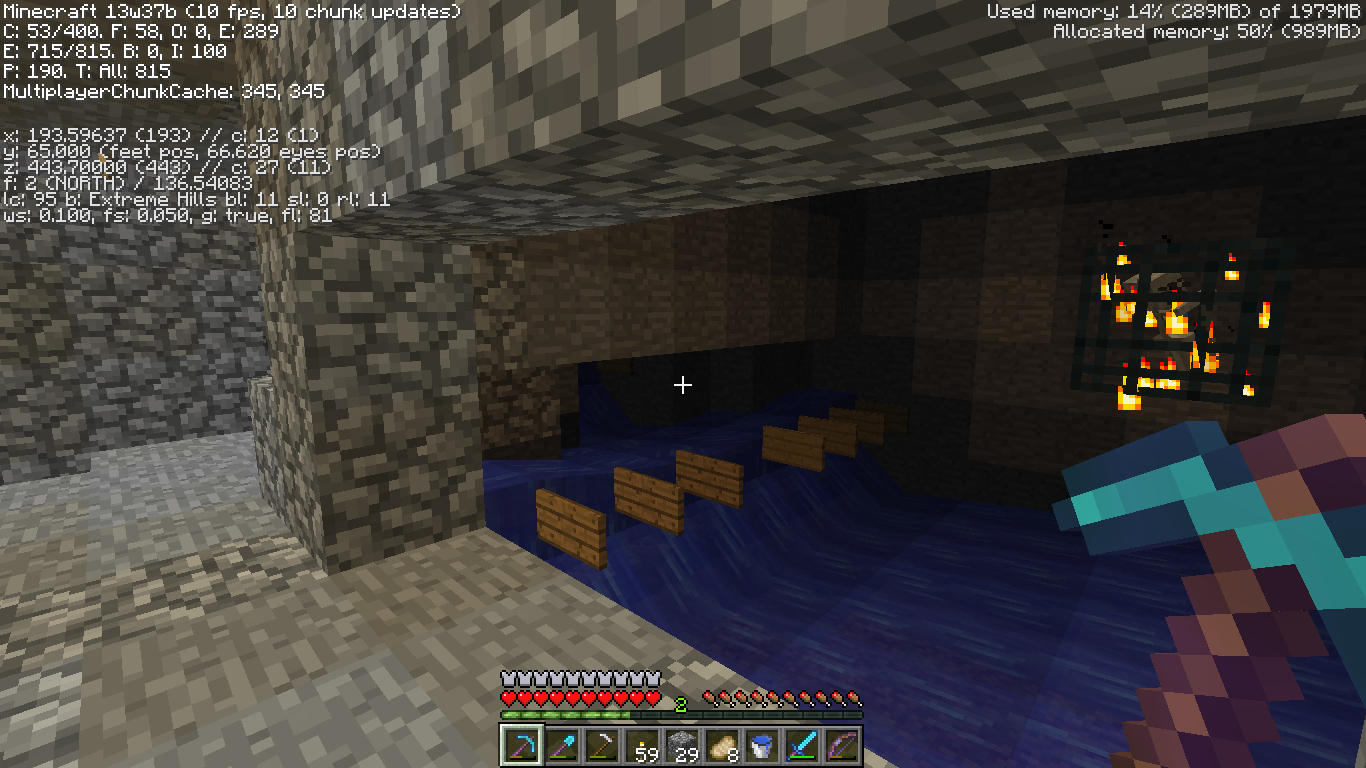
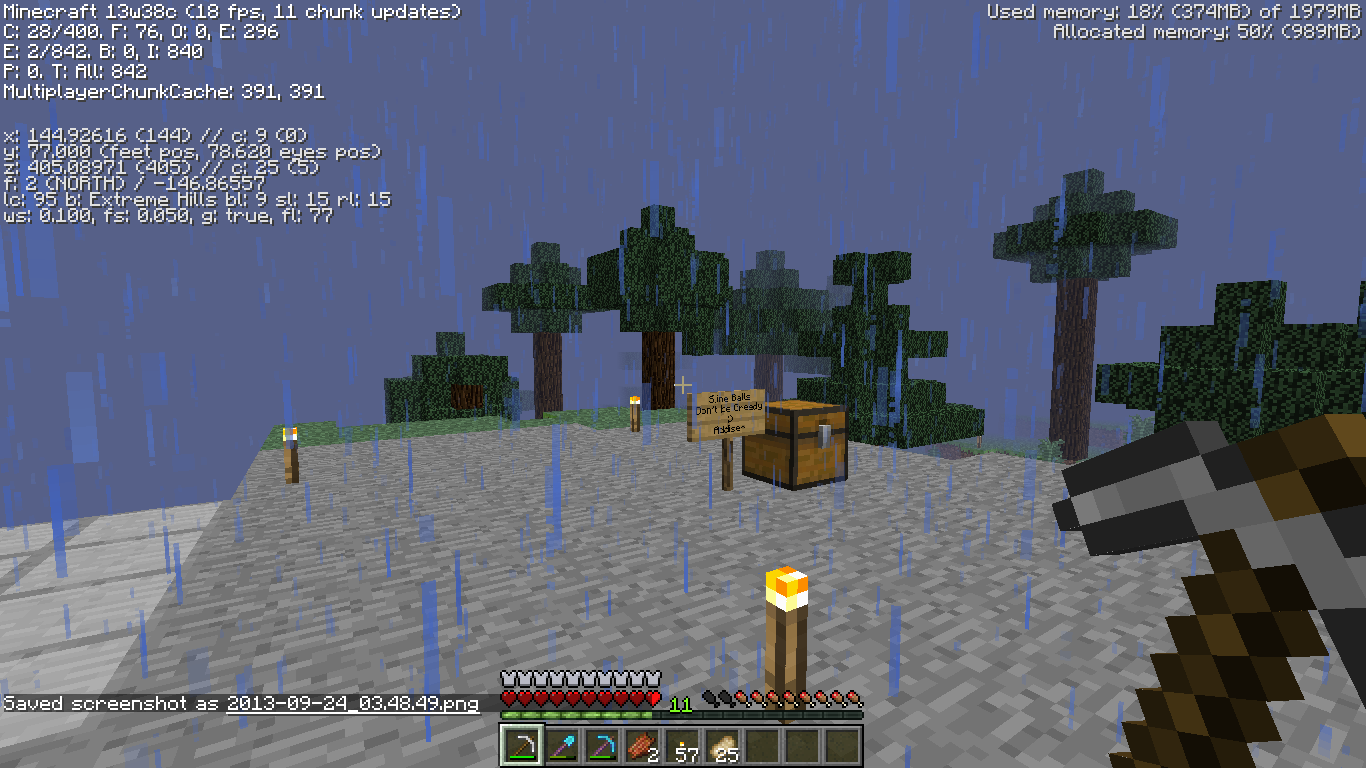
The picture with the sky shot is outside of spawn/skeleton farm range, standard entity count of 110ish. The picture with the furnace + chest is within the same room as the farm, but looking away (800+ entities). Proof shot of the skeleton farm is there. And the picture with the dispenser is the most direct shot of the arrows. See those glitched out ones inside it? Yeah, 680 or so. You can also see the fps drop, which I didn't really look at until now (37 on far to 10 on tiny)
Arrows shot from skeletons and (likely) infinity bows as well do not despawn over time. Normally, these dissapear after 5 minutes of sitting like any dropped item, xp orb or similar entity. These count as entities in the world, so they can contribute to entity lag like that of item frames, minecarts, glitched items or other things.
The server I've been playing the snapshots on has a skeleton farm within the spawn chunks (meaning that the area is loaded 100% of the time). After 2 days or so of this farm being used briefly after 37b release, roughly 700 arrows have accumulated there since skeletons can see through the corner of blocks sometimes, depending on the block and angle and shoot at you. Normally this isn't a problem, but the arrows don't despawn.. and it's within spawn chunks, so the lag from them is always there.
The picture with the sky shot is outside of spawn/skeleton farm range, standard entity count of 110ish. The picture with the furnace + chest is within the same room as the farm, but looking away (800+ entities). Proof shot of the skeleton farm is there. And the picture with the dispenser is the most direct shot of the arrows. See those glitched out ones inside it? Yeah, 680 or so. You can also see the fps drop, which I didn't really look at until now (37 on far to 10 on tiny).
Arrows shot from skeletons and (likely) infinity bows as well do not despawn over time (didn't test infinity because I don't have it yet..). Normally, these dissapear after 5 minutes of sitting like any dropped item, xp orb or similar entity. These count as entities in the world, so they can contribute to entity lag like that of item frames, minecarts, glitched items or other things.
The server I've been playing the snapshots on has a skeleton farm within the spawn chunks (meaning that the area is loaded 100% of the time). After 2 days or so of this farm being used briefly after 37b release, roughly 700 arrows have accumulated there since skeletons can see through the corner of blocks sometimes, depending on the block and angle and shoot at you. Normally this isn't a problem, but the arrows don't despawn.. and it's within spawn chunks, so the lag from them is always there.
The picture with the sky shot is outside of spawn/skeleton farm range, standard entity count of 110ish. The picture with the furnace + chest is within the same room as the farm, but looking away (800+ entities). Proof shot of the skeleton farm is there. And the picture with the dispenser is the most direct shot of the arrows. See those glitched out ones inside it? Yeah, 680 or so. You can also see the fps drop, which I didn't really look at until now (37 on far to 10 on tiny).
Arrows shot from skeletons and (likely) infinity bows as well do not despawn over time (didn't test infinity because I don't have it yet..). Normally, these dissapear after 5 minutes of sitting like any dropped item, xp orb or similar entity. These count as entities in the world, so they can contribute to entity lag like that of item frames, minecarts, glitched items or other things.
The server I've been playing the snapshots on has a skeleton farm within the spawn chunks (meaning that the area is loaded 100% of the time). After 2 days or so of this farm being used briefly after 37b release, roughly 700 arrows have accumulated there since skeletons can see through the corner of blocks sometimes, depending on the block and angle, and shoot at you. Normally this isn't a problem, but the arrows don't despawn.. and it's within spawn chunks, so the lag from them is always there.
The picture with the sky shot is outside of spawn/skeleton farm range, standard entity count of 110ish. The picture with the furnace + chest is within the same room as the farm, but looking away (800+ entities). Proof shot of the skeleton farm is there. And the picture with the dispenser is the most direct shot of the arrows. See those glitched out ones inside it? Yeah, 680 or so. You can also see the fps drop, which I didn't really look at until now (37 on far to 10 on tiny).
My friend, and myself twice, have experienced a problem where we've died in 39a and 39b and a few items out of all of what is dropped dissapear. I'm not sure if it's because the items try to enter a solid block and end up getting deleted, if it has to do with chunks containing entities loading/unloading and an error, or if it has to do with miscalculation when you die/lost level.dat information when the engine is processing the death.
All I can say is that I've lost stacks of quartz ore, blocks, slabs, stairs, pillars, chiseled blocks, netherbrick slabs, blocks, armor, a sword, bow, pickaxes, logs,.. a lot of stuff.. from this bug (I included the items my friend lost).
This bug occurred on SMP versions of 39a and 39b.
Edit: forgot to add tags..
This happens in any game mode.
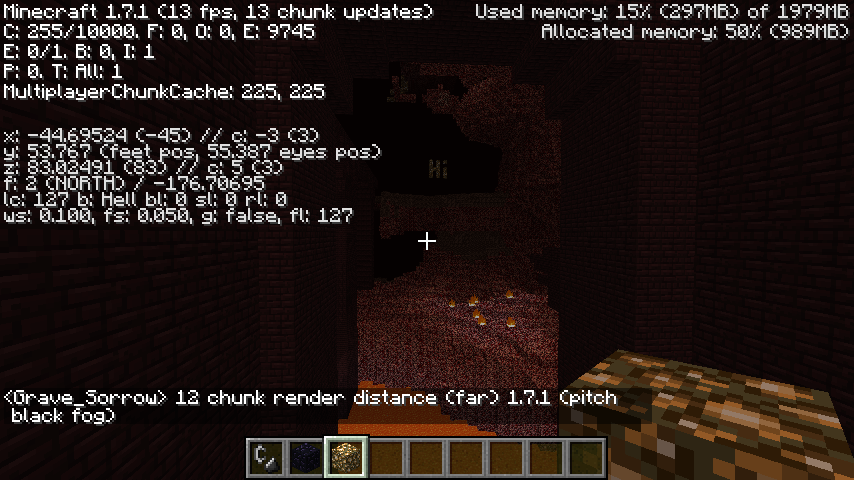
Render distance fog in the Nether is far closer in all 1.7 versions and snapshots for 1.7 than it was in 1.5 or 1.6. It is also pitch black, which makes it even harder to see.
Edit: You can also see that in 1.7.1, my fps is much lower. My pc isn't great to begin with but the fact remains that there are performance issues.
This happens in any game mode.
Render distance fog in the Nether is far closer in all 1.7 versions and snapshots for 1.7 than it was in 1.5 or 1.6. It is also pitch black, which makes it even harder to see.
Edit: You can also see that in 1.7.1, my fps is much lower. My pc isn't great to begin with but the fact remains that there are performance issues. I shouldn't be getting 8-10 fps on any render distance beyond 2 chunks and even at 2 chunks I only get about 20. In 1.7 pre, I was getting 40-50+ average and at 4 or 5, close to 40-50.
This happens in any game mode.
Render distance fog in the Nether is far closer in all 1.7 versions and snapshots for 1.7 than it was in 1.5 or 1.6. It is also pitch black, which makes it even harder to see.
Edit: You can also see that in 1.7.1, my fps is much lower. My pc isn't great to begin with but the fact remains that there are performance issues. I shouldn't be getting 8-10 fps on any render distance beyond 2 chunks and even at 2 chunks I only get about 20. In 1.7 pre, I was getting 40-50+ fps average and at 4 or 5 chunks, close to 40-50.
This happens in any game mode.
Render distance fog in the Nether is far closer in all 1.7 versions and snapshots for 1.7 than it was in 1.5 or 1.6. It is also pitch black, which makes it even harder to see.
Edit: You can also see that in 1.7.1, my fps is much lower. My pc isn't great to begin with but the fact remains that there are performance issues. I shouldn't be getting 8-10 fps on any render distance beyond 2 chunks and even at 2 chunks I only get about 20. In 1.7 pre, I was getting 40-50+ fps average and at 4 or 5 chunks, close to 40-50. On 7-8 chunks, 20-30. Now in anything 3+ I get less than 15.
This happens in any game mode.
Render distance fog in the Nether is far closer in all 1.7 versions and snapshots for 1.7 than it was in 1.5 or 1.6. It is also pitch black, which makes it even harder to see.
Edit: You can also see that in 1.7.1, my fps is much lower. My pc isn't great to begin with but the fact remains that there are performance issues. I shouldn't be getting 8-10 fps on any render distance beyond 2 chunks and even at 2 chunks I only get about 20. In 1.7 pre, I was getting 40-50+ fps average and at 4 or 5 chunks, close to 40-50. On 7-8 chunks, 20-30. Now in anything 3+ render I get less than 15 fps in 1.7.1.
This happens in any game mode.
Render distance fog in the Nether is far closer in all 1.7 versions and snapshots for 1.7 than it was in 1.5 or 1.6. It is also pitch black, which makes it even harder to see.
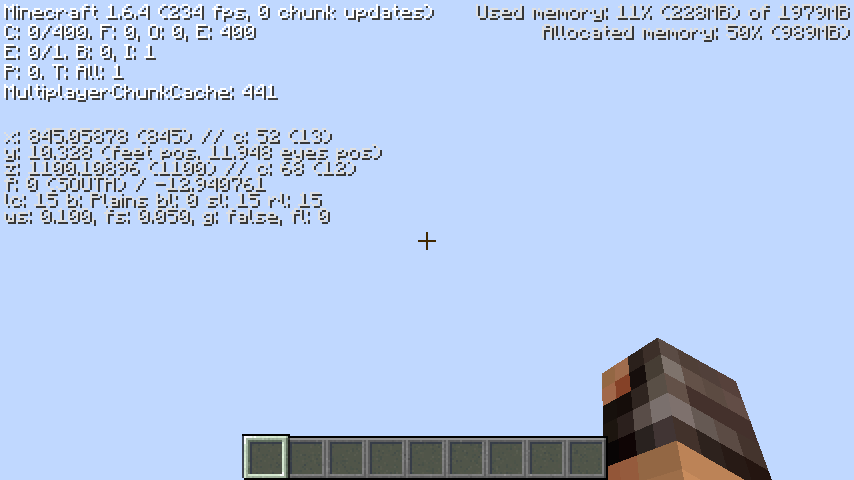
Edit: You can also see that in 1.7.1, my fps is much lower. My pc isn't great to begin with but the fact remains that there are performance issues. I shouldn't be getting 8-10 fps on any render distance beyond 2 chunks and even at 2 chunks I only get about 20. In 1.7 pre, I was getting 40-50+ fps average and at 4 or 5 chunks, close to 40-50. On 7-8 chunks, 20-30. Now in anything 3+ render I get less than 15 fps in 1.7.1.
Edit 2: In the final 2 pictures, the 1.7.1 far render (12 chunks) picture is fully loaded. In the 1.6.4 Far render picture, I didn't even bother letting it load for more than 5 or 10 seconds. The red 1.6.4 fog is still further away..
Game mode doesn't matter, it's worse fps period.
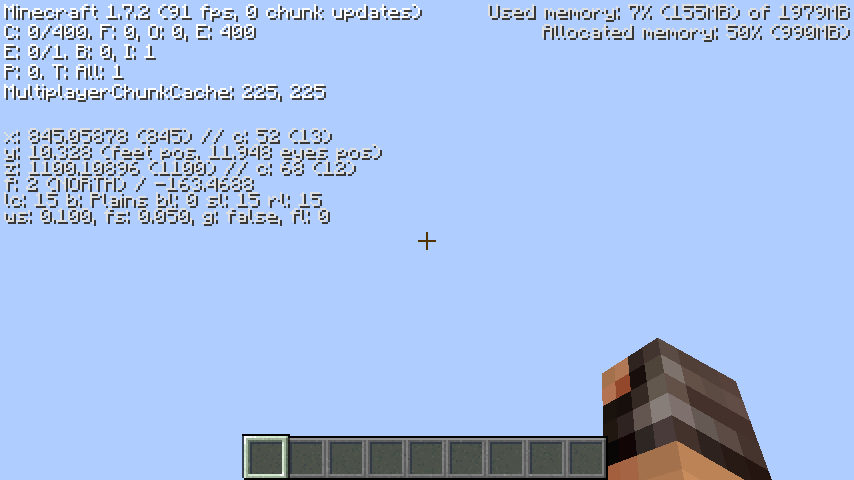
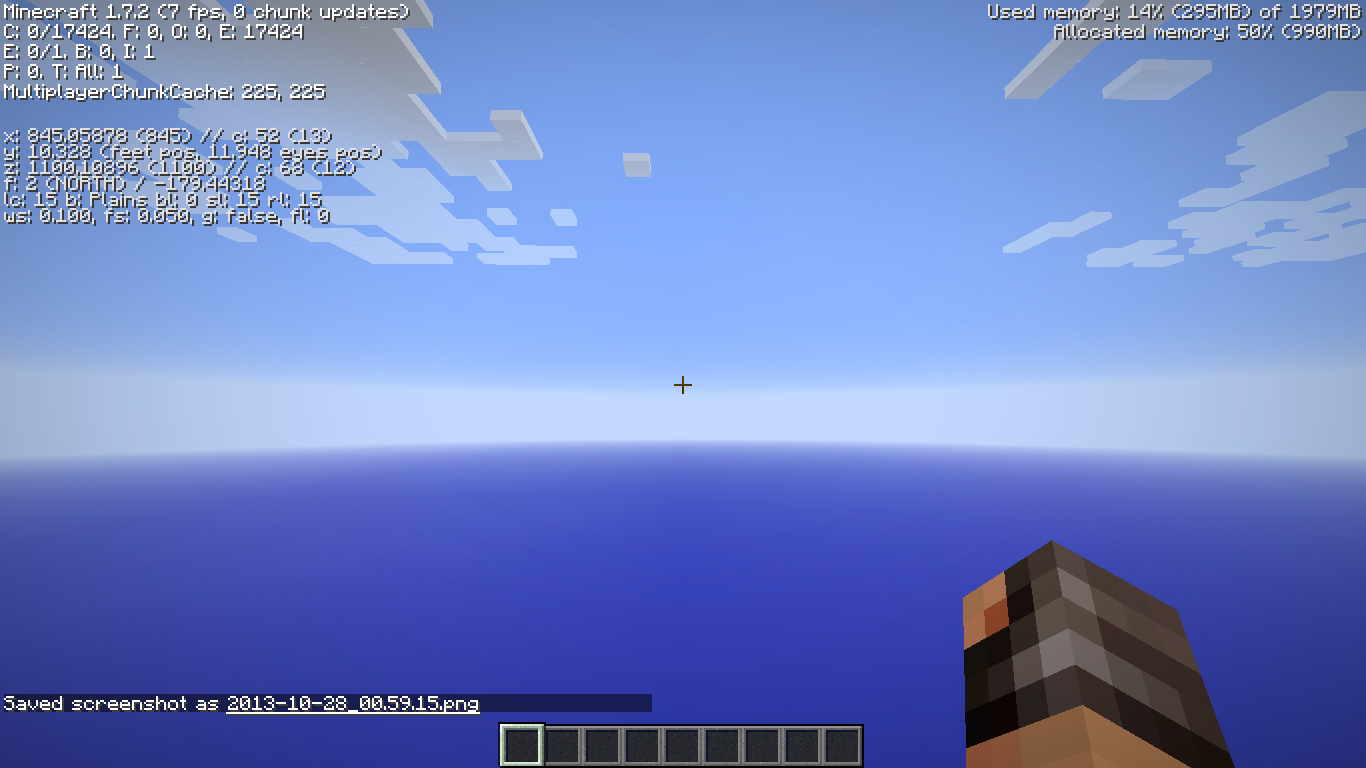
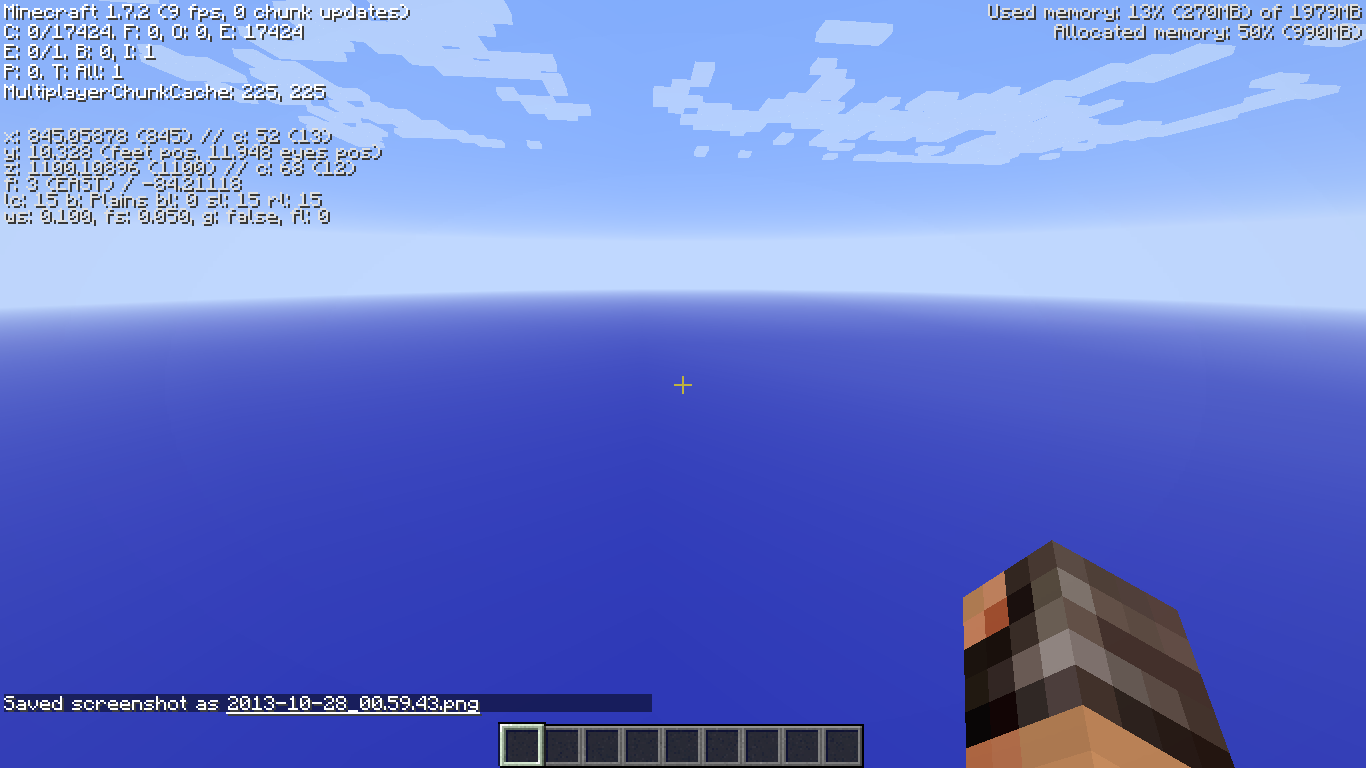
Two 1.6.4 pictures, three 1.7.2 pictures taken in a 100% void world for maximum results.
1.6.4 (1) = Absolute minimum video settings (standard size windowed mode) Average 220fps
1.6.4 (2) = Absolute maximum video settings (full screen) Average 70fps
1.7.2 (1) = Absolute minimum video settings (standard size windowed mode) Average 65fps
1.7.2 (2) = Max video settings minus anisotropic filtering and mipmapping (full screen) Average 5fps
1.7.2 (3) = Absolute max video settings (full screen) Average 8fpsAll pics taken immediately after changing settings.
Game mode doesn't matter, it's worse fps period.
Two 1.6.4 pictures, three 1.7.2 pictures taken in a 100% void world for maximum results.
1.6.4 (1) = Absolute minimum video settings (standard size windowed mode) Average 220fps
1.6.4 (2) = Absolute maximum video settings (full screen) Average 70fps
1.7.2 (1) = Absolute minimum video settings (standard size windowed mode) Average 65fps
1.7.2 (2) = Max video settings minus anisotropic filtering and mipmapping (full screen) Average 5fps
1.7.2 (3) = Absolute max video settings (full screen) Average 8fpsAll pics taken immediately after changing settings. Averages taken across 60-80+ increments of time.
Game mode doesn't matter, it's worse fps period.
Two 1.6.4 pictures, three 1.7.2 pictures taken in a 100% void world for maximum results.
1.6.4 (1) = Absolute minimum video settings (standard size windowed mode) Average 220fps
1.6.4 (2) = Absolute maximum video settings (full screen) Average 70fps
1.7.2 (1) = Absolute minimum video settings (standard size windowed mode) Average 65fps
1.7.2 (2) = Max video settings minus anisotropic filtering and mipmapping (full screen) Average 5fps
1.7.2 (3) = Absolute max video settings (full screen) Average 8fpsAll pics taken immediately after changing settings. Averages taken across 60-80+ second increments of time.
Chunk rendering/loading on any render distance affecting framerate or internal server stability when you begin loading any chunks within what is considered the "world spawn". Frame dips will occur, slashing fps by enough to see noticeable stuttering, or the game will freeze for up to about 8 seconds.
This may have to do with generation instabilities with pre-14w03a/b worlds only or something. As soon as I get out into 14w03b+ generated areas, the lag is completely gone.
Any stress on the system will make the game lag exponentially more (as expected). More mob spawning calculations per minute (i.e., higher render distance/MPChunkCache), more mobs within the loaded area, more lighting/redstone updates, higher render distance (includes on peaceful), higher graphics settings and faster movement/unloading and loading of chunks will all increase lag, stuttering and/or internal server stability issues in or around what is considered "spawn chunks".
Slightly less of a chance of this happening with more adequate hardware, but is prevalent to an extent regardless of system specs. Internal server instabilities creating "block lag" exists regardless of snapshot, area, etc. as long as chunks are being generated, but do not create frame stutter/drops at all as long as you are not rendering "spawn chunks".
Chunk rendering/loading on any render distance affecting framerate or internal server stability when you begin loading any chunks within what is considered the "world spawn". Frame dips will occur, slashing fps by enough to see noticeable stuttering, or the game will freeze for up to about 8 seconds.
This may have to do with generation instabilities with pre-14w03a/b worlds only or something. As soon as I get out into 14w03b+ generated areas, the lag is completely gone.
Any stress on the system will make the game lag exponentially more (as expected). More mob spawning calculations per minute (i.e., higher render distance/MPChunkCache), more mobs within the loaded area, more lighting/redstone updates, higher render distance (includes on peaceful), higher graphics settings and faster movement/unloading and loading of chunks will all increase lag, stuttering and/or internal server stability issues in or around what is considered "spawn chunks".
Slightly less of a chance of this happening with more adequate hardware, but is prevalent to an extent regardless of system specs. Internal server instabilities creating "block lag" exists regardless of snapshot, area, etc. as long as chunks are being generated, but do not create frame stutter/drops at all as long as you are not rendering "spawn chunks". This is only noticeable when first generating said chunks as well. Mostly clarifying the type of "lag" I'm getting at or around my world spawns.
I'm also having major major memory leaks in 1.6.2. I've had this since 1.6.1, and it happened more when I had lots of mobs in water/severe amounts of particles. Now in 1.6.2 and launcher version 1.2.1, I'm having severe memory leaks of 200mb in seconds. Minecraft wasn't like this until 2-3 weeks ago, max (hadn't been playing due to massive lag regardless of memory leak).
I'm running Windows 7 64bit, Java 7 Update 25 for both 32 and 64-bit versions. Doesn't matter what settings I have in-game.
Still does not show bonus damage in the most recent 1.6.2 patch and 1.2.1 launcher.
Is it really supposed to, though? I'd like it to, don't get me wrong.
I've yet to encounter this issue. If anything, they despawn.
Still an issue as of this post.
Still an issue as of this post date.
Still exists in the most recent 1.6.2 and launcher.
Still an issue as of this post.
It seems to be fixed in 13w38a. Arrows seem to despawn within 30-60 seconds after being shot by skeletons now. I threw up about 1500 of them from skeletons for testing's sake, and it took far less than 5 minutes for them to despawn if no updates occur to them (break the block they're stuck to, etc will reset the despawn timer). That was done in singleplayer, I'll have to see if it's any different on the server I'll be playing snapshots on.
I checked on the server, and the arrow count didn't go down at all when waiting for the arrows to despawn.. That sucks.
Still no change on the server, but I think they changed the entity ID if that's possible. If they used the same one from 37a/b in 38a-c, it may fix itself. Otherwise, I don't know. I just know that no new arrows are stacking up. All old ones are still all over the world.
Can anyone confirm a hotfix that was applied to 13w38c in the last 4 hours? My fps in 38c has gone up considerably (haven't tested it everywhere), and Minecraft seems to be performing well. I still get about 25% drop in my FPS because of the tools/weapons (improved), but my memory usage is less than 40%+ of what it was before.
I'll update with a new post if anything changes. I think it was just being kind to me on this morning's 3rd launch of Minecraft.
I can confirm this has happened to myself.
Nothing fixes it except maybe a full client reboot, but even then it's not a guaranteed fix.
Do you want picture proof with all my settings, pc info, etc?
I don't believe this is a bug. It's considered a vehicle (like a horse or mine cart) but has no health, which would replace the hunger bar. On top of that, you don't lose hunger in a boat so it's not a problem.
Instead, maybe Mojang should implement a hunger bar into vehicle GUI so that people aren't blind if they take damage when in a vehicle.
That has to do with mipmapping and not having anisotropic filtering set up high enough, I believe. They wouldn't look nearly as blurry, if at all, if you maxed out anisotropic filtering on your video settings. It's not a bug.
I recommend you retake both pictures with your F3 menu up in the exact/nearly exact same camera and foot position for accuracy. It's really hard to tell how far you moved, or if you moved.
Edit: F3 menu will do 3 things for you:
-Add legitimacy to your position in coordinates
-More clearly show your render distance
-Show what versions of Minecraft each picture was taken in
Another tip for you would be to take 4 pictures. 1.7.2, any snapshot/version of 1.7 before 1.7.2, 1.6.4, and 1.5.2. That'll also help show any inconsistencies in the 1.7 snapshots.
I made a new report for my FPS issues, go check it out if you like.
So it's intended for FPS to be severely limited, even when close to nothing is being rendered?
I forgot to mention that this seems to only affect certain systems and certain world types. Some people only have it with amplified terrain, others with every world type, and others with normal terrain gen.
Could be a driver issue with NVidia. Possibly only Windows 7 systems. Haven't heard anything about W8/8.1 or recent Catalyst drivers from AMD being affected.