 Pixel
Pixel
- HighpixleGaming
- JIRAUSER478550
- America/Chicago
- Yes
- No
 MC-189233
 MCL-17471
 WEB-4733
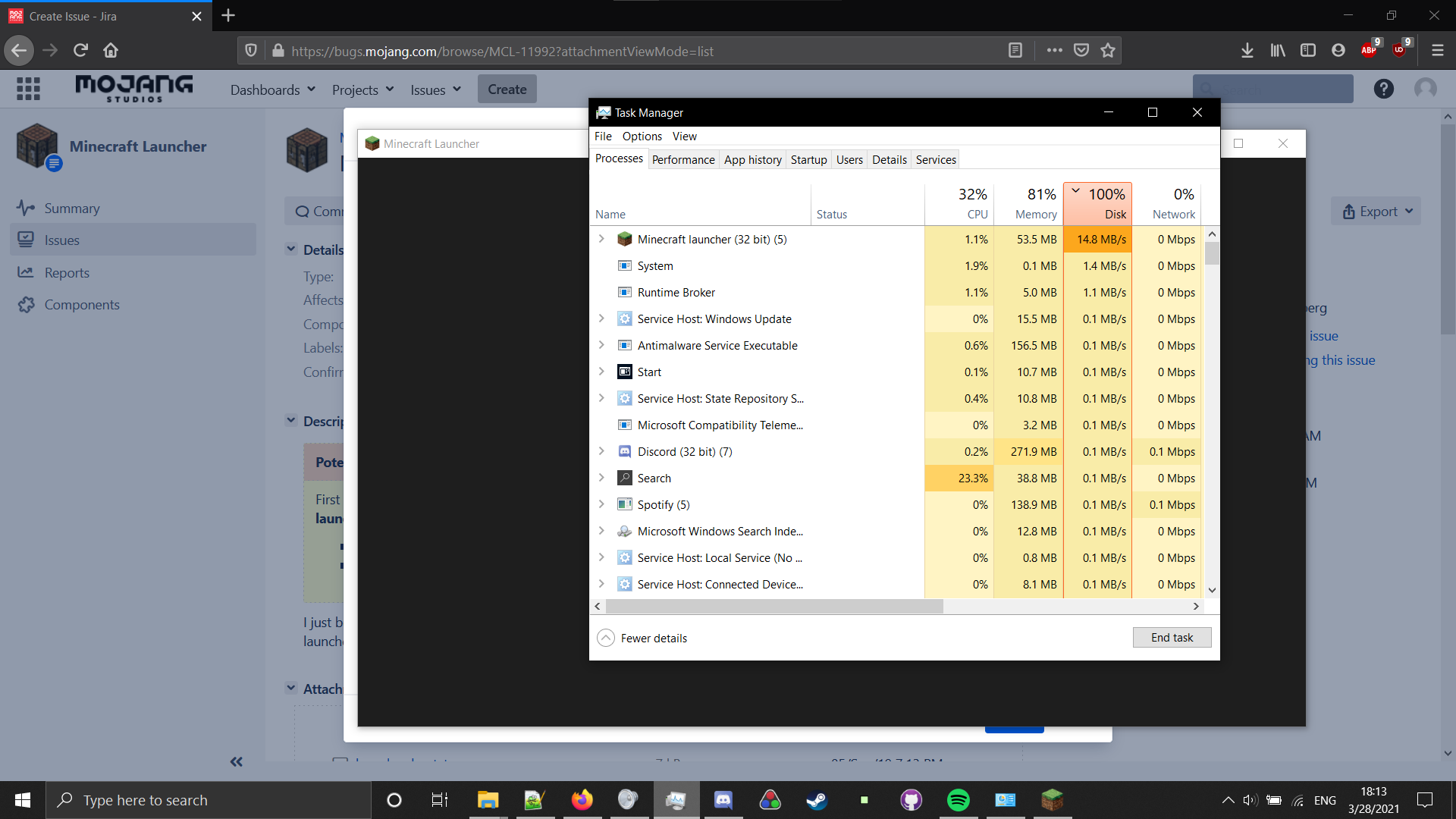
This seemed to start a couple months ago, and I was really confused as to why. Firstly, I noticed that the launcher, when opened, only opened to a grey screen, and was unusable. I looked at the potential workaround of an issue similar to this (deleting the launcher_msa_crendentials.json file), but it was unsuccessful.
However,I also believe that this issue is a separate one as,interestingly enough,when I closed the launcher by simply clicking on the X on the window, it seemed to close, but when looking at task manager, it was still running. Anotherinteresting thingthat I found on task manager was how much disk the launcher was seemingly using. I looked to see that theMinecraftlauncher was using 5-15mb of disk! (according to task manager) I am genuinely perplexed. I will link the launcher log and a screenshot of task manager with the launcher open. I have tried updating my drivers, updating java, and re-installing the launcher. That's just about everything I could think of to fix it, and they were all unsuccessful. If there is any way to boot up Minecraft without the use of the launcher, let me know, because as it stands, I can't even boot up the game. Any help will be appreciated!This seemed to start a couple months ago, and I was really confused as to why. Firstly, I noticed that the launcher, when opened, only opened to a grey screen, and was unusable. I looked at the potential workaround of an issue similar to this (deleting the launcher_msa_crendentials.json file), but it was unsuccessful. I also believe that this issue is a separate one as, when I closed the launcher by simply clicking on the X on the window, it seemed to close, but when looking at task manager, it was still running. Another potential issue that I found on task manager was how much disk the launcher was seemingly using. I looked to see that the launcher was using 5-15mb of disk! (according to task manager) I am genuinely perplexed. I will link the launcher log and a screenshot of task manager with the launcher open. I have tried updating my drivers, updating java, and re-installing the launcher. That's just about everything I could think of to fix it, and they were all unsuccessful. If there is any way to boot up Minecraft without the use of the launcher, let me know, because as it stands, I can't even boot up the game. Any help will be appreciated!
minecraft_launcher_being_strange.png
This seemed to start a couple months ago, and I was really confused as to why. Firstly, I noticed that the launcher, when opened, only opened to a grey screen, and was unusable. I looked at the potential workaround of an issue similar to this (deleting the launcher_msa_crendentials.json file), but it was unsuccessful. I also believe that this issue is a separate one as, when I closed the launcher by simply clicking on the X on the window, it seemed to close, but when looking at task manager, it was still running. Another potential issue that I found on task manager was how much disk the launcher was seemingly using. I looked to see that the launcher was using 5-15mb of disk! (according to task manager) I am genuinely perplexed. I will link the launcher log and a screenshot of task manager with the launcher open. I have tried updating my drivers, updating java, and re-installing the launcher. That's just about everything I could think of to fix it, and they were all unsuccessful. If there is any way to boot up Minecraft without the use of the launcher, let me know, because as it stands, I can't even boot up the game. Any help will be appreciated!
-Edit: After some trial and error, if I completely uninstall the game, and then open it for the first time, it works. But since it doesn't close, then I have to close it with task manager in order to open it again. After this happens, every time the minecraft launcher starts, it will not respond (only grey screen)
This seemed to start a couple months ago, and I was really confused as to why. Firstly, I noticed that the launcher, when opened, only opened to a grey screen, and was unusable. I looked at the potential workaround of an issue similar to this (deleting the launcher_msa_crendentials.json file), but it was unsuccessful. I also believe that this issue is a separate one as, when I closed the launcher by simply clicking on the X on the window, it seemed to close, but when looking at task manager, it was still running. Another potential issue that I found on task manager was how much disk the launcher was seemingly using. I looked to see that the launcher was using 5-15mb of disk! (according to task manager) I am genuinely perplexed. I will link the launcher log and a screenshot of task manager with the launcher open. I have tried updating my drivers, updating java, and re-installing the launcher. That's just about everything I could think of to fix it, and they were all unsuccessful. If there is any way to boot up Minecraft without the use of the launcher, let me know, because as it stands, I can't even boot up the game. Any help will be appreciated!
-Edit: After some trial and error, if I completely uninstall the game, and then open it for the first time, it works. But since it doesn't close, then I have to close it with task manager in order to open it again. After this happens, every time the minecraft launcher starts, it will not respond (only grey screen)
https://drive.google.com/file/d/1FPtMTI4sZQzYw5AfyGcWJ00n9P03JM0q/view?usp=sharing (Watch at 2x speed, because I didn't edit it)
This seemed to start a couple months ago, and I was really confused as to why. Firstly, I noticed that the launcher, when opened, only opened to a grey screen, and was unusable. I looked at the potential workaround of an issue similar to this (deleting the launcher_msa_crendentials.json file), but it was unsuccessful. I also believe that this issue is a separate one as, when I closed the launcher by simply clicking on the X on the window, it seemed to close, but when looking at task manager, it was still running. Another potential issue that I found on task manager was how much disk the launcher was seemingly using. I looked to see that the launcher was using 5-15mb of disk! (according to task manager) I am genuinely perplexed. I will link the launcher log and a screenshot of task manager with the launcher open. I have tried updating my drivers, updating java, and re-installing the launcher. That's just about everything I could think of to fix it, and they were all unsuccessful. If there is any way to boot up Minecraft without the use of the launcher, let me know, because as it stands, I can't even boot up the game. Any help will be appreciated!
-Edit: After some trial and error, if I completely uninstall the game, and then open it for the first time, it works. But since it doesn't close, then I have to close it with task manager in order to open it again. After this happens, every time the minecraft launcher starts, it will not respond (only grey screen)
-Edit 2: Deleting the "game" folder in "C:\Program Files (x86)\Minecraft Launcher" yields the same result as uninstalling and reinstalling.
https://drive.google.com/file/d/1FPtMTI4sZQzYw5AfyGcWJ00n9P03JM0q/view?usp=sharing (Watch at 2x speed, because I didn't edit it)
Pixel, If you are still having issues with the launcher after trying the workaround, you may want to try contacting Community Support
F3+C Debug Crash Report (If this helps)
---- Minecraft Crash Report ----
// Who set us up the TNT?
Time: 6/12/20 7:57 PM
Description: Manually triggered debug crash
java.lang.Throwable
at dlv.b(SourceFile:462)
at dlx.p(SourceFile:1567)
at dlx.e(SourceFile:994)
at dlx.d(SourceFile:654)
at net.minecraft.client.main.Main.main(SourceFile:215)
A detailed walkthrough of the error, its code path and all known details is as follows:
---------------------------------------------------------------------------------------
– Head –
Thread: Render thread
Stacktrace:
at dlv.b(SourceFile:462)
– Affected level –
Details:
All players: 1 total; [ebf['HighpixleGaming'/243, l='ClientLevel', x=44.23, y=88.37, z=-247.25]]
Chunk stats: Client Chunk Cache: 841, 574
Level dimension: minecraft:overworld
Level spawn location: World: (32,68,-208), Chunk: (at 0,4,0 in 2,-13; contains blocks 32,0,-208 to 47,255,-193), Region: (0,-1; contains chunks 0,-32 to 31,-1, blocks 0,0,-512 to 511,255,-1)
Level time: 17389 game time, 1 day time
Server brand: vanilla
Server type: Integrated singleplayer server
Stacktrace:
at dym.a(SourceFile:449)
at dlx.c(SourceFile:2176)
at dlx.d(SourceFile:672)
at net.minecraft.client.main.Main.main(SourceFile:215)
– System Details –
Details:
Minecraft Version: 1.16 Pre-release 5
Minecraft Version ID: 1.16-pre5
Operating System: Windows 10 (amd64) version 10.0
Java Version: 1.8.0_51, Oracle Corporation
Java VM Version: Java HotSpot(TM) 64-Bit Server VM (mixed mode), Oracle Corporation
Memory: 654234048 bytes (623 MB) / 1744830464 bytes (1664 MB) up to 2147483648 bytes (2048 MB)
CPUs: 8
JVM Flags: 9 total; -XX:HeapDumpPath=MojangTricksIntelDriversForPerformance_javaw.exe_minecraft.exe.heapdump -Xss1M -Xmx2G -XX:+UnlockExperimentalVMOptions -XX:+UseG1GC -XX:G1NewSizePercent=20 -XX:G1ReservePercent=20 -XX:MaxGCPauseMillis=50 -XX:G1HeapRegionSize=32M
Launched Version: 1.16-pre5
Backend library: LWJGL version 3.2.2 build 10
Backend API: GeForce GTX 1050 Ti/PCIe/SSE2 GL version 4.6.0 NVIDIA 441.14, NVIDIA Corporation
GL Caps: Using framebuffer using OpenGL 3.0
Using VBOs: Yes
Is Modded: Probably not. Jar signature remains and client brand is untouched.
Type: Client (map_client.txt)
Resource Packs:
Current Language: English (US)
CPU: 8x Intel(R) Core(TM) i5-8300H CPU @ 2.30GHz
Thank you so much anyways, I will continue to try and get this fixed!
-Edit
Sorry for any lost time because of this.
-Edit 2
It seems that looking even further into this, my graphics card driver was the culprit. After many a google search I managed to update the driver correctly and it works perfectly. Sorry for any lost time once again.
Thanks for your time! And I will make sure to try anything I think of!
I tried the workaround, (deleting the "game" folder located in "C:\Program Files (x86)\Minecraft Launcher") and it was unsuccessful. When opening the launcher after deleting the "game" folder, the launcher opens fine, and I can launch the game as normal, however, when the launcher is closed it does not open again without force closing the background instances of the launcher. Looking on task manager, there are four background instances of "Minecraft launcher (32 bit)" that stay open after closing the the launcher as normally, (with the "X" button on the launcher window) which is normal. The launcher not opening again after closing it (with the "X" and not task manager) is not. After force closing the instances of the launcher that stay open, and opening the launcher again, it yields the same result as in the picture "blanklauncher.png" attached. Hope this helps!