Launcher files can occasionally become corrupt, causing unexpected behavior
Certain files being corrupt or missing can cause the launcher to behave unexpectedly.
Files becoming corrupt seems to be relatively new.
Windows
Confirmed:
- 'game/cef.pak' and 'game/icudtl.dat' : Launcher fails to start, sometimes leaving a process running in the background
- 'game/v8_context_snapshot.bin' : Launcher is blank and window title is missing
Observed through testing, not yet confirmed:
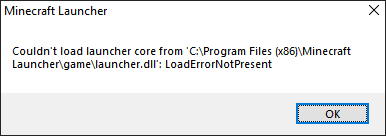
- 'game/chrome_elf.dll' and 'game/launcher.dll' : Dialogs can appear:
"Couldn't load launcher core from '<launcher installation dir>\game\launcher.dll': LoadErrorNotPresent"
"Unable to start the Minecraft Runtime Environment. This is most likely caused by a corruption. Please try to reinstall Minecraft."
See also:MCL-11754
Workaround
Deleting the game folder in the launcher directory (Usually C:\Program Files (x86)\Minecraft Launcher) and having the launcher redownload the corrupt and/or missing files fixes the issue. Deleting the 'game/.version' file should work too. In the case there is a prompt saying a file is already in use, restart the device then retry the workaround.
Environment
Windows 10 Home 20H2 64-bit
Linked Issues
is duplicated by26
 MC-223586minecraft launcher won't openDuplicateMC-223651Minecraft launcher not openingDuplicateMC-223805My Mc Launcher will not launch, even tho i have done everythingDuplicateMC-226494Minecraft launcher Eternal Grey ScreenDuplicateMC-231365Minecraft Launcher Does Not Work!DuplicateMC-233512Minecraft Launcher stopped working aganeDuplicateMC-233979Minecraft Black ScreemDuplicateMC-234052Minecraft Black ScreemDuplicateMC-234112gray screen on launcherDuplicateMC-248661Minecraft launcher black or doesn't open at allDuplicate
 MCL-17594Launcher shows grey screen upon loadingDuplicateMCL-17636Minecraft Launcher gray screenDuplicateMCL-17639Minecraft launcher frozen on gray screen and can only open onceDuplicateMCL-17899Minecraft Launcher not workingDuplicateMCL-18171Launcher presents a grey screen instead of play buttionDuplicateMCL-18373Screen Update FailureDuplicateMCL-18479Minecraft launcher won't load.DuplicateMCL-18604Launcher not loadingDuplicateMCL-18734Launcher sometimes won't load anythingDuplicateMCL-18808minecraft launcher won't load?DuplicateMCL-18811blank launchererror or bugDuplicateMCL-18959Minecraft Launcher Grey/Black ScreenDuplicateMCL-19498Grey Screen on LauncherDuplicateMCL-19639My Launcher doesn't open at all, I've tried countless ways to open it but nothing works. DuplicateMCL-19663Launcher não abre quando tento abri-lo. // Launcher doesn't work when I try to open it.DuplicateMCL-19919Launcher will not executeDuplicate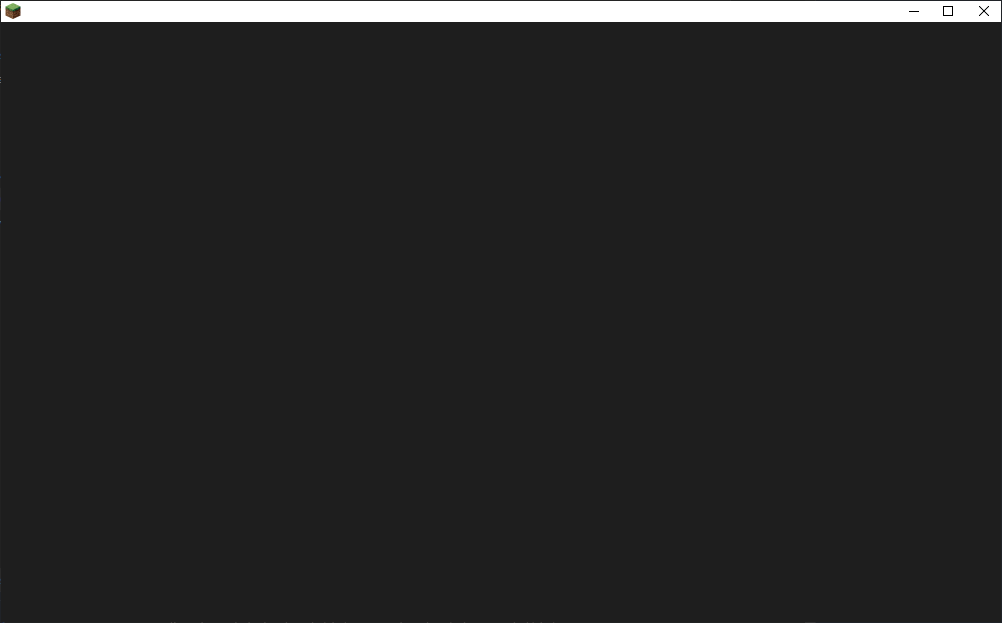

Created Issue:
Launcher files can occasionally become corrupt, causing unexpected behavior
Certain files being corrupt or missing can cause the launcher to behave unexpectedly.
Here is what has been tested so far:
Windows:
game/cef.pak : Launcher fails to start
game/v8_context_snapshot.bin : Launcher is blank and window title is missingEnvironment
Windows 10 Home 20H2 64-bit
Attachments1
Certain files being corrupt or missing can cause the launcher to behave unexpectedly.
Here is what has been tested so far:
Windows:
game/cef.pak : Launcher fails to start
game/v8_context_snapshot.bin : Launcher is blank and window title is missingCertain files being corrupt or missing can cause the launcher to behave unexpectedly.
Files becoming corrupt seems to be relatively new.Here is what has been tested so far:
Windows:
game/cef.pak : Launcher fails to start
game/v8_context_snapshot.bin : Launcher is blank and window title is missing
Certain files being corrupt or missing can cause the launcher to behave unexpectedly.
Files becoming corrupt seems to be relatively new.Here is what has been tested so far:
Windows:
game/cef.pak : Launcher fails to start, sometimes leaving a process running in the background
game/v8_context_snapshot.bin : Launcher is blank and window title is missing
Certain files being corrupt or missing can cause the launcher to behave unexpectedly.
Files becoming corrupt seems to be relatively new.Here is what has been tested so far:
Windows:
game/cef.pak : Launcher fails to start, sometimes leaving a process running in the background
game/v8_context_snapshot.bin : Launcher is blank and window title is missing
Workaround:
Deleting the game folder and having the launcher redownload the corrupt and/or missing files fixes the issue.
Certain files being corrupt or missing can cause the launcher to behave unexpectedly.
Files becoming corrupt seems to be relatively new.Here is what has been tested so far:
Windows:
game/cef.pak : Launcher fails to start, sometimes leaving a process running in the background
game/v8_context_snapshot.bin : Launcher is blank and window title is missing
Workaround:
Deleting the game folder and having the launcher redownload the corrupt and/or missing files fixes the issue.

relates to
Certain files being corrupt or missing can cause the launcher to behave unexpectedly.
Files becoming corrupt seems to be relatively new.Here is what has been tested so far:
Windows:
'game/cef.pak' and '' : Launcher fails to start, sometimes leaving a process running in the background
'game/v8_context_snapshot.bin' : Launcher is blank and window title is missingWorkaround:
Deleting the game folder and having the launcher redownload the corrupt and/or missing files fixes the issue.
Certain files being corrupt or missing can cause the launcher to behave unexpectedly.
Files becoming corrupt seems to be relatively new.Here is what has been tested so far:
Windows:
'game/cef.pak' and 'game/locales' : Launcher fails to start, sometimes leaving a process running in the background
'game/v8_context_snapshot.bin' : Launcher is blank and window title is missingWorkaround:
Deleting the game folder and having the launcher redownload the corrupt and/or missing files fixes the issue.
Certain files being corrupt or missing can cause the launcher to behave unexpectedly.
Files becoming corrupt seems to be relatively new.Here is what has been tested so far:
Windows:
'game/cef.pak' and 'game/locales/*.pak' : Launcher fails to start, sometimes leaving a process running in the background
'game/v8_context_snapshot.bin' : Launcher is blank and window title is missingWorkaround:
Deleting the game folder and having the launcher redownload the corrupt and/or missing files fixes the issue.
Certain files being corrupt or missing can cause the launcher to behave unexpectedly.
Files becoming corrupt seems to be relatively new.Here is what has been tested so far:
Windows:
'game/cef.pak'and 'game/locales/*.pak': Launcher fails to start, sometimes leaving a process running in the background
'game/v8_context_snapshot.bin' : Launcher is blank and window title is missingWorkaround:
Deleting the game folder and having the launcher redownload the corrupt and/or missing files fixes the issue.
Certain files being corrupt or missing can cause the launcher to behave unexpectedly.
Files becoming corrupt seems to be relatively new.Here is what has been tested so far:
Windows:
'game/cef.pak' : Launcher fails to start, sometimes leaving a process running in the background
'game/v8_context_snapshot.bin' : Launcher is blank and window title is missingWorkaround:
Deleting the game folder in the launcher directory and having the launcher redownload the corrupt and/or missing files fixes the issue.
![[Mod] Greymagic27](../../../data/avatars/users/92875.png)
Certain files being corrupt or missing can cause the launcher to behave unexpectedly.
Files becoming corrupt seems to be relatively new.Here is what has been tested so far:
Windows:
'game/cef.pak' : Launcher fails to start, sometimes leaving a process running in the background
'game/v8_context_snapshot.bin' : Launcher is blank and window title is missingWorkaround:
Deleting the game folder in the launcher directory (C:\Program Files (x86)\Minecraft) and having the launcher redownload the corrupt and/or missing files fixes the issue.
Certain files being corrupt or missing can cause the launcher to behave unexpectedly.
Files becoming corrupt seems to be relatively new.
Here is what has been tested so far:Windows:
'game/cef.pak' : Launcher fails to start, sometimes leaving a process running in the background
'game/v8_context_snapshot.bin' : Launcher is blank and window title is missingWorkaround:
Deleting the game folder in the launcher directory (C:\Program Files (x86)\Minecraft) and having the launcher redownload the corrupt and/or missing files fixes the issue.Certain files being corrupt or missing can cause the launcher to behave unexpectedly.
Files becoming corrupt seems to be relatively new.What has been tested so far:
Windows:
'game/cef.pak' : Launcher fails to start, sometimes leaving a process running in the background
'game/v8_context_snapshot.bin' : Launcher is blank and window title is missingWorkaround:
Deleting the game folder in the launcher directory (Usually C:\Program Files (x86)\Minecraft Launcher) and having the launcher redownload the corrupt and/or missing files fixes the issue.
Certain files being corrupt or missing can cause the launcher to behave unexpectedly.
Files becoming corrupt seems to be relatively new.What has been tested/observed so far:
Windows:
'game/cef.pak' : Launcher fails to start, sometimes leaving a process running in the background
'game/v8_context_snapshot.bin' : Launcher is blank and window title is missingMacOS/Linux:
Nothing has been observed for these operating systems so far.Workaround:
Deleting the game folder in the launcher directory (Usually C:\Program Files (x86)\Minecraft Launcher) and having the launcher redownload the corrupt and/or missing files fixes the issue.
is duplicated by
Certain files being corrupt or missing can cause the launcher to behave unexpectedly.
Files becoming corrupt seems to be relatively new.What has been tested/observed so far:
Windows:
'game/cef.pak' : Launcher fails to start, sometimes leaving a process running in the background
'game/v8_context_snapshot.bin' : Launcher is blank and window title is missingMacOS/Linux:
Nothing has been observed for these operating systems so far.Workaround:
Deleting the game folder in the launcher directory (Usually C:\Program Files (x86)\Minecraft Launcher) and having the launcher redownload the corrupt and/or missing files fixes the issue. In the case you get a prompt saying a file is already in use, restart the computer then retry the workaround.
Certain files being corrupt or missing can cause the launcher to behave unexpectedly.
Files becoming corrupt seems to be relatively new.What has been tested/observed so far:
Windows:
'game/cef.pak' : Launcher fails to start, sometimes leaving a process running in the background
'chrome_elf.dll' : Dialog(s) can appear containing "Couldn't load launcher core from '<launcher installation path>\game\launcher.dll' : LoadErrorNotPresent" and/or "Unable to start the Minecraft Runtime Environment. This is more likely caused by a corruption. Please try to reinstall Minecraft.".
'game/v8_context_snapshot.bin' : Launcher is blank and window title is missingMacOS/Linux:
Nothing has been observed for these operating systems so far.Workaround:
Deleting the game folder in the launcher directory (Usually C:\Program Files (x86)\Minecraft Launcher) and having the launcher redownload the corrupt and/or missing files fixes the issue. In the case you get a prompt saying a file is already in use, restart the computer then retry the workaround.
Certain files being corrupt or missing can cause the launcher to behave unexpectedly.
Files becoming corrupt seems to be relatively new.What has been tested/observed so far:
Windows:
'game/cef.pak' : Launcher fails to start, sometimes leaving a process running in the background
'chrome_elf.dll' : Dialog(s) can appear containing "Couldn't load launcher core from '<launcher installation path>\game\launcher.dll' : LoadErrorNotPresent" and/or "Unable to start the Minecraft Runtime Environment. This is morelikely caused by a corruption. Please try to reinstall Minecraft.".
'game/v8_context_snapshot.bin' : Launcher is blank and window title is missingMacOS/Linux:
Nothing has been observed for these operating systems so far.Workaround:
Deleting the game folder in the launcher directory (Usually C:\Program Files (x86)\Minecraft Launcher) and having the launcher redownload the corrupt and/or missing files fixes the issue. In the case you get a prompt saying a file is already in use, restart the computer then retry the workaround.Certain files being corrupt or missing can cause the launcher to behave unexpectedly.
Files becoming corrupt seems to be relatively new.What has been tested/observed so far:
Windows:
'game/cef.pak' : Launcher fails to start, sometimes leaving a process running in the background
'chrome_elf.dll' : Dialog(s) can appear containing "Couldn't load launcher core from '<launcher installation path>\game\launcher.dll' : LoadErrorNotPresent" and/or "Unable to start the Minecraft Runtime Environment. This is most likely caused by a corruption. Please try to reinstall Minecraft.".
'game/v8_context_snapshot.bin' : Launcher is blank and window title is missingMacOS/Linux:
Nothing has been observed for these operating systems so far.Workaround:
Deleting the game folder in the launcher directory (Usually C:\Program Files (x86)\Minecraft Launcher) and having the launcher redownload the corrupt and/or missing files fixes the issue. In the case you get a prompt saying a file is already in use, restart the computer then retry the workaround.
is duplicated by
Certain files being corrupt or missing can cause the launcher to behave unexpectedly.
Files becoming corrupt seems to be relatively new.What has been tested/observed so far:
Windows:
'game/cef.pak' : Launcher fails to start, sometimes leaving a process running in the background
'chrome_elf.dll' : Dialog(s) can appear containing "Couldn't load launcher core from '<launcher installation path>\game\launcher.dll' : LoadErrorNotPresent" and/or "Unable to start the Minecraft Runtime Environment. This is most likely caused by a corruption. Please try to reinstall Minecraft.".
'game/v8_context_snapshot.bin' : Launcher is blank and window title is missingMacOS/Linux:
Nothing has been observed for these operating systems so far.Workaround:
Deleting the game folder in the launcher directory (Usually C:\Program Files (x86)\Minecraft Launcher) and having the launcher redownload the corrupt and/or missing files fixes the issue. In the caseyou geta prompt saying a file is already in use, restart thecomputerthen retry the workaround.Certain files being corrupt or missing can cause the launcher to behave unexpectedly.
Files becoming corrupt seems to be relatively new.Windows
Confirmed:
- 'game/cef.pak' : Launcher fails to start, sometimes leaving a process running in the background
- 'game/v8_context_snapshot.bin' : Launcher is blank and window title is missing
Observed through testing, not yet confirmed:
- 'chrome_elf.dll' : Dialogs can appear:
Workaround
Deleting the game folder in the launcher directory (Usually C:\Program Files (x86)\Minecraft Launcher) and having the launcher redownload the corrupt and/or missing files fixes the issue. In the case there is a prompt saying a file is already in use, restart the device then retry the workaround.
Certain files being corrupt or missing can cause the launcher to behave unexpectedly.
Files becoming corrupt seems to be relatively new.Windows
Confirmed:
- 'game/cef.pak' : Launcher fails to start, sometimes leaving a process running in the background
- 'game/v8_context_snapshot.bin' : Launcher is blank and window title is missing
Observed through testing, not yet confirmed:
- 'chrome_elf.dll' : Dialogs can appear:
Workaround
Deleting the game folder in the launcher directory (Usually C:\Program Files (x86)\Minecraft Launcher) and having the launcher redownload the corrupt and/or missing files fixes the issue. In the case there is a prompt saying a file is already in use, restart the device then retry the workaround.Certain files being corrupt or missing can cause the launcher to behave unexpectedly.
Files becoming corrupt seems to be relatively new.Windows
Confirmed:
- 'game/cef.pak' : Launcher fails to start, sometimes leaving a process running in the background
- 'game/v8_context_snapshot.bin' : Launcher is blank and window title is missing
Observed through testing, not yet confirmed:
- 'chrome_elf.dll' : Dialogs can appear
Workaround
Deleting the game folder in the launcher directory (Usually C:\Program Files (x86)\Minecraft Launcher) and having the launcher redownload the corrupt and/or missing files fixes the issue. In the case there is a prompt saying a file is already in use, restart the device then retry the workaround.
Certain files being corrupt or missing can cause the launcher to behave unexpectedly.
Files becoming corrupt seems to be relatively new.Windows
Confirmed:
- 'game/cef.pak' : Launcher fails to start, sometimes leaving a process running in the background
- 'game/v8_context_snapshot.bin' : Launcher is blank and window title is missing
Observed through testing, not yet confirmed:
- 'chrome_elf.dll' : Dialogs can appear
Workaround
Deleting the game folder in the launcher directory (Usually C:\Program Files (x86)\Minecraft Launcher) and having the launcher redownload the corrupt and/or missing files fixes the issue. In the case there is a prompt saying a file is already in use, restart the device then retry the workaround.Certain files being corrupt or missing can cause the launcher to behave unexpectedly.
Files becoming corrupt seems to be relatively new.Windows
Confirmed:
- 'game/cef.pak' : Launcher fails to start, sometimes leaving a process running in the background
- 'game/v8_context_snapshot.bin' : Launcher is blank and window title is missing
Observed through testing, not yet confirmed:
- 'chrome_elf.dll' : Dialogs can appear:
Workaround
Deleting the game folder in the launcher directory (Usually C:\Program Files (x86)\Minecraft Launcher) and having the launcher redownload the corrupt and/or missing files fixes the issue. In the case there is a prompt saying a file is already in use, restart the device then retry the workaround.
Certain files being corrupt or missing can cause the launcher to behave unexpectedly.
Files becoming corrupt seems to be relatively new.Windows
Confirmed:
- 'game/cef.pak' : Launcher fails to start, sometimes leaving a process running in the background
- 'game/v8_context_snapshot.bin' : Launcher is blank and window title is missing
Observed through testing, not yet confirmed:
- 'chrome_elf.dll' : Dialogs can appear:
Workaround
Deleting the game folder in the launcher directory (Usually C:\Program Files (x86)\Minecraft Launcher) and having the launcher redownload the corrupt and/or missing files fixes the issue. In the case there is a prompt saying a file is already in use, restart the device then retry the workaround.Certain files being corrupt or missing can cause the launcher to behave unexpectedly.
Files becoming corrupt seems to be relatively new.Windows
Confirmed:
- 'game/cef.pak' : Launcher fails to start, sometimes leaving a process running in the background
- 'game/v8_context_snapshot.bin' : Launcher is blank and window title is missing
Observed through testing, not yet confirmed:
- 'chrome_elf.dll' : Dialogs can appear:

Workaround
Deleting the game folder in the launcher directory (Usually C:\Program Files (x86)\Minecraft Launcher) and having the launcher redownload the corrupt and/or missing files fixes the issue. In the case there is a prompt saying a file is already in use, restart the device then retry the workaround.
Certain files being corrupt or missing can cause the launcher to behave unexpectedly.
Files becoming corrupt seems to be relatively new.Windows
Confirmed:
- 'game/cef.pak' : Launcher fails to start, sometimes leaving a process running in the background
- 'game/v8_context_snapshot.bin' : Launcher is blank and window title is missing
Observed through testing, not yet confirmed:
- 'chrome_elf.dll' : Dialogs can appear:
Workaround
Deleting the game folder in the launcher directory (Usually C:\Program Files (x86)\Minecraft Launcher) and having the launcher redownload the corrupt and/or missing files fixes the issue. In the case there is a prompt saying a file is already in use, restart the device then retry the workaround.Certain files being corrupt or missing can cause the launcher to behave unexpectedly.
Files becoming corrupt seems to be relatively new.Windows
Confirmed:
- 'game/cef.pak' : Launcher fails to start, sometimes leaving a process running in the background
- 'game/v8_context_snapshot.bin' : Launcher is blank and window title is missing
Observed through testing, not yet confirmed:
- 'chrome_elf.dll' : Dialogs can appear:
"Couldn't load launcher core from '<launcher installation dir>\game\launcher.dll': LoadErrorNotPresent"
"Unable to start the Minecraft Runtime Environment. This is most likely caused by a corruption. Please try to reinstall Minecraft."Workaround
Deleting the game folder in the launcher directory (Usually C:\Program Files (x86)\Minecraft Launcher) and having the launcher redownload the corrupt and/or missing files fixes the issue. In the case there is a prompt saying a file is already in use, restart the device then retry the workaround.
Certain files being corrupt or missing can cause the launcher to behave unexpectedly.
Files becoming corrupt seems to be relatively new.Windows
Confirmed:
- 'game/cef.pak' : Launcher fails to start, sometimes leaving a process running in the background
- 'game/v8_context_snapshot.bin' : Launcher is blank and window title is missing
Observed through testing, not yet confirmed:
- 'chrome_elf.dll' : Dialogs can appear:
"Couldn't load launcher core from '<launcher installation dir>\game\launcher.dll': LoadErrorNotPresent"
"Unable to start the Minecraft Runtime Environment. This is most likely caused by a corruption. Please try to reinstall Minecraft."
See also:MCL-11754Workaround
Deleting the game folder in the launcher directory (Usually C:\Program Files (x86)\Minecraft Launcher) and having the launcher redownload the corrupt and/or missing files fixes the issue. In the case there is a prompt saying a file is already in use, restart the device then retry the workaround.
Certain files being corrupt or missing can cause the launcher to behave unexpectedly.
Files becoming corrupt seems to be relatively new.Windows
Confirmed:
- 'game/cef.pak' : Launcher fails to start, sometimes leaving a process running in the background
- 'game/v8_context_snapshot.bin' : Launcher is blank and window title is missing
Observed through testing, not yet confirmed:
- 'chrome_elf.dll' and 'launcher.dll' : Dialogs can appear:
"Couldn't load launcher core from '<launcher installation dir>\game\launcher.dll': LoadErrorNotPresent"
"Unable to start the Minecraft Runtime Environment. This is most likely caused by a corruption. Please try to reinstall Minecraft."
See also:MCL-11754Workaround
Deleting the game folder in the launcher directory (Usually C:\Program Files (x86)\Minecraft Launcher) and having the launcher redownload the corrupt and/or missing files fixes the issue. In the case there is a prompt saying a file is already in use, restart the device then retry the workaround.
Certain files being corrupt or missing can cause the launcher to behave unexpectedly.
Files becoming corrupt seems to be relatively new.Windows
Confirmed:
- 'game/cef.pak' and 'game/icudtl.dat' : Launcher fails to start, sometimes leaving a process running in the background
- 'game/v8_context_snapshot.bin' : Launcher is blank and window title is missing
Observed through testing, not yet confirmed:
- 'game/chrome_elf.dll' and 'game/launcher.dll' : Dialogs can appear:
"Couldn't load launcher core from '<launcher installation dir>\game\launcher.dll': LoadErrorNotPresent"
"Unable to start the Minecraft Runtime Environment. This is most likely caused by a corruption. Please try to reinstall Minecraft."
See also:MCL-11754Workaround
Deleting the game folder in the launcher directory (Usually C:\Program Files (x86)\Minecraft Launcher) and having the launcher redownload the corrupt and/or missing files fixes the issue. In the case there is a prompt saying a file is already in use, restart the device then retry the workaround.
is duplicated by
is duplicated by
Certain files being corrupt or missing can cause the launcher to behave unexpectedly.
Files becoming corrupt seems to be relatively new.Windows
Confirmed:
- 'game/cef.pak' and 'game/icudtl.dat' : Launcher fails to start, sometimes leaving a process running in the background
- 'game/v8_context_snapshot.bin' : Launcher is blank and window title is missing
Observed through testing, not yet confirmed:
- 'game/chrome_elf.dll' and 'game/launcher.dll' : Dialogs can appear:
"Couldn't load launcher core from '<launcher installation dir>\game\launcher.dll': LoadErrorNotPresent"
"Unable to start the Minecraft Runtime Environment. This is most likely caused by a corruption. Please try to reinstall Minecraft."
See also:MCL-11754Workaround
Deleting the game folder in the launcher directory (Usually C:\Program Files (x86)\Minecraft Launcher) and having the launcher redownload the corrupt and/or missing files fixes the issue. Deleting the 'game/.version' file should work too. In the case there is a prompt saying a file is already in use, restart the device then retry the workaround.
is duplicated by
![[Bot] Arisa](../../../data/avatars/users/43007.png)
![[Mod] Michael Wobst](../../../data/avatars/users/37868.png)
is duplicated by
![[Mod] SPGoding](../../../data/avatars/users/44622.png)
is duplicated by
is duplicated by
is duplicated by
is duplicated by
![[Mod] Urielsalis](../../../data/assets/gravatar/urielsalis.jpeg)
is duplicated by
is duplicated by
![[Mod] OcelotOnesie](../../../data/avatars/users/43220.png)
is duplicated by
is duplicated by
![[Mod] tryashtar](../../../data/avatars/users/41963.png)
is duplicated by
is duplicated by
is duplicated by
is duplicated by
![[Mod] Chandler](../../../data/assets/gravatar/triwonder81.png)
is duplicated by
is duplicated by
MC-236007
is duplicated by
is duplicated by
is duplicated by
is duplicated by
is duplicated by
is duplicated by
is duplicated by
![[Mojang] Mega_Spud (Jay Wells)](../../../data/avatars/users/92696.png)
Hey Timothy, without knowing too much what might cause the issue, it looks like this could be related to MCL-17485. Could you try following the workaround in that description to see if it fixes your issue?
Thank you for your report!
We're tracking this issue in MCL-17485, so this ticket is being resolved and linked as a duplicate.
If you would like to add a vote and any extra information to the main ticket it would be appreciated.
If you haven't already, you might like to make use of the search feature to see if the issue has already been mentioned.
Quick Links:
📓 Bug Tracker Guidelines – 💬 Community Support – 📧 Mojang Support
📓 Project Summary – ✍️ Feedback and Suggestions – 📖 Game Wiki
Please try the workaround on MCL-17485 and see if this solves your issue.
Thank you for your report!
We're tracking this issue in MCL-17485, so this ticket is being resolved and linked as a duplicate.
If you would like to add a vote and any extra information to the main ticket it would be appreciated.
If you haven't already, you might like to make use of the search feature to see if the issue has already been mentioned.
Quick Links:
📓 Bug Tracker Guidelines – 💬 Community Support – 📧 Mojang Support
📓 Project Summary – ✍️ Feedback and Suggestions – 📖 Game Wiki
Thank you for your report!
We're tracking this issue in MCL-17485, so this ticket is being resolved and linked as a duplicate.
If you would like to add a vote and any extra information to the main ticket it would be appreciated.
If you haven't already, you might like to make use of the search feature to see if the issue has already been mentioned.
Quick Links:
📓 Bug Tracker Guidelines – 💬 Community Support – 📧 Mojang Support
📓 Project Summary – ✍️ Feedback and Suggestions – 📖 Game Wiki
Thank you for your report!
We're tracking this issue in MCL-17485, so this ticket is being resolved and linked as a duplicate.
If you would like to add a vote and any extra information to the main ticket it would be appreciated.
If you haven't already, you might like to make use of the search feature to see if the issue has already been mentioned.
Quick Links:
📓 Bug Tracker Guidelines – 💬 Community Support – 📧 Mojang Support
📓 Project Summary – ✍️ Feedback and Suggestions – 📖 Game Wiki
Thank you for your report!
We're tracking this issue in MCL-17485, so this ticket is being resolved and linked as a duplicate.
If you would like to add a vote and any extra information to the main ticket it would be appreciated.
If you haven't already, you might like to make use of the search feature to see if the issue has already been mentioned.
Quick Links:
📓 Bug Tracker Guidelines – 💬 Community Support – 📧 Mojang Support
📓 Project Summary – ✍️ Feedback and Suggestions – 📖 Game Wiki
![[Helper] Whomsky](../../../data/avatars/users/90300.png)
![[Mod] Avoma](../../../data/avatars/users/86198.png)
Duplicate of MCL-17485.
Thank you for your report!
We're tracking this issue in MCL-17485, so this ticket is being resolved and linked as a duplicate.
If you would like to add a vote and any extra information to the main ticket it would be appreciated.
If you haven't already, you might like to make use of the search feature to see if the issue has already been mentioned.
Quick Links:
📓 Bug Tracker Guidelines – 💬 Community Support – 📧 Mojang Support
📓 Project Summary – ✍️ Feedback and Suggestions – 📖 Game Wiki
Duplicate of MCL-17485.
Duplicate of MCL-17485.
Duplicate of MCL-17485.
Duplicate of MCL-17485.
Thank you for your report!
We're tracking this issue in MCL-17485, so this ticket is being resolved and linked as a duplicate.
If you would like to add a vote and any extra information to the main ticket it would be appreciated.
If you haven't already, you might like to make use of the search feature to see if the issue has already been mentioned.
Quick Links:
📓 Bug Tracker Guidelines – 💬 Community Support – 📧 Mojang Support
📓 Project Summary – ✍️ Feedback and Suggestions – 📖 Game Wiki
– I am a bot. This action was performed automatically! If you think it was incorrect, please notify us on Discord or Reddit
Duplicate of MCL-17485.
Thank you for your report!
We're tracking this issue in MCL-17485, so this ticket is being resolved and linked as a duplicate.
If you would like to add a vote and any extra information to the main ticket it would be appreciated.
If you haven't already, you might like to make use of the search feature to see if the issue has already been mentioned.
Quick Links:
📓 Bug Tracker Guidelines – 💬 Community Support – 📧 Mojang Support
📓 Project Summary – ✍️ Feedback and Suggestions – 📖 Game Wiki
– I am a bot. This action was performed automatically! If you think it was incorrect, please notify us on Discord or Reddit
Duplicate of MCL-17485.
Does MCL-17485 describe your issue?
Thank you for your report!
We're tracking this issue in MCL-17485, so this ticket is being resolved and linked as a duplicate.
If you would like to add a vote and any extra information to the main ticket it would be appreciated.
If you haven't already, you might like to make use of the search feature to see if the issue has already been mentioned.
Quick Links:
📓 Bug Tracker Guidelines – 💬 Community Support – 📧 Mojang Support
📓 Project Summary – ✍️ Feedback and Suggestions – 📖 Game Wiki
– I am a bot. This action was performed automatically! The ticket was resolved by one of our moderators, and I left this message to give more information to you.
Judging by the information you've provided in this ticket, I'd consider this ticket to be a duplicate of MCL-17485.
Duplicate of MCL-17485.
Duplicate of MCL-17485.
Duplicate of MCL-17485.
Thank you for your report!
We're tracking this issue in MCL-17485, so this ticket is being resolved and linked as a duplicate.
If you would like to add a vote and any extra information to the main ticket it would be appreciated.
If you haven't already, you might like to make use of the search feature to see if the issue has already been mentioned.
Quick Links:
📓 Bug Tracker Guidelines – 💬 Community Support – 📧 Mojang Support
📓 Project Summary – ✍️ Feedback and Suggestions – 📖 Game Wiki
– I am a bot. This action was performed automatically! The ticket was resolved by one of our moderators, and I left this message to give more information to you.
Duplicate of MCL-17485.

Please read MCL-17485 for a potential solution. There is a Workaround.
You also have the Community Support link above for further help.
Thank you for your report!
We're tracking this issue in MCL-17485, so this ticket is being resolved and linked as a duplicate.
If you would like to add a vote and any extra information to the main ticket it would be appreciated.
If you haven't already, you might like to make use of the search feature to see if the issue has already been mentioned.
Quick Links:
📓 Bug Tracker Guidelines – 💬 Community Support – 📧 Mojang Support
📓 Project Summary – ✍️ Feedback and Suggestions – 📖 Game Wiki
– I am a bot. This action was performed automatically! The ticket was resolved by one of our moderators, and I left this message to give more information to you.
Thank you for your report!
We're tracking this issue in MCL-17485, so this ticket is being resolved and linked as a duplicate.
If you would like to add a vote and any extra information to the main ticket it would be appreciated.
If you haven't already, you might like to make use of the search feature to see if the issue has already been mentioned.
Quick Links:
📓 Bug Tracker Guidelines – 💬 Community Support – 📧 Mojang Support
📓 Project Summary – ✍️ Feedback and Suggestions – 📖 Game Wiki
– I am a bot. This action was performed automatically! The ticket was resolved by one of our moderators, and I left this message to give more information to you.
Thank you for your report!
We're tracking this issue in MCL-17485, so this ticket is being resolved and linked as a duplicate.
If you would like to add a vote and any extra information to the main ticket it would be appreciated.
If you haven't already, you might like to make use of the search feature to see if the issue has already been mentioned.
Quick Links:
📓 Bug Tracker Guidelines – 💬 Community Support – 📧 Mojang Support
📓 Project Summary – ✍️ Feedback and Suggestions – 📖 Game Wiki
– I am a bot. This action was performed automatically! The ticket was resolved by one of our moderators, and I left this message to give more information to you.
Duplicate of MCL-17485.
Thank you for your report!
We're tracking this issue in MCL-17485, so this ticket is being resolved and linked as a duplicate.
If you would like to add a vote and any extra information to the main ticket it would be appreciated.
If you haven't already, you might like to make use of the search feature to see if the issue has already been mentioned.
Quick Links:
📓 Bug Tracker Guidelines – 💬 Community Support – 📧 Mojang Support
📓 Project Summary – ✍️ Feedback and Suggestions – 📖 Game Wiki
– I am a bot. This action was performed automatically! The ticket was resolved by one of our moderators, and I left this message to give more information to you.
Duplicate of MCL-17485.
Duplicate of MCL-17485.
Thank you for your report!
We're tracking this issue in MCL-17485, so this ticket is being resolved and linked as a duplicate.
If you would like to add a vote and any extra information to the main ticket it would be appreciated.
If you haven't already, you might like to make use of the search feature to see if the issue has already been mentioned.
Quick Links:
📓 Bug Tracker Guidelines – 💬 Community Support – 📧 Mojang Support
📓 Project Summary – ✍️ Feedback and Suggestions – 📖 Game Wiki
Thank you for your report!
We're tracking this issue in MCL-17485, so this ticket is being resolved and linked as a duplicate.
If you would like to add a vote and any extra information to the main ticket it would be appreciated.
If you haven't already, you might like to make use of the search feature to see if the issue has already been mentioned.
Quick Links:
📓 Bug Tracker Guidelines – 💬 Community Support – 📧 Mojang Support
📓 Project Summary – ✍️ Feedback and Suggestions – 📖 Game Wiki
– I am a bot. This action was performed automatically! The ticket was resolved by one of our moderators, and I left this message to give more information to you.
Duplicates MCL-17485. Please ask Community Support for help with your problem.
Thank you for your report!
We're tracking this issue in MCL-17485, so this ticket is being resolved and linked as a duplicate.
If you would like to add a vote and any extra information to the main ticket it would be appreciated.
If you haven't already, you might like to make use of the search feature to see if the issue has already been mentioned.
Quick Links:
📓 Bug Tracker Guidelines – 💬 Community Support – 📧 Mojang Support
📓 Project Summary – ✍️ Feedback and Suggestions – 📖 Game Wiki
– I am a bot. This action was performed automatically! The ticket was resolved by one of our moderators, and I left this message to give more information to you.
Thank you for your report!
We're tracking this issue in MCL-17485, so this ticket is being resolved and linked as a duplicate.
If you would like to add a vote and any extra information to the main ticket it would be appreciated.
If you haven't already, you might like to make use of the search feature to see if the issue has already been mentioned.
Quick Links:
📓 Bug Tracker Guidelines – 💬 Community Support – 📧 Mojang Support
📓 Project Summary – ✍️ Feedback and Suggestions – 📖 Game Wiki
Thank you for your report!
We're tracking this issue in MCL-17485, so this ticket is being resolved and linked as a duplicate.
If you would like to add a vote and any extra information to the main ticket it would be appreciated.
If you haven't already, you might like to make use of the search feature to see if the issue has already been mentioned.
Quick Links:
📓 Bug Tracker Guidelines – 💬 Community Support – 📧 Mojang Support
📓 Project Summary – ✍️ Feedback and Suggestions – 📖 Game Wiki
– I am a bot. This action was performed automatically! The ticket was resolved by one of our moderators, and I left this message to give more information to you.

Duplicate of MCL-17485. In addition, please use the correct project for submitting bug reports and only submit one issue per report.

I have followed through with the Community Support, but upon attempting to execute the launcher again it seems the problem has resolved itself. I am still not able to identify the cause of the problem, or what was exactly the thing that caused it in the first place, as I have not made any significant changes to my computer or my java executables since I followed through with Minecraft Support before i even made the ticket.
I do suspect it had something to do with corrupt files, and apparently this issue is linked to MCL-17485, as was pointed out by community support.
Regardless, my problem has been resolved (although again, i have no idea why.) and the ticket can be closed and marked as duplicated by the issue above.
Thank you for your report!
We're tracking this issue in MCL-17485, so this ticket is being resolved and linked as a duplicate.
If you would like to add a vote and any extra information to the main ticket it would be appreciated.
If you haven't already, you might like to make use of the search feature to see if the issue has already been mentioned.
Quick Links:
📓 Bug Tracker Guidelines – 💬 Community Support – 📧 Mojang Support
📓 Project Summary – ✍️ Feedback and Suggestions – 📖 Game Wiki
– I am a bot. This action was performed automatically! The ticket was resolved by one of our moderators, and I left this message to give more information to you.
Duplicate of MCL-17485.
For future reference, this is the wrong project for reporting bugs with the launcher (https://bugs.mojang.com/browse/MCL is the correct one). As Tail said above, it is also recommended to use the standard 2.1 launcher (not the Microsoft Store one) if you want a stable experience.
Thank you for your report!
We're tracking this issue in MCL-17485, so this ticket is being resolved and linked as a duplicate.
If you would like to add a vote and any extra information to the main ticket it would be appreciated.
If you haven't already, you might like to make use of the search feature to see if the issue has already been mentioned.
Quick Links:
📓 Bug Tracker Guidelines – 💬 Community Support – 📧 Mojang Support
📓 Project Summary – ✍️ Feedback and Suggestions – 📖 Game Wiki
– I am a bot. This action was performed automatically! The ticket was resolved by one of our moderators, and I left this message to give more information to you.
Hey, do you have any more information regarding what might cause the files to corrupt?
They are just files sitting on a drive. Unless something writes into them (which shouldn't happen randomly), they should just sit there and never change.
So the most likely issue is some sort of hardware failure.
But note the use of should.
The launcher should be able to recover from this though. We should be able to detect that the launcher didn't start correctly and mark the files to be fixed on next start. We already do this in some cases, but 'soft failures' that happen once the launcher processes are running are harder to catch than outright crashes or failure to load the libraries.
I have not experienced this issue nearly enough (twice) to narrow down the cause, all I know is that it's relatively recent and can happen. I have started seeing people with this issue, and having them do the above workaround fixes it.
I bought the game and it only shows me that I can only play the demo,what should I do?
That is a different issue, please see
MCL-16570I've just experienced this issue with my launcher being stuck on a grey screen. Managed to solve it by deleting the whole 'game' folder
I tried the workaround, (deleting the "game" folder located in "C:\Program Files (x86)\Minecraft Launcher") and it was unsuccessful. When opening the launcher after deleting the "game" folder, the launcher opens fine, and I can launch the game as normal, however, when the launcher is closed it does not open again without force closing the background instances of the launcher. Looking on task manager, there are four background instances of "Minecraft launcher (32 bit)" that stay open after closing the the launcher as normally, (with the "X" button on the launcher window) which is normal. The launcher not opening again after closing it (with the "X" and not task manager) is not. After force closing the instances of the launcher that stay open, and opening the launcher again, it yields the same result as in the picture "blanklauncher.png" attached. Hope this helps!
Pixel, If you are still having issues with the launcher after trying the workaround, you may want to try contacting Community Support
I have the blank launcher bug, and have reinstalled multiple times. but (very randomly) it always keeps going back to the blank launcher every day or two after I reinstall, causing me to reinstall again.
when i enter minecraft they tell me you haven't buy minecraft but i buy minecraft
please anyone can help me for this
yaqeen raad, please contact Community Support for assistance
Thank you for your report!
However, this issue has been temporarily closed as Awaiting Response
Is this still an issue in the latest version?
This ticket will automatically reopen when you reply.
Quick Links:
📓 Issue Guidelines – 💬 Mojang Support – 📧 Suggestions – 📖 Minecraft Wiki