 Ian McCurdy
- IAMc24
- iamc24
- America/Los_Angeles
- Yes
- No
 MC-136502
![[Mojang] Georgii Gavrichev](../../../data/avatars/users/22428.png)
 MCL-10651




I have a prototype bamboo farm in a creative testing world that worked fine last snapshot. When I turned it on this snapshot, the bamboo items started going through the glass surrounding the bamboo. I replaced the glass with stone and items still went through the blocks.
What I expected to happen was for the blocks to stop the items and contain them.
What actually happened was the items going through the blocks.
Steps to Reproduce:
1. Place a horizontal piston 4 blocks above the ground.
2. Place blocks surrounding where the piston head would be if it was extended except above.
3. Throw items in front of the still unextended piston head and place a block above them.
4. Power the piston. In 1.13.2 and 19w04b, the items will stay in the contained area. In 19w05a, the items will be pushed out and will land on the ground. If done at ground level in 19w05a, the items can be pushed down, going through blocks until it reaches an opening - void, cave, abandoned mineshaft, etc.The fir
I have a prototype bamboo farm in a creative testing world that worked fine last snapshot. When I turned it on this snapshot, the bamboo items started going through the glass surrounding the bamboo. I replaced the glass with stone and items still went through the blocks.
What I expected to happen was for the blocks to stop the items and contain them.
What actually happened was the items going through the blocks.
Steps to Reproduce:
1. Place a horizontal piston 4 blocks above the ground.
2. Place blocks surrounding where the piston head would be if it was extended except above.
3. Throw items in front of the still unextended piston head and place a block above them.
4. Power the piston. In 1.13.2 and 19w04b, the items will stay in the contained area. In 19w05a, the items will be pushed out and will land on the ground. If done at ground level in 19w05a, the items can be pushed down, going through blocks until it reaches an opening - void, cave, abandoned mineshaft, etc.The fir
I have a prototype bamboo farm in a creative testing world that worked fine last snapshot. When I turned it on this snapshot, the bamboo items started going through the glass surrounding the bamboo. I replaced the glass with stone and items still went through the blocks.
What I expected to happen was for the blocks to stop the items and contain them.
What actually happened was the items going through the blocks.
Steps to Reproduce:
1. Place a horizontal piston 4 blocks above the ground.
2. Place blocks surrounding where the piston head would be if it was extended except above.
3. Throw items in front of the still unextended piston head and place a block above them.
4. Power the piston. In 1.13.2 and 19w04b, the items will stay in the contained area. In 19w05a, the items will be pushed out and will land on the ground. If done at ground level in 19w05a, the items can be pushed down, going through blocks until it reaches an opening - void, cave, abandoned mineshaft, etc.
I have a prototype bamboo farm in a creative testing world that worked fine last snapshot. When I turned it on this snapshot, the bamboo items started going through the glass surrounding the bamboo. I replaced the glass with stone and items still went through the blocks.
What I expected to happen was for the blocks to stop the items and contain them.
What actually happened was the items going through the blocks.
Steps to Reproduce:
1. Place a horizontal piston 4 blocks above the ground.
2. Place blocks surrounding where the piston head would be if it was extended except above.
3. Throw items in front of the still unextended piston head and place a block above them.
4. Power the piston. In 1.13.2 and 19w04b, the items will stay in the contained area. In 19w05a, the items will be pushed out and will land on the ground. If done at ground level in 19w05a, the items can be pushed down, going through blocks until it reaches an opening - void, cave, abandoned mineshaft, etc.
I have a prototype bamboo farm in a creative testing world that worked fine last snapshot. When I turned it on this snapshot, the bamboo items started going through the glass surrounding the bamboo. I replaced the glass with stone and items still went through the blocks.
What I expected to happen was for the blocks to stop the items and contain them.
What actually happened was the items going through the blocks.
Steps to Reproduce:
1. Place a horizontal piston 4 blocks above the ground.
2. Place blocks surrounding where the piston head would be if it was extended except above.
3. Throw items in front of the still unextended piston head and place a block above them.
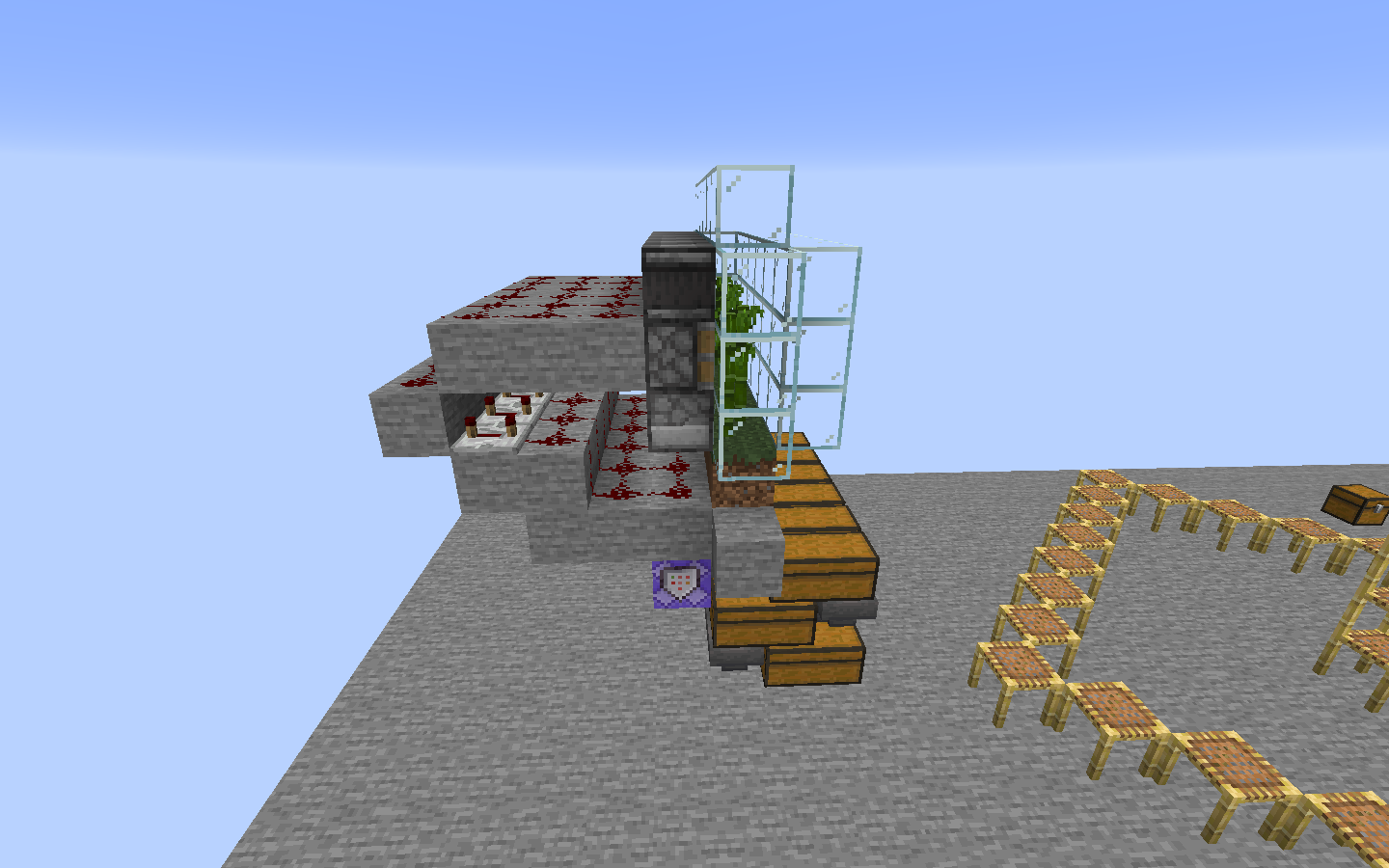
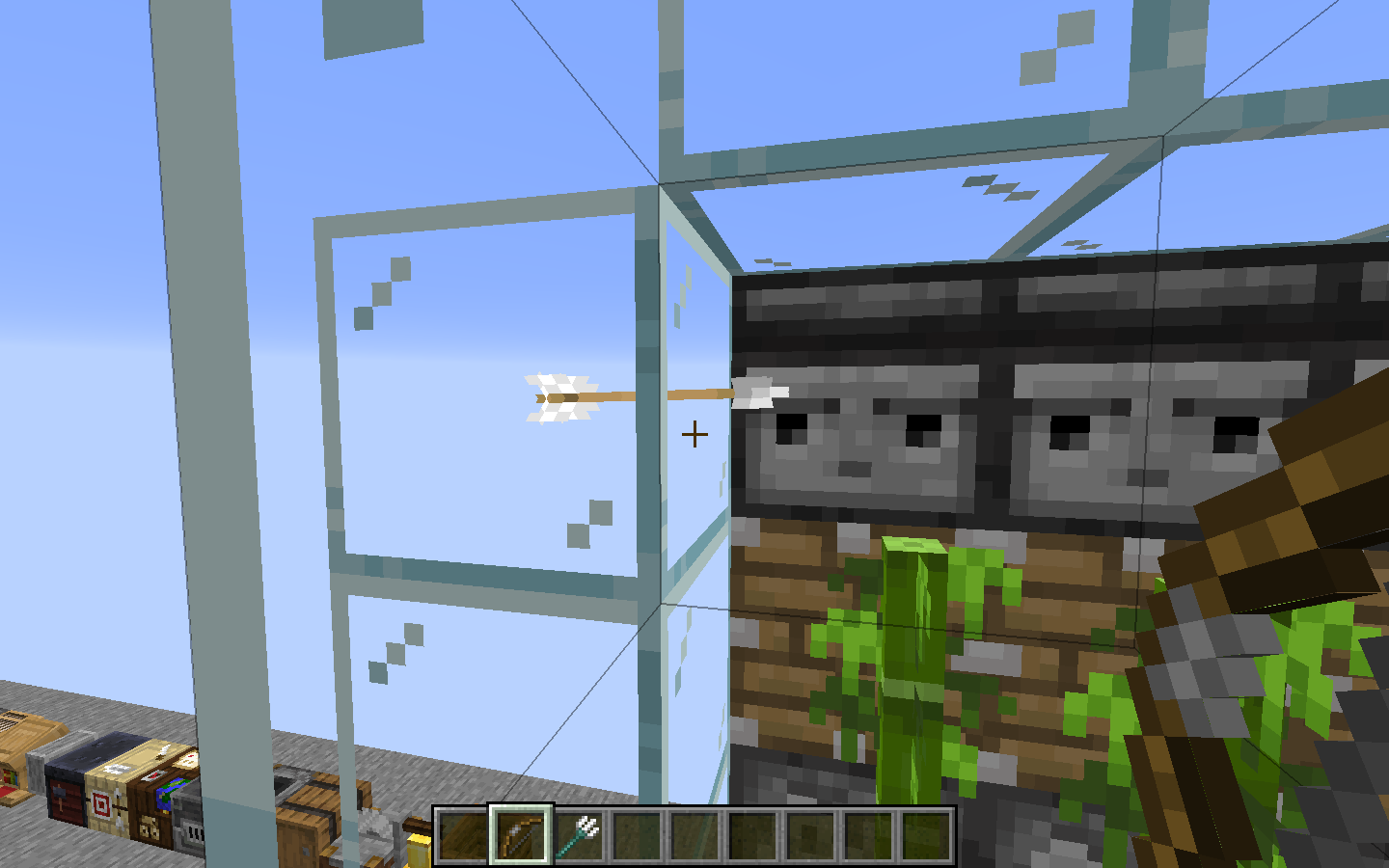
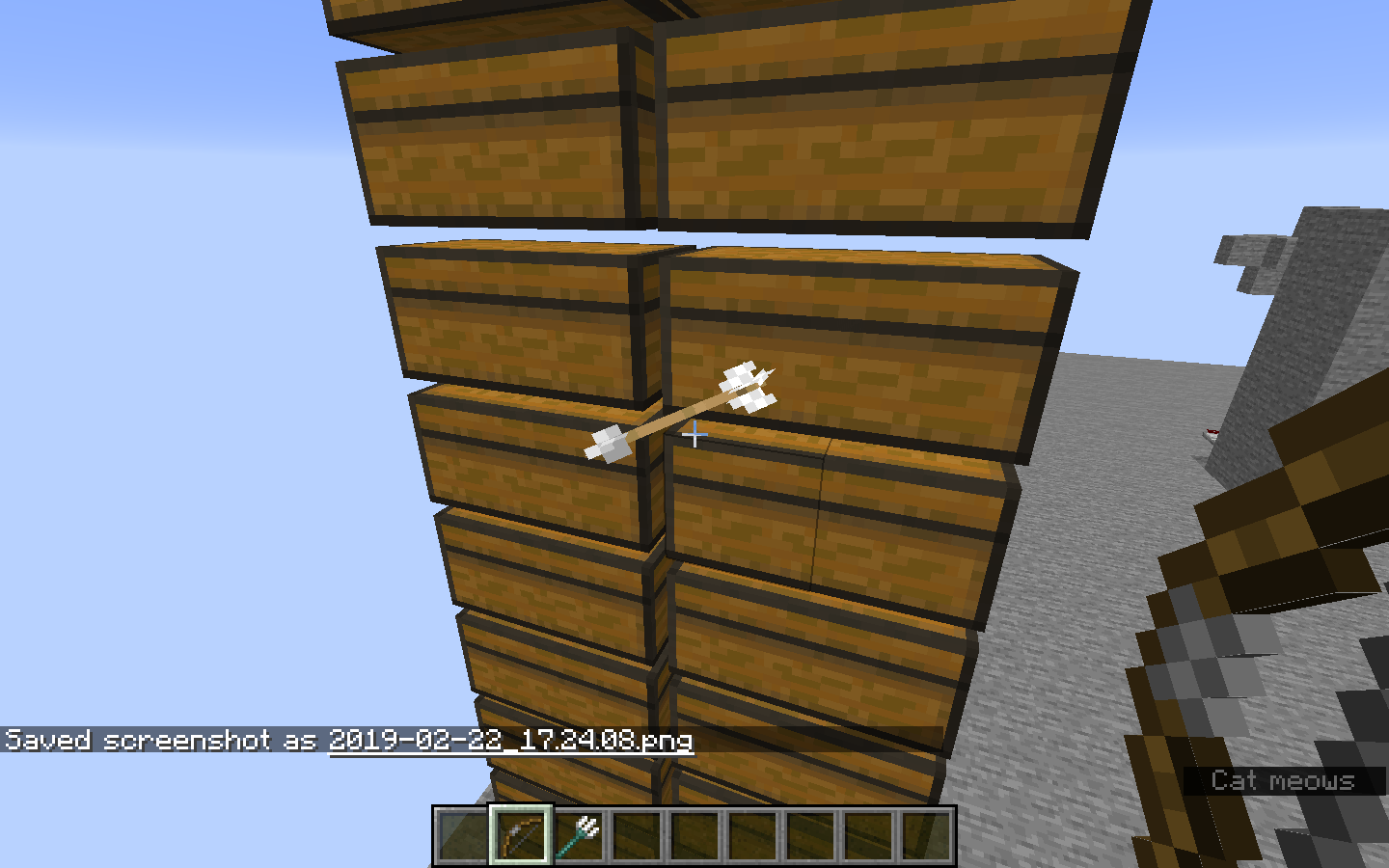
4. Power the piston. In 1.13.2 and 19w04b, the items will stay in the contained area. In 19w05a, the items will be pushed out and will land on the ground. If done at ground level in 19w05a, the items can be pushed down, going through blocks until it reaches an opening - void, cave, abandoned mineshaft, etc.The first picture is my testing set-up. The other two are of my farm (the command blocks are for keeping the dispensers filled with bonemeal).
I have a prototype bamboo farm in a creative testing world that worked fine last snapshot. When I turned it on this snapshot, the bamboo items started going through the glass surrounding the bamboo. I replaced the glass with stone and items still went through the blocks.
What I expected to happen was for the blocks to stop the items and contain them.
What actually happened was the items going through the blocks.
Steps to Reproduce:
1. Place a horizontal piston 4 blocks above the ground.
2. Place blocks surrounding where the piston head would be if it was extended except above.
3. Throw items in front of the still unextended piston head and place a block above them.
4. Power the piston. In 1.13.2 and 19w04b, the items will stay in the contained area. In 19w05a, the items will be pushed out and will land on the ground. If done at ground level in 19w05a, the items can be pushed down, going through blocks until it reaches an opening - void, cave, abandoned mineshaft, etc.The
firstpicture ismytesting set-up. The other two are of my farm (the command blocks are for keeping the dispensers filled with bonemeal).I have a prototype bamboo farm in a creative testing world that worked fine last snapshot. When I turned it on this snapshot, the bamboo items started going through the glass surrounding the bamboo. I replaced the glass with stone and items still went through the blocks.
What I expected to happen was for the blocks to stop the items and contain them.
What actually happened was the items going through the blocks.
Steps to Reproduce:
1. Place a horizontal piston 4 blocks above the ground.
2. Place blocks surrounding where the piston head would be if it was extended except above.
3. Throw items in front of the still unextended piston head and place a block above them.
4. Power the piston. In 1.13.2 and 19w04b, the items will stay in the contained area. In 19w05a, the items will be pushed out and will land on the ground. If done at ground level in 19w05a, the items can be pushed down, going through blocks until it reaches an opening - void, cave, abandoned mineshaft, etc.The one picture is of my bug testing set-up. The other two are of my farm (the command blocks are for keeping the dispensers filled with bonemeal).
I have a prototype bamboo farm in a creative testing world that worked fine last snapshot. When I turned it on this snapshot, the bamboo items started going through the glass surrounding the bamboo. I replaced the glass with stone and items still went through the blocks.
What I expected to happen was for the blocks to stop the items and contain them.
What actually happened was the items going through the blocks.
Steps to Reproduce:
1. Place a horizontal piston 4 blocks above the ground.
2. Place blocks surrounding where the piston head would be if it was extended except above.
3. Throw items in front of the still unextended piston head and place a block above them.
4. Power the piston. In 1.13.2 and 19w04b, the items will stay in the contained area. In 19w05a, the items will be pushed out and will land on the ground. If done at ground level in 19w05a, the items can be pushed down, going through blocks until it reaches an opening - void, cave, abandoned mineshaft, etc.
The one picture is of my bug testing set-up. The other two are of my farm (the command blocks are for keeping the dispensers filled with bonemeal).I have a prototype bamboo farm in a creative testing world that worked fine last snapshot. When I turned it on this snapshot, the bamboo items started going through the glass surrounding the bamboo. I replaced the glass with stone and items still went through the blocks.
What I expected to happen was for the blocks to stop the items and contain them.
What actually happened was the items going through the blocks.
Steps to Reproduce:
1. Place a horizontal piston 4 blocks above the ground.
2. Place blocks surrounding where the piston head would be if it was extended except above.
3. Throw items in front of the still unextended piston head and place a block above them.
4. Power the piston. In 1.13.2 and 19w04b, the items will stay in the contained area. In 19w05a, the items will be pushed out and will land on the ground. If done at ground level in 19w05a, the items can be pushed down, going through blocks until it reaches an opening - void, cave, abandoned mineshaft, etc.One picture is of my bug testing set-up. The other two are of my farm (the command blocks are for keeping the dispensers filled with bonemeal).
2019-01-30_15.40.40.png
I have a prototype bamboo farm in a creative testing world that worked fine last snapshot. When I turned it on this snapshot, the bamboo items started going through the glass surrounding the bamboo. I replaced the glass with stone and items still went through the blocks.
What I expected to happen was for the blocks to stop the items and contain them.
What actually happened was the items going through the blocks.
Steps to Reproduce:
1. Place a horizontal piston 4 blocks above the ground.
2. Place blocks surrounding where the piston head would be if it was extended except above.
3. Throw items in front of the still unextended piston head and place a block above them.
4. Power the piston. In 1.13.2 and 19w04b, the items will stay in the contained area. In 19w05a, the items will be pushed out and will land on the ground. If done at ground level in 19w05a, the items can be pushed down, going through blocks until it reaches an opening - void, cave, abandoned mineshaft, etc.One picture is of my bug testing set-up. The other two are of my farm (the command blocks are for keeping the dispensers filled with bonemeal).
Edit: I did some additional testing, and I think it is an issue with the items themselves not interacting properly with blocks. Replace the piston with a normal block, and place another block inside the items that are thrown out. Previously, the items would be pushed above the block placed in them. Now the items will be pushed downwards like with the piston method at ground level.
Items canbe pushedthrough solid blocksItems can glitch through solid blocks
I have a prototype bamboo farm in a creative testing world that worked fine last snapshot. When I turned it on this snapshot, the bamboo items started going through the glass surrounding the bamboo. I replaced the glass with stone and items still went through the blocks.
What I expected to happen was for the blocks to stop the items and contain them.
What actually happened was the items going through the blocks.
Steps to Reproduce:
1. Place a horizontal piston 4 blocks above the ground.
2. Place blocks surrounding where the piston head would be if it was extended except above.
3. Throw items in front of the still unextended piston head and place a block above them.
4. Power the piston. In 1.13.2 and 19w04b, the items will stay in the contained area. In 19w05a, the items will be pushed out and will land on the ground. If done at ground level in 19w05a, the items can be pushed down, going through blocks until it reaches an opening - void, cave, abandoned mineshaft, etc.One picture is of my bug testing set-up. The other two are of my farm (the command blocks are for keeping the dispensers filled with bonemeal).
Edit: I did some additional testing, and I think it is an issue with the items themselves not interacting properly with blocks. Replace the piston with a normal block, and place another block inside the items that are thrown out. Previously, the items would be pushed above the block placed in them. Now the items will be pushed downwards like with the piston method at ground level. I changed the bug title to reflect this.
OSX High Sierra 10.13.6
64-bit Java 8 Update 201 Build 09
I have a prototype bamboo farm in a creative testing world that worked fine last snapshot. When I turned it on this snapshot, the bamboo items started going through the glass surrounding the bamboo. I replaced the glass with stone and items still went through the blocks.
What I expected to happen was for the blocks to stop the items and contain them.
What actually happened was the items going through the blocks.
Steps to Reproduce:
1. Place a horizontal piston 4 blocks above the ground.
2. Place blocks surrounding where the piston head would be if it was extended except above.
3. Throw items in front of the still unextended piston head and place a block above them.
4. Power the piston. In 1.13.2 and 19w04b, the items will stay in the contained area. In 19w05a, the items will be pushed out and will land on the ground. If done at ground level in 19w05a, the items can be pushed down, going through blocks until it reaches an opening - void, cave, abandoned mineshaft, etc.One picture is of my bug testing set-up. The other two are of my farm (the command blocks are for keeping the dispensers filled with bonemeal).
Edit: I did some additional testing, and I think it is an issue with the items themselves not interacting properly with blocks. Replace the piston with a normal block, and place another block inside the items that are thrown out. Previously, the items would be pushed above the block placed in them. Now the items will be pushed downwards like with the piston method at ground level. I changed the bug title to reflect this.
Edit 2: As of 19w08a, this has been partially fixed: items will properly pop up when there are blocks surrounding them and another block is placed inside them if another block isn't above the items (items properly respond to the the steps to reproduce in the first edit). If items are in a block with other blocks on all six faces, the items still glitch through blocks improperly. This time they will either go to one of the sides (x or z axis), or they will go down. From my testing, it seems that it is about 50/50 whether the items go to the side or go down.
Put the summary of the bug you're having here
What I expected to happen was...:
Describe what you thought should happen hereWhat actually happened was...:
Describe what happened hereSteps to Reproduce:
1.Put a step by step guide on how to trigger the bug here
2. ...
3. ...Buttons need to be double clicked to register if you go from windowed to fullscreen while the game is on the loading screen (the one with the progress bar).
What I expected to happen was...:
Menu buttons to react to a single click.What actually happened was...:
Menu buttons needed to be double clicked for them to function.Steps to Reproduce:
1. Start Minecraft in windowed
2. Go fullscreen while the game is still loading on the progress bar screen.
3. After the game finishes loading, try clicking a menu button. It doesn't work, so try doubling clicking a menu button. This happens with all buttons in all menus.
Buttonsneed to be double clicked to register if you go from windowed to fullscreen while the game is on the loading screen (the one with the progress bar).What I expected to happen was...:
Menu buttons to react to asingle click.What actually happened was...:
Menu buttons needed to bedouble clicked for them to function.Steps to Reproduce:
1. Start Minecraft in windowed
2. Go fullscreen while the game is still loading on the progress bar screen.
3. After the game finishes loading, try clicking a menu button. It doesn't work, so try doubling clickingamenu button. This happens with allbuttons in all menus.The mouse needs to be double clicked for clicks to register if you go from windowed to fullscreen while the game is on the loading screen (the one with the progress bar).
What I expected to happen was...:
The game to register single clicks.What actually happened was...:
A double click is necessary for the game to recognize the mouse clicking (and it doesn't even always register the double clicks either).Steps to Reproduce:
1. Start Minecraft in windowed
2. Go fullscreen while the game is still loading on the progress bar screen.
3. After the game finishes loading, try clicking a menu button. It doesn't work, so try doubling clicking the menu button. This happens with all mouse interaction even in game.
Arrows and Tridents are going through blocks
What I expected to happen was...:
for the launcher to quit with command-q, the menu bar quit command, or the quit shortcut in dockWhat actually happened was...:
the launcher window closed, but the application is still open and can be still be switched to from the dock or command-tab. the only way to get it to close is to force quit from the menu bar, command-option-esc, or activity monitor. if activity monitor isn't used to force quit the launcher, the launcher helper will sometimes (re)open. after quitting the helper, the helper will sometimes continue to reopen until it is force quit and sometimes it will still reopen, in which case the correct process need to be force quit from activity monitor.Steps to Reproduce:
1. Open the launcher2. Try quitting the launcher, the window will close, but the app won't quit
3. Try force quitting the launcher, the app should quit, but the launcher helper may (re)open
4. If the launcher helper opens, try quitting it, it should quit and reopen
5. If it reopens, try force quitting it, it should stay closed
6. If it doesn't stay closed, go into activity monitor, select one of the processes with a blank name, and click the info button in the top left. if the parent process field says launchd (1), force quit the currently selected process. if not, click the parent process link until the field does say launchd (1) and force quit the process that has that for the field.
NOTE: This may be a Mac only bug.
What I expected to happen was...:
for the launcher to quit with command-q, the menu bar quit command, or the quit shortcut in dockWhat actually happened was...:
the launcher window closed, but the application is still open and can be still be switched to from the dock or command-tab. the only way to get it to close is to force quit from the menu bar, command-option-esc, or activity monitor. if activity monitor isn't used to force quit the launcher, the launcher helper will sometimes (re)open. after quitting the helper, the helper will sometimes continue to reopen until it is force quit and sometimes it will still reopen, in which case the correct process need to be force quit from activity monitor.Steps to Reproduce:
1. Open the launcher2. Try quitting the launcher, the window will close, but the app won't quit
3. Try force quitting the launcher, the app should quit, but the launcher helper may (re)open
4. If the launcher helper opens, try quitting it, it should quit and reopen
5. If it reopens, try force quitting it, it should stay closed
6. If it doesn't stay closed, go into activity monitor, select one of the processes with a blank name, and click the info button in the top left. if the parent process field says launchd (1), force quit the currently selected process. if not, click the parent process link until the field does say launchd (1) and force quit the process that has that for the field.
7. If it still doesn't stay closed, then your only hope is to try different combinations of quitting and force quitting methods.
NOTE: This may be a Mac only bug.
![[Mod] bemoty](../../../data/avatars/users/50554.png)
As Ian McCurdy has already pointed out, this is intended behavior – Ocelots no longer turn into pet cats when tamed. Instead you will have to tame stray cats found in villages in order to obtain pet cats now.
I would say this works as intended b/c scaffolding can't occupy the same block as the one it breaks on, and it can't float above them. Also, if it was changed, it would be inconsistent with other falling blocks.
Naturally spawned wandering traders despawn after 2-3 in game days so there isn't really a point in the trades being able to be refreshed b/c they disappear pretty quickly anyways. However, I do think that you should be able to do more trades with them before they are locked out.
Using google translate, this looks like it is actually a duplicate of
MC-143351. They are trying to place maps (in item frames).Items aren't just pushed down one block. If there is a solid area under, the item gets pushed down until it hits an open area.
Bubble columns only generate in water source blocks.
This works as intended.
I would say works as intended. They can spawn anywhere with in 48 blocks of the player.
Invalid. Non-vanilla environment.
Works as intended. Cats and ocelots are separate mobs now. To get tamed cats, you have to tame stray cats that spawn in villages. Ocelots are no longer tamable. You can feed them to make the trust you (meaning they won't run away), but they can still do what they like.
Invalid. Wrong project. Should be reported under mojang web services.
The crash has nothing to do with the issue. If you go from windowed to fullscreen or fullscreen to windowed while the game is still loading, all mouse input for the game is messed up, and it requires at least a double click for clicking to register. This includes clicking menu buttons, interacting with your inventory, and left/right clicking to use items and place/break blocks during gameplay.
The trident issue that you say this duplicates has nothing to do with the trident issue I am reporting and nothing to do with the arrow part that I did duplicate. The tridents are turning black for reasons similar to why armor stands turn black inside of blocks, but without actually being inside a block. The trident issue that I am reporting is exactly the same reason as for the issue with the arrows.
1) There is a bug that has reduced iron golem spawn rates in villages.
2) 1 iron golem will always spawn in a village, but only when the village is first generated.
the keybind for commands will always put a slash as if you were starting a command
It happens all the time for me. It makes it almost impossible to close the launcher.
Still present in 1.14.3 pre-release 2.
Still in 1.15.2 except the scores won't update at all in either book (following steps to reproduce).