 Jeffrey C
- jc86035
- jc86035
- Europe/Stockholm
- Yes
- No
 MC-33193






When worlds are recreated, item frames and paintings are still there (everything else is gone). The worlds that were recreated were made in
Minecraft 1.5.2
Minecraft 1.6.4
Minecraft 13w39bEach was recreated in 13w39b. For all three, paintings and item frames were duplicated.
Strangely, this doesn't occur when copying from 1.6.4 to 1.6.4, or 1.5.2 to 1.6.4.
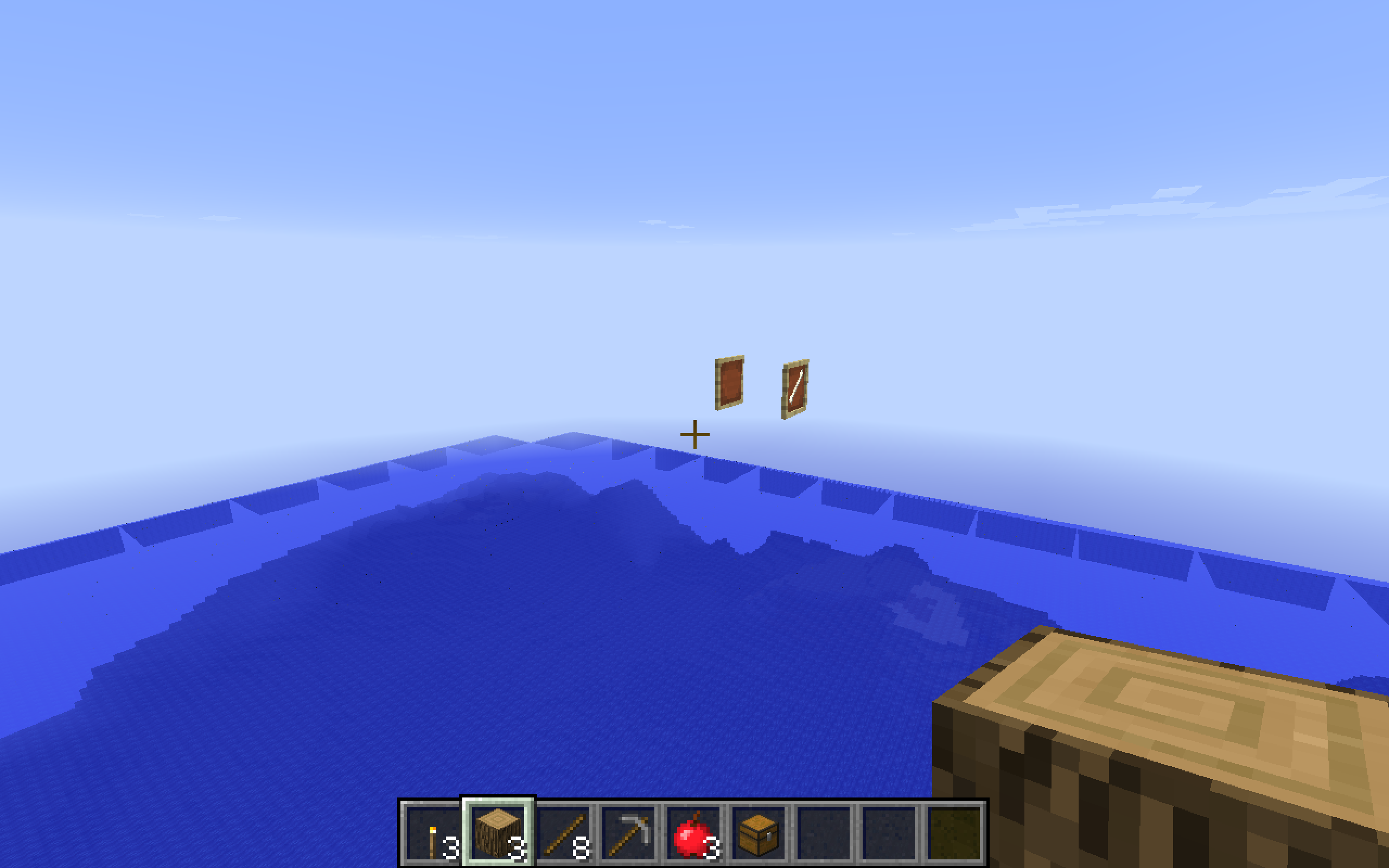
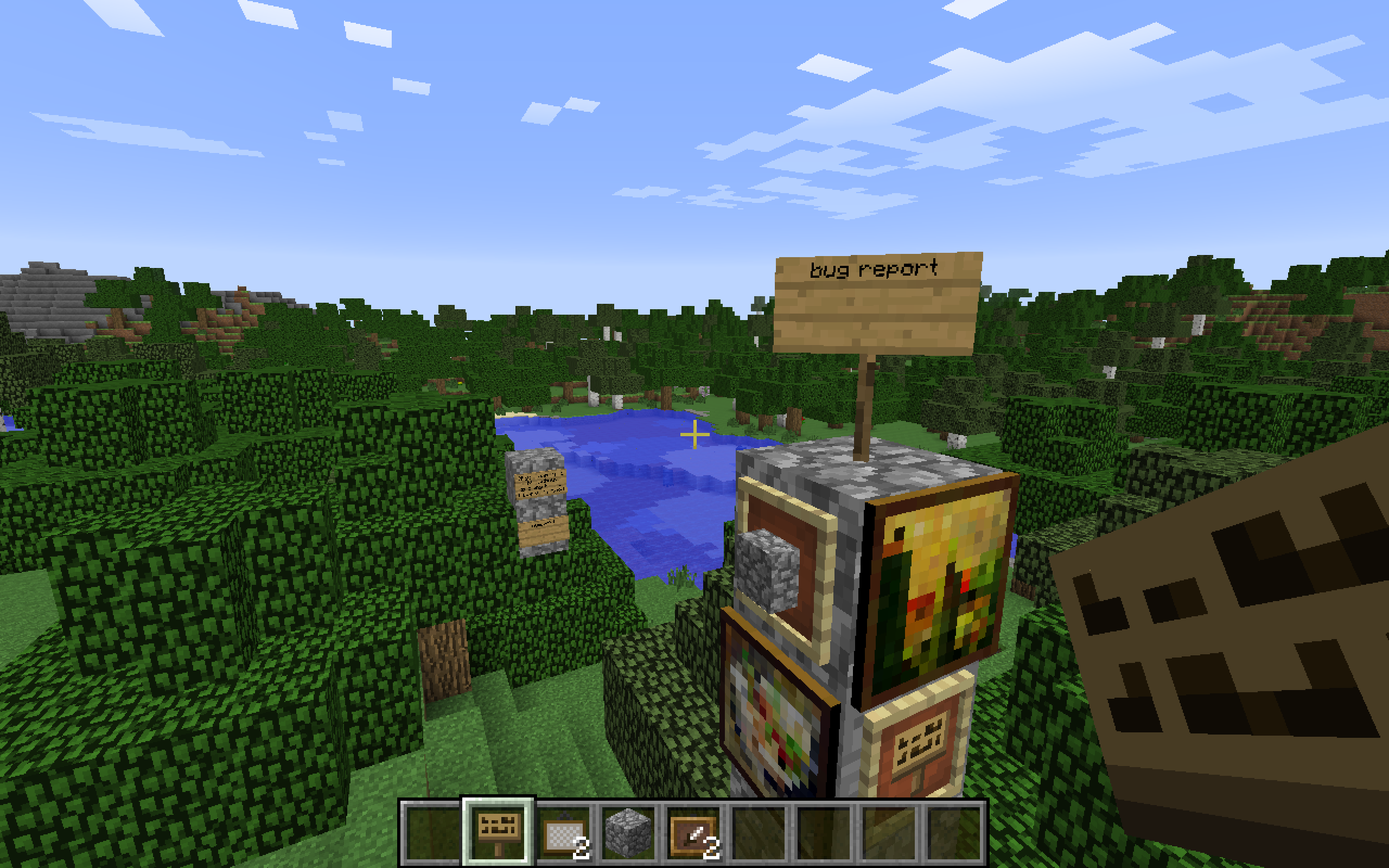
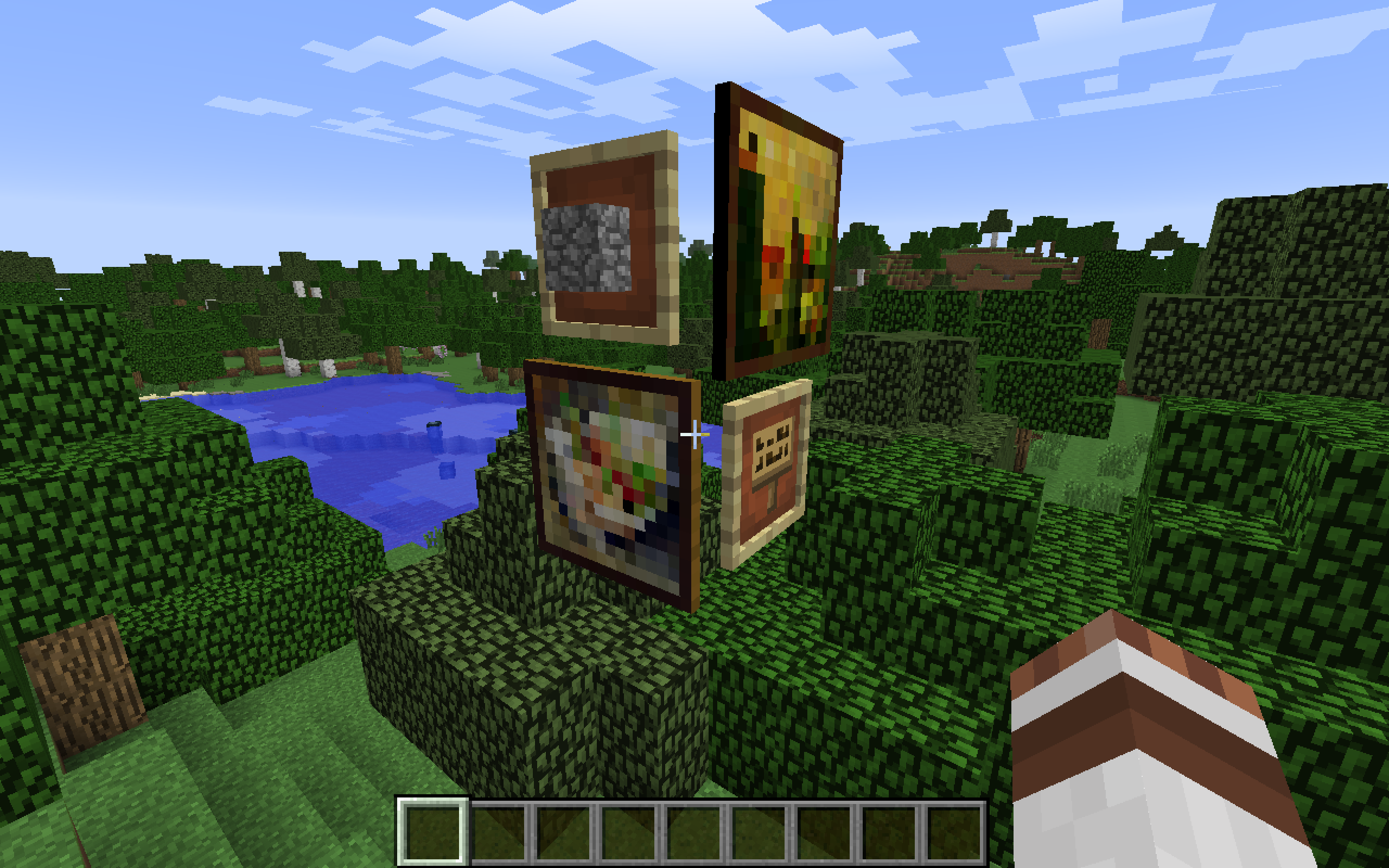
(Two with almost same background are from 13w39b to 13w39b, two with different background are from 1.6.4 to 13w39b, and the one over the ocean is 1.5.2 to 13w39b.)
How to reproduce:
1 Create a world in any version of Minecraft that has paintings and item frames, in Survival or Creative.
2 Place some paintings and item frames.
3 Save and quit to title
4 Re-create world
5 Travel back to the coordinates in the old world where you placed the paintings/item frames
6 Item frames and paintings are still there even though the world is recreated
When worlds are recreated, item frames and paintings are still there (everything else is gone). The worlds that were recreated were made in
Minecraft 1.5.2
Minecraft 1.6.4
Minecraft 13w39bEach was recreated in 13w39b. For all three, paintings and item frames were duplicated.
Strangely, this doesn't occur when copying from 1.6.4 to 1.6.4, or 1.5.2 to 1.6.4.
(Two with almost same background are from 13w39b to 13w39b, two with different background are from 1.6.4 to 13w39b, and the one over the ocean is 1.5.2 to 13w39b.)
How to reproduce:
1 Create a world in any version of Minecraft that has paintings and item frames, in Survival or Creative.
2 Place some paintings and item frames.3Save and quit to title
4Re-create world
5Travel back to the coordinatesin the old worldwhere you placed the paintings/item frames
6Item frames and paintings are still there even though the world is recreatedWhen worlds are recreated, item frames and paintings are still there (everything else is gone). The worlds that were recreated were made in
Minecraft 1.5.2
Minecraft 1.6.4
Minecraft 13w39bEach was recreated in 13w39b. For all three, paintings and item frames were duplicated.
Strangely, this doesn't occur when copying from 1.6.4 to 1.6.4, or 1.5.2 to 1.6.4.
(Two with almost same background are from 13w39b to 13w39b, two with different background are from 1.6.4 to 13w39b, and the one over the ocean is 1.5.2 to 13w39b.)
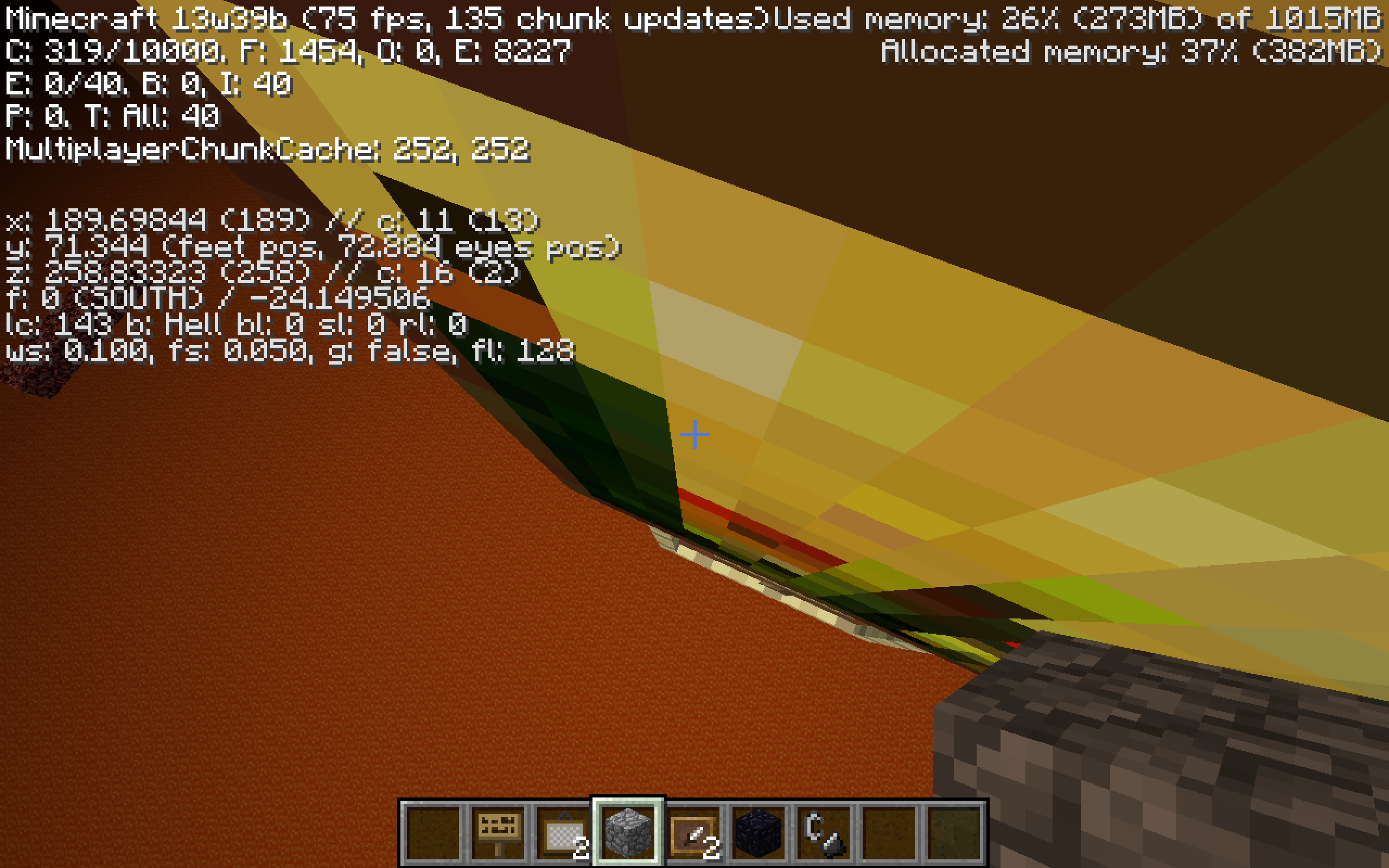
The item frames and paintings are also duplicated in different dimensions at the same coordinates, in both the re-created world and the original.
How to reproduce:
1 Create a world in any version of Minecraft that has paintings and item frames, in Survival or Creative
2 In any dimension, place some paintings and/or item frames3 Travel to a different dimension (e.g. the Nether and/or the End)
4 Go to the coordinates where you placed the paintings/item frames in the first dimension
5 The paintings/item frames are still there6 Save and quit to title
7 Re-create world
8 Travel back to the coordinates where the paintings/item frames were in the old world, in any dimension, where you placed the paintings/item frames
9 Item frames and paintings are still there even though the world is recreated
When worlds are recreated, item frames and paintings are still there (everything else is gone). The worlds that were recreated were made in
Minecraft 1.5.2
Minecraft 1.6.4
Minecraft 13w39bEach was recreated in 13w39b. For all three, paintings and item frames were duplicated.
Strangely, this doesn't occur when copying from 1.6.4 to 1.6.4, or 1.5.2 to 1.6.4.
(Two with almost same background are from 13w39b to 13w39b, two with different background are from 1.6.4 to 13w39b, and the one over the ocean is 1.5.2 to 13w39b.)
The item frames and paintings are also duplicated in different dimensions at the same coordinates, in both the re-created world and the original.
How to reproduce:
1 Create a world in any version of Minecraft that has paintings and item frames, in Survival or Creative
2 In any dimension, place some paintings and/or item frames3 Travel to a different dimension (e.g. the Nether and/or the End)
4 Go to the coordinates where you placed the paintings/item frames in the first dimension
5 The paintings/item frames are still there6 Save and quit to title
7 Re-create world
8 Travel back to the coordinates where the paintings/item frames were in the old world, in any dimension, where you placed the paintings/item frames
9 Item frames and paintingsare still there even though the world is recreatedWhen worlds are recreated, item frames and paintings are still there (everything else is gone). The worlds that were recreated were made in
Minecraft 1.5.2
Minecraft 1.6.4
Minecraft 13w39bEach was recreated in 13w39b. For all three, paintings and item frames were duplicated.
Strangely, this doesn't occur when copying from 1.6.4 to 1.6.4, or 1.5.2 to 1.6.4.
(Two with almost same background are from 13w39b to 13w39b, two with different background are from 1.6.4 to 13w39b, and the one over the ocean is 1.5.2 to 13w39b.)
The item frames and paintings are also duplicated in different dimensions at the same coordinates, in both the re-created world and the original.
How to reproduce:
1 Create a world in any version of Minecraft that has paintings and item frames, in Survival or Creative
2 In any dimension, place some paintings and/or item frames3 Travel to a different dimension (e.g. the Nether and/or the End)
4 Go to the coordinates where you placed the paintings/item frames in the first dimension
5 The paintings/item frames are still there6 Save and quit to title
7 Re-create world
8 Travel back to the coordinates where the paintings/item frames were placed in the old world, in any dimension
9 Item frames and paintings exist at those coordinates
When worlds are recreated, item frames and paintings are still there (everything else is gone). The worlds that were recreated were made in
Minecraft 1.5.2
Minecraft 1.6.4
Minecraft 13w39bEach was recreated in 13w39b. For all three, paintings and item frames were duplicated.
Strangely, this doesn't occur when copying from 1.6.4 to 1.6.4, or 1.5.2 to 1.6.4.
(Two with almost same background are from 13w39b to 13w39b, two with different background are from 1.6.4 to 13w39b, and the one over the ocean is 1.5.2 to 13w39b.)
The item frames and paintings are also duplicated in different dimensions at the same coordinates, in both the re-created world and the original.
How to reproduce:
1 Create a world in any version of Minecraft that has paintings and item frames, in Survival or Creative
2 In any dimension, place some paintings and/or item frames3 Travel to a different dimension (e.g. the Nether and/or the End)
4Go to the coordinates where you placed the paintings/item frames in the first dimension
5The paintings/item frames are still there
6Save and quit to title
7Re-create world
8Travel back to the coordinates where the paintings/item frames were placed in the old world, in any dimension
9Item frames and paintings exist at those coordinatesWhen worlds are recreated, item frames and paintings are still there (everything else is gone). The worlds that were recreated were made in
Minecraft 1.5.2
Minecraft 1.6.4
Minecraft 13w39bEach was recreated in 13w39b. For all three, paintings and item frames were duplicated.
Strangely, this doesn't occur when copying from 1.6.4 to 1.6.4, or 1.5.2 to 1.6.4.
(Two with almost same background are from 13w39b to 13w39b, two with different background are from 1.6.4 to 13w39b, and the one over the ocean is 1.5.2 to 13w39b.)
The item frames and paintings are also duplicated in different dimensions at the same coordinates, in both the re-created world and the original.
How to reproduce:
01 Create a world in any version of Minecraft that has paintings and item frames, in Survival or Creative
02 In any dimension, place some paintings and/or item frames03 Restart and change the version to any beta of 1.7
04 Go back in the world05 Travel to a different dimension (e.g. the Nether and/or the End)
06 Go to the coordinates where you placed the paintings/item frames in the first dimension
07 The paintings/item frames are still there08 Save and quit to title
09 Re-create world
10 Travel back to the coordinates where the paintings/item frames were placed in the old world, in any dimension
11 Item frames and paintings exist at those coordinates
When worlds are recreated, item frames and paintings are still there (everything else is gone). The worlds that were recreated were made in
Minecraft 1.5.2
Minecraft 1.6.4
Minecraft 13w39bEach was recreated in 13w39b. For all three, paintings and item frames were duplicated.
Strangely, this doesn't occur when copying from 1.6.4 to 1.6.4, or 1.5.2 to 1.6.4.
(Two with almost same background are from 13w39b to 13w39b, two with different background are from 1.6.4 to 13w39b, and the one over the ocean is 1.5.2 to 13w39b.)
The item frames and paintings are also duplicated in different dimensions at the same coordinates, in both the re-created world and the original.
How to reproduce:
01 Create a world; regular, superflat, large or amplified; in any version of Minecraft that has paintings and item frames, in Survival or Creative
02 In any dimension, place some paintings and/or item frames03 Restart and change the version to any beta of 1.7
04 Go back in the world05 Travel to a different dimension (e.g. the Nether and/or the End)
06 Go to the coordinates where you placed the paintings/item frames in the first dimension
07 The paintings/item frames are still there08 Save and quit to title
09 Re-create world
10 Travel back to the coordinates where the paintings/item frames were placed in the old world, in any dimension
11 Item frames and paintings exist at those coordinates
When worlds are recreated, maps, item frames and paintings are still there (everything else is gone). The worlds that were recreated were made in
Minecraft 1.5.2
Minecraft 1.6.4
Minecraft 13w39bEach was recreated in 13w39b. For all three, paintings and item frames were duplicated.
Strangely, this doesn't occur when copying from 1.6.4 to 1.6.4, or 1.5.2 to 1.6.4.
(Two with almost same background are from 13w39b to 13w39b, two with different background are from 1.6.4 to 13w39b, and the one over the ocean is 1.5.2 to 13w39b.)
The item frames and paintings are also duplicated in different dimensions at the same coordinates, in both the re-created world and the original.
A separate bug report, marked as duplicate of this one, also states the same problem with maps.
How to reproduce:
01 Create a world; regular, superflat, large or amplified; in any version of Minecraft that has maps, paintings and item frames, in Survival or Creative
02 In any dimension, place some maps, paintings and/or item frames03 Restart and change the version to any beta of 1.7
04 Go back in the world05 Travel to a different dimension (e.g. the Nether and/or the End)
06 Go to the coordinates where you placed the maps/paintings/item frames in the first dimension
07 The maps/paintings/item frames are still there08 Save and quit to title
09 Re-create world
10 Travel back to the coordinates where the maps/paintings/item frames were placed in the old world, in any dimension
11 Item frames, maps and paintings exist at those coordinates
Mac OS X 10.8.
5; Java 7Mac OS X 10.8.x, Windows 7; Java 7
Mac OS X 10.6.x, 10.7.x, 10.8.x, Windows 7 and up; Java 7
Mac OS X 10.6.x, 10.7.x, 10.8.x, Windows 7
and up; Java 7Mac OS X 10.6.x, OS X 10.7.x, OS X 10.8.x, Windows 7, Windows 8; Java 7
When worlds are recreated, maps, item frames and paintings are still there (everything else is gone). The worlds that were recreated were made in
Minecraft 1.5.2
Minecraft 1.6.4
Minecraft 13w39bEach was recreated in 13w39b. For all three, paintings and item frames were duplicated.
Strangely, this doesn't occur when copying from 1.6.4 to 1.6.4, or 1.5.2 to 1.6.4.
(Two with almost same background are from 13w39b to 13w39b, two with different background are from 1.6.4 to 13w39b, and the one over the ocean is 1.5.2 to 13w39b.)
The item frames and paintings are also duplicated in different dimensions at the same coordinates, in both the re-created world and the original.
A separate bug report, marked as duplicate of this one, also states the same problem with maps.
How to reproduce:
01 Create a world; regular, superflat, large or amplified; in any version of Minecraft that has maps, paintings and item frames,in Survival or Creative
02 In any dimension, place some maps, paintings and/or item frames03 Restart and change the version to any beta of 1.7
04 Go back in the world05 Travel to a different dimension (e.g. the Nether and/or the End)
06 Go to the coordinates where you placed the maps/paintings/item frames in the first dimension
07 The maps/paintings/item frames are still there08 Save and quit to title
09 Re-create world
10 Travel back to the coordinates where the maps/paintings/item frames were placed in the old world, in any dimension
11 Item frames, maps and paintings exist at those coordinatesWhen worlds are recreated, maps, item frames and paintings are still there (everything else is gone). The worlds that were recreated were made in
Minecraft 1.5.2
Minecraft 1.6.4
Minecraft 13w39bEach was recreated in 13w39b. For all three, paintings and item frames were duplicated.
Strangely, this doesn't occur when copying from 1.6.4 to 1.6.4, or 1.5.2 to 1.6.4.
(Two with almost same background are from 13w39b to 13w39b, two with different background are from 1.6.4 to 13w39b, and the one over the ocean is 1.5.2 to 13w39b.)
The item frames and paintings are also duplicated in different dimensions at the same coordinates, in both the re-created world and the original.
A separate bug report, marked as duplicate of this one, also states the same problem with maps.
How to reproduce:
01 Create a world; regular, superflat, large or amplified; in any version of Minecraft that has maps, paintings and item frames; in Survival or Creative; on 64- or 32-bit Windows or Mac OS X (on Linux?)
02 In any dimension, place some maps, paintings and/or item frames03 Restart and change the version to any beta of 1.7
04 Go back in the world05 Travel to a different dimension (e.g. the Nether and/or the End)
06 Go to the coordinates where you placed the maps/paintings/item frames in the first dimension
07 The maps/paintings/item frames are still there08 Save and quit to title
09 Re-create world
10 Travel back to the coordinates where the maps/paintings/item frames were placed in the old world, in any dimension
11 Item frames, maps and paintings exist at those coordinates
When worlds are recreated, maps, item frames and paintings are still there (everything else is gone). The worlds that were recreated were made in
Minecraft 1.5.2
Minecraft 1.6.4
Minecraft 13w39bEach was recreated in 13w39b. For all three, paintings and item frames were duplicated.
Strangely, this doesn't occur when copying from 1.6.4 to 1.6.4, or 1.5.2 to 1.6.4.
(Two with almost same background are from 13w39b to 13w39b, two with different background are from 1.6.4 to 13w39b, and the one over the ocean is 1.5.2 to 13w39b.)
The item frames and paintings are also duplicated in different dimensions at the same coordinates, in both the re-created world and the original.
A separate bug report, marked as duplicate of this one, also states the same problem with maps.
How to reproduce:
01 Create a world; regular, superflat, large or amplified; in any version of Minecraft that has maps, paintings and item frames; in Survival or Creative; on 64- or 32-bit Windows or Mac OS X (on Linux?)
02 In any dimension, place some maps, paintings and/or item frames03 Restart and change the version to any beta of 1.7 or 1.7.1
04 Go back in the world05 Travel to a different dimension (e.g. the Nether and/or the End)
06 Go to the coordinates where you placed the maps/paintings/item frames in the first dimension
07 The maps/paintings/item frames are still there08 Save and quit to title
09 Re-create world
10 Travel back to the coordinates where the maps/paintings/item frames were placed in the old world, in any dimension
11 Item frames, maps and paintings exist at those coordinates
When worlds are recreated, maps, item frames and paintings are still there (everything else is gone). The worlds that were recreated were made in
Minecraft 1.5.2
Minecraft 1.6.4
Minecraft 13w39bEach was recreated in 13w39b. For all three, paintings and item frames were duplicated.
Strangely, this doesn't occur when copying from 1.6.4 to 1.6.4, or 1.5.2 to 1.6.4.
(Two with almost same background are from 13w39b to 13w39b, two with different background are from 1.6.4 to 13w39b, and the one over the ocean is 1.5.2 to 13w39b.)
The item frames and paintings are also duplicated in different dimensions at the same coordinates, in both the re-created world and the original.
A separate bug report, marked as duplicate of this one, also states the same problem with maps.How to reproduce:
01 Create a world; regular, superflat, large or amplified; in any version of Minecraft that has maps, paintings and item frames; in Survival or Creative; on 64- or 32-bit Windows or Mac OS X (on Linux?)
02 In any dimension, place some maps, paintings and/or item frames03 Restart and change the version to any beta of 1.7 or 1.7.1
04 Go back in the world05 Travel to a different dimension (e.g. the Nether and/or the End)
06 Go to the coordinates where you placed the maps/paintings/item frames in the first dimension
07 The maps/paintings/item frames are still there08 Save and quit to title
09 Re-create world
10 Travel back to the coordinates where the maps/paintings/item frames were placed in the old world, in any dimension
11 Item frames, maps and paintings exist at those coordinatesWhen worlds are recreated, maps, item frames and paintings are still there (everything else is gone). The worlds that were recreated were made in
Minecraft 1.5.2
Minecraft 1.6.4
Minecraft 13w39bEach was recreated in 13w39b. For all three, paintings and item frames were duplicated.
Strangely, this doesn't occur when copying from 1.6.4 to 1.6.4, or 1.5.2 to 1.6.4.
(Two with almost same background are from 13w39b to 13w39b, two with different background are from 1.6.4 to 13w39b, and the one over the ocean is 1.5.2 to 13w39b.)
The item frames and paintings are also duplicated in different dimensions at the same coordinates, in both the re-created world and the original. A separate bug report, marked as duplicate of this one, also states the same problem with maps.
However, this issue seems to have been fixed in 1.7.4.
How to reproduce:
01 Create a world; regular, superflat, large or amplified; in any version of Minecraft that has maps, paintings and item frames; in Survival or Creative; on 64- or 32-bit Windows or Mac OS X (on Linux?)
02 In any dimension, place some maps, paintings and/or item frames03 Restart and change the version to any beta of 1.7 or 1.7.1
04 Go back in the world05 Travel to a different dimension (e.g. the Nether and/or the End)
06 Go to the coordinates where you placed the maps/paintings/item frames in the first dimension
07 The maps/paintings/item frames are still there08 Save and quit to title
09 Re-create world
10 Travel back to the coordinates where the maps/paintings/item frames were placed in the old world, in any dimension
11 Item frames, maps and paintings exist at those coordinates
Screen Shot 2013-09-29 at 7.02.03 PM.png
Confirmed that there is also a ghost in the Nether, both in the original world (7:00:22) and the duplicate (7:02:03).
Wrong bug report
Nope; it's only if the "Re-Create World" function is used. I did not go into any other dimensions.
Confirmed; they are ghosts
Obviously the one without the cobblestone is the second one because you can't actually put them there without them attached to a block.
Also happens in the End, although this is probably trivial if you're trying to shoot a dragon that's a hundred metres away and automatically regenerates its health.
Also happens in the Nether (in both the worlds)
All three of the ones in the other dimensions are ghosts
This issue doesn't seem to happen in 1.7.4 anymore. Could someone please confirm?