Ghost Item frames, maps and paintings in re-created worlds
When worlds are recreated, maps, item frames and paintings are still there (everything else is gone). The worlds that were recreated were made in
Minecraft 1.5.2
Minecraft 1.6.4
Minecraft 13w39b
Each was recreated in 13w39b. For all three, paintings and item frames were duplicated.
Strangely, this doesn't occur when copying from 1.6.4 to 1.6.4, or 1.5.2 to 1.6.4.
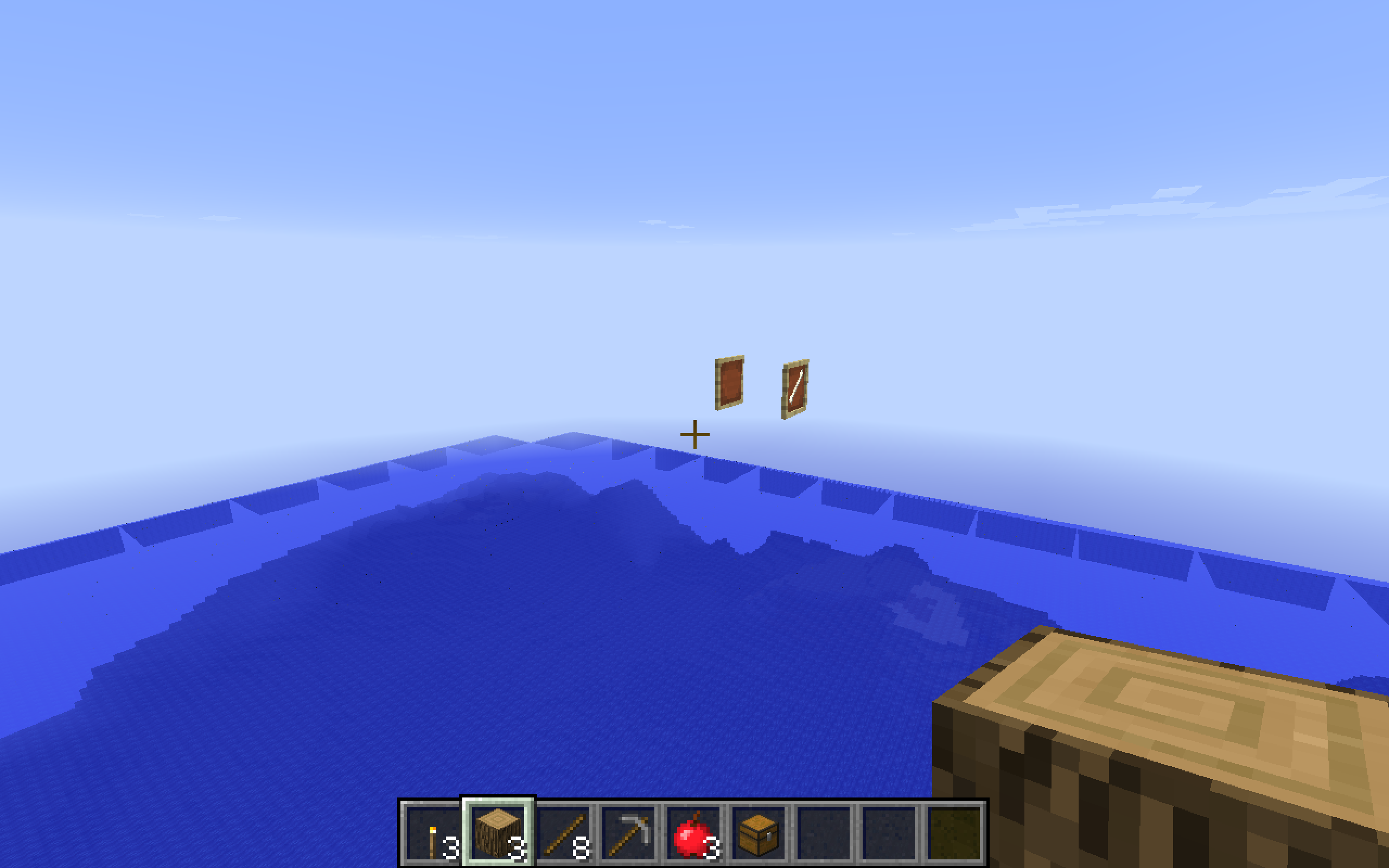
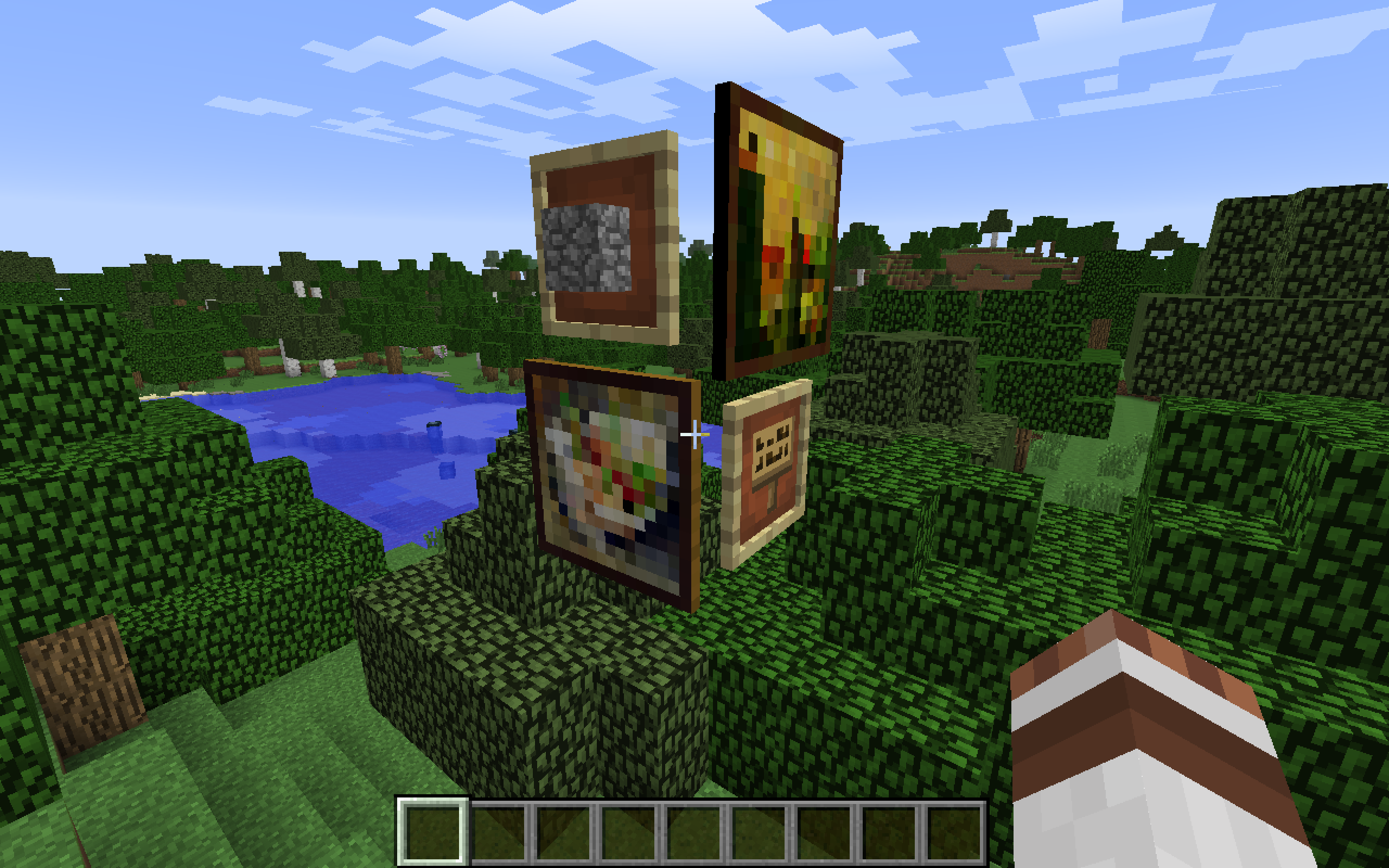
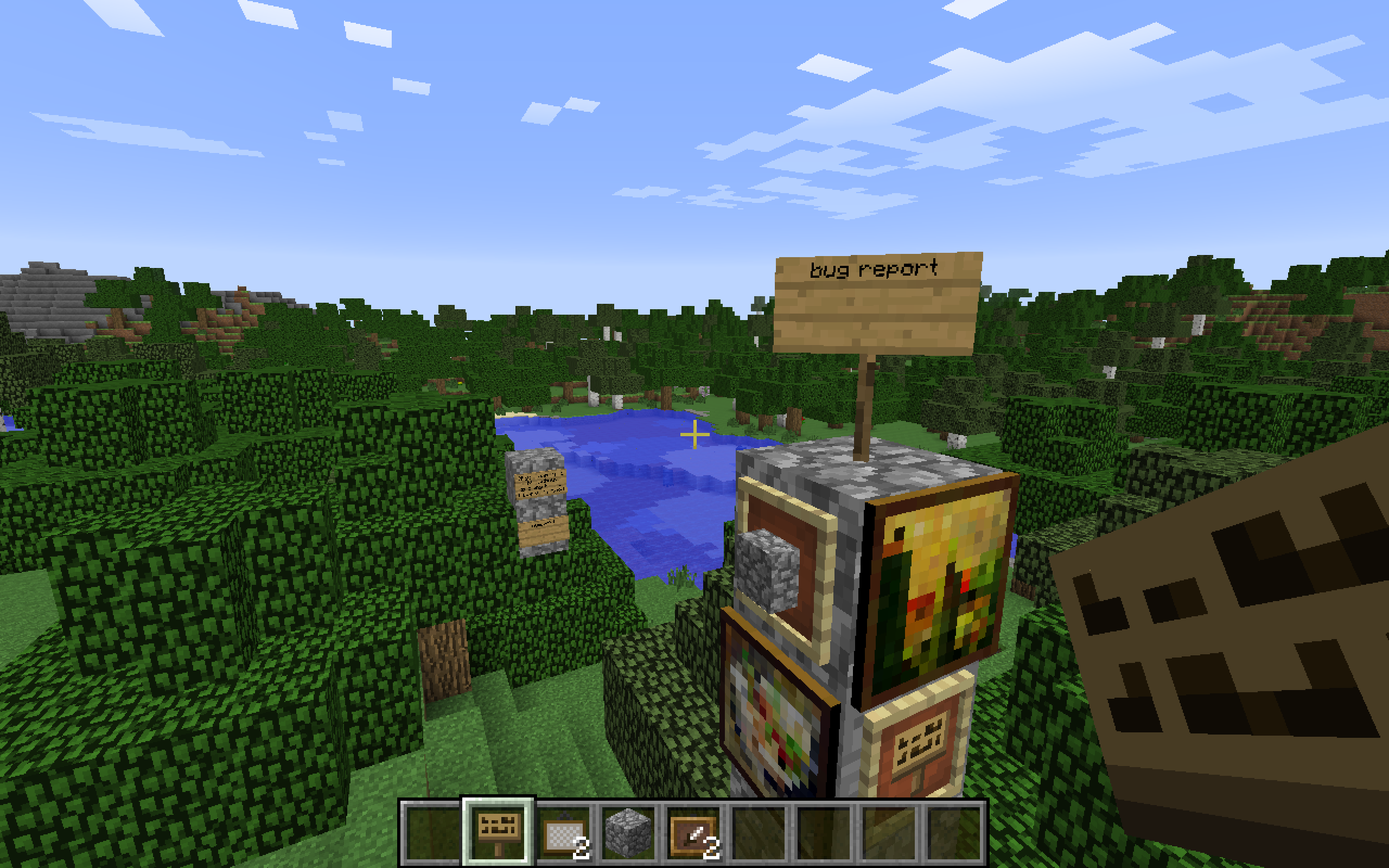
(Two with almost same background are from 13w39b to 13w39b, two with different background are from 1.6.4 to 13w39b, and the one over the ocean is 1.5.2 to 13w39b.)
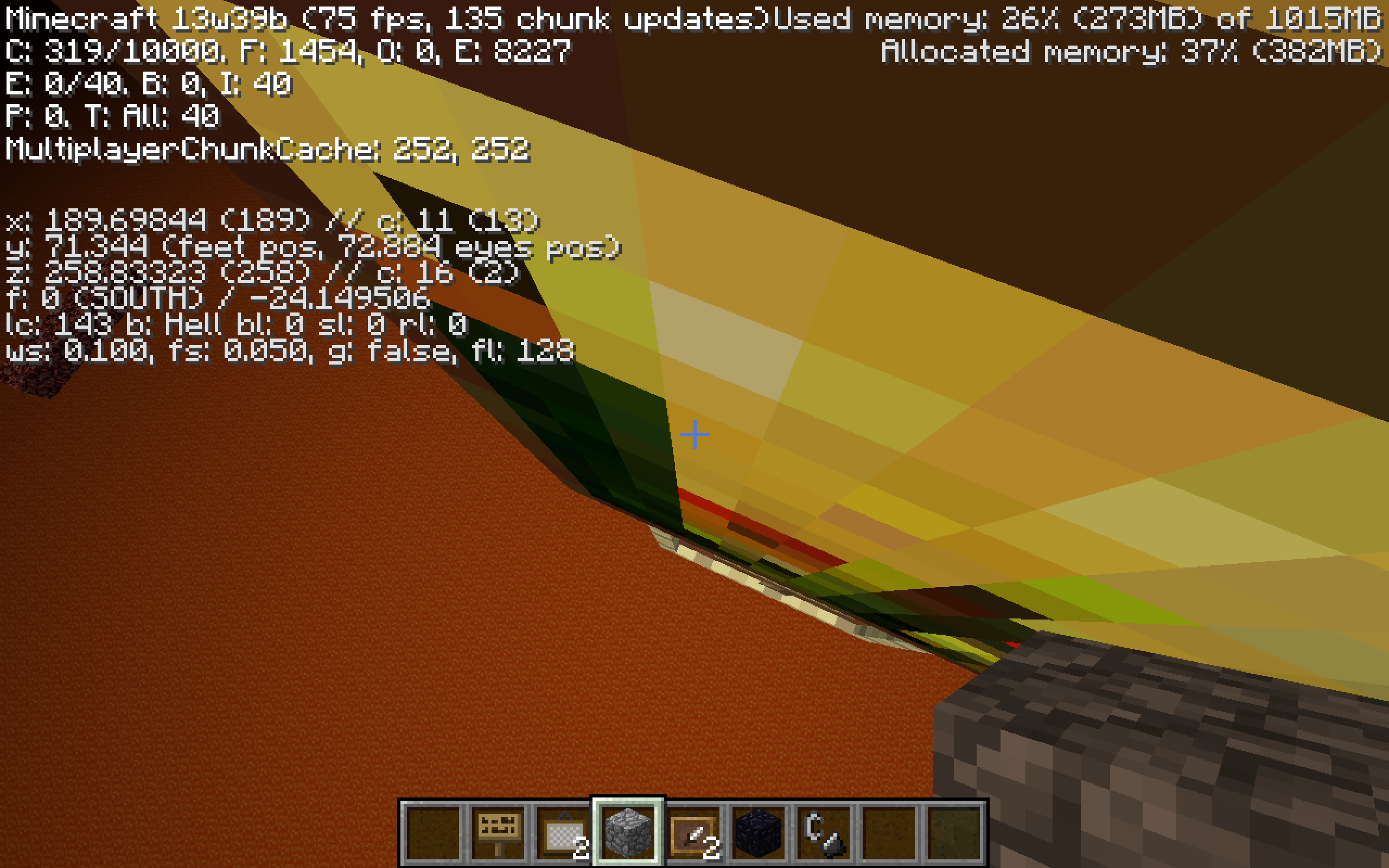
The item frames and paintings are also duplicated in different dimensions at the same coordinates, in both the re-created world and the original. A separate bug report, marked as duplicate of this one, also states the same problem with maps.
However, this issue seems to have been fixed in 1.7.4.
How to reproduce:
01 Create a world; regular, superflat, large or amplified; in any version of Minecraft that has maps, paintings and item frames; in Survival or Creative; on 64- or 32-bit Windows or Mac OS X (on Linux?)
02 In any dimension, place some maps, paintings and/or item frames
03 Restart and change the version to any beta of 1.7 or 1.7.1
04 Go back in the world
05 Travel to a different dimension (e.g. the Nether and/or the End)
06 Go to the coordinates where you placed the maps/paintings/item frames in the first dimension
07 The maps/paintings/item frames are still there
08 Save and quit to title
09 Re-create world
10 Travel back to the coordinates where the maps/paintings/item frames were placed in the old world, in any dimension
11 Item frames, maps and paintings exist at those coordinates
Environment
Mac OS X 10.6.x, OS X 10.7.x, OS X 10.8.x, Windows 7, Windows 8; Java 7
Linked Issues
is duplicated by13
 MC-33187item framesDuplicateMC-33197Floating Item Frame with Redstone in NetherDuplicateMC-33232Frames float in any new game createdDuplicateMC-33481Spawning picture frames in new worldsDuplicateMC-33512Item frames are flying.DuplicateMC-33523When a new flat world is created with the same preset as the one you just exited the entities get transferedDuplicateMC-33900Diverse rendering issues (floating, mobs, chests, item frames, water etc.)DuplicateMC-34273Item frames from Over World appearing in the Nether DuplicateMC-34664Map on wall in overword appearing floating in nether. Glitchy image DuplicateMC-36202World map data mismatchingDuplicateMC-36770Map displays normal world on superflat.DuplicateMC-368951.7.1 MapsDuplicateMC-36915Map from first world displays in second world. Closed bug not yet resolved. Duplicate
Attachments12




Created Issue:
Item frames and duplicated
When worlds are recreated, item frames and paintings are still there (everything else is gone). The worlds that were recreated were made in
Minecraft 1.5.2
Minecraft 1.6.4
Minecraft 13w39bEach was recreated in 13w39b. For all three, paintings and item frames were duplicated.
Strangely, this doesn't occur when copying from 1.6.4 to 1.6.4, or 1.5.2 to 1.6.4.
(Two with almost same background are from 13w39b to 13w39b, two with different background are from 1.6.4 to 13w39b, and the one over the ocean is 1.5.2 to 13w39b.)
Environment
Mac OS X 10.8.5; Java 7
Attachments6
Item frames and paintings duplicated
When worlds are recreated, item frames and paintings are still there (everything else is gone). The worlds that were recreated were made in
Minecraft 1.5.2
Minecraft 1.6.4
Minecraft 13w39bEach was recreated in 13w39b. For all three, paintings and item frames were duplicated.
Strangely, this doesn't occur when copying from 1.6.4 to 1.6.4, or 1.5.2 to 1.6.4.
(Two with almost same background are from 13w39b to 13w39b, two with different background are from 1.6.4 to 13w39b, and the one over the ocean is 1.5.2 to 13w39b.)
How to reproduce:
1 Create a world in any version of Minecraft that has paintings and item frames, in Survival or Creative.
2 Place some paintings and item frames.
3 Save and quit to title
4 Re-create world
5 Travel back to the coordinates in the old world where you placed the paintings/item frames
6 Item frames and paintings are still there even though the world is recreated

is duplicated by
relates to
Item frames and paintingsduplicatedGhost Item frames and paintings in re-created worlds
is duplicated by
When worlds are recreated, item frames and paintings are still there (everything else is gone). The worlds that were recreated were made in
Minecraft 1.5.2
Minecraft 1.6.4
Minecraft 13w39bEach was recreated in 13w39b. For all three, paintings and item frames were duplicated.
Strangely, this doesn't occur when copying from 1.6.4 to 1.6.4, or 1.5.2 to 1.6.4.
(Two with almost same background are from 13w39b to 13w39b, two with different background are from 1.6.4 to 13w39b, and the one over the ocean is 1.5.2 to 13w39b.)
How to reproduce:
1 Create a world in any version of Minecraft that has paintings and item frames, in Survival or Creative.
2 Place some paintings and item frames.3Save and quit to title
4Re-create world
5Travel back to the coordinatesin the old worldwhere you placed the paintings/item frames
6Item frames and paintings are still there even though the world is recreatedWhen worlds are recreated, item frames and paintings are still there (everything else is gone). The worlds that were recreated were made in
Minecraft 1.5.2
Minecraft 1.6.4
Minecraft 13w39bEach was recreated in 13w39b. For all three, paintings and item frames were duplicated.
Strangely, this doesn't occur when copying from 1.6.4 to 1.6.4, or 1.5.2 to 1.6.4.
(Two with almost same background are from 13w39b to 13w39b, two with different background are from 1.6.4 to 13w39b, and the one over the ocean is 1.5.2 to 13w39b.)
The item frames and paintings are also duplicated in different dimensions at the same coordinates, in both the re-created world and the original.
How to reproduce:
1 Create a world in any version of Minecraft that has paintings and item frames, in Survival or Creative
2 In any dimension, place some paintings and/or item frames3 Travel to a different dimension (e.g. the Nether and/or the End)
4 Go to the coordinates where you placed the paintings/item frames in the first dimension
5 The paintings/item frames are still there6 Save and quit to title
7 Re-create world
8 Travel back to the coordinates where the paintings/item frames were in the old world, in any dimension, where you placed the paintings/item frames
9 Item frames and paintings are still there even though the world is recreated
When worlds are recreated, item frames and paintings are still there (everything else is gone). The worlds that were recreated were made in
Minecraft 1.5.2
Minecraft 1.6.4
Minecraft 13w39bEach was recreated in 13w39b. For all three, paintings and item frames were duplicated.
Strangely, this doesn't occur when copying from 1.6.4 to 1.6.4, or 1.5.2 to 1.6.4.
(Two with almost same background are from 13w39b to 13w39b, two with different background are from 1.6.4 to 13w39b, and the one over the ocean is 1.5.2 to 13w39b.)
The item frames and paintings are also duplicated in different dimensions at the same coordinates, in both the re-created world and the original.
How to reproduce:
1 Create a world in any version of Minecraft that has paintings and item frames, in Survival or Creative
2 In any dimension, place some paintings and/or item frames3 Travel to a different dimension (e.g. the Nether and/or the End)
4 Go to the coordinates where you placed the paintings/item frames in the first dimension
5 The paintings/item frames are still there6 Save and quit to title
7 Re-create world
8 Travel back to the coordinates where the paintings/item frames were in the old world, in any dimension, where you placed the paintings/item frames
9 Item frames and paintingsare still there even though the world is recreatedWhen worlds are recreated, item frames and paintings are still there (everything else is gone). The worlds that were recreated were made in
Minecraft 1.5.2
Minecraft 1.6.4
Minecraft 13w39bEach was recreated in 13w39b. For all three, paintings and item frames were duplicated.
Strangely, this doesn't occur when copying from 1.6.4 to 1.6.4, or 1.5.2 to 1.6.4.
(Two with almost same background are from 13w39b to 13w39b, two with different background are from 1.6.4 to 13w39b, and the one over the ocean is 1.5.2 to 13w39b.)
The item frames and paintings are also duplicated in different dimensions at the same coordinates, in both the re-created world and the original.
How to reproduce:
1 Create a world in any version of Minecraft that has paintings and item frames, in Survival or Creative
2 In any dimension, place some paintings and/or item frames3 Travel to a different dimension (e.g. the Nether and/or the End)
4 Go to the coordinates where you placed the paintings/item frames in the first dimension
5 The paintings/item frames are still there6 Save and quit to title
7 Re-create world
8 Travel back to the coordinates where the paintings/item frames were placed in the old world, in any dimension
9 Item frames and paintings exist at those coordinates
When worlds are recreated, item frames and paintings are still there (everything else is gone). The worlds that were recreated were made in
Minecraft 1.5.2
Minecraft 1.6.4
Minecraft 13w39bEach was recreated in 13w39b. For all three, paintings and item frames were duplicated.
Strangely, this doesn't occur when copying from 1.6.4 to 1.6.4, or 1.5.2 to 1.6.4.
(Two with almost same background are from 13w39b to 13w39b, two with different background are from 1.6.4 to 13w39b, and the one over the ocean is 1.5.2 to 13w39b.)
The item frames and paintings are also duplicated in different dimensions at the same coordinates, in both the re-created world and the original.
How to reproduce:
1 Create a world in any version of Minecraft that has paintings and item frames, in Survival or Creative
2 In any dimension, place some paintings and/or item frames3 Travel to a different dimension (e.g. the Nether and/or the End)
4Go to the coordinates where you placed the paintings/item frames in the first dimension
5The paintings/item frames are still there
6Save and quit to title
7Re-create world
8Travel back to the coordinates where the paintings/item frames were placed in the old world, in any dimension
9Item frames and paintings exist at those coordinatesWhen worlds are recreated, item frames and paintings are still there (everything else is gone). The worlds that were recreated were made in
Minecraft 1.5.2
Minecraft 1.6.4
Minecraft 13w39bEach was recreated in 13w39b. For all three, paintings and item frames were duplicated.
Strangely, this doesn't occur when copying from 1.6.4 to 1.6.4, or 1.5.2 to 1.6.4.
(Two with almost same background are from 13w39b to 13w39b, two with different background are from 1.6.4 to 13w39b, and the one over the ocean is 1.5.2 to 13w39b.)
The item frames and paintings are also duplicated in different dimensions at the same coordinates, in both the re-created world and the original.
How to reproduce:
01 Create a world in any version of Minecraft that has paintings and item frames, in Survival or Creative
02 In any dimension, place some paintings and/or item frames03 Restart and change the version to any beta of 1.7
04 Go back in the world05 Travel to a different dimension (e.g. the Nether and/or the End)
06 Go to the coordinates where you placed the paintings/item frames in the first dimension
07 The paintings/item frames are still there08 Save and quit to title
09 Re-create world
10 Travel back to the coordinates where the paintings/item frames were placed in the old world, in any dimension
11 Item frames and paintings exist at those coordinates
When worlds are recreated, item frames and paintings are still there (everything else is gone). The worlds that were recreated were made in
Minecraft 1.5.2
Minecraft 1.6.4
Minecraft 13w39bEach was recreated in 13w39b. For all three, paintings and item frames were duplicated.
Strangely, this doesn't occur when copying from 1.6.4 to 1.6.4, or 1.5.2 to 1.6.4.
(Two with almost same background are from 13w39b to 13w39b, two with different background are from 1.6.4 to 13w39b, and the one over the ocean is 1.5.2 to 13w39b.)
The item frames and paintings are also duplicated in different dimensions at the same coordinates, in both the re-created world and the original.
How to reproduce:
01 Create a world; regular, superflat, large or amplified; in any version of Minecraft that has paintings and item frames, in Survival or Creative
02 In any dimension, place some paintings and/or item frames03 Restart and change the version to any beta of 1.7
04 Go back in the world05 Travel to a different dimension (e.g. the Nether and/or the End)
06 Go to the coordinates where you placed the paintings/item frames in the first dimension
07 The paintings/item frames are still there08 Save and quit to title
09 Re-create world
10 Travel back to the coordinates where the paintings/item frames were placed in the old world, in any dimension
11 Item frames and paintings exist at those coordinates
is duplicated by
is duplicated by
is duplicated by
relates to
is duplicated by
Ghost Item frames, maps and paintings in re-created worlds
is duplicated by
is duplicated by
When worlds are recreated, maps, item frames and paintings are still there (everything else is gone). The worlds that were recreated were made in
Minecraft 1.5.2
Minecraft 1.6.4
Minecraft 13w39bEach was recreated in 13w39b. For all three, paintings and item frames were duplicated.
Strangely, this doesn't occur when copying from 1.6.4 to 1.6.4, or 1.5.2 to 1.6.4.
(Two with almost same background are from 13w39b to 13w39b, two with different background are from 1.6.4 to 13w39b, and the one over the ocean is 1.5.2 to 13w39b.)
The item frames and paintings are also duplicated in different dimensions at the same coordinates, in both the re-created world and the original.
A separate bug report, marked as duplicate of this one, also states the same problem with maps.
How to reproduce:
01 Create a world; regular, superflat, large or amplified; in any version of Minecraft that has maps, paintings and item frames, in Survival or Creative
02 In any dimension, place some maps, paintings and/or item frames03 Restart and change the version to any beta of 1.7
04 Go back in the world05 Travel to a different dimension (e.g. the Nether and/or the End)
06 Go to the coordinates where you placed the maps/paintings/item frames in the first dimension
07 The maps/paintings/item frames are still there08 Save and quit to title
09 Re-create world
10 Travel back to the coordinates where the maps/paintings/item frames were placed in the old world, in any dimension
11 Item frames, maps and paintings exist at those coordinates
Mac OS X 10.8.
5; Java 7Mac OS X 10.8.x, Windows 7; Java 7
Mac OS X 10.6.x, 10.7.x, 10.8.x, Windows 7 and up; Java 7
Mac OS X 10.6.x, 10.7.x, 10.8.x, Windows 7
and up; Java 7Mac OS X 10.6.x, OS X 10.7.x, OS X 10.8.x, Windows 7, Windows 8; Java 7
When worlds are recreated, maps, item frames and paintings are still there (everything else is gone). The worlds that were recreated were made in
Minecraft 1.5.2
Minecraft 1.6.4
Minecraft 13w39bEach was recreated in 13w39b. For all three, paintings and item frames were duplicated.
Strangely, this doesn't occur when copying from 1.6.4 to 1.6.4, or 1.5.2 to 1.6.4.
(Two with almost same background are from 13w39b to 13w39b, two with different background are from 1.6.4 to 13w39b, and the one over the ocean is 1.5.2 to 13w39b.)
The item frames and paintings are also duplicated in different dimensions at the same coordinates, in both the re-created world and the original.
A separate bug report, marked as duplicate of this one, also states the same problem with maps.
How to reproduce:
01 Create a world; regular, superflat, large or amplified; in any version of Minecraft that has maps, paintings and item frames,in Survival or Creative
02 In any dimension, place some maps, paintings and/or item frames03 Restart and change the version to any beta of 1.7
04 Go back in the world05 Travel to a different dimension (e.g. the Nether and/or the End)
06 Go to the coordinates where you placed the maps/paintings/item frames in the first dimension
07 The maps/paintings/item frames are still there08 Save and quit to title
09 Re-create world
10 Travel back to the coordinates where the maps/paintings/item frames were placed in the old world, in any dimension
11 Item frames, maps and paintings exist at those coordinatesWhen worlds are recreated, maps, item frames and paintings are still there (everything else is gone). The worlds that were recreated were made in
Minecraft 1.5.2
Minecraft 1.6.4
Minecraft 13w39bEach was recreated in 13w39b. For all three, paintings and item frames were duplicated.
Strangely, this doesn't occur when copying from 1.6.4 to 1.6.4, or 1.5.2 to 1.6.4.
(Two with almost same background are from 13w39b to 13w39b, two with different background are from 1.6.4 to 13w39b, and the one over the ocean is 1.5.2 to 13w39b.)
The item frames and paintings are also duplicated in different dimensions at the same coordinates, in both the re-created world and the original.
A separate bug report, marked as duplicate of this one, also states the same problem with maps.
How to reproduce:
01 Create a world; regular, superflat, large or amplified; in any version of Minecraft that has maps, paintings and item frames; in Survival or Creative; on 64- or 32-bit Windows or Mac OS X (on Linux?)
02 In any dimension, place some maps, paintings and/or item frames03 Restart and change the version to any beta of 1.7
04 Go back in the world05 Travel to a different dimension (e.g. the Nether and/or the End)
06 Go to the coordinates where you placed the maps/paintings/item frames in the first dimension
07 The maps/paintings/item frames are still there08 Save and quit to title
09 Re-create world
10 Travel back to the coordinates where the maps/paintings/item frames were placed in the old world, in any dimension
11 Item frames, maps and paintings exist at those coordinates
is duplicated by
relates to
relates to
is duplicated by

is duplicated by
is duplicated by
When worlds are recreated, maps, item frames and paintings are still there (everything else is gone). The worlds that were recreated were made in
Minecraft 1.5.2
Minecraft 1.6.4
Minecraft 13w39bEach was recreated in 13w39b. For all three, paintings and item frames were duplicated.
Strangely, this doesn't occur when copying from 1.6.4 to 1.6.4, or 1.5.2 to 1.6.4.
(Two with almost same background are from 13w39b to 13w39b, two with different background are from 1.6.4 to 13w39b, and the one over the ocean is 1.5.2 to 13w39b.)
The item frames and paintings are also duplicated in different dimensions at the same coordinates, in both the re-created world and the original.
A separate bug report, marked as duplicate of this one, also states the same problem with maps.
How to reproduce:
01 Create a world; regular, superflat, large or amplified; in any version of Minecraft that has maps, paintings and item frames; in Survival or Creative; on 64- or 32-bit Windows or Mac OS X (on Linux?)
02 In any dimension, place some maps, paintings and/or item frames03 Restart and change the version to any beta of 1.7 or 1.7.1
04 Go back in the world05 Travel to a different dimension (e.g. the Nether and/or the End)
06 Go to the coordinates where you placed the maps/paintings/item frames in the first dimension
07 The maps/paintings/item frames are still there08 Save and quit to title
09 Re-create world
10 Travel back to the coordinates where the maps/paintings/item frames were placed in the old world, in any dimension
11 Item frames, maps and paintings exist at those coordinates
When worlds are recreated, maps, item frames and paintings are still there (everything else is gone). The worlds that were recreated were made in
Minecraft 1.5.2
Minecraft 1.6.4
Minecraft 13w39bEach was recreated in 13w39b. For all three, paintings and item frames were duplicated.
Strangely, this doesn't occur when copying from 1.6.4 to 1.6.4, or 1.5.2 to 1.6.4.
(Two with almost same background are from 13w39b to 13w39b, two with different background are from 1.6.4 to 13w39b, and the one over the ocean is 1.5.2 to 13w39b.)
The item frames and paintings are also duplicated in different dimensions at the same coordinates, in both the re-created world and the original.
A separate bug report, marked as duplicate of this one, also states the same problem with maps.How to reproduce:
01 Create a world; regular, superflat, large or amplified; in any version of Minecraft that has maps, paintings and item frames; in Survival or Creative; on 64- or 32-bit Windows or Mac OS X (on Linux?)
02 In any dimension, place some maps, paintings and/or item frames03 Restart and change the version to any beta of 1.7 or 1.7.1
04 Go back in the world05 Travel to a different dimension (e.g. the Nether and/or the End)
06 Go to the coordinates where you placed the maps/paintings/item frames in the first dimension
07 The maps/paintings/item frames are still there08 Save and quit to title
09 Re-create world
10 Travel back to the coordinates where the maps/paintings/item frames were placed in the old world, in any dimension
11 Item frames, maps and paintings exist at those coordinatesWhen worlds are recreated, maps, item frames and paintings are still there (everything else is gone). The worlds that were recreated were made in
Minecraft 1.5.2
Minecraft 1.6.4
Minecraft 13w39bEach was recreated in 13w39b. For all three, paintings and item frames were duplicated.
Strangely, this doesn't occur when copying from 1.6.4 to 1.6.4, or 1.5.2 to 1.6.4.
(Two with almost same background are from 13w39b to 13w39b, two with different background are from 1.6.4 to 13w39b, and the one over the ocean is 1.5.2 to 13w39b.)
The item frames and paintings are also duplicated in different dimensions at the same coordinates, in both the re-created world and the original. A separate bug report, marked as duplicate of this one, also states the same problem with maps.
However, this issue seems to have been fixed in 1.7.4.
How to reproduce:
01 Create a world; regular, superflat, large or amplified; in any version of Minecraft that has maps, paintings and item frames; in Survival or Creative; on 64- or 32-bit Windows or Mac OS X (on Linux?)
02 In any dimension, place some maps, paintings and/or item frames03 Restart and change the version to any beta of 1.7 or 1.7.1
04 Go back in the world05 Travel to a different dimension (e.g. the Nether and/or the End)
06 Go to the coordinates where you placed the maps/paintings/item frames in the first dimension
07 The maps/paintings/item frames are still there08 Save and quit to title
09 Re-create world
10 Travel back to the coordinates where the maps/paintings/item frames were placed in the old world, in any dimension
11 Item frames, maps and paintings exist at those coordinates
is duplicated by
![[Mod] Ezekiel (ezfe)](../../../data/assets/gravatar/ezekielelin.jpeg)

This ticket has been marked as a duplicate of MC-33193, in favor of the more general or better information provided.
Interesting. What happens if you join your flat world, leave Minecraft , restart it and then try to join your server world ?
There are some strange issues at the moment, especially with frames and paintings like MC-33193. Probably the frames and paintings stay allocated in the graphics card what ghosts those in MC-33193 and enables you to play your server world.
Duplicate of MC-33193 - If you have not, please use the search function in the future, to see if your bug has already been submitted. If you could not find the original report, please comment with the keywords you searched for.
Duplicate of MC-33193 - If you have not, please use the search function in the future, to see if your bug has already been submitted. If you could not find the original report, please comment with the keywords you searched for.
That's probably a partial duplicate of MC-33193, but that water, mobs and chests are ghosting is new.
Did you install Catalyst 13.9 or Catalyst 13.10 beta ?
(Edit: Fix typo)
Duplicate of MC-33193 - If you have not, please use the search function in the future, to see if your bug has already been submitted. If you could not find the original report, please comment with the keywords you searched for.
Not a duplicate of MC-33193. This is about map data of the same ID being shared across save files, not map locations being shared across dimensions or worlds. The screenshots I've attached show the effects of opening one save after another, and the map data being left in cache. The contents of the map appear in the other save, misrepresenting terrain and images contained in maps.
Although I do not know any 1.7 servers to test this with, in theory loading a map in single player and going onto a 1.7 server would make it appear as though your single player maps were on the server, and vice versa.
As for Meta's comment, deleting the map data files does NOT fix this bug, but restarting Minecraft does. I agree that it sounds like a feature, saving time in loading maps. However, it sounds like that feature was poorly implemented.
Please check if
MC-31785describes your issue, I can no longer reproduce that. Will test with your procedure.Nope; it's only if the "Re-Create World" function is used. I did not go into any other dimensions.
I can confirm. I played in my SP world using 13w39b. Then I made a new world, a super flat world. In the distance I saw some floating things, those were Item Frames. They were rendered at the exact location as in my SP world. I couldn't remove them.
Confirmed.
Confirmed; they are ghosts
Obviously the one without the cobblestone is the second one because you can't actually put them there without them attached to a block.
Also happens in the End, although this is probably trivial if you're trying to shoot a dragon that's a hundred metres away and automatically regenerates its health.
Also happens in the Nether (in both the worlds)
All three of the ones in the other dimensions are ghosts
This issue doesn't seem to happen in 1.7.4 anymore. Could someone please confirm?
Fix confirmed.