 Jordin Smith
- Jordin
- jordin
- America/Halifax
- Yes
- No
 MC-33467


Crash Log: http://pastebin.com/99r1vmp6
{Flicker:1,Trail:1,Type:4,Colors:[0xff00ff]}
NOTE This bug is not game-mode specific.
Command ran: */summon FireworksRocketEntity ~ ~1 ~ {LifeTime:2,FireworksItem:{id:401,Count:1,tag:{Fireworks:{Explosions:[]}}}}*
Attempting to use hexadecimal values for color will result in a ClassCastException.
Crash Log: http://pastebin.com/99r1vmp6
{Flicker:1,Trail:1,Type:4,Colors:[0xff00ff]}
NOTE This bug is not game-mode specific.
Command ran: */summon FireworksRocketEntity ~ ~1 ~ {LifeTime:2,FireworksItem:{id:401,Count:1,tag:{Fireworks:{Explosions:[]}}}}
*Attempting to use hexadecimal values for color will result in a ClassCastException.
Crash Log: http://pastebin.com/99r1vmp6
{Flicker:1,Trail:1,Type:4,Colors:[0xff00ff]}
NOTE This bug is not game-mode specific.
Command ran:
/summon FireworksRocketEntity ~ ~1 ~ {LifeTime:2,FireworksItem:{id:401,Count:1,tag:{Fireworks:{Explosions:[]}}}}
Attempting to use hexadecimal values for color will result in a ClassCastException.
Before
After
Spectator gamemode (gamemode 3) is useless underground
Mac OS X Mavericks, Java 6 (also happens in Java 7)
Spectator gamemode (gamemode 3) is useless underground [FIXED]
Spectator gamemode (gamemode 3) is useless underground [FIXED]Gamemode 3 (spectator) is useless underground [FIXED in 14w31a]
Put the summary of the bug you're having here
What I expected to happen was...:
Describe what you thought should happen here
What actually happened was...:
Describe whathappened hereSteps to Reproduce:
1. Put a step by step guide on how to trigger the bug here
2. ...3. ...---- Minecraft Crash Report ----
// Shall we play a game?Time: 9/10/15 5:24 PM
Description: Unexpected errorjava.lang.ArrayIndexOutOfBoundsException: -1
at aqz.a(SourceFile:552)
at bap.b(SourceFile:152)
at bap.a(SourceFile:70)
at bap.a(SourceFile:53)
at bah.a(SourceFile:217)
at bkp.a(SourceFile:1036)
at azx.as(SourceFile:954)
at azx.a(SourceFile:377)
at net.minecraft.client.main.Main.main(SourceFile:125)A detailed walkthrough of the error, its code path and all known details is as follows:
---------------------------------------------------------------------------------------– Head –
Stacktrace:
at aqz.a(SourceFile:552)
at bap.b(SourceFile:152)
at bap.a(SourceFile:70)
at bap.a(SourceFile:53)
at bah.a(SourceFile:217)– Affected level –
Details:
Level name: MpServer
All players: 2 total; [bkc['Jordin'/22, l='MpServer', x=-3.38, y=-0.15, z=7.70], bkd['thehne011'/23, l='MpServer', x=-4.18, y=1.00, z=7.20]]
Chunk stats: MultiplayerChunkCache: 441, 441
Level seed: 0
Level generator: ID 01 - flat, ver 0. Features enabled: false
Level generator options:
Level spawn location: World: (0,4,0), Chunk: (at 0,0,0 in 0,0; contains blocks 0,0,0 to 15,255,15), Region: (0,0; contains chunks 0,0 to 31,31, blocks 0,0,0 to 511,255,511)
Level time: 206472 game time, 5854 day time
Level dimension: 0
Level storage version: 0x00000 - Unknown?
Level weather: Rain time: 0 (now: false), thunder time: 0 (now: false)
Level game mode: Game mode: adventure (ID 2). Hardcore: false. Cheats: false
Forced entities: removed
Retry entities: 0 total; []
Server brand: vanilla
Server type: Non-integrated multiplayer server
Stacktrace:
at bid.a(SourceFile:366)
at azx.b(SourceFile:2369)
at azx.a(SourceFile:391)
at net.minecraft.client.main.Main.main(SourceFile:125)
The bugWh
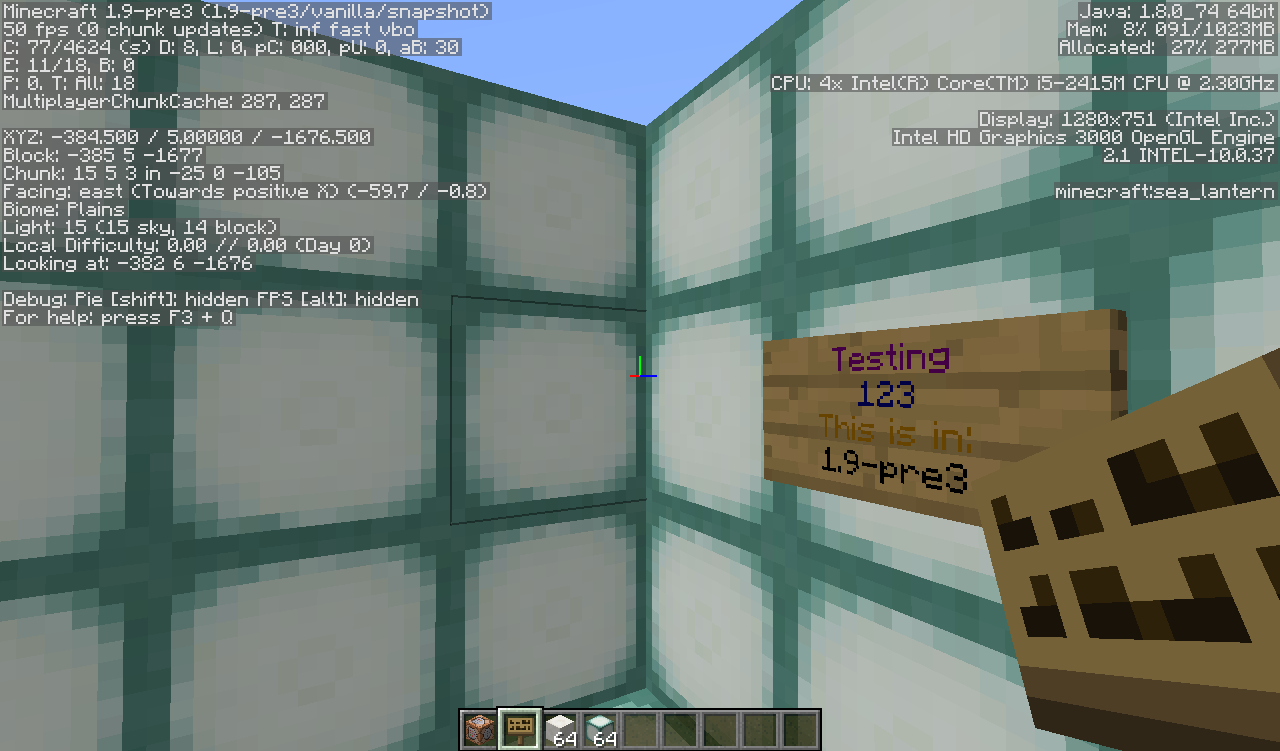
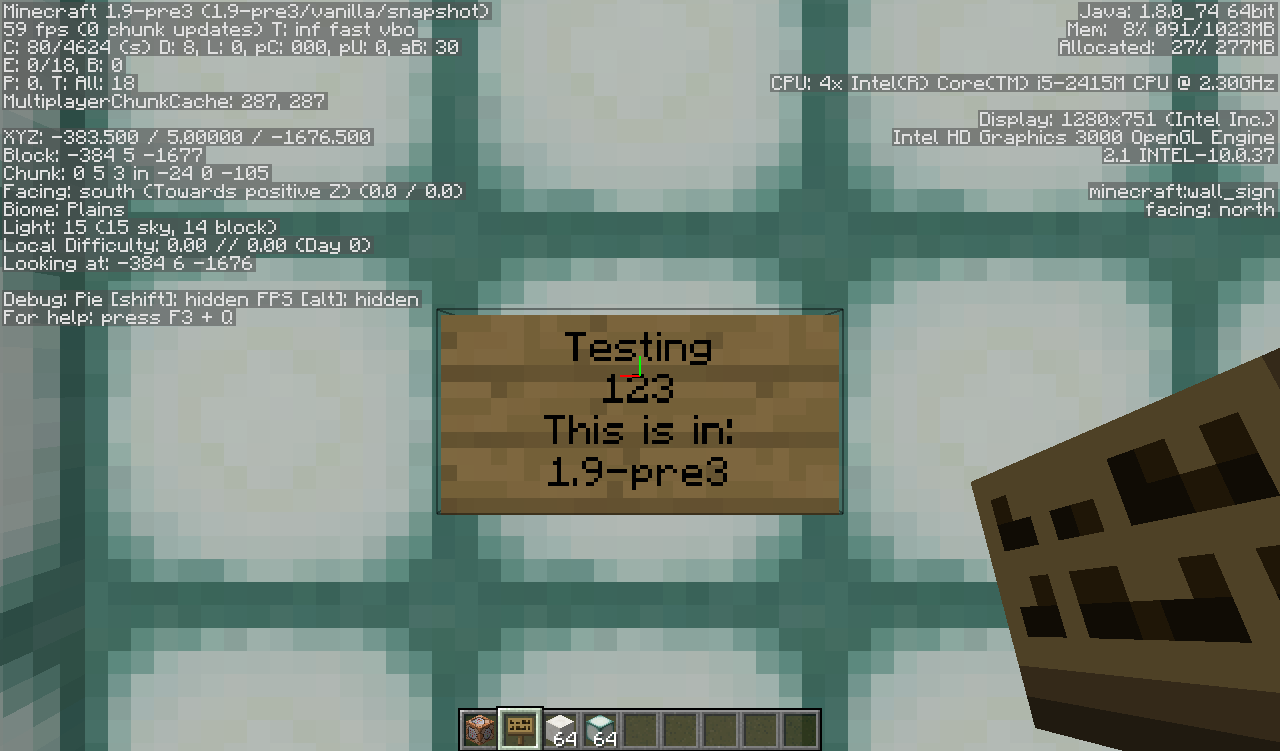
ats wrong is that when looking directly at a sign that has colors it will show no colors unless you go at a sharp angle that is almost looking directly at the side of the sign will you see the colors on the sign. Anyone witha 2.4 GHz Intel Core i5 MacBook Pro has thisissue and it is quite annoying.Bug Description
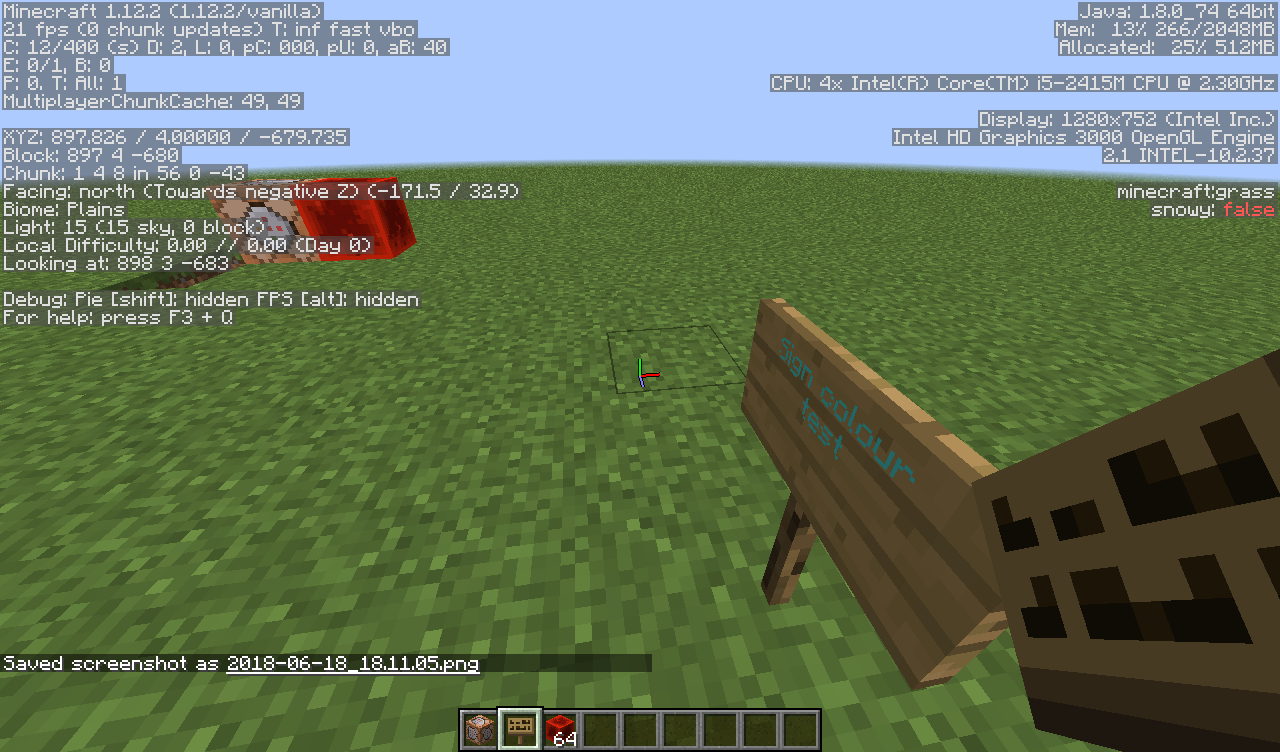
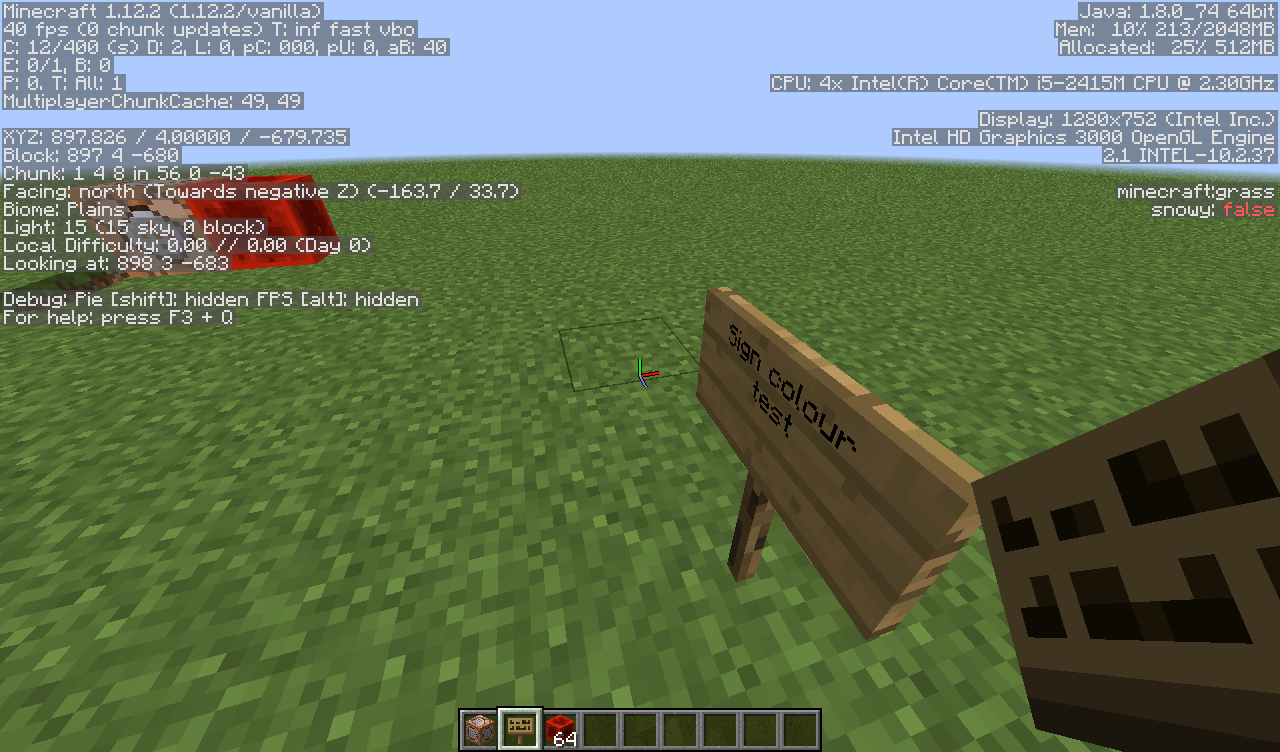
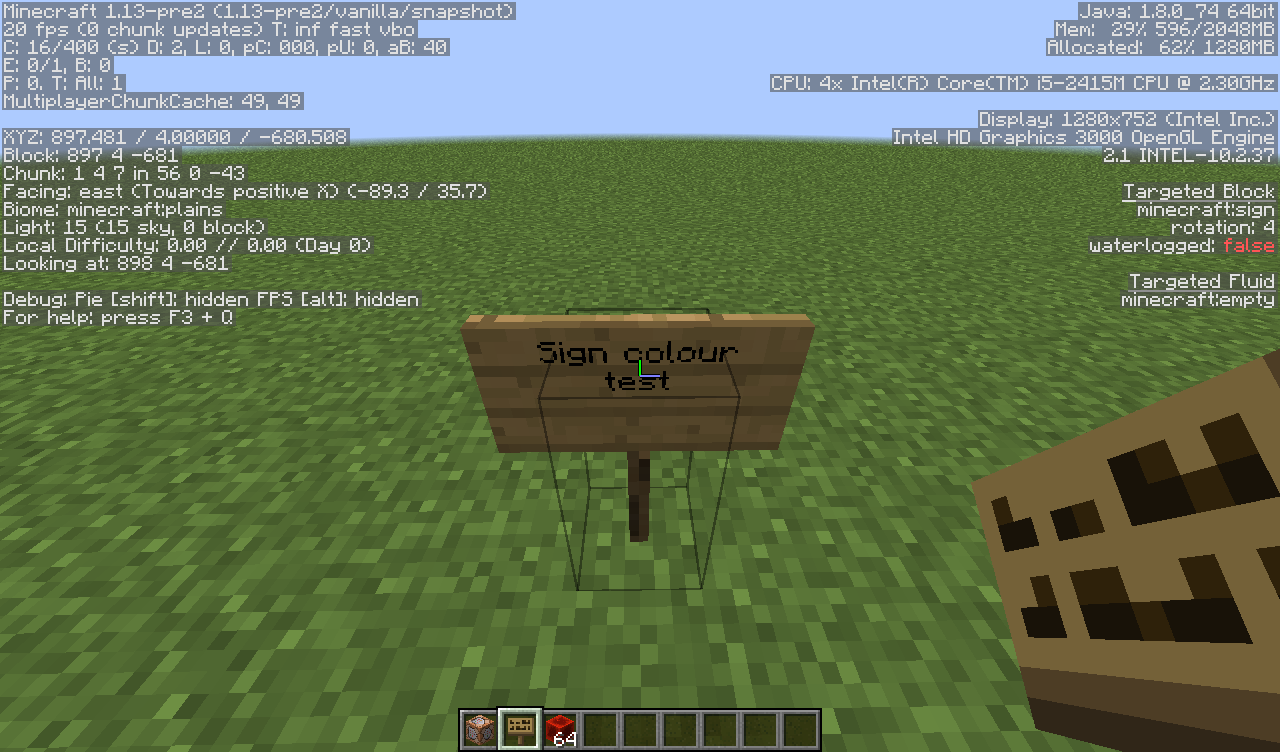
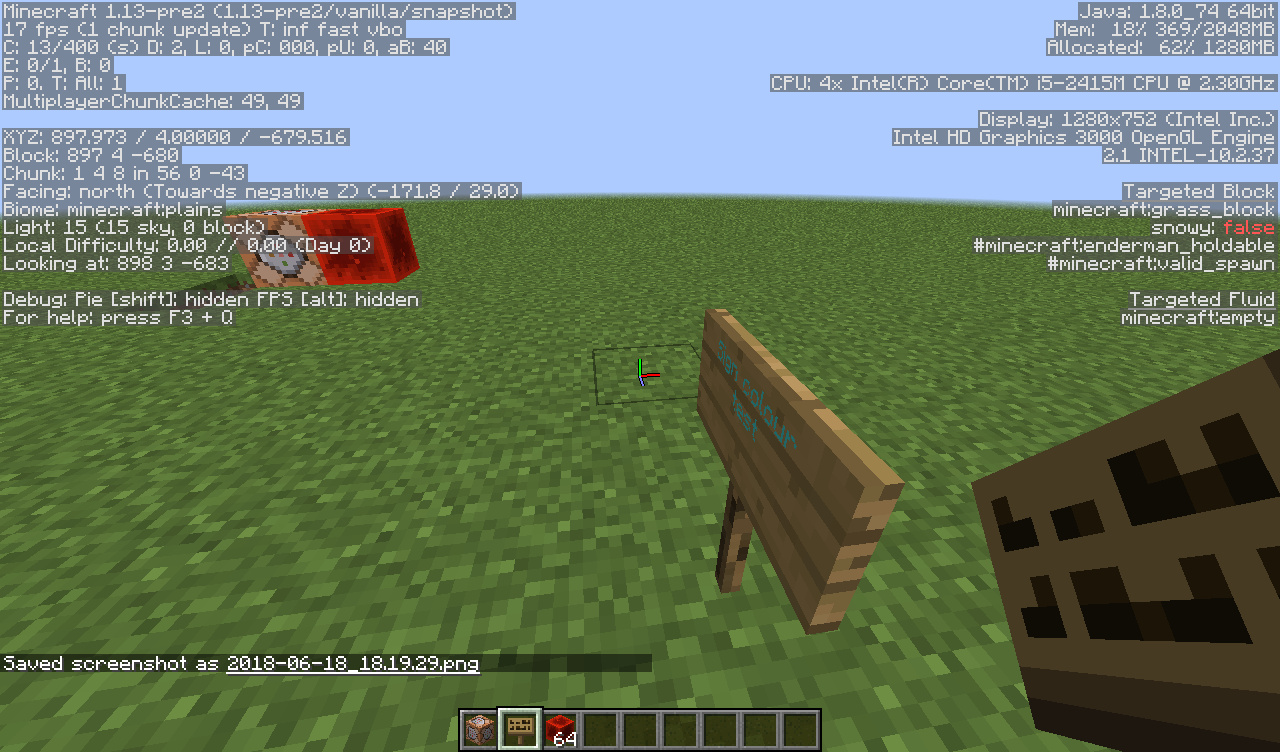
While viewing a sign with coloured text, you are unable to see the text colour from the front of the sign on macOS / OS X. This effects every Minecraft version to date (with coloured sign text of course), regardless of macOS version, Java version, or graphics driver version. This bug does not effect Minecraft on Windows or Linux.
Bug Example
Simply spawn in a sign with coloured text with one of the following on macOS / OS X and observe the colour of the text while viewing the sign straight-on and from a sharp angle.
*/give @p minecraft:sign 1 0 {BlockEntityTag:{Text1:"
{\"text\":\"Coloured Text\",\"color\":\"blue\"}"}}*
or*/setblock ~ ~ ~ minecraft:standing_sign 0 destroy {Text1:"
{\"text\":\"Coloured Text\",\"color\":\"blue\"}"}*
Bug Cause
This bug is caused by incorrectly defining the surface normal vector while rendering the text on a sign. This causes the surface "face" to be defined as the back of the sign, rather than the front (where the text is visible). The OpenGL implementation on Windows and Linux appears to have a relaxed policy for applying colour to the surface, while the OpenGL implemenation on macOS has a stricter policy for applying the colour. It appears that OpenGL on macOS does not apply the colour if the surface is not "visible", which is why the colour is only applied on sharp angles to the sign, where part of the surface would be visible.
Bug Fix
This bug can easily be fixed by properly defining the surface normal while rendering the text on the sign. This change does not break rendering behaviour on Windows and Linux (tested on Windows 10 and Arch Linux), while fixing the text rendering on macOS (tested on macOS High Sierra and a beta of macOS Mojave).
Minecraft 1.12.2 (MCP Mappings)
- Navigate to net.minecraft.client.renderer.tileentity.TileEntitySignRenderer
- Find line 76: GlStateManager.glNormal3f(0.0F, 0.0F, -0.010416667F);
- Change line 76 to: GlStateManager.glNormal3f(0.0F, 0.0F, 0.010416667F); (notice the sign of the z-coordinate of the normal vector)
Minecraft 1.13-pre6 (Obfuscated)
- Navigate to cva
- Find line 64: cst.a(0.0F, 0.0F, -0.010416667F);
- Change line 64 to: cst.a(0.0F, 0.0F, 0.010416667F); (notice the sign of the z-coordinate of the normal vector)
This change will correctly define the surface normal to be the front of the sign, fixing coloured signs on macOS.
Bug Description
While viewing a sign with coloured text, you are unable to see the text colour from the front of the sign on macOS / OS X. This effects every Minecraft version to date (with coloured sign text of course), regardless of macOS version, Java version, or graphics driver version. This bug does not effect Minecraft on Windows or Linux.
Bug Example
Simply spawn in a sign with coloured text with one of the following on macOS / OS X and observe the colour of the text while viewing the sign straight-on and from a sharp angle.
{\"text\":\"Coloured Text\",\"color\":\"blue\"}
*/give @p minecraft:sign 1 0 {BlockEntityTag:{Text1:""}}*
or{\"text\":\"Coloured Text\",\"color\":\"blue\"}
*/setblock ~ ~ ~ minecraft:standing_sign 0 destroy {Text1:""}
*Bug Cause
This bug is caused by incorrectly defining the surface normal vector while rendering the text on a sign. This causes the surface "face" to be defined as the back of the sign, rather than the front (where the text is visible). The OpenGL implementation on Windows and Linux appears to have a relaxed policy for applying colour to the surface, while the OpenGL implemenation on macOS has a stricter policy for applying the colour. It appears that OpenGL on macOS does not apply the colour if the surface is not "visible", which is why the colour is only applied on sharp angles to the sign, where part of the surface would be visible.
Bug Fix
This bug can easily be fixed by properly defining the surface normal while rendering the text on the sign. This change does not break rendering behaviour on Windows and Linux (tested on Windows 10 and Arch Linux), while fixing the text rendering on macOS (tested on macOS High Sierra and a beta of macOS Mojave).
Minecraft 1.12.2 (MCP Mappings)
- Navigate to net.minecraft.client.renderer.tileentity.TileEntitySignRenderer
- Find line 76: GlStateManager.glNormal3f(0.0F, 0.0F, -0.010416667F);
- Change line 76 to: GlStateManager.glNormal3f(0.0F, 0.0F, 0.010416667F); (notice the sign of the z-coordinate of the normal vector)
Minecraft 1.13-pre6 (Obfuscated)
- Navigate to cva
- Find line 64: cst.a(0.0F, 0.0F, -0.010416667F);
- Change line 64 to: cst.a(0.0F, 0.0F, 0.010416667F); (notice the sign of the z-coordinate of the normal vector)
This change will correctly define the surface normal to be the front of the sign, fixing coloured signs on macOS.
Bug Description
While viewing a sign with coloured text, you are unable to see the text colour from the front of the sign on macOS / OS X. This effects every Minecraft version to date (with coloured sign text of course), regardless of macOS version, Java version, or graphics driver version. This bug does not effect Minecraft on Windows or Linux.
Bug Example
Simply spawn in a sign with coloured text with one of the following on macOS / OS X and observe the colour of the text while viewing the sign straight-on and from a sharp angle.
/give @p minecraft:sign 1 0 {BlockEntityTag:{Text1:"
{\"text\":\"Coloured Text\",\"color\":\"blue\"}"}}
or
/setblock ~ ~ ~ minecraft:standing_sign 0 destroy {Text1:"
{\"text\":\"Coloured Text\",\"color\":\"blue\"}"}
Bug Cause
This bug is caused by incorrectly defining the surface normal vector while rendering the text on a sign. This causes the surface "face" to be defined as the back of the sign, rather than the front (where the text is visible). The OpenGL implementation on Windows and Linux appears to have a relaxed policy for applying colour to the surface, while the OpenGL implemenation on macOS has a stricter policy for applying the colour. It appears that OpenGL on macOS does not apply the colour if the surface is not "visible", which is why the colour is only applied on sharp angles to the sign, where part of the surface would be visible.
Bug Fix
This bug can easily be fixed by properly defining the surface normal while rendering the text on the sign. This change does not break rendering behaviour on Windows and Linux (tested on Windows 10 and Arch Linux), while fixing the text rendering on macOS (tested on macOS High Sierra and a beta of macOS Mojave).
Minecraft 1.12.2 (MCP Mappings)
- Navigate to net.minecraft.client.renderer.tileentity.TileEntitySignRenderer
- Find line 76: GlStateManager.glNormal3f(0.0F, 0.0F, -0.010416667F);
- Change line 76 to: GlStateManager.glNormal3f(0.0F, 0.0F, 0.010416667F); (notice the sign of the z-coordinate of the normal vector)
Minecraft 1.13-pre6 (Obfuscated)
- Navigate to cva
- Find line 64: cst.a(0.0F, 0.0F, -0.010416667F);
- Change line 64 to: cst.a(0.0F, 0.0F, 0.010416667F); (notice the sign of the z-coordinate of the normal vector)
This change will correctly define the surface normal to be the front of the sign, fixing coloured signs on macOS.
Bug Description
While viewing a sign with coloured text, you are unable to see the text colour from the front of the sign on macOS / OS X. This effects every Minecraft version to date (with coloured sign text of course), regardless of macOS version, Java version, or graphics driver version. This bug does not effect Minecraft on Windows or Linux.
Bug Example
Simply spawn in a sign with coloured text
with one of the followingon macOS / OS X and observe the colour of the text while viewing the sign straight-on and from a sharp angle./give @p minecraft:sign 1 0 {BlockEntityTag:{Text1:"
{\"text\":\"Coloured Text\",\"color\":\"blue\"}"}}
or
/setblock ~ ~ ~ minecraft:standing_sign 0 destroy {Text1:"
{\"text\":\"Coloured Text\",\"color\":\"blue\"}"}
Bug Cause
This bug is caused by incorrectly defining the surface normal vector while rendering the text on a sign. This causes the surface "face" to be defined as the back of the sign, rather than the front (where the text is visible). The OpenGL implementation on Windows and Linux appears to have a relaxed policy for applying colour to the surface, while the OpenGL implemenation on macOS has a stricter policy for applying the colour. It appears that OpenGL on macOS does not apply the colour if the surface is not "visible", which is why the colour is only applied on sharp angles to the sign, where part of the surface would be visible.
Bug Fix
This bug can easily be fixed by properly defining the surface normal while rendering the text on the sign. This change does not break rendering behaviour on Windows and Linux (tested on Windows 10 and Arch Linux), while fixing the text rendering on macOS (tested on macOS High Sierra and a beta of macOS Mojave).
Minecraft 1.12.2 (MCP Mappings)
- Navigate to net.minecraft.client.renderer.tileentity.TileEntitySignRenderer
- Find line 76: GlStateManager.glNormal3f(0.0F, 0.0F, -0.010416667F);
- Change line 76 to: GlStateManager.glNormal3f(0.0F, 0.0F, 0.010416667F); (notice the sign of the z-coordinate of the normal vector)
Minecraft 1.13-pre6 (Obfuscated)
- Navigate to cva
- Find line 64: cst.a(0.0F, 0.0F, -0.010416667F);
- Change line 64 to: cst.a(0.0F, 0.0F, 0.010416667F); (notice the sign of the z-coordinate of the normal vector)
This change will correctly define the surface normal to be the front of the sign, fixing coloured signs on macOS.
Bug Description
While viewing a sign with coloured text, you are unable to see the text colour from the front of the sign on macOS / OS X. This effects every Minecraft version to date (with coloured sign text of course), regardless of macOS version, Java version, or graphics driver version. This bug does not effect Minecraft on Windows or Linux.
Bug Example
Simply spawn in a sign with coloured text on macOS / OS X and observe the colour of the text while viewing the sign straight-on and from a sharp angle.
Bug Cause
This bug is caused by incorrectly defining the surface normal vector while rendering the text on a sign. This causes the surface "face" to be defined as the back of the sign, rather than the front (where the text is visible). The OpenGL implementation on Windows and Linux appears to have a relaxed policy for applying colour to the surface, while the OpenGL implemenation on macOS has a stricter policy for applying the colour. It appears that OpenGL on macOS does not apply the colour if the surface is not "visible", which is why the colour is only applied on sharp angles to the sign, where part of the surface would be visible.
Bug Fix
This bug can easily be fixed by properly defining the surface normal while rendering the text on the sign. This change does not break rendering behaviour on Windows and Linux (tested on Windows 10 and Arch Linux), while fixing the text rendering on macOS (tested on macOS High Sierra and a beta of macOS Mojave).
Minecraft 1.12.2 (MCP Mappings)
- Navigate to net.minecraft.client.renderer.tileentity.TileEntitySignRenderer
- Find line 76: GlStateManager.glNormal3f(0.0F, 0.0F, -0.010416667F);
- Change line 76 to: GlStateManager.glNormal3f(0.0F, 0.0F, 0.010416667F); (notice the sign of the z-coordinate of the normal vector)
Minecraft 1.13-pre6 (Obfuscated)
- Navigate to cva
- Find line 64: cst.a(0.0F, 0.0F, -0.010416667F);
- Change line 64 to: cst.a(0.0F, 0.0F, 0.010416667F); (notice the sign of the z-coordinate of the normal vector)
This change will correctly define the surface normal to be the front of the sign, fixing coloured signs on macOS.
Bug Description
While viewing a sign with coloured text, you are unable to see the text colour from the front of the sign on macOS / OS X. This effects every Minecraft version to date (with coloured sign text of course), regardless of macOS version, Java version, or graphics driver version. This bug does not effect Minecraft on Windows or Linux.
Bug Example
Simply spawn in a sign with coloured text on macOS / OS X and observe the colour of the text while viewing the sign straight-on and from a sharp angle.
Bug Cause
This bug is caused by incorrectly defining the surface normal vector while rendering the text on a sign. This causes the surface "face" to be defined as the back of the sign, rather than the front (where the text is visible). The OpenGL implementation on Windows and Linux appears to have a relaxed policy for applying colour to the surface, while the OpenGL implemenation on macOS has a stricter policy for applying the colour. It appears that OpenGL on macOS does not apply the colour if the surface is not "visible", which is why the colour is only applied on sharp angles to the sign, where part of the surface would be visible.
Bug Fix
This bug can easily be fixed by properly defining the surface normal while rendering the text on the sign. This change does not break rendering behaviour on Windows and Linux (tested on Windows 10 and Arch Linux), while fixing the text rendering on macOS (tested on macOS High Sierra and a beta of macOS Mojave).
Minecraft 1.12.2 (MCP Mappings)
- Navigate to net.minecraft.client.renderer.tileentity.TileEntitySignRenderer
- Find line 76: GlStateManager.glNormal3f(0.0F, 0.0F, -0.010416667F);
- Change line 76 to: GlStateManager.glNormal3f(0.0F, 0.0F, 0.010416667F); (notice the sign of the z-coordinate of the normal vector)
Minecraft 1.13-pre6 (Obfuscated)
- Navigate to cva
- Find line 64: cst.a(0.0F, 0.0F, -0.010416667F);
- Change line 64 to: cst.a(0.0F, 0.0F, 0.010416667F); (notice the sign of the z-coordinate of the normal vector)
This change will correctly define the surface normal to be the front of the sign, fixing coloured signs on macOS.
OSX: Unable to seecoloredsigns from the frontOSX: Unable to see text colour on signs from the front
Bug Description
While viewing a sign with coloured text, you are unable to see the text colour from the front of the sign on macOS / OS X. This effects every Minecraft version to date (with coloured sign text of course), regardless of macOS version, Java version, or graphics driver version. This bug does not effect Minecraft on Windows or Linux.
Bug Example
Simply spawn in a sign with coloured text on macOS / OS X and observe the colour of the text while viewing the sign straight-on and from a sharp angle.
Bug Cause
This bug is caused by incorrectly defining the surface normal vector while rendering the text on a sign. This causes the surface "face" to be defined as the back of the sign, rather than the front (where the text is visible). The OpenGL implementation on Windows and Linux appears to have a relaxed policy for applying colour to the surface, while the OpenGL implemenation on macOS has a stricter policy for applying the colour. It appears that OpenGL on macOS does not apply the colour if the surface is not "visible", which is why the colour is only applied on sharp angles to the sign, where part of the surface would be visible.
Bug Fix
This bug can easily be fixed by properly defining the surface normal while rendering the text on the sign. This change does not break rendering behaviour on Windows and Linux (tested on Windows 10 and Arch Linux), while fixing the text rendering on macOS (tested on macOS High Sierra and a beta of macOS Mojave).
Minecraft 1.12.2 (MCP Mappings)
- Navigate to net.minecraft.client.renderer.tileentity.TileEntitySignRenderer
- Find line 76: GlStateManager.glNormal3f(0.0F, 0.0F, -0.010416667F);
- Change line 76 to: GlStateManager.glNormal3f(0.0F, 0.0F, 0.010416667F); (notice the sign of the z-coordinate of the normal vector)
Minecraft 1.13-pre6 (Obfuscated)
- Navigate to cva
- Find line 64: cst.a(0.0F, 0.0F, -0.010416667F);
- Change line 64 to: cst.a(0.0F, 0.0F, 0.010416667F); (notice the sign of the z-coordinate of the normal vector)
This change will correctly define the surface normal to be the front of the sign, fixing coloured signs on macOS.
Bug Description
While viewing a sign with coloured text, you are unable to see the text colour from the front of the sign on macOS / OS X. This effects every Minecraft version to date (with coloured sign text of course), regardless of macOS version, Java version, or graphics driver version. This bug does not effect Minecraft on Windows or Linux.
Bug Example
Simply spawn in a sign with coloured text on macOS / OS X and observe the colour of the text while viewing the sign straight-on and from a sharp angle.
Bug Cause
This bug is caused by incorrectly defining the surface normal vector while rendering the text on a sign. This causes the surface "face" to be defined as the back of the sign, rather than the front (where the text is visible). The OpenGL implementation on Windows and Linux appears to have a relaxed policy for applying colour to the surface, while the OpenGL implemenation on macOS has a stricter policy for applying the colour. It appears that OpenGL on macOS does not apply the colour if the surface is not "visible", which is why the colour is only applied on sharp angles to the sign, where part of the surface would be visible.
Bug Fix
This bug can easily be fixed by properly defining the surface normal while rendering the text on the sign. This change does not break rendering behaviour on Windows and Linux (tested on Windows 10 and Arch Linux), while fixing the text rendering on macOS (tested on macOS High Sierra and a beta of macOS Mojave).
Minecraft 1.12.2 (MCP Mappings)
- Navigate to
net.minecraft.client.renderer.tileentity.TileEntitySignRenderer- Find line 76: GlStateManager.glNormal3f(0.0F, 0.0F, -0.010416667F);
- Change line 76 to: GlStateManager.glNormal3f(0.0F, 0.0F, 0.010416667F); (notice the sign of the z-coordinate of the normal vector)
Minecraft 1.13-pre6 (Obfuscated)
- Navigate to
cva- Find line 64: cst.a(0.0F, 0.0F, -0.010416667F);
- Change line 64 to: cst.a(0.0F, 0.0F, 0.010416667F); (notice the sign of the z-coordinate of the normal vector)
This change will correctly define the surface normal to be the front of the sign, fixing coloured signs on macOS.
Bug Description
While viewing a sign with coloured text, you are unable to see the text colour from the front of the sign on macOS / OS X. This effects every Minecraft version to date (with coloured sign text of course), regardless of macOS version, Java version, or graphics driver version. This bug does not effect Minecraft on Windows or Linux.
Bug Example
Simply spawn in a sign with coloured text on macOS / OS X and observe the colour of the text while viewing the sign straight-on and from a sharp angle.
Bug Cause
This bug is caused by incorrectly defining the surface normal vector while rendering the text on a sign. This causes the surface "face" to be defined as the back of the sign, rather than the front (where the text is visible). The OpenGL implementation on Windows and Linux appears to have a relaxed policy for applying colour to the surface, while the OpenGL implemenation on macOS has a stricter policy for applying the colour. It appears that OpenGL on macOS does not apply the colour if the surface is not "visible", which is why the colour is only applied on sharp angles to the sign, where part of the surface would be visible.
Bug Fix
This bug can easily be fixed by properly defining the surface normal while rendering the text on the sign. This change does not break rendering behaviour on Windows and Linux (tested on Windows 10 and Arch Linux), while fixing the text rendering on macOS (tested on macOS High Sierra and a beta of macOS Mojave).
Minecraft 1.12.2 (MCP Mappings)
- Navigate to: net.minecraft.client.renderer.tileentity.TileEntitySignRenderer
- Find line 76: GlStateManager.glNormal3f(0.0F, 0.0F, -0.010416667F);
- Change line 76 to: GlStateManager.glNormal3f(0.0F, 0.0F, 0.010416667F); (notice the sign of the z-coordinate of the normal vector)
Minecraft 1.13-pre6 (Obfuscated)
- Navigate to: cva
- Find line 64: cst.a(0.0F, 0.0F, -0.010416667F);
- Change line 64 to: cst.a(0.0F, 0.0F, 0.010416667F); (notice the sign of the z-coordinate of the normal vector)
This change will correctly define the surface normal to be the front of the sign, fixing coloured signs on macOS.
Bug Description
While viewing a sign with coloured text, you are unable to see the text colour from the front of the sign on macOS / OS X. This effects every Minecraft version to date (with coloured sign text of course), regardless of macOS version, Java version, or graphics driver version. This bug does not effect Minecraft on Windows or Linux.
Bug Example
Simply spawn in a sign with coloured text on macOS / OS X and observe the colour of the text while viewing the sign straight-on and from a sharp angle.
Bug Cause
This bug is caused by incorrectly defining the surface normal vector while rendering the text on a sign. This causes the surface "face" to be defined as the back of the sign, rather than the front (where the text is visible). The OpenGL implementation on Windows and Linux appears to have a relaxed policy for applying colour to the surface, while the OpenGL implemenation on macOS has a stricter policy for applying the colour. It appears that OpenGL on macOS does not apply the colour if the surface is not "visible", which is why the colour is only applied on sharp angles to the sign, where part of the surface would be visible.
Bug Fix
This bug can easily be fixed by properly defining the surface normal while rendering the text on the sign. This change does not break rendering behaviour on Windows and Linux (tested on Windows 10 and Arch Linux), while fixing the text rendering on macOS (tested on macOS High Sierra and a beta of macOS Mojave).
Minecraft 1.12.2 (MCP Mappings)
- Navigate to: net.minecraft.client.renderer.tileentity.TileEntitySignRenderer
- Find line 76: GlStateManager.glNormal3f(0.0F, 0.0F, -0.010416667F);
- Change line 76 to: GlStateManager.glNormal3f(0.0F, 0.0F, 0.010416667F); (notice the sign of the z-coordinate of the normal vector)
Minecraft 1.13-pre6 (Obfuscated)
- Navigate to: cva
- Find line 64: cst.a(0.0F, 0.0F, -0.010416667F);
- Change line 64 to: cst.a(0.0F, 0.0F, 0.010416667F); (notice the sign of the z-coordinate of the normal vector)
Minecraft 1.13-pre6 (Obfuscated)
- Navigate to: cvi
- Find line 64: ctb.a(0.0F, 0.0F, -0.010416667F);
- Change line 64 to: ctb.a(0.0F, 0.0F, 0.010416667F); (notice the sign of the z-coordinate of the normal vector)
This change will correctly define the surface normal to be the front of the sign, fixing coloured signs on macOS.
Bug Description
While viewing a sign with coloured text, you are unable to see the text colour from the front of the sign on macOS / OS X. This effects every Minecraft version to date (with coloured sign text of course), regardless of macOS version, Java version, or graphics driver version. This bug does not effect Minecraft on Windows or Linux.
Bug Example
Simply spawn in a sign with coloured text on macOS / OS X and observe the colour of the text while viewing the sign straight-on and from a sharp angle.
Bug Cause
This bug is caused by incorrectly defining the surface normal vector while rendering the text on a sign. This causes the surface "face" to be defined as the back of the sign, rather than the front (where the text is visible). The OpenGL implementation on Windows and Linux appears to have a relaxed policy for applying colour to the surface, while the OpenGL implemenation on macOS has a stricter policy for applying the colour. It appears that OpenGL on macOS does not apply the colour if the surface is not "visible", which is why the colour is only applied on sharp angles to the sign, where part of the surface would be visible.
Bug Fix
This bug can easily be fixed by properly defining the surface normal while rendering the text on the sign. This change does not break rendering behaviour on Windows and Linux (tested on Windows 10 and Arch Linux), while fixing the text rendering on macOS (tested on macOS High Sierra and a beta of macOS Mojave).
Minecraft 1.12.2 (MCP Mappings)
- Navigate to: net.minecraft.client.renderer.tileentity.TileEntitySignRenderer
- Find line 76: GlStateManager.glNormal3f(0.0F, 0.0F, -0.010416667F);
- Change line 76 to: GlStateManager.glNormal3f(0.0F, 0.0F, 0.010416667F); (notice the sign of the z-coordinate of the normal vector)
Minecraft 1.13-pre6 (Obfuscated)
- Navigate to: cva
- Find line 64: cst.a(0.0F, 0.0F, -0.010416667F);
- Change line 64 to: cst.a(0.0F, 0.0F, 0.010416667F); (notice the sign of the z-coordinate of the normal vector)
Minecraft 1.13-pre
6(Obfuscated)
- Navigate to: cvi
- Find line 64: ctb.a(0.0F, 0.0F, -0.010416667F);
- Change line 64 to: ctb.a(0.0F, 0.0F, 0.010416667F); (notice the sign of the z-coordinate of the normal vector)
This change will correctly define the surface normal to be the front of the sign, fixing coloured signs on macOS.
Bug Description
While viewing a sign with coloured text, you are unable to see the text colour from the front of the sign on macOS / OS X. This effects every Minecraft version to date (with coloured sign text of course), regardless of macOS version, Java version, or graphics driver version. This bug does not effect Minecraft on Windows or Linux.
Bug Example
Simply spawn in a sign with coloured text on macOS / OS X and observe the colour of the text while viewing the sign straight-on and from a sharp angle.
Bug Cause
This bug is caused by incorrectly defining the surface normal vector while rendering the text on a sign. This causes the surface "face" to be defined as the back of the sign, rather than the front (where the text is visible). The OpenGL implementation on Windows and Linux appears to have a relaxed policy for applying colour to the surface, while the OpenGL implemenation on macOS has a stricter policy for applying the colour. It appears that OpenGL on macOS does not apply the colour if the surface is not "visible", which is why the colour is only applied on sharp angles to the sign, where part of the surface would be visible.
Bug Fix
This bug can easily be fixed by properly defining the surface normal while rendering the text on the sign. This change does not break rendering behaviour on Windows and Linux (tested on Windows 10 and Arch Linux), while fixing the text rendering on macOS (tested on macOS High Sierra and a beta of macOS Mojave).
Minecraft 1.12.2 (MCP Mappings)
- Navigate to: net.minecraft.client.renderer.tileentity.TileEntitySignRenderer
- Find line 76: GlStateManager.glNormal3f(0.0F, 0.0F, -0.010416667F);
- Change line 76 to: GlStateManager.glNormal3f(0.0F, 0.0F, 0.010416667F); (notice the sign of the z-coordinate of the normal vector)
Minecraft 1.13-pre6 (Obfuscated)
- Navigate to: cva
- Find line 64: cst.a(0.0F, 0.0F, -0.010416667F);
- Change line 64 to: cst.a(0.0F, 0.0F, 0.010416667F); (notice the sign of the z-coordinate of the normal vector)
Minecraft 1.13-pre7 (Obfuscated)
- Navigate to: cvi
- Find line 64: ctb.a(0.0F, 0.0F, -0.010416667F);
- Change line 64 to: ctb.a(0.0F, 0.0F, 0.010416667F); (notice the sign of the z-coordinate of the normal vector)
This change will correctly define the surface normal to be the front of the sign, fixing coloured signs on macOS.
Bug Description
While viewing a sign with coloured text, you are unable to see the text colour from the front of the sign on macOS / OS X. This effects every Minecraft version to date (with coloured sign text of course), regardless of macOS version, Java version, or graphics driver version. This bug does not effect Minecraft on Windows or Linux.
Bug Example
Simply spawn in a sign with coloured text on macOS / OS X and observe the colour of the text while viewing the sign straight-on and from a sharp angle.
Bug Cause
This bug is caused by incorrectly defining the surface normal vector while rendering the text on a sign. This causes the surface "face" to be defined as the back of the sign, rather than the front (where the text is visible). The OpenGL implementation on Windows and Linux appears to have a relaxed policy for applying colour to the surface, while the OpenGL implemenation on macOS has a stricter policy for applying the colour. It appears that OpenGL on macOS does not apply the colour if the surface is not "visible", which is why the colour is only applied on sharp angles to the sign, where part of the surface would be visible.
Bug Fix
This bug can easily be fixed by properly defining the surface normal while rendering the text on the sign. This change does not break rendering behaviour on Windows and Linux (tested on Windows 10 and Arch Linux), while fixing the text rendering on macOS (tested on macOS High Sierra and a beta of macOS Mojave).
Minecraft 1.12.2 (MCP Mappings)
- Navigate to: net.minecraft.client.renderer.tileentity.TileEntitySignRenderer
- Find line 76: GlStateManager.glNormal3f(0.0F, 0.0F, -0.010416667F);
- Change line 76 to: GlStateManager.glNormal3f(0.0F, 0.0F, 0.010416667F); (notice the sign of the z-coordinate of the normal vector)
Minecraft 1.13-pre6 (Obfuscated)
- Navigate to: cva
- Find line 64: cst.a(0.0F, 0.0F, -0.010416667F);
- Change line 64 to: cst.a(0.0F, 0.0F, 0.010416667F); (notice the sign of the z-coordinate of the normal vector)
Minecraft 1.13-pre7 (Obfuscated)
- Navigate to: cvi
- Find line 64: ctb.a(0.0F, 0.0F, -0.010416667F);
- Change line 64 to: ctb.a(0.0F, 0.0F, 0.010416667F); (notice the sign of the z-coordinate of the normal vector)
Minecraft 1.13-pre8 (Obfuscated)
- Navigate to: cvs
- Find line 64: ctl.a(0.0F, 0.0F, -0.010416667F);
- Change line 64 to: ctl.a(0.0F, 0.0F, 0.010416667F); (notice the sign of the z-coordinate of the normal vector)
This change will correctly define the surface normal to be the front of the sign, fixing coloured signs on macOS.
Bug Description
While viewing a sign with coloured text, you are unable to see the text colour from the front of the sign on macOS / OS X. This effects every Minecraft version to date (with coloured sign text of course), regardless of macOS version, Java version, or graphics driver version. This bug does not effect Minecraft on Windows or Linux.
Bug Example
Simply spawn in a sign with coloured text on macOS / OS X and observe the colour of the text while viewing the sign straight-on and from a sharp angle.
Bug Cause
This bug is caused by incorrectly defining the surface normal vector while rendering the text on a sign. This causes the surface "face" to be defined as the back of the sign, rather than the front (where the text is visible). The OpenGL implementation on Windows and Linux appears to have a relaxed policy for applying colour to the surface, while the OpenGL implemenation on macOS has a stricter policy for applying the colour. It appears that OpenGL on macOS does not apply the colour if the surface is not "visible", which is why the colour is only applied on sharp angles to the sign, where part of the surface would be visible.
Bug Fix
This bug can easily be fixed by properly defining the surface normal while rendering the text on the sign. This change does not break rendering behaviour on Windows and Linux (tested on Windows 10 and Arch Linux), while fixing the text rendering on macOS (tested on macOS High Sierra and a beta of macOS Mojave).
Minecraft 1.12.2 (MCP Mappings)
- Navigate to: net.minecraft.client.renderer.tileentity.TileEntitySignRenderer
- Find line 76: GlStateManager.glNormal3f(0.0F, 0.0F, -0.010416667F);
- Change line 76 to: GlStateManager.glNormal3f(0.0F, 0.0F, 0.010416667F); (notice the sign of the z-coordinate of the normal vector)
Minecraft 1.13-pre6 (Obfuscated)
- Navigate to: cva
- Find line 64: cst.a(0.0F, 0.0F, -0.010416667F);
- Change line 64 to: cst.a(0.0F, 0.0F, 0.010416667F); (notice the sign of the z-coordinate of the normal vector)
Minecraft 1.13-pre7 (Obfuscated)
- Navigate to: cvi
- Find line 64: ctb.a(0.0F, 0.0F, -0.010416667F);
- Change line 64 to: ctb.a(0.0F, 0.0F, 0.010416667F); (notice the sign of the z-coordinate of the normal vector)
Minecraft 1.13-pre8 (Obfuscated)
- Navigate to: cvs
- Find line 64: ctl.a(0.0F, 0.0F, -0.010416667F);
- Change line 64 to: ctl.a(0.0F, 0.0F, 0.010416667F); (notice the sign of the z-coordinate of the normal vector)
Minecraft 1.13-pre9 (Obfuscated) (Same obfuscation as 1.13-pre8)
- Navigate to: cvs
- Find line 64: ctl.a(0.0F, 0.0F, -0.010416667F);
- Change line 64 to: ctl.a(0.0F, 0.0F, 0.010416667F); (notice the sign of the z-coordinate of the normal vector)
This change will correctly define the surface normal to be the front of the sign, fixing coloured signs on macOS.
Bug Description
While viewing a sign with coloured text, you are unable to see the text colour from the front of the sign on macOS / OS X. This effects every Minecraft version to date (with coloured sign text of course), regardless of macOS version, Java version, or graphics driver version. This bug does not effect Minecraft on Windows or Linux.
Bug Example
Simply spawn in a sign with coloured text on macOS / OS X and observe the colour of the text while viewing the sign straight-on and from a sharp angle.
Bug Cause
This bug is caused by incorrectly defining the surface normal vector while rendering the text on a sign. This causes the surface "face" to be defined as the back of the sign, rather than the front (where the text is visible). The OpenGL implementation on Windows and Linux appears to have a relaxed policy for applying colour to the surface, while the OpenGL implemenation on macOS has a stricter policy for applying the colour. It appears that OpenGL on macOS does not apply the colour if the surface is not "visible", which is why the colour is only applied on sharp angles to the sign, where part of the surface would be visible.
Bug Fix
This bug can easily be fixed by properly defining the surface normal while rendering the text on the sign. This change does not break rendering behaviour on Windows and Linux (tested on Windows 10 and Arch Linux), while fixing the text rendering on macOS (tested on macOS High Sierra and a beta of macOS Mojave).
Minecraft 1.12.2 (MCP Mappings)
- Navigate to: net.minecraft.client.renderer.tileentity.TileEntitySignRenderer
- Find line 76: GlStateManager.glNormal3f(0.0F, 0.0F, -0.010416667F);
- Change line 76 to: GlStateManager.glNormal3f(0.0F, 0.0F, 0.010416667F); (notice the sign of the z-coordinate of the normal vector)
Minecraft 1.13-pre6 (Obfuscated)
- Navigate to: cva
- Find line 64: cst.a(0.0F, 0.0F, -0.010416667F);
- Change line 64 to: cst.a(0.0F, 0.0F, 0.010416667F); (notice the sign of the z-coordinate of the normal vector)
Minecraft 1.13-pre7 (Obfuscated)
- Navigate to: cvi
- Find line 64: ctb.a(0.0F, 0.0F, -0.010416667F);
- Change line 64 to: ctb.a(0.0F, 0.0F, 0.010416667F); (notice the sign of the z-coordinate of the normal vector)
Minecraft 1.13-pre8 (Obfuscated)
- Navigate to: cvs
- Find line 64: ctl.a(0.0F, 0.0F, -0.010416667F);
- Change line 64 to: ctl.a(0.0F, 0.0F, 0.010416667F); (notice the sign of the z-coordinate of the normal vector)
Minecraft 1.13-pre9 (Obfuscated) (Same obfuscation as 1.13-pre8)
- Navigate to: cvs
- Find line 64: ctl.a(0.0F, 0.0F, -0.010416667F);
- Change line 64 to: ctl.a(0.0F, 0.0F, 0.010416667F); (notice the sign of the z-coordinate of the normal vector)
Minecraft 1.13-pre10 (Obfuscated)
- Navigate to: cvu
- Find line 64: ctn.a(0.0F, 0.0F, -0.010416667F);
- Change line 64 to: ctn.a(0.0F, 0.0F, 0.010416667F); (notice the sign of the z-coordinate of the normal vector)
This change will correctly define the surface normal to be the front of the sign, fixing coloured signs on macOS.
Bug Description
While viewing a sign with coloured text, you are unable to see the text colour from the front of the sign on macOS / OS X. This effects every Minecraft version to date (with coloured sign text of course), regardless of macOS version, Java version, or graphics driver version. This bug does not effect Minecraft on Windows or
Linux.Bug Example
Simply spawn in a sign with coloured text on macOS / OS X and observe the colour of the text while viewing the sign straight-on and from a sharp angle.
Bug Cause
This bug is caused by incorrectly defining the surface normal vector while rendering the text on a sign. This causes the surface "face" to be defined as the back of the sign, rather than the front (where the text is visible). The OpenGL implementation on Windows and Linux appears to have a relaxed policy for applying colour to the surface, while the OpenGL implemenation on macOS has a stricter policy for applying the colour. It appears that OpenGL on macOS does not apply the colour if the surface is not "visible", which is why the colour is only applied on sharp angles to the sign, where part of the surface would be visible.
Bug Fix
This bug can easily be fixed by properly defining the surface normal while rendering the text on the sign. This change does not break rendering behaviour on Windows and Linux (tested on Windows 10 and Arch Linux), while fixing the text rendering on macOS (tested on macOS High Sierra and a beta of macOS Mojave).
Minecraft 1.12.2 (MCP Mappings)
- Navigate to: net.minecraft.client.renderer.tileentity.TileEntitySignRenderer
- Find line 76: GlStateManager.glNormal3f(0.0F, 0.0F, -0.010416667F);
- Change line 76 to: GlStateManager.glNormal3f(0.0F, 0.0F, 0.010416667F); (notice the sign of the z-coordinate of the normal vector)
Minecraft 1
.13-pre6 (Obfuscated)
- Navigate to: cva
- Find line 64: cst.a(0.0F, 0.0F, -0.010416667F);
- Change line 64 to: cst.a(0.0F, 0.0F, 0.010416667F); (notice the sign of the z-coordinate of the normal vector)
Minecraft 1.13-pre
7 (Obfuscated)
- Navigate to: cvi
- Find line 64: ctb.a(0.0F, 0.0F, -0.010416667F);
- Change line 64 to: ctb.a(0.0F, 0.0F, 0.010416667F); (notice the sign of the z-coordinate
of the normal vector)Minecraft 1.13-pre8
(Obfuscated)
- Navigate to: cvs
- Find line 64: ctl.a(0.0F, 0.0F, -0.010416667F);
- Change line 64 to: ctl.a(0.0F, 0.0F, 0.010416667F); (notice the sign of the z-coordinate of the normal vector)
Minecraft 1.1
3-pre9 (Obfuscated)(Same obfuscation as1.13-pre8)
- Navigate to: cvs
- Find line 64: ctl.a(0.0F, 0.0F, -0.010416667F);
- Change line 64 to: ctl.a(0.0F, 0.0F, 0.010416667F); (notice the sign of the z-coordinate of the normal vector)
Minecraft 1.1
3-pre10 (Obfuscated)
- Navigate to: cvu
- Find line 64: ctn.a(0.0F, 0.0F, -0.010416667F);
- Change line 64 to: ctn.a(0.0F, 0.0F, 0.010416667F); (notice the sign of the z-coordinate of the normal vector)
This change will correctly define the surface normal to be the front of the sign, fixing coloured signs on macOS.
Bug Description
While viewing a sign with coloured text, you are unable to see the text colour from the front of the sign on macOS / OS X. This effects every Minecraft version to date (with coloured sign text of course), regardless of macOS version, Java version, or graphics driver version. This bug does not effect Minecraft running on Windows or any version of Linux (that I know of).
Bug Example
Simply spawn in a sign with coloured text on macOS / OS X and observe the colour of the text while viewing the front of the sign straight-on and from a sharp angle.
Bug Cause
This bug is caused by incorrectly defining the surface normal vector of the front of the sign while rendering the text on a sign. This causes the surface "face" to be defined as the back of the sign, rather than the front (where the text is visible). The OpenGL implementation on Windows and Linux appears to have a relaxed policy for applying colour to the surface, while the OpenGL implemenation on macOS has a stricter policy for applying the colour. It appears that OpenGL on macOS does not apply the colour if the surface is not "visible", which is why the colour is only applied on sharp angles to the sign, where part of the surface would be visible.
Bug Fix
This bug can easily be fixed by properly defining the surface normal while rendering the text on the sign. This change does not break rendering behaviour on Windows and Linux (tested on Windows 10 and Arch Linux), while fixing the text rendering on macOS (tested on OS X Mountain Lion, OS X Mavericks, OS X Yosemite, OS X El Capitan, macOS Sierra, macOS High Sierra, and a beta of macOS Mojave).
How to Fix - MCP Mappings
Minecraft 1.12.2
- Navigate to: net.minecraft.client.renderer.tileentity.TileEntitySignRenderer
- Find line 76: GlStateManager.glNormal3f(0.0F, 0.0F, -0.010416667F);
- Change line 76 to: GlStateManager.glNormal3f(0.0F, 0.0F, 0.010416667F);
How to Fix - Obfuscated Game
Minecraft 18w31a
- Navigate to: cwe
- Find line 64: ctx.a(0.0F, 0.0F, -0.010416667F);
- Change line 64 to: ctx.a(0.0F, 0.0F, 0.010416667F);
Minecraft 18w30b
- Navigate to: cvz
- Find line 64: cts.a(0.0F, 0.0F, -0.010416667F);
- Change line 64 to: cts.a(0.0F, 0.0F, 0.010416667F);
Minecraft 18w30a
- Navigate to: cvy
- Find line 64: ctr.a(0.0F, 0.0F, -0.010416667F);
- Change line 64 to: ctr.a(0.0F, 0.0F, 0.010416667F);
Minecraft 1.13
- Navigate to: cvw
- Find line 64: ctp.a(0.0F, 0.0F, -0.010416667F);
- Change line 64 to: ctp.a(0.0F, 0.0F, 0.010416667F);
Minecraft 1.13-pre10
- Navigate to: cvu
- Find line 64: ctn.a(0.0F, 0.0F, -0.010416667F);
- Change line 64 to: ctn.a(0.0F, 0.0F, 0.010416667F);
Minecraft 1.13-pre10
- Navigate to: cvu
- Find line 64: ctn.a(0.0F, 0.0F, -0.010416667F);
- Change line 64 to: ctn.a(0.0F, 0.0F, 0.010416667F);
Minecraft 1.13-pre9 (Same obfuscation as Minecraft 1.13-pre8)
- Navigate to: cvs
- Find line 64: ctl.a(0.0F, 0.0F, -0.010416667F);
- Change line 64 to: ctl.a(0.0F, 0.0F, 0.010416667F);
Minecraft 1.13-pre8
- Navigate to: cvs
- Find line 64: ctl.a(0.0F, 0.0F, -0.010416667F);
- Change line 64 to: ctl.a(0.0F, 0.0F, 0.010416667F);
Minecraft 1.13-pre7
- Navigate to: cvi
- Find line 64: ctb.a(0.0F, 0.0F, -0.010416667F);
- Change line 64 to: ctb.a(0.0F, 0.0F, 0.010416667F);
Minecraft 1.13-pre6
- Navigate to: cva
- Find line 64: cst.a(0.0F, 0.0F, -0.010416667F);
- Change line 64 to: cst.a(0.0F, 0.0F, 0.010416667F);
Minecraft 1.12.2 (Same obfuscation as Minecraft 1.12.1)
- Navigate to: bxf
- Find line 75: bus.a(0.0F, 0.0F, -0.010416667F);
- Change line 75 to: bus.a(0.0F, 0.0F, 0.010416667F);
Minecraft 1.12.1
- Navigate to: bxf
- Find line 75: bus.a(0.0F, 0.0F, -0.010416667F);
- Change line 75 to: bus.a(0.0F, 0.0F, 0.010416667F);
Minecraft 1.12
- Navigate to: bxd
- Find line 75: buq.a(0.0F, 0.0F, -0.010416667F);
- Change line 75 to: buq.a(0.0F, 0.0F, 0.010416667F);
Minecraft 1.11.2 (Same obfuscation as Minecraft 1.11.1)
- Navigate to: bss
- Find line 75: bqg.a(0.0F, 0.0F, -0.010416667F);
- Change line 75 to: bqg.a(0.0F, 0.0F, 0.010416667F);
Minecraft 1.11.1
- Navigate to: bss
- Find line 75: bqg.a(0.0F, 0.0F, -0.010416667F);
- Change line 75 to: bqg.a(0.0F, 0.0F, 0.010416667F);
Minecraft 1.11
- Navigate to: bsq
- Find line 75: bqe.a(0.0F, 0.0F, -0.010416667F);
- Change line 75 to: bqe.a(0.0F, 0.0F, 0.010416667F);
Minecraft 1.10.2 (Same obfuscation as Minecraft 1.10.1)
- Navigate to: bqm
- Find line 75: bob.a(0.0F, 0.0F, -0.010416667F);
- Change line 75 to: bob.a(0.0F, 0.0F, 0.010416667F);
Minecraft 1.10.1 (Same obfuscation as Minecraft 1.10)
- Navigate to: bqm
- Find line 75: bob.a(0.0F, 0.0F, -0.010416667F);
- Change line 75 to: bob.a(0.0F, 0.0F, 0.010416667F);
Minecraft 1.10
- Navigate to: bqm
- Find line 75: bob.a(0.0F, 0.0F, -0.010416667F);
- Change line 75 to: bob.a(0.0F, 0.0F, 0.010416667F);
Minecraft 1.9.4 (Same obfuscation as Minecraft 1.9.3)
- Navigate to: bpq
- Find line 75: bnf.a(0.0F, 0.0F, -1.0F * ☃);
- Change line 75 to: bnf.a(0.0F, 0.0F, ☃);
Minecraft 1.9.3 (Same obfuscation as Minecraft 1.9.2)
- Navigate to: bpq
- Find line 75: bnf.a(0.0F, 0.0F, -1.0F * ☃);
- Change line 75 to: bnf.a(0.0F, 0.0F, ☃);
Minecraft 1.9.2 (Same obfuscation as Minecraft 1.9.1)
- Navigate to: bpq
- Find line 75: bnf.a(0.0F, 0.0F, -1.0F * ☃);
- Change line 75 to: bnf.a(0.0F, 0.0F, ☃);
Minecraft 1.9.1
- Navigate to: bpq
- Find line 75: bnf.a(0.0F, 0.0F, -1.0F * ☃);
- Change line 75 to: bnf.a(0.0F, 0.0F, ☃);
Minecraft 1.9
- Navigate to: bpt
- Find line 75: bni.a(0.0F, 0.0F, -1.0F * ☃);
- Change line 75 to: bni.a(0.0F, 0.0F, ☃);
Minecraft 1.8.9
- Navigate to: bhj
- Find line 77: GL11.glNormal3f(0.0F, 0.0F, -1.0F * ☃);
- Change line 77 to: GL11.glNormal3f(0.0F, 0.0F, ☃);
Minecraft 1.8
- Navigate to: cnv
- Find line 77: GL11.glNormal3f(0.0F, 0.0F, -1.0F * f3);
- Change line 77 to: GL11.glNormal3f(0.0F, 0.0F, f3);
Minecraft 1.7.10
- Navigate to: bmr
- Find line 54: GL11.glNormal3f(0.0F, 0.0F, -1.0F * f3);
- Change line 54 to: GL11.glNormal3f(0.0F, 0.0F, f3);
Minecraft 1.6.4
- Navigate to: bja
- Find line 53: GL11.glNormal3f(0.0F, 0.0F, -1.0F * f3);
- Change line 53 to: GL11.glNormal3f(0.0F, 0.0F, f3);
Minecraft 1.5.2
- Navigate to: bja
- Find line 50: GL11.glNormal3f(0.0F, 0.0F, -1.0F * f3);
- Change line 50 to: GL11.glNormal3f(0.0F, 0.0F, f3);
Minecraft 1.4.7
- Navigate to: bdt
- Find line 50: GL11.glNormal3f(0.0F, 0.0F, -1.0F * f3);
- Change line 50 to: GL11.glNormal3f(0.0F, 0.0F, f3);
Minecraft 1.3.2
- Navigate to: axq
- Find line 50: GL11.glNormal3f(0.0F, 0.0F, -1.0F * f3);
- Change line 50 to: GL11.glNormal3f(0.0F, 0.0F, f3);
Minecraft 1.2.5
- Navigate to: ll
- Find line 51: GL11.glNormal3f(0.0F, 0.0F, -1.0F * f3);
- Change line 51 to: GL11.glNormal3f(0.0F, 0.0F, f3);
Minecraft 1.1
- Navigate to: ku
- Find line 51: GL11.glNormal3f(0.0F, 0.0F, -1.0F * f3);
- Change line 51 to: GL11.glNormal3f(0.0F, 0.0F, f3);
Minecraft 1.0
- Navigate to: aeu
- Find line 51: GL11.glNormal3f(0.0F, 0.0F, -1.0F * f3);
- Change line 51 to: GL11.glNormal3f(0.0F, 0.0F, f3);
Notice the sign of the z-coordinate of the normal vector. This change will correctly define the surface normal to be the front of the sign, fixing coloured signs on macOS.
Bug Description
While viewing a sign with coloured text, you are unable to see the text colour from the front of the sign on macOS / OS X. This effects every Minecraft version to date (with coloured sign text of course), regardless of macOS version, Java version, or graphics driver version. This bug does not effect Minecraft running on Windows or any version of Linux (that I know of).
Bug Example
Simply spawn in a sign with coloured text on macOS / OS X and observe the colour of the text while viewing the front of the sign straight-on and from a sharp angle.
Bug Cause
This bug is caused by incorrectly defining the surface normal vector of the front of the sign while rendering the text on a sign. This causes the surface "face" to be defined as the back of the sign, rather than the front (where the text is visible). The OpenGL implementation on Windows and Linux appears to have a relaxed policy for applying colour to the surface, while the OpenGL implemenation on macOS has a stricter policy for applying the colour. It appears that OpenGL on macOS does not apply the colour if the surface is not "visible", which is why the colour is only applied on sharp angles to the sign, where part of the surface would be visible.
Bug Fix
This bug can easily be fixed by properly defining the surface normal while rendering the text on the sign. This change does not break rendering behaviour on Windows and Linux (tested on Windows 10 and Arch Linux), while fixing the text rendering on macOS (tested on OS X Mountain Lion, OS X Mavericks, OS X Yosemite, OS X El Capitan, macOS Sierra, macOS High Sierra, and a beta of macOS Mojave).
How to Fix - MCP Mappings
Minecraft 1.12.2
- Navigate to: net.minecraft.client.renderer.tileentity.TileEntitySignRenderer
- Find line 76: GlStateManager.glNormal3f(0.0F, 0.0F, -0.010416667F);
- Change line 76 to: GlStateManager.glNormal3f(0.0F, 0.0F, 0.010416667F);
How to Fix - Obfuscated Game
Minecraft 18w31a
- Navigate to: cwe
- Find line 64: ctx.a(0.0F, 0.0F, -0.010416667F);
- Change line 64 to: ctx.a(0.0F, 0.0F, 0.010416667F);
Minecraft 18w30b
- Navigate to: cvz
- Find line 64: cts.a(0.0F, 0.0F, -0.010416667F);
- Change line 64 to: cts.a(0.0F, 0.0F, 0.010416667F);
Minecraft 18w30a
- Navigate to: cvy
- Find line 64: ctr.a(0.0F, 0.0F, -0.010416667F);
- Change line 64 to: ctr.a(0.0F, 0.0F, 0.010416667F);
Minecraft 1.13
- Navigate to: cvw
- Find line 64: ctp.a(0.0F, 0.0F, -0.010416667F);
- Change line 64 to: ctp.a(0.0F, 0.0F, 0.010416667F);
Minecraft 1.13-pre10
- Navigate to: cvu
- Find line 64: ctn.a(0.0F, 0.0F, -0.010416667F);
- Change line 64 to: ctn.a(0.0F, 0.0F, 0.010416667F);
Minecraft 1.13-pre10
- Navigate to: cvu
- Find line 64: ctn.a(0.0F, 0.0F, -0.010416667F);
- Change line 64 to: ctn.a(0.0F, 0.0F, 0.010416667F);
Minecraft 1.13-pre9 (Same obfuscation as Minecraft 1.13-pre8)
- Navigate to: cvs
- Find line 64: ctl.a(0.0F, 0.0F, -0.010416667F);
- Change line 64 to: ctl.a(0.0F, 0.0F, 0.010416667F);
Minecraft 1.13-pre8
- Navigate to: cvs
- Find line 64: ctl.a(0.0F, 0.0F, -0.010416667F);
- Change line 64 to: ctl.a(0.0F, 0.0F, 0.010416667F);
Minecraft 1.13-pre7
- Navigate to: cvi
- Find line 64: ctb.a(0.0F, 0.0F, -0.010416667F);
- Change line 64 to: ctb.a(0.0F, 0.0F, 0.010416667F);
Minecraft 1.13-pre6
- Navigate to: cva
- Find line 64: cst.a(0.0F, 0.0F, -0.010416667F);
- Change line 64 to: cst.a(0.0F, 0.0F, 0.010416667F);
Minecraft 1.12.2 (Same obfuscation as Minecraft 1.12.1)
- Navigate to: bxf
- Find line 75: bus.a(0.0F, 0.0F, -0.010416667F);
- Change line 75 to: bus.a(0.0F, 0.0F, 0.010416667F);
Minecraft 1.12.1
- Navigate to: bxf
- Find line 75: bus.a(0.0F, 0.0F, -0.010416667F);
- Change line 75 to: bus.a(0.0F, 0.0F, 0.010416667F);
Minecraft 1.12
- Navigate to: bxd
- Find line 75: buq.a(0.0F, 0.0F, -0.010416667F);
- Change line 75 to: buq.a(0.0F, 0.0F, 0.010416667F);
Minecraft 1.11.2 (Same obfuscation as Minecraft 1.11.1)
- Navigate to: bss
- Find line 75: bqg.a(0.0F, 0.0F, -0.010416667F);
- Change line 75 to: bqg.a(0.0F, 0.0F, 0.010416667F);
Minecraft 1.11.1
- Navigate to: bss
- Find line 75: bqg.a(0.0F, 0.0F, -0.010416667F);
- Change line 75 to: bqg.a(0.0F, 0.0F, 0.010416667F);
Minecraft 1.11
- Navigate to: bsq
- Find line 75: bqe.a(0.0F, 0.0F, -0.010416667F);
- Change line 75 to: bqe.a(0.0F, 0.0F, 0.010416667F);
Minecraft 1.10.2 (Same obfuscation as Minecraft 1.10.1)
- Navigate to: bqm
- Find line 75: bob.a(0.0F, 0.0F, -0.010416667F);
- Change line 75 to: bob.a(0.0F, 0.0F, 0.010416667F);
Minecraft 1.10.1 (Same obfuscation as Minecraft 1.10)
- Navigate to: bqm
- Find line 75: bob.a(0.0F, 0.0F, -0.010416667F);
- Change line 75 to: bob.a(0.0F, 0.0F, 0.010416667F);
Minecraft 1.10
- Navigate to: bqm
- Find line 75: bob.a(0.0F, 0.0F, -0.010416667F);
- Change line 75 to: bob.a(0.0F, 0.0F, 0.010416667F);
Minecraft 1.9.4 (Same obfuscation as Minecraft 1.9.3)
- Navigate to: bpq
- Find line 75: bnf.a(0.0F, 0.0F, -1.0F * ☃);
- Change line 75 to: bnf.a(0.0F, 0.0F, ☃);
Minecraft 1.9.3 (Same obfuscation as Minecraft 1.9.2)
- Navigate to: bpq
- Find line 75: bnf.a(0.0F, 0.0F, -1.0F * ☃);
- Change line 75 to: bnf.a(0.0F, 0.0F, ☃);
Minecraft 1.9.2 (Same obfuscation as Minecraft 1.9.1)
- Navigate to: bpq
- Find line 75: bnf.a(0.0F, 0.0F, -1.0F * ☃);
- Change line 75 to: bnf.a(0.0F, 0.0F, ☃);
Minecraft 1.9.1
- Navigate to: bpq
- Find line 75: bnf.a(0.0F, 0.0F, -1.0F * ☃);
- Change line 75 to: bnf.a(0.0F, 0.0F, ☃);
Minecraft 1.9
- Navigate to: bpt
- Find line 75: bni.a(0.0F, 0.0F, -1.0F * ☃);
- Change line 75 to: bni.a(0.0F, 0.0F, ☃);
Minecraft 1.8.9
- Navigate to: bhj
- Find line 77: GL11.glNormal3f(0.0F, 0.0F, -1.0F * ☃);
- Change line 77 to: GL11.glNormal3f(0.0F, 0.0F, ☃);
Minecraft 1.8
- Navigate to: cnv
- Find line 77: GL11.glNormal3f(0.0F, 0.0F, -1.0F * f3);
- Change line 77 to: GL11.glNormal3f(0.0F, 0.0F, f3);
Minecraft 1.7.10
- Navigate to: bmr
- Find line 54: GL11.glNormal3f(0.0F, 0.0F, -1.0F * f3);
- Change line 54 to: GL11.glNormal3f(0.0F, 0.0F, f3);
Minecraft 1.6.4
- Navigate to: bja
- Find line 53: GL11.glNormal3f(0.0F, 0.0F, -1.0F * f3);
- Change line 53 to: GL11.glNormal3f(0.0F, 0.0F, f3);
Minecraft 1.5.2
- Navigate to: bja
- Find line 50: GL11.glNormal3f(0.0F, 0.0F, -1.0F * f3);
- Change line 50 to: GL11.glNormal3f(0.0F, 0.0F, f3);
Minecraft 1.4.7
- Navigate to: bdt
- Find line 50: GL11.glNormal3f(0.0F, 0.0F, -1.0F * f3);
- Change line 50 to: GL11.glNormal3f(0.0F, 0.0F, f3);
Minecraft 1.3.2
- Navigate to: axq
- Find line 50: GL11.glNormal3f(0.0F, 0.0F, -1.0F * f3);
- Change line 50 to: GL11.glNormal3f(0.0F, 0.0F, f3);
Minecraft 1.2.5
- Navigate to: ll
- Find line 51: GL11.glNormal3f(0.0F, 0.0F, -1.0F * f3);
- Change line 51 to: GL11.glNormal3f(0.0F, 0.0F, f3);
Minecraft 1.1
- Navigate to: ku
- Find line 51: GL11.glNormal3f(0.0F, 0.0F, -1.0F * f3);
- Change line 51 to: GL11.glNormal3f(0.0F, 0.0F, f3);
Minecraft 1.0
- Navigate to: aeu
- Find line 51: GL11.glNormal3f(0.0F, 0.0F, -1.0F * f3);
- Change line 51 to: GL11.glNormal3f(0.0F, 0.0F, f3);
Notice the sign of the z-coordinate of the normal vector. This change will correctly define the surface normal to be the front of the sign, fixing coloured signs on macOS.
OSX:Unable to see text colour on signs from the frontmacOS: Incorrect sign surface normal causing the text colour to not be applied properly
macOS: Incorrect sign surface normal causingthe text colour to not be applied properlymacOS: Incorrect sign surface normal causes the text colour to not be applied properly
Processor: 2.4 GHz Intel Core i5
Graphics: Intel HD Graphics 3000 512 MBJava SE 6 64-Bit Version: 1.6.0_33-b03-424
Mac OSX Mountain Lion [Affects all OSX's on Macs with a 2.4 GHz Intel Core i5]
Processor: 2.4 GHz Intel Core i5
Graphics: Intel HD Graphics 3000 512 MBJava SE 6 64-Bit Version: 1.6.0_33-b03-424
Java SE Runtime Environment 7u80
Java SE Development Kit 7u80
Java SE Runtime Environment 8u181
Java SE Development Kit 8u181
Mojang-included JavaMac OSX Mountain Lion [Affects all OSX's on Macs with a 2.4 GHz Intel Core i5]
Processor: 2.4 GHz Intel Core i5
Graphics:Intel HD Graphics 3000 512 MBJava SE 6 64-Bit Version: 1.6.0_33-b03-424
Java SE Runtime Environment 7u80
Java SE Development Kit 7u80
Java SE Runtime Environment 8u181
Java SE Development Kit 8u181
Mojang-included Java
MacOSX Mountain Lion[Affects all OSX's on Macs with a 2.4 GHz Intel Core i5]Processor: 2.4 GHz Intel Core i5
Graphics: Intel HD Graphics 3000 512 MBJava SE 6 64-Bit Version: 1.6.0_33-b03-424
Java SE Runtime Environment 7u80
Java SE Development Kit 7u80
Java SE Runtime Environment 8u181
Java SE Development Kit 8u181
Mojang-included JavaOS X Mountain Lion
OS X Mavericks
OS X Yosemite
OS X El Capitan
macOS Sierra
macOS High Sierra
macOS Mojave
Bug Description
While viewing a sign with coloured text, you are unable to see the text colour from the front of the sign on macOS / OS X. This effects every Minecraft version to date (with coloured sign text of course), regardless of macOS version, Java version, or graphics driver version. This bug does not effect Minecraft running on Windows or any version of Linux (that I know of).
Bug Example
Simply spawn in a sign with coloured text on macOS / OS X and observe the colour of the text while viewing the front of the sign straight-on and from a sharp angle.
Bug Cause
This bug is caused by incorrectly defining the surface normal vector of the front of the sign while rendering the text on a sign. This causes the surface "face" to be defined as the back of the sign, rather than the front (where the text is visible). The OpenGL implementation on Windows and Linux appears to have a relaxed policy for applying colour to the surface, while the OpenGL implemenation on macOS has a stricter policy for applying the colour. It appears that OpenGL on macOS does not apply the colour if the surface is not "visible", which is why the colour is only applied on sharp angles to the sign, where part of the surface would be visible.
Bug Fix
This bug can easily be fixed by properly defining the surface normal while rendering the text on the sign. This change does not break rendering behaviour on Windows and Linux (tested on Windows 10 and Arch Linux), while fixing the text rendering on macOS (tested on OS X Mountain Lion, OS X Mavericks, OS X Yosemite, OS X El Capitan, macOS Sierra, macOS High Sierra, and a beta of macOS Mojave).
How to Fix - MCP Mappings
Minecraft 1.12.2
- Navigate to: net.minecraft.client.renderer.tileentity.TileEntitySignRenderer
- Find line 76: GlStateManager.glNormal3f(0.0F, 0.0F, -0.010416667F);
- Change line 76 to: GlStateManager.glNormal3f(0.0F, 0.0F, 0.010416667F);
How to Fix - Obfuscated Game
Minecraft 18w31a
- Navigate to: cwe
- Find line 6
4: ctx.a(0.0F, 0.0F, -0.010416667F);- Change line 6
4to: ctx.a(0.0F, 0.0F, 0.010416667F);Minecraft 18w3
0b
- Navigate to: c
vz- Find line 64: ct
s.a(0.0F, 0.0F, -0.010416667F);- Change line 64 to: ct
s.a(0.0F, 0.0F, 0.010416667F);Minecraft 18w30
a
- Navigate to: cv
y- Find line 64: ct
r.a(0.0F, 0.0F, -0.010416667F);- Change line 64 to: ct
r.a(0.0F, 0.0F, 0.010416667F);Minecraft 1
.13
- Navigate to: cv
w- Find line 64: ct
p.a(0.0F, 0.0F, -0.010416667F);- Change line 64 to: ct
p.a(0.0F, 0.0F, 0.010416667F);Minecraft 1.13
-pre10
- Navigate to: cv
u- Find line 64: ct
n.a(0.0F, 0.0F, -0.010416667F);- Change line 64 to: ct
n.a(0.0F, 0.0F, 0.010416667F);Minecraft 1.13-pre10
- Navigate to: cvu
- Find line 64: ctn.a(0.0F, 0.0F, -0.010416667F);
- Change line 64 to: ctn.a(0.0F, 0.0F, 0.010416667F);
Minecraft 1.13-pre
9 (Same obfuscation as Minecraft 1.13-pre8)
- Navigate to: cv
s- Find line 64: ct
l.a(0.0F, 0.0F, -0.010416667F);- Change line 64 to: ct
l.a(0.0F, 0.0F, 0.010416667F);Minecraft 1.13-pre8
- Navigate to: cvs
- Find line 64: ctl.a(0.0F, 0.0F, -0.010416667F);
- Change line 64 to: ctl.a(0.0F, 0.0F, 0.010416667F);
Minecraft 1.13-pre
7
- Navigate to: cv
i- Find line 64: ct
b.a(0.0F, 0.0F, -0.010416667F);- Change line 64 to: ct
b.a(0.0F, 0.0F, 0.010416667F);Minecraft 1.13-pre
6
- Navigate to: cv
a- Find line 64: c
st.a(0.0F, 0.0F, -0.010416667F);- Change line 64 to: c
st.a(0.0F, 0.0F, 0.010416667F);Minecraft 1.12.2 (Same obfuscation as Minecraft 1.12.1)
- Navigate to: bxf
- Find line 75: bus.a(0.0F, 0.0F, -0.010416667F);
- Change line 75 to: bus.a(0.0F, 0.0F, 0.010416667F);
Minecraft 1.12.1
- Navigate to: bxf
- Find line 75: bus.a(0.0F, 0.0F, -0.010416667F);
- Change line 75 to: bus.a(0.0F, 0.0F, 0.010416667F);
Minecraft 1.12
- Navigate to: bxd
- Find line 75: buq.a(0.0F, 0.0F, -0.010416667F);
- Change line 75 to: buq.a(0.0F, 0.0F, 0.010416667F);
Minecraft 1.11.2 (Same obfuscation as Minecraft 1.11.1)
- Navigate to: bss
- Find line 75: bqg.a(0.0F, 0.0F, -0.010416667F);
- Change line 75 to: bqg.a(0.0F, 0.0F, 0.010416667F);
Minecraft 1.11.1
- Navigate to: bss
- Find line 75: bqg.a(0.0F, 0.0F, -0.010416667F);
- Change line 75 to: bqg.a(0.0F, 0.0F, 0.010416667F);
Minecraft 1.11
- Navigate to: bsq
- Find line 75: bqe.a(0.0F, 0.0F, -0.010416667F);
- Change line 75 to: bqe.a(0.0F, 0.0F, 0.010416667F);
Minecraft 1.10.2 (Same obfuscation as Minecraft 1.10.1)
- Navigate to: bqm
- Find line 75: bob.a(0.0F, 0.0F, -0.010416667F);
- Change line 75 to: bob.a(0.0F, 0.0F, 0.010416667F);
Minecraft 1.10.1 (Same obfuscation as Minecraft 1.10)
- Navigate to: bqm
- Find line 75: bob.a(0.0F, 0.0F, -0.010416667F);
- Change line 75 to: bob.a(0.0F, 0.0F, 0.010416667F);
Minecraft 1.10
- Navigate to: bqm
- Find line 75: bob.a(0.0F, 0.0F, -0.010416667F);
- Change line 75 to: bob.a(0.0F, 0.0F, 0.010416667F);
Minecraft 1.9.4 (Same obfuscation as Minecraft 1.9.3)
- Navigate to: bpq
- Find line 75: bnf.a(0.0F, 0.0F, -1.0F * ☃);
- Change line 75 to: bnf.a(0.0F, 0.0F, ☃);
Minecraft 1.9.3 (Same obfuscation as Minecraft 1.9.2)
- Navigate to: bpq
- Find line 75: bnf.a(0.0F, 0.0F, -1.0F * ☃);
- Change line 75 to: bnf.a(0.0F, 0.0F, ☃);
Minecraft 1.9.2 (Same obfuscation as Minecraft 1.9.1)
- Navigate to: bpq
- Find line 75: bnf.a(0.0F, 0.0F, -1.0F * ☃);
- Change line 75 to: bnf.a(0.0F, 0.0F, ☃);
Minecraft 1.9.1
- Navigate to: bpq
- Find line 75: bnf.a(0.0F, 0.0F, -1.0F * ☃);
- Change line 75 to: bnf.a(0.0F, 0.0F, ☃);
Minecraft 1.9
- Navigate to: bpt
- Find line 75: bni.a(0.0F, 0.0F, -1.0F * ☃);
- Change line 75 to: bni.a(0.0F, 0.0F, ☃);
Minecraft 1.8.9
- Navigate to: bhj
- Find line 77: GL11.glNormal3f(0.0F, 0.0F, -1.0F * ☃);
- Change line 77 to: GL11.glNormal3f(0.0F, 0.0F, ☃);
Minecraft 1.8
- Navigate to: cnv
- Find line 77: GL11.glNormal3f(0.0F, 0.0F, -1.0F * f3);
- Change line 77 to: GL11.glNormal3f(0.0F, 0.0F, f3);
Minecraft 1.7.10
- Navigate to: bmr
- Find line 54: GL11.glNormal3f(0.0F, 0.0F, -1.0F * f3);
- Change line 54 to: GL11.glNormal3f(0.0F, 0.0F, f3);
Minecraft 1.6.4
- Navigate to: bja
- Find line 53: GL11.glNormal3f(0.0F, 0.0F, -1.0F * f3);
- Change line 53 to: GL11.glNormal3f(0.0F, 0.0F, f3);
Minecraft 1.5.2
- Navigate to: bja
- Find line 50: GL11.glNormal3f(0.0F, 0.0F, -1.0F * f3);
- Change line 50 to: GL11.glNormal3f(0.0F, 0.0F, f3);
Minecraft 1.4.7
- Navigate to: bdt
- Find line 50: GL11.glNormal3f(0.0F, 0.0F, -1.0F * f3);
- Change line 50 to: GL11.glNormal3f(0.0F, 0.0F, f3);
Minecraft 1.3.2
- Navigate to: axq
- Find line 50: GL11.glNormal3f(0.0F, 0.0F, -1.0F * f3);
- Change line 50 to: GL11.glNormal3f(0.0F, 0.0F, f3);
Minecraft 1.2.5
- Navigate to: ll
- Find line 51: GL11.glNormal3f(0.0F, 0.0F, -1.0F * f3);
- Change line 51 to: GL11.glNormal3f(0.0F, 0.0F, f3);
Minecraft 1.1
- Navigate to: ku
- Find line 51: GL11.glNormal3f(0.0F, 0.0F, -1.0F * f3);
- Change line 51 to: GL11.glNormal3f(0.0F, 0.0F, f3);
Minecraft 1.0
- Navigate to: aeu
- Find line 51: GL11.glNormal3f(0.0F, 0.0F, -1.0F * f3);
- Change line 51 to: GL11.glNormal3f(0.0F, 0.0F, f3);
Notice the sign of the z-coordinate of the normal vector. This change will correctly define the surface normal to be the front of the sign, fixing coloured signs on macOS.
Bug Description
While viewing a sign with coloured text, you are unable to see the text colour from the front of the sign on macOS / OS X. This effects every Minecraft version to date (with coloured sign text of course), regardless of macOS version, Java version, or graphics driver version. This bug does not effect Minecraft running on Windows or any version of Linux (that I know of).
Bug Example
Simply spawn in a sign with coloured text on macOS / OS X and observe the colour of the text while viewing the front of the sign straight-on and from a sharp angle.
Bug Cause
This bug is caused by incorrectly defining the surface normal vector of the front of the sign while rendering the text on a sign. This causes the surface "face" to be defined as the back of the sign, rather than the front (where the text is visible). The OpenGL implementation on Windows and Linux appears to have a relaxed policy for applying colour to the surface, while the OpenGL implemenation on macOS has a stricter policy for applying the colour. It appears that OpenGL on macOS does not apply the colour if the surface is not "visible", which is why the colour is only applied on sharp angles to the sign, where part of the surface would be visible.
Bug Fix
This bug can easily be fixed by properly defining the surface normal while rendering the text on the sign. This change does not break rendering behaviour on Windows and Linux (tested on Windows 10 and Arch Linux), while fixing the text rendering on macOS (tested on OS X Mountain Lion, OS X Mavericks, OS X Yosemite, OS X El Capitan, macOS Sierra, macOS High Sierra, and a beta of macOS Mojave).
How to Fix - MCP Mappings
Minecraft 1.12.2
- Navigate to: net.minecraft.client.renderer.tileentity.TileEntitySignRenderer
- Find line 76: GlStateManager.glNormal3f(0.0F, 0.0F, -0.010416667F);
- Change line 76 to: GlStateManager.glNormal3f(0.0F, 0.0F, 0.010416667F);
How to Fix - Obfuscated Game
Minecraft 18w32a (Same obfuscation as Minecraft 18w31a)
- Navigate to: cwe
- Find line 67: ctx.a(0.0F, 0.0F, -0.010416667F);
- Change line 67 to: ctx.a(0.0F, 0.0F, 0.010416667F);
Minecraft 18w31a
- Navigate to: cwe
- Find line 64: ctx.a(0.0F, 0.0F, -0.010416667F);
- Change line 64 to: ctx.a(0.0F, 0.0F, 0.010416667F);
Minecraft 18w30b
- Navigate to: cvz
- Find line 64: cts.a(0.0F, 0.0F, -0.010416667F);
- Change line 64 to: cts.a(0.0F, 0.0F, 0.010416667F);
Minecraft 18w30a
- Navigate to: cvy
- Find line 64: ctr.a(0.0F, 0.0F, -0.010416667F);
- Change line 64 to: ctr.a(0.0F, 0.0F, 0.010416667F);
Minecraft 1.13
- Navigate to: cvw
- Find line 64: ctp.a(0.0F, 0.0F, -0.010416667F);
- Change line 64 to: ctp.a(0.0F, 0.0F, 0.010416667F);
Minecraft 1.13-pre10
- Navigate to: cvu
- Find line 64: ctn.a(0.0F, 0.0F, -0.010416667F);
- Change line 64 to: ctn.a(0.0F, 0.0F, 0.010416667F);
Minecraft 1.13-pre10
- Navigate to: cvu
- Find line 64: ctn.a(0.0F, 0.0F, -0.010416667F);
- Change line 64 to: ctn.a(0.0F, 0.0F, 0.010416667F);
Minecraft 1.13-pre9 (Same obfuscation as Minecraft 1.13-pre8)
- Navigate to: cvs
- Find line 64: ctl.a(0.0F, 0.0F, -0.010416667F);
- Change line 64 to: ctl.a(0.0F, 0.0F, 0.010416667F);
Minecraft 1.13-pre8
- Navigate to: cvs
- Find line 64: ctl.a(0.0F, 0.0F, -0.010416667F);
- Change line 64 to: ctl.a(0.0F, 0.0F, 0.010416667F);
Minecraft 1.13-pre7
- Navigate to: cvi
- Find line 64: ctb.a(0.0F, 0.0F, -0.010416667F);
- Change line 64 to: ctb.a(0.0F, 0.0F, 0.010416667F);
Minecraft 1.13-pre6
- Navigate to: cva
- Find line 64: cst.a(0.0F, 0.0F, -0.010416667F);
- Change line 64 to: cst.a(0.0F, 0.0F, 0.010416667F);
Minecraft 1.12.2 (Same obfuscation as Minecraft 1.12.1)
- Navigate to: bxf
- Find line 75: bus.a(0.0F, 0.0F, -0.010416667F);
- Change line 75 to: bus.a(0.0F, 0.0F, 0.010416667F);
Minecraft 1.12.1
- Navigate to: bxf
- Find line 75: bus.a(0.0F, 0.0F, -0.010416667F);
- Change line 75 to: bus.a(0.0F, 0.0F, 0.010416667F);
Minecraft 1.12
- Navigate to: bxd
- Find line 75: buq.a(0.0F, 0.0F, -0.010416667F);
- Change line 75 to: buq.a(0.0F, 0.0F, 0.010416667F);
Minecraft 1.11.2 (Same obfuscation as Minecraft 1.11.1)
- Navigate to: bss
- Find line 75: bqg.a(0.0F, 0.0F, -0.010416667F);
- Change line 75 to: bqg.a(0.0F, 0.0F, 0.010416667F);
Minecraft 1.11.1
- Navigate to: bss
- Find line 75: bqg.a(0.0F, 0.0F, -0.010416667F);
- Change line 75 to: bqg.a(0.0F, 0.0F, 0.010416667F);
Minecraft 1.11
- Navigate to: bsq
- Find line 75: bqe.a(0.0F, 0.0F, -0.010416667F);
- Change line 75 to: bqe.a(0.0F, 0.0F, 0.010416667F);
Minecraft 1.10.2 (Same obfuscation as Minecraft 1.10.1)
- Navigate to: bqm
- Find line 75: bob.a(0.0F, 0.0F, -0.010416667F);
- Change line 75 to: bob.a(0.0F, 0.0F, 0.010416667F);
Minecraft 1.10.1 (Same obfuscation as Minecraft 1.10)
- Navigate to: bqm
- Find line 75: bob.a(0.0F, 0.0F, -0.010416667F);
- Change line 75 to: bob.a(0.0F, 0.0F, 0.010416667F);
Minecraft 1.10
- Navigate to: bqm
- Find line 75: bob.a(0.0F, 0.0F, -0.010416667F);
- Change line 75 to: bob.a(0.0F, 0.0F, 0.010416667F);
Minecraft 1.9.4 (Same obfuscation as Minecraft 1.9.3)
- Navigate to: bpq
- Find line 75: bnf.a(0.0F, 0.0F, -1.0F * ☃);
- Change line 75 to: bnf.a(0.0F, 0.0F, ☃);
Minecraft 1.9.3 (Same obfuscation as Minecraft 1.9.2)
- Navigate to: bpq
- Find line 75: bnf.a(0.0F, 0.0F, -1.0F * ☃);
- Change line 75 to: bnf.a(0.0F, 0.0F, ☃);
Minecraft 1.9.2 (Same obfuscation as Minecraft 1.9.1)
- Navigate to: bpq
- Find line 75: bnf.a(0.0F, 0.0F, -1.0F * ☃);
- Change line 75 to: bnf.a(0.0F, 0.0F, ☃);
Minecraft 1.9.1
- Navigate to: bpq
- Find line 75: bnf.a(0.0F, 0.0F, -1.0F * ☃);
- Change line 75 to: bnf.a(0.0F, 0.0F, ☃);
Minecraft 1.9
- Navigate to: bpt
- Find line 75: bni.a(0.0F, 0.0F, -1.0F * ☃);
- Change line 75 to: bni.a(0.0F, 0.0F, ☃);
Minecraft 1.8.9
- Navigate to: bhj
- Find line 77: GL11.glNormal3f(0.0F, 0.0F, -1.0F * ☃);
- Change line 77 to: GL11.glNormal3f(0.0F, 0.0F, ☃);
Minecraft 1.8
- Navigate to: cnv
- Find line 77: GL11.glNormal3f(0.0F, 0.0F, -1.0F * f3);
- Change line 77 to: GL11.glNormal3f(0.0F, 0.0F, f3);
Minecraft 1.7.10
- Navigate to: bmr
- Find line 54: GL11.glNormal3f(0.0F, 0.0F, -1.0F * f3);
- Change line 54 to: GL11.glNormal3f(0.0F, 0.0F, f3);
Minecraft 1.6.4
- Navigate to: bja
- Find line 53: GL11.glNormal3f(0.0F, 0.0F, -1.0F * f3);
- Change line 53 to: GL11.glNormal3f(0.0F, 0.0F, f3);
Minecraft 1.5.2
- Navigate to: bja
- Find line 50: GL11.glNormal3f(0.0F, 0.0F, -1.0F * f3);
- Change line 50 to: GL11.glNormal3f(0.0F, 0.0F, f3);
Minecraft 1.4.7
- Navigate to: bdt
- Find line 50: GL11.glNormal3f(0.0F, 0.0F, -1.0F * f3);
- Change line 50 to: GL11.glNormal3f(0.0F, 0.0F, f3);
Minecraft 1.3.2
- Navigate to: axq
- Find line 50: GL11.glNormal3f(0.0F, 0.0F, -1.0F * f3);
- Change line 50 to: GL11.glNormal3f(0.0F, 0.0F, f3);
Minecraft 1.2.5
- Navigate to: ll
- Find line 51: GL11.glNormal3f(0.0F, 0.0F, -1.0F * f3);
- Change line 51 to: GL11.glNormal3f(0.0F, 0.0F, f3);
Minecraft 1.1
- Navigate to: ku
- Find line 51: GL11.glNormal3f(0.0F, 0.0F, -1.0F * f3);
- Change line 51 to: GL11.glNormal3f(0.0F, 0.0F, f3);
Minecraft 1.0
- Navigate to: aeu
- Find line 51: GL11.glNormal3f(0.0F, 0.0F, -1.0F * f3);
- Change line 51 to: GL11.glNormal3f(0.0F, 0.0F, f3);
Notice the sign of the z-coordinate of the normal vector. This change will correctly define the surface normal to be the front of the sign, fixing coloured signs on macOS.
Processor: 2.4 GHz Intel Core i5
Graphics: Intel HD Graphics 3000 512 MBJava SE 6 64-Bit Version: 1.6.0_33-b03-424
Java SE Runtime Environment 7u80
Java SE Development Kit 7u80
Java SE Runtime Environment 8u181
Java SE Development Kit 8u181
Mojang-included JavaOS X Mountain Lion
OS X Mavericks
OS X Yosemite
OS X El Capitan
macOS Sierra
macOS High Sierra
macOS Mojave
Bug Description
While viewing a sign with coloured text, you are unable to see the text colour from the front of the sign on macOS / OS X. This effects every Minecraft version to date (with coloured sign text of course), regardless of macOS version, Java version, or graphics driver version. This bug does not effect Minecraft running on Windows or any version of Linux (that I know of).
Bug Example
Simply spawn in a sign with coloured text on macOS / OS X and observe the colour of the text while viewing the front of the sign straight-on and from a sharp angle.
Bug Cause
This bug is caused by incorrectly defining the surface normal vector of the front of the sign while rendering the text on a sign. This causes the surface "face" to be defined as the back of the sign, rather than the front (where the text is visible). The OpenGL implementation on Windows and Linux appears to have a relaxed policy for applying colour to the surface, while the OpenGL implemenation on macOS has a stricter policy for applying the colour. It appears that OpenGL on macOS does not apply the colour if the surface is not "visible", which is why the colour is only applied on sharp angles to the sign, where part of the surface would be visible.
Bug Fix
This bug can easily be fixed by properly defining the surface normal while rendering the text on the sign. This change does not break rendering behaviour on Windows and Linux (tested on Windows 10 and Arch Linux), while fixing the text rendering on macOS (tested on OS X Mountain Lion, OS X Mavericks, OS X Yosemite, OS X El Capitan, macOS Sierra, macOS High Sierra, and a beta of macOS Mojave).
How to Fix - MCP Mappings
Minecraft 1.12.2
- Navigate to: net.minecraft.client.renderer.tileentity.TileEntitySignRenderer
- Find line 76: GlStateManager.glNormal3f(0.0F, 0.0F, -0.010416667F);
- Change line 76 to: GlStateManager.glNormal3f(0.0F, 0.0F, 0.010416667F);
How to Fix - Obfuscated Game
Minecraft 18w3
2a (Same obfuscation as Minecraft 18w31a)
- Navigate to: cw
e- Find line 67: ct
x.a(0.0F, 0.0F, -0.010416667F);- Change line 67 to: ct
x.a(0.0F, 0.0F, 0.010416667F);Minecraft 18w31a
- Navigate to: cwe
- Find line 6
4: ctx.a(0.0F, 0.0F, -0.010416667F);- Change line 6
4to: ctx.a(0.0F, 0.0F, 0.010416667F);Minecraft 18w3
0b
- Navigate to: c
vz- Find line 64: ct
s.a(0.0F, 0.0F, -0.010416667F);- Change line 64 to: ct
s.a(0.0F, 0.0F, 0.010416667F);Minecraft 18w30
a
- Navigate to: cv
y- Find line 64: ct
r.a(0.0F, 0.0F, -0.010416667F);- Change line 64 to: ct
r.a(0.0F, 0.0F, 0.010416667F);Minecraft 1
.13
- Navigate to: cv
w- Find line 64: ct
p.a(0.0F, 0.0F, -0.010416667F);- Change line 64 to: ct
p.a(0.0F, 0.0F, 0.010416667F);Minecraft 1.13
-pre10
- Navigate to: cv
u- Find line 64: ct
n.a(0.0F, 0.0F, -0.010416667F);- Change line 64 to: ct
n.a(0.0F, 0.0F, 0.010416667F);Minecraft 1.13-pre10
- Navigate to: cvu
- Find line 64: ctn.a(0.0F, 0.0F, -0.010416667F);
- Change line 64 to: ctn.a(0.0F, 0.0F, 0.010416667F);
Minecraft 1.13-pre
9 (Same obfuscation as Minecraft 1.13-pre8)
- Navigate to: cv
s- Find line 64: ct
l.a(0.0F, 0.0F, -0.010416667F);- Change line 64 to: ct
l.a(0.0F, 0.0F, 0.010416667F);Minecraft 1.13-pre8
- Navigate to: cvs
- Find line 64: ctl.a(0.0F, 0.0F, -0.010416667F);
- Change line 64 to: ctl.a(0.0F, 0.0F, 0.010416667F);
Minecraft 1.13-pre
7
- Navigate to: cv
i- Find line 64: ct
b.a(0.0F, 0.0F, -0.010416667F);- Change line 64 to: ct
b.a(0.0F, 0.0F, 0.010416667F);Minecraft 1.13-pre
6
- Navigate to: cv
a- Find line 64: c
st.a(0.0F, 0.0F, -0.010416667F);- Change line 64 to: c
st.a(0.0F, 0.0F, 0.010416667F);Minecraft 1.12.2 (Same obfuscation as Minecraft 1.12.1)
- Navigate to: bxf
- Find line 75: bus.a(0.0F, 0.0F, -0.010416667F);
- Change line 75 to: bus.a(0.0F, 0.0F, 0.010416667F);
Minecraft 1.12.1
- Navigate to: bxf
- Find line 75: bus.a(0.0F, 0.0F, -0.010416667F);
- Change line 75 to: bus.a(0.0F, 0.0F, 0.010416667F);
Minecraft 1.12
- Navigate to: bxd
- Find line 75: buq.a(0.0F, 0.0F, -0.010416667F);
- Change line 75 to: buq.a(0.0F, 0.0F, 0.010416667F);
Minecraft 1.11.2 (Same obfuscation as Minecraft 1.11.1)
- Navigate to: bss
- Find line 75: bqg.a(0.0F, 0.0F, -0.010416667F);
- Change line 75 to: bqg.a(0.0F, 0.0F, 0.010416667F);
Minecraft 1.11.1
- Navigate to: bss
- Find line 75: bqg.a(0.0F, 0.0F, -0.010416667F);
- Change line 75 to: bqg.a(0.0F, 0.0F, 0.010416667F);
Minecraft 1.11
- Navigate to: bsq
- Find line 75: bqe.a(0.0F, 0.0F, -0.010416667F);
- Change line 75 to: bqe.a(0.0F, 0.0F, 0.010416667F);
Minecraft 1.10.2 (Same obfuscation as Minecraft 1.10.1)
- Navigate to: bqm
- Find line 75: bob.a(0.0F, 0.0F, -0.010416667F);
- Change line 75 to: bob.a(0.0F, 0.0F, 0.010416667F);
Minecraft 1.10.1 (Same obfuscation as Minecraft 1.10)
- Navigate to: bqm
- Find line 75: bob.a(0.0F, 0.0F, -0.010416667F);
- Change line 75 to: bob.a(0.0F, 0.0F, 0.010416667F);
Minecraft 1.10
- Navigate to: bqm
- Find line 75: bob.a(0.0F, 0.0F, -0.010416667F);
- Change line 75 to: bob.a(0.0F, 0.0F, 0.010416667F);
Minecraft 1.9.4 (Same obfuscation as Minecraft 1.9.3)
- Navigate to: bpq
- Find line 75: bnf.a(0.0F, 0.0F, -1.0F * ☃);
- Change line 75 to: bnf.a(0.0F, 0.0F, ☃);
Minecraft 1.9.3 (Same obfuscation as Minecraft 1.9.2)
- Navigate to: bpq
- Find line 75: bnf.a(0.0F, 0.0F, -1.0F * ☃);
- Change line 75 to: bnf.a(0.0F, 0.0F, ☃);
Minecraft 1.9.2 (Same obfuscation as Minecraft 1.9.1)
- Navigate to: bpq
- Find line 75: bnf.a(0.0F, 0.0F, -1.0F * ☃);
- Change line 75 to: bnf.a(0.0F, 0.0F, ☃);
Minecraft 1.9.1
- Navigate to: bpq
- Find line 75: bnf.a(0.0F, 0.0F, -1.0F * ☃);
- Change line 75 to: bnf.a(0.0F, 0.0F, ☃);
Minecraft 1.9
- Navigate to: bpt
- Find line 75: bni.a(0.0F, 0.0F, -1.0F * ☃);
- Change line 75 to: bni.a(0.0F, 0.0F, ☃);
Minecraft 1.8.9
- Navigate to: bhj
- Find line 77: GL11.glNormal3f(0.0F, 0.0F, -1.0F * ☃);
- Change line 77 to: GL11.glNormal3f(0.0F, 0.0F, ☃);
Minecraft 1.8
- Navigate to: cnv
- Find line 77: GL11.glNormal3f(0.0F, 0.0F, -1.0F * f3);
- Change line 77 to: GL11.glNormal3f(0.0F, 0.0F, f3);
Minecraft 1.7.10
- Navigate to: bmr
- Find line 54: GL11.glNormal3f(0.0F, 0.0F, -1.0F * f3);
- Change line 54 to: GL11.glNormal3f(0.0F, 0.0F, f3);
Minecraft 1.6.4
- Navigate to: bja
- Find line 53: GL11.glNormal3f(0.0F, 0.0F, -1.0F * f3);
- Change line 53 to: GL11.glNormal3f(0.0F, 0.0F, f3);
Minecraft 1.5.2
- Navigate to: bja
- Find line 50: GL11.glNormal3f(0.0F, 0.0F, -1.0F * f3);
- Change line 50 to: GL11.glNormal3f(0.0F, 0.0F, f3);
Minecraft 1.4.7
- Navigate to: bdt
- Find line 50: GL11.glNormal3f(0.0F, 0.0F, -1.0F * f3);
- Change line 50 to: GL11.glNormal3f(0.0F, 0.0F, f3);
Minecraft 1.3.2
- Navigate to: axq
- Find line 50: GL11.glNormal3f(0.0F, 0.0F, -1.0F * f3);
- Change line 50 to: GL11.glNormal3f(0.0F, 0.0F, f3);
Minecraft 1.2.5
- Navigate to: ll
- Find line 51: GL11.glNormal3f(0.0F, 0.0F, -1.0F * f3);
- Change line 51 to: GL11.glNormal3f(0.0F, 0.0F, f3);
Minecraft 1.1
- Navigate to: ku
- Find line 51: GL11.glNormal3f(0.0F, 0.0F, -1.0F * f3);
- Change line 51 to: GL11.glNormal3f(0.0F, 0.0F, f3);
Minecraft 1.0
- Navigate to: aeu
- Find line 51: GL11.glNormal3f(0.0F, 0.0F, -1.0F * f3);
- Change line 51 to: GL11.glNormal3f(0.0F, 0.0F, f3);
Notice the sign of the z-coordinate of the normal vector. This change will correctly define the surface normal to be the front of the sign, fixing coloured signs on macOS.
Bug Description
While viewing a sign with coloured text, you are unable to see the text colour from the front of the sign on macOS / OS X. This effects every Minecraft version to date (with coloured sign text of course), regardless of macOS version, Java version, or graphics driver version. This bug does not effect Minecraft running on Windows or any version of Linux (that I know of).
Bug Example
Simply spawn in a sign with coloured text on macOS / OS X and observe the colour of the text while viewing the front of the sign straight-on and from a sharp angle.
Bug Cause
This bug is caused by incorrectly defining the surface normal vector of the front of the sign while rendering the text on a sign. This causes the surface "face" to be defined as the back of the sign, rather than the front (where the text is visible). The OpenGL implementation on Windows and Linux appears to have a relaxed policy for applying colour to the surface, while the OpenGL implemenation on macOS has a stricter policy for applying the colour. It appears that OpenGL on macOS does not apply the colour if the surface is not "visible", which is why the colour is only applied on sharp angles to the sign, where part of the surface would be visible.
Bug Fix
This bug can easily be fixed by properly defining the surface normal while rendering the text on the sign. This change does not break rendering behaviour on Windows and Linux (tested on Windows 10 and Arch Linux), while fixing the text rendering on macOS (tested on OS X Mountain Lion, OS X Mavericks, OS X Yosemite, OS X El Capitan, macOS Sierra, macOS High Sierra, and a beta of macOS Mojave).
How to Fix - MCP Mappings
Minecraft 1.12.2
- Navigate to: net.minecraft.client.renderer.tileentity.TileEntitySignRenderer
- Find line 76: GlStateManager.glNormal3f(0.0F, 0.0F, -0.010416667F);
- Change line 76 to: GlStateManager.glNormal3f(0.0F, 0.0F, 0.010416667F);
How to Fix - Obfuscated Game
Minecraft 18w33a
- Navigate to: cwf
- Find line 67: cty.a((float)0.0f, (float)0.0f, (float)-0.010416667f);
- Change line 67 to: cty.a((float)0.0f, (float)0.0f, (float)0.010416667f);
Minecraft 18w32a (Same obfuscation as Minecraft 18w31a)
- Navigate to: cwe
- Find line 67: ctx.a(0.0F, 0.0F, -0.010416667F);
- Change line 67 to: ctx.a(0.0F, 0.0F, 0.010416667F);
Minecraft 18w31a
- Navigate to: cwe
- Find line 64: ctx.a(0.0F, 0.0F, -0.010416667F);
- Change line 64 to: ctx.a(0.0F, 0.0F, 0.010416667F);
Minecraft 18w30b
- Navigate to: cvz
- Find line 64: cts.a(0.0F, 0.0F, -0.010416667F);
- Change line 64 to: cts.a(0.0F, 0.0F, 0.010416667F);
Minecraft 18w30a
- Navigate to: cvy
- Find line 64: ctr.a(0.0F, 0.0F, -0.010416667F);
- Change line 64 to: ctr.a(0.0F, 0.0F, 0.010416667F);
Minecraft 1.13
- Navigate to: cvw
- Find line 64: ctp.a(0.0F, 0.0F, -0.010416667F);
- Change line 64 to: ctp.a(0.0F, 0.0F, 0.010416667F);
Minecraft 1.13-pre10
- Navigate to: cvu
- Find line 64: ctn.a(0.0F, 0.0F, -0.010416667F);
- Change line 64 to: ctn.a(0.0F, 0.0F, 0.010416667F);
Minecraft 1.13-pre10
- Navigate to: cvu
- Find line 64: ctn.a(0.0F, 0.0F, -0.010416667F);
- Change line 64 to: ctn.a(0.0F, 0.0F, 0.010416667F);
Minecraft 1.13-pre9 (Same obfuscation as Minecraft 1.13-pre8)
- Navigate to: cvs
- Find line 64: ctl.a(0.0F, 0.0F, -0.010416667F);
- Change line 64 to: ctl.a(0.0F, 0.0F, 0.010416667F);
Minecraft 1.13-pre8
- Navigate to: cvs
- Find line 64: ctl.a(0.0F, 0.0F, -0.010416667F);
- Change line 64 to: ctl.a(0.0F, 0.0F, 0.010416667F);
Minecraft 1.13-pre7
- Navigate to: cvi
- Find line 64: ctb.a(0.0F, 0.0F, -0.010416667F);
- Change line 64 to: ctb.a(0.0F, 0.0F, 0.010416667F);
Minecraft 1.13-pre6
- Navigate to: cva
- Find line 64: cst.a(0.0F, 0.0F, -0.010416667F);
- Change line 64 to: cst.a(0.0F, 0.0F, 0.010416667F);
Minecraft 1.12.2 (Same obfuscation as Minecraft 1.12.1)
- Navigate to: bxf
- Find line 75: bus.a(0.0F, 0.0F, -0.010416667F);
- Change line 75 to: bus.a(0.0F, 0.0F, 0.010416667F);
Minecraft 1.12.1
- Navigate to: bxf
- Find line 75: bus.a(0.0F, 0.0F, -0.010416667F);
- Change line 75 to: bus.a(0.0F, 0.0F, 0.010416667F);
Minecraft 1.12
- Navigate to: bxd
- Find line 75: buq.a(0.0F, 0.0F, -0.010416667F);
- Change line 75 to: buq.a(0.0F, 0.0F, 0.010416667F);
Minecraft 1.11.2 (Same obfuscation as Minecraft 1.11.1)
- Navigate to: bss
- Find line 75: bqg.a(0.0F, 0.0F, -0.010416667F);
- Change line 75 to: bqg.a(0.0F, 0.0F, 0.010416667F);
Minecraft 1.11.1
- Navigate to: bss
- Find line 75: bqg.a(0.0F, 0.0F, -0.010416667F);
- Change line 75 to: bqg.a(0.0F, 0.0F, 0.010416667F);
Minecraft 1.11
- Navigate to: bsq
- Find line 75: bqe.a(0.0F, 0.0F, -0.010416667F);
- Change line 75 to: bqe.a(0.0F, 0.0F, 0.010416667F);
Minecraft 1.10.2 (Same obfuscation as Minecraft 1.10.1)
- Navigate to: bqm
- Find line 75: bob.a(0.0F, 0.0F, -0.010416667F);
- Change line 75 to: bob.a(0.0F, 0.0F, 0.010416667F);
Minecraft 1.10.1 (Same obfuscation as Minecraft 1.10)
- Navigate to: bqm
- Find line 75: bob.a(0.0F, 0.0F, -0.010416667F);
- Change line 75 to: bob.a(0.0F, 0.0F, 0.010416667F);
Minecraft 1.10
- Navigate to: bqm
- Find line 75: bob.a(0.0F, 0.0F, -0.010416667F);
- Change line 75 to: bob.a(0.0F, 0.0F, 0.010416667F);
Minecraft 1.9.4 (Same obfuscation as Minecraft 1.9.3)
- Navigate to: bpq
- Find line 75: bnf.a(0.0F, 0.0F, -1.0F * ☃);
- Change line 75 to: bnf.a(0.0F, 0.0F, ☃);
Minecraft 1.9.3 (Same obfuscation as Minecraft 1.9.2)
- Navigate to: bpq
- Find line 75: bnf.a(0.0F, 0.0F, -1.0F * ☃);
- Change line 75 to: bnf.a(0.0F, 0.0F, ☃);
Minecraft 1.9.2 (Same obfuscation as Minecraft 1.9.1)
- Navigate to: bpq
- Find line 75: bnf.a(0.0F, 0.0F, -1.0F * ☃);
- Change line 75 to: bnf.a(0.0F, 0.0F, ☃);
Minecraft 1.9.1
- Navigate to: bpq
- Find line 75: bnf.a(0.0F, 0.0F, -1.0F * ☃);
- Change line 75 to: bnf.a(0.0F, 0.0F, ☃);
Minecraft 1.9
- Navigate to: bpt
- Find line 75: bni.a(0.0F, 0.0F, -1.0F * ☃);
- Change line 75 to: bni.a(0.0F, 0.0F, ☃);
Minecraft 1.8.9
- Navigate to: bhj
- Find line 77: GL11.glNormal3f(0.0F, 0.0F, -1.0F * ☃);
- Change line 77 to: GL11.glNormal3f(0.0F, 0.0F, ☃);
Minecraft 1.8
- Navigate to: cnv
- Find line 77: GL11.glNormal3f(0.0F, 0.0F, -1.0F * f3);
- Change line 77 to: GL11.glNormal3f(0.0F, 0.0F, f3);
Minecraft 1.7.10
- Navigate to: bmr
- Find line 54: GL11.glNormal3f(0.0F, 0.0F, -1.0F * f3);
- Change line 54 to: GL11.glNormal3f(0.0F, 0.0F, f3);
Minecraft 1.6.4
- Navigate to: bja
- Find line 53: GL11.glNormal3f(0.0F, 0.0F, -1.0F * f3);
- Change line 53 to: GL11.glNormal3f(0.0F, 0.0F, f3);
Minecraft 1.5.2
- Navigate to: bja
- Find line 50: GL11.glNormal3f(0.0F, 0.0F, -1.0F * f3);
- Change line 50 to: GL11.glNormal3f(0.0F, 0.0F, f3);
Minecraft 1.4.7
- Navigate to: bdt
- Find line 50: GL11.glNormal3f(0.0F, 0.0F, -1.0F * f3);
- Change line 50 to: GL11.glNormal3f(0.0F, 0.0F, f3);
Minecraft 1.3.2
- Navigate to: axq
- Find line 50: GL11.glNormal3f(0.0F, 0.0F, -1.0F * f3);
- Change line 50 to: GL11.glNormal3f(0.0F, 0.0F, f3);
Minecraft 1.2.5
- Navigate to: ll
- Find line 51: GL11.glNormal3f(0.0F, 0.0F, -1.0F * f3);
- Change line 51 to: GL11.glNormal3f(0.0F, 0.0F, f3);
Minecraft 1.1
- Navigate to: ku
- Find line 51: GL11.glNormal3f(0.0F, 0.0F, -1.0F * f3);
- Change line 51 to: GL11.glNormal3f(0.0F, 0.0F, f3);
Minecraft 1.0
- Navigate to: aeu
- Find line 51: GL11.glNormal3f(0.0F, 0.0F, -1.0F * f3);
- Change line 51 to: GL11.glNormal3f(0.0F, 0.0F, f3);
Notice the sign of the z-coordinate of the normal vector. This change will correctly define the surface normal to be the front of the sign, fixing coloured signs on macOS.
Bug Description
While viewing a sign with coloured text, you are unable to see the text colour from the front of the sign on macOS / OS X. This effects every Minecraft version to date (with coloured sign text of course), regardless of macOS version, Java version, or graphics driver version. This bug does not effect Minecraft running on Windows or any version of Linux (that I know of).
Bug Example
Simply spawn in a sign with coloured text on macOS / OS X and observe the colour of the text while viewing the front of the sign straight-on and from a sharp angle.
Bug Cause
This bug is caused by incorrectly defining the surface normal vector of the front of the sign while rendering the text on a sign. This causes the surface "face" to be defined as the back of the sign, rather than the front (where the text is visible). The OpenGL implementation on Windows and Linux appears to have a relaxed policy for applying colour to the surface, while the OpenGL implemenation on macOS has a stricter policy for applying the colour. It appears that OpenGL on macOS does not apply the colour if the surface is not "visible", which is why the colour is only applied on sharp angles to the sign, where part of the surface would be visible.
Bug Fix
This bug can easily be fixed by properly defining the surface normal while rendering the text on the sign. This change does not break rendering behaviour on Windows and Linux (tested on Windows 10 and Arch Linux), while fixing the text rendering on macOS (tested on OS X Mountain Lion, OS X Mavericks, OS X Yosemite, OS X El Capitan, macOS Sierra, macOS High Sierra, and a beta of macOS Mojave).
How to Fix - MCP Mappings
Minecraft 1.12.2
- Navigate to: net.minecraft.client.renderer.tileentity.TileEntitySignRenderer
- Find line 76: GlStateManager.glNormal3f(0.0F, 0.0F, -0.010416667F);
- Change line 76 to: GlStateManager.glNormal3f(0.0F, 0.0F, 0.010416667F);
How to Fix - Obfuscated Game
Minecraft 1
8w33a
- Navigate to: cw
f- Find line 67: ct
y.a((float)0.0f, (float)0.0f, (float)-0.010416667f);- Change line 67 to: ct
y.a((float)0.0f, (float)0.0f, (float)0.010416667f);Minecraft 18w3
2a (Same obfuscation as Minecraft 18w31a)
- Navigate to: cw
e- Find line 67: ct
x.a(0.0F, 0.0F, -0.010416667F);- Change line 67 to: ct
x.a(0.0F, 0.0F, 0.010416667F);Minecraft 18w31a
- Navigate to: cwe
- Find line 6
4: ctx.a(0.0F, 0.0F, -0.010416667F);- Change line 6
4to: ctx.a(0.0F, 0.0F, 0.010416667F);Minecraft 18w3
0b
- Navigate to: c
vz- Find line 64: ct
s.a(0.0F, 0.0F, -0.010416667F);- Change line 64 to: ct
s.a(0.0F, 0.0F, 0.010416667F);Minecraft 18w30
a
- Navigate to: cv
y- Find line 64: ct
r.a(0.0F, 0.0F, -0.010416667F);- Change line 64 to: ct
r.a(0.0F, 0.0F, 0.010416667F);Minecraft 1
.13
- Navigate to: cv
w- Find line 64: ct
p.a(0.0F, 0.0F, -0.010416667F);- Change line 64 to: ct
p.a(0.0F, 0.0F, 0.010416667F);Minecraft 1.13
-pre10
- Navigate to: cv
u- Find line 64: ct
n.a(0.0F, 0.0F, -0.010416667F);- Change line 64 to: ct
n.a(0.0F, 0.0F, 0.010416667F);Minecraft 1.13-pre10
- Navigate to: cvu
- Find line 64: ctn.a(0.0F, 0.0F, -0.010416667F);
- Change line 64 to: ctn.a(0.0F, 0.0F, 0.010416667F);
Minecraft 1.13-pre
9 (Same obfuscation as Minecraft 1.13-pre8)
- Navigate to: cv
s- Find line 64: ct
l.a(0.0F, 0.0F, -0.010416667F);- Change line 64 to: ct
l.a(0.0F, 0.0F, 0.010416667F);Minecraft 1.13-pre8
- Navigate to: cvs
- Find line 64: ctl.a(0.0F, 0.0F, -0.010416667F);
- Change line 64 to: ctl.a(0.0F, 0.0F, 0.010416667F);
Minecraft 1.13-pre
7
- Navigate to: cv
i- Find line 64: ct
b.a(0.0F, 0.0F, -0.010416667F);- Change line 64 to: ct
b.a(0.0F, 0.0F, 0.010416667F);Minecraft 1.13-pre
6
- Navigate to: cv
a- Find line 64: c
st.a(0.0F, 0.0F, -0.010416667F);- Change line 64 to: c
st.a(0.0F, 0.0F, 0.010416667F);Minecraft 1.12.2 (Same obfuscation as Minecraft 1.12.1)
- Navigate to: bxf
- Find line 75: bus.a(0.0F, 0.0F, -0.010416667F);
- Change line 75 to: bus.a(0.0F, 0.0F, 0.010416667F);
Minecraft 1.12.1
- Navigate to: bxf
- Find line 75: bus.a(0.0F, 0.0F, -0.010416667F);
- Change line 75 to: bus.a(0.0F, 0.0F, 0.010416667F);
Minecraft 1.12
- Navigate to: bxd
- Find line 75: buq.a(0.0F, 0.0F, -0.010416667F);
- Change line 75 to: buq.a(0.0F, 0.0F, 0.010416667F);
Minecraft 1.11.2 (Same obfuscation as Minecraft 1.11.1)
- Navigate to: bss
- Find line 75: bqg.a(0.0F, 0.0F, -0.010416667F);
- Change line 75 to: bqg.a(0.0F, 0.0F, 0.010416667F);
Minecraft 1.11.1
- Navigate to: bss
- Find line 75: bqg.a(0.0F, 0.0F, -0.010416667F);
- Change line 75 to: bqg.a(0.0F, 0.0F, 0.010416667F);
Minecraft 1.11
- Navigate to: bsq
- Find line 75: bqe.a(0.0F, 0.0F, -0.010416667F);
- Change line 75 to: bqe.a(0.0F, 0.0F, 0.010416667F);
Minecraft 1.10.2 (Same obfuscation as Minecraft 1.10.1)
- Navigate to: bqm
- Find line 75: bob.a(0.0F, 0.0F, -0.010416667F);
- Change line 75 to: bob.a(0.0F, 0.0F, 0.010416667F);
Minecraft 1.10.1 (Same obfuscation as Minecraft 1.10)
- Navigate to: bqm
- Find line 75: bob.a(0.0F, 0.0F, -0.010416667F);
- Change line 75 to: bob.a(0.0F, 0.0F, 0.010416667F);
Minecraft 1.10
- Navigate to: bqm
- Find line 75: bob.a(0.0F, 0.0F, -0.010416667F);
- Change line 75 to: bob.a(0.0F, 0.0F, 0.010416667F);
Minecraft 1.9.4 (Same obfuscation as Minecraft 1.9.3)
- Navigate to: bpq
- Find line 75: bnf.a(0.0F, 0.0F, -1.0F * ☃);
- Change line 75 to: bnf.a(0.0F, 0.0F, ☃);
Minecraft 1.9.3 (Same obfuscation as Minecraft 1.9.2)
- Navigate to: bpq
- Find line 75: bnf.a(0.0F, 0.0F, -1.0F * ☃);
- Change line 75 to: bnf.a(0.0F, 0.0F, ☃);
Minecraft 1.9.2 (Same obfuscation as Minecraft 1.9.1)
- Navigate to: bpq
- Find line 75: bnf.a(0.0F, 0.0F, -1.0F * ☃);
- Change line 75 to: bnf.a(0.0F, 0.0F, ☃);
Minecraft 1.9.1
- Navigate to: bpq
- Find line 75: bnf.a(0.0F, 0.0F, -1.0F * ☃);
- Change line 75 to: bnf.a(0.0F, 0.0F, ☃);
Minecraft 1.9
- Navigate to: bpt
- Find line 75: bni.a(0.0F, 0.0F, -1.0F * ☃);
- Change line 75 to: bni.a(0.0F, 0.0F, ☃);
Minecraft 1.8.9
- Navigate to: bhj
- Find line 77: GL11.glNormal3f(0.0F, 0.0F, -1.0F * ☃);
- Change line 77 to: GL11.glNormal3f(0.0F, 0.0F, ☃);
Minecraft 1.8
- Navigate to: cnv
- Find line 77: GL11.glNormal3f(0.0F, 0.0F, -1.0F * f3);
- Change line 77 to: GL11.glNormal3f(0.0F, 0.0F, f3);
Minecraft 1.7.10
- Navigate to: bmr
- Find line 54: GL11.glNormal3f(0.0F, 0.0F, -1.0F * f3);
- Change line 54 to: GL11.glNormal3f(0.0F, 0.0F, f3);
Minecraft 1.6.4
- Navigate to: bja
- Find line 53: GL11.glNormal3f(0.0F, 0.0F, -1.0F * f3);
- Change line 53 to: GL11.glNormal3f(0.0F, 0.0F, f3);
Minecraft 1.5.2
- Navigate to: bja
- Find line 50: GL11.glNormal3f(0.0F, 0.0F, -1.0F * f3);
- Change line 50 to: GL11.glNormal3f(0.0F, 0.0F, f3);
Minecraft 1.4.7
- Navigate to: bdt
- Find line 50: GL11.glNormal3f(0.0F, 0.0F, -1.0F * f3);
- Change line 50 to: GL11.glNormal3f(0.0F, 0.0F, f3);
Minecraft 1.3.2
- Navigate to: axq
- Find line 50: GL11.glNormal3f(0.0F, 0.0F, -1.0F * f3);
- Change line 50 to: GL11.glNormal3f(0.0F, 0.0F, f3);
Minecraft 1.2.5
- Navigate to: ll
- Find line 51: GL11.glNormal3f(0.0F, 0.0F, -1.0F * f3);
- Change line 51 to: GL11.glNormal3f(0.0F, 0.0F, f3);
Minecraft 1.1
- Navigate to: ku
- Find line 51: GL11.glNormal3f(0.0F, 0.0F, -1.0F * f3);
- Change line 51 to: GL11.glNormal3f(0.0F, 0.0F, f3);
Minecraft 1.0
- Navigate to: aeu
- Find line 51: GL11.glNormal3f(0.0F, 0.0F, -1.0F * f3);
- Change line 51 to: GL11.glNormal3f(0.0F, 0.0F, f3);
Notice the sign of the z-coordinate of the normal vector. This change will correctly define the surface normal to be the front of the sign, fixing coloured signs on macOS.
Bug Description
While viewing a sign with coloured text, you are unable to see the text colour from the front of the sign on macOS / OS X. This effects every Minecraft version to date (with coloured sign text of course), regardless of macOS version, Java version, or graphics driver version. This bug does not effect Minecraft running on Windows or any version of Linux (that I know of).
Bug Example
Simply spawn in a sign with coloured text on macOS / OS X and observe the colour of the text while viewing the front of the sign straight-on and from a sharp angle.
Bug Cause
This bug is caused by incorrectly defining the surface normal vector of the front of the sign while rendering the text on a sign. This causes the surface "face" to be defined as the back of the sign, rather than the front (where the text is visible). The OpenGL implementation on Windows and Linux appears to have a relaxed policy for applying colour to the surface, while the OpenGL implemenation on macOS has a stricter policy for applying the colour. It appears that OpenGL on macOS does not apply the colour if the surface is not "visible", which is why the colour is only applied on sharp angles to the sign, where part of the surface would be visible.
Bug Fix
This bug can easily be fixed by properly defining the surface normal while rendering the text on the sign. This change does not break rendering behaviour on Windows and Linux (tested on Windows 10 and Arch Linux), while fixing the text rendering on macOS (tested on OS X Mountain Lion, OS X Mavericks, OS X Yosemite, OS X El Capitan, macOS Sierra, macOS High Sierra, and a beta of macOS Mojave).
How to Fix - MCP Mappings
Minecraft 1.12.2
- Navigate to: net.minecraft.client.renderer.tileentity.TileEntitySignRenderer
- Find line 76: GlStateManager.glNormal3f(0.0F, 0.0F, -0.010416667F);
- Change line 76 to: GlStateManager.glNormal3f(0.0F, 0.0F, 0.010416667F);
How to Fix - Obfuscated Game
Minecraft 1.13.1-pre1
- Navigate to: cwg
- Find line 67: ctz.a((float)0.0f, (float)0.0f, (float)-0.010416667f);
- Change line 67 to: ctz.a((float)0.0f, (float)0.0f, (float)0.010416667f);
Minecraft 18w33a
- Navigate to: cwf
- Find line 67: cty.a((float)0.0f, (float)0.0f, (float)-0.010416667f);
- Change line 67 to: cty.a((float)0.0f, (float)0.0f, (float)0.010416667f);
Minecraft 18w32a (Same obfuscation as Minecraft 18w31a)
- Navigate to: cwe
- Find line 67: ctx.a(0.0F, 0.0F, -0.010416667F);
- Change line 67 to: ctx.a(0.0F, 0.0F, 0.010416667F);
Minecraft 18w31a
- Navigate to: cwe
- Find line 64: ctx.a(0.0F, 0.0F, -0.010416667F);
- Change line 64 to: ctx.a(0.0F, 0.0F, 0.010416667F);
Minecraft 18w30b
- Navigate to: cvz
- Find line 64: cts.a(0.0F, 0.0F, -0.010416667F);
- Change line 64 to: cts.a(0.0F, 0.0F, 0.010416667F);
Minecraft 18w30a
- Navigate to: cvy
- Find line 64: ctr.a(0.0F, 0.0F, -0.010416667F);
- Change line 64 to: ctr.a(0.0F, 0.0F, 0.010416667F);
Minecraft 1.13
- Navigate to: cvw
- Find line 64: ctp.a(0.0F, 0.0F, -0.010416667F);
- Change line 64 to: ctp.a(0.0F, 0.0F, 0.010416667F);
Minecraft 1.13-pre10
- Navigate to: cvu
- Find line 64: ctn.a(0.0F, 0.0F, -0.010416667F);
- Change line 64 to: ctn.a(0.0F, 0.0F, 0.010416667F);
Minecraft 1.13-pre10
- Navigate to: cvu
- Find line 64: ctn.a(0.0F, 0.0F, -0.010416667F);
- Change line 64 to: ctn.a(0.0F, 0.0F, 0.010416667F);
Minecraft 1.13-pre9 (Same obfuscation as Minecraft 1.13-pre8)
- Navigate to: cvs
- Find line 64: ctl.a(0.0F, 0.0F, -0.010416667F);
- Change line 64 to: ctl.a(0.0F, 0.0F, 0.010416667F);
Minecraft 1.13-pre8
- Navigate to: cvs
- Find line 64: ctl.a(0.0F, 0.0F, -0.010416667F);
- Change line 64 to: ctl.a(0.0F, 0.0F, 0.010416667F);
Minecraft 1.13-pre7
- Navigate to: cvi
- Find line 64: ctb.a(0.0F, 0.0F, -0.010416667F);
- Change line 64 to: ctb.a(0.0F, 0.0F, 0.010416667F);
Minecraft 1.13-pre6
- Navigate to: cva
- Find line 64: cst.a(0.0F, 0.0F, -0.010416667F);
- Change line 64 to: cst.a(0.0F, 0.0F, 0.010416667F);
Minecraft 1.12.2 (Same obfuscation as Minecraft 1.12.1)
- Navigate to: bxf
- Find line 75: bus.a(0.0F, 0.0F, -0.010416667F);
- Change line 75 to: bus.a(0.0F, 0.0F, 0.010416667F);
Minecraft 1.12.1
- Navigate to: bxf
- Find line 75: bus.a(0.0F, 0.0F, -0.010416667F);
- Change line 75 to: bus.a(0.0F, 0.0F, 0.010416667F);
Minecraft 1.12
- Navigate to: bxd
- Find line 75: buq.a(0.0F, 0.0F, -0.010416667F);
- Change line 75 to: buq.a(0.0F, 0.0F, 0.010416667F);
Minecraft 1.11.2 (Same obfuscation as Minecraft 1.11.1)
- Navigate to: bss
- Find line 75: bqg.a(0.0F, 0.0F, -0.010416667F);
- Change line 75 to: bqg.a(0.0F, 0.0F, 0.010416667F);
Minecraft 1.11.1
- Navigate to: bss
- Find line 75: bqg.a(0.0F, 0.0F, -0.010416667F);
- Change line 75 to: bqg.a(0.0F, 0.0F, 0.010416667F);
Minecraft 1.11
- Navigate to: bsq
- Find line 75: bqe.a(0.0F, 0.0F, -0.010416667F);
- Change line 75 to: bqe.a(0.0F, 0.0F, 0.010416667F);
Minecraft 1.10.2 (Same obfuscation as Minecraft 1.10.1)
- Navigate to: bqm
- Find line 75: bob.a(0.0F, 0.0F, -0.010416667F);
- Change line 75 to: bob.a(0.0F, 0.0F, 0.010416667F);
Minecraft 1.10.1 (Same obfuscation as Minecraft 1.10)
- Navigate to: bqm
- Find line 75: bob.a(0.0F, 0.0F, -0.010416667F);
- Change line 75 to: bob.a(0.0F, 0.0F, 0.010416667F);
Minecraft 1.10
- Navigate to: bqm
- Find line 75: bob.a(0.0F, 0.0F, -0.010416667F);
- Change line 75 to: bob.a(0.0F, 0.0F, 0.010416667F);
Minecraft 1.9.4 (Same obfuscation as Minecraft 1.9.3)
- Navigate to: bpq
- Find line 75: bnf.a(0.0F, 0.0F, -1.0F * ☃);
- Change line 75 to: bnf.a(0.0F, 0.0F, ☃);
Minecraft 1.9.3 (Same obfuscation as Minecraft 1.9.2)
- Navigate to: bpq
- Find line 75: bnf.a(0.0F, 0.0F, -1.0F * ☃);
- Change line 75 to: bnf.a(0.0F, 0.0F, ☃);
Minecraft 1.9.2 (Same obfuscation as Minecraft 1.9.1)
- Navigate to: bpq
- Find line 75: bnf.a(0.0F, 0.0F, -1.0F * ☃);
- Change line 75 to: bnf.a(0.0F, 0.0F, ☃);
Minecraft 1.9.1
- Navigate to: bpq
- Find line 75: bnf.a(0.0F, 0.0F, -1.0F * ☃);
- Change line 75 to: bnf.a(0.0F, 0.0F, ☃);
Minecraft 1.9
- Navigate to: bpt
- Find line 75: bni.a(0.0F, 0.0F, -1.0F * ☃);
- Change line 75 to: bni.a(0.0F, 0.0F, ☃);
Minecraft 1.8.9
- Navigate to: bhj
- Find line 77: GL11.glNormal3f(0.0F, 0.0F, -1.0F * ☃);
- Change line 77 to: GL11.glNormal3f(0.0F, 0.0F, ☃);
Minecraft 1.8
- Navigate to: cnv
- Find line 77: GL11.glNormal3f(0.0F, 0.0F, -1.0F * f3);
- Change line 77 to: GL11.glNormal3f(0.0F, 0.0F, f3);
Minecraft 1.7.10
- Navigate to: bmr
- Find line 54: GL11.glNormal3f(0.0F, 0.0F, -1.0F * f3);
- Change line 54 to: GL11.glNormal3f(0.0F, 0.0F, f3);
Minecraft 1.6.4
- Navigate to: bja
- Find line 53: GL11.glNormal3f(0.0F, 0.0F, -1.0F * f3);
- Change line 53 to: GL11.glNormal3f(0.0F, 0.0F, f3);
Minecraft 1.5.2
- Navigate to: bja
- Find line 50: GL11.glNormal3f(0.0F, 0.0F, -1.0F * f3);
- Change line 50 to: GL11.glNormal3f(0.0F, 0.0F, f3);
Minecraft 1.4.7
- Navigate to: bdt
- Find line 50: GL11.glNormal3f(0.0F, 0.0F, -1.0F * f3);
- Change line 50 to: GL11.glNormal3f(0.0F, 0.0F, f3);
Minecraft 1.3.2
- Navigate to: axq
- Find line 50: GL11.glNormal3f(0.0F, 0.0F, -1.0F * f3);
- Change line 50 to: GL11.glNormal3f(0.0F, 0.0F, f3);
Minecraft 1.2.5
- Navigate to: ll
- Find line 51: GL11.glNormal3f(0.0F, 0.0F, -1.0F * f3);
- Change line 51 to: GL11.glNormal3f(0.0F, 0.0F, f3);
Minecraft 1.1
- Navigate to: ku
- Find line 51: GL11.glNormal3f(0.0F, 0.0F, -1.0F * f3);
- Change line 51 to: GL11.glNormal3f(0.0F, 0.0F, f3);
Minecraft 1.0
- Navigate to: aeu
- Find line 51: GL11.glNormal3f(0.0F, 0.0F, -1.0F * f3);
- Change line 51 to: GL11.glNormal3f(0.0F, 0.0F, f3);
Notice the sign of the z-coordinate of the normal vector. This change will correctly define the surface normal to be the front of the sign, fixing coloured signs on macOS.
Bug Description
While viewing a sign with coloured text, you are unable to see the text colour from the front of the sign on macOS / OS X. This effects every Minecraft version to date (with coloured sign text of course), regardless of macOS version, Java version, or graphics driver version. This bug does not effect Minecraft running on Windows or any version of Linux (that I know of).
Bug Example
Simply spawn in a sign with coloured text on macOS / OS X and observe the colour of the text while viewing the front of the sign straight-on and from a sharp angle.
Bug Cause
This bug is caused by incorrectly defining the surface normal vector of the front of the sign while rendering the text on a sign. This causes the surface "face" to be defined as the back of the sign, rather than the front (where the text is visible). The OpenGL implementation on Windows and Linux appears to have a relaxed policy for applying colour to the surface, while the OpenGL implemenation on macOS has a stricter policy for applying the colour. It appears that OpenGL on macOS does not apply the colour if the surface is not "visible", which is why the colour is only applied on sharp angles to the sign, where part of the surface would be visible.
Bug Fix
This bug can easily be fixed by properly defining the surface normal while rendering the text on the sign. This change does not break rendering behaviour on Windows and Linux (tested on Windows 10 and Arch Linux), while fixing the text rendering on macOS (tested on OS X Mountain Lion, OS X Mavericks, OS X Yosemite, OS X El Capitan, macOS Sierra, macOS High Sierra, and a beta of macOS Mojave).
How to Fix - MCP Mappings
Minecraft 1.12.2
- Navigate to: net.minecraft.client.renderer.tileentity.TileEntitySignRenderer
- Find line 76: GlStateManager.glNormal3f(0.0F, 0.0F, -0.010416667F);
- Change line 76 to: GlStateManager.glNormal3f(0.0F, 0.0F, 0.010416667F);
How to Fix - Obfuscated Game
Minecraft 1.13.1-pre
1
- Navigate to: cwg
- Find line
67: ctz.a((float)0.0f,(float)0.0f,(float)-0.010416667f);- Change line
67to: ctz.a((float)0.0f,(float)0.0f,(float)0.010416667f);Minecraft 1
8w33a
- Navigate to: cw
f- Find line 67: ct
y.a((float)0.0f, (float)0.0f, (float)-0.010416667f);- Change line 67 to: ct
y.a((float)0.0f, (float)0.0f, (float)0.010416667f);Minecraft 18w3
2a (Same obfuscation as Minecraft 18w31a)
- Navigate to: cw
e- Find line 67: ct
x.a(0.0F, 0.0F, -0.010416667F);- Change line 67 to: ct
x.a(0.0F, 0.0F, 0.010416667F);Minecraft 18w31a
- Navigate to: cwe
- Find line 6
4: ctx.a(0.0F, 0.0F, -0.010416667F);- Change line 6
4to: ctx.a(0.0F, 0.0F, 0.010416667F);Minecraft 18w3
0b
- Navigate to: c
vz- Find line 64: ct
s.a(0.0F, 0.0F, -0.010416667F);- Change line 64 to: ct
s.a(0.0F, 0.0F, 0.010416667F);Minecraft 18w30
a
- Navigate to: cv
y- Find line 64: ct
r.a(0.0F, 0.0F, -0.010416667F);- Change line 64 to: ct
r.a(0.0F, 0.0F, 0.010416667F);Minecraft 1
.13
- Navigate to: cv
w- Find line 64: ct
p.a(0.0F, 0.0F, -0.010416667F);- Change line 64 to: ct
p.a(0.0F, 0.0F, 0.010416667F);Minecraft 1.13
-pre10
- Navigate to: cv
u- Find line 64: ct
n.a(0.0F, 0.0F, -0.010416667F);- Change line 64 to: ct
n.a(0.0F, 0.0F, 0.010416667F);Minecraft 1.13-pre10
- Navigate to: cvu
- Find line 64: ctn.a(0.0F, 0.0F, -0.010416667F);
- Change line 64 to: ctn.a(0.0F, 0.0F, 0.010416667F);
Minecraft 1.13-pre
9 (Same obfuscation as Minecraft 1.13-pre8)
- Navigate to: cv
s- Find line 64: ct
l.a(0.0F, 0.0F, -0.010416667F);- Change line 64 to: ct
l.a(0.0F, 0.0F, 0.010416667F);Minecraft 1.13-pre8
- Navigate to: cvs
- Find line 64: ctl.a(0.0F, 0.0F, -0.010416667F);
- Change line 64 to: ctl.a(0.0F, 0.0F, 0.010416667F);
Minecraft 1.13-pre
7
- Navigate to: cv
i- Find line 64: ct
b.a(0.0F, 0.0F, -0.010416667F);- Change line 64 to: ct
b.a(0.0F, 0.0F, 0.010416667F);Minecraft 1.13-pre
6
- Navigate to: cv
a- Find line 64: c
st.a(0.0F, 0.0F, -0.010416667F);- Change line 64 to: c
st.a(0.0F, 0.0F, 0.010416667F);Minecraft 1.12.2 (Same obfuscation as Minecraft 1.12.1)
- Navigate to: bxf
- Find line 75: bus.a(0.0F, 0.0F, -0.010416667F);
- Change line 75 to: bus.a(0.0F, 0.0F, 0.010416667F);
Minecraft 1.12.1
- Navigate to: bxf
- Find line 75: bus.a(0.0F, 0.0F, -0.010416667F);
- Change line 75 to: bus.a(0.0F, 0.0F, 0.010416667F);
Minecraft 1.12
- Navigate to: bxd
- Find line 75: buq.a(0.0F, 0.0F, -0.010416667F);
- Change line 75 to: buq.a(0.0F, 0.0F, 0.010416667F);
Minecraft 1.11.2 (Same obfuscation as Minecraft 1.11.1)
- Navigate to: bss
- Find line 75: bqg.a(0.0F, 0.0F, -0.010416667F);
- Change line 75 to: bqg.a(0.0F, 0.0F, 0.010416667F);
Minecraft 1.11.1
- Navigate to: bss
- Find line 75: bqg.a(0.0F, 0.0F, -0.010416667F);
- Change line 75 to: bqg.a(0.0F, 0.0F, 0.010416667F);
Minecraft 1.11
- Navigate to: bsq
- Find line 75: bqe.a(0.0F, 0.0F, -0.010416667F);
- Change line 75 to: bqe.a(0.0F, 0.0F, 0.010416667F);
Minecraft 1.10.2 (Same obfuscation as Minecraft 1.10.1)
- Navigate to: bqm
- Find line 75: bob.a(0.0F, 0.0F, -0.010416667F);
- Change line 75 to: bob.a(0.0F, 0.0F, 0.010416667F);
Minecraft 1.10.1 (Same obfuscation as Minecraft 1.10)
- Navigate to: bqm
- Find line 75: bob.a(0.0F, 0.0F, -0.010416667F);
- Change line 75 to: bob.a(0.0F, 0.0F, 0.010416667F);
Minecraft 1.10
- Navigate to: bqm
- Find line 75: bob.a(0.0F, 0.0F, -0.010416667F);
- Change line 75 to: bob.a(0.0F, 0.0F, 0.010416667F);
Minecraft 1.9.4 (Same obfuscation as Minecraft 1.9.3)
- Navigate to: bpq
- Find line 75: bnf.a(0.0F, 0.0F, -1.0F * ☃);
- Change line 75 to: bnf.a(0.0F, 0.0F, ☃);
Minecraft 1.9.3 (Same obfuscation as Minecraft 1.9.2)
- Navigate to: bpq
- Find line 75: bnf.a(0.0F, 0.0F, -1.0F * ☃);
- Change line 75 to: bnf.a(0.0F, 0.0F, ☃);
Minecraft 1.9.2 (Same obfuscation as Minecraft 1.9.1)
- Navigate to: bpq
- Find line 75: bnf.a(0.0F, 0.0F, -1.0F * ☃);
- Change line 75 to: bnf.a(0.0F, 0.0F, ☃);
Minecraft 1.9.1
- Navigate to: bpq
- Find line 75: bnf.a(0.0F, 0.0F, -1.0F * ☃);
- Change line 75 to: bnf.a(0.0F, 0.0F, ☃);
Minecraft 1.9
- Navigate to: bpt
- Find line 75: bni.a(0.0F, 0.0F, -1.0F * ☃);
- Change line 75 to: bni.a(0.0F, 0.0F, ☃);
Minecraft 1.8.9
- Navigate to: bhj
- Find line 77: GL11.glNormal3f(0.0F, 0.0F, -1.0F * ☃);
- Change line 77 to: GL11.glNormal3f(0.0F, 0.0F, ☃);
Minecraft 1.8
- Navigate to: cnv
- Find line 77: GL11.glNormal3f(0.0F, 0.0F, -1.0F * f3);
- Change line 77 to: GL11.glNormal3f(0.0F, 0.0F, f3);
Minecraft 1.7.10
- Navigate to: bmr
- Find line 54: GL11.glNormal3f(0.0F, 0.0F, -1.0F * f3);
- Change line 54 to: GL11.glNormal3f(0.0F, 0.0F, f3);
Minecraft 1.6.4
- Navigate to: bja
- Find line 53: GL11.glNormal3f(0.0F, 0.0F, -1.0F * f3);
- Change line 53 to: GL11.glNormal3f(0.0F, 0.0F, f3);
Minecraft 1.5.2
- Navigate to: bja
- Find line 50: GL11.glNormal3f(0.0F, 0.0F, -1.0F * f3);
- Change line 50 to: GL11.glNormal3f(0.0F, 0.0F, f3);
Minecraft 1.4.7
- Navigate to: bdt
- Find line 50: GL11.glNormal3f(0.0F, 0.0F, -1.0F * f3);
- Change line 50 to: GL11.glNormal3f(0.0F, 0.0F, f3);
Minecraft 1.3.2
- Navigate to: axq
- Find line 50: GL11.glNormal3f(0.0F, 0.0F, -1.0F * f3);
- Change line 50 to: GL11.glNormal3f(0.0F, 0.0F, f3);
Minecraft 1.2.5
- Navigate to: ll
- Find line 51: GL11.glNormal3f(0.0F, 0.0F, -1.0F * f3);
- Change line 51 to: GL11.glNormal3f(0.0F, 0.0F, f3);
Minecraft 1.1
- Navigate to: ku
- Find line 51: GL11.glNormal3f(0.0F, 0.0F, -1.0F * f3);
- Change line 51 to: GL11.glNormal3f(0.0F, 0.0F, f3);
Minecraft 1.0
- Navigate to: aeu
- Find line 51: GL11.glNormal3f(0.0F, 0.0F, -1.0F * f3);
- Change line 51 to: GL11.glNormal3f(0.0F, 0.0F, f3);
Notice the sign of the z-coordinate of the normal vector. This change will correctly define the surface normal to be the front of the sign, fixing coloured signs on macOS.
Bug Description
While viewing a sign with coloured text, you are unable to see the text colour from the front of the sign on macOS / OS X. This effects every Minecraft version to date (with coloured sign text of course), regardless of macOS version, Java version, or graphics driver version. This bug seems to only effect older mac processors. This bug does not effect Minecraft running on Windows or any version of Linux (that I know of).
Bug Example
Simply spawn in a sign with coloured text on macOS / OS X and observe the colour of the text while viewing the front of the sign straight-on and from a sharp angle.
Bug Cause
This bug is caused by incorrectly defining the surface normal vector of the front of the sign while rendering the text on a sign. This causes the surface "face" to be defined as the back of the sign, rather than the front (where the text is visible). The OpenGL implementation on Windows and Linux appears to have a relaxed policy for applying colour to the surface, while the OpenGL implemenation on macOS has a stricter policy for applying the colour. It appears that OpenGL on macOS does not apply the colour if the surface is not "visible", which is why the colour is only applied on sharp angles to the sign, where part of the surface would be visible.
Bug Fix
This bug can easily be fixed by properly defining the surface normal while rendering the text on the sign. This change does not break rendering behaviour on Windows and Linux (tested on Windows 10 and Arch Linux), while fixing the text rendering on macOS (tested on OS X Mountain Lion, OS X Mavericks, OS X Yosemite, OS X El Capitan, macOS Sierra, macOS High Sierra, and a beta of macOS Mojave).
How to Fix - MCP Mappings
Minecraft 1.12.2
- Navigate to: net.minecraft.client.renderer.tileentity.TileEntitySignRenderer
- Find line 76: GlStateManager.glNormal3f(0.0F, 0.0F, -0.010416667F);
- Change line 76 to: GlStateManager.glNormal3f(0.0F, 0.0F, 0.010416667F);
How to Fix - Obfuscated Game
Minecraft 1.13.1-pre2 (Same obfuscation as Minecraft 1.13.1-pre1)
- Navigate to: cwg
- Find line 43: ctz.a(0.0F, 0.0F, -0.010416667F);
- Change line 43 to: ctz.a(0.0F, 0.0F, 0.010416667F);
Minecraft 1.13.1-pre1
- Navigate to: cwg
- Find line 67: ctz.a((float)0.0f, (float)0.0f, (float)-0.010416667f);
- Change line 67 to: ctz.a((float)0.0f, (float)0.0f, (float)0.010416667f);
Minecraft 18w33a
- Navigate to: cwf
- Find line 67: cty.a((float)0.0f, (float)0.0f, (float)-0.010416667f);
- Change line 67 to: cty.a((float)0.0f, (float)0.0f, (float)0.010416667f);
Minecraft 18w32a (Same obfuscation as Minecraft 18w31a)
- Navigate to: cwe
- Find line 67: ctx.a(0.0F, 0.0F, -0.010416667F);
- Change line 67 to: ctx.a(0.0F, 0.0F, 0.010416667F);
Minecraft 18w31a
- Navigate to: cwe
- Find line 64: ctx.a(0.0F, 0.0F, -0.010416667F);
- Change line 64 to: ctx.a(0.0F, 0.0F, 0.010416667F);
Minecraft 18w30b
- Navigate to: cvz
- Find line 64: cts.a(0.0F, 0.0F, -0.010416667F);
- Change line 64 to: cts.a(0.0F, 0.0F, 0.010416667F);
Minecraft 18w30a
- Navigate to: cvy
- Find line 64: ctr.a(0.0F, 0.0F, -0.010416667F);
- Change line 64 to: ctr.a(0.0F, 0.0F, 0.010416667F);
Minecraft 1.13
- Navigate to: cvw
- Find line 64: ctp.a(0.0F, 0.0F, -0.010416667F);
- Change line 64 to: ctp.a(0.0F, 0.0F, 0.010416667F);
Minecraft 1.13-pre10
- Navigate to: cvu
- Find line 64: ctn.a(0.0F, 0.0F, -0.010416667F);
- Change line 64 to: ctn.a(0.0F, 0.0F, 0.010416667F);
Minecraft 1.13-pre10
- Navigate to: cvu
- Find line 64: ctn.a(0.0F, 0.0F, -0.010416667F);
- Change line 64 to: ctn.a(0.0F, 0.0F, 0.010416667F);
Minecraft 1.13-pre9 (Same obfuscation as Minecraft 1.13-pre8)
- Navigate to: cvs
- Find line 64: ctl.a(0.0F, 0.0F, -0.010416667F);
- Change line 64 to: ctl.a(0.0F, 0.0F, 0.010416667F);
Minecraft 1.13-pre8
- Navigate to: cvs
- Find line 64: ctl.a(0.0F, 0.0F, -0.010416667F);
- Change line 64 to: ctl.a(0.0F, 0.0F, 0.010416667F);
Minecraft 1.13-pre7
- Navigate to: cvi
- Find line 64: ctb.a(0.0F, 0.0F, -0.010416667F);
- Change line 64 to: ctb.a(0.0F, 0.0F, 0.010416667F);
Minecraft 1.13-pre6
- Navigate to: cva
- Find line 64: cst.a(0.0F, 0.0F, -0.010416667F);
- Change line 64 to: cst.a(0.0F, 0.0F, 0.010416667F);
Minecraft 1.12.2 (Same obfuscation as Minecraft 1.12.1)
- Navigate to: bxf
- Find line 75: bus.a(0.0F, 0.0F, -0.010416667F);
- Change line 75 to: bus.a(0.0F, 0.0F, 0.010416667F);
Minecraft 1.12.1
- Navigate to: bxf
- Find line 75: bus.a(0.0F, 0.0F, -0.010416667F);
- Change line 75 to: bus.a(0.0F, 0.0F, 0.010416667F);
Minecraft 1.12
- Navigate to: bxd
- Find line 75: buq.a(0.0F, 0.0F, -0.010416667F);
- Change line 75 to: buq.a(0.0F, 0.0F, 0.010416667F);
Minecraft 1.11.2 (Same obfuscation as Minecraft 1.11.1)
- Navigate to: bss
- Find line 75: bqg.a(0.0F, 0.0F, -0.010416667F);
- Change line 75 to: bqg.a(0.0F, 0.0F, 0.010416667F);
Minecraft 1.11.1
- Navigate to: bss
- Find line 75: bqg.a(0.0F, 0.0F, -0.010416667F);
- Change line 75 to: bqg.a(0.0F, 0.0F, 0.010416667F);
Minecraft 1.11
- Navigate to: bsq
- Find line 75: bqe.a(0.0F, 0.0F, -0.010416667F);
- Change line 75 to: bqe.a(0.0F, 0.0F, 0.010416667F);
Minecraft 1.10.2 (Same obfuscation as Minecraft 1.10.1)
- Navigate to: bqm
- Find line 75: bob.a(0.0F, 0.0F, -0.010416667F);
- Change line 75 to: bob.a(0.0F, 0.0F, 0.010416667F);
Minecraft 1.10.1 (Same obfuscation as Minecraft 1.10)
- Navigate to: bqm
- Find line 75: bob.a(0.0F, 0.0F, -0.010416667F);
- Change line 75 to: bob.a(0.0F, 0.0F, 0.010416667F);
Minecraft 1.10
- Navigate to: bqm
- Find line 75: bob.a(0.0F, 0.0F, -0.010416667F);
- Change line 75 to: bob.a(0.0F, 0.0F, 0.010416667F);
Minecraft 1.9.4 (Same obfuscation as Minecraft 1.9.3)
- Navigate to: bpq
- Find line 75: bnf.a(0.0F, 0.0F, -1.0F * ☃);
- Change line 75 to: bnf.a(0.0F, 0.0F, ☃);
Minecraft 1.9.3 (Same obfuscation as Minecraft 1.9.2)
- Navigate to: bpq
- Find line 75: bnf.a(0.0F, 0.0F, -1.0F * ☃);
- Change line 75 to: bnf.a(0.0F, 0.0F, ☃);
Minecraft 1.9.2 (Same obfuscation as Minecraft 1.9.1)
- Navigate to: bpq
- Find line 75: bnf.a(0.0F, 0.0F, -1.0F * ☃);
- Change line 75 to: bnf.a(0.0F, 0.0F, ☃);
Minecraft 1.9.1
- Navigate to: bpq
- Find line 75: bnf.a(0.0F, 0.0F, -1.0F * ☃);
- Change line 75 to: bnf.a(0.0F, 0.0F, ☃);
Minecraft 1.9
- Navigate to: bpt
- Find line 75: bni.a(0.0F, 0.0F, -1.0F * ☃);
- Change line 75 to: bni.a(0.0F, 0.0F, ☃);
Minecraft 1.8.9
- Navigate to: bhj
- Find line 77: GL11.glNormal3f(0.0F, 0.0F, -1.0F * ☃);
- Change line 77 to: GL11.glNormal3f(0.0F, 0.0F, ☃);
Minecraft 1.8
- Navigate to: cnv
- Find line 77: GL11.glNormal3f(0.0F, 0.0F, -1.0F * f3);
- Change line 77 to: GL11.glNormal3f(0.0F, 0.0F, f3);
Minecraft 1.7.10
- Navigate to: bmr
- Find line 54: GL11.glNormal3f(0.0F, 0.0F, -1.0F * f3);
- Change line 54 to: GL11.glNormal3f(0.0F, 0.0F, f3);
Minecraft 1.6.4
- Navigate to: bja
- Find line 53: GL11.glNormal3f(0.0F, 0.0F, -1.0F * f3);
- Change line 53 to: GL11.glNormal3f(0.0F, 0.0F, f3);
Minecraft 1.5.2
- Navigate to: bja
- Find line 50: GL11.glNormal3f(0.0F, 0.0F, -1.0F * f3);
- Change line 50 to: GL11.glNormal3f(0.0F, 0.0F, f3);
Minecraft 1.4.7
- Navigate to: bdt
- Find line 50: GL11.glNormal3f(0.0F, 0.0F, -1.0F * f3);
- Change line 50 to: GL11.glNormal3f(0.0F, 0.0F, f3);
Minecraft 1.3.2
- Navigate to: axq
- Find line 50: GL11.glNormal3f(0.0F, 0.0F, -1.0F * f3);
- Change line 50 to: GL11.glNormal3f(0.0F, 0.0F, f3);
Minecraft 1.2.5
- Navigate to: ll
- Find line 51: GL11.glNormal3f(0.0F, 0.0F, -1.0F * f3);
- Change line 51 to: GL11.glNormal3f(0.0F, 0.0F, f3);
Minecraft 1.1
- Navigate to: ku
- Find line 51: GL11.glNormal3f(0.0F, 0.0F, -1.0F * f3);
- Change line 51 to: GL11.glNormal3f(0.0F, 0.0F, f3);
Minecraft 1.0
- Navigate to: aeu
- Find line 51: GL11.glNormal3f(0.0F, 0.0F, -1.0F * f3);
- Change line 51 to: GL11.glNormal3f(0.0F, 0.0F, f3);
Notice the sign of the z-coordinate of the normal vector. This change will correctly define the surface normal to be the front of the sign, fixing coloured signs on macOS.
Bug Description
While viewing a sign with coloured text, you are unable to see the text colour from the front of the sign on macOS / OS X. This effects every Minecraft version to date (with coloured sign text of course), regardless of macOS version, Java version, or graphics driver version. This bug seems to only effect older mac processors. This bug does not effect Minecraft running on Windows or any version of Linux (that I know of).
Bug Example
Simply spawn in a sign with coloured text on macOS / OS X and observe the colour of the text while viewing the front of the sign straight-on and from a sharp angle.
Bug Cause
This bug is caused by incorrectly defining the surface normal vector of the front of the sign while rendering the text on a sign. This causes the surface "face" to be defined as the back of the sign, rather than the front (where the text is visible). The OpenGL implementation on Windows and Linux appears to have a relaxed policy for applying colour to the surface, while the OpenGL implemenation on macOS has a stricter policy for applying the colour. It appears that OpenGL on macOS does not apply the colour if the surface is not "visible", which is why the colour is only applied on sharp angles to the sign, where part of the surface would be visible.
Bug Fix
This bug can easily be fixed by properly defining the surface normal while rendering the text on the sign. This change does not break rendering behaviour on Windows and Linux (tested on Windows 10 and Arch Linux), while fixing the text rendering on macOS (tested on OS X Mountain Lion, OS X Mavericks, OS X Yosemite, OS X El Capitan, macOS Sierra, macOS High Sierra, and a beta of macOS Mojave).
How to Fix - MCP Mappings
Minecraft 1.12.2
- Navigate to: net.minecraft.client.renderer.tileentity.TileEntitySignRenderer
- Find line 76: GlStateManager.glNormal3f(0.0F, 0.0F, -0.010416667F);
- Change line 76 to: GlStateManager.glNormal3f(0.0F, 0.0F, 0.010416667F);
How to Fix - Obfuscated Game
Minecraft 1.13.1
-pre2(Same obfuscation as Minecraft 1.13.1-pre1)
- Navigate to: cwg
- Find line 43: ctz.a(0.0F, 0.0F, -0.010416667F);
- Change line 43 to: ctz.a(0.0F, 0.0F, 0.010416667F);
Minecraft 1.13.1-pre1
- Navigate to: cwg
- Find line 67: ctz.a((float)0.0f, (float)0.0f, (float)-0.010416667f);
- Change line 67 to: ctz.a((float)0.0f, (float)0.0f, (float)0.010416667f);
Minecraft 18w33a
- Navigate to: cwf
- Find line 67: cty.a((float)0.0f, (float)0.0f, (float)-0.010416667f);
- Change line 67 to: cty.a((float)0.0f, (float)0.0f, (float)0.010416667f);
Minecraft 18w32a (Same obfuscation as Minecraft 18w31a)
- Navigate to: cwe
- Find line 67: ctx.a(0.0F, 0.0F, -0.010416667F);
- Change line 67 to: ctx.a(0.0F, 0.0F, 0.010416667F);
Minecraft 18w31a
- Navigate to: cwe
- Find line 64: ctx.a(0.0F, 0.0F, -0.010416667F);
- Change line 64 to: ctx.a(0.0F, 0.0F, 0.010416667F);
Minecraft 18w30b
- Navigate to: cvz
- Find line 64: cts.a(0.0F, 0.0F, -0.010416667F);
- Change line 64 to: cts.a(0.0F, 0.0F, 0.010416667F);
Minecraft 18w30a
- Navigate to: cvy
- Find line 64: ctr.a(0.0F, 0.0F, -0.010416667F);
- Change line 64 to: ctr.a(0.0F, 0.0F, 0.010416667F);
Minecraft 1.13
- Navigate to: cvw
- Find line 64: ctp.a(0.0F, 0.0F, -0.010416667F);
- Change line 64 to: ctp.a(0.0F, 0.0F, 0.010416667F);
Minecraft 1.13-pre10
- Navigate to: cvu
- Find line 64: ctn.a(0.0F, 0.0F, -0.010416667F);
- Change line 64 to: ctn.a(0.0F, 0.0F, 0.010416667F);
Minecraft 1.13-pre10
- Navigate to: cvu
- Find line 64: ctn.a(0.0F, 0.0F, -0.010416667F);
- Change line 64 to: ctn.a(0.0F, 0.0F, 0.010416667F);
Minecraft 1.13-pre9 (Same obfuscation as Minecraft 1.13-pre8)
- Navigate to: cvs
- Find line 64: ctl.a(0.0F, 0.0F, -0.010416667F);
- Change line 64 to: ctl.a(0.0F, 0.0F, 0.010416667F);
Minecraft 1.13-pre8
- Navigate to: cvs
- Find line 64: ctl.a(0.0F, 0.0F, -0.010416667F);
- Change line 64 to: ctl.a(0.0F, 0.0F, 0.010416667F);
Minecraft 1.13-pre7
- Navigate to: cvi
- Find line 64: ctb.a(0.0F, 0.0F, -0.010416667F);
- Change line 64 to: ctb.a(0.0F, 0.0F, 0.010416667F);
Minecraft 1.13-pre6
- Navigate to: cva
- Find line 64: cst.a(0.0F, 0.0F, -0.010416667F);
- Change line 64 to: cst.a(0.0F, 0.0F, 0.010416667F);
Minecraft 1.12.2 (Same obfuscation as Minecraft 1.12.1)
- Navigate to: bxf
- Find line 75: bus.a(0.0F, 0.0F, -0.010416667F);
- Change line 75 to: bus.a(0.0F, 0.0F, 0.010416667F);
Minecraft 1.12.1
- Navigate to: bxf
- Find line 75: bus.a(0.0F, 0.0F, -0.010416667F);
- Change line 75 to: bus.a(0.0F, 0.0F, 0.010416667F);
Minecraft 1.12
- Navigate to: bxd
- Find line 75: buq.a(0.0F, 0.0F, -0.010416667F);
- Change line 75 to: buq.a(0.0F, 0.0F, 0.010416667F);
Minecraft 1.11.2 (Same obfuscation as Minecraft 1.11.1)
- Navigate to: bss
- Find line 75: bqg.a(0.0F, 0.0F, -0.010416667F);
- Change line 75 to: bqg.a(0.0F, 0.0F, 0.010416667F);
Minecraft 1.11.1
- Navigate to: bss
- Find line 75: bqg.a(0.0F, 0.0F, -0.010416667F);
- Change line 75 to: bqg.a(0.0F, 0.0F, 0.010416667F);
Minecraft 1.11
- Navigate to: bsq
- Find line 75: bqe.a(0.0F, 0.0F, -0.010416667F);
- Change line 75 to: bqe.a(0.0F, 0.0F, 0.010416667F);
Minecraft 1.10.2 (Same obfuscation as Minecraft 1.10.1)
- Navigate to: bqm
- Find line 75: bob.a(0.0F, 0.0F, -0.010416667F);
- Change line 75 to: bob.a(0.0F, 0.0F, 0.010416667F);
Minecraft 1.10.1 (Same obfuscation as Minecraft 1.10)
- Navigate to: bqm
- Find line 75: bob.a(0.0F, 0.0F, -0.010416667F);
- Change line 75 to: bob.a(0.0F, 0.0F, 0.010416667F);
Minecraft 1.10
- Navigate to: bqm
- Find line 75: bob.a(0.0F, 0.0F, -0.010416667F);
- Change line 75 to: bob.a(0.0F, 0.0F, 0.010416667F);
Minecraft 1.9.4 (Same obfuscation as Minecraft 1.9.3)
- Navigate to: bpq
- Find line 75: bnf.a(0.0F, 0.0F, -1.0F * ☃);
- Change line 75 to: bnf.a(0.0F, 0.0F, ☃);
Minecraft 1.9.3 (Same obfuscation as Minecraft 1.9.2)
- Navigate to: bpq
- Find line 75: bnf.a(0.0F, 0.0F, -1.0F * ☃);
- Change line 75 to: bnf.a(0.0F, 0.0F, ☃);
Minecraft 1.9.2 (Same obfuscation as Minecraft 1.9.1)
- Navigate to: bpq
- Find line 75: bnf.a(0.0F, 0.0F, -1.0F * ☃);
- Change line 75 to: bnf.a(0.0F, 0.0F, ☃);
Minecraft 1.9.1
- Navigate to: bpq
- Find line 75: bnf.a(0.0F, 0.0F, -1.0F * ☃);
- Change line 75 to: bnf.a(0.0F, 0.0F, ☃);
Minecraft 1.9
- Navigate to: bpt
- Find line 75: bni.a(0.0F, 0.0F, -1.0F * ☃);
- Change line 75 to: bni.a(0.0F, 0.0F, ☃);
Minecraft 1.8.9
- Navigate to: bhj
- Find line 77: GL11.glNormal3f(0.0F, 0.0F, -1.0F * ☃);
- Change line 77 to: GL11.glNormal3f(0.0F, 0.0F, ☃);
Minecraft 1.8
- Navigate to: cnv
- Find line 77: GL11.glNormal3f(0.0F, 0.0F, -1.0F * f3);
- Change line 77 to: GL11.glNormal3f(0.0F, 0.0F, f3);
Minecraft 1.7.10
- Navigate to: bmr
- Find line 54: GL11.glNormal3f(0.0F, 0.0F, -1.0F * f3);
- Change line 54 to: GL11.glNormal3f(0.0F, 0.0F, f3);
Minecraft 1.6.4
- Navigate to: bja
- Find line 53: GL11.glNormal3f(0.0F, 0.0F, -1.0F * f3);
- Change line 53 to: GL11.glNormal3f(0.0F, 0.0F, f3);
Minecraft 1.5.2
- Navigate to: bja
- Find line 50: GL11.glNormal3f(0.0F, 0.0F, -1.0F * f3);
- Change line 50 to: GL11.glNormal3f(0.0F, 0.0F, f3);
Minecraft 1.4.7
- Navigate to: bdt
- Find line 50: GL11.glNormal3f(0.0F, 0.0F, -1.0F * f3);
- Change line 50 to: GL11.glNormal3f(0.0F, 0.0F, f3);
Minecraft 1.3.2
- Navigate to: axq
- Find line 50: GL11.glNormal3f(0.0F, 0.0F, -1.0F * f3);
- Change line 50 to: GL11.glNormal3f(0.0F, 0.0F, f3);
Minecraft 1.2.5
- Navigate to: ll
- Find line 51: GL11.glNormal3f(0.0F, 0.0F, -1.0F * f3);
- Change line 51 to: GL11.glNormal3f(0.0F, 0.0F, f3);
Minecraft 1.1
- Navigate to: ku
- Find line 51: GL11.glNormal3f(0.0F, 0.0F, -1.0F * f3);
- Change line 51 to: GL11.glNormal3f(0.0F, 0.0F, f3);
Minecraft 1.0
- Navigate to: aeu
- Find line 51: GL11.glNormal3f(0.0F, 0.0F, -1.0F * f3);
- Change line 51 to: GL11.glNormal3f(0.0F, 0.0F, f3);
Notice the sign of the z-coordinate of the normal vector. This change will correctly define the surface normal to be the front of the sign, fixing coloured signs on macOS.
Bug Description
While viewing a sign with coloured text, you are unable to see the text colour from the front of the sign on macOS / OS X. This effects every Minecraft version to date (with coloured sign text of course), regardless of macOS version, Java version, or graphics driver version. This bug seems to only effect older mac processors. This bug does not effect Minecraft running on Windows or any version of Linux (that I know of).
Bug Example
Simply spawn in a sign with coloured text on macOS / OS X and observe the colour of the text while viewing the front of the sign straight-on and from a sharp angle.
Bug Cause
This bug is caused by incorrectly defining the surface normal vector of the front of the sign while rendering the text on a sign. This causes the surface "face" to be defined as the back of the sign, rather than the front (where the text is visible). The OpenGL implementation on Windows and Linux appears to have a relaxed policy for applying colour to the surface, while the OpenGL implemenation on macOS has a stricter policy for applying the colour. It appears that OpenGL on macOS does not apply the colour if the surface is not "visible", which is why the colour is only applied on sharp angles to the sign, where part of the surface would be visible.
Bug Fix
This bug can easily be fixed by properly defining the surface normal while rendering the text on the sign. This change does not break rendering behaviour on Windows and Linux (tested on Windows 10 and Arch Linux), while fixing the text rendering on macOS (tested on OS X Mountain Lion, OS X Mavericks, OS X Yosemite, OS X El Capitan, macOS Sierra, macOS High Sierra, and a beta of macOS Mojave).
How to Fix - MCP Mappings
Minecraft 1.12.2
- Navigate to: net.minecraft.client.renderer.tileentity.TileEntitySignRenderer
- Find line 76: GlStateManager.glNormal3f(0.0F, 0.0F, -0.010416667F);
- Change line 76 to: GlStateManager.glNormal3f(0.0F, 0.0F, 0.010416667F);
How to Fix - Obfuscated Game
Minecraft 1.13.1 (Same obfuscation as Minecraft 1.13.1-pre2)
- Navigate to: cwg
- Find line 43:
Unknown macro: {ctz.a(0.0F, 0.0F, -0.010416667F);}}
- Change line 43 to: ctz.a(0.0F, 0.0F, -0.010416667F);
Minecraft 1.13.1-pre2 (Same obfuscation as Minecraft 1.13.1-pre1)
- Navigate to: cwg
- Find line 43: ctz.a(0.0F, 0.0F, -0.010416667F);
- Change line 43 to: ctz.a(0.0F, 0.0F, 0.010416667F);
Minecraft 1.13.1-pre1
- Navigate to: cwg
- Find line 67: ctz.a((float)0.0f, (float)0.0f, (float)-0.010416667f);
- Change line 67 to: ctz.a((float)0.0f, (float)0.0f, (float)0.010416667f);
Minecraft 18w33a
- Navigate to: cwf
- Find line 67: cty.a((float)0.0f, (float)0.0f, (float)-0.010416667f);
- Change line 67 to: cty.a((float)0.0f, (float)0.0f, (float)0.010416667f);
Minecraft 18w32a (Same obfuscation as Minecraft 18w31a)
- Navigate to: cwe
- Find line 67: ctx.a(0.0F, 0.0F, -0.010416667F);
- Change line 67 to: ctx.a(0.0F, 0.0F, 0.010416667F);
Minecraft 18w31a
- Navigate to: cwe
- Find line 64: ctx.a(0.0F, 0.0F, -0.010416667F);
- Change line 64 to: ctx.a(0.0F, 0.0F, 0.010416667F);
Minecraft 18w30b
- Navigate to: cvz
- Find line 64: cts.a(0.0F, 0.0F, -0.010416667F);
- Change line 64 to: cts.a(0.0F, 0.0F, 0.010416667F);
Minecraft 18w30a
- Navigate to: cvy
- Find line 64: ctr.a(0.0F, 0.0F, -0.010416667F);
- Change line 64 to: ctr.a(0.0F, 0.0F, 0.010416667F);
Minecraft 1.13
- Navigate to: cvw
- Find line 64: ctp.a(0.0F, 0.0F, -0.010416667F);
- Change line 64 to: ctp.a(0.0F, 0.0F, 0.010416667F);
Minecraft 1.13-pre10
- Navigate to: cvu
- Find line 64: ctn.a(0.0F, 0.0F, -0.010416667F);
- Change line 64 to: ctn.a(0.0F, 0.0F, 0.010416667F);
Minecraft 1.13-pre10
- Navigate to: cvu
- Find line 64: ctn.a(0.0F, 0.0F, -0.010416667F);
- Change line 64 to: ctn.a(0.0F, 0.0F, 0.010416667F);
Minecraft 1.13-pre9 (Same obfuscation as Minecraft 1.13-pre8)
- Navigate to: cvs
- Find line 64: ctl.a(0.0F, 0.0F, -0.010416667F);
- Change line 64 to: ctl.a(0.0F, 0.0F, 0.010416667F);
Minecraft 1.13-pre8
- Navigate to: cvs
- Find line 64: ctl.a(0.0F, 0.0F, -0.010416667F);
- Change line 64 to: ctl.a(0.0F, 0.0F, 0.010416667F);
Minecraft 1.13-pre7
- Navigate to: cvi
- Find line 64: ctb.a(0.0F, 0.0F, -0.010416667F);
- Change line 64 to: ctb.a(0.0F, 0.0F, 0.010416667F);
Minecraft 1.13-pre6
- Navigate to: cva
- Find line 64: cst.a(0.0F, 0.0F, -0.010416667F);
- Change line 64 to: cst.a(0.0F, 0.0F, 0.010416667F);
Minecraft 1.12.2 (Same obfuscation as Minecraft 1.12.1)
- Navigate to: bxf
- Find line 75: bus.a(0.0F, 0.0F, -0.010416667F);
- Change line 75 to: bus.a(0.0F, 0.0F, 0.010416667F);
Minecraft 1.12.1
- Navigate to: bxf
- Find line 75: bus.a(0.0F, 0.0F, -0.010416667F);
- Change line 75 to: bus.a(0.0F, 0.0F, 0.010416667F);
Minecraft 1.12
- Navigate to: bxd
- Find line 75: buq.a(0.0F, 0.0F, -0.010416667F);
- Change line 75 to: buq.a(0.0F, 0.0F, 0.010416667F);
Minecraft 1.11.2 (Same obfuscation as Minecraft 1.11.1)
- Navigate to: bss
- Find line 75: bqg.a(0.0F, 0.0F, -0.010416667F);
- Change line 75 to: bqg.a(0.0F, 0.0F, 0.010416667F);
Minecraft 1.11.1
- Navigate to: bss
- Find line 75: bqg.a(0.0F, 0.0F, -0.010416667F);
- Change line 75 to: bqg.a(0.0F, 0.0F, 0.010416667F);
Minecraft 1.11
- Navigate to: bsq
- Find line 75: bqe.a(0.0F, 0.0F, -0.010416667F);
- Change line 75 to: bqe.a(0.0F, 0.0F, 0.010416667F);
Minecraft 1.10.2 (Same obfuscation as Minecraft 1.10.1)
- Navigate to: bqm
- Find line 75: bob.a(0.0F, 0.0F, -0.010416667F);
- Change line 75 to: bob.a(0.0F, 0.0F, 0.010416667F);
Minecraft 1.10.1 (Same obfuscation as Minecraft 1.10)
- Navigate to: bqm
- Find line 75: bob.a(0.0F, 0.0F, -0.010416667F);
- Change line 75 to: bob.a(0.0F, 0.0F, 0.010416667F);
Minecraft 1.10
- Navigate to: bqm
- Find line 75: bob.a(0.0F, 0.0F, -0.010416667F);
- Change line 75 to: bob.a(0.0F, 0.0F, 0.010416667F);
Minecraft 1.9.4 (Same obfuscation as Minecraft 1.9.3)
- Navigate to: bpq
- Find line 75: bnf.a(0.0F, 0.0F, -1.0F * ☃);
- Change line 75 to: bnf.a(0.0F, 0.0F, ☃);
Minecraft 1.9.3 (Same obfuscation as Minecraft 1.9.2)
- Navigate to: bpq
- Find line 75: bnf.a(0.0F, 0.0F, -1.0F * ☃);
- Change line 75 to: bnf.a(0.0F, 0.0F, ☃);
Minecraft 1.9.2 (Same obfuscation as Minecraft 1.9.1)
- Navigate to: bpq
- Find line 75: bnf.a(0.0F, 0.0F, -1.0F * ☃);
- Change line 75 to: bnf.a(0.0F, 0.0F, ☃);
Minecraft 1.9.1
- Navigate to: bpq
- Find line 75: bnf.a(0.0F, 0.0F, -1.0F * ☃);
- Change line 75 to: bnf.a(0.0F, 0.0F, ☃);
Minecraft 1.9
- Navigate to: bpt
- Find line 75: bni.a(0.0F, 0.0F, -1.0F * ☃);
- Change line 75 to: bni.a(0.0F, 0.0F, ☃);
Minecraft 1.8.9
- Navigate to: bhj
- Find line 77: GL11.glNormal3f(0.0F, 0.0F, -1.0F * ☃);
- Change line 77 to: GL11.glNormal3f(0.0F, 0.0F, ☃);
Minecraft 1.8
- Navigate to: cnv
- Find line 77: GL11.glNormal3f(0.0F, 0.0F, -1.0F * f3);
- Change line 77 to: GL11.glNormal3f(0.0F, 0.0F, f3);
Minecraft 1.7.10
- Navigate to: bmr
- Find line 54: GL11.glNormal3f(0.0F, 0.0F, -1.0F * f3);
- Change line 54 to: GL11.glNormal3f(0.0F, 0.0F, f3);
Minecraft 1.6.4
- Navigate to: bja
- Find line 53: GL11.glNormal3f(0.0F, 0.0F, -1.0F * f3);
- Change line 53 to: GL11.glNormal3f(0.0F, 0.0F, f3);
Minecraft 1.5.2
- Navigate to: bja
- Find line 50: GL11.glNormal3f(0.0F, 0.0F, -1.0F * f3);
- Change line 50 to: GL11.glNormal3f(0.0F, 0.0F, f3);
Minecraft 1.4.7
- Navigate to: bdt
- Find line 50: GL11.glNormal3f(0.0F, 0.0F, -1.0F * f3);
- Change line 50 to: GL11.glNormal3f(0.0F, 0.0F, f3);
Minecraft 1.3.2
- Navigate to: axq
- Find line 50: GL11.glNormal3f(0.0F, 0.0F, -1.0F * f3);
- Change line 50 to: GL11.glNormal3f(0.0F, 0.0F, f3);
Minecraft 1.2.5
- Navigate to: ll
- Find line 51: GL11.glNormal3f(0.0F, 0.0F, -1.0F * f3);
- Change line 51 to: GL11.glNormal3f(0.0F, 0.0F, f3);
Minecraft 1.1
- Navigate to: ku
- Find line 51: GL11.glNormal3f(0.0F, 0.0F, -1.0F * f3);
- Change line 51 to: GL11.glNormal3f(0.0F, 0.0F, f3);
Minecraft 1.0
- Navigate to: aeu
- Find line 51: GL11.glNormal3f(0.0F, 0.0F, -1.0F * f3);
- Change line 51 to: GL11.glNormal3f(0.0F, 0.0F, f3);
Notice the sign of the z-coordinate of the normal vector. This change will correctly define the surface normal to be the front of the sign, fixing coloured signs on macOS.
Bug Description
While viewing a sign with coloured text, you are unable to see the text colour from the front of the sign on macOS / OS X. This effects every Minecraft version to date (with coloured sign text of course), regardless of macOS version, Java version, or graphics driver version. This bug seems to only effect older mac processors. This bug does not effect Minecraft running on Windows or any version of Linux (that I know of).
Bug Example
Simply spawn in a sign with coloured text on macOS / OS X and observe the colour of the text while viewing the front of the sign straight-on and from a sharp angle.
Bug Cause
This bug is caused by incorrectly defining the surface normal vector of the front of the sign while rendering the text on a sign. This causes the surface "face" to be defined as the back of the sign, rather than the front (where the text is visible). The OpenGL implementation on Windows and Linux appears to have a relaxed policy for applying colour to the surface, while the OpenGL implemenation on macOS has a stricter policy for applying the colour. It appears that OpenGL on macOS does not apply the colour if the surface is not "visible", which is why the colour is only applied on sharp angles to the sign, where part of the surface would be visible.
Bug Fix
This bug can easily be fixed by properly defining the surface normal while rendering the text on the sign. This change does not break rendering behaviour on Windows and Linux (tested on Windows 10 and Arch Linux), while fixing the text rendering on macOS (tested on OS X Mountain Lion, OS X Mavericks, OS X Yosemite, OS X El Capitan, macOS Sierra, macOS High Sierra, and a beta of macOS Mojave).
How to Fix - MCP Mappings
Minecraft 1.12.2
- Navigate to: net.minecraft.client.renderer.tileentity.TileEntitySignRenderer
- Find line 76: GlStateManager.glNormal3f(0.0F, 0.0F, -0.010416667F);
- Change line 76 to: GlStateManager.glNormal3f(0.0F, 0.0F, 0.010416667F);
How to Fix - Obfuscated Game
Minecraft 1.13.1 (Same obfuscation as Minecraft 1.13.1-pre2)
- Navigate to: cwg
- Find line 43:
}
- Change line 43 to: ctz.a(0.0F, 0.0F, -0.010416667F);
Minecraft 1.13.1-pre2 (Same obfuscation as Minecraft 1.13.1-pre1)
- Navigate to: cwg
- Find line 43: ctz.a(0.0F, 0.0F, -0.010416667F);
- Change line 43 to: ctz.a(0.0F, 0.0F, 0.010416667F);
Minecraft 1.13.1-pre1
- Navigate to: cwg
- Find line 67: ctz.a((float)0.0f, (float)0.0f, (float)-0.010416667f);
- Change line 67 to: ctz.a((float)0.0f, (float)0.0f, (float)0.010416667f);
Minecraft 18w33a
- Navigate to: cwf
- Find line 67: cty.a((float)0.0f, (float)0.0f, (float)-0.010416667f);
- Change line 67 to: cty.a((float)0.0f, (float)0.0f, (float)0.010416667f);
Minecraft 18w32a (Same obfuscation as Minecraft 18w31a)
- Navigate to: cwe
- Find line 67: ctx.a(0.0F, 0.0F, -0.010416667F);
- Change line 67 to: ctx.a(0.0F, 0.0F, 0.010416667F);
Minecraft 18w31a
- Navigate to: cwe
- Find line 64: ctx.a(0.0F, 0.0F, -0.010416667F);
- Change line 64 to: ctx.a(0.0F, 0.0F, 0.010416667F);
Minecraft 18w30b
- Navigate to: cvz
- Find line 64: cts.a(0.0F, 0.0F, -0.010416667F);
- Change line 64 to: cts.a(0.0F, 0.0F, 0.010416667F);
Minecraft 18w30a
- Navigate to: cvy
- Find line 64: ctr.a(0.0F, 0.0F, -0.010416667F);
- Change line 64 to: ctr.a(0.0F, 0.0F, 0.010416667F);
Minecraft 1.13
- Navigate to: cvw
- Find line 64: ctp.a(0.0F, 0.0F, -0.010416667F);
- Change line 64 to: ctp.a(0.0F, 0.0F, 0.010416667F);
Minecraft 1.13-pre10
- Navigate to: cvu
- Find line 64: ctn.a(0.0F, 0.0F, -0.010416667F);
- Change line 64 to: ctn.a(0.0F, 0.0F, 0.010416667F);
Minecraft 1.13-pre10
- Navigate to: cvu
- Find line 64: ctn.a(0.0F, 0.0F, -0.010416667F);
- Change line 64 to: ctn.a(0.0F, 0.0F, 0.010416667F);
Minecraft 1.13-pre9 (Same obfuscation as Minecraft 1.13-pre8)
- Navigate to: cvs
- Find line 64: ctl.a(0.0F, 0.0F, -0.010416667F);
- Change line 64 to: ctl.a(0.0F, 0.0F, 0.010416667F);
Minecraft 1.13-pre8
- Navigate to: cvs
- Find line 64: ctl.a(0.0F, 0.0F, -0.010416667F);
- Change line 64 to: ctl.a(0.0F, 0.0F, 0.010416667F);
Minecraft 1.13-pre7
- Navigate to: cvi
- Find line 64: ctb.a(0.0F, 0.0F, -0.010416667F);
- Change line 64 to: ctb.a(0.0F, 0.0F, 0.010416667F);
Minecraft 1.13-pre6
- Navigate to: cva
- Find line 64: cst.a(0.0F, 0.0F, -0.010416667F);
- Change line 64 to: cst.a(0.0F, 0.0F, 0.010416667F);
Minecraft 1.12.2 (Same obfuscation as Minecraft 1.12.1)
- Navigate to: bxf
- Find line 75: bus.a(0.0F, 0.0F, -0.010416667F);
- Change line 75 to: bus.a(0.0F, 0.0F, 0.010416667F);
Minecraft 1.12.1
- Navigate to: bxf
- Find line 75: bus.a(0.0F, 0.0F, -0.010416667F);
- Change line 75 to: bus.a(0.0F, 0.0F, 0.010416667F);
Minecraft 1.12
- Navigate to: bxd
- Find line 75: buq.a(0.0F, 0.0F, -0.010416667F);
- Change line 75 to: buq.a(0.0F, 0.0F, 0.010416667F);
Minecraft 1.11.2 (Same obfuscation as Minecraft 1.11.1)
- Navigate to: bss
- Find line 75: bqg.a(0.0F, 0.0F, -0.010416667F);
- Change line 75 to: bqg.a(0.0F, 0.0F, 0.010416667F);
Minecraft 1.11.1
- Navigate to: bss
- Find line 75: bqg.a(0.0F, 0.0F, -0.010416667F);
- Change line 75 to: bqg.a(0.0F, 0.0F, 0.010416667F);
Minecraft 1.11
- Navigate to: bsq
- Find line 75: bqe.a(0.0F, 0.0F, -0.010416667F);
- Change line 75 to: bqe.a(0.0F, 0.0F, 0.010416667F);
Minecraft 1.10.2 (Same obfuscation as Minecraft 1.10.1)
- Navigate to: bqm
- Find line 75: bob.a(0.0F, 0.0F, -0.010416667F);
- Change line 75 to: bob.a(0.0F, 0.0F, 0.010416667F);
Minecraft 1.10.1 (Same obfuscation as Minecraft 1.10)
- Navigate to: bqm
- Find line 75: bob.a(0.0F, 0.0F, -0.010416667F);
- Change line 75 to: bob.a(0.0F, 0.0F, 0.010416667F);
Minecraft 1.10
- Navigate to: bqm
- Find line 75: bob.a(0.0F, 0.0F, -0.010416667F);
- Change line 75 to: bob.a(0.0F, 0.0F, 0.010416667F);
Minecraft 1.9.4 (Same obfuscation as Minecraft 1.9.3)
- Navigate to: bpq
- Find line 75: bnf.a(0.0F, 0.0F, -1.0F * ☃);
- Change line 75 to: bnf.a(0.0F, 0.0F, ☃);
Minecraft 1.9.3 (Same obfuscation as Minecraft 1.9.2)
- Navigate to: bpq
- Find line 75: bnf.a(0.0F, 0.0F, -1.0F * ☃);
- Change line 75 to: bnf.a(0.0F, 0.0F, ☃);
Minecraft 1.9.2 (Same obfuscation as Minecraft 1.9.1)
- Navigate to: bpq
- Find line 75: bnf.a(0.0F, 0.0F, -1.0F * ☃);
- Change line 75 to: bnf.a(0.0F, 0.0F, ☃);
Minecraft 1.9.1
- Navigate to: bpq
- Find line 75: bnf.a(0.0F, 0.0F, -1.0F * ☃);
- Change line 75 to: bnf.a(0.0F, 0.0F, ☃);
Minecraft 1.9
- Navigate to: bpt
- Find line 75: bni.a(0.0F, 0.0F, -1.0F * ☃);
- Change line 75 to: bni.a(0.0F, 0.0F, ☃);
Minecraft 1.8.9
- Navigate to: bhj
- Find line 77: GL11.glNormal3f(0.0F, 0.0F, -1.0F * ☃);
- Change line 77 to: GL11.glNormal3f(0.0F, 0.0F, ☃);
Minecraft 1.8
- Navigate to: cnv
- Find line 77: GL11.glNormal3f(0.0F, 0.0F, -1.0F * f3);
- Change line 77 to: GL11.glNormal3f(0.0F, 0.0F, f3);
Minecraft 1.7.10
- Navigate to: bmr
- Find line 54: GL11.glNormal3f(0.0F, 0.0F, -1.0F * f3);
- Change line 54 to: GL11.glNormal3f(0.0F, 0.0F, f3);
Minecraft 1.6.4
- Navigate to: bja
- Find line 53: GL11.glNormal3f(0.0F, 0.0F, -1.0F * f3);
- Change line 53 to: GL11.glNormal3f(0.0F, 0.0F, f3);
Minecraft 1.5.2
- Navigate to: bja
- Find line 50: GL11.glNormal3f(0.0F, 0.0F, -1.0F * f3);
- Change line 50 to: GL11.glNormal3f(0.0F, 0.0F, f3);
Minecraft 1.4.7
- Navigate to: bdt
- Find line 50: GL11.glNormal3f(0.0F, 0.0F, -1.0F * f3);
- Change line 50 to: GL11.glNormal3f(0.0F, 0.0F, f3);
Minecraft 1.3.2
- Navigate to: axq
- Find line 50: GL11.glNormal3f(0.0F, 0.0F, -1.0F * f3);
- Change line 50 to: GL11.glNormal3f(0.0F, 0.0F, f3);
Minecraft 1.2.5
- Navigate to: ll
- Find line 51: GL11.glNormal3f(0.0F, 0.0F, -1.0F * f3);
- Change line 51 to: GL11.glNormal3f(0.0F, 0.0F, f3);
Minecraft 1.1
- Navigate to: ku
- Find line 51: GL11.glNormal3f(0.0F, 0.0F, -1.0F * f3);
- Change line 51 to: GL11.glNormal3f(0.0F, 0.0F, f3);
Minecraft 1.0
- Navigate to: aeu
- Find line 51: GL11.glNormal3f(0.0F, 0.0F, -1.0F * f3);
- Change line 51 to: GL11.glNormal3f(0.0F, 0.0F, f3);
Notice the sign of the z-coordinate of the normal vector. This change will correctly define the surface normal to be the front of the sign, fixing coloured signs on macOS.
Bug Description
While viewing a sign with coloured text, you are unable to see the text colour from the front of the sign on macOS / OS X. This effects every Minecraft version to date (with coloured sign text of course), regardless of macOS version, Java version, or graphics driver version. This bug seems to only effect older mac processors. This bug does not effect Minecraft running on Windows or any version of Linux (that I know of).
Bug Example
Simply spawn in a sign with coloured text on macOS / OS X and observe the colour of the text while viewing the front of the sign straight-on and from a sharp angle.
Bug Cause
This bug is caused by incorrectly defining the surface normal vector of the front of the sign while rendering the text on a sign. This causes the surface "face" to be defined as the back of the sign, rather than the front (where the text is visible). The OpenGL implementation on Windows and Linux appears to have a relaxed policy for applying colour to the surface, while the OpenGL implemenation on macOS has a stricter policy for applying the colour. It appears that OpenGL on macOS does not apply the colour if the surface is not "visible", which is why the colour is only applied on sharp angles to the sign, where part of the surface would be visible.
Bug Fix
This bug can easily be fixed by properly defining the surface normal while rendering the text on the sign. This change does not break rendering behaviour on Windows and Linux (tested on Windows 10 and Arch Linux), while fixing the text rendering on macOS (tested on OS X Mountain Lion, OS X Mavericks, OS X Yosemite, OS X El Capitan, macOS Sierra, macOS High Sierra, and a beta of macOS Mojave).
How to Fix - MCP Mappings
Minecraft 1.12.2
- Navigate to: net.minecraft.client.renderer.tileentity.TileEntitySignRenderer
- Find line 76: GlStateManager.glNormal3f(0.0F, 0.0F, -0.010416667F);
- Change line 76 to: GlStateManager.glNormal3f(0.0F, 0.0F, 0.010416667F);
How to Fix - Obfuscated Game
Minecraft 1.13.1 (Same obfuscation as Minecraft 1.13.1-pre2)
- Navigate to: cwg
- Find line 43: ctz.a(0.0F, 0.0F, -0.010416667F);
- Change line 43 to: ctz.a(0.0F, 0.0F, -0.010416667F);
Minecraft 1.13.1-pre2 (Same obfuscation as Minecraft 1.13.1-pre1)
- Navigate to: cwg
- Find line 43: ctz.a(0.0F, 0.0F, -0.010416667F);
- Change line 43 to: ctz.a(0.0F, 0.0F, 0.010416667F);
Minecraft 1.13.1-pre1
- Navigate to: cwg
- Find line 67: ctz.a((float)0.0f, (float)0.0f, (float)-0.010416667f);
- Change line 67 to: ctz.a((float)0.0f, (float)0.0f, (float)0.010416667f);
Minecraft 18w33a
- Navigate to: cwf
- Find line 67: cty.a((float)0.0f, (float)0.0f, (float)-0.010416667f);
- Change line 67 to: cty.a((float)0.0f, (float)0.0f, (float)0.010416667f);
Minecraft 18w32a (Same obfuscation as Minecraft 18w31a)
- Navigate to: cwe
- Find line 67: ctx.a(0.0F, 0.0F, -0.010416667F);
- Change line 67 to: ctx.a(0.0F, 0.0F, 0.010416667F);
Minecraft 18w31a
- Navigate to: cwe
- Find line 64: ctx.a(0.0F, 0.0F, -0.010416667F);
- Change line 64 to: ctx.a(0.0F, 0.0F, 0.010416667F);
Minecraft 18w30b
- Navigate to: cvz
- Find line 64: cts.a(0.0F, 0.0F, -0.010416667F);
- Change line 64 to: cts.a(0.0F, 0.0F, 0.010416667F);
Minecraft 18w30a
- Navigate to: cvy
- Find line 64: ctr.a(0.0F, 0.0F, -0.010416667F);
- Change line 64 to: ctr.a(0.0F, 0.0F, 0.010416667F);
Minecraft 1.13
- Navigate to: cvw
- Find line 64: ctp.a(0.0F, 0.0F, -0.010416667F);
- Change line 64 to: ctp.a(0.0F, 0.0F, 0.010416667F);
Minecraft 1.13-pre10
- Navigate to: cvu
- Find line 64: ctn.a(0.0F, 0.0F, -0.010416667F);
- Change line 64 to: ctn.a(0.0F, 0.0F, 0.010416667F);
Minecraft 1.13-pre10
- Navigate to: cvu
- Find line 64: ctn.a(0.0F, 0.0F, -0.010416667F);
- Change line 64 to: ctn.a(0.0F, 0.0F, 0.010416667F);
Minecraft 1.13-pre9 (Same obfuscation as Minecraft 1.13-pre8)
- Navigate to: cvs
- Find line 64: ctl.a(0.0F, 0.0F, -0.010416667F);
- Change line 64 to: ctl.a(0.0F, 0.0F, 0.010416667F);
Minecraft 1.13-pre8
- Navigate to: cvs
- Find line 64: ctl.a(0.0F, 0.0F, -0.010416667F);
- Change line 64 to: ctl.a(0.0F, 0.0F, 0.010416667F);
Minecraft 1.13-pre7
- Navigate to: cvi
- Find line 64: ctb.a(0.0F, 0.0F, -0.010416667F);
- Change line 64 to: ctb.a(0.0F, 0.0F, 0.010416667F);
Minecraft 1.13-pre6
- Navigate to: cva
- Find line 64: cst.a(0.0F, 0.0F, -0.010416667F);
- Change line 64 to: cst.a(0.0F, 0.0F, 0.010416667F);
Minecraft 1.12.2 (Same obfuscation as Minecraft 1.12.1)
- Navigate to: bxf
- Find line 75: bus.a(0.0F, 0.0F, -0.010416667F);
- Change line 75 to: bus.a(0.0F, 0.0F, 0.010416667F);
Minecraft 1.12.1
- Navigate to: bxf
- Find line 75: bus.a(0.0F, 0.0F, -0.010416667F);
- Change line 75 to: bus.a(0.0F, 0.0F, 0.010416667F);
Minecraft 1.12
- Navigate to: bxd
- Find line 75: buq.a(0.0F, 0.0F, -0.010416667F);
- Change line 75 to: buq.a(0.0F, 0.0F, 0.010416667F);
Minecraft 1.11.2 (Same obfuscation as Minecraft 1.11.1)
- Navigate to: bss
- Find line 75: bqg.a(0.0F, 0.0F, -0.010416667F);
- Change line 75 to: bqg.a(0.0F, 0.0F, 0.010416667F);
Minecraft 1.11.1
- Navigate to: bss
- Find line 75: bqg.a(0.0F, 0.0F, -0.010416667F);
- Change line 75 to: bqg.a(0.0F, 0.0F, 0.010416667F);
Minecraft 1.11
- Navigate to: bsq
- Find line 75: bqe.a(0.0F, 0.0F, -0.010416667F);
- Change line 75 to: bqe.a(0.0F, 0.0F, 0.010416667F);
Minecraft 1.10.2 (Same obfuscation as Minecraft 1.10.1)
- Navigate to: bqm
- Find line 75: bob.a(0.0F, 0.0F, -0.010416667F);
- Change line 75 to: bob.a(0.0F, 0.0F, 0.010416667F);
Minecraft 1.10.1 (Same obfuscation as Minecraft 1.10)
- Navigate to: bqm
- Find line 75: bob.a(0.0F, 0.0F, -0.010416667F);
- Change line 75 to: bob.a(0.0F, 0.0F, 0.010416667F);
Minecraft 1.10
- Navigate to: bqm
- Find line 75: bob.a(0.0F, 0.0F, -0.010416667F);
- Change line 75 to: bob.a(0.0F, 0.0F, 0.010416667F);
Minecraft 1.9.4 (Same obfuscation as Minecraft 1.9.3)
- Navigate to: bpq
- Find line 75: bnf.a(0.0F, 0.0F, -1.0F * ☃);
- Change line 75 to: bnf.a(0.0F, 0.0F, ☃);
Minecraft 1.9.3 (Same obfuscation as Minecraft 1.9.2)
- Navigate to: bpq
- Find line 75: bnf.a(0.0F, 0.0F, -1.0F * ☃);
- Change line 75 to: bnf.a(0.0F, 0.0F, ☃);
Minecraft 1.9.2 (Same obfuscation as Minecraft 1.9.1)
- Navigate to: bpq
- Find line 75: bnf.a(0.0F, 0.0F, -1.0F * ☃);
- Change line 75 to: bnf.a(0.0F, 0.0F, ☃);
Minecraft 1.9.1
- Navigate to: bpq
- Find line 75: bnf.a(0.0F, 0.0F, -1.0F * ☃);
- Change line 75 to: bnf.a(0.0F, 0.0F, ☃);
Minecraft 1.9
- Navigate to: bpt
- Find line 75: bni.a(0.0F, 0.0F, -1.0F * ☃);
- Change line 75 to: bni.a(0.0F, 0.0F, ☃);
Minecraft 1.8.9
- Navigate to: bhj
- Find line 77: GL11.glNormal3f(0.0F, 0.0F, -1.0F * ☃);
- Change line 77 to: GL11.glNormal3f(0.0F, 0.0F, ☃);
Minecraft 1.8
- Navigate to: cnv
- Find line 77: GL11.glNormal3f(0.0F, 0.0F, -1.0F * f3);
- Change line 77 to: GL11.glNormal3f(0.0F, 0.0F, f3);
Minecraft 1.7.10
- Navigate to: bmr
- Find line 54: GL11.glNormal3f(0.0F, 0.0F, -1.0F * f3);
- Change line 54 to: GL11.glNormal3f(0.0F, 0.0F, f3);
Minecraft 1.6.4
- Navigate to: bja
- Find line 53: GL11.glNormal3f(0.0F, 0.0F, -1.0F * f3);
- Change line 53 to: GL11.glNormal3f(0.0F, 0.0F, f3);
Minecraft 1.5.2
- Navigate to: bja
- Find line 50: GL11.glNormal3f(0.0F, 0.0F, -1.0F * f3);
- Change line 50 to: GL11.glNormal3f(0.0F, 0.0F, f3);
Minecraft 1.4.7
- Navigate to: bdt
- Find line 50: GL11.glNormal3f(0.0F, 0.0F, -1.0F * f3);
- Change line 50 to: GL11.glNormal3f(0.0F, 0.0F, f3);
Minecraft 1.3.2
- Navigate to: axq
- Find line 50: GL11.glNormal3f(0.0F, 0.0F, -1.0F * f3);
- Change line 50 to: GL11.glNormal3f(0.0F, 0.0F, f3);
Minecraft 1.2.5
- Navigate to: ll
- Find line 51: GL11.glNormal3f(0.0F, 0.0F, -1.0F * f3);
- Change line 51 to: GL11.glNormal3f(0.0F, 0.0F, f3);
Minecraft 1.1
- Navigate to: ku
- Find line 51: GL11.glNormal3f(0.0F, 0.0F, -1.0F * f3);
- Change line 51 to: GL11.glNormal3f(0.0F, 0.0F, f3);
Minecraft 1.0
- Navigate to: aeu
- Find line 51: GL11.glNormal3f(0.0F, 0.0F, -1.0F * f3);
- Change line 51 to: GL11.glNormal3f(0.0F, 0.0F, f3);
Notice the sign of the z-coordinate of the normal vector. This change will correctly define the surface normal to be the front of the sign, fixing coloured signs on macOS.

Jordin Smith since it's a non "real" version we can't select it anyway
I can confirm that this happens, it happens on every type of superflat (original, custom).
It is not a change to spectator mode. Spectator mode is affected because you can be in blocks, which, causes the rendering algorithm to find no block faces to render. I will provide screenshots though.
Duplicate of
MC-63026Fixed in 14w31a
Happens to me running Java 8 on OS X 10.11 El Capitan. I have found a way to fix it, below is a method of fixing it using MCP mappings:
Go to TileEntitySignRenderer.java
Look for the method: renderTileEntityAt(TileEntitySign, double, double, double, float, int)
Find float f3 = 0.015625F * f;
The third line after that uses this float: GL11.glNormal3f(0.0F, 0.0F, -1.0F * f3); (Probably using GlStateManager but MCP changed it)
Changing this line to not use a negative number fixes it, example:
GL11.glNormal3f(0.0F, 0.0F, 1.0F * f3);
or, more simply:
GL11.glNormal3f(0.0F, 0.0F, f3);
(this is right after you bind the sign texture, right before you disable depth mask)
Using 1.9-pre2 obfuscated:
Go to bps.class
Look for the method: public void a(aqm, double, double, double, float, int)
Find: float \u2603 = 0.015625F * \u2603;
The third line after that uses this float: bnh.a(0.0F, 0.0F, -1.0F * \u2603);
Changing this line to not use a negative number fixes it, example:
bnh.a(0.0F, 0.0F, \u2603);
(this is right after you bind the sign texture, right before you disable depth mask)
Yes this is still in 1.9-pre2, and in 1.9-pre3, I added some screenshots showing it (using Attach Files). Later today I can provide the way to fix it in 1.9-pre3.
Still an issue in 1.9-pre4.
This is still an issue on full release 1.9.
This is still an issue in 1.9.1 and 1.9.2. I'm not sure if it counts but this issue seems to be fixed in 1.RV-Pre1 The Trendy Update (the 2016 April Fools joke). I believe we should wait until the next actual version comes out before marking this as resolved.
This is still an issue in 1.9.3-pre1 and 16w15b.
This is still not fixed on the 1.10 snapshot 16w20a.
This is also in 16w21a.
This is still an issue in 16w21b.
Also, do you mods get a notification if I edit a previous comment? I hate spamming this every update. If not, is it ok if I remove the old messages (every one except the latest)?
Did you accidentally enable touchscreen mode?
Yes that is the problem. If you are not using a touchscreen you should turn it off. The touchscreen mode assumes you will be pressing down for more than just an instant like a mouse click. This is not a bug.
This is still an issue on 1.12.2 and 1.13-pre2 on a Macbook Pro.
This is still an issue on 1.13-pre6. I also updated the bug report with more details.
This is still an issue on 1.13-pre7.
This issue is still present in 1.13-pre8.
This is still an issue for macOS on 1.13-pre9.
Sorry, I was only leaving a comment because FVbico told me to, I'll stop leaving them now
This bug appears to have been fixed in 19w39a. I tested it on my old macbook and the sign rendering was broken in 19w38b but worked fine in 19w39a and 19w40a. Looking at the source, it looks like they removed the offending normal3f() in 19w39a.
Although, with all the changes to the rendering and new issues with signs, I wouldn't be surprised if they reverted this change back, reintroducing the bug. But for now, it appears to be fixed.
I tried to test it yesterday but I was still running an older snapshot for some reason. I attempted to remove those versions when I realized but I guess it didn't work. The only version I am able to change is 1.14.4 (where the bug still occurs), all the others versions are archived and I cannot change them.
I was not able to reproduce this bug in 19w39a or 19w40a.