 Bryan Forseth
- Kerellian
- kerellian
- Europe/Stockholm
- Yes
- No
 MC-168380
@Bryan Forseth next time if you get stuck on the red screen try deleting the minecraft saved app data too. I'm sure if you do all the steps as I defined you won't see the issue again (hopefully!)
To do this, on PS4 go to Settings --> Application Saved Data Management --> Saved Data in System Storage --> Delete --> Choose Minecraft --> Check the Boxes where you see Sprocket icon and press Delete (see screenshot)
Now delete Minecraft as normal, reinstall it, start playing without logging into Microsoft Account, and hopefully you'll never see a stuck red mojang screen again!
FYI, I make no guarantee that your existing worlds will remain intact. We didn't lose ours but this is Minecraft. Anything goes.
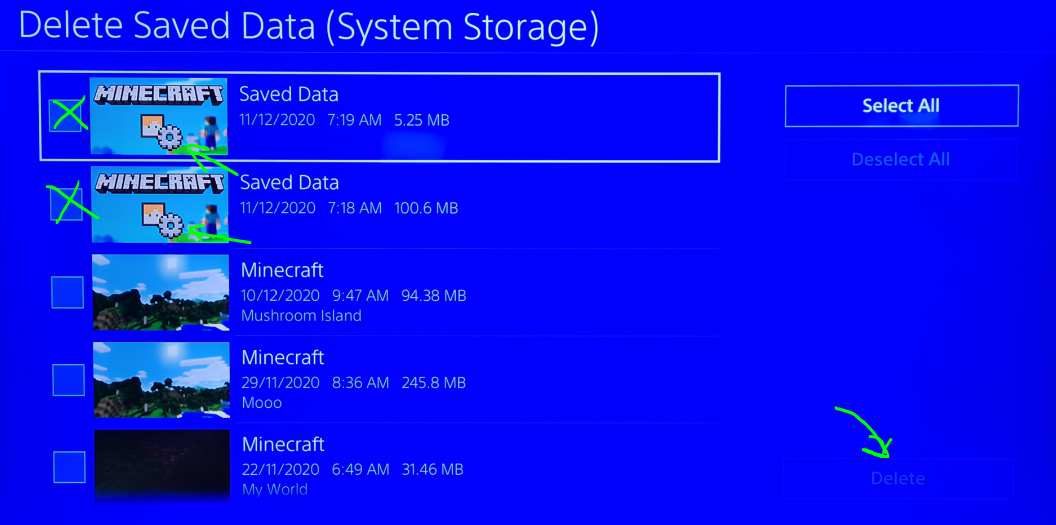

@Bryan Forseth I dropped "saved data" and only "saved data". And all my worlds are in place
I am having the same issue on a multiplayer server. we had 7 bees . came back two days later there was 1 left .
I started with the Disk version. since the update to the nether update i get this issue every couple of days . the only work around i know is to uninstall minecraft and reinstall it . but this lasts maybe 2 days and the longest
Uninstalling Minecraft and reinstalling when it gets stuck on the red Mojang screen is only a temporary fix. So far i have it only last about 4 days at the longest with out it going back to getting stuck. Once again as per my previous comment i am using the disk version of Minecraft updated to the lastest version of Minecraft. uninstalling and reinstalling Minecraft also seems to make the save file unstable. I have had an issue where the file because corrupted and i had to delete that part of the save. Thankfully i had a back up that was recent but this fix seems to cause more issues than it fixes
Bug still is a major issue. Holding the button combo L1 + R1 + L2 + R2 + OPTIONS + Touch Pad for a minute did not clear the screen. still having to uninstall and reinstall to fix the issue. this is still causing save files to be corrupt on repeat re-installs unless you have a access to a cloud backup.
Since the last update this issue has gotten worse . Uninstalling and reinstalling is the only way to get around the red screen. but repeated reinstalling is causing Corruption to the save files . the button combo listed by Devs no longer works .
Something I have tried that seems to be working most of the time.
When you open minecraft and get stuck on the red screen.
1 try button combo (knowing that it wont work)
2 push the playstation button on the controller and close the application
3 reopen minecraft and press the button combo right away.
This has worked for me recently and it works about 80% of the time .
@Christine this is not about VR . it as been happening long before VR support was added. Everyone needs to Vote for this issue. it currently has 216 votes. the higher the vote count the higher the priority on the issue. For those who coming here for non PS4 redscreen issues. please find the correct thread for your system and post there. we need to keep this thread about the redscreen issue and updates for it . we have many possible work arounds for PS4 users that have some success.
@Mudassar Khan I have had the same results just uninstalling minecraft and reinstalling it on the PS4. i had no need to delete anything from the cloud at all. as long as you just remove the game and reinstall, It should work fine for a random period of time. I have yet to find any correlation to what causes the redscreen of doom. it doesn't always happen on a update. the game gets shut down the same way everytime . my son plays on a single player offline world so there is no online interaction ( minus the store being connected) it just randomly breaks
@Mudassar Khan I am saying you don't have too do that .I am well over a month of no red screen just from reinstalling minecraft. if you delete saved data you delete world info so that step is useless because it will take down your world. just the act of reinstalling does the fix and it can be a one time fix or it has to be done lots. some times it lasts only a few days. but the last time i did it was well over a month ago. the saved data has nothing to do with the redscreen nor is the microsoft login because i never linked my microsoft account