 Mudassar Khan
- ultramoo
- ultramoo
- Europe/Stockholm
- Yes
- No
 MC-118391
![[Mojang] Georgii Gavrichev](../../../data/avatars/users/22428.png)
 WEB-6211



 MCPE-84790
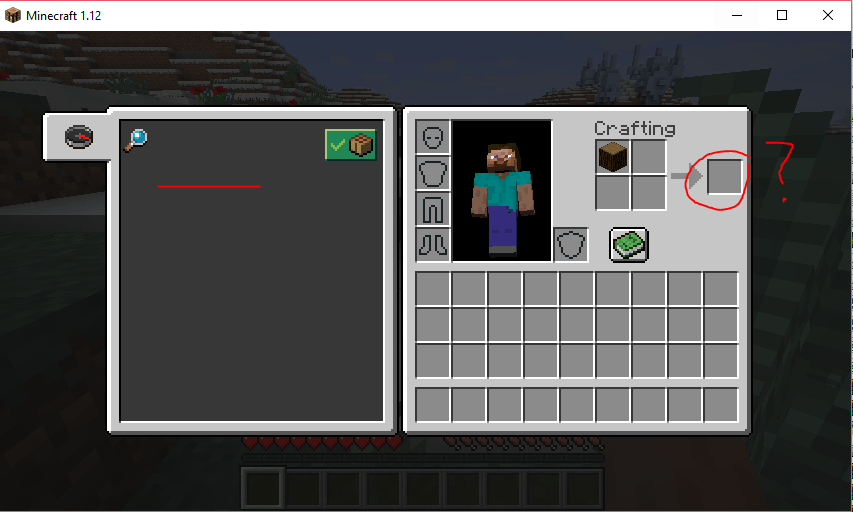
When running a minecraft server on Windows as a user with privileges limited to only the users minecraft folder, minecraft will not allow crafting. Crafting book is empty.
If I run the Minecraft server as an administrator, there is no problem however this is a huge security risk since I run multiple servers for different users.
This only impacts Minecraft version 1.12
1.11.2 and lower versions are not impacted.Reading from the console, I can see the following error messages which states that its attempting to access a file which might be outside the game server's folder. The question is, where is it trying to access the file? Why the change?
8/06/2017 7:58 AM: [MC]: java.nio.file.AccessDeniedException: C:\GAME SERVERS\user mct 9\minecraft_server.jar
8/06/2017 7:58 AM: [MC]: at sun.nio.fs.WindowsException.translateToIOException(WindowsException.java:83) ~[?:1.8.0_111]
8/06/2017 7:58 AM: [MC]: at sun.nio.fs.WindowsException.rethrowAsIOException(WindowsException.java:90) ~[?:1.8.0_111]
8/06/2017 7:58 AM: [MC]: at sun.nio.fs.WindowsLinkSupport.getRealPath(WindowsLinkSupport.java:259) ~[?:1.8.0_111]
8/06/2017 7:58 AM: [MC]: at sun.nio.fs.WindowsPath.toRealPath(WindowsPath.java:836) ~[?:1.8.0_111]
8/06/2017 7:58 AM: [MC]: at sun.nio.fs.WindowsPath.toRealPath(WindowsPath.java:44) ~[?:1.8.0_111]
8/06/2017 7:58 AM: [MC]: at com.sun.nio.zipfs.ZipFileSystemProvider.newFileSystem(ZipFileSystemProvider.java:111) ~[zipfs.jar:1.8.0_111]
8/06/2017 7:58 AM: [MC]: at java.nio.file.FileSystems.newFileSystem(FileSystems.java:326) ~[?:1.8.0_111]
8/06/2017 7:58 AM: [MC]: at java.nio.file.FileSystems.newFileSystem(FileSystems.java:276) ~[?:1.8.0_111]
8/06/2017 7:58 AM: [MC]: at nq.a(SourceFile:133) [minecraft_server.jar:?]
8/06/2017 7:58 AM: [MC]: at nq.a(SourceFile:73) [minecraft_server.jar:?]
8/06/2017 7:58 AM: [MC]: at nq.<init>(SourceFile:66) [minecraft_server.jar:?]
8/06/2017 7:58 AM: [MC]: at om.b(SourceFile:163) [minecraft_server.jar:?]
8/06/2017 7:58 AM: [MC]: at net.minecraft.server.MinecraftServer.a(SourceFile:281) [minecraft_server.jar:?]
8/06/2017 7:58 AM: [MC]: at nx.j(SourceFile:230) [minecraft_server.jar:?]
8/06/2017 7:58 AM: [MC]: at net.minecraft.server.MinecraftServer.run(SourceFile:434) [minecraft_server.jar:?]
8/06/2017 7:58 AM: [MC]: at java.lang.Thread.run(Thread.java:745) [?:1.8.0_111]When running a minecraft server on Windows as a user with privileges limited to only the users minecraft folder, minecraft will not allow crafting. Crafting book is empty.
If I run the Minecraft server as an administrator, there is no problem however this is a huge security risk since I run multiple servers for different users.
This only impacts Minecraft version 1.12
1.11.2 and lower versions are not impacted.Reading from the console, I can see the following error messages which states that its attempting to access a file which might be outside the game server's folder (please see attached). The question is, where is it trying to access the file? Why the change?
Impacts Windows OSs only (Windows 2012 in our case). Linux is fine
It seems when Minecraft 1.14 Prerelease 5 is idle, it still continues to consume CPU at a significantly higher rate than Minecraft 1.13.2
I've compared the 2 side by side from VisualVM on both Linux and Windows, but I cannot find the cause when I run a snapshot from CPU Sampler. Both results are same, but the CPU consumption is too high on 1.14 Pre5.
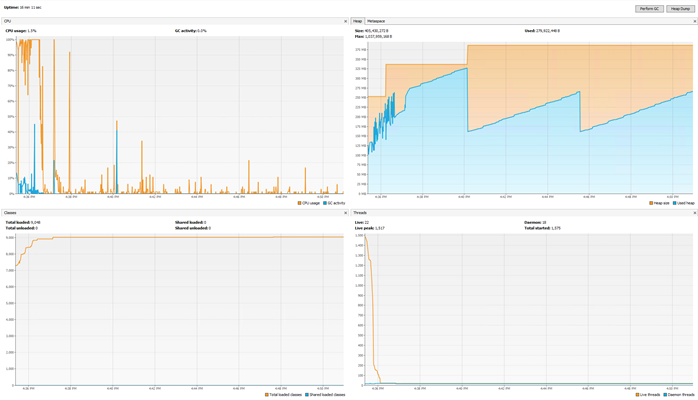
I have included screenshots from VisualVM running both Minecraft 1.13.2 and Minecraft 1.14
1.13.2:
1.14 Pre 5:
It seems when Minecraft 1.14 Prerelease 5 is idle, it still continues to consume CPU at a significantly higher rate than Minecraft 1.13.2
I've compared the 2 side by side from VisualVM on both Linux and Windows, but I cannot find the cause when I run a snapshot from CPU Sampler. Both results are same, but the CPU consumption is too high on 1.14 Pre5.
I have included screenshots from VisualVM running both Minecraft 1.13.2 and Minecraft 1.14
1.13.2 - Fresh start, No players, Monsters on, Animals on. 1GB RAM Allocated
1.14 Pre 5: Fresh start, No players, Monsters on, Animals on. 1GB RAM Allocated
Results did not change when I turned off Animals and Monsters.
Hardware:
Tested on Linux
and Windowsboth on Intel x5690 - 3.47Ghz , 64GB RAM, 440GB Intel SSDSoftware:
Minecraft 1.13.2
Miencraft 1.14 PreRelease 5
Used CPU Monitor and Java VisualVM
Hardware:
Tested on Linux Ubuntu 16.04 and Windows Server 2012 both on Intel x5690 - 3.47Ghz , 64GB RAM, 440GB Intel SSD
Software:
Minecraft 1.13.2
Miencraft 1.14 PreRelease 5
Used CPU Monitor and Java VisualVM
It seems when Minecraft 1.14 Prerelease 5 is idle, it still continues to consume CPU at a significantly higher rate than Minecraft 1.13.2
I've compared the 2 side by side from VisualVM on both Linux and Windows, but I cannot find the cause when I run a snapshot from CPU Sampler. Both results are same, but the CPU consumption is too high on 1.14 Pre5.
I have included screenshots from VisualVM running both Minecraft 1.13.2 and Minecraft 1.14
1.13.2 - Fresh start, No players, Monsters on, Animals on. 1GB RAM Allocated
1.14 Pre 5: Fresh start, No players, Monsters on, Animals on. 1GB RAM Allocated
Results did not change when I turned off Animals and Monsters.
Additional notes:
On Windows, the problem is intermittent... sometimes it might run smoothly and then its almost like something triggers it to go out of idle mode and start munching CPU.
On Linux the problem occurs 100% of the time.
It seems when Minecraft 1.14 Prerelease 5 is idle, it still continues to consume CPU at a significantly higher rate than Minecraft 1.13.2
I've compared the 2 side by side from VisualVM on both Linux and Windows, but I cannot find the cause when I run a snapshot from CPU Sampler. Both results are same, but the CPU consumption is too high on 1.14 Pre5.
I have included screenshots from VisualVM running both Minecraft 1.13.2 and Minecraft 1.14
1.13.2 - Fresh start, No players, Monsters on, Animals on. 1GB RAM Allocated
1.14 Pre 5: Fresh start, No players, Monsters on, Animals on. 1GB RAM Allocated
Results did not change when I turned off Animals and Monsters.
Additional notes:
On Windows, the problem is intermittent... sometimes it might run smoothly and then its almost like something triggers it to go out of idle mode and start munching CPU.
On Linux the problem occurs 100% of the time.
Theory #1:
I think it might have something to do with a large thread count of Netty Epoll Server IO (or Netty server IO on windows). On linux its running 60+ threads of this instance. On Windows, I noticed that there were over 50 threads when it started to go high cpu. But then were isn't a CPU issue the threadcount is <5.
This is still just a theory, I'm trying to replicate. B
It seems when Minecraft 1.14 Prerelease 5 is idle, it still continues to consume CPU at a significantly higher rate than Minecraft 1.13.2
I've compared the 2 side by side from VisualVM on both Linux and Windows, but I cannot find the cause when I run a snapshot from CPU Sampler. Both results are same, but the CPU consumption is too high on 1.14 Pre5.
I have included screenshots from VisualVM running both Minecraft 1.13.2 and Minecraft 1.14
1.13.2 - Fresh start, No players, Monsters on, Animals on. 1GB RAM Allocated
1.14 Pre 5: Fresh start, No players, Monsters on, Animals on. 1GB RAM Allocated
Results did not change when I turned off Animals and Monsters.
Additional notes:
On Windows, the problem is intermittent... sometimes it might run smoothly and then its almost like something triggers it to go out of idle mode and start munching CPU.
On Linux the problem occurs 100% of the time.
Theory #1:
I think it might have something to do with a large thread count of Netty Epoll Server IO (or Netty server IO on windows). On linux its running 60+ threads of this instance. On Windows, I noticed that there were over 50 threads when it started to go high cpu. But then were isn't a CPU issue the threadcount is <5.
This is still just a theory, I'm trying to replicate.
B
It seems when Minecraft 1.14 Prerelease 5 is idle, it still continues to consume CPU at a significantly higher rate than Minecraft 1.13.2
I've compared the 2 side by side from VisualVM on both Linux and Windows, but I cannot find the cause when I run a snapshot from CPU Sampler. Both results are same, but the CPU consumption is too high on 1.14 Pre5.
I have included screenshots from VisualVM running both Minecraft 1.13.2 and Minecraft 1.14
1.13.2 - Fresh start, No players, Monsters on, Animals on. 1GB RAM Allocated
1.14 Pre 5: Fresh start, No players, Monsters on, Animals on. 1GB RAM Allocated
Results did not change when I turned off Animals and Monsters.
Additional notes:
On Windows, the problem is intermittent... sometimes it might run smoothly and then its almost like something triggers it to go out of idle mode and start munching CPU.
On Linux the problem occurs 100% of the time.
Theory #1:
I think it might have something to do with a large thread count of Netty Epoll Server IO (or Netty server IO on windows). On linux its running 60+ threads of this instance. On Windows, I noticed that there were over 50 threads when it started to go high cpu. But then were isn't a CPU issue the threadcount is <5. (No players on server I might add)
This is still just a theory, I'm trying to replicate.
It seems when Minecraft 1.14 Prerelease 5 is idle, it still continues to consume CPU at a significantly higher rate than Minecraft 1.13.2
I've compared the 2 side by side from VisualVM on both Linux and Windows, but I cannot find the cause when I run a snapshot from CPU Sampler. Both results are same, but the CPU consumption is too high on 1.14 Pre5.
I have included screenshots from VisualVM running both Minecraft 1.13.2 and Minecraft 1.14
1.13.2 - Fresh start, No players, Monsters on, Animals on. 1GB RAM Allocated
1.14 Pre 5: Fresh start, No players, Monsters on, Animals on. 1GB RAM Allocated
Results did not change when I turned off Animals and Monsters.
Additional notes:
On Windows, the problem is intermittent... sometimes it might run smoothly and then its almost like something triggers it to go out of idle mode and start munching CPU.
On Linux the problem occurs 100% of the time.
Theory #1:
I think it might have something to do with a large thread count of Netty Epoll Server IO (or Netty server IO on windows). On linux its always running 60+ threads of this instance. On Windows, I noticed that there were over 50 threads when it started to go high cpu. But then were isn't a CPU issue the threadcount is <5. (No players on server I might add)
This is still just a theory, I'm trying to replicate.
It seems when Minecraft 1.14 Prerelease 5 is idle, it still continues to consume CPU at a significantly higher rate than Minecraft 1.13.2
I've compared the 2 side by side from VisualVM on both Linux and Windows, but I cannot find the cause when I run a snapshot from CPU Sampler. Both results are same, but the CPU consumption is too high on 1.14 Pre5.
I have included screenshots from VisualVM running both Minecraft 1.13.2 and Minecraft 1.14
1.13.2 - Fresh start, No players, Monsters on, Animals on. 1GB RAM Allocated
1.14 Pre 5: Fresh start, No players, Monsters on, Animals on. 1GB RAM Allocated
Results did not change when I turned off Animals and Monsters.
Additional notes:
On Windows, the problem is intermittent... sometimes it might run smoothly and then its almost like something triggers it to go out of idle mode and start munching CPU.
On Linux the problem occurs 100% of the time.
Theory #1:
I think it might have something to do with a large thread count of Netty Epoll Server IO (or Netty server IO on windows). On linux its always running 60+ threads of this instance. On Windows, I noticed that there were over 50 threads when it started to go high cpu. But then were isn't a CPU issue the threadcount is <5. (No players on server I might add)
This is still just a theory, I'm trying to replicate.
It seems when Minecraft 1.14 Prerelease 5 is idle, it still continues to consume CPU at a significantly higher rate than Minecraft 1.13.2
I've compared the 2 side by side from VisualVM on both Linux and Windows, but I cannot find the cause when I run a snapshot from CPU Sampler. Both results are same, but the CPU consumption is too high on 1.14 Pre5.
I have included screenshots from VisualVM running both Minecraft 1.13.2 and Minecraft 1.14
1.13.2 - Fresh start, No players, Monsters on, Animals on. 1GB RAM Allocated
1.14 Pre 5: Fresh start, No players, Monsters on, Animals on. 1GB RAM Allocated
Results did not change when I turned off Animals and Monsters.
Additional notes:
On Windows, the problem is intermittent... sometimes it might run smoothly and then its almost like something triggers it to go out of idle mode and start munching CPU.
On Linux the problem occurs 100% of the time.
Theory #1:
I think it might have something to do with a large thread count of Netty Epoll Server IO (or Netty server IO on windows). On linux its always running 60+ threads of this instance. On Windows, I noticed that there were over 50 threads when it started to go high cpu. But then were isn't a CPU issue the threadcount is <5. (No players on server I might add)
This is still just a theory, I'm trying to replicate.Theory #1 failed when I managed to see a large spawn of Netty Server IO on Windows in 1.14 PreRelease 5, there were no CPU issues at that time. I'm having trouble replicating the problem now on Windows. Linux is always a problem
High Idle CPU usage on Server Edition (Minecraft 1.14Pre 5)High Idle CPU usage on Server Edition (Minecraft 1.14 Release)
It seems when Minecraft 1.14
Prerelease 5is idle, it still continues to consume CPU at a significantly higher rate than Minecraft 1.13.2
I've compared the 2 side by side from VisualVM on both Linux and Windows, but I cannot find the cause when I run a snapshot from CPU Sampler. Both results are same, but the CPU consumption is too high on 1.14
Pre5.
I have included screenshots from VisualVM running both Minecraft 1.13.2 and Minecraft 1.14
1.13.2 - Fresh start, No players, Monsters on, Animals on. 1GB RAM Allocated
1.14
Pre 5: Fresh start, No players, Monsters on, Animals on. 1GB RAM Allocated
Results did not change when I turned off Animals and Monsters.
Additional notes:
On Windows, the problem is intermittent... sometimes it might run smoothly and then its almost like something triggers it to go out of idle mode and start munching CPU.
On Linux the problem occurs 100% of the time.
Theory #1:
I think it might have something to do with a large thread count of Netty Epoll Server IO (or Netty server IO on windows). On linux its always running 60+ threads of this instance. On Windows, I noticed that there were over 50 threads when itstartedto go high cpu. But then were isn't a CPU issue the threadcount is <5. (No players on server I might add)
This is still just a theory, I'm trying to replicate.Theory #1 failed when I managed to see a large spawn of Netty Server IO on Windows in 1.14 PreRelease 5, there were no CPU issues at that time. I'm having trouble replicating the problem now on Windows. Linux is always a problem
It seems when Minecraft 1.14 is idle, it still continues to consume CPU at a significantly higher rate than its predecessors like Minecraft 1.13.2
I've compared the 2 side by side from VisualVM on both Linux and Windows, but I cannot find the cause when I run a snapshot from CPU Sampler. Both results are same, but the CPU consumption is too high on 1.14.
I have included screenshots from VisualVM running both Minecraft 1.13.2 and Minecraft 1.14
1.13.2 - Fresh start, No players, Monsters on, Animals on. 1GB RAM Allocated
1.14: Fresh start, No players, Monsters on, Animals on. 1GB RAM Allocated
Results did not change when I turned off Animals and Monsters.
Additional notes:
On Windows, the problem is slightly intermittent... sometimes it might run smoothly and then its almost like something triggers it to go out of idle mode and start munching CPU.
On Linux the problem occurs 100% of the time.
A second issue (which could be related) is that Minecraft is consuming up the server thread by 100% nearly all the time. Players join and stay in a single area, but seems like the Server Thread is still doing something way abnormally high. (Appears to be working with chunks, even though chunks are loaded, perhaps a bug in chunk loading / looping?)
As a result, the server console repeatedly reports falling behind in ticks by 80ms to 2000ms. I've done as much tweaking as possible, even installed on a server with fastest single thread CPU core (Intel Core i7-9700K) https://www.cpubenchmark.net/singleThread.html. However even on this powerful CPU, its still maxing out the core for server thread.
This is only on Minecraft 1.14, previous stable versions have been fine.
Hardware:
Tested on Linux Ubuntu 16.04 and Windows Server 2012 both on Intel x5690 - 3.47Ghz , 64GB RAM, 440GB Intel SSD
Software:
Minecraft 1.13.2
Miencraft 1.14PreRelease5
Used CPU Monitor and Java VisualVM
It seems when Minecraft 1.14 is idle, it still continues to consume CPU at a significantly higher rate than its predecessors like Minecraft 1.13.2
I've compared the 2 side by side from VisualVM on both Linux and Windows, but I cannot find the cause when I run a snapshot from CPU Sampler. Both results are same, but the CPU consumption is too high on 1.14.
I have included screenshots from VisualVM running both Minecraft 1.13.2 and Minecraft 1.14
1.13.2 - Fresh start, No players, Monsters on, Animals on. 1GB RAM Allocated
1.14: Fresh start, No players, Monsters on, Animals on. 1GB RAM Allocated
Results did not change when I turned off Animals and Monsters.
Additional notes:
On Windows, the problem is slightly intermittent... sometimes it might run smoothly and then its almost like something triggers it to go out of idle mode and start munching CPU.
On Linux the problem occurs 100% of the time.
A second issue (which could be related) is that Minecraft is consuming up the server thread by 100% nearly all the time. Players join and stay in a single area, but seems like the Server Thread is still doing something way abnormally high. (Appears to be working with chunks, even though chunks are loaded, perhaps a bug in chunk loading / looping?)
As a result, the server console repeatedly reports falling behind in ticks by 80ms to 2000ms. I've done as much tweaking as possible, even installed on a server with fastest single thread CPU core (Intel Core i7-9700K) https://www.cpubenchmark.net/singleThread.html.
However even on this powerful CPU, its still maxing out the core for server thread.This is only on Minecraft 1.14, previous stable versions have been fine.
It seems when Minecraft 1.14 is idle, it still continues to consume CPU at a significantly higher rate than its predecessors like Minecraft 1.13.2
I've compared the 2 side by side from VisualVM on both Linux and Windows, but I cannot find the cause when I run a snapshot from CPU Sampler. Both results are same, but the CPU consumption is too high on 1.14.
I have included screenshots from VisualVM running both Minecraft 1.13.2 and Minecraft 1.14
1.13.2 - Fresh start, No players, Monsters on, Animals on. 1GB RAM Allocated
1.14: Fresh start, No players, Monsters on, Animals on. 1GB RAM Allocated
Results did not change when I turned off Animals and Monsters.
Additional notes:
On Windows, the problem is slightly intermittent... sometimes it might run smoothly and then its almost like something triggers it to go out of idle mode and start munching CPU.
On Linux the problem occurs 100% of the time.
A second issue (which could be related) is that Minecraft is consuming up the server thread by 100% nearly all the time. Players join and stay in a single area, but seems like the Server Thread is still doing something way abnormally high. (Appears to be working with chunks, even though chunks are loaded, perhaps a bug in chunk loading / looping?)
As a result, the server console repeatedly reports falling behind in ticks by 80ms to 2000ms.NOTE: I have found that the second issue is a known duplicate: https://bugs.mojang.com/browse/MC-138550
So this bug will now only focus on the first issue, which is high IDLE cpu usage. Minecraft server instance uses a considerable amount of CPU with no players in server. It is also a significant waste of earth resources considering how many instances of Minecraft 1.14 is running around the world.
I wanted to add that perhaps the reason why you get 5% on i7 4770k is maybe because it's single core thread is more powerful and 5% is proportional to that?
Edit sorry my bad it seems that's not the case. I'm quite curious now. Will perform some more tests
Not sure if it's the xeon chips. I've tested on both xeon E3-2670 and xeon E5-5670
On linux the problem is apparent on both. On windows it's intermittent or non-existant now.
Ive been meaning to test using Oracle JDK instead of OpenJDK but seems like you already did it. What version of Oracle JDK did you use?
My theory is that world tick events are unable to sync with entities & chunk blocks. As it loses sync, it piles up and eventually causes tps/tick to fall behind. Normally the minecraft main "server thread" reaches max when this happens but been its been so difficult to trace and replicate. Using the java profiling tools has proven to be insufficient, I get random results every time. So the problem appears to be at minecraft engine level rather than particular action or entity.

Mudassar Khan
Can you please stop repeating this? Even if you throw hardware at the server that does not resolve the UNDERLYING issue. You're just telling people to spend money upgrading to work around Mojang's error.
Yes, there is a floor to the CPU performance that can run a Minecraft server. This issue is about how quickly that floor has raised and whether or not that speed of that rise is legitimate or not. There has been an almost order of magnitude increase in per-user server load and it is unfair to ask people to lay out cash to work around a problem that Mojang SHOULD BE FIXING.
There are clear indications of MASSIVE inefficiencies in 1.14 and a significant lack of optimisation, both client side and server side. I suspect that this issue is because of a couple of big ticket items, like the insane increase in spawn chunk radius and 1.14's tendency to keep many many MANY more chunks loaded than previous versions and the INSANE increase in Villager processing cost, and a bunch of small ticket items are coming together to create the issues that people are experiencing.
Time and again people make it clear they are comparing 1.14 to 1.13 and you keep acting like they don't know what they are talking about and just should upgrade. Stop it. There is an obvious issue with 1.14, people keep providing mountains of evidence of the issue and you keep repeating the same non-advice. THERE IS NO AMOUNT OF HARDWARE YOU CAN THROW AT 1.14 TO MAKE IT RUN CORRECTLY: no matter what hardware you buy Minecraft will still not run efficiently. Yes, you can make it smooth, but the hardware required to do so (on a per-user basis) is 4 or 6 times 1.13. THAT IS INSANE. There is not enough extra content in 1.14 to justify that. There is an obvious issue. It is clear as day.
Hi Mudassar Khan. There were issues with our infrastructure earlier, are you able to retest now? We are seeing our services recovering.
Let us know if you still see issues!
Is that a joke? Who in the right mind would run a game as an Administrator? Please escalate this to your manager as you have no idea what you are talking about.
This is 100% a bug because the only way I can fix this is by modifying your code but I need the source.
Please provide me the source so I can fix it for you and also for 10,000 other servers in my community who are suffering as the result of this.
Thanks - The thing is the permissions are already set which allow user to have access.
After further analysis it seems you are using a new java module called zip fs. This attempts to access libraries within the minecraft jar file but it can't due to the file already being open by minecraft itself and zipfs appears to use a separate thread which is not part of the same process.
This appears to be a bug in Java and windows but fix only available for the unreleased version of java 1.9. Sadly I can;t use java 1.9 due to other side effects on the game.
Guess I'm on my own at the moment to find a solution. If your developers figure something out, please do let me know.
Thanks
Resolved the issue - zipfs checks access to each folder before it reaches the last one - which is unnecessary. Has been raised as a bug in java and fixed in unreleased version JRE 1.9.
For now I've set additional permissions from root folders with limited read access. Exposes folder paths sadly but better than nothing.
Can confirm still an issue on 19w05a. This problem is preventing proper performance testing of other components. Could this be taken to developers as a higher priority so we have sufficient testing time before release?
I believe this would impact Realms too when released? All their server's would overload and lock out.
Still an issue on Minecraft 1.14.1 release
not a bug. One of your json files is malformed - did you edit a file manually?
maybe whitelist.json or banned.json .. either remove all json files or fix the syntax and restart server
accept malformed JSON at line 1 column 1 path $
Some info:
For those testing on Spigot, please switch your server back to vanilla before reporting bugs here. I've already found a lot of chunk oversize issues with latest r1 release of Spigot 1.14.1 causing the server to lag as above with high cpu usage. When I switched to vanilla, it fixed all the chunks and lag was gone.
second info:
Using a newer generation CPUs Post 2015 did help for my case. If you look at cpubenchmark.net, check your cpu "single" thread rating. It should be at least 1600 points or above. Chunk loading is still single threaded from what I can see, so you need more powerful single thread. But you still need multiple cores so that Minecraft can push other processes like players into the other cores. This is just from my observation. I've been playing around with a lot of server machines to figure out whats going on. Would be nice if somebody can confirm
If you want it playable, have a look at your CPU model through CPU Benchmark.
FIRST: Single Thread: https://www.cpubenchmark.net/singleThread.html
MINIMUM Benchmark Points should be: 1600 or above (This will help prevent some of the TPS/Ticks falling behind problems in certain cases, such as during chunk loading and pvping but its not 100% perfect, loading chucks too fast will overwhelm like with any version of Minecraft. Though 1.14 series does use more CPU for this)
SECONDLY: For this type of CPU, you should have at least 4 cores reserved per Minecraft instance. So if your running 4 instances of Minecraft 1.14 servers, 16 cores is recommended. You should also have extra cores reserved for OS and other applications you might be running.
Christopher,
I didn't realize i mentioned upgrading of hardware before sorry. I saw a lot of crying posters so i was just making a post out to them.
Ive been playing around with so much hardware past few weeks since the release of 1.14 just to try making it work. This same issue happened when 1.13 was released. Mojang never fixed it. I don't see them fixing 1.14 either.
So solution, hopefully a temp solution (keep dreaming), is to upgrade, and yes maybe waste a lot of energy in doing do, which may impact the world environmentally. But since I did the upgrades ive had very little problems.
Peace
Quietust, that seems to align with some of my tests. I've had a hard time replicating sometimes on Windows. It does happen though, just not as frequent.
Perhaps its to do with OpenJDK and not supporting a certain sleep based command. If so, I'm sure Mojang could figure this one out quick enough and resolve it.
Still experiencing this issue on latest release Minecraft 1.14.3 using Ubuntu 16.04. Tried various CPUs.
Reading up on some posts above, @momcilo found that Ubuntu 18 resolved the issue as long as you set the timerslack_ns to 200,000 ? Could you advise what you did to set the timerslack on the instance? I'll do some tests in my own environment. Is there any way to do it on Ubuntu 16?
Still a problem on 1.14.4 Pre-Release 1
Tested on following CPUs:
i7 7700k
E5-2687W
E5-2670 & E5-2680
X5690
D-1541
Idles between 17% to 25% of a core with no players, no monsters, nothing but a empty void world.
All CPUs are on dedicated hardware with Ubuntu 16 and 18 (no virtual). 64GB minimum RAM. CPU set on high performance.
Getting a little out of hand. Has it been looked into at all?
@rafael ristovski - Is it possible to make this adjustment in ubuntu 16? If not, what OS did you use and what steps did you take to achieve this?
I'm seeing about 20% improvement at most, if that.
Where it was idling at 7.5% before (1.14.3).. now its 6% (1.14.4 Pre-6) on E5-2680 Intel CPU, Ubuntu 16 and similar ratios for other CPUs.
as a benchmark, 1.13 idles at 0.5% - 1.2% on the same CPU / OS
I think its got something to do with parknonos being used as a sleep/park function in 1.14 instead of the previous sleep in 1.13 and under. This might be related:
https://hazelcast.com/blog/locksupport-parknanos-under-the-hood-and-the-curious-case-of-parking/
This is going to be tricky to resolve as long as parknonos is used.
If there is any debug data we can provide you, let us know.
Tested on Ubuntu Server 18.04.2 LTS - same type of reduction ratio as Ubuntu 16 (maybe a bit more)
From 16% to 10% on a X5670 CPU (1.14.3 --> 1.14.4 Pre-Release 6)
Not near as low as 1.13.2, which idles at <1% but none the less a noticeable improvement.
I appreciate the effort made thus far, but I still think the root cause of the high idle CPU has not been resolved and a lot more can be saved.
May I know what the solution was to this?
When sync-chunk-writes=true, (for java dedicated server) it still causes a large amount of IO usage, slowing down chunk generation and overall server performance in proportion to the speed of the disk drive.
Was the solution just to set sync-chunk-writes to false ?
I'm having same issue on PS4 with digital version.
I have to delete and download again costing me 2.2GB of data and download time every time I do this.
So far I've had to do this 3 times in the last 7 days.
Update: was stuck in Mojang screen again.
Using the buttons: L1 + R1 + L2 + R2 + OPTIONS + Touch Pad did not help in first attempt. I pressed it for 3 mins until my fingers gave in (Really bad combination)
Then, in the PS4 menu, I went in options and forced closed Minecraft and started it up again, on second attempt still no good either. I repeated this process 4 more times (By closing Minecraft and opening and pressing buttons) until finally, I was able to get in and play! It didn't appear to clear my profile or sign in data (was it meant to?)
I'll update on next occurrence.
ok I had the mojang splash screen stuck again.
This time it took even longer to reset it with L1 + R1 + L2 + R2 + OPTIONS + Touch Pad. Had to close and restart the instance about 10 times and kept mashing the buttons until it finally registered and got me back in the main menu with the profile reset.
I am back in the game though after those many attempts
issue still not resolved after update. Though its been almost a month without incident, unfortunately its come back today. And this time I've tried L1 + R1 + L2 + R2 + OPTIONS + Touch Pad combo many times to no avail. It worked last time, not sure why this combo is not working this time.
It's now been 4 days and it's still stuck on the red mojang splash screen.
So I can conclude trying to wait for it to self resolve is pointless.
The button combinations not working anymore.
I've just reinstalled it and I'm back in.
Now everytime I see the red mojang logo screen I get anxiety. Who would have thought.
Is there a way to temp disable the red mojang splash screen? The White loading screen is way more helpful
L1 + R1 + L2 + R2 + OPTIONS + Touch Pad does not work.
Can you make a easier combination. My fingers are bleeding trying to press the combination
Could any of the moderators advise if Mojang are aware of the seriousness of this issue?
The workaround provided is not a solution and is difficult to execute (and sometimes it doesn't work and you have to reinstall the whole game).
We would really appreciate an update or at least a reason as to why its not yet resolved.
@Ren - I have two accounts also here, one PSN and one Local, I tried switching out of the local and went into the PSN account, didn't work for me. Still stuck in the red Mojang screen. I tried several different combinations, close game, start from PSN account, etc, didn't work. I don't think your issue is related to the Mojang's red screen of death issue.
I also tried the supersampling setting that one of the Mojang Moderators were talking about trying. Didn't work, my TV doesn't even support it according to PS4. It has supersampling disabled by default. (Maybe because I already play on 4k ? My TV is 2020 Samsung model) I tried changing the resolutions around and adjusted various video settings. None of them helped.
Its now been 1 hour and its still stuck on red screen so I'm giving up. I refuse to delete and download it again and again, so I'm jus leaving it on the Red screen until somebody has a solution. If anyone has anything for me to try, let me know.
Benuchø - this thread only focuses on the permanently stuck Mojang Red splash screen when starting up Minecraft on the PS4 - it prevents complete access to the game. The issue you have mentioned is not related and you should create a new issue for that (I think some already exist for that)
UPDATE: So its been several weeks since the game has been stuck in Red Mojang logo screen. I couldn't be bothered reinstalling the game, so my kids had been patiently waiting. Every morning, the 4 and 5 year old would start up the PS4, launch Minecraft and just wait for 30+ mins until they gave up and turned off TV.
For the first time ever this morning, they went to the PS4 room as normal and I heard shouting and screaming, rushed to the room thinking something was terribly wrong and to my surprise Minecraft had actually LOADED (The world data was still there)
They did nothing different. Just launch the game as normal every day for the past month. The only thing I noticed was the microsoft account needed to be logged in again to play online. I'll leave it as it is without logging on to see if it gets stuck ever again. They are playing as we speak and refuse to quit the game as to not jinx it. Looks like the TV is booked for the day.
Did Mojang do something or is this just a fluke ?
I'm currently stuck in the red screen I will try to disconnect internet and restart Minecraft to see if it will help.
UPDATE: Internet off, relaunched Minecraft, still stuck in red screen. Also rebooted PS4. I would have to conclude the issue is not related to the internet. (At least when it starts to happen.)
UPDATE: Deleting game app data for Minecraft via PlayStation settings did not fix the issue. How is this possible? When you delete the entire game, it starts to work but the same should apply when you delete the game app data files. Does this mean that Minecraft is saving app data in locations where it should not be? (Static location) This would be considered very bad coding and might explain why the issue hasn't been resolved for so long.
I think this has something to do with when you log into your Microsoft profile within Minecraft.
I've been a having this issue every week for past 3 to 4 months, but over the last month I've not seen a stuck red Mojang screen. The only reason I can think of is I did not log in this time and been just playing single player.
anyone else back me up on this?
Steps I took to resolve:
1) Delete Minecraft from PS4
2) Delete all Minecraft Data (config etc) from PS4 Local and Cloud vis the PS4 settings.
3) Reinstall Minecraft on PS4 - Do not log into Microsoft profile.
4) No issue for a month now.
I believe Step 2 is critical. If you don't delete all Minecraft Config Data from PS4 and Cloud, it will still cause a problem even if you don't log in.
@Bryan Forseth next time if you get stuck on the red screen try deleting the minecraft saved app data too. I'm sure if you do all the steps as I defined you won't see the issue again (hopefully!)
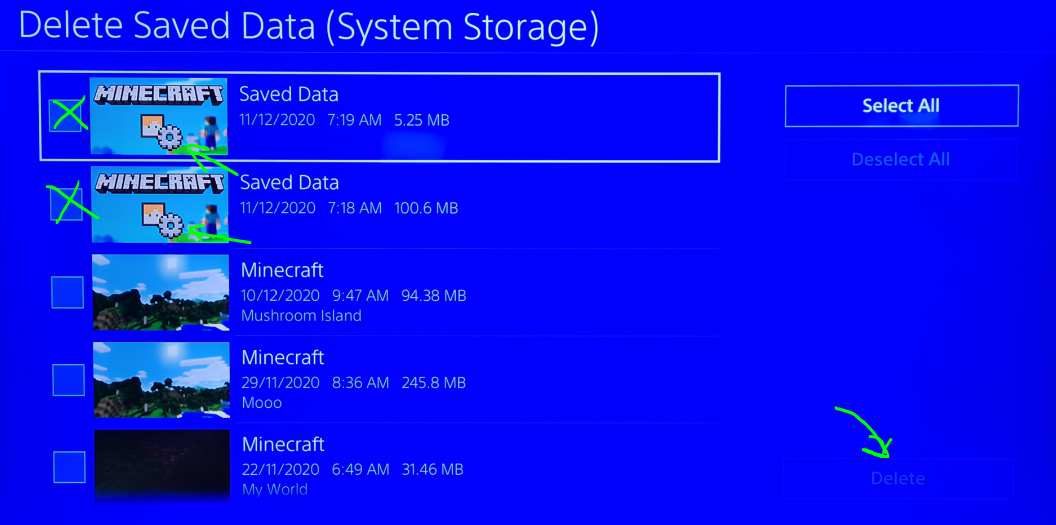
To do this, on PS4 go to Settings --> Application Saved Data Management --> Saved Data in System Storage --> Delete --> Choose Minecraft --> Check the Boxes where you see Sprocket icon and press Delete (see screenshot)
Now delete Minecraft as normal, reinstall it, start playing without logging into Microsoft Account, and hopefully you'll never see a stuck red mojang screen again!
FYI, I make no guarantee that your existing worlds will remain intact. We didn't lose ours but this is Minecraft. Anything goes.
I too had the red screen of death again on my PS4. After almost 2 months of trouble free - I thought the issue was finally behind us ,but just the other week the red screen came back. Didn't do anything different for the past 2 months.
I've had to uninstall and reinstall minecraft to get it going again. Nothing else worked.
All good now! Thanks
Wait what....
You resolved spawn-animals bug option by just removing the feature altogether?
We have been using this feature for 10+ years. How would we disable animals now?
That's actually what I had done but it still didn't work.
I've deleted the world folder completely and started from scratch but the server cannot generate the data packs.
I suppose just uploading an existing world from client to server is fine but thought I'd let you guys know anyway of the bug if you want to fix it.
I completely wiped all server files and that seems to have resolved the issue. I am not sure why it didn't work by just deleting the world files only.
I can no longer replicate the issue so you can go ahead and mark this as resolved. Thanks