 Kyle Rabe
- kyle8497
- kyle8497
- Europe/Stockholm
- Yes
- No
 MC-31658
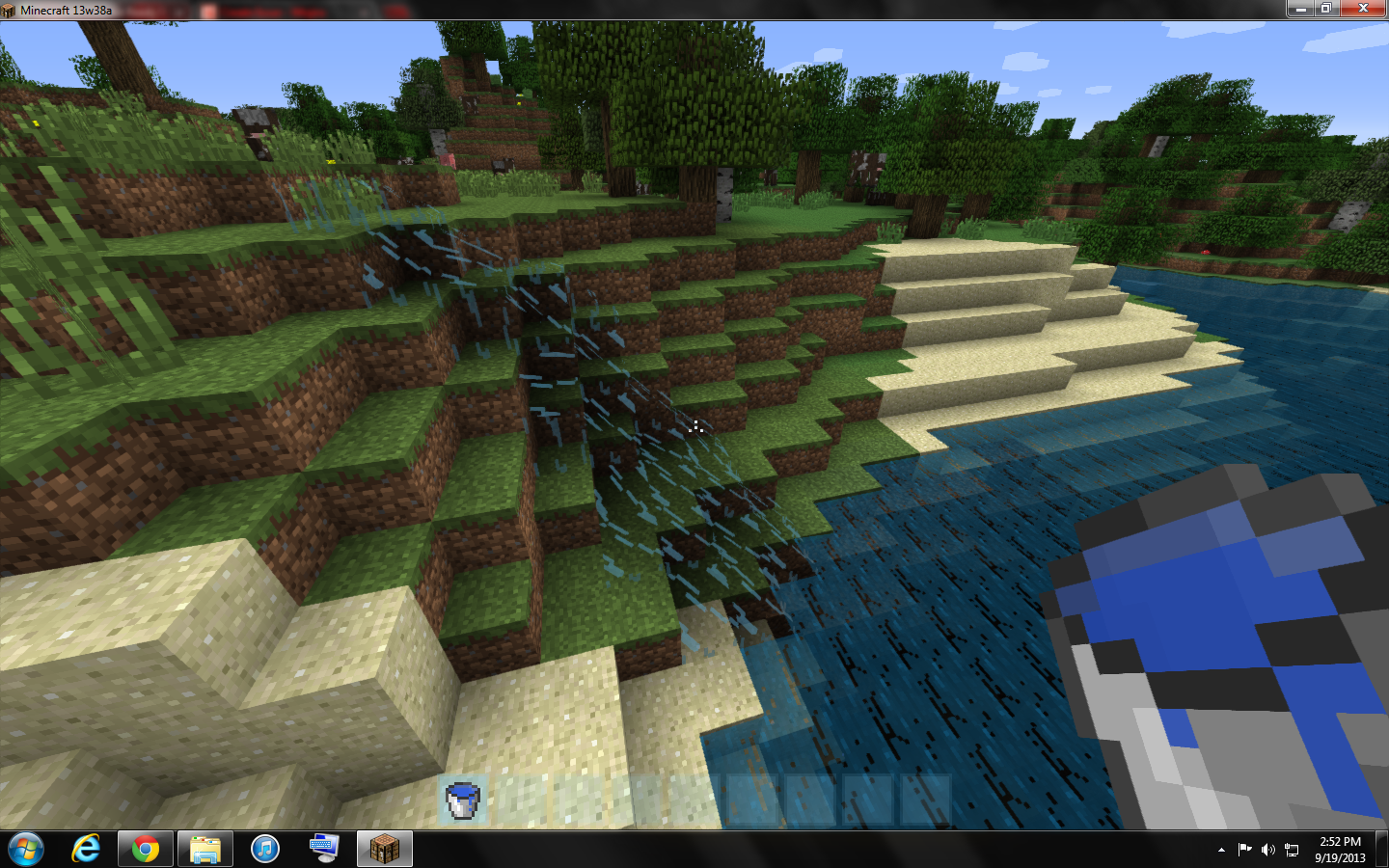
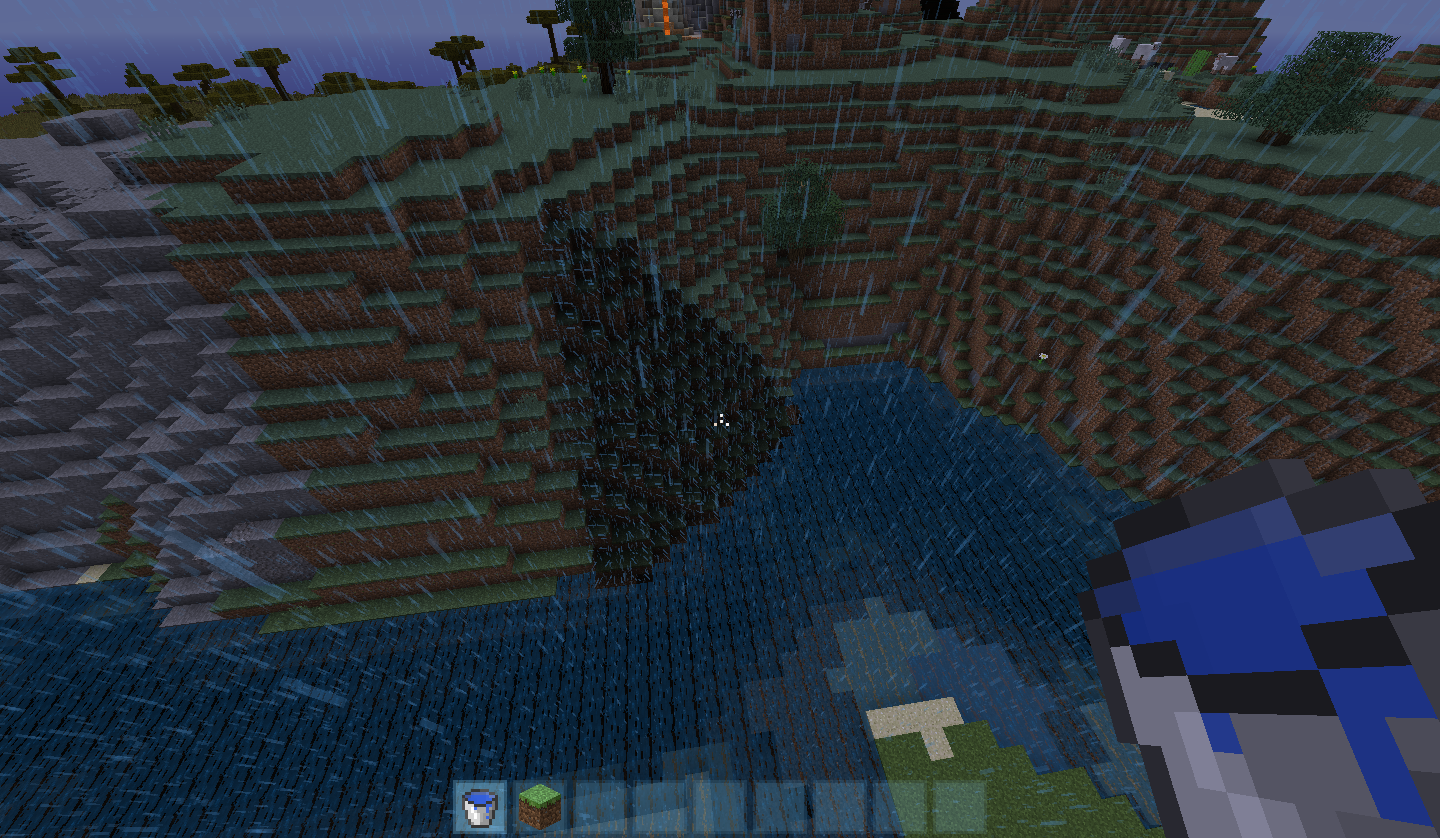
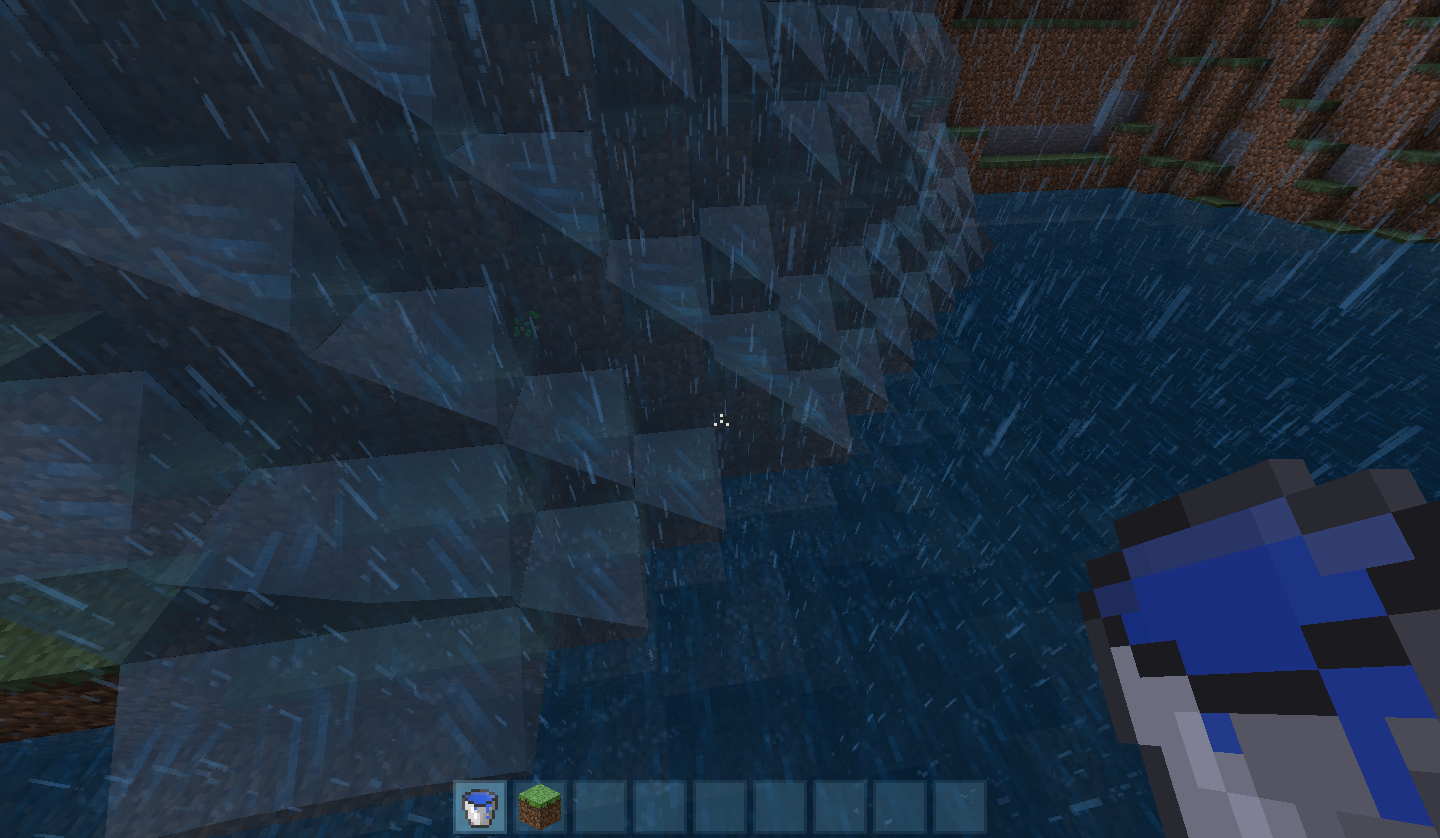


My custom resourcepack's water texture files worked fine in Snapshot 13w37b and now are broken, as in it has some parts of the texture missing.
My water_still.png has holes in the texture, water_flow.png has basically the opposite look of water_still.png, and rain.png is completely invisible (The particles of the rain hitting a surface still shows)
Custom Water Textures (water_still.png/water_flow.png/rain.png) are Broken.
Far away and close up pictures with Snapshot 13w38c. Normal at close range but broken at a distance.
My custom resourcepack's water texture files worked fine in Snapshot 13w37b and now are broken, as in it has some parts of the texture missing.
My water_still.png has holes in the texture, water_flow.png has basically the opposite look of water_still.png, and rain.png is completely invisible (The particles of the rain hitting a surface still shows)
EDIT: 13w38c - Custom rain has been fixed completely. Custom flowing and still water appear fine when close but at a distance they appear broken again.
EDIT: 13w39b - Flowing/still water are still broken at a distance.
My custom resourcepack's water texture files worked fine in Snapshot 13w37b and now are broken, as in it has some parts of the texture missing.
My water_still.png has holes in the texture, water_flow.png has basically the opposite look of water_still.png, and rain.png is completely invisible (The particles of the rain hitting a surface still shows)
EDIT: 13w38c - Custom rain has been fixed completely. Custom flowing and still water appear fine when close but at a distance they appear broken again.
EDIT: 13w39b - Flowing/still water are still broken at a distance.
EDIT: 13w41a - Flowing/still water are still broken at a distance.
My custom resourcepack's water texture files worked fine in Snapshot 13w37b and now are broken, as in it has some parts of the texture missing.
My water_still.png has holes in the texture, water_flow.png has basically the opposite look of water_still.png
, and rain.png is completely invisible (The particles of the rain hitting a surface still shows)EDIT: 13w38c - Custom rain has been fixed completely. Custom flowing and still water appear fine when close but at a distance they appear broken again.
EDIT: 13w39b - Flowing/still water are still broken at a distance.
EDIT: 13w41a - Flowing/still water are still broken at a distance.
My custom resourcepack's water texture files worked fine in Snapshot 13w37b and now are broken, as in it has some parts of the texture missing.
My water_still.png has holes in the texture, water_flow.png has basically the opposite look of water_still.png.
EDIT: 13w38c - Custom rain has been fixed completely. Custom flowing and still water appear fine when close but at a distance they appear broken again.
EDIT: 13w39b - Flowing/still water are still broken at a distance.
EDIT: 13w41a - Flowing/still water are still broken at a distance.
Demonstration on what happens with the transparency when I move to and from it.
My custom resourcepack's water texture files worked fine in Snapshot 13w37b and now are broken, as in it has some parts of the texture missing.
My water_still.png has holes in the texture, water_flow.png has basically the opposite look of water_still.png.
EDIT: 13w
38c - Custom rain has been fixed completely. Custom flowingandstill water appear fine when close but at a distance they appear broken again.EDIT: 13w
39b - Flowing/stillwater are still broken at a distance.EDIT: 13w41a - Flowing/still water are still broken at a distance.
My custom resourcepack's water texture files worked fine in Snapshot 13w37b and now are broken, as in it has some parts of the texture missing.
My water_still.png has holes in the texture, water_flow.png has basically the opposite look of water_still.png.
EDIT: 13w41a - Flowing/still water are still broken at a distance.
EDIT: 13w42a - Everything appears to be fixed from what I've tested. Please post your feedback from the new snapshot.
 MC-32011
When you sprint/land on the edge of a block that is next to a water (Flowing or source block) from a height while flying in Creative Mode, the shockwave of particles that appear are particles of water and not of the block you landed on. The particles also appear over the water block and not where you are.
I am aware of
MC-9553, but this is not that bug.
Sprinting/Landing on the edge of a block that's next to water will cause a shockwave of water particles instead of particles of the block you're on.
To remove interface text (What I mean by interface text is, for example, when you open a Crafting Table, it says "Crafting" and "Inventory" over the interface in gray text.) in a language file, you go into the language file and replace the value, for example, "Chest" in the code "container.chest=Chest" with a space so there's no visible text.
For some odd reason it doesn't work for all interfaces. I haven't made an error, believe me. I've done it over and over and the same interfaces have this issue. It's usually dispenser, normal chests, enchanting tables, and furnaces.
In the la
stest Minecraft versions, the coding layout for language files has changed and more text can't be made invisible and/or just takes the text from other code in the same line. I have a language file from earlier coding versions that works almost perfectly, but Dispensers and Chests still wouldn't disappear.To remove interface text (What I mean by interface text is, for example, when you open a Crafting Table, it says "Crafting" and "Inventory" over the interface in gray text.) in a language file, you go into the language file and replace the value, for example, "Chest" in the code "container.chest=Chest" with a space so there's no visible text.
For some odd reason it doesn't work for all interfaces. I haven't made an error, believe me. I've done it over and over and the same interfaces have this issue. It's usually dispenser, normal chests, enchanting tables, and furnaces.
In the latest Minecraft versions, the coding layout for language files has changed and more text can't be made invisible and/or just takes the text from other code in the same line. I have a language file from earlier coding versions that works almost perfectly, but Dispensers and Chests still wouldn't disappear.
The language file I uploaded (en_MP) is an earlier version of the language files where I could remove most of the text.
To remove interface text (What I mean by interface text is, for example, when you open a Crafting Table, it says "Crafting" and "Inventory" over the interface in gray text.) in a language file, you go into the language file and replace the value, for example, "Chest" in the code "container.chest=Chest" with a space so there's no visible text.
For some odd reason it doesn't work for all interfaces. I haven't made an error, believe me. I've done it over and over and the same interfaces have this issue. It's usually dispenser, normal chests, enchanting tables, and furnaces.
In the latest Minecraft versions, the coding layout for language files has changed and more text can't be made invisible and/or just takes the text from other code in the same line. I have a language file from earlier coding versions that works almost perfectly, but Dispensers and Chests still wouldn't disappear.
The language file I uploaded (en_MP) is an earlier version of the language files where I could remove most of the text.
To remove interface text (What I mean by interface text is, for example, when you open a Crafting Table, it says "Crafting" and "Inventory" over the interface in gray text.) in a language file, you go into the language file and replace the value, for example, "Chest" in the code "container.chest=Chest" with a space so there's no visible text.
For some odd reason it doesn't work for all interfaces. I haven't made an error, believe me. I've done it over and over and the same interfaces have this issue. It's usually dispenser, normal chests, enchanting tables, and furnaces.
In the latest Minecraft versions, the coding layout for language files has changed and more text can't be made invisible and/or just takes the text from other code in the same line. I have a language file from earlier coding versions that works almost perfectly, but Dispensers and Chests still wouldn't disappear.
Information on Uploaded Language Files
The language file "en_MP" is the first version of language files made my Mojang. Here, most of the interface text could be removed.
The language file "en_MP_1.7.2" is the newer style of language files and uses the same technique to remove interface text but is worse as it doesn't notice there's spaces as values in more places.
To remove interface text (What I mean by interface text is, for example, when you open a Crafting Table, it says "Crafting" and "Inventory" over the interface in gray text.) in a language file, you go into the language file and replace the value, for example, "Chest" in the code "container.chest=Chest" with a space so there's no visible text.
For some odd reason it doesn't work for all interfaces. I haven't made an error, believe me. I've done it over and over and the same interfaces have this issue. It's usually dispenser, normal chests, enchanting tables, and furnaces.
In the latest Minecraft versions, the coding layout for language files has changed and more text can't be made invisible and/or just takes the text from other code in the same line. I have a language file from earlier coding versions that works almost perfectly, but Dispensers and Chests still wouldn't disappear.
Information on Uploaded Language Files
The language file "en_MP" is the first version of language files mademy Mojang. Here, most of the interface text could be removed.
The language file "en_MP_1.7.2" is the newer style of language files and uses the same technique to remove interface text but is worse as it doesn't notice there's spaces as values in more places.To remove interface text (What I mean by interface text is, for example, when you open a Crafting Table, it says "Crafting" and "Inventory" over the interface in gray text.) in a language file, you go into the language file and replace the value, for example, "Chest" in the code "container.chest=Chest" with a space so there's no visible text.
For some odd reason it doesn't work for all interfaces. I haven't made an error, believe me. I've done it over and over and the same interfaces have this issue. It's usually dispenser, normal chests, enchanting tables, and furnaces.
In the latest Minecraft versions, the coding layout for language files has changed and more text can't be made invisible and/or just takes the text from other code in the same line. I have a language file from earlier coding versions that works almost perfectly, but Dispensers and Chests still wouldn't disappear.
Information on Uploaded Language Files
The language file "en_MP" is the first version of language files made by Mojang. Here, most of the interface text could be removed.
The language file "en_MP_1.7.2" is the newer style of language files and uses the same technique to remove interface text but is worse as it doesn't notice there's spaces as values in more places.
To remove interface text (What I mean by interface text is, for example, when you open a Crafting Table, it says "Crafting" and "Inventory" over the interface in gray text.) in a language file, you go into the language file and replace the value, for example, "Chest" in the code "container.chest=Chest" with a space so there's no visible text.
For some odd reason it doesn't work for all interfaces. I haven't made an error, believe me. I've done it over and over and the same interfaces have this issue. It's usually dispenser, normal chests, enchanting tables, and furnaces.
In the latest Minecraft versions, the coding layout for language files has changed and more text can't be made invisible and/or just takes the text from other code in the same line. I have a language file from earlier coding versions that works almost perfectly, but Dispensers and Chests still wouldn't disappear.
Information on Uploaded Language Files
The language file "en_MP" is the first version of language files made by Mojang. Here, most of the interface text could be removed.
The language file "en_MP_1.7.2" is the newer style of language files and uses the same technique to remove interface text but is worse as it doesn't notice there's spaces as values in more places.
To remove interface text (What I mean by interface text is, for example, when you open a Crafting Table, it says "Crafting" and "Inventory" over the interface in gray text.) in a language file, you go into the language file and replace the value, for example, "Chest" in the code "container.chest=Chest" with a space so there's no visible text.
For some odd reason it doesn't work for all interfaces. I haven't made an error, believe me. I've done it over and over and the same interfaces have this issue. It's usually dispenser, normal chests, enchanting tables, and furnaces.
In the latest Minecraft versions, the coding layout for language files has changed and more text can't be made invisible and/or just takes the text from other code in the same line. I have a language file from earlier coding versions that works almost perfectly, but Dispensers and Chests still wouldn't disappear.
Information on Uploaded Language Files
The language file "en_MP" is the first version of language files made by Mojang. Here, most of the interface text could be removed.
The language file "en_MP_1.7.2" is the newer style of language files and uses the same technique to remove interface text butvthe coding is worse as it doesn't notice there's spaces as values in more places.
en_MP_1.7.2.lang
To remove interface text (What I mean by interface text is, for example, when you open a Crafting Table, it says "Crafting" and "Inventory" over the interface in gray text.) in a language file, you go into the language file and replace the value, for example, "Chest" in the code "container.chest=Chest" with a space so there's no visible text.
For some odd reason it doesn't work for all interfaces. I haven't made an error, believe me. I've done it over and over and the same interfaces have this issue. It's usually dispenser, normal chests, enchanting tables, and furnaces.
In the latest Minecraft versions, the coding layout for language files has changed and more text can't be made invisible and/or just takes the text from other code in the same line. I have a language file from earlier coding versions that works almost perfectly, but Dispensers and Chests still wouldn't disappear.
Information on Uploaded Language Files
The language file "en_MP" is the first version of language files made by Mojang. Here, most of the interface text could be removed.
The language file "en_MP_1.7.2" is the newer style of language files and usesthe same technique to remove interface text butvthe codingis worse as it doesn't notice there's spaces as values in more places.To remove interface text (What I mean by interface text is, for example, when you open a Crafting Table, it says "Crafting" and "Inventory" over the interface in gray text.) in a language file, you go into the language file and replace the value, for example, "Chest" in the code "container.chest=Chest" with a space so there's no visible text.
For some odd reason it doesn't work for all interfaces. I haven't made an error, believe me. I've done it over and over and the same interfaces have this issue. It's usually dispenser, normal chests, enchanting tables, and furnaces.
In the latest Minecraft versions, the coding layout for language files has changed and more text can't be made invisible and/or just takes the text from other code in the same line. I have a language file from earlier coding versions that works almost perfectly, but Dispensers and Chests still wouldn't disappear.
Information on Uploaded Language Files
The language file "en_MP" is the first version of language files made by Mojang. Here, most of the interface text could be removed.
The language file "en_MP_1.7.2" is the newer style of language files and I used the same technique to remove interface text but the new coding doesn't recognize there's spaces as values in more places.
To remove interface text (What I mean by interface text is, for example, when you open a Crafting Table, it says "Crafting" and "Inventory" over the interface in gray text.) in a language file, you go into the language file and replace the value, for example, "Chest" in the code "container.chest=Chest" with a space so there's no visible text.
For some odd reason it doesn't work for all interfaces. I haven't made an error, believe me. I've done it over and over and the same interfaces have this issue. It's usually dispenser, normal chests, enchanting tables, and
furnaces.In the latest Minecraft versions, the coding layout for language files has changed and more text can't be made invisible and/or just takes the text from other code in the same line. I have a language file from earlier coding versions that works almost perfectly, but Dispensers and Chests still wouldn't disappear.
Information on Uploaded Language Files
The language file "en_MP" is the first version of language files made by Mojang. Here, most of the interface text could be removed.
The language file "en_MP_1.7.2" is the newer style of language files and I used the same technique to remove interface text but the new coding doesn't recognize there's spaces as values in more places.To remove interface text (What I mean by interface text is, for example, when you open a Crafting Table, it says "Crafting" and "Inventory" over the interface in gray text.) in a language file, you go into the language file and replace the value, for example, "Chest" in the code "container.chest=Chest" with a space so there's no visible text.
For some odd reason it doesn't work for all interfaces. I haven't made an error, believe me. I've done it over and over and the same interfaces have this issue. It's usually dispenser, normal chests, enchanting tables, and brewing stands.
In the latest Minecraft versions, the coding layout for language files has changed and more text can't be made invisible and/or just takes the text from other code in the same line. I have a language file from earlier coding versions that works almost perfectly, but Dispensers and Chests still wouldn't disappear.
Information on Uploaded Language Files
The language file "en_MP" is the first version of language files made by Mojang. Here, most of the interface text could be removed.
The language file "en_MP_1.7.2" is the newer style of language files and I used the same technique to remove interface text but the new coding doesn't recognize there's spaces as values in more places.
Hey insomniac_lemon! You seem to be fascinated by my (Kyle8497) posts, especially on the Minecraft Forums! I must thank you for your input on this as well.
I just downloaded the updated Snapshot 13w38c and noticed that the textures work fine when you're close to the water, but are broken when at a distance. I uploaded two more pictures that show what I mean. Oh, and custom rain works now.
EDIT: This happens whether mipmapping is on or off.
Assumes I didn't search... well I always search for a similar bug but nothing appeared that was relevant to what I searched. So I say that it's just a bad search mechanic.
Everything appears to be fixed in the new snapshot, 13w42a. Please see if it is fixed for you, too, or if you manage to find it being broken again.
@Mod Ezekiel
OK, my mistake, the furnace text disappears but the other listed interfaces (I removed furnace and replaced it with brewing stand) listed in the description do not work. Download the "en_MP_1.7.2.lang" language file, examine the code, then place it in your game files to see what I mean. If needed, I can post an image of the code in the language file and then take some screenshots of the game interfaces that do not work, just let me know.
You must change all of the other titles to " ", first. That's when it starts to bug out.
I uploaded a quickly-put-together collage of the .lang file code and what the titles look like in-game.
What do you mean by "weird line breaking?". I copied the default "en_US" that is in the game files and replaced all the "container.Inventory=Inventory", etc, with spaces. I did nothing more.
Then how do I fix something I didn't break?
OK, I figured I should do that, thanks for telling me though. Thanks for helping me solve this problem, too. The last thing I have to say is that it should come spaced out with line breaks instead of jumbled up as it was.