 Lorenzo Federici
- LorenzoF06
- lorenzof06
- Europe/Stockholm
- Yes
- No
 MC-133679
![[Mojang] Felix Jones](../../../data/avatars/users/40484.png)
 Normal
 Low
Low












Hi!After downloading the pre-release 9 I gone in my world using the data pack I'm making (it works in pre8) and after 30-60 the game crashesAfter downloading the pre-release 9 I gone in my world using the data pack I'm making (it works in pre8) and after 30-60 the game crashes
I don't know if the presence of the data pack changes something, I will try
After downloading the pre-release 9 I gone in my world using the data pack I'm making (it works in pre8) and after 30-60 the game crashes
I don't know if the presence of the data pack changes something, I will tryAfter downloading the pre-release 9 I gone in my world using the data pack I'm making (it works in pre8) and after 30-60 the game crashes
The world was created in pre8, creating a world in pre9 doesn't crash the game
After downloading the pre-release 9 I gone in my world using the data pack I'm making (it works in pre8) and after 30-60 the game crashes
The world was created in pre8
, creating a world in pre9 doesn't crash the gameAfter downloading the pre-release 9 I gone in my world using the data pack I'm making (it works in pre8) and after 30-60 the game crashes
The world was created in pre8
Creating a world in pre9 doesn't crash the game
Now I'll try adding a data pack to the pre9 world
After downloading the pre-release 9 I gone in my world using the data pack I'm making (it works in pre8) and after 30-60 the game crashes
The world was created in pre8
Creating a world in pre9 doesn't crash the game
Now I'll try adding a data pack to the pre9 world
After downloading the pre-release 9 I gone in my world using the data pack I'm making (it works in pre8) and after 30-60 the game crashes
The world was created in pre8
Creating a world in pre9 (and adding data packs in worlds created in 1.13-pre9) doesn't crash the game
After downloading the pre-release 9 I gone in my world using the data pack I'm making (it works in pre8) and after 30-60 the game crashes
The world was created in pre8
Creating a world in pre9 (and adding data packs in worlds created in 1.13-pre9) doesn't crash the game
Now I'll try opening a 1.13-pre8 world in 1.13-pre9
After downloading the pre-release 9 I gone in my world using the data pack I'm making (it works in pre8) and after 30-60 the game crashes
The world was created in pre8
Creating a world in pre9
(and adding data packs in worlds created in 1.13-pre9)doesn't crash the game
Now I'll try opening a 1.13-pre8 world in 1.13-pre9After downloading the pre-release 9 I gone in my world using the data pack I'm making (it works in pre8) and after 30-60 the game crashes
The world was created in pre8
Creating a world in pre9 doesn't crash the game
Adding data packs in worlds created in 1.13-pre9 doesn't crash the game
Opening in 1.13-pre9 a 1.13-pre8 world doesn't crash the game
After downloading the pre-release 9 I gone in my world using the data pack I'm making (it works in pre8) and after 30-60 the game crashes
The world was created in pre8
Creating a world in pre9 doesn't crash the game
Adding data packs in worlds created in 1.13-pre9 doesn't crash the game
Opening in 1.13-pre9 a 1.13-pre8 world doesn't crash the game
Adding data packs in 1.13-pre9 in worlds created in 1.13-pre8 doesn't crash the game
Loading a world like the bugged world at the start of the description doesn't crash the game...
so that world is bugged
I'll make a new one

Minecraft 1.13-pre9 crashes after30-60 seconds from startingMinecraft 1.13-pre9 crashes after opening a 1.13-pre8 world with data packs (semi-solved)
Minecraft 1.13-pre9 crashes after opening a 1.13-pre8 world with data packs (semi-solved)Minecraft 1.13-pre9 crashes after opening a 1.13-pre8 world with data packs (only that world crashes the game)
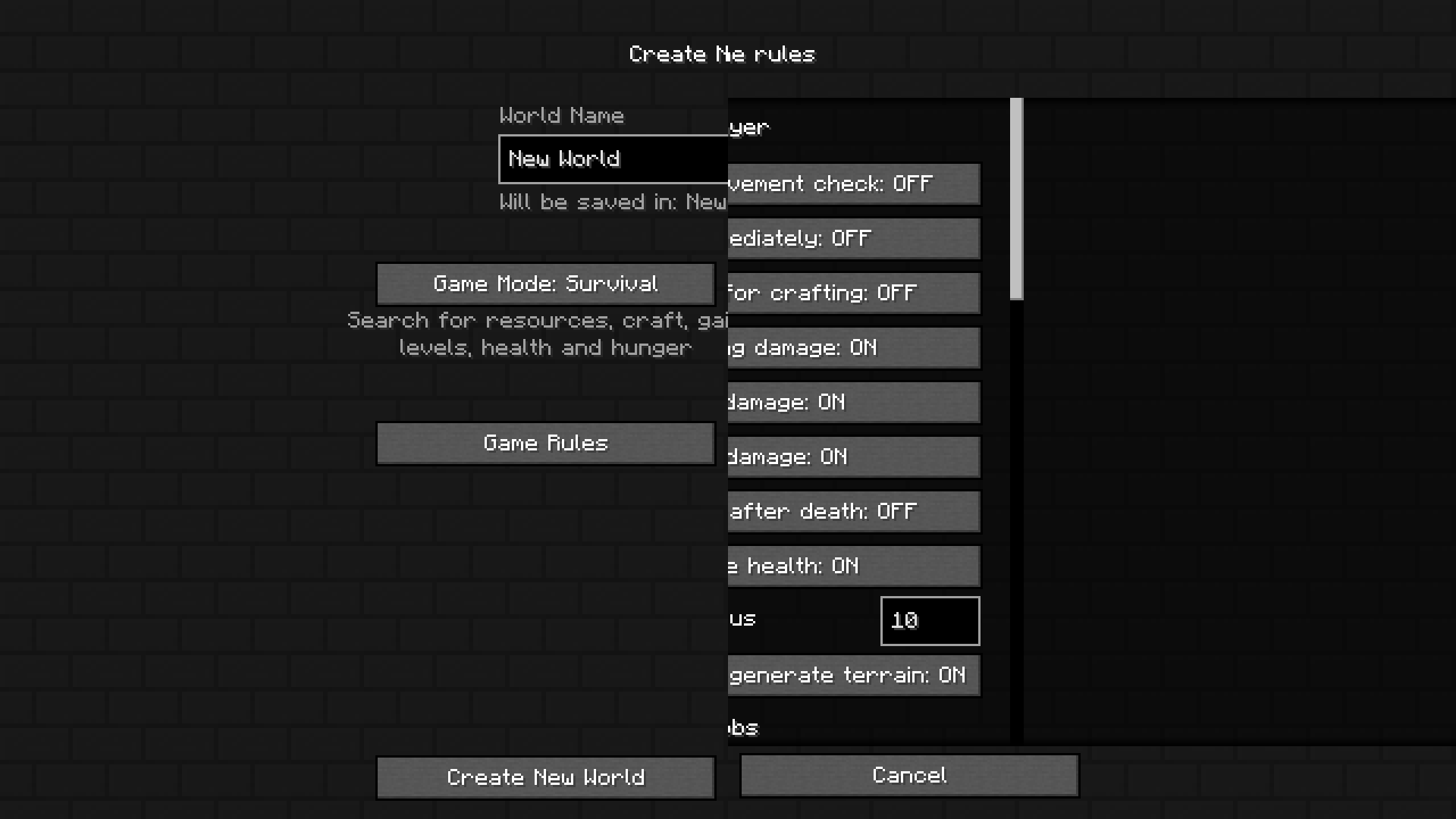
When adding a lot of data packs to a world, the text overlaps the buttons.
(Credits: xisumavoid)

Overlapwhen importing multiple data packsText overlaps buttons when importing multiple data packs
When adding a lot of data packs to a world, the text overlaps the buttons.
(Credits: xisumavoid)
When adding a lot of data packs to a world, the text overlaps the buttons.
(Credits: xisumavoid)
image-2020-06-05-18-32-24-012.png
The pixel 48, 87 in assets/minecraft/textures/font/nonlatin_european.png shouldn't be there as that's an German lowercase Eszett/sharp S (ß, U+00DF), and not a Greek lowercase beta (β, U+03B2). The long tail can be accepted in cursive writing, but that's not the case.
What I expected to happen was...:
That letter shouldn't have a tail.What actually happened was...:
That letter has a tail, making it look like a Greek β or as a Latin B with a tail.Steps to Reproduce:
Write "ß" in any of the text fields in the game, such as the chat.The pixel 48, 87 in assets/minecraft/textures/font/nonlatin_european.png shouldn't be there as that's an German lowercase Eszett/sharp S (ß, U+00DF), and not a Greek lowercase beta (β, U+03B2). The long tail can be accepted in cursive writing, but that's not the case.
What I expected to happen was...:
That letter shouldn't have a tail. I've attached both how it could be without that pixel and another proposal compared to B/β/ẞ.What actually happened was...:
That letter has a tail, making it look like a Greek β or as a Latin B with a tail.Steps to Reproduce:
Write "ß" in any of the text fields in the game, such as the chat.
The pixel 48, 87 in assets/minecraft/textures/font/nonlatin_european.png shouldn't be there as that's a
nGerman lowercase Eszett/sharp S (ß, U+00DF), and not a Greek lowercase beta (β, U+03B2). The long tail can be accepted in cursive writing, but that's not the case.What I expected to happen was...:
That letter shouldn't have a tail. I've attached both how it could be without that pixel and another proposal compared to B/β/ẞ.What actually happened was...:
That letter has a tail, making it look like a Greek β or as a Latin B with a tail.Steps to Reproduce:
Write "ß" in any of the text fields in the game, such as the chat.
The pixel 48,
87 in assets/minecraft/textures/font/nonlatin_european.png shouldn't be there as that's a German lowercase Eszett/sharp S (ß, U+00DF), and not a Greek lowercase beta (β, U+03B2). The long tail can be accepted in cursive writing, but that's not the case.What I expected to happen was...:
That letter shouldn't have a tail. I've attached both how it could be without that pixel and another proposal compared to B/β/ẞ.What actually happened was...:
That letter has a tail, making it look like a Greek β or as a Latin B with a tail.Steps to Reproduce:
Write "ß" in any of the text fields in the game, such as the chat.
The pixel 48,87 in assets/minecraft/textures/font/nonlatin_european.png shouldn't be there as that's a German lowercase Eszett/sharp S (ß, U+00DF), and not a Greek lowercase beta (β, U+03B2). The long tail can be accepted in cursive writing, but that's not the case.
What I expected to happen was...:
That letter shouldn't have a tail. I've attached both how it could be without that pixel and another proposal compared to B/β/ẞ.What actually happened was...:
That letter has a tail, making it look like a Greek β or as a Latin B with a tail.Steps to Reproduce:
Write "ß" in any of the text fields in the game, such as the chat.The pixel 48,87 in assets/minecraft/textures/font/nonlatin_european.png shouldn't be there as that's a German lowercase Eszett/sharp S (ß, U+00DF), and not a Greek lowercase beta (β, U+03B2). The long tail can be accepted in cursive writing, but that's not the case.
What I expected to happen was...:
That letter shouldn't have a tail. I've attached both how it could be without that pixel and another proposal compared to B/β/ẞ.What actually happened was...:
That letter has a tail, making it look like a Greek β or as a Latin B with a tail.Steps to Reproduce:
Write "ß" in any of the text fields in the game, such as the chat.
The pixel 48,87 in assets/minecraft/textures/font/nonlatin_european.png shouldn't be there as that's a German lowercase Eszett/sharp S (ß, U+00DF), and not a Greek lowercase beta (β, U+03B2). The long tail can be accepted in cursive writing, but that's not the case.
What I expected to happen was...:
That letter shouldn't have a tail. I've attached both how it could be without that pixel and another proposal compared to B/β/ẞ.What actually happened was...:
That letter has a tail, making it look like a Greek β or as a Latin B with a tail.Steps to Reproduce:
Write "ß" in any of the text fields in the game, such as the chat.The pixel 48,87 in assets/minecraft/textures/font/nonlatin_european.png shouldn't be there as that's a German lowercase Eszett/sharp S (ß, U+00DF), and not a Greek lowercase beta (β, U+03B2). The long tail can be accepted in cursive writing, but that's not the case.
That letter shouldn't have a tail, because the tail makes it look like a Greek β or like a Latin B with a tail.
I've attached both how it could be without that pixel and another proposal compared to B/β/ẞ.The three symbols, both uppercase and lowercase, in case you need to copy and paste
Latin B b
Greek Β β
German ẞ ßa
The pixel 48,87 in assets/minecraft/textures/font/nonlatin_european.png shouldn't be there as that's a German lowercase Eszett/sharp S (ß, U+00DF), and not a Greek lowercase beta (β, U+03B2). The long tail can be accepted in cursive writing, but that's not the case.
That letter shouldn't have a tail, because the tail makes it look like a Greek β or like a Latin B with a tail.
I've attached both how it could be without that pixel and another proposal compared to B/β/ẞ.The three symbols, both uppercase and lowercase, in case you need to copy and paste
Latin B
b
Greek Ββ
German ẞßa
The pixel 48,87 in assets/minecraft/textures/font/nonlatin_european.png shouldn't be there as that's a German lowercase Eszett/sharp S (ß, U+00DF), and not a Greek lowercase beta (β, U+03B2). The long tail can be accepted in cursive writing, but that's not the case.
That letter shouldn't have a tail, because the tail makes it look like a Greek β or like a Latin B with a tail.
I've attached both how it could be without that pixel and another proposal compared to B/β/ẞ.The three symbols, both uppercase and lowercase, in case you need to copy and paste
Latin B U+0042 b U+0062
Greek Β U+0392 β U+03B2
German ẞ U+1E9E ß U+00DF
The pixel 48,87 in assets/minecraft/textures/font/nonlatin_european.png shouldn't be there as that's a German lowercase Eszett/sharp S (ß, U+00DF), and not a Greek lowercase beta (β, U+03B2). The long tail can be accepted in cursive writing, but that's not the case.
That letter shouldn't have a tail, because the tail makes it look like a Greek β or like a Latin B with a tail.
I've attached both how it could be without that pixel and another proposal compared to B/β/ẞ.The three symbols, both uppercase and lowercase, in case you need to copy and paste
Latin B U+0042 b U+0062
Greek Β U+0392 β U+03B2
German ẞ U+1E9E ß U+00DFThe pixel 48,87 in assets/minecraft/textures/font/nonlatin_european.png shouldn't be there as that's a German lowercase Eszett/sharp S (ß, U+00DF), and not a Greek lowercase beta (β, U+03B2). The long tail can be accepted in cursive writing, but that's not the case.
That letter shouldn't have a tail, because the tail makes it look like a Greek β or like a Latin B with a tail.
I've attached both how it could be without that pixel and another proposal compared to B/β/ẞ.The three symbols, both uppercase and lowercase, in case you need to copy and paste
Lowercase Uppercase Latin b (U+0062) B (U+0042) Greek β (U+03B2) Β (U+0392) German ß (U+00DF) ẞ (U+1E9E)
The pixel 48,87 in assets/minecraft/textures/font/nonlatin_european.png shouldn't be there as that's a German lowercase Eszett/sharp S (
ß, U+00DF), and not a Greek lowercase beta (β, U+03B2). The long tail can be accepted in cursive writing, but that's not the case.
That letter shouldn't have a tail, because the tail makes it look like a Greek β or like a Latin B with a tail.
I've attached both how it could be without that pixel and another proposal compared to B/β/ẞ.The three symbols, both uppercase and lowercase, in case you need to copy and paste
Lowercase Uppercase Latin b (U+0062) B (U+0042) Greek β (U+03B2) Β (U+0392) German ß (U+00DF) ẞ (U+1E9E) The pixel 48,87 in assets/minecraft/textures/font/nonlatin_european.png shouldn't be there as that's a German lowercase Eszett/sharp S (ß, U+00DF), and not a Greek lowercase beta (β, U+03B2). The long tail can be accepted in cursive writing, but that's not the case.
That letter shouldn't have a tail, because the tail makes it look like a Greek β or like a Latin B with a tail.
I've attached both how it could be without that pixel and another proposal compared to B, β, and ẞ.The three symbols, both uppercase and lowercase, in case you need to copy and paste
Lowercase Uppercase Latin b (U+0062) B (U+0042) Greek β (U+03B2) Β (U+0392) German ß (U+00DF) ẞ (U+1E9E)
The pixel 48,87 in assets/minecraft/textures/font/nonlatin_european.png shouldn't be there as that's a German lowercase Eszett/sharp S (ß, U+00DF), and not a Greek lowercase beta (β, U+03B2). The long tail can be accepted in cursive writing, but that's not the case.
That letter shouldn't have a tail, because the tail makes it look like a Greek β or like a Latin B with a tail.
I've attached both how it could be without that pixel and another proposal compared to B, β, and ẞ.The three symbols, both uppercase and lowercase, in case you need to copy and paste
Lowercase Uppercase Latin b (U+0062) B (U+0042) Greek β (U+03B2) Β (U+0392) German ß (U+00DF) ẞ (U+1E9E) The proposal
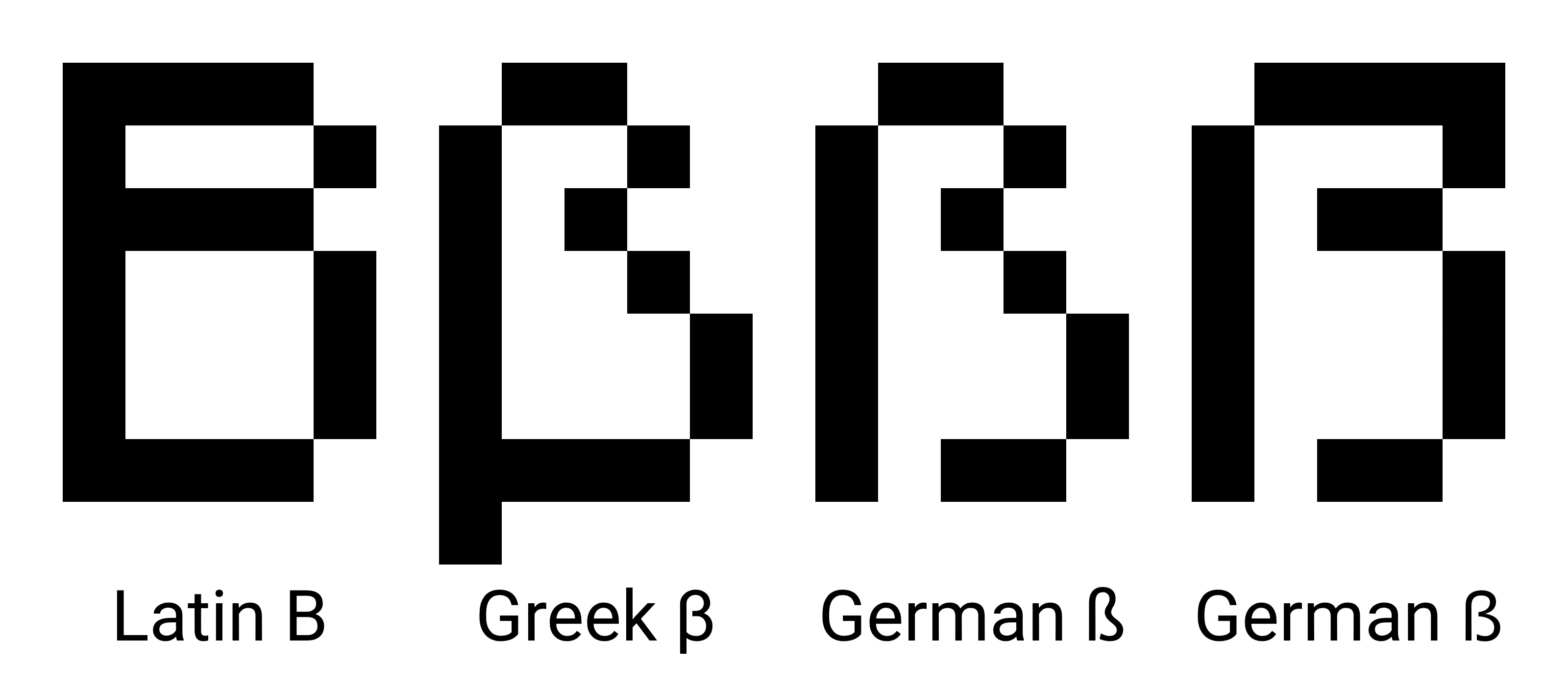
The pixel 48,87 in assets/minecraft/textures/font/nonlatin_european.png shouldn't be there as that's a German lowercase Eszett/sharp S (ß, U+00DF), and not a Greek lowercase beta (β, U+03B2). The long tail can be accepted in cursive writing, but that's not the case.
That letter shouldn't have a tail, because the tail makes it look like a Greek β or like a Latin B with a tail.
I've attached both how it could be without that pixel and another proposal compared to B, β, and ẞ.The three symbols, both uppercase and lowercase, in case you need to copy and paste
Lowercase Uppercase Latin b (U+0062) B (U+0042) Greek β (U+03B2) Β (U+0392) German ß (U+00DF) ẞ (U+1E9E) The proposal
The pixel 48,87 in assets/minecraft/textures/font/nonlatin_european.png shouldn't be there as that's a German lowercase Eszett/sharp S (ß, U+00DF), and not a Greek lowercase beta (β, U+03B2). The long tail can be accepted in cursive writing, but that's not the case.
That letter shouldn't have a tail, because the tail makes it look like a Greek β or like a Latin B with a tail.
I've attached both how it could be without that pixel and another proposal compared to B, β, and ẞ.The three symbols, both uppercase and lowercase, in case you need to copy and paste
Lowercase Uppercase Latin b (U+0062) B (U+0042) Greek β (U+03B2) Β (U+0392) German ß (U+00DF) ẞ (U+1E9E) The proposal
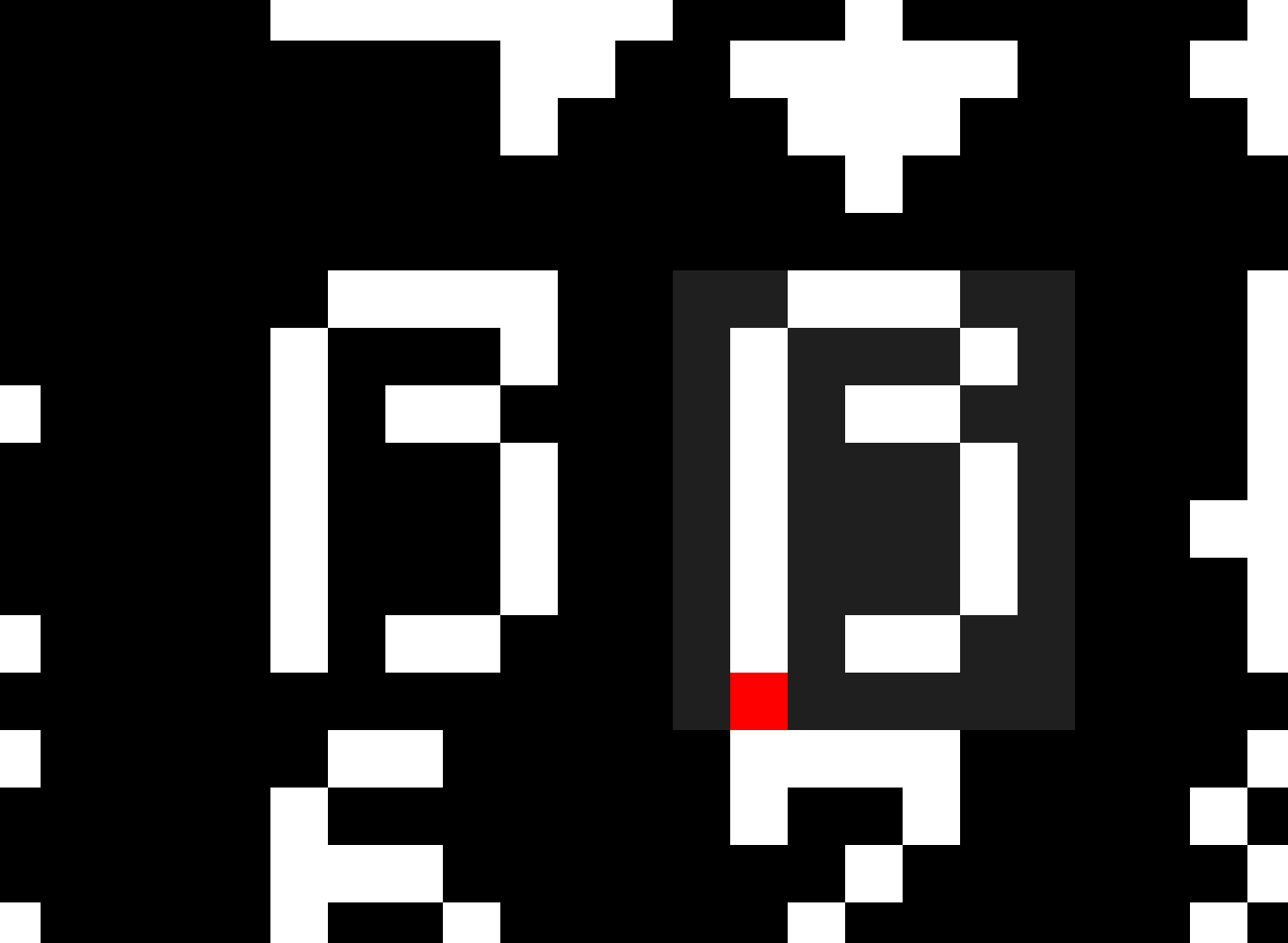
The pixel 174,1, 175,1, and 175,2 in the top-right corners in assets/minecraft/textures/gui/container/enchanting_table.png shouldn't be there. This isn't very noticeable, because the screen gets darkened anyway, but it's there and it's visible.
I've attached both the original GUI file and a close-up on that corner.
The pixel 174,1, 175,1, and 175,2 in the top-right corners in assets/minecraft/textures/gui/container/enchanting_table.png shouldn't be there. This isn't very noticeable, because the screen gets darkened anyway, but it's there and it's visible.
I've attached both the original GUI file and a close-up on that corner.
The pixel 174,1, 175,1, and 175,2 in the top-right corners in assets/minecraft/textures/gui/container/enchanting_table.png shouldn't be there. This isn't very noticeable, because the screen gets darkened anyway, but it's there and it's visible.
I've attached both the original GUI file and a close-up on that corner.
The pixel 174,1, 175,1, and 175,2 in the top-right corners in assets/minecraft/textures/gui/container/enchanting_table.png shouldn't be there. This isn't very noticeable, because the screen gets darkened anyway, but it's there and it's visible.
I've attached both the original GUI file and a close-up on that corner.
The pixel 174,1, 175,1, and 175,2 in the top-right corners in assets/minecraft/textures/gui/container/enchanting_table.png shouldn't be there. This isn't very noticeable, because the screen gets darkened anyway, but it's there and it's visible.
I've attached both the original GUI file and a close-up on that corner.
I've attached both the original GUI file and a close-up on that corner.
The pixel 174,1, 175,1, and 175,2 in the top-right corners in assets/minecraft/textures/gui/container/enchanting_table.png shouldn't be there. This isn't very noticeable, because the screen gets darkened anyway, but it's there and it's visible.
I've attached both the original GUI file and a close-up on that corner.
The pixel 174,1, 175,1, and 175,2 in the top-right corners in assets/minecraft/textures/gui/container/enchanting_table.png shouldn't be there. This isn't very noticeable, because the screen gets darkened anyway, but it's there and it's visible.
I've attached both the original GUI file and a close-up on that corner.
The pixel 174,1, 175,1, and 175,2 in the top-right corners in assets/minecraft/textures/gui/container/enchanting_table.png shouldn't be there. This isn't very noticeable, because the screen gets darkened anyway, but it's there and it's visible.
I've attached both the original GUI file and a close-up on that corner.
The symbol on line 2135, column 37 (position 70675) in assets/minecraft/texts/credits.json is a left double quotation mark (", U+201C), instead of a right double quotation mark (", U+201D)
The line is:
"Michael"Mikaus*"* Whiteley",
While it should be:
"Michael"Mikaus*"* Whiteley",The symbol on line 2135, column 37 (position 70675) in assets/minecraft/texts/credits.json is a left double quotation mark (", U+201C), instead of a right double quotation mark (", U+201D)
The line is:
"Michael “Mikaus*“* Whiteley",
While it should be:
"Michael “Mikaus*”* Whiteley",
The symbol on line 2135, column 37 (position 70675) in assets/minecraft/texts/credits.json is a left double quotation mark (", U+201C), instead of a right double quotation mark (", U+201D)
The line is:
"Michael “Mikaus*“*Whiteley",
While it should be:
"Michael “Mikaus*”*Whiteley",The symbol on line 2135, column 37 (position 70675) in assets/minecraft/texts/credits.json is a left double quotation mark (", U+201C), instead of a right double quotation mark (", U+201D)
The line is:
"Michael “Mikaus“ Whiteley",
While it should be:
"Michael “Mikaus” Whiteley",
The symbol on line 2135, column 37 (position 70675) in assets/minecraft/texts/credits.json is a left double quotation mark (", U+201C), instead of a right double quotation mark (", U+201D)
The line is:
"Michael “Mikaus“ Whiteley",
While it should be:
"Michael “Mikaus” Whiteley",The symbol on line 2135, column 37 (position 70675) in assets/minecraft/texts/credits.json is a left double quotation mark (“, U+201C), instead of a right double quotation mark (”, U+201D)
The line is:
"Michael “Mikaus“ Whiteley",
While it should be:
"Michael “Mikaus” Whiteley",
The symbol on line 2135, column 37 (position 70675) in assets/minecraft/texts/credits.json is a left double quotation mark (“, U+201C), instead of a right double quotation mark (”, U+201D)
The line is:
"Michael “Mikaus“ Whiteley",
While it should be:
"Michael “Mikaus” Whiteley",The symbol on line 2135, column 37 (position 70675) in assets/minecraft/texts/credits.json is a left double quotation mark (“, U+201C), instead of a right double quotation mark (”, U+201D)
The line is:
"Michael “Mikaus“ Whiteley",
While it should be:
"Michael “Mikaus” Whiteley",
The symbol on line 2135, column 37 (position 70675) in assets/minecraft/texts/credits.json is a left double quotation mark (“, U+201C), instead of a right double quotation mark (”, U+201D)
The line is:
"Michael “Mikaus“ Whiteley",
While it should be:
"Michael “Mikaus” Whiteley",
The symbol on line 2135, column 37 (position 70675) in assets/minecraft/texts/credits.json is a left double quotation mark (“, U+201C), instead of a right double quotation mark (”, U+201D)
The line is:
"Michael “Mikaus“ Whiteley",
While it should be:
"Michael “Mikaus” Whiteley",
The symbol on line 2135, column 37 (position 70675) in assets/minecraft/texts/credits.json is a left double quotation mark (“, U+201C), instead of a right double quotation mark (”, U+201D)
The line is:
"Michael “Mikaus“ Whiteley",
While it should be:
"Michael “Mikaus” Whiteley",
The symbol on line 2135, column 37 (position 70675) in assets/minecraft/texts/credits.json is a left double quotation mark (“, U+201C), instead of a right double quotation mark (”, U+201D)
The line is:
"Michael “Mikaus“ Whiteley",
While it should be:
"Michael “Mikaus” Whiteley",This may not be noticeable here on the bug tracker, because the font of this website seems to unify the two symbols as ".
The symbol on line 2135, column 37 (position 70675) in assets/minecraft/texts/credits.json is a left double quotation mark (“, U+201C), instead of a right double quotation mark (”, U+201D)
The line is:
"Michael “Mikaus“ Whiteley",
While it should be:
"Michael “Mikaus” Whiteley",This may not be noticeable here on the bug tracker, because the font of this website seems to unify the two symbols as ". Check this image for reference.
In the new Credits file, on line 2135 there's a"instead of"In the new Credits file, on line 2135 there's a “ instead of ”
Can confirm for 1.17.1
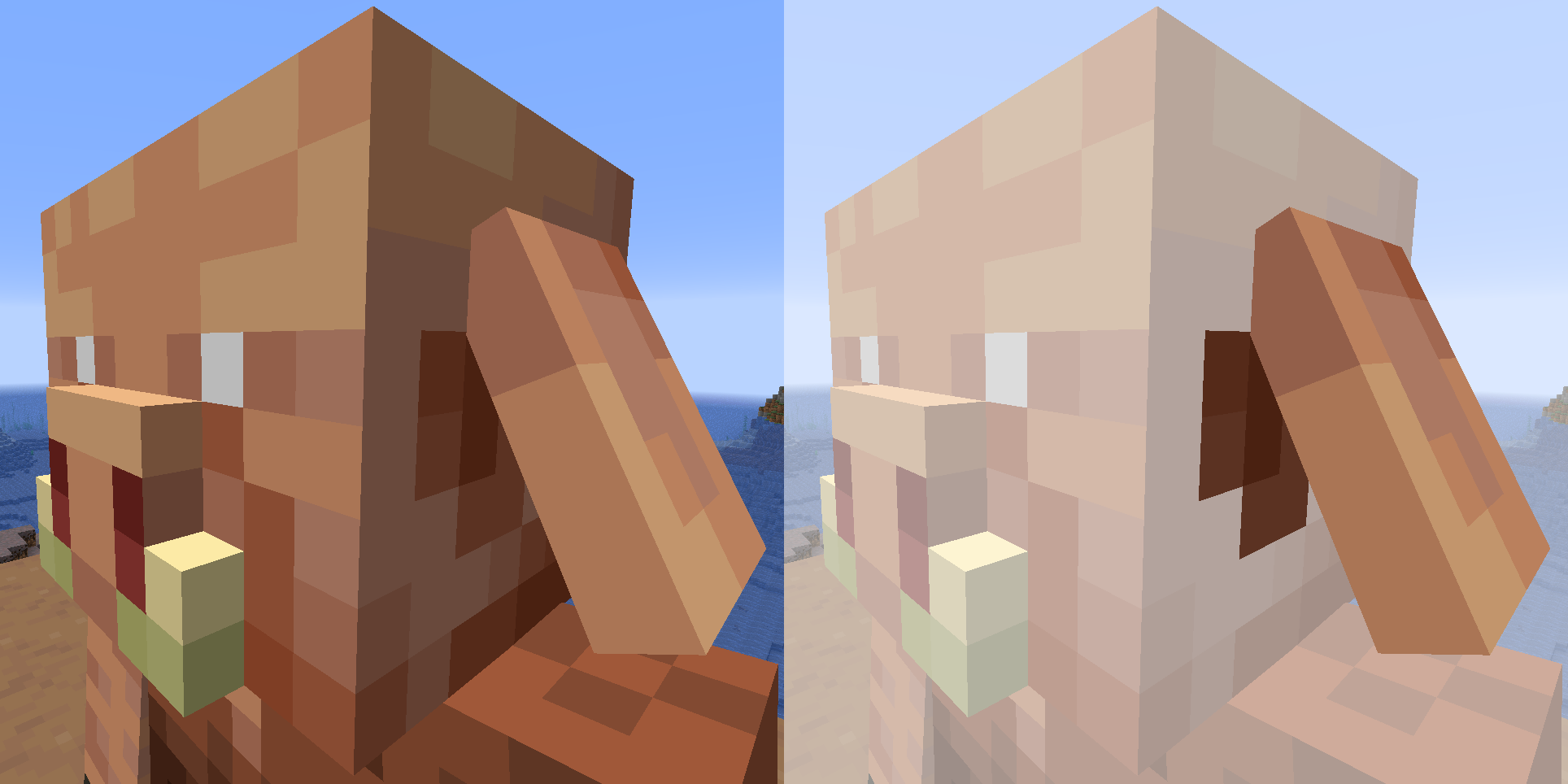
The open bundle textures (textures/item/bundle_open_back.png and textures/item/bundle_open_front.png) use the newer (clearer) texture from Bedrock (with the lightest leather pixel being #D18249), while the basic bundle texture (textures/item/bundle.png) still uses the old (darker) color palette (with #CD7B46).
Relates to
MCPE-185519andMC-275331.Expected outcome
Both versions are supposed to use a single color palette, most likely the lighter one used in Minecraft: Bedrock Edition as it is the newer one.
Javausesthe olderbundle texture only for the closed bundleClosed bundles in Java still use the older textures
Closed bundles in Java still use the oldertexturesClosed bundles in Java still use the old texture file
The open bundle textures (textures/item/bundle_open_back.png and textures/item/bundle_open_front.png) use the newer (clearer) texture from Bedrock (with the lightest leather pixel being #D18249), while the basic bundle texture (textures/item/bundle.png) still uses the old (darker) color palette (with #CD7B46).
Relates to
MCPE-185519andMC-275331.Expected outcome
Both versions are supposed to use a single color palette, most likely the lighter one used in Minecraft: Bedrock Edition as it is the newer one.
The open bundle textures (textures/item/bundle_open_back.png and textures/item/bundle_open_front.png) use the newer (clearer) texture from Bedrock (with the lightest leather pixel being #D18249), while the basic bundle texture (textures/item/bundle.png) still uses the old (darker) color palette (with #CD7B46).
Relates to
MCPE-185519andMC-275331.Expected outcome
Both versions are supposed to use a single color palette, most likely the lighter one used in Minecraft: Bedrock Edition as it is the newer one. This way, the only file that is kept unchanged is bundle.png in Java.
The open bundle textures (textures/item/bundle_open_back.png and textures/item/bundle_open_front.png) use the new
er (clearer)texture fromBedrock(with the lightest leather pixel being #D18249), while thebasicbundle texture (textures/item/bundle.png) still uses the old(darker)color palette (with #CD7B46).Relates to
MCPE-185519andMC-275331.Expected outcome
Both versions are supposed to use a single color palette, most likely the lighter one used in Minecraft: Bedrock Edition as it is the newer one. This way, the only file that is kept unchanged is bundle.png
in Java.The open bundle textures (textures/item/bundle_open_back.png and textures/item/bundle_open_front.png) use the new clearer textures from Minecraft: Bedrock Edition (with the lightest leather pixel being #D18249), while the closed bundle texture (textures/item/bundle.png) still uses the old darker color palette (with #CD7B46).
Expected outcome
Both versions are supposed to use a single color palette, most likely the lighter one used in Minecraft: Bedrock Edition as it is the newer one. This way, the only file that is kept unchanged is bundle.png in Java.
Related issues
Relates to
MCPE-185519andMC-275331.
The open bundle textures (textures/item/bundle_open_back.png and textures/item/bundle_open_front.png) use the new clearer textures from Minecraft: Bedrock Edition (with the lightest leather pixel being #D18249), while the closed bundle texture (textures/item/bundle.png) still uses the old darker color palette (with #CD7B46).
Expected
outcomeBoth versions are supposed to use a single color palette, most likely the lighter one used in Minecraft: Bedrock Edition as it is the newer one. This way, the only file that is kept unchanged is bundle.png in Java.
Related
issuesRelates to
MCPE-185519andMC-275331.The open bundle textures (textures/item/bundle_open_back.png and textures/item/bundle_open_front.png) use the new clearer textures from Minecraft: Bedrock Edition (with the lightest leather pixel being #D18249), while the closed bundle texture (textures/item/bundle.png) still uses the old darker color palette (with #CD7B46).
Expected Outcome
Both versions are supposed to use a single color palette, most likely the lighter one used in Minecraft: Bedrock Edition as it is the newer one. This way, the only file that is kept unchanged is bundle.png in Java.
Related Issues
Relates to
MCPE-185519andMC-275331.
Closedbundles in Javastilluse theoldtexturefileClosed Bundles in Java Still Use the Old Texture File
The open bundle textures (textures/item/bundle_open_back.png and textures/item/bundle_open_front.png) use the new clearer textures
fromMinecraft: Bedrock Edition (with the lightest leather pixel being #D18249), while the closed bundle texture (textures/item/bundle.png) still uses the old darker color palette (with #CD7B46).Expected Outcome
Both versions are supposed to use a single color palette, most likely the lighter one used in Minecraft: Bedrock Edition as it is the newer one. This way, the only file that is kept unchanged is bundle.png in Java.
Related Issues
Relates to
MCPE-185519andMC-275331.The open bundle textures (textures/item/bundle_open_back.png and textures/item/bundle_open_front.png) use the new clearer textures, also present in Minecraft: Bedrock Edition (with the lightest leather pixel being #D18249), while the closed bundle texture (textures/item/bundle.png) in Minecraft: Java Edition still uses the old darker color palette (with #CD7B46).
Expected Outcome
Both versions are supposed to use a single color palette, most likely the lighter one used in Minecraft: Bedrock Edition as it is the newer one. This way, the only file that is kept unchanged is bundle.png in Java.
Related Issues
Relates to
MCPE-185519andMC-275331.
ClosedBundlesin Java Still Use the Old Texture FileBundles Use Inconsistent Color Palettes
The open bundle textures (
textures/item/bundle_open_back.pngand textures/item/bundle_open_front.png) use the new clearer textures, also present in Minecraft: Bedrock Edition (with the lightest leather pixel being #D18249), while the closed bundle texture (textures/item/bundle.png) in Minecraft: Java Edition still uses the old darker color palette (with #CD7B46).Expected Outcome
Both versions are supposed to use a single color palette, most likely the lighter one used in Minecraft: Bedrock Edition as it is the newer one. This way, the only file that is kept unchanged is bundle.png in Java.
Related Issues
Relates to
MCPE-185519andMC-275331.Issue 1: Open and Closed Bundles on Java
The open bundle textures (textures/item/bundle_open_back.png and textures/item/bundle_open_front.png) use the new clearer textures, also present in Minecraft: Bedrock Edition (with the lightest leather pixel being #D18249), while the closed bundle texture (textures/item/bundle.png) in Minecraft: Java Edition still uses the old darker color palette (with #CD7B46).
Expected Outcome
Both versions are supposed to use a single color palette, most likely the lighter one used in Minecraft: Bedrock Edition as it is the newer one. This way, the only file that is kept unchanged is bundle.png in Java.
Issue 2: Slightly Different Palettes
Related Issues
Relates to
MCPE-185519andMC-275331.
Issue 1:Open and Closed Bundles on JavaThe open bundle textures (textures/item/bundle_open_back.png and textures/item/bundle_open_front.png) use the new clearer textures, also present in Minecraft: Bedrock Edition (with the lightest leather pixel being #D18249), while the closed bundle texture (textures/item/bundle.png) in Minecraft: Java Edition still uses the old darker color palette (with #CD7B46).
Expected Outcome
Both versions are supposed to use a single color palette, most likely the lighter one used in Minecraft: Bedrock Edition as it is the newer one. This way, the only file that is kept unchanged is bundle.png in Java.
Issue 2: Slightly Different PalettesRelated Issues
Relates to
MCPE-185519andMC-275331.Open and Closed Bundles on Java
The open bundle textures (textures/item/bundle_open_back.png and textures/item/bundle_open_front.png) use the new clearer textures, also present in Minecraft: Bedrock Edition (with the lightest leather pixel being #D18249), while the closed bundle texture (textures/item/bundle.png) in Minecraft: Java Edition still uses the old darker color palette (with #CD7B46).
Expected Outcome
Both versions are supposed to use a single color palette, most likely the lighter one used in Minecraft: Bedrock Edition as it is the newer one. This way, the only file that is kept unchanged is bundle.png in Java.
Related Issues
Relates to
MCPE-185519andMC-275331.
Open and Closed Bundles on Java
The open bundle textures (textures/item/bundle_open_back.png and textures/item/bundle_open_front.png) use the new clearer textures, also present in Minecraft: Bedrock Edition (with the lightest leather pixel being #D18249), while the closed bundle texture (textures/item/bundle.png) in Minecraft: Java Edition still uses the old darker color palette (with #CD7B46).Expected Outcome
Both versions are supposed to use a single color palette, most likely the lighter one used in Minecraft: Bedrock Edition as it is the newer one. This way, the only file that is kept unchanged is bundle.png in Java.
Related Issues
Relates to
MCPE-185519andMC-275331.The open bundle textures (textures/item/bundle_open_back.png and textures/item/bundle_open_front.png) use the new clearer textures, also present in Minecraft: Bedrock Edition (with the lightest leather pixel being #D18249), while the closed bundle texture (textures/item/bundle.png) in Minecraft: Java Edition still uses the old darker color palette (with #CD7B46).
Expected Outcome
Both versions are supposed to use a single color palette, most likely the lighter one used in Minecraft: Bedrock Edition as it is the newer one. This way, the only file that is kept unchanged is bundle.png in Java.
Related Issues
Relates to
MCPE-185519andMC-275331.
Bundlesuseinconsistent colorpalettesClosed Bundles Use the Older Palette
"fps" is inconsistentlycapitalizedInconsistent capitalization for "fps"
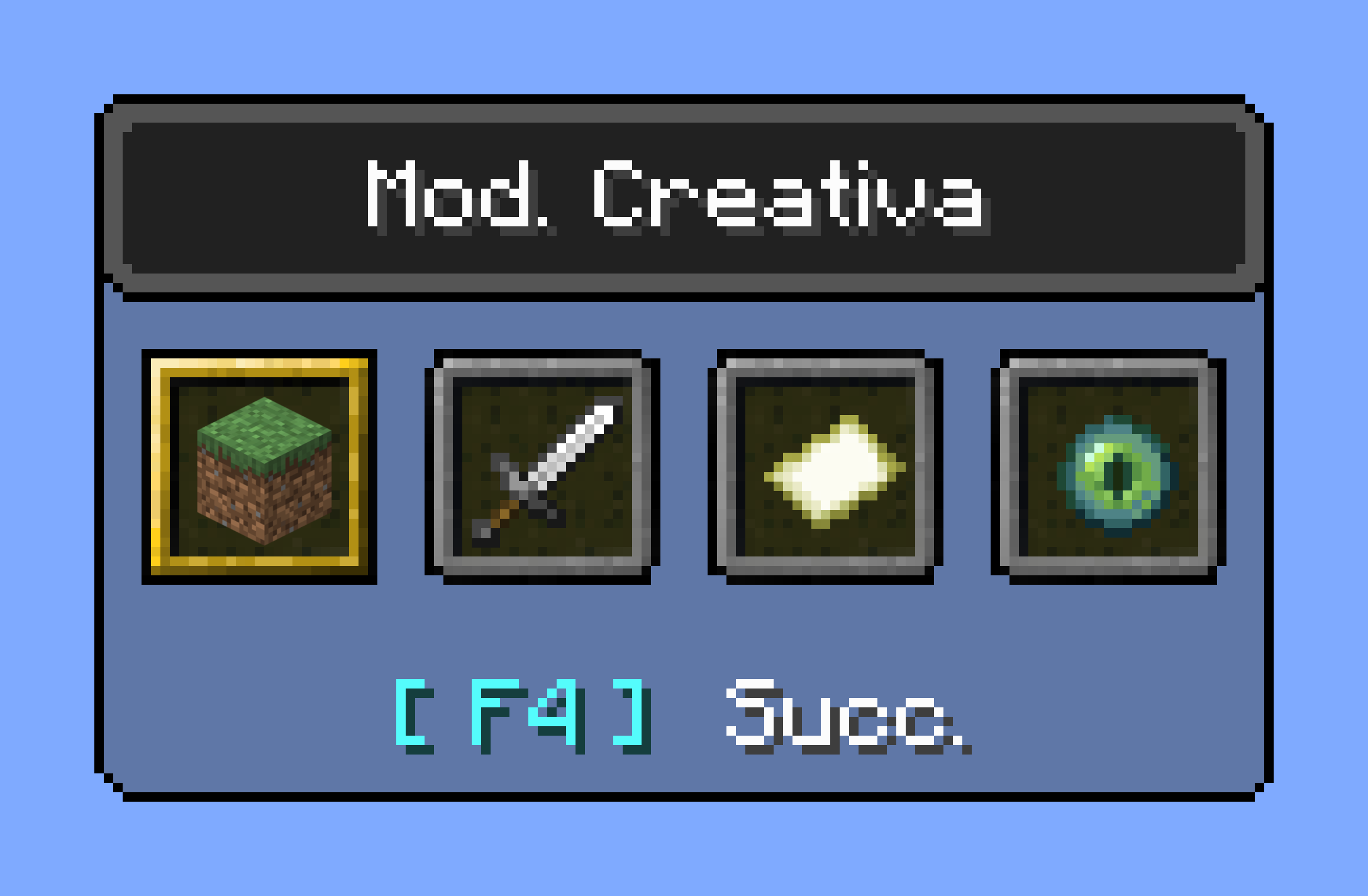
When the game has to display framerates, it's usually followed or preceded by a text saying fps (frames per second).
This text was originally uppercase (FPS) everywhere, but was then made lowercase (fps) in the F3 debug menu. This is supposedly the intended spelling, as FPS is usually referred to first-person shooters and as units are usually lowercase, unless when there's a specific reason to have them capitalized (such as N for Newton or W for Watt).
A new key in 24w33a(options.inactivityFpsLimit)added a new inconsistent string.
- Red text means wrong spelling
- Green text means correct spelling
Key Current Text Expected Text F3 debug menu, untranslatable %s fps %s fps options.framerate %s fps %s fps options.inactivityFpsLimit Reduce FPS when Reduce fps when Reduce framerate Reduced framerate telemetry.property.frame_rate_samples.title Frame Rate Samples (FPS) Frame Rate Samples (fps) When the game has to display framerates, it's usually followed or preceded by a text saying fps (frames per second).
This text was originally uppercase (FPS) everywhere, but was then made lowercase (fps) in the F3 debug menu. This is supposedly the intended spelling, as FPS is usually referred to first-person shooters and as units are usually lowercase, unless when there's a specific reason to have them capitalized (such as N for Newton or W for Watt).
Snapshot 24w33a recently added another inconsistency (options.inactivityFpsLimit), that was earlier only limited to the telemetry element.
- Red text means wrong spelling
- Green text means correct spelling
Key Current Text Expected Text [F3 debug menu, untranslatable] %s fps %s fps options.framerate %s fps %s fps options.inactivityFpsLimit Reduce FPS when Reduce fps when Reduce framerate Reduced framerate telemetry.property.frame_rate_samples.title Frame Rate Samples (FPS) Frame Rate Samples (fps)
When the game has to display framerates, it's usually followed or preceded by a text saying fps (frames per second).
This text was originally uppercase (FPS) everywhere, but was then made lowercase (fps) in the F3 debug menu. This is supposedly the intended spelling, as FPS is usually referred to first-person shooters and as units are usually lowercase, unless when there's a specific reason to have them capitalized (such as N for Newton or W for Watt).
Snapshot 24w33a recently added another inconsistency (options.inactivityFpsLimit), that was earlier only limited to the telemetry element.
- Red text means wrong spelling
- Green text means correct spelling
Key Current Text Expected Text [F3 debug menu, untranslatable] %s fps %s fps options.framerate %s fps %s fps options.inactivityFpsLimitReduce FPS whenReduce fps when Reduce framerate Reduced framerate telemetry.property.frame_rate_samples.title Frame Rate Samples (FPS) Frame Rate Samples (fps) When the game has to display framerates, it's usually followed or preceded by a text saying fps (frames per second).
This text was originally uppercase (FPS) everywhere, but was then made lowercase (fps) in the F3 debug menu. This is supposedly the intended spelling, as FPS is usually referred to first-person shooters and as units are usually lowercase, unless when there's a specific reason to have them capitalized (such as N for Newton or W for Watt).
Snapshot 24w33a recently added another inconsistency (options.inactivityFpsLimit), that was earlier only limited to the telemetry element.
- Red text means wrong spelling
- Green text means correct spelling
Key Current Text Expected Text [F3 debug menu, untranslatable] %s fps %s fps options.framerate %s fps %s fps Reduce fps when options.inactivityFpsLimit Reduce FPS when Reduce framerate Reduced framerate telemetry.property.frame_rate_samples.title Frame Rate Samples (FPS) Frame Rate Samples (fps)
When the game has to display framerates, it's usually followed or preceded by a text saying fps (frames per second).
This text was originally uppercase (FPS) everywhere, but was then made lowercase (fps) in the F3 debug menu. This is supposedly the intended spelling, as FPS is usually referred to first-person shooters and as units are usually lowercase, unless when there's a specific reason to have them capitalized (such as N for Newton or W for Watt).
Snapshot 24w33a recently added another inconsistency (options.inactivityFpsLimit), that was earlier only limited to the telemetry element.
- Red text means wrong spelling
- Green text means correct spelling
Key Current Text Expected Text [F3 debug menu, untranslatable] %s fps %s fps options.framerate %s fps %s fps Reduce fps when options.inactivityFpsLimit Reduce FPS when Reduce framerate Reduced framerate telemetry.property.frame_rate_samples.title Frame Rate Samples (FPS) Frame Rate Samples (fps) When the game has to display framerates, it's usually followed or preceded by a text saying fps (frames per second).
This text was originally uppercase (FPS) everywhere, but was then made lowercase (fps) in the F3 debug menu. This is supposedly the intended spelling, as FPS is usually referred to first-person shooters and as units are usually lowercase, unless when there's a specific reason to have them capitalized (such as N for Newton or W for Watt).
Snapshot 24w33a recently added another inconsistency (options.inactivityFpsLimit), that was earlier only limited to the telemetry element.
- Red text means wrong spelling
- Green text means correct spelling
Key Current Text Expected Text [F3 debug menu, untranslatable] %s fps %s fps options.framerate %s fps %s fps options.inactivityFpsLimit Reduce FPS when • Reduce fps when
• Reduce framerate
• Reduced framerate
telemetry.property.frame_rate_samples.title Frame Rate Samples (FPS) Frame Rate Samples (fps)
When the game has to display framerates, it's usually followed or preceded by a text saying fps (frames per second).
This text was originally uppercase (FPS) everywhere, but was then made lowercase (fps) in the F3 debug menu. This is supposedly the intended spelling, as FPS is usually referred to first-person shooters and as units are usually lowercase, unless when there's a specific reason to have them capitalized (such as N for Newton or W for Watt).
Snapshot 24w33a recently added another inconsistency (options.inactivityFpsLimit), that was earlier only limited to the telemetry element.
- Red text means wrong spelling
- Green text means correct spelling
Key Current Text Expected Text [F3 debug menu, untranslatable] %s fps %s fps options.framerate %s fps %s fps options.inactivityFpsLimit Reduce FPS when • Reduce fps when
• Reduce framerate
• Reduced framerate
telemetry.property.frame_rate_samples.title Frame Rate Samples (FPS) Frame Rate Samples (fps) When the game has to display framerates, it's usually followed or preceded by a text saying fps (frames per second).
This text was originally uppercase (FPS) everywhere, but was then made lowercase (fps) in the F3 debug menu. This is supposedly the intended spelling, as FPS is usually referred to first-person shooters and as units are usually lowercase, unless when there's a specific reason to have them capitalized (such as N for Newton or W for Watt).
Snapshot 24w33a recently added another inconsistency (options.inactivityFpsLimit), that was earlier only limited to the telemetry element.
- Red text means wrong spelling
- Green text means correct spelling
Key Current Text Expected Text [F3 debug menu, untranslatable] %s fps %s fps options.framerate %s fps %s fps options.inactivityFpsLimit Reduce FPS when • Reduce fps when
• Reduce framerate
• Reduced frameratetelemetry.property.frame_rate_samples.title Frame Rate Samples (FPS) Frame Rate Samples (fps)
When the game has to display framerates, it's usually followed or preceded by a text saying fps (frames per second).
This text was originally uppercase (FPS) everywhere, but was then made lowercase (fps) in the F3 debug menu. This is supposedly the intended spelling, as FPS is usually referred to first-person shooters and as units are usually lowercase, unless when there's a specific reason to have them capitalized (such as N for Newton or W for Watt).
Snapshot 24w33a recently added another inconsistency (options.inactivityFpsLimit), that was earlier only limited to the telemetry element.
- Red text means wrong spelling
- Green text means correct spelling
Key Current Text Expected Text [F3 debug menu, untranslatable] %s fps %s fps options.framerate %s fps %s fps options.inactivityFpsLimit Reduce FPS when One of these (or similar)
• Reduce fps when
• Reduce framerate
• Reduced frameratetelemetry.property.frame_rate_samples.title Frame Rate Samples (FPS) Frame Rate Samples (fps)
Still an issue in Java 20w40a, so I don't know.
Can confirm for 1.17.1
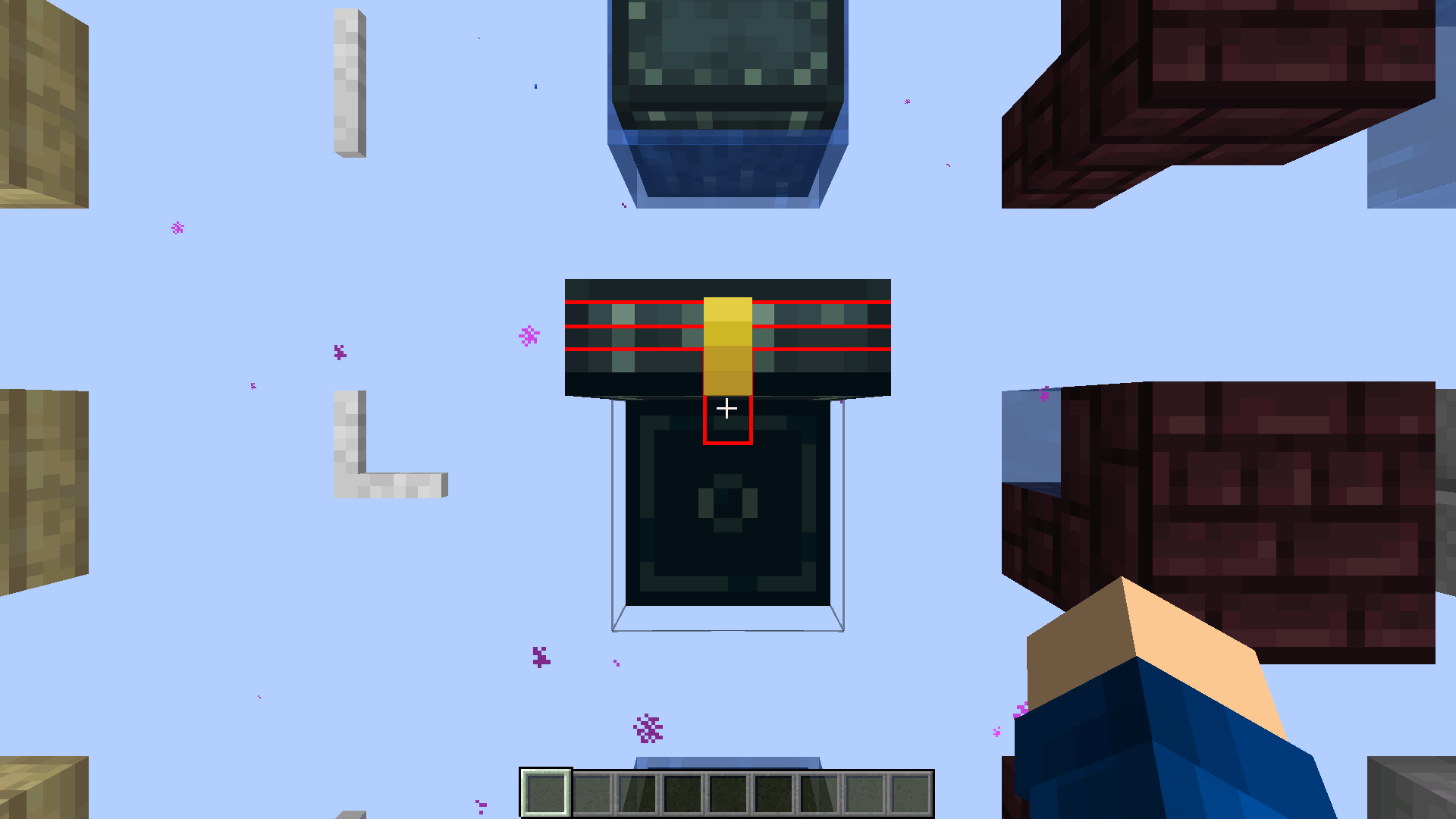
I've added some more screenshots where it's more visible. You can notice how even the pivot point is technically wrong as it gets in the top part of the chest during the animation.
Can confirm in 1.21, even after the icons got separated from their main texture file.
I made it clearer, hope it helps.
I honestly prefer the older ones, but the newer ones look more polished, which might be what Mojang intended to use. Whatever the intended palette is, I hope they can make it consistent before 1.21.2. I've seen they've updated the blaze texture (
MC-144327) after 5 years, so it seems logical to fix it soon.Still present in 24w40a.