 majaha
- majaha
- majaha
- Europe/London
- Yes
- No
![[Mojang] Nathan Adams](../../../data/assets/gravatar/dinnerbone.png)
 MCPE-2587
 MC-36563
![[Mojang] Cory Scheviak](../../../data/avatars/users/92893.png)
![[Mojang] Grum (Erik Broes)](../../../data/assets/gravatar/grum.png)
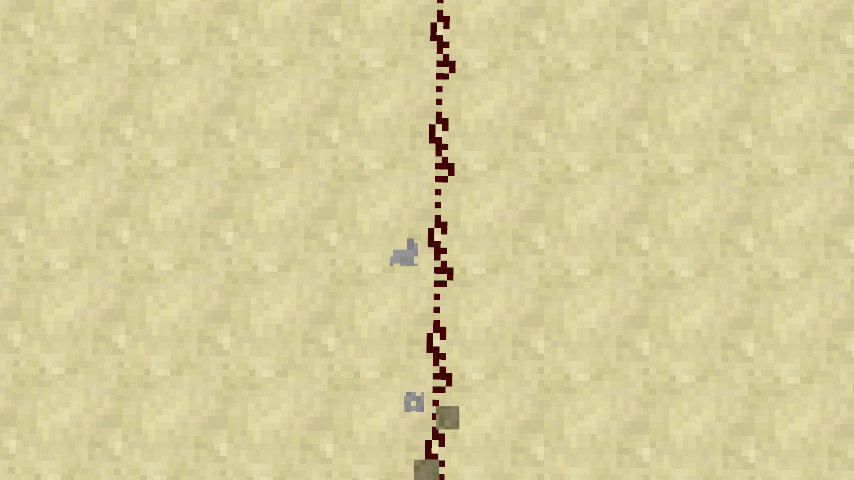
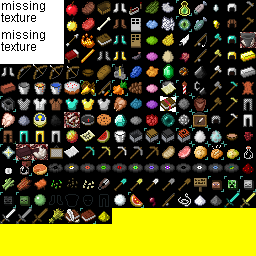



When jump sprinting on redstone, the particles appear like the greyscale texture, rather than red like the particles you get when breaking it.
As redstone is not solid, most of the time when you sprint on it particles of the block below are created, but if you jump while sprinting, redstone particles are created. To see them, make a line of redstone, look down, sprint on it and jump.
Sprinting/ Fallingon redstone wire produces greyscale particlesJump Sprinting on redstone wire produces greyscale particles
The file chestplateCloth_overlay.png in minecraft.jar/textures/items appears to be incorrect. It has an empty alpha channel and the image itself is of an undyed brown leather tunic.
Is this maybe caused by the fact that in the old-style items.png the overlay is blank?
It appears to have no affect on the ingame look of the tunic.
I have attached chestplateCloth_overlay.png and also a version with full alpha, demonstrating that it is of the brown leather tunic.
Edit: On further experimentation, this seems to be caused by the unstitcher, and similar things happen with other texture packs, however I have not pinned down whether this is specific to leather armor overlays.
When loading a world or changing dimension while in fullscreen mode, the background image is distorted for a split second before changing to normal.
This doesn't appear to occur in windowed mode.
I haven't attached a screenshot, as it is more difficult to take one in fullscreen mode (F2 does not work here). Hopefully you can see the problem for yourself.
Edit: The loading text is also similarly distorted, although it's harder to catch.
This still affects 1.5.1
Remember, that is a community created list of observed changes in the snapshot, not a changelog from the developers themselves. Although its possible this is intended, the number of other texture bugs going round at the moment, as well as it looking a little out of place, suggest to me that this is indeed a bug.
Edit: The changelog on mojang.com also says the new texture system "may blow up". Mojang are expecting bugs, I would be quite surprised if this was intended .
.
I'd like to add this only happens at time 0, not at time 24000 or any other multiple of 24000, as far as I can tell.
This is probably intended, as it is supposed to be a short duration effect, similar to instant health and damage effects which do not have icons either.
I discovered this with "/give @p 0" which crashes the game. However, as they are replacing this functionality, is it really worth fixing?
Still effects 1.7 prerelease
This seems too deliberate to be a bug. Also, Jens commented about a fix in the future. With the new way transparency rendering is handled, is it time to revisit this?
I'm no longer using the computer on which I found this bug, but on my laptop I cannot notice any such distortion in 14w08a or in 1.7 for which this bug was reported. As such I can't really comment at the moment on whether this is a concern for some computers/graphics in 14w08a.
Still affecting 1.7.9 it seems!
Edit: I wonder if this is related to
MC-38758This still seems to effect 1.7.9, it's a pretty big bug. Renders the server exe useless, but running the server jar with java or javaw (see below) seems to work. This makes server setup on windows a bit less intuitive.
I wonder if this is related to MC-33041, which occurs when the server jar is run with javaw.
This is still a bug,I just checked in 14w18a. You have to jump whilst sprinting to see this. This is hardly a game breaking bug, but it's a bug non the less. I just updated this report to make it a bit clearer.
Actually, you can use pick block (bound by default to middle click) on an item to duplicate it, enchantments and all.
Definitely related to mipmapping being turned off. You can see it only effects blocks a certain distance away, just like mipmapping. I took a closer look at a screenshot I took and it seems textures are mipmapped anyway even when the setting is turned off. Also, when I turn mipmapping up from off in the settings all the buttons turn white.
A very closely related problem: when upgrading from 1.7 to 1.8, Maps in Item Frames are rotated wrong. I believe this all has to do with the 1.8 feature of being able to rotate items in item frames by 45 degrees rather than 90. When 1.8 loads an item frame from 1.7, it multiplies the ItemRotation value by 2, thereby keeping most items at the same rotation angle. However, because maps still rotate by 90 degrees for every ItemRotation, maps come out rotated twice as much as they should be.
Ways to fix this: 1. When loading 1.7 item frames in 1.8, check if the item is a map and decide whether to multiply the ItemRotation by 2 accordingly. And keep ItemRotation in the range 0-3 for item frames with maps in them.
2. Redefine ItemRotation for item frames with maps in, so they are always in (0, 2, 4, 6).
P.S. This bug still affects 14w29b
I think the point is that there's a mismatch between what you think you've done to the inventory, and what has actually happened to it, rather than an exploit you could use in survival to cheat.
This still affects 14w34c
This still affects 14w34d.
Also, should we add some of the information from my earlier comment to this bug report? Or maybe split it into it's own report? It seems Mojang is getting ready to release 1.8 soon and this bug is going to break maps-in-item-frames in existing worlds.
Still affects 1.8-pre1
Affects 1.8-pre2
Affects 1.8-pre3
Still affects 1.8
By the way, I filed my related bug as
MC-68941.I guess it's too late to prevent conversion problems, but the underlying bug can still be fixed.
Yes, it's too late to try to fix old maps, but the mapping is still doubled up. The directions 0-3 are visually identical to directions 4-7, but are technically different e.g. comparators give different values (MC45892). This can still be fixed, e.g. by coercing the direction values to a set half the size.
Awesome, thanks! This bug has kept me awake at night for four years, looking forward to getting some much needed shut-eye tonight 👍