 megashub
- megashub
- megashub
- America/Los_Angeles
- Yes
- No
 MC-15105
 MCPE-5884






13w18cCrash During World Generation
Seed: -6213056192259519720
Biome: Desert
Go to coords: -327X, 64Y, 380Z
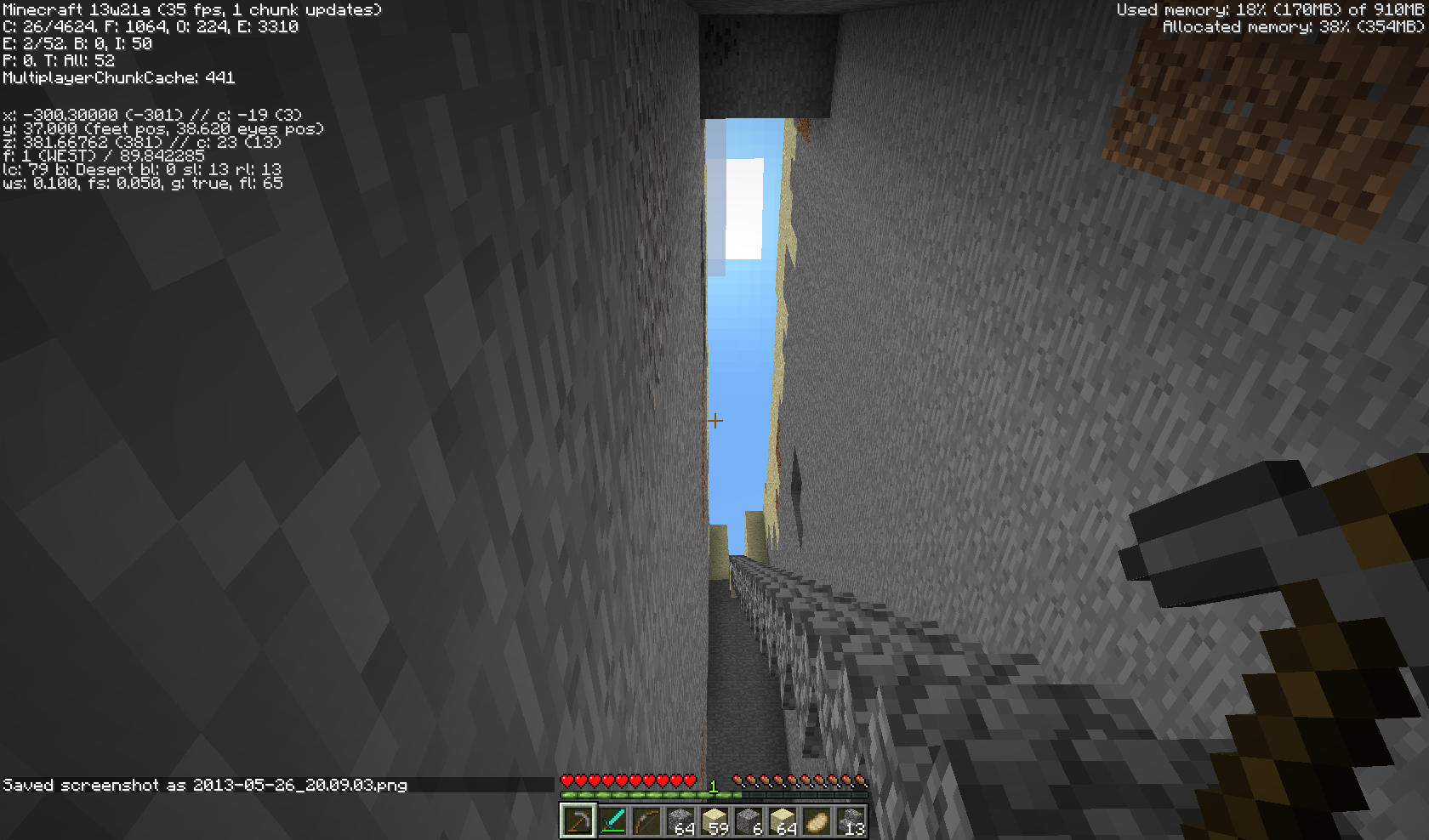
Face East and begin digging down and forward one block until you reach Y37. Turn around and clear all of the ore one block to the left and right, as well as all the blocks above your path downward. Clear them all the way back to where you began digging, all the way up to Y64 and all the way down to Y37. (see screenshots)In all of those blocks, you will find about two blocks of coal.
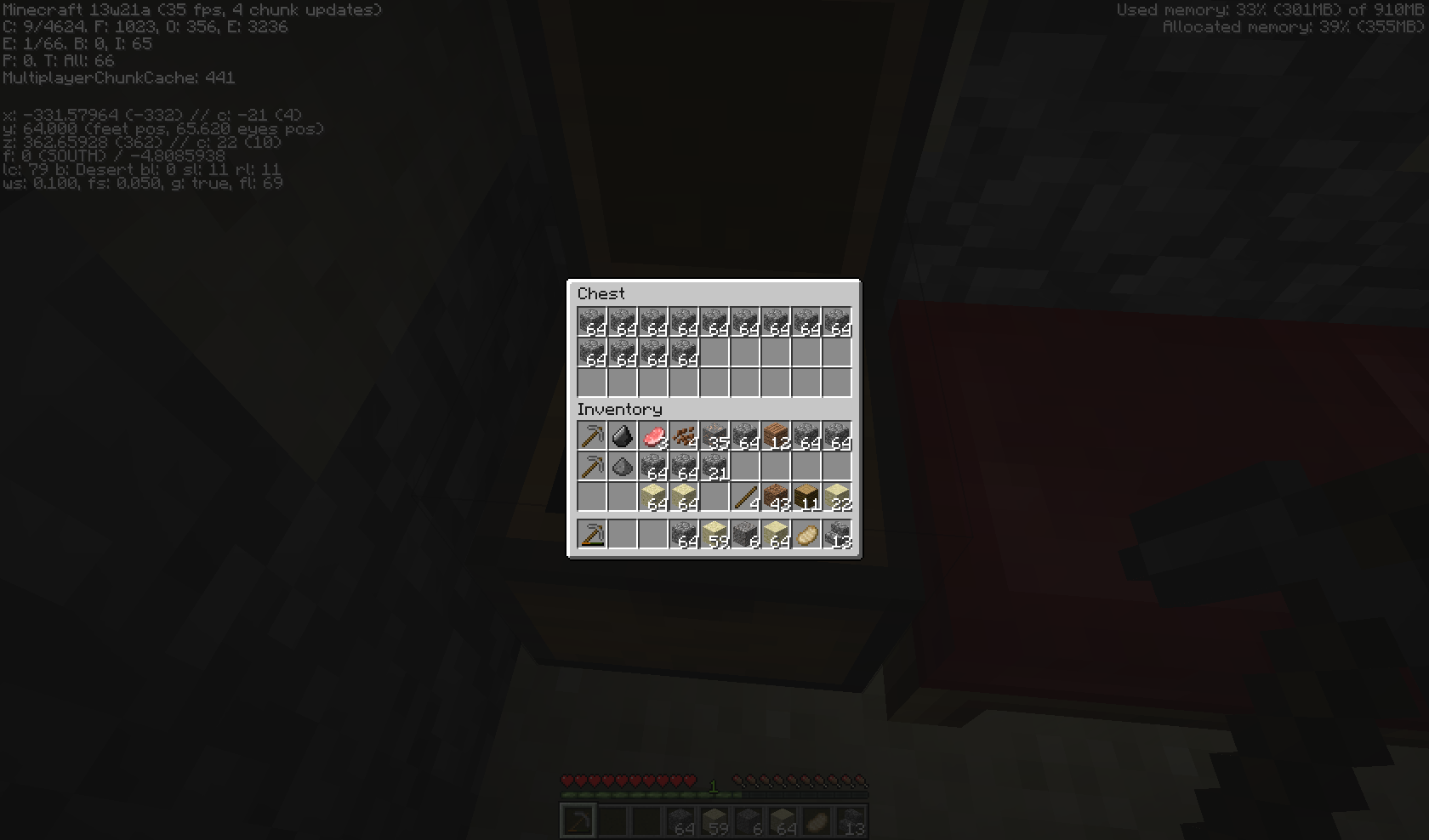
I took screenshots of my resulting inventory, minus what it took to make more picks and a very small box house.
I mined for more than 1 minecraft week in survival before I found that coal. In that time I accumulated 35 blocks of iron
(which I could not yet smelt).I mined in this fashion so that I could use sunlight to light my mine, since I could find no coal.
Is coal supposed to be that rare in desert biomes (or at all)?
If not, it's likely broken now and should be fixed. It feels very imbalanced, at least on this seed.
Seed: -6213056192259519720
Biome: Desert
Go to coords: -327X, 64Y, 380Z
Face East and begin digging down and forward one block until you reach Y37. Turn around and clear all of the ore one block to the left and right, as well as all the blocks above your path downward. Clear them all the way back to where you began digging, all the way up to Y64 and all the way down to Y37. (see screenshots)In all of those blocks, you will find about two blocks of coal. (see top middle of one of the screenshots)
I took screenshots of my resulting inventory, minus what it took to make more picks and a very small box house.
I mined for more than 1 minecraft week in survival before I found that coal. In that time I accumulated 35 blocks of iron.
I mined in this fashion so that I could use sunlight to light my mine, since I could find no coal.
Is coal supposed to be that rare in desert biomes (or at all)?
If not, it's likely broken now and should be fixed. It feels very imbalanced, at least on this seed.
Seems as though username is locked as "Steve". Can't backspace or add any other characters.Unable to change the world name. Can't backspace.
I'm using a Nexus 5, running Android 4.4.
I believe this is the same problem outlined in
MCPE-5882, just impacting another text box (World Name instead of Player Name). If I have enough access to add a Jira issue link, I'll do so.
Unable to change the world name. Can't backspace.I'm using a Nexus 5, running Android 4.4.
I believe this is the same problem outlined in
MCPE-5882, just impacting another text box (World Name instead of Player Name). If I have enough access to add a Jira issue link, I'll do so.When generating a new world, I am unable to change the world name. Can't backspace.
I'm using a Nexus 5, running Android 4.4.
I believe this is the same problem outlined in
MCPE-5882, just impacting another text box (World Name instead of Player Name). If I have enough access to add a Jira issue link, I'll do so.
clones
is cloned by
Android 4.4, Nexus 5 - 0.8.0 beta build 7.
When I hit spiders with a sword, their heads turn red, but the rest of their body doesn't. When I hit sheep, they do not turn red at all.
I've confirmed this exists for beta builds 0.8.0 b5 through b
7, at least.I'm on Android 4.4, Nexus 5.
Occasionally, though I haven't been able to nail down the exact conditions, items will duplicate in the hot/quick bar. Whatever it's called.
It's important to note that the item itself does not seem to duplicate. The same item occupies more than one slot on the hotbar. When you look at inventory, like when choosing what to put in a chest, the correct quantity of items is shown.
I've seen it most with picks, but I hesitate to say it's limited to any given item.
I'll just look down and see at least one slot containing another of the same item. When the item is a tool, the same wear is also shown on the copied item.
If I change out the items in my hot bar, the problem goes away. Until it happens again later.
If I figure out exact steps to duplicate this bug, I'll update this issue accordingly. Just playing normally from a fresh world for less than 30 minutes will usually be enough.
I've confirmed this exists for beta builds 0.8.0 b5 through b8, at least.
I'm on Android 4.4, Nexus 5.
Occasionally, though I haven't been able to nail down the exact conditions, items will duplicate in the hot/quick bar. Whatever it's called.
It's important to note that the item itself does not seem to duplicate. The same item occupies more than one slot on the hotbar. When you look at inventory, like when choosing what to put in a chest, the correct quantity of items is shown.
I've seen it most with picks, but I hesitate to say it's limited to any given item.
I'll just look down and see at least one slot containing another of the same item. When the item is a tool, the same wear is also shown on the copied item.
If I change out the items in my hot bar, the problem goes away. Until it happens again later.
If I figure out exact steps to duplicate this bug, I'll update this issue accordingly. Just playing normally from a fresh world for less than 30 minutes will usually be enough.
Hotbar Items DuplicateOccasionallyHotbar Items Display Duplicate Items When Hotbar Item Breaks
I've confirmed this exists for beta builds 0.8.0 b5 through b8, at least.
I'm on Android 4.4, Nexus 5.
Occasionally, though I haven't been able to nail down the exact conditions, items will duplicate in the hot/quick bar. Whatever it's called.
It's important to note that the item itself does not seem to duplicate. The same item occupies more than one slot on the hotbar. When you look at inventory, like when choosing what to put in a chest, the correct quantity of items is shown.
I've seen it most with picks, but I hesitate to say it's limited to any given item.
I'll just look down and see at least one slot containing another of the same item. When the item is a tool, the same wear is also shown on the copied item.
If I change out the items in my hot bar, the problem goes away. Until it happens again later.
If I figure out exact steps to duplicate this bug, I'll update this issue accordingly. Just playing normally from a fresh world for less than 30 minutes will usually be enough.
I've confirmed this exists for beta builds 0.8.0 b5 through b8, at least.
I'm on Android 4.4, Nexus 5.
duplicate in the hotbar.It's important to note that the item itself does not seem to duplicate. The same item occupies more than one slot on the hotbar. When you look at inventory, like when choosing what to put in a chest, the correct quantity of items is shown.
I've seen it most with picks, but I hesitate to say it's limited to any given item.
I'll just look down and see at least one slot containing another of the same item. When the item is a tool, the same wear is also shown on the copied item.
If I change out the items in my hot bar, the problem goes away. Until it happens again later.
If I figure out exact steps to duplicate this bug, I'll update this issue accordingly. Just playing normally from a fresh world for less than 30 minutes will usually be enough.
I've confirmed this exists for beta builds 0.8.0 b5 through b8, at least.
I'm on Android 4.4, Nexus 5.
duplicate in the hotbar.It's important to note that the item itself does not seem to duplicate. The same item occupies more than one slot on the hotbar. When you look at inventory, like when choosing what to put in a chest, the correct quantity of items is shown.
I'
ve seen it most with picks, but Ihesitate to say it's limited to any givenitem.I
'll just look down and see at least one slot containing another of the same item. When the item is a tool, the same wear is also shown on the copied item.If I change out the items in my hot bar, the problem goes away. Until it happens again later.
If I figure out exact steps to duplicate this bug, I'll update this issue accordingly. Just playing normally from a fresh world for less than 30 minutes will usually be enough.
I've confirmed this exists for beta builds 0.8.0 b5 through b8, at least.
I'm on Android 4.4, Nexus 5.
Hotbar Items Display Duplicate Items When Hotbar Item Breaks
It's important to note that the item itself does not seem to duplicate. The same item occupies more than one slot on the hotbar. When you look at inventory, like when choosing what to put in a chest, the correct quantity of items is shown.
I'll just look down and see at least one slot containing another of the same item. When the item is a tool, the same wear is also shown on the copied item.
If I change out the items in my hot bar, the problem goes away. Until it happens again later.
Steps to duplicate:
Obtain up to 6 unique items types, but no more, with at least one of them being a tool.
Put all 6 items in your hot bar, with the tool occupying the first, leftmost slot.
Break that tool from normal wear.
Observe the rightmost box populate with a duplicate item already in your hotbar.
HotbarItemsDisplay Duplicate Items When Hotbar Item BreaksHotbar Displays Duplicate Items When Hotbar Item Breaks
I've confirmed this exists for beta builds 0.8.0 b5 through b8, at least.
I'm on Android 4.4, Nexus 5.
Hotbar
ItemsDisplay Duplicate Items When Hotbar Item BreaksIt's important to note that the item itself does not seem to duplicate. The same item occupies more than one slot on the hotbar. When you look at inventory, like when choosing what to put in a chest, the correct quantity of items is shown.
I'll just look down and see at least one slot containing another of the same item. When the item is a tool, the same wear is also shown on the copied item.
If I change out the items in my hot bar, the problem goes away. Until it happens again later.
Steps to duplicate:
Obtain up to 6 unique items types, but no more, with at least one of them being a tool.
Put all 6 items in your hot bar, with the tool occupying the first, leftmost slot.
Break that tool from normal wear.
Observe the rightmost box populate with a duplicate item already in your hotbar.I've confirmed this exists for beta builds 0.8.0 b5 through b8, at least.
I'm on Android 4.4, Nexus 5.
Hotbar Displays Duplicate Items When Hotbar Item Breaks
It's important to note that the item itself does not seem to duplicate. The same item occupies more than one slot on the hotbar. When you look at inventory, like when choosing what to put in a chest, the correct quantity of items is shown.
I'll just look down and see at least one slot containing another of the same item. When the item is a tool, the same wear is also shown on the copied item.
If I change out the items in my hot bar, the problem goes away. Until it happens again later.
Steps to duplicate:
Obtain up to 6 unique items types, but no more, with at least one of them being a tool.
Put all 6 items in your hot bar, with the tool occupying the first, leftmost slot.
Break that tool from normal wear.
Observe the rightmost box populate with a duplicate item already in your hotbar.
When playing with just me playing locally (without a remote player connected), I can use portals to move between the Overworld and the Nether just fine. I can also play fine while in the Nether. However, once a remote player joins, the MCPE client takes minutes to switch into or out of the Nether, and the game's performance for both the local and remote player degrades to a near-unplayable state while either (or both) players are in the Nether.
When switching into or out of the Nether, the client can easily (but not always) crash to desktop without presenting an error message if the player tabs out and back in again while waiting for the dimension to load.
There is nothing special about our map. Only three players and very little development so far. We've only explored about an 8000-block radius around our spawn point so far.
Lastly, while loading dimensions (into or out of the Nether), the host player can run Resource Monitor and observe that the CPU load is between 65 and 100% pegged, and once the dimension load finishes, the load drops significantly. Please note that I have an 8-core 4Ghz CPU: AMD FX-8350 and 32 GB of RAM. Memory and disk I/O are nominal when this happens. Only CPU seems abnormally high. See screenshot attached. It shows a slice of time while loading the dimension, and immediately after the loading is complete.
Sidenote: Any animals traveling in minecarts in the Nether which are traveling through unloaded chunks when the client crashes will be lost completely. Both the minecart and its occupant are gone when the game is reloaded.
When playing with just me playing locally (without a remote player connected), I can use portals to move between the Overworld and the Nether just fine. I can also play fine while in the Nether. However, once a remote player joins, the MCPE client takes minutes to switch into or out of the Nether
, and the game's performance for both the local and remote player degrades to a near-unplayable state while either (or both) players are in the Nether.When switching into or out of the Nether, the client can easily (but not always) crash to desktop without presenting an error message if the player tabs out and back in again while waiting for the dimension to load.
There is nothing special about our map. Only three players and very little development so far. We've only explored about an 8000-block radius around our spawn point so far.
Lastly, while loading dimensions (into or out of the Nether), the host player can run Resource Monitor and observe that the CPU load is between 65 and 100% pegged, and once the dimension load finishes, the load drops significantly. Please note that I have an 8-core 4Ghz CPU: AMD FX-8350 and 32 GB of RAM. Memory and disk I/O are nominal when this happens. Only CPU seems abnormally high. See screenshot attached. It shows a slice of time while loading the dimension, and immediately after the loading is complete.
Sidenote: Any animals traveling in minecarts in the Nether which are traveling through unloaded chunks when the client crashes will be lost completely. Both the minecart and its occupant are gone when the game is reloaded.
When playing with just me playing locally (without a remote player connected), I can use portals to move between the Overworld and the Nether just fine. I can also play fine while in the Nether. However, once a remote player joins, the MCPE client takes minutes to switch into or out of the Nether. The game's performance for both the local and remote player degrades to a near-unplayable state while either (or both) players are in the Nether.
When switching into or out of the Nether, the client can easily (but not always) crash to desktop without presenting an error message if the player tabs out and back in again while waiting for the dimension to load.
There is nothing special about our map. Only three players and very little development so far. We've only explored about an 8000-block radius around our spawn point so far.
Lastly, while loading dimensions (into or out of the Nether), the host player can run Resource Monitor and observe that the CPU load is between 65 and 100% pegged, and once the dimension load finishes, the load drops significantly. Please note that I have an 8-core 4Ghz CPU: AMD FX-8350 and 32 GB of RAM. Memory and disk I/O are nominal when this happens. Only CPU seems abnormally high. See screenshot attached. It shows a slice of time while loading the dimension, and immediately after the loading is complete.
Sidenote: Any animals traveling in minecarts in the Nether which are traveling through unloaded chunks when the client crashes will be lost completely. Both the minecart and its occupant are gone when the game is reloaded.
When playing with just me
playinglocally (without a remote player connected), I can use portals to move between the Overworld and the Nether just fine. I can also play fine while in the Nether. However, once a remote player joins, the MCPE client takes minutes to switch into or out of the Nether. The game's performance for both the local and remote player degrades to a near-unplayable state while either (or both) players are in the Nether.When switching into or out of the Nether, the client can easily (but not always) crash to desktop without presenting an error message if the player tabs out and back in again while waiting for the dimension to load.
There is nothing special about our map. Only three players and very little development so far. We've only explored about an 8000-block radius around our spawn point so far.
Lastly, while loading dimensions (into or out of the Nether), the host player can run Resource Monitor and observe that the CPU load is between 65 and 100% pegged, and once the dimension load finishes, the load drops significantly. Please note that I have an 8-core 4Ghz CPU: AMD FX-8350 and 32 GB of RAM. Memory and disk I/O are nominal when this happens. Only CPU seems abnormally high. See screenshot attached. It shows a slice of time while loading the dimension, and immediately after the loading is complete.
Sidenote: Any animals traveling in minecarts in the Nether which are traveling through unloaded chunks when the client crashes will be lost completely. Both the minecart and its occupant are gone when the game is reloaded.
When playing with just me locally (without a remote player connected), I can use portals to move between the Overworld and the Nether just fine. I can also play fine while in the Nether. However, once a remote player joins, the MCPE client takes minutes to switch into or out of the Nether. The game's performance for both the local and remote player degrades to a near-unplayable state while either (or both) players are in the Nether.
When switching into or out of the Nether, the client can easily (but not always) crash to desktop without presenting an error message if the player tabs out and back in again while waiting for the dimension to load.
There is nothing special about our map. Only three players and very little development so far. We've only explored about an 8000-block radius around our spawn point so far.
Lastly, while loading dimensions (into or out of the Nether), the host player can run Resource Monitor and observe that the CPU load is between 65 and 100% pegged, and once the dimension load finishes, the CPU load drops significantly. Please note that I have an 8-core 4Ghz CPU: AMD FX-8350 and 32 GB of RAM. Memory and disk I/O are nominal when this happens. Only CPU seems abnormally high. See screenshot attached. It shows a slice of time while loading the dimension, and immediately after the loading is complete.
Sidenote: Any animals traveling in minecarts in the Nether which are traveling through unloaded chunks when the client crashes will be lost completely. Both the minecart and its occupant are gone when the game is reloaded.
I am running 1.5.1 and am currently experiencing this bug. I elected to drop the distance on my SMP server to improve performance, and am no longer seeing mob spawns, even after changing difficulty levels. I am happy to provide any troubleshooting data necessary to facilitate the resolution of this bug.
I agree with the OP, that if indeed these two functions (view distance and mob spawning) are tied together, they probably should not be. Although I admit I'm completely ignorant of the reasons behind why that might have been done, so it's entirely possible the reasons require it to remain unchanged.
Either way, I'm happy to help resolve this however I can.
Update: This is reproduce-able, at least on my machine. I tried re-running the game, and loading the world I had just tried to create. This time I get the beginnings of the world starting to render on my screen (sunrise, no land in front of me, a single cow off in the distance, same HUD), I can't move around, and the moment I click, my mouse becomes visible and the game crashes with the same log output:
Thanks! ... curious: what does that mean?
13w18c world data (such as it is). As requested by Chris Koehler
FWIW, I tried creating a second new world and also tried opening existing worlds from previous versions. All crash exactly the same way. Since it opens for you, Chris, it's probably an interaction problem between my environment and the snapshot. Every other stable version up to and including 1.5.2 work perfectly fine.
Confirmed bug is still present in 13w19a. Behavior unchanged.
Hi Tails, Where do I find that?
I've attached a screenshot of what happens immediately after the crash, if that helps?
Same here. Voted up this issue.
Update: this bug does not appear to be present in 13w21a. Whatever changed (which I'm sure was a lot), this bug seems to be squashed as a result. I've tested it several times using the same procedure which caused the crashes in the previous snapshots, but the crash does not occur now. Game loads and plays normally (as far as this JIRA issue is concerned).
Since this has been reopened, I too have seen the paralysis issue as described by OP. I have not yet tested the multiplayer component of their report though.
I would like to add my voice to this problem. We've tested this thoroughly on our survival multiplayer server, and would be happy to demo this for anyone at Mojang, at any time.
The symptoms are the same, and the action is automatic. It happens automatically anywhere from a few seconds to a minute or two after opening the trap doors. If an unhooked tripwire hook is present on the block, and that same block has a trap door on it, that trap door will auto-close.
It's a bigger problem too, because I've been able to isolate that all trapdoors which are adjacent to the hook itself (but not diagonal), will also auto-close at the same time.
For the record, our server is running 1.6.2.
Hi Tails,
Thanks!
Question: It's linked as a duplicate, but is it? Also, this is marked as resolved, but is it's own separate problem. ...right? confused
Can this issue please be updated to include 1.6.2 and Survival mode as well?
I know this is a resolved issue, but the title needs to be updated for accuracy: "Trap Doors close automatically when on or adjacent to trip wire hooks"
Still present in 1.7.2.
My wife and I have experienced this on both Mac and PC. For our own sanity, we've had to mute the music entirely because of it.
I have a similar problem. I can't change the name, but I can add characters. Once I add characters, I cannot remove those either.
So, really, it just sounds like backspace is not working.
I am using a Nexus 5, Android 4.4, Kernel 3.4.0-g9eb14ba (Build KRT16M).
Edit: I would recommend editing the Summary of this issue to exclude the phone model, as it appears to be handset agnostic. Probably a bug in the app and/or compatibility with specific Android OS versions.
I believe
MCPE-5882andMCPE-5884effectively duplicate this issue.This appears to be resolved in 0.8.0 beta build 8.
Confirmed this still happens in 0.8.0 beta build 8.
I've narrowed down the behavior to when an item breaks, the hotbar moves all of the items over to the left one box, and auto-fills in the right-most box with another item from your inventory. If your inventory doesn't have many items in it, it will display a copy of the same item already in your hotbar.
Expected behavior: I expected either analgous behavior to the PC version (ie. the box containing the broken item remains empty after it breaks), or, if the auto-shifting/auto-filling behavior is intended for PE, then I expected the right-most box to remain empty if your inventory doesn't contain enough items to autofill the hotbar.
Having two of the same item in the hotbar just to keep it populated seems unnecessary, as is just confusing to see two of the same item.
See screenshot for example.
note the duplicated bow in the hotbar after the left-most item broke and all of the hotbar items shifted over to the left one.
This appears to be fixed for me on 0.8.1a. I'm running a Nexus 5 4.4.2.
Mod, please update affected versions to include 0.8.1
Mod: Please update the affected versions to include 0.8.0 beta build 5 & 0.8.0 beta build 8 and 0.8.1 as they were specified in
MCPE-6353andMCPE-6624as well.FWIW,
MCPE-6713indicates Android-hosted worlds creates instability for iPhone guest players. Did not think to test the reverse (iPhone-hosted with Android guest). That issue description contains other details regarding signal strength and distance which appear to negate the concerns of a bad connection. Both phones are top-end handsets, as well, so client hardware/OS version limitations are not a likely cause either.FWIW: My server has seen this problem from well before 1.7.2, and it's a bare metal server which I wouldn't consider slow.
Oh, right. Derp. Because SP is now the same as MP under the hood. Sorry, forgot about that.
So the only thing Mojang cares about is Effect, and not Cause?
1. Will update and retest. Didn't know 1.7 compatibility issues had been resolved.
2. True. But in MC 1.7.10 I don't have this problem.
3. That is contributed to by lots of zombies holding eggs below ground. But beyond that, the ticket description does say highly developed areas. Because the zombies aren't visible in that screenshot, they shouldn't be rendered. But even without them, the performance loss when compared to 1.7.10 is bug worthy.
I'm happy to provide a comparison screenshot if that would help.
The scene in that screenshot isn't exactly excessive-looking. The houses and castle have decorated interiors and exteriors with windows. It's a populated village with 30ish villagers and iron golems. It has a simple redstone street lighting system. ... and that's really it.
If there all that is what makes up 1200 entities, then that still sounds bug-like. If, however, the caves underneath these chunks are full of egg-bearing zombies, and THAT's what's inflating that entity count, then that's still a bug, but not one that's specific to the FPS optimizations that Mojang just released.