 Kerwin
- MrKirby
- mrkirby
- Europe/Stockholm
- Yes
- No
 MC-144419
 REALMS-11558





- Go to the end
- Go back to normal world
- Find destroyed item frames
- Save and quit & reopen world
- Items still on the ground and also on wall/chests etc.
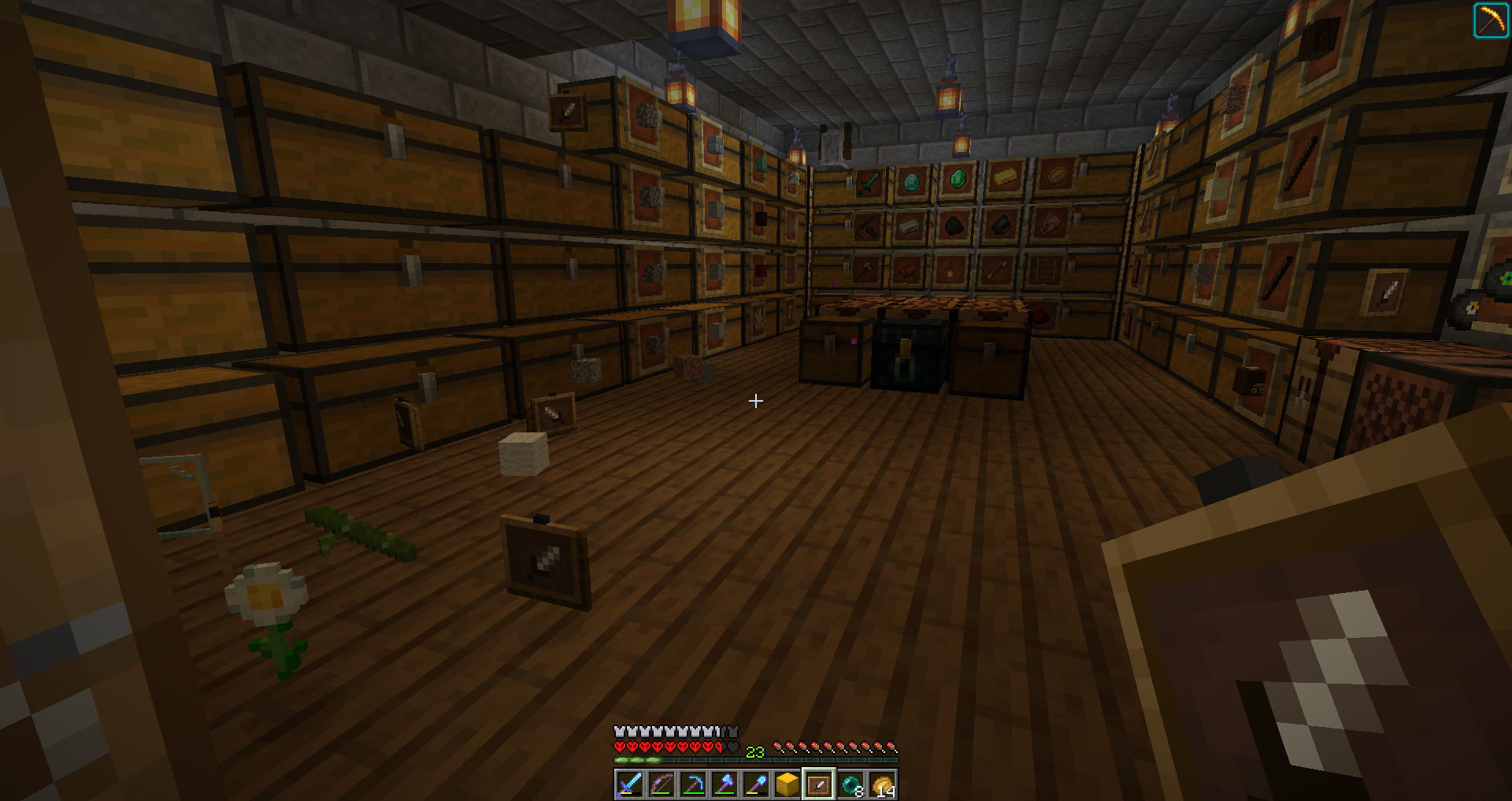
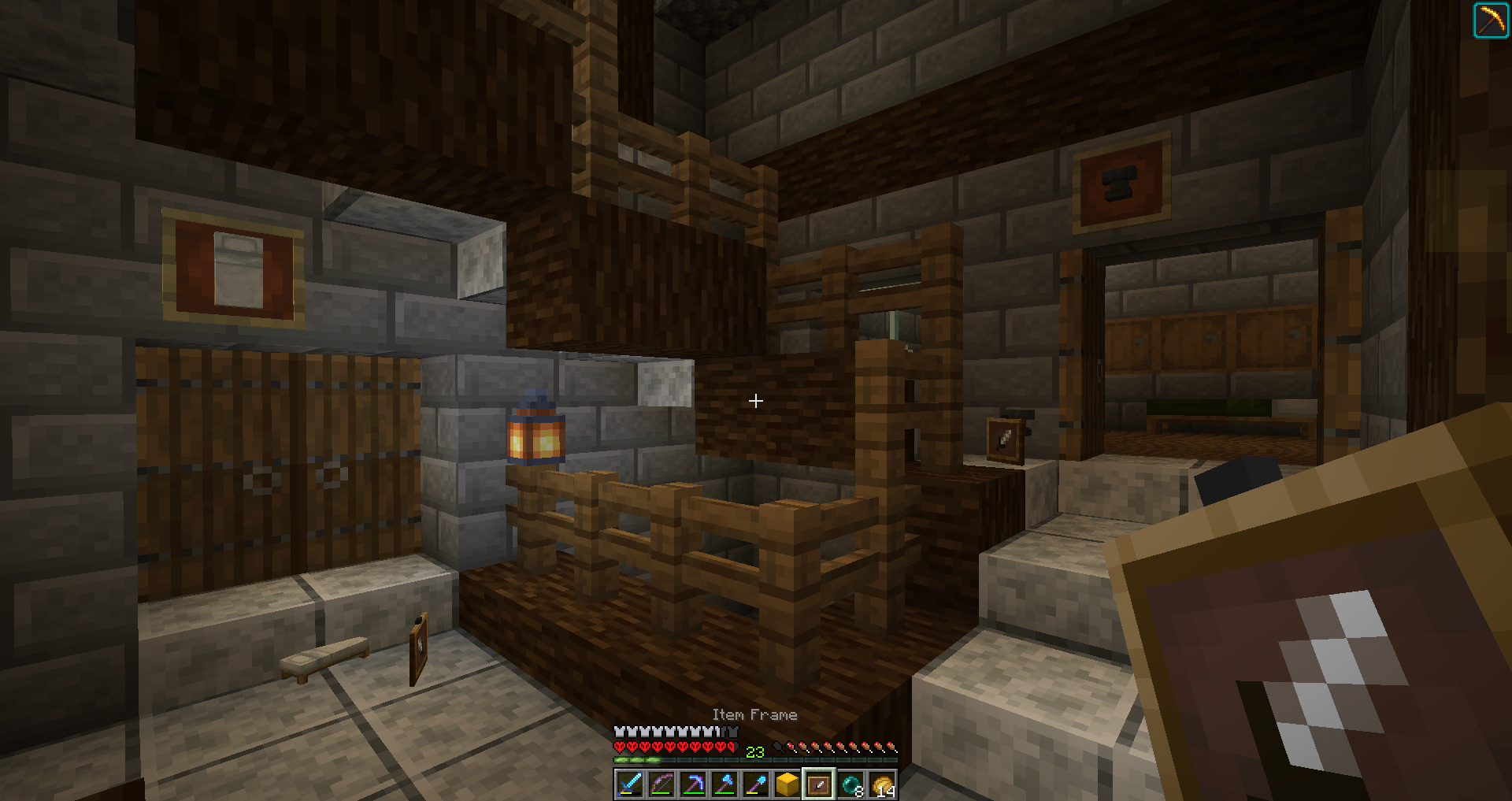
Below are some screenshots from before and after the save & quit and reopening world.
(Wrong order probably)
- Go to the end
- Go back to normal world
- Find destroyed item frames
- Save and quit & reopen world
- Items still on the ground and also on wall/chests etc.
Also good to mention. The game still 'knows' the item frames are there before relogging. Because you cannot place that item back on the spot where it was (or is, sort of). You'll 'lose' the item, but it won't be placed. When left clicking somewhere else you get the item back in hand again, (or it's placed depends if you can place a frame on the place you clicked).
Below are some screenshots from before and after the save & quit and reopening world.
PS: Some chests never had item frames. So every single one 'breaks' but is still there when reopening world.
- Go to the end
- Go back to normal world
- Find destroyed item frames
- Save and quit & reopen world
- Items still on the ground and also on wall/chests etc.
Also good to mention. The game still 'knows' the item frames are there before relogging. Because you cannot place that item back on the spot where it was (or is, sort of). You'll 'lose' the item, but it won't be placed. When left clicking somewhere else you get the item back in hand again, (or it's placed depends if you can place a frame on the place you clicked).
Below are some screenshots from before and after the save & quit and reopening world.
PS: Some chests never had item frames. So every single one 'breaks' but is still there whenreopening world.
- Go to the end
- Go back to normal world
- Find destroyed item frames
- Save and quit & reopen world
- Items still on the ground and also on wall/chests etc.
Also good to mention. The game still 'knows' the item frames are there before relogging. Because you cannot place that item back on the spot where it was (or is, sort of). You'll 'lose' the item, but it won't be placed. When left clicking somewhere else you get the item back in hand again, (or it's placed depends if you can place a frame on the place you clicked).
Maybe good to mention this too: It's not all item frames , it's only some of them. (looks chunck related.)
Below are some screenshots from before and after the save & quit and reopening world.
PS: Some chests never had item frames. So every single one 'breaks' but is still there when reopening world.
- Go to the end
- Go back to normal world
- Find destroyed item frames
- Save and quit & reopen world
- Items still on the ground and also on wall/chests etc.
Also good to mention. The game still 'knows' the item frames are there before relogging. Because you cannot place that item back on the spot where it was (or is, sort of). You'll 'lose' the item, but it won't be placed. When left clicking somewhere else you get the item back in hand again, (or it's placed depends if you can place a frame on the place you clicked).
Maybe good to mention this too: It's not all item frames , it's only some of them. (looks chunck related
.)Below are some screenshots from before and after the save & quit and reopening world.
PS: Some chests never had item frames. So every single one 'breaks' but is still there when reopening world.
- Go to the end
- Go back to normal world
- Find destroyed item frames
- Save and quit & reopen world
- Items still on the ground and also on wall/chests etc.
Also good to mention. The game still 'knows' the item frames are there before relogging. Because you cannot place that item back on the spot where it was (or is, sort of). You'll 'lose' the item, but it won't be placed. When left clicking somewhere else you get the item back in hand again, (or it's placed depends if you can place a frame on the place you clicked).
Maybe good to mention this too: It's not all item frames , it's only some of them. (looks chunck related, first time it was the back part and not the front of the chests, second time the front and not the back)
Below are some screenshots from before and after the save & quit and reopening world.
PS: Some chests never had item frames. So every single one 'breaks' but is still there when reopening world.
- Go to the end
- Go back to normal world
- Find destroyed item frames
- Save and quit & reopen world
- Items still on the ground and also on wall/chests etc.
Also good to mention. The game still 'knows' the item frames are there before relogging. Because you cannot place that item back on the spot where it was (or is, sort of). You'll 'lose' the item, but it won't be placed. When left clicking somewhere else you get the item back in hand again, (or it's placed depends if you can place a frame on the place you clicked).
Maybe good to mention this too: It's not all item frames , it's only some of them. (looks chunck related, first time it was the back part and not the front of the chests, second time the front and not the back). (I spawned in at the same spot both times when coming back from the end)
Below are some screenshots from before and after the save & quit and reopening world.
PS: Some chests never had item frames. So every single one 'breaks' but is still there when reopening world.
I cannot confirm not recreate this issue. But I've been playing in a hardcore world on the newest snapshots (with and without LAN). And constently there are no mobs to be seen, plenty of friendly mobs, like, A LOT. But very low amount of hostiles.
While typing this I don't think this has anything to do with hostile or friendly mobs, because there are no bats spawning either.
- Render distance doesn't change anything.
- Killing all mobs using "kill @e[type=creeper]" for creeper, zombie, skeleton, spider etc. doesn't help, some respawn ofcourse, but mostly nothing. Mostly ~30 per mobtype killed.
*I cannot confirm not recreate this issue. But I've been playing in a hardcore world on the newest snapshots (with and without LAN). And constently there are no mobs to be seen, plenty of friendly mobs, like, A LOT. But very low amount of hostiles.
While typing this I don't think this has anything to do with hostile or friendly mobs, because there are no bats spawning either.
- Render distance doesn't change anything.
- Killing all mobs using "kill @e[type=creeper]" for creeper, zombie, skeleton, spider etc. doesn't help, some respawn ofcourse, but mostly nothing. Mostly ~30 per mobtype killed.
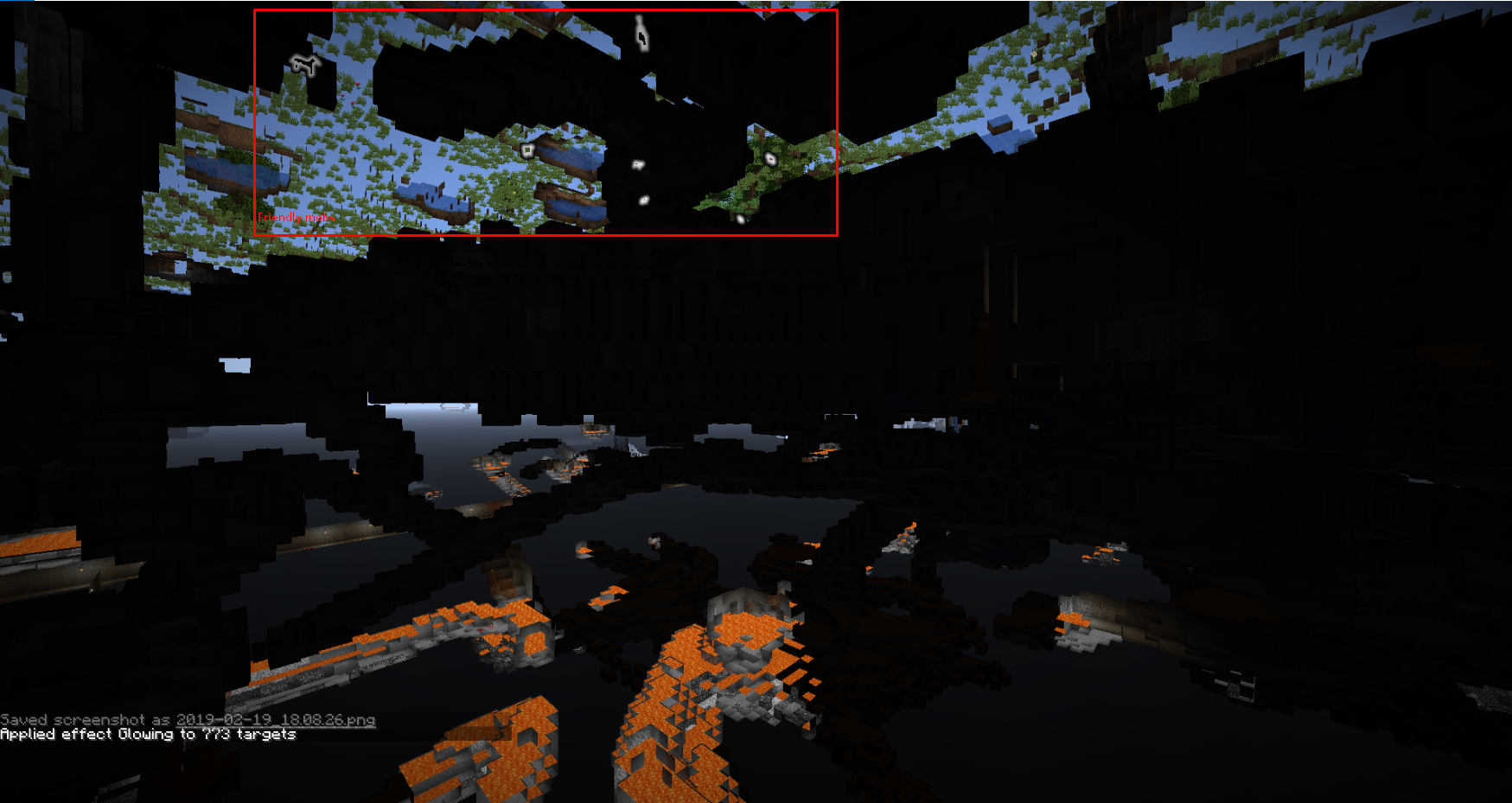
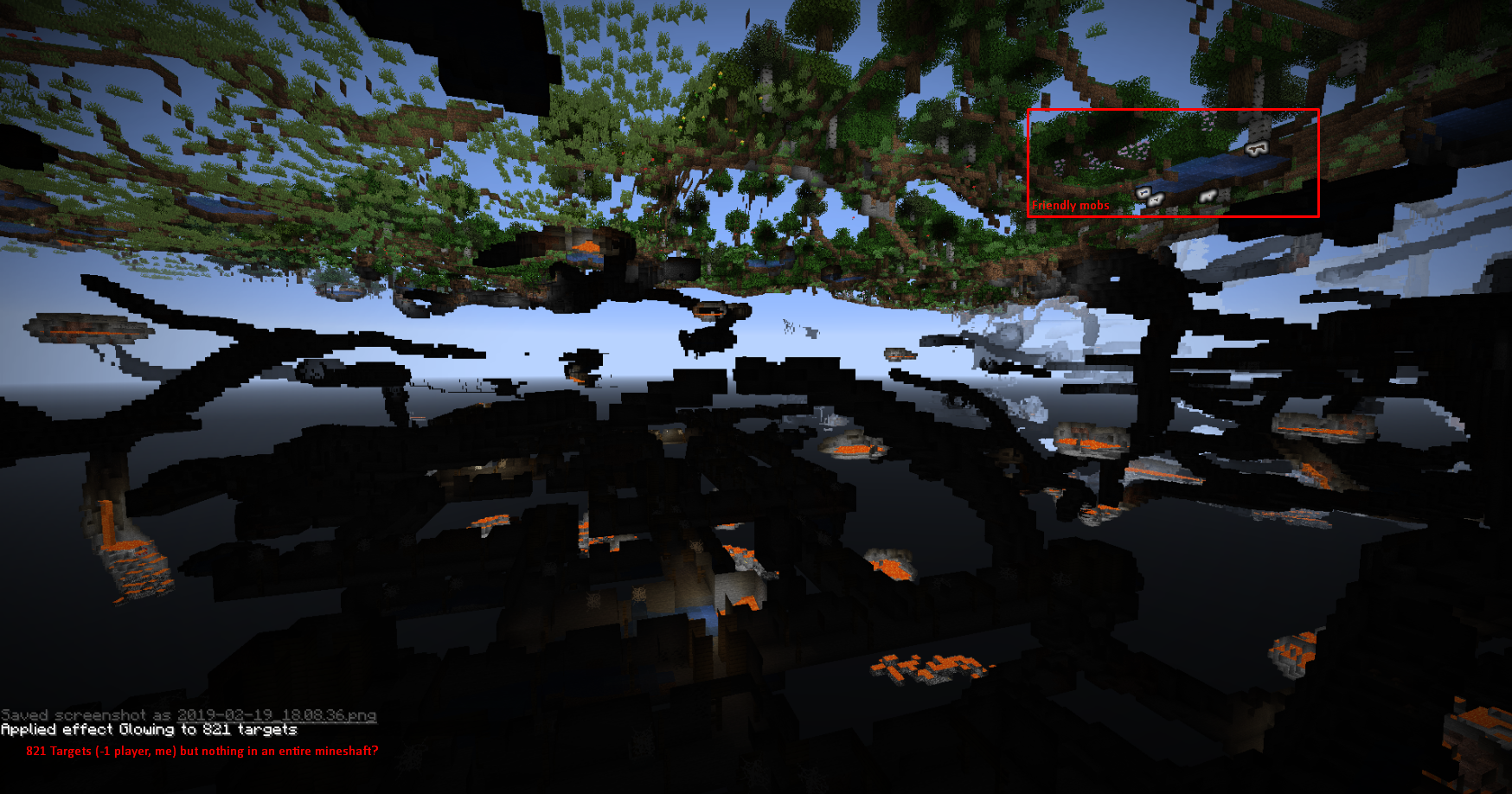
I went in spectator mode, to a place that didn't have torched caves. Executed the command: "/effect give @e minecraft:glowing 30 1 true" and the result is in the screenshots.
I cannot confirm not recreate this issue. But I've been playing in a hardcore world on the newest snapshots (with and without LAN). And constently there are no mobs to be seen, plenty of friendly mobs, like, A LOT. But very low amount of hostiles.
While typing this I don't think this has anything to do with hostile or friendly mobs, because there are no bats spawning either.
- Render distance doesn't change anything.
- Killing all mobs using "kill @e[type=creeper]" for creeper, zombie, skeleton, spider etc. doesn't help, some respawn ofcourse, but mostly nothing. Mostly ~30 per mobtype killed.
I went in spectator mode, to a place that didn't have torched caves. Executed the command: "/effect give @e minecraft:glowing 30 1 true" and the result is in the screenshots.
I am unsure if this
Hardcore mobs bugMobs (with low lightlevel) bug (In Hardcore?)
I cannot confirm not recreate this issue. But I've been playing in a hardcore world on the newest snapshots (with and without LAN). And constently there are no mobs to be seen, plenty of friendly mobs, like, A LOT. But very low amount of hostiles.
While typing this I don't think this has anything to do with hostile or friendly mobs, because there are no bats spawning either.
- Render distance doesn't change anything.
- Killing all mobs using "kill @e[type=creeper]" for creeper, zombie, skeleton, spider etc. doesn't help, some respawn ofcourse, but mostly nothing. Mostly ~30 per mobtype killed.
I went in spectator mode, to a place that didn't have torched caves. Executed the command: "/effect give @e minecraft:glowing 30 1 true" and the result is in the screenshots.
I am unsure if this
I cannot confirm not recreate this issue. But I've been playing in a hardcore world on the newest snapshots (with and without LAN). And constently there are no mobs to be seen, plenty of friendly mobs, like, A LOT. But very low amount of hostiles.
While typing this I don't think this has anything to do with hostile or friendly mobs, because there are no bats spawning either.
- Render distance doesn't change anything.
- Killing all mobs using "kill @e[type=creeper]" for creeper, zombie, skeleton, spider etc. doesn't help, some respawn ofcourse, but mostly nothing. Mostly ~30 per mobtype killed.
I went in spectator mode, to a place that didn't have torched caves. Executed the command: "/effect give @e minecraft:glowing 30 1 true" and the result is in the screenshots.
I am unsure if this is an actual hardcore bug or not. I am playing in hardcore.
I cannot confirm not recreate this issue. But I've been playing in a hardcore world on the newest snapshots (with and without LAN). And constently there are no mobs to be seen, plenty of friendly mobs, like, A LOT. But very low amount of hostiles.
While typing this I don't think this has anything to do with hostile or friendly mobs, because there are no bats spawning either.
- Render distance doesn't change anything.
- Killing all mobs using "kill @e[type=creeper]" for creeper, zombie, skeleton, spider etc. doesn't help, some respawn ofcourse, but mostly nothing. Mostly ~30 per mobtype killed.
I went in spectator mode, to a place that didn't have torched caves. Executed the command: "/effect give @e minecraft:glowing 30 1 true" and the result is in the screenshots.
I am unsure if this is an actual hardcore bug or not. I am playing in hardcore.
I cannot confirm not recreate this issue. But I've been playing in a hardcore world on the newest snapshots (with and without LAN). And constently there are no mobs to be seen, plenty of friendly mobs, like, A LOT. But very low amount of hostiles.
While typing this I don't think this has anything to do with hostile or friendly mobs, because there are no bats spawning either.
- Render distance doesn't change anything.
- Killing all mobs using "kill @e[type=creeper]" for creeper, zombie, skeleton, spider etc. doesn't help, some respawn ofcourse, but mostly nothing. Mostly ~30 per mobtype killed.
- I went in spectator mode, to a place that didn't have torched caves. Executed the command: "/effect give @e minecraft:glowing 30 1 true" and the result is in the screenshots.
I am unsure if this is an actual hardcore bug or not. I am playing in hardcore.
I cannot confirm no
trecreate this issue. But I've been playing in a hardcore world on the newest snapshots (with and without LAN). And constently there are no mobs to be seen, plenty of friendly mobs, like, A LOT. But very low amount of hostiles.While typing this I don't think this has anything to do with hostile or friendly mobs, because there are no bats spawning either.
- Render distance doesn't change anything.
- Killing all mobs using "kill @e[type=creeper]" for creeper, zombie, skeleton, spider etc. doesn't help, some respawn ofcourse, but mostly nothing. Mostly ~30 per mobtype killed.
- I went in spectator mode, to a place that didn't have torched caves. Executed the command: "/effect give @e minecraft:glowing 30 1 true" and the result is in the screenshots.
I am unsure if this is an actual hardcore bug or not. I am playing in hardcore.
I cannot confirm nor recreate this issue. But I've been playing in a hardcore world on the newest snapshots (with and without LAN). And constently there are no mobs to be seen, plenty of friendly mobs, like, A LOT. But very low amount of hostiles.
While typing this I don't think this has anything to do with hostile or friendly mobs, because there are no bats spawning either.
- Render distance doesn't change anything.
- Killing all mobs using "kill @e[type=creeper]" for creeper, zombie, skeleton, spider etc. doesn't help, some respawn ofcourse, but mostly nothing. Mostly ~30 per mobtype killed.
- I went in spectator mode, to a place that didn't have torched caves. Executed the command: "/effect give @e minecraft:glowing 30 1 true" and the result is in the screenshots.
I am unsure if this is an actual hardcore bug or not. I am playing in hardcore. I started a new world (non hardcore, set it to night using "time set 18000" and ran the same effect command. The result is in the screenshots
screenshot4.png
When destroying a crafter in any way (tool, no tool) the block does not drop in item form. This only happens if the world is created in a Realm. If I download my Realm world and play it in Single Player it still doesn't drop. But if I create a Singe Player world, it does drop.
This world was created in the first snapshot (23w42a) and it hasn't been fixed after updating the world to the newest snapshot (23w43b)
See:
https://www.youtube.com/watch?v=70pf6vXDjmQ
This is related to #
MC-265959but that issue was closed without resolving the issue and commenting on it wasn't picked up.
When destroying a crafter in any way (tool, no tool) the block does not drop in item form. This only happens if the world is created in a Realm. If I download my Realm world and play it in Single Player it still doesn't drop. But if I create a Singe Player world, it does drop.
This world was created in the first snapshot (23w42a) and it hasn't been fixed after updating the world to the newest snapshot (23w43b)
See:
https://www.youtube.com/watch?v=70pf6vXDjmQ (removed due to "resolution: fixed")
This is related to #
MC-265959but that issue was closed without resolving the issue and commenting on it wasn't picked up.
Magma cubes can spawn spaces they'd suffocate in. Video file too large, so here's the upload:
Magma cubes can spawn spaces they'd suffocate in. Video file too large, so here's the upload:
Note: The magma cubes on top did NOT spawn on the glass, they spawned through it and jumped up

Magma cubes can spawn spaces they'd suffocate in. Video file too large, so here's the upload:
Note: The magma cubes on top did NOT spawn on the glass, they spawned through it and jumped up
Magma cubes can spawn spaces they'd suffocate in. Video file too large, so here's the upload:
Note: The magma cubes on top did NOT spawn on the glass, they spawned through it and jumped up.
Magma cubes can spawn spaces they'd suffocate in. Video file too large, so here's the upload:
https://youtu.be/M_J0RXSw2dg (removed due to duplicate issue)
Note: The magma cubes on top did NOT spawn on the glass, they spawned through it and jumped up.
An argument can be made that the mob isn't despawning naturally. It despawns because the timer runs out.
I still have this issue. It only happens on Realms. When I create a world in single player it works as expected but downloading a realm world to single player and beaking a crafter there it still doesn't drop.
This is still happening in the latest Realm snapshot (23w43b)
https://www.youtube.com/watch?v=70pf6vXDjmQ
@panda4994 💪🏼
Ugh, yes- my bad. Somehow didn't find that issue... Thanks!