 Nan R
Nan R
- Nanr
- JIRAUSER771106
- Europe/Stockholm
- Yes
- No
 WEB-6862
 MCL-24048
 MC-269382
 Low
Low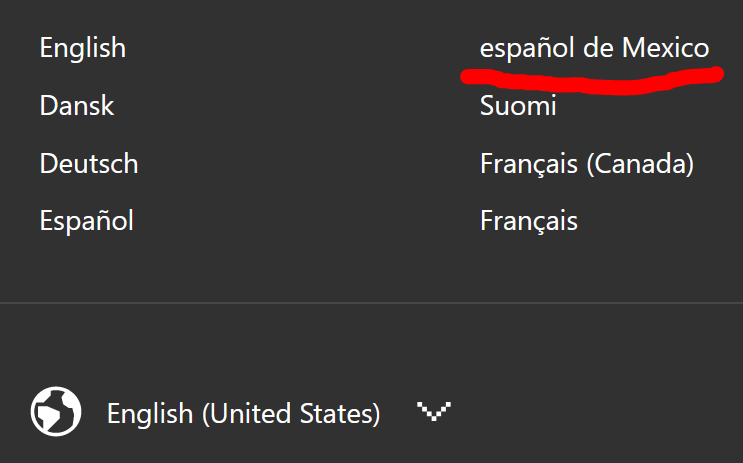

The Mexican Spanish language button is improperly capitalized in the language selection menu of minecraft.net.
Steps to Reproduce:
- Go into minecraft.net
- Scroll all the way down to find the language selection menu
- Open the menu and look at the options
Observed Results:
The language appears as "español de Mexico"
Expected Results:
The language should appear as "Español de Mexico", similarly to "Português Brasileiro"{}
The Mexican Spanish language button is improperly capitalized in the language selection menu of minecraft.net.
Steps to Reproduce:
- Go into minecraft.net
- Scroll all the way down to find the language selection menu
- Open the menu and look at the options
Observed Results:
The language appears as "español de Mexico"
Expected Results:
The language should appear as "Español de Mexico", similarly to "Português Brasileiro"
Mistake in launcher string "effect"->"affect"Mistake in launcher string "effect" instead of "affect"
The Bug:
The word "entires" is used instead of "entries" in https://crowdin.com/editor/minecraft-launcher/9420/en#5365350
Affected String:
Before reading the table, please note the following:
- Words colored in GREEN are correct.
- Words colored in RED are incorrect.
Current String Expected String String Context String URL on Crowdin Delete All Quick Play Entires Delete All Quick Play Ent ires#: ..\..\apps\launcher\src\routes\Settings\routes\General\components\Form\index.tsx:424 https://crowdin.com/editor/minecraft-launcher/9420/en#5365350 Steps to Reproduce:
- Locate the affected string as listed above in the Crowdin project.
Observed Behavior:
This word "entires" is used instead of "entries"
Notes:
This string is seemingly not implemented into the launcher yet, so it is not possible to view it in-app. This mistake can still be seen in the Crowdin link above.
The Bug:
The word "entires" is used instead of "entries" in https://crowdin.com/editor/minecraft-launcher/9420/en#5365350
Affected String:
Before reading the table, please note the following:
- Words colored in GREEN are correct.
- Words colored in RED are incorrect.
Current String Expected String String Context String URL on Crowdin Delete All Quick Play Entires Delete All Quick Play Entries #: ..\..\apps\launcher\src\routes\Settings\routes\General\components\Form\index.tsx:424 https://crowdin.com/editor/minecraft-launcher/9420/en#5365350 Steps to Reproduce:
- Locate the affected string as listed above in the Crowdin project.
Observed Behavior:
This word "entires" is used instead of "entries"
Notes:
This string is seemingly not implemented into the launcher yet, so it is not possible to view it in-app. This mistake can still be seen in the Crowdin link above.
The Bug:
The error message "Only single slots allowed, got '%s'" is inconsistent with other similar error messages.
Below is a table I've constructed that highlights this error. You can find information about what the current and expected string is and would be, some context regarding it, and a link to the appropriate string on Crowdin. Additionally, I have attached a picture of the editor view in Crowdin that showcases this issue.
Affected String:
Before reading the table, please note the following:
- GREEN means correct.
- RED means incorrect.
Current String Expected String String Context String URL on Crowdin Only single slots allowed, got '%s' Only single slots allowed, got %s Key: "slot.only_single_allowed"
-> slot.only_single_allowedhttps://crowdin.com/editor/minecraft/10038/enus-es?view=comfortable#5365456 Steps to Reproduce:
- Locate the affected string as listed above in the launcher by searching "got %s"
- Compare the affected string with the others
Observed Behavior:
This string uses '%s' instead of simply %s
Expected Behavior:
This string is consistent with the other error messages and doesn't use single quotation marks.
The Bug:
The error message "Only single slots allowed, got '%s'" is inconsistent with other similar error messages.
Below is a table I've constructed that highlights this error. You can find information about what the current and expected string is and would be, some context regarding it, and a link to the appropriate string on Crowdin. Additionally, I have attached a picture of the editor view in Crowdin that showcases this issue.
Affected String:
Before reading the table, please note the following:
- GREEN means correct.
- RED means incorrect.
Current String Expected String String Context String URL on Crowdin Only single slots allowed, got '%s' Only single slots allowed, got %s Key: "slot.only_single_allowed"
-> slot.only_single_allowedhttps://crowdin.com/editor/minecraft/10038/enus-es?view=comfortable#5365456 Steps to Reproduce:
- Locate the affected string as listed above in the launcher by searching "got %s" or by clicking the following link: https://crowdin.com/editor/minecraft/10038/enus-es?view=comfortable&filter=basic&value=0#q=got%20%25s
- Compare the affected string with the others
Observed Behavior:
This string uses '%s' instead of simply %s.
Expected Behavior:
This string is consistent with the other error messages and doesn't use single quotation marks.
"Single slots allowed" error message is inconsistent with other error messages with its use of single quotation marks"Only single slots allowed" error message is inconsistent with other error messages with its use of single quotation marks
The Bug:
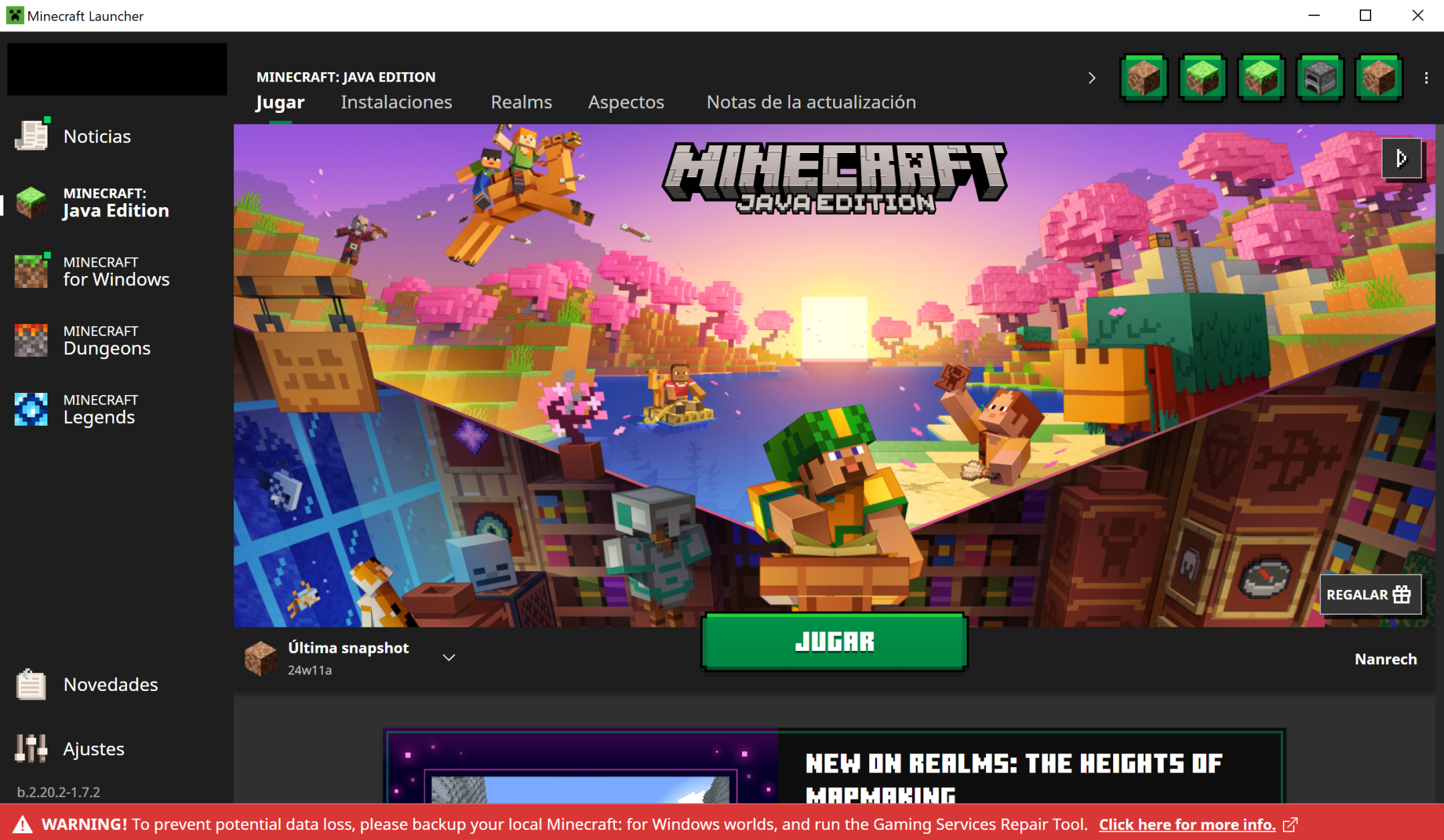
The string "WARNING! To prevent potential data loss, please backup your local Minecraft: for Windows worlds, and run the Gaming Services Repair Tool. Click here for more info." is currently untranslatable. As it does not appear in the official Crowdin Minecraft Launcher project.
Steps to Reproduce:
- Open the Launcher in the latest available version.
- Look for the mentioned string at the bottom of the window (as shown in screenshot attached).
- Change the language of the launcher to a language other than English
Search for the string in the Crowdin project or follow this link.→

Regardless of the language selected, the string remains in English and it is alsonot present in the Crowdin project.Observed Behavior:
The string cannot be translated.
Expected Behavior:
The string would be translatable.
The Bug:
The string "WARNING! To prevent potential data loss, please backup your local Minecraft: for Windows worlds, and run the Gaming Services Repair Tool. Click here for more info." is currently untranslatable. As it does not appear in the official Crowdin Minecraft Launcher project.
Steps to Reproduce:
- Open the Launcher in the latest available version.
- Look for the mentioned string at the bottom of the window (as shown in screenshot attached).
- Search for the string in the Crowdin project or follow this link.
→
Observed Behavior:
The string cannot be translated.
Expected Behavior:
The string would be translatable.
jira_quotes.PNG
Can confirm as of 24w06a.
Can confirm as of 24w06a.
Can confirm as of 24w06a.
Can confirm as of 24w09a.
Can confirm as of 24w09a.
Can confirm as of 24w09a. Note that F3 + T does not seem to work when viewing any kind of menu.
Can confirm as of 24w09a. Likely intended behaviour as Jiingy stated.
Can confirm as of 24w09a.
Can confirm as of 24w09a.
Can confirm as of 24w09a.
Can confirm as of 1.20.4 and 24w10a.
The commands in the bug description no longer work with the addition of components. Use the following commands instead:
/give @a written_book[minecraft:written_book_content={pages:["{text:\"Line 1\\nLine 2\"}"], title: "Test", author: "Test"}]/give @a writable_book[minecraft:writable_book_content={pages:["{text:\"Line 1\\nLine 2\"}"]}]Can confirm as of 1.20.4 and 24w10a, but this is probably WAI.
Can confirm as of 24w10a and 1.20.4
Can confirm.
Can confirm for 1.21.40.22 Preview