 Rowan Daly
- Nawor3565
- nawor3565
- America/New_York
- Yes
- No
 MC-74060
 REALMS-43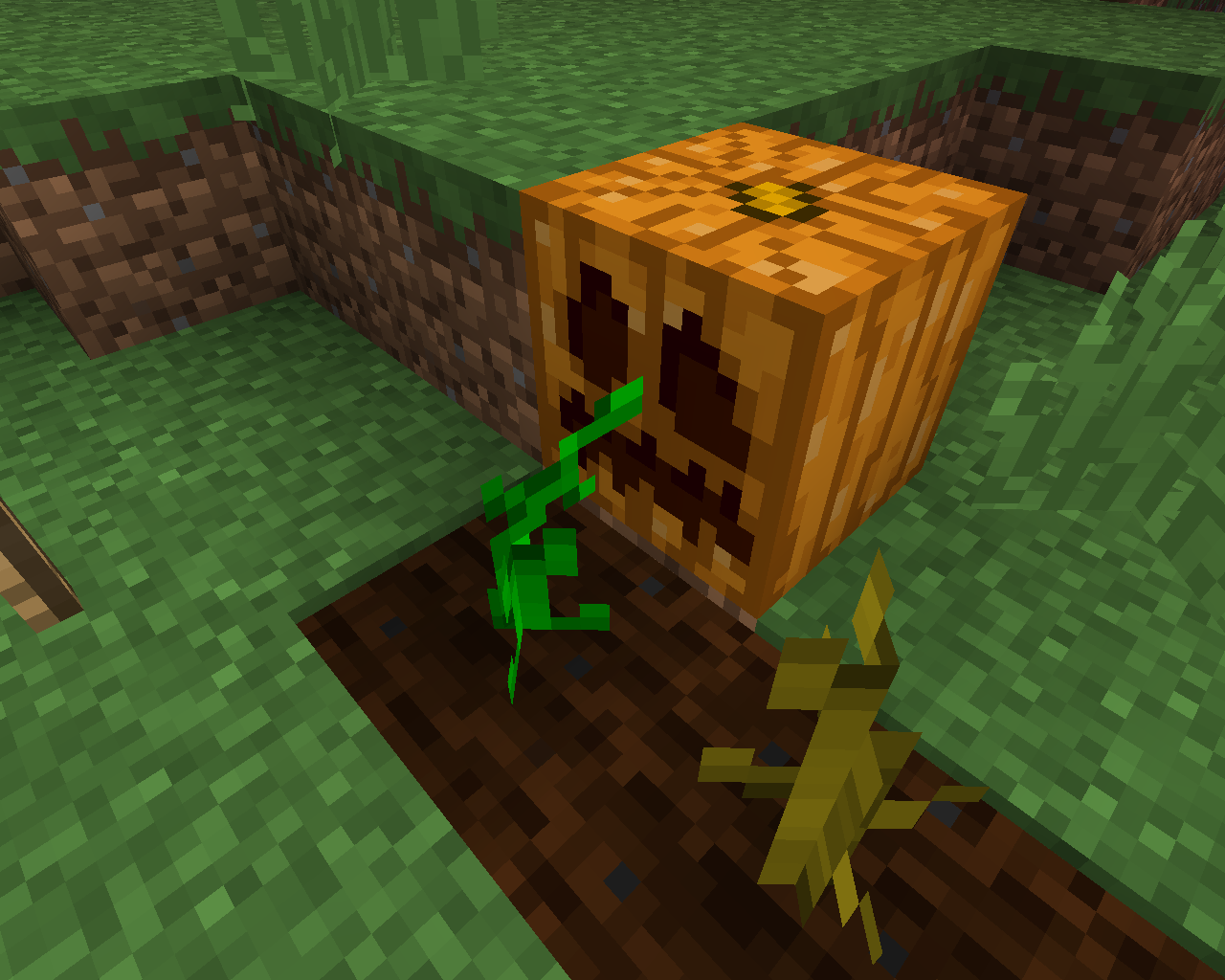

As you can see in the screenshots, if you place a Pumpkin next to a Pumpkin stem that is not fully grown, it will change to the bent over model, but keep it's color. It changes back to the stage it was at before when you break the pumpkin.
UPDATE: This is the same with melons and melon stems.
Put the summary of the bug you're having here
EDIT: I just tried again to get it to work. Now it says I need to update my drivers.
What I expected to happen was...:
Minecraft would open as normalWhat actually happened was...:
No "Mojang" Screen came up, and a few seconds later, it crashedSteps to Reproduce:
1. Open the Minecraft Launcher
2. Click Play
3. Wait
Put the summary of the bug you're having here
EDIT:
I just tried again to get it towork.Now it says I need to update my drivers.What I expected to happen was...:
Minecraft would open as normalWhat actually happened was...:
No "Mojang" Screen came up, and a few seconds later, it crashedSteps to Reproduce:
1. Open the Minecraft Launcher
2. Click Play
3. WaitPut the summary of the bug you're having here
EDIT: Ok, I updated my drivers, now it works. Can I delete this post now?
What I expected to happen was...:
Minecraft would open as normalWhat actually happened was...:
No "Mojang" Screen came up, and a few seconds later, it crashedSteps to Reproduce:
1. Open the Minecraft Launcher
2. Click Play
3. Wait
What I expected to happen was...
When I downloaded my Realm world, it would be exactly the same as it is on the RealmsWhat actually happened was...
All of the blocks, chests, etc. were the same, but everyone's inventory was the same as it was the last time I uploaded a world.Steps to Reproduce:
1. Upload a world to Realms with a dirt in your inventory.
2. Once in Realms, replace the dirt in your inventory with wood, and build a small structure.
3. Download your would to your computer.
4. Even though the structure you built is still there, you now have the dirt in your inventory even though you replaced it with wood on your Realm.What I expected to happen was...
When I downloaded my Realm world, it would be exactly the same as it is on the RealmsWhat actually happened was...
All of the blocks, chests, etc. were the same, but everyone's inventory was the same as it was the last time I uploaded a world.Steps to Reproduce:
1. Upload a world to Realms with a dirt in your inventory.
2. Once in Realms, replace the dirt in your inventory with wood, and build a small structure.
3. Download your world to your computer.
4. Even though the structure you built is still there, you now have the dirt in your inventory even though you replaced it with wood on your Realm.
Shoot. Why didnt I see that? Oh well.
Confirmed for 1.8.4
Can confirm for 15w44b
I just tried it, it still doesnt work in the newest snapshot.