 Jon-Jacob
- nogluten
- nogluten
- America/Edmonton
- Yes
- No
 MC-2813
 REALMS-1338
 Normal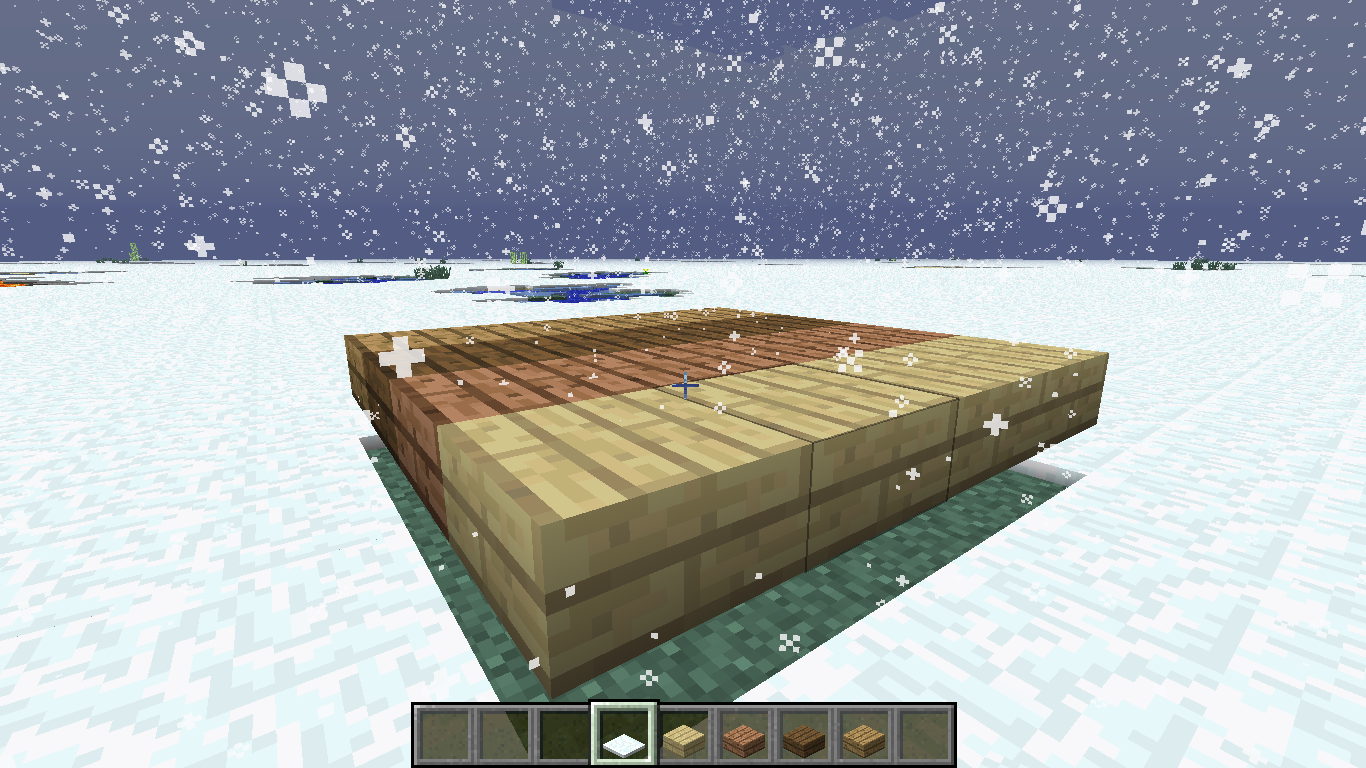


when you have an upside down half slab and it is snowing in the game, the snow will land on whole blocks but not upside down half slabs. i believe that this is a bug because you can place red stone, torches, and other things on half slabs, but snow doesn't fall on them. this bug happens in all gamemodes. On double half slabs snow does form.
when you have an upside down half slab and it is snowing in the game, the snow will land on whole blocks but not upside down half slabs.ibelieve that this is a bug because you can place red stone, torches, and other things on half slabs, but snow doesn't fall on them. this bug happens in all gamemodes. On double half slabs snow does form.When you have an upside down half slab and it is snowing in the game, the snow will land on whole blocks but not upside down half slabs. I believe that this is a bug because you can place red stone, torches, and other things on half slabs, but snow doesn't fall on them. this bug happens in all gamemodes. On double half slabs snow does form.
When you have an upside down half slab and it is snowing in the game, the snow will land on whole blocks but not upside down half slabs. I believe that this is a bug because you can place red stone, torches, and other things on half slabs, but snow doesn't fall on them.
this bug happens in all gamemodes. On double half slabs snow does form.When you have an upside down half slab and it is snowing in the game, the snow will land on whole blocks but not upside down half slabs. I believe that this is a bug because you can place red stone, torches, and other things on half slabs, but snow doesn't fall on them. This bug happens in all gamemodes. On double half slabs snow does form.
Still an issue in 1.6.1... This should be added to the affected versions...
My world is quite old, and we've been using it for at least the last two years, if not more. However this latest update has given us more issues than normal. First in July I decided to go exploring, only to start receiving a crash and then more crashes, and I ended up having to download the world and delete the latest chunks and then tp myself out of there upon reuploading it to realms. That seemed to solve the issue.
Now, I seem to be getting the issue again. I was exploring and loading new chunks near my base and was kicked off with a message saying 'server closed', I then tried to log back on and got the following:
io.netty.channel.AbstractChannel$AnnotatedConnectException: Connection refused: no further information:
I then tried turning the server off and on again, only to have the same issue upon logging in. I loaded up a new world and had no issues exploring. I restored the world from a backup and had no issues either. Other people went on the world after we encountered this issue and did not get the 'server closed' message, yet when I went on everyone was kicked and got the message, then the second one upon trying to reconnect. This is the exact same as what happened in July, though I can not remember if the message was different.
My world is quite old, and we've been using it for at least the last two years, if not more. However this latest update has given us more issues than normal. First in July I decided to go exploring, only to start receiving a crash and then more crashes, and I ended up having to download the world and delete the latest chunks and then tp myself out of there upon reuploading it to realms. That seemed to solve the issue.
Now, I seem to be getting the issue again. I was exploring and loading new chunks near my base and was kicked off with a message saying 'server closed', I then tried to log back on and got the following:
io.netty.channel.AbstractChannel$AnnotatedConnectException: Connection refused: no further information:
I then tried turning the server off and on again, only to have the same issue upon logging in. I loaded up a new world and had no issues exploring. I restored the world from a backup and had no issues either. Other people went on the world after we encountered this issue and did not get the 'server closed' message, yet when I went on everyone was kicked and got the message, then the second one upon trying to reconnect. This is the exact same as what happened in July, though I can not remember if the message was different.
Edit: A friend joined the server after I had reset it and went exploring and it crashed for him as well.
This is an offshoot of
MC-243216, with the issue being that you are unable to change the render distance on Realms (I'm using Java, but presumably you can't change it on bedrock either). Essentially in 1.18, from what I understand, an option was added to separate render distance from the players and the servers (incl. realms), making it so the render distance for players is limited to whatever it is set to for the server the player joins. In theory this would be fine, however no option was ever added to the realms files to permit the changing of render distance. Thus in realms worlds, render distance is capped off at 8-10, with no options or ways to change it. On servers you can change the render distance using the server properties file, but no such option exists for realms.
It is possible that this may be fixed in 1.18.1 pre-release 1, but since there is no way of updating the realms worlds to the pre-release, it is impossible to know until said pre-release is released and the realms worlds update. However seeing as the world options file in realms has not changed for 1.18, I would wager that it is not fixed in 1.18.1.
This is an offshoot of
MC-243216, with the issue being that you are unable to change the render distance on Realms (I'm using Java, but presumably you can't change it on bedrock either). Essentially in 1.18, from what I understand, an option was added to separate render distance from the players and the servers (incl. realms), making it so the render distance for players is limited to whatever it is set to for the server the player joins. In theory this would be fine, however no option was ever added to the realms files to permit the changing of render distance. Thus in realms worlds, render distance is capped off at 8-10, with no options or ways to change it. On servers you can change the render distance using the server properties file, but no such option exists for realms.
This is still an issue in 1.18.1
i get the same issue sorta:
1. put a stack of 64 cobble and 36 cobble into a hopper above a furnace
2. put lava bucket into furnace
3. have hopper beneath furnace
4. look back into furnace, 2 times out of 6 the lava bucket will be gone and the furnace will show the fire aspect, but nothing is smelting...
snapshot 13w03a
image: http://imgur.com/a/NySBh
Also happens to horses, and wolfs, and probably every mob that you can attach a lead to...
I am still getting the bug in 1.11.2. I lit a forest on fire to remove it, then left to work on other things nearby, when I returned there are random areas of light still throughout the area. I tried F3+A like mentioned here, however that doesn't make the lighting glitches go away, placing blocks where the light sources are appears to work, however there is no way to actually know where the light is coming from which makes this option extremely tedious, and not really feasible. The world is in realms making it rather difficult for me to use MCEdit. There is also a second area in the world where this happened, however that area was created back in 1.8 or so, but I doubt that it has much to do with that.
Edit: I figured out a way to fix the lighting issues, however you can only do it when you are an op. Basically you make a large body of water (ie ocean) and clone it to about y100-200 depending on the forest you burned down. Then let the water fall and all ghost lights should be gone. Then just clone open air back to where you cloned the water and you should be good to go after the water has gone.
I've been receiving this bug too. It is quite annoying, and I've attempted to solve it by changing my graphics settings, and by restarting my computer. Neither seemed to have any affect. It is worth mentioning that the current world is on Realms, and was previously a single player lan world which my friend started on with 1.8. However I don't think that would cause any issues because my previous world before this on Realms was started in 1.8 and didn't have any issues. It happens randomly while mining blocks or when dropping them. For example I'll be mining and some blocks will show the items while others won't.
I've attached a set of photos as an example, I mined 9 blocks of stone and didn't see anything on the ground, but when I walked over them I collected 9 cobblestone.


Edit: I've attached a crash report from my game
Okay, so why does it say it's closed each time we try to explore then?
I was unable to download the world recently, as it failed at about 20-40% each time I tried (I tried 5 times), but I do have a download from July when I first encountered the issue (I downloaded it and then deleted the chunks in question then reuploaded and tp'd myself away). Anyways, I loaded it up and got it to crash again, here is a crash report:
crash-2018-09-23_11.38.06-server.txt
The entire game crashed and the only message I got was:
"an unexpected issue occurred and the game has crashed. We are sorry for the inconvenience."
I've had this issue as well in 21w11a. Whilst playing a couple times in survival I found gold, redstone, and lapis before finding a single piece of iron ore. I did find some iron eventually, but in such small quantities that it was basically useless. There seemed to be more iron available in desert temples then actually in the ground.
Right, I know that it was tweaked, but it should still be generating in caves and such. The image doesn't say anything about less air exposure or anything like that, so it doesn't explain why iron is almost impossible to find, especially in caves. Not to mention the fact that iron and copper appear to have almost the exact same frequency, and yet when actually playing in survival, copper is way more common than iron. I had over two stacks of copper ore before I found a single piece of iron ore.
This report explains the issue a bit better: https://bugs.mojang.com/browse/MC-220326
Is the issue fixed in realms as well? As if not then it's definitely not fixed, as part of the issue is that you can't change the distance setting on realms at all.
I see, well in that case I'm presuming the issue hasn't been properly fixed for realms, as the list of fixes for 1.18.1 does not list anything about allowing you to change the render distance for realms. Thus I have made a separate bug report for that:
REALMS-9851Probably, but I'd at least like to hear an official statement one way or the other from mojang.
Yup, I figured it would still be an issue, as they never really stated to have fixed the render distance, just the fog. Though because the issue now is that you can not change the render distance in realms, I doubt this ticket will be reopened. I have made a bug report for that -
REALMS-9851but I don't know if they will respond to it or if it is working as intended or not.I emailed customer support regarding this issue, and they responded by saying that they know it's frustrating, but that they can't give any information about it. So I'm not too sure when or if this issue will be fixed.