 Patrick Rannou
- ouatcheur
- ouatcheur
- America/Havana
- Yes
- No
 MC-12598



When in inventory screen, if you have let's say a stack in the mouse and do, over an empty item slot, a left-click quickly follow
ed bya right click:-In 1.4.7, the first action is done correctly (in this case, dropping the stack into the item slot), and the second action is also done immediately afterwards (in this case, quickly grabbing half the stack back). This is the correct behavior: a click
that doesn't have adouble-click behaviordefined alwaysbehaves as a single-click.-In 1.5 and 1.5.1, the first action is done (here, dropping the stack into the slot), but then the second click is completely ignored.
This bug actually seems to be pervasive all across the game interface on all item slots, not merely inventory slots (crafting, smelting, etc.).
Essentially, it seems as if the game tries to interpret the second click's short time interval to mean that the second click is actually part of a double-click action, and since there are no double-click actions involving the use of both mouse buttons, it just drops the second click altogether.
Note that the second click is not ignored if you do the opposite: a right
click quickly followed by a leftclick, will do both actions. Same thing for two rightclicks in quick succession, or two leftclicks. However, in the case of right-click-then-quick-left-click, there seem to be a slight delay in the second response to the second click.When in inventory screen, if you have let's say a stack in the mouse and do, over an empty item slot, a left-click and quickly follow up with a right click:
-In 1.4.7, the first action is done correctly (in this case, dropping the stack into the item slot), and the second action is also done immediately afterwards (in this case, quickly grabbing half the stack back). This is the correct behavior: a click done without any defined double-click behavior behaves as a single-click command.
-In 1.5 and 1.5.1, the first action is done (here, dropping the stack into the item slot), but then the second click is completely ignored.
This bug actually seems to be pervasive all across the game interface on all item slots, not merely inventory slots (crafting, smelting, etc.). It occurs both in Creative and Survival mode, and occurs 100% of the time (perfect reproductability).
Essentially, it seems as if the game tries to interpret the second click's short time interval to mean that the second click is actually part of a double-click action, and since there are no double-click actions involving the use of both mouse buttons, it just drops and ignores the second click altogether instead of using the single-click action for it.
Note that the second click is not ignored if you do the opposite: a right-click quickly followed by a left-click, will still do both actions. Same thing for two right-clicks in quick succession, or two left-clicks.
However, in the case of a left-click done quickly after a right-click, there seem to be a slight delay involved in the response time for the second click, that didn't exist before in 1.4.7.
Java: Version 1.7.0_17 from Oracle Corp (32 bits)
OS: Windows Vista 32 bits installed on a Dell Vostro 220 Desktop
CPU: Pentium Dual Core E5400 @ 2.70GHz 4 GB RAM
Graphic Card: ATI Radeon HD 3400 Series
Installed on: Standard Internal Desktop Hard DriveComputer: Dell Vostro 220 Desktop
CPU: Pentium Dual Core E5400 @ 2.70GHz 4 GB RAM
Graphic Card: ATI Radeon HD 3400 Series
OS: Windows Vista 32 bits
Java: Version 1.7.0_17 from Oracle Corp (32 bits)
Minecraft: Vanilla 1.5.1, Vanilla 1.5
Mods: None.
Installed on: Standard Internal Desktop Hard Drive
In inventoryifright-clicking is ignored ifdone after a left-clic within double-click time intervalIn inventory, right-click done after a left-click will be ignored if done within double-click time interval.
Fix Nether Portal orientationupon arrivalFix Nether Portal orientation (the portal's itself on creation, and Steve's upon traveling)
Made a nether portal pair where the destination coordinates match exactly (by a factor of 8). These portals hav
ce a "front" enrance, and are placed against a wall so their "back" is made of solid blocks.Entering from the north side facing south on the nether portal, I arrive also facing south in the overworld. But entering from the south side facing north in the overworld, I arrive facing north in the Nether, face up against the wall
.Why the useless 180 degrees orientation switch?This occurs in lots of other portals as well.
Make it so the player's orientation NEVER changes.
Also, make it so that when a portal is automatically created, the new portal's orientation is the same as the other portal. Entering a portal to end up "facing" the side column looks even more stupider. Are those things really portals or are they some kind of carousels?
Made a nether portal pair where the destination coordinates match exactly (by a factor of 8). These portals have a "front" entrance, and are placed against a wall so their "back" is made of solid blocks.
Entering from the north side facing south on the nether portal, I arrive also facing south in the overworld. But entering from the south side facing north in the overworld, I arrive facing north in the Nether, ergo, face up against the wall! Why the useless 180 degrees orientation switch?
This occurs in lots of other portals as well.
Make it so the player's orientation NEVER changes.
Also, make it so that when a portal is automatically created, the new portal's orientation is the same as the other portal. Entering a portal to end up "facing" the side column looks even more stupider. Are those things really portals or are they some kind of carousels?
Portals should be: you walk in, then you walk out. End of story. They definitely should not be: you walk in, you rotate maybe 0, maybe 90 degrees, maybe 180 degrees, depending on which portal pair you used, and then you finally walk out.
This is exactly like the
MC-13024"bug", which was closed for being "invalid". However the "invalid" verdict is in itself not valid at all. See below!Yes, I can confirm that this is occuring "mostly" because of some optical mouses.
BUT!
The statement that "this is not a Minecraft issue" is invalid because: (please read fully)
For any input type, wether it is keyboard or mouse, any software should definitely check for its desired "valid range" of input values, and acordingly adjust the input to let through only good data likely to produce desired results. Undesirable input, especially known sources of bad input from users or independent third-party, should in all cases be either be prevented or modulated.
If Microsoft Windows was coded using the "this is a mouse input issue, not a Windows issue", then the same kind of thing would also occur, at the same kind of frequency, in the windows environment, and we'd get wild mouse pointer mouvements because Windows would stupidly "simply follow suit", believing that all input from the mouse hardware "is and should be perfect".
If all other freaking games were also coded using that same "philosophy", then all of those other games would ALSO give wild spinning seizures because of overly-sensitive hardware. Most don't, which is proof enough that the professionnal game makers do see this is something that needs to be adressed.
If sound systems and cell phones were designed with the same "philosohy", then users would constantly hear constant noisy scratches and interference-like white noises coming from the speakers of such devices, because the software designers thought that simply taking the input directly and for granted, without trying to filter it at all, and then put the fault of bad sound on the bad microphones hardware of the other cell phone companies, was a sufficient reason.
If passenger airplanes and jet planes were designed in this manner, thousands would die each year because, when the pilot does a "bad manoeuver", instead of refusing or modulating the input to within tolerance levels, the plane would simply wildly try to "follow suit" doing impossible moves, and then of course something would break and the plane would crash and burn.
Forgetting to filter input to within playable levels is a bug, in the very same sense that "assuming" that a variable "should" fall within a range of values going from X to Y and then seeing the game crash because, of course, the coders deliberately dismissed there are in-game ways to make that variable go outside of that "valid" range anyway, will also end up causing bugs. This wild spin is just that: one more of those b
igs caused by failing to predictand to deal withinvalid input value ranges.And this bug here occurs QUITE OFTEN ENOUGH. I suffer from it wildly and all the time, in fact every few minutes of play, major annoyance all around. Sometimes it lasts for several seconds or even FOREVER SPINNING UNTIL I MOVE MY MOUSE AGAIN.
It happens more to some mouses, especially optical mouses and other very sensitive input devices. In the case of an optical mouse it is caused by the mouse being moved ever so slightly "off the surface" on one side (front, back, or actual mouse sides), making the laser go "off" it's right range of values and maybe output "infinite or division by zero" values. Or something way beyond the normal range. Only the tiniest fraction of a millimeter is needed to cause this. This is simply a signal spike of some sort. SIMPLE TO DETECT. This is what cause all those input devices to send off wild input signals, and Minecraft stupidly chooses to simply "follow suit" with that grossly bad input data.
The game should EASILY be able to tell when the player movement is a wild spin for seemingly no reason at all, and prevent it altogether.
It happens a LOT more when moving to look up or down. In those directions, the tinist mouse movement can generate a LOT of on-screen movement. Something feels just plain WRONG with the way Minecraft handles mouse movement in those directions.
Seemingly, Minecraft just forgets to poll the mouse again until the next "true" mouse movement event. That is why this glitch can occur for seemingly LONG times. If an input data "spike" occurs right before the mouse stops moving, then you're in it again for a wild spin again, ether looking straght up or down (but even sometimes at eye level too).
If Minecraft did this polling check (not a few times per second but actually tens of times per second - either as fast as the mouse hardware allows or at least tring to check twice as fast as a good human reaction time, because the mouse is a critical input stream and should be treated as such), then Minecraft would easily be able to take note when such "wild input" becomes brief spikes that fall completely out of the mouse acceleration input value from "right before", flag it, and if in the next few instants the spike is confirmed as such (thew values return to within their previous range), then it would be able to correct what the hardware failed to do and return the view to what it would have been without the spike, with only a "normal" amound of rotation instead of a super-fast wild spin. And Minecraft would also be able to STOP the spinning, too, as soon as the mouse would be immobile. currenty, it is unable to do so, how can you not see that as a bug is beyond me.
Windows does this filtering.
All other games do it too.
DVDs do it before transmitting an image to a TV screen.
Sound systems and mobile phones do it before sending sound to their speakers.
It is done for plane control to avoid pilot errors.
etc.!It is called Noise Filtering and is a basic coding practive and failing to do it is a buggy behavior, definitely not a feature "working as intended"!
This is exactly like the
MC-13024"bug", which was closed for being "invalid". However the "invalid" verdict is in itself not valid at all. See below!Yes, I can confirm that this is occuring "mostly" because of some optical mouses.
BUT!
The statement that "this is not a Minecraft issue" is invalid because: (please read fully)
For any input type, wether it is keyboard or mouse, any software should definitely check for its desired "valid range" of input values, and acordingly adjust the input to let through only good data likely to produce desired results. Undesirable input, especially known sources of bad input from users or independent third-party, should in all cases be either be prevented or modulated.
If Microsoft Windows was coded using the "this is a mouse input issue, not a Windows issue", then the same kind of thing would also occur, at the same kind of frequency, in the windows environment, and we'd get wild mouse pointer mouvements because Windows would stupidly "simply follow suit", believing that all input from the mouse hardware "is and should be perfect".
If all other freaking games were also coded using that same "philosophy", then all of those other games would ALSO give wild spinning seizures because of overly-sensitive hardware. Most don't, which is proof enough that the professionnal game makers do see this is something that needs to be adressed.
If sound systems and cell phones were designed with the same "philosohy", then users would constantly hear constant noisy scratches and interference-like white noises coming from the speakers of such devices, because the software designers thought that simply taking the input directly and for granted, without trying to filter it at all, and then put the fault of bad sound on the bad microphones hardware of the other cell phone companies, was a sufficient reason.
If passenger airplanes and jet planes were designed in this manner, thousands would die each year because, when the pilot does a "bad manoeuver", instead of refusing or modulating the input to within tolerance levels, the plane would simply wildly try to "follow suit" doing impossible moves, and then of course something would break and the plane would crash and burn.
Forgetting to filter input to within playable levels is a bug, in the very same sense that "assuming" that a variable "should" fall within a range of values going from X to Y and then seeing the game crash because, of course, the coders deliberately dismissed there are in-game ways to make that variable go outside of that "valid" range anyway, will also end up causing bugs. This wild spin is just that: one more of those bugs caused by failing to predict
and to deal withinvalid input value ranges.And this bug here occurs QUITE OFTEN ENOUGH. I suffer from it wildly and all the time, in fact every few minutes of play, major annoyance all around. Sometimes it lasts for several seconds or even FOREVER SPINNING UNTIL I MOVE MY MOUSE AGAIN.
It happens more to some mouses, especially optical mouses and other very sensitive input devices. In the case of an optical mouse it is caused by the mouse being moved ever so slightly "off the surface" on one side (front, back, or actual mouse sides), making the laser go "off" it's right range of values and maybe output "infinite or division by zero" values. Or something way beyond the normal range. Only the tiniest fraction of a millimeter is needed to cause this. This is simply a signal spike of some sort. SIMPLE TO DETECT. This is what cause all those input devices to send off wild input signals, and Minecraft stupidly chooses to simply "follow suit" with that grossly bad input data.
The game should EASILY be able to tell when the player movement is a wild spin for seemingly no reason at all, and prevent it altogether.
It happens a LOT more when moving to look up or down. In those directions, the tinist mouse movement can generate a LOT of on-screen movement. Something feels just plain WRONG with the way Minecraft handles mouse movement in those directions.
Seemingly, Minecraft just forgets to poll the mouse again until the next "true" mouse movement event. That is why this glitch can occur for seemingly LONG times. If an input data "spike" occurs right before the mouse stops moving, then you're in it again for a wild spin again, ether looking straght up or down (but even sometimes at eye level too).
If Minecraft did this polling check (not a few times per second but actually tens of times per second - either as fast as the mouse hardware allows or at least tring to check twice as fast as a good human reaction time, because the mouse is a critical input stream and should be treated as such), then Minecraft would easily be able to take note when such "wild input" becomes brief spikes that fall completely out of the mouse acceleration input value from "right before", flag it, and if in the next few instants the spike is confirmed as such (thew values return to within their previous range), then it would be able to correct what the hardware failed to do and return the view to what it would have been without the spike, with only a "normal" amound of rotation instead of a super-fast wild spin. And Minecraft would also be able to STOP the spinning, too, as soon as the mouse would be immobile. currenty, it is unable to do so, how can you not see that as a bug is beyond me.
Windows does this filtering.
All other games do it too.
DVDs do it before transmitting an image to a TV screen.
Sound systems and mobile phones do it before sending sound to their speakers.
It is done for plane control to avoid pilot errors.
etc.!It is called Noise Filtering and is a basic coding practive and failing to do it is a buggy behavior, definitely not a feature "working as intended"!
This is exactly like the
MC-13024"bug", which was closed for being "invalid". However the "invalid" verdict is in itself not valid at all. See below!Yes, I can confirm that this is occuring "mostly" because of some optical mouses.
BUT!
The statement that "this is not a Minecraft issue" is invalid because: (please read fully)
For any input type, wether it is keyboard or mouse, any software should definitely check for its desired "valid range" of input values, and acordingly adjust the input to let through only good data likely to produce desired results. Undesirable input, especially known sources of bad input from users or independent third-party, should in all cases be either be prevented or modulated.
If Microsoft Windows was coded using the "this is a mouse input issue, not a Windows issue", then the same kind of thing would also occur, at the same kind of frequency, in the windows environment, and we'd get wild mouse pointer mouvements because Windows would stupidly "simply follow suit", believing that all input from the mouse hardware "is and should be perfect".
If all other freaking games were also coded using that same "philosophy", then all of those other games would ALSO give wild spinning seizures because of overly-sensitive hardware. Most don't, which is proof enough that the professionnal game makers do see this is something that needs to be adressed.
If sound systems and cell phones were designed with the same "philosohy", then users would constantly hear constant noisy scratches and interference-like white noises coming from the speakers of such devices, because the software designers thought that simply taking the input directly and for granted, without trying to filter it at all, and then put the fault of bad sound on the bad microphones hardware of the other cell phone companies, was a sufficient reason.
If passenger airplanes and jet planes were designed in this manner, thousands would die each year because, when the pilot does a "bad manoeuver", instead of refusing or modulating the input to within tolerance levels, the plane would simply wildly try to "follow suit" doing impossible moves, and then of course something would break and the plane would crash and burn.
Forgetting to filter input to within playable levels is a bug, in the very same sense that "assuming" that a variable "should" fall within a range of values going from X to Y and then seeing the game crash because, of course, the coders deliberately dismissed there are in-game ways to make that variable go outside of that "valid" range anyway, will also end up causing bugs. This wild spin is just that: one more of those bugs caused by failing to predict
and to deal withinvalid input value ranges.And this bug here occurs QUITE OFTEN ENOUGH. I suffer from it wildly and all the time, in fact every few minutes of play, major annoyance all around. Sometimes it lasts for several seconds or even FOREVER SPINNING UNTIL I MOVE MY MOUSE AGAIN.
It happens more to some mouses, especially optical mouses and other very sensitive input devices. In the case of an optical mouse it is caused by the mouse being moved ever so slightly "off the surface" on one side (front, back, or actual mouse sides), making the laser go "off" it's right range of values and maybe output "infinite or division by zero" values. Or something way beyond the normal range. Only the tiniest fraction of a millimeter is needed to cause this. This is simply a signal spike of some sort. SIMPLE TO DETECT. This is what cause all those input devices to send off wild input signals, and Minecraft stupidly chooses to simply "follow suit" with that grossly bad input data.
The game should EASILY be able to tell when the player movement is a wild spin for seemingly no reason at all, and prevent it altogether.
It happens a LOT more when moving to look up or down. In those directions, the tiniest mouse movement can generate a LOT of on-screen movement. Something feels just plain WRONG with the way Minecraft handles mouse movement in those directions.
Seemingly, Minecraft just forgets to poll the mouse again until the next "true" mouse movement event. That is why this glitch can occur for seemingly LONG times. If an input data "spike" occurs right before the mouse stops moving, then you're in it again for a wild spin again, ether looking straght up or down (but even sometimes at eye level too).
If Minecraft did this polling check (not a few times per second but actually tens of times per second - either as fast as the mouse hardware allows or at least tring to check twice as fast as a good human reaction time, because the mouse is a critical input stream and should be treated as such), then Minecraft would easily be able to take note when such "wild input" becomes brief spikes that fall completely out of the mouse acceleration input value from "right before", flag it, and if in the next few instants the spike is confirmed as such (thew values return to within their previous range), then it would be able to correct what the hardware failed to do and return the view to what it would have been without the spike, with only a "normal" amound of rotation instead of a super-fast wild spin. And Minecraft would also be able to STOP the spinning, too, as soon as the mouse would be immobile. currenty, it is unable to do so, how can you not see that as a bug is beyond me.
Windows does this filtering.
All other games do it too.
DVDs do it before transmitting an image to a TV screen.
Sound systems and mobile phones do it before sending sound to their speakers.
It is done for plane control to avoid pilot errors.
etc.!It is called Noise Filtering and is a basic coding practive and failing to do it is a buggy behavior, definitely not a feature "working as intended"!
This is exactly like the
MC-13024"bug", which was closed for being "invalid". However the "invalid" verdict is in itself not valid at all. See below!Yes, I can confirm that this is occuring "mostly" because of some optical mouses.
BUT!
The statement that "this is not a Minecraft issue" is invalid because: (please read fully)
For any input type, wether it is keyboard or mouse, any software should definitely check for its desired "valid range" of input values, and acordingly adjust the input to let through only good data likely to produce desired results. Undesirable input, especially known sources of bad input from users or independent third-party, should in all cases
beeither be prevented or modulated.If Microsoft Windows was coded using the "this is a mouse input issue, not a Windows issue", then the same kind of thing would also occur, at the same kind of frequency,
in thewindowsenvironment, and we'd get wild mouse pointer mouvements because Windows would stupidly "simply follow suit", believing that all input from the mouse hardware "is and should be perfect".If all other freaking games were also coded using that same "philosophy", then all of those other games would ALSO give wild spinning
seizuresbecause of overly-sensitive hardware. Most don't, which is proof enough that the professionnal game makers do see thisis something that needs to be adressed.If sound systems and cell phones were designed with the same "philosohy", then users would constantly hear constant noisy scratches and interference-like white noises coming from
thespeakersof such devices, because the software designers thought that simply taking the input directly and for granted, without trying to filter it at all, and then put the fault of bad sound on the badmicrophones hardware of the other cell phone companies, was a sufficient reason.If passenger airplanes and jet planes were designed in this manner, thousands would die each year because, when the pilot does a "bad manoeuver", instead of refusing or modulating the input to within tolerance levels, the plane would simply wildly try to "follow suit" doing impossible moves, and then of course something would break and the plane would crash and burn.
Forgetting to filter input to within playable levels is a bug, in the very same sense that "assuming" that a variable "should" fall within a range of values going from X to Y and then seeing the game crash because, of course, the coders deliberately dismissed there are in-game ways to make that variable go outside of that "valid" range anyway, will also end up causing bugs. This wild spin is just that: one more of those bugs caused by failing to predict
and to deal withinvalid input value ranges.And this bug here occurs QUITE OFTEN ENOUGH. I suffer from it wildly and all the time, in fact every few minutes of play, major annoyance all around. Sometimes it lasts for several seconds or even FOREVER SPINNING UNTIL I MOVE MY MOUSE AGAIN.
It happens more to some mouses, especially optical mouses and other very sensitive input devices. In the case of an optical mouse it is caused by the mouse being moved ever so slightly "off the surface" on one side (front, back, or actual mouse sides), making the laser go "off" it's right range of values and maybe output "infinite or division by zero" values. Or something way beyond the normal range. Only the tiniest fraction of a millimeter is needed to cause this.
This is simply a signal spike of some sort. SIMPLE TO DETECT. This is what cause all those input devices to send off wild input signals, and Minecraft stupidly chooses to simply "follow suit" with that grossly bad input data.
The game should EASILY be able to tell when the player movement is a wild spin for seemingly no reason at all, and prevent it altogether.
It happens a LOT more when moving to look up or down. In those directions, the tiniest mouse movement can generate a LOT of on-screen movement. Something feels just plain WRONG with the way Minecraft handles mouse movement in those directions.
Seemingly, Minecraft just forgets to poll the mouse again until the next "true" mouse movement event. That is why this glitch can occur for seemingly LONG times. If an input data "spike" occurs right before the mouse stops moving, then you're in it again for a wild spin again, ether looking straght up or down (but even sometimes at eye level too).If Minecraft did this polling check (not a few times per second but actually tens of times per second - either as fast as the mouse hardware allows or at least tring to check twice as fast as a good human reaction time, because the mouse is a critical input stream and should be treated as such), then Minecraft would easily be able to take note when such "wild input" becomes brief spikes that fall completely out of the mouse acceleration input value from "right before", flag it, and if in the next few instants the spike is confirmed as such (thew values return to within their previous range), then it would be able to correct what the hardware failed to do and return the view to what it would have been without the spike, with only a "normal" amound of rotation instead of a super-fast wild spin. And Minecraft would also be able to STOP the spinning, too, as soon as the mouse would be immobile. currenty, it is unable to do so, how can you not see that as a bug is beyond me.
Windows does this filtering.
All other games do it too.
DVDs do it beforetransmittinganimage to a TV screen.
Sound systems and mobile phones do it before sending sound to their speakers.
It is done for plane control to avoid pilot errors.
etc.!
It is called Noise Filtering and is a basiccoding practive and failing to do it is a buggy behavior, definitely not a feature "working as intended"!This is exactly like the
MC-13024"bug", which was closed for being "invalid". However the "invalid" verdict is in itself not valid at all. See below!Yes, I can confirm that this is occuring "mostly" because of some optical mouses.
BUT!
The statement that "this is not a Minecraft issue" is invalid because: (please read fully, detailed bug behavior explained after why this should be fixed)
For any input type, wether it is keyboard or mouse, any software should definitely check for its desired "valid range" of input values, and accordingly adjust the input to let through only good data likely to produce desired results. Undesirable input, especially known sources of bad input from users or independent third-party, should in all cases either be prevented or modulated.
If Microsoft Windows was coded using the "this is a mouse input issue, not a Windows issue", then the same kind of thing would also occur, at the same kind of frequency, on the Windows desktop, and we'd get wild mouse pointer mouvements because Windows would stupidly "simply follow suit", believing that all input from the mouse hardware "is and should be perfect".
If all other freaking games were also coded using that same "philosophy", then all of those other games would ALSO give seizure-inducing wild spinning because of overly-sensitive hardware. Most games don't, which is proof enough that the professionnal game makers actually do see this as something that needs to be adressed.
If sound systems and cell phones were designed with the same "philosohy", then users would constantly hear constant noisy scratches and interference-like white noises coming from such devices, because the software designers thought that simply taking the input directly and for granted, without trying to filter it at all, and then put the fault of bad sound on the bad microphones hardware of the other cell phone companies, or a bad connection, was a sufficient reason.
If passenger airplanes and jet planes were designed in this manner, thousands would die each year because, when the pilot does a "bad manoeuver", instead of refusing or modulating the input to within the plane's tolerance levels, the plane would simply wildly try to "follow suit" doing impossible moves, and then of course something would break and the plane would crash and burn. And then trying to say "But it's not the fault of the plane, it was the fault of the pilot!" just wouldn't cut it, wouldnt it?
Forgetting to filter input to within playable levels is a bug, in the very same sense that "assuming" that a variable "should" fall within a range of values normally going from X to Y, and then seeing the game crash because, of course, the coders deliberately dismissed that there are in-game ways to make that variable go outside of that "valid" range anyway, will also end up causing bugs. This wild spin is just that: one more of those bugs caused by failing to predict
and to deal withinvalid input value ranges.And this bug here occurs QUITE OFTEN ENOUGH. I suffer from it wildly and all the time, in fact every few minutes of play, major annoyance all around. Sometimes it lasts for several seconds or even FOREVER SPINNING UNTIL I MOVE MY MOUSE AGAIN.
It happens more to some mouses, especially optical mouses and other very sensitive input devices. In the case of an optical mouse it is caused by the mouse being moved ever so slightly "off the surface" on one side (front, back, or actual mouse sides), thus making the laser go "off" it's right range of values and maybe output "infinite or division by zero" values. Or something way beyond the normal range. Only the tiniest fraction of a millimeter is needed to cause this. and the way a user holds his mouse will have a great impact on the frequency of this happening, so it's not just the mouse hardware it's also the way the user holds his input device when playing games.
In short, this is simply a signal spike of some sort. SIMPLE TO DETECT. This is what causes all those input devices to send off wild input signals, and Minecraft stupidly chooses to simply "follow suit" with that grossly bad input data.
The game should EASILY be able to tell when the player movement is a wild spin for seemingly no reason at all, and prevent it altogether.
It happens a LOT more when moving the mouse towards looking up or down. In those directions, the tiniest mouse movement can generate a LOT of on-screen movement. Something feels just plain WRONG with the way Minecraft handles mouse movement in those directions.
Seemingly, Minecraft just forgets to poll the mouse again until the next "true" mouse movement event. That is why this glitch can occur for seemingly LONG times. If an input data "spike" occurs right before the mouse stops moving, then you're in it again for a wild spin again, ether looking straight up or down (but even sometimes at eye level too).
If Minecraft did this polling check (not a few times per second but actually tens of times per second - either as fast as the mouse hardware allows or at least tring to check twice as fast as a good human reaction time, because the mouse is a critical input stream and should be treated as such), then Minecraft would easily be able to take note of when such "wild input" becomes brief spikes that fall completely out of the mouse acceleration input value from "right before", flag it, and if in the next few instants the spike is confirmed as such (the acceleration not position values just as suddenly return to within near their previous range), then it would be able to correct what the hardware failed to do and return the view to what it would have been without the spike, with only a "normal" amound of rotation instead of always getting a super-fast wild spin.
And by polling frequently using mouse acceleration instead of position, Minecraft would also be able to STOP any spinning, too, as soon as the mouse would become immobile again. Currenty, it is unable to do so, how can you not see that as a bug is beyond me.
Windows does this filtering.
All other games do it too.
DVDs do it between reading the signal from the DVD and transmitting the image to a TV screen.
Sound systems and mobile phones do it between getting the sound from the airwaves before sending the sound to their speakers.
It is also done for plane control to avoid pilot errors.
etc.!It is called [ Noise Filtering ] and is an elementary coding practice. Failing to do it is a buggy behavior, definitely not a feature "working as intended"!
Multiple.
Pentium Dual Core E5400 @ 2.7GHz (4 GB RAM)
ATI Radeon HD 3400 Series [W2353]
Vista
Java version 7 update 55
Direct3D 7.14.10.0833
OpenGL 6.14.10.10750
This bug relates to
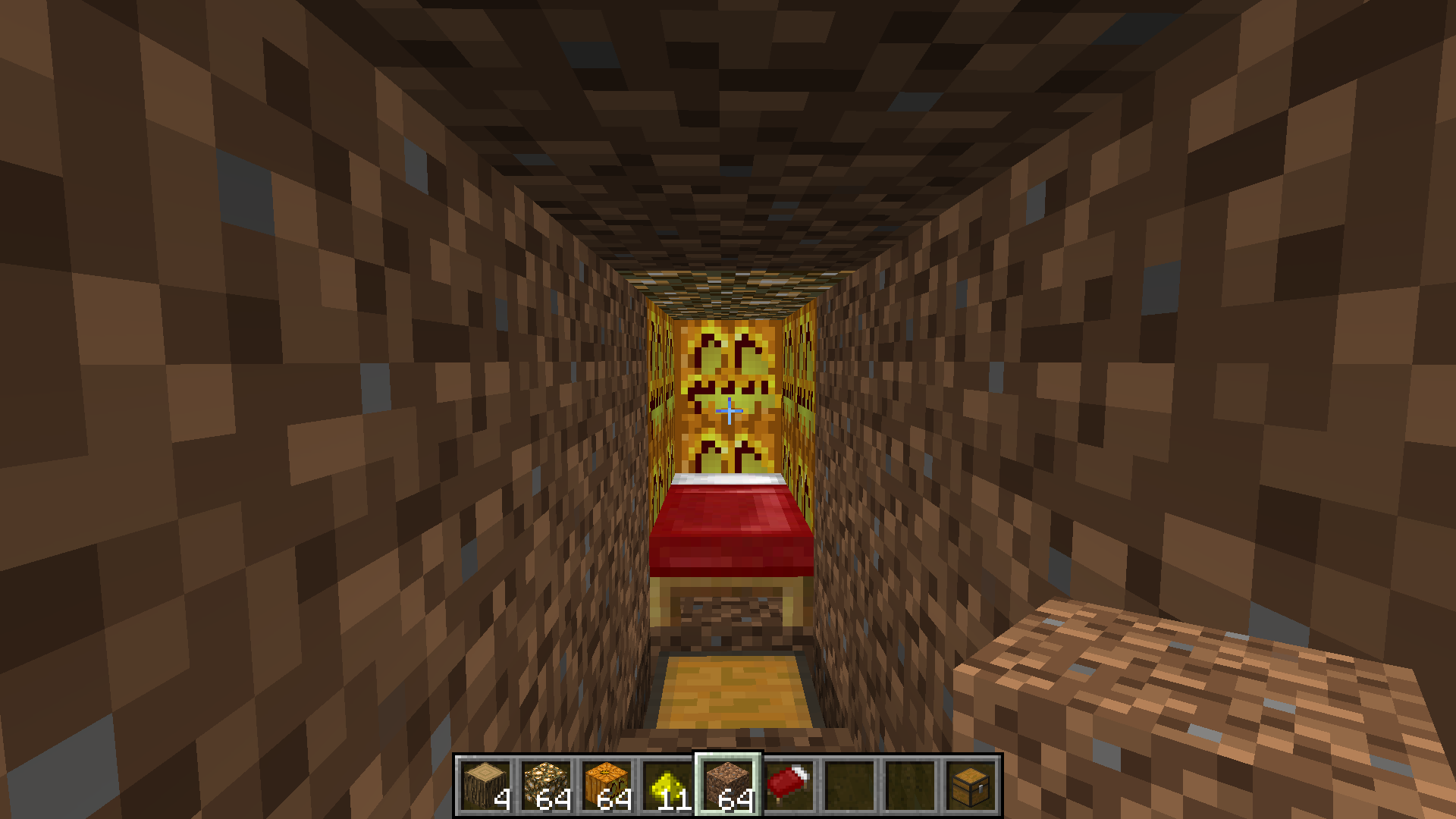
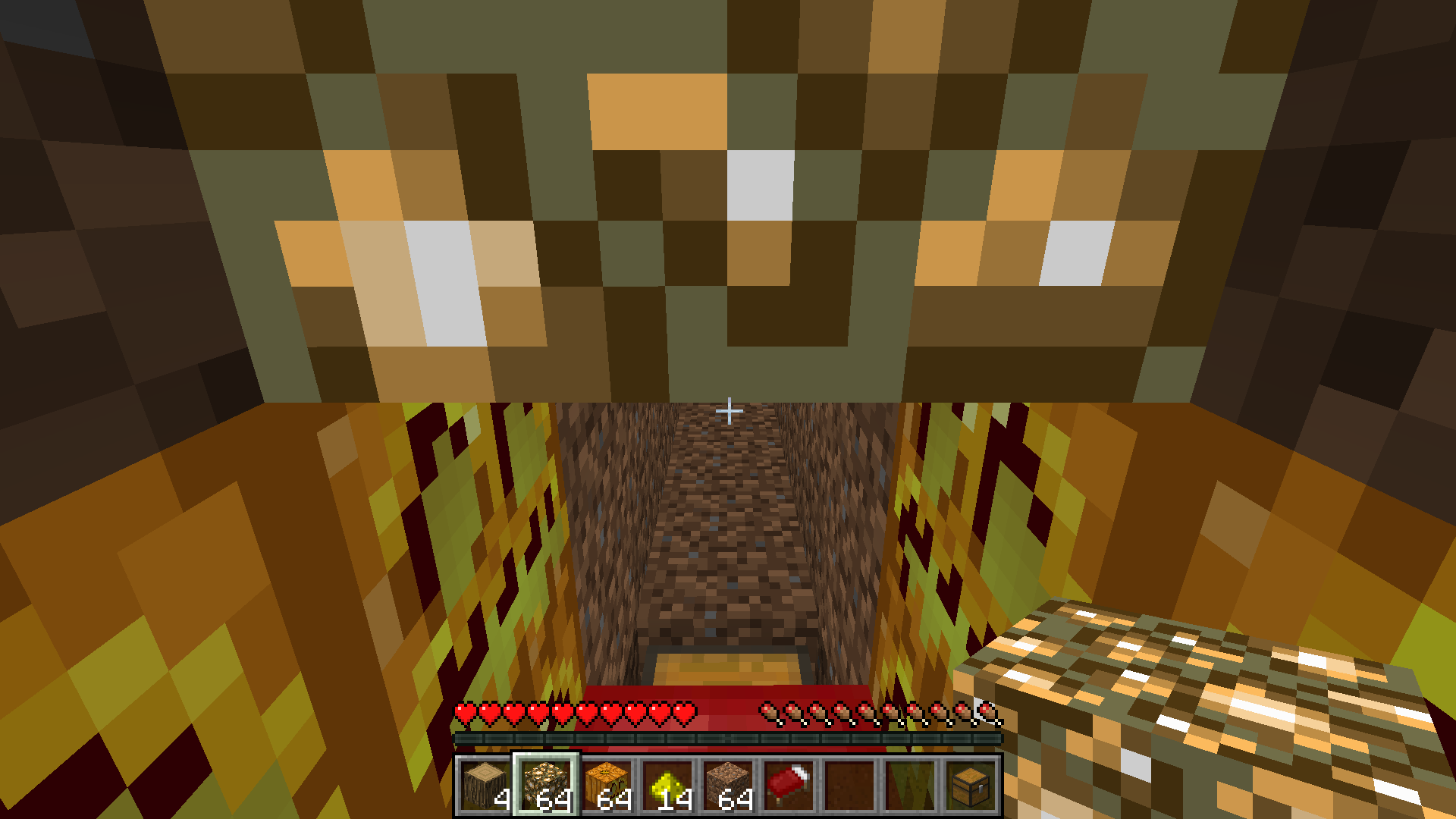
MC-9529, however we see that no half-slab need to be involved here, and that there IS enough available air block space that SHOULD allow waking up safely.BUG EFFECT: When waking up from sleeping in a bed, EVEN if there is an available air block beside the bed, if that air block is not over a solid block then it won't be considered a valid "bed exit" block, making the player wake up on the bed itself.
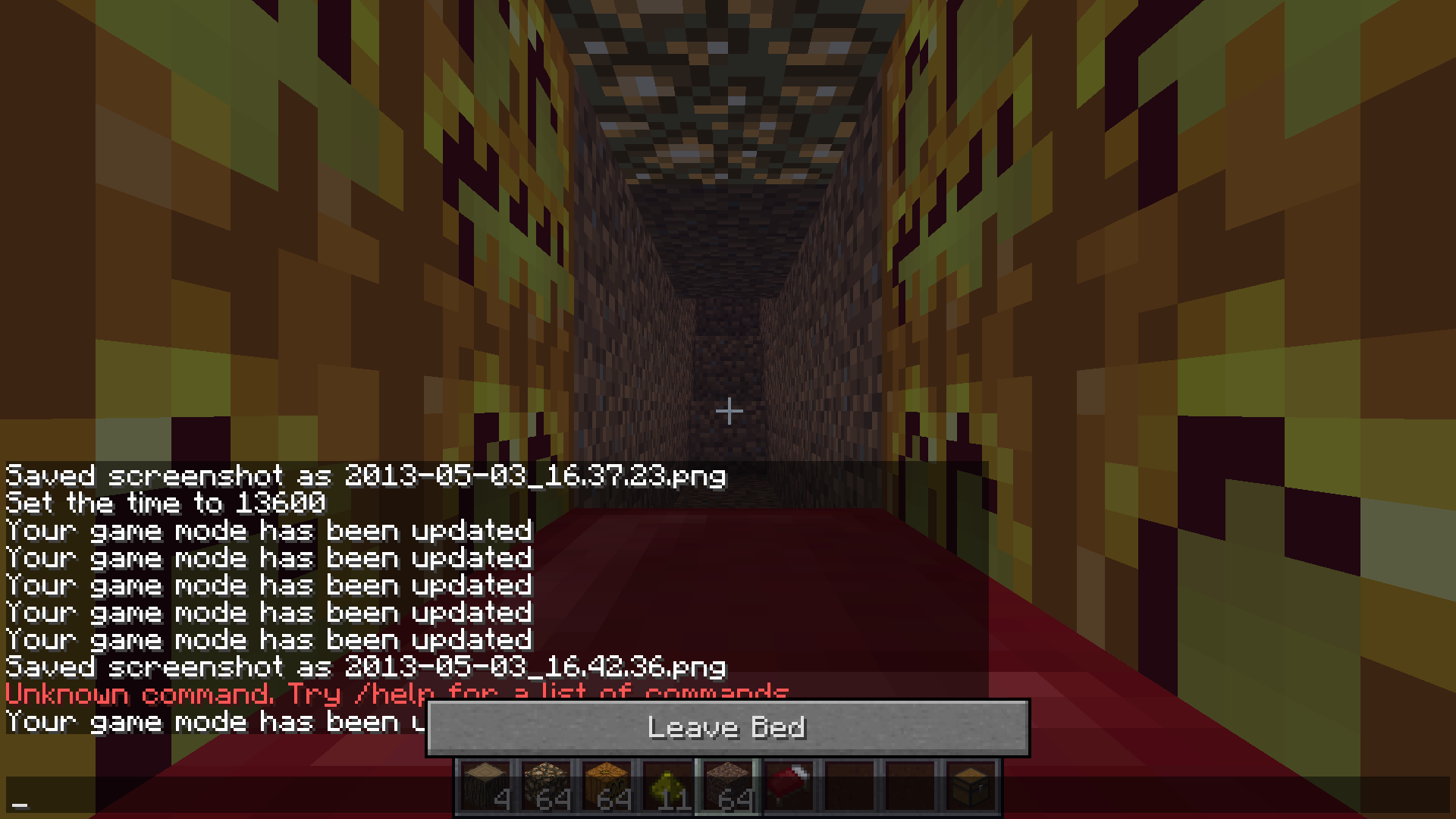
Now, when the roof is 3 high that isn't a problem. However, when the roof is only 2 high, this causes suffocation and if the player can't break the block his head is stuck inside in time, then he dies.
See images below:
1st image: Setup, bed with an air block at it's feet, however that air block is over a transparent block, here a chest.
2nd image: The view from sleeping in the bed.
3rd image: View upon waking up. Instead of waking up safely at the feet of the bed, we wake up with
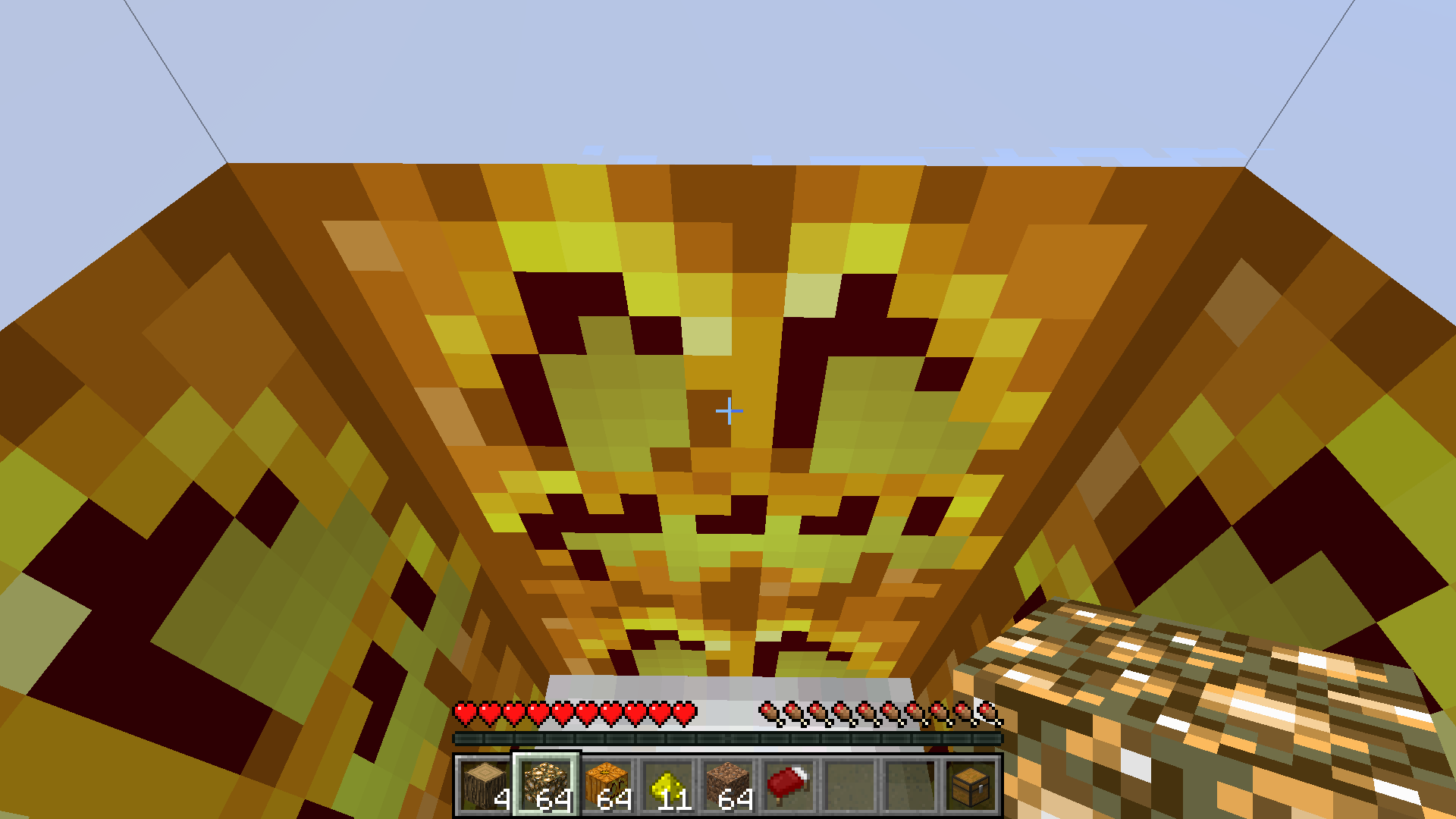
ghead in the roof. Here I chose to make the roof out of glowstone bcause for some reason Steve doesn't seem to suffocate when his head is stuck inside it.4th image:
same position, looking downward a bit.5th image:
same position, after breaking the glowstone.
- Block attributes I use am using here:
'Pass-through' block: if a block type is allows movement in all directins, then it has that flag set. Includes all blocks that don't have hitboxes. Examples: Air, most small vegetation like roses, saplings and crops, vines, pajtings and item frames, etc.
'Half-block': Any block type that will block movement only in either it's upper half or lower half will have this flag set plus a way to know which half of the block is filled. This attribute is often prefixed with "lower or upper" to indicate which half is filled.
- Suggested fix:
When checking for places to let the player out of a bed, the condition should not be:
"Both feet and head in an air block, and feet over a solid block."
but should be instead
"Both feet and head in an air block, and feet over a 'pass-through' block"
A more "detailed" condition could be:
IF
head in a pass-through block, and feet in a pass-through block, and feet not over a pass-through block
THEN
This is a valid 'primary importance' exit spot.
OTHERWISE IF
head in a upper-half-block, and feet in a pass-through block, and feet over a lower-half-block
THEN
This is a valid 'secondary importance' exit spot.(in short the game should checks all potential exist spots in order of ideal preference, and stops going through the list when it finds a good spot).
And in all cases, upon waking up, if the block below is a half-block, then the player appears in the block below already at the 'half-block' elevation (instead of dropping by one half block)
Also, spots to be checked should be all those around the bed (ortogonally) PLUS ALSO all those around the bed but at a +1 elevation (total of 12 potential exit spots). If all that fails, then the 2 bed spots (bed head and bed feet) are checked.
Also, all exit spots should also be checked when trying to GO TO SLEEP, and if no valid spot is found then the "switch to bedp position to rest" should actually be prevented with a chat message:
"Cannot rest when there is no place to wake up from the bed."
This would allow players to be able to place "recessed" beds (aka "japanese style" beds) (ok, that part is more like a feature request not a bug per se) and would also fix most of these suffocation problems (this really adresses the "this is a feature not a bug" part).
This bug relates to
MC-9529, however we see that no half-slab need to be involved here, and that there IS enough available air block space that SHOULD allow waking up safely.BUG EFFECT: When waking up from sleeping in a bed, EVEN if there is an available air block beside the bed, if that air block is not over a solid block then it won't be considered a valid "bed exit" block, making the player wake up on the bed itself. Now, when the roof is 3 high that isn't a problem. However, when the roof is only 2 high, this causes suffocation and if the player can't break the block his head is stuck inside in time, then he dies.
See images below:
1st image: Setup, bed with an air block at it's feet, however that air block is over a transparent block, here a chest.
2nd image: The view from sleeping in the bed.
3rd image: View upon waking up. Instead of waking up safely at the feet of the bed, we wake up with our head in the roof. Here I chose to make the roof out of glowstone because for some reason Steve doesn't seem to suffocate when his head is stuck inside it.
4th image: Same position, looking downward a bit.
5th image: Same position, after breaking the glowstone.
- Block attributes I use am using here:
'Pass-through' block: if a block type is allows movement in all directins, then it has that flag set. Includes all blocks that don't have hitboxes. Examples: Air, most small vegetation like roses, saplings and crops, vines, pajtings and item frames, etc.
'Half-block': Any block type that will block movement only in either it's upper half or lower half will have this flag set plus a way to know which half of the block is filled. This attribute is often prefixed with "lower or upper" to indicate which half is filled.
- Suggested fix:
When checking for places to let the player out of a bed, the condition should not be:
"Both feet and head in an air block, and feet over a solid block."
but should be instead
"Both feet and head in an air block, and feet over a 'pass-through' block"
A more "detailed" condition could be:
IF
head in a pass-through block, and feet in a pass-through block, and feet not over a pass-through block
THEN
This is a valid 'primary importance' exit spot.
OTHERWISE IF
head in a upper-half-block, and feet in a pass-through block, and feet over a lower-half-block
THEN
This is a valid 'secondary importance' exit spot.(in short the game should checks all potential exist spots in order of ideal preference, and stops going through the list when it finds a good spot).
And in all cases, upon waking up, if the block below is a half-block, then the player appears in the block below already at the 'half-block' elevation (instead of dropping by one half block)
Also, spots to be checked should be all those around the bed (ortogonally) PLUS ALSO all those around the bed but at a +1 elevation (total of 12 potential exit spots). If all that fails, then the 2 bed spots (bed head and bed feet) are checked.
Also, all exit spots should also be checked when trying to GO TO SLEEP, and if no valid spot is found then the "switch to bedp position to rest" should actually be prevented with a chat message:
"Cannot rest when there is no place to wake up from the bed."
This would allow players to be able to place "recessed" beds (aka "japanese style" beds) (ok, that part is more like a feature request not a bug per se) and would also fix most of these suffocation problems (this really adresses the "this is a feature not a bug" part).
This bug relates to
MC-9529, however we see that no half-slab need to be involved here, and that there IS enough available air block space that SHOULD allow waking up safely.BUG EFFECT: When waking up from sleeping in a bed, EVEN if there is an available air block beside the bed, if that air block is not over a solid block then it won't be considered a valid "bed exit" block, making the player wake up on the bed itself. Now, when the roof is 3 high that isn't a problem. However, when the roof is only 2 high, this causes suffocation and if the player can't break the block his head is stuck inside in time, then he dies.
See images below:
1st image: Setup, bed with an air block at it's feet, however that air block is over a transparent block, here a chest.
2nd image: The view from sleeping in the bed.
3rd image: View upon waking up. Instead of waking up safely at the feet of the bed, we wake up with our head in the roof. Here I chose to make the roof out of glowstone because for some reason Steve doesn't seem to suffocate when his head is stuck inside it.
4th image: Same position, looking downward a bit.
5th image: Same position, after breaking the glowstone.
- Block attributes I use am using here:
'Pass-through' block: if a block type
isallows movement in all directins, then it has that flag set. Includes all blocks that don't have hitboxes. Examples: Air, most small vegetation like roses, saplings and crops, vines, pajtings and item frames, etc.'Half-block': Any block type that will block movement only in either it's upper half or lower half will have this flag set plus a way to know which half of the block is filled. This attribute is often prefixed with "lower or upper" to indicate which half is filled.
- Suggested fix:
When checking for places to let the player out of a bed, the condition should not be:
"Both feet and head in an air block, and feet over a solid block."
but should be instead
"Both feet and head in an air block, and feet over a 'pass-through' block"
A more "detailed" condition could be:
IF
head in a pass-through block, and feet in a pass-through block, and feet not over a pass-through block
THEN
This is a valid 'primary importance' exit spot.
OTHERWISE IF
head in a upper-half-block, and feet in a pass-through block, and feet over a lower-half-block
THEN
This is a valid 'secondary importance' exit spot.(in short the game should checks all potential exist spots in order of ideal preference, and stops going through the list when it finds a good spot).
And in all cases, upon waking up, if the block below is a half-block, then the player appears in the block below already at the 'half-block' elevation (instead of dropping by one half block)
Also, spots to be checked should be all those around the bed (ortogonally) PLUS ALSO all those around the bed but at a +1 elevation (total of 12 potential exit spots). If all that fails, then the 2 bed spots (bed head and bed feet) are checked.
Also, all exit spots should also be checked when trying to GO TO SLEEP, and if no valid spot is found then the "switch to bedp position to rest" should actually be prevented with a chat message:
"Cannot rest when there is no place to wake up from the bed."
This would allow players to be able to place "recessed" beds (aka "japanese style" beds) (ok, that part is more like a feature request not a bug per se) and would also fix most of these suffocation problems (this really adresses the "this is a feature not a bug" part).
This bug relates to
MC-9529, however we see that no half-slab need to be involved here, and that there IS enough available air block space that SHOULD allow waking up safely.BUG EFFECT: When waking up from sleeping in a bed, EVEN if there is an available air block beside the bed, if that air block is not over a solid block then it won't be considered a valid "bed exit" block, making the player wake up on the bed itself. Now, when the roof is 3 high that isn't a problem. However, when the roof is only 2 high, this causes suffocation and if the player can't break the block his head is stuck inside in time, then he dies.
See images below:
1st image: Setup, bed with an air block at it's feet, however that air block is over a transparent block, here a chest.
2nd image: The view from sleeping in the bed.
3rd image: View upon waking up. Instead of waking up safely at the feet of the bed, we wake up with our head in the roof. Here I chose to make the roof out of glowstone because for some reason Steve doesn't seem to suffocate when his head is stuck inside it.
4th image: Same position, looking downward a bit.
5th image: Same position, after breaking the glowstone.
> Block attributes I use am using here:
'Pass-through' block: if a block type allows movement in all directions, then it has that flag set. Includes all blocks that don't have hitboxes. Examples: Air, most small vegetation like roses, saplings and crops, vines, pajtings and item frames, etc.
'Half-block': Any block type that will block movement only in either it's upper half or lower half will have this flag set plus a way to know which half of the block is filled. This attribute is often prefixed with "lower or upper" to indicate which half is filled.
> Suggested fix:
When checking for places to let the player out of a bed, the condition should not be:
"Both feet and head in an air block, and feet over a solid block."
but should be instead
"Both feet and head in an air block, and feet over a 'pass-through' block"
A more "detailed" condition could be:
IF
head in a pass-through block, and feet in a pass-through block, and feet not over a pass-through block
THEN
This is a valid 'primary importance' exit spot.
OTHERWISE IF
head in a upper-half-block, and feet in a pass-through block, and feet over a lower-half-block
THEN
This is a valid 'secondary importance' exit spot.(in short the game should checks all potential exist spots in order of ideal preference, and stops going through the list when it finds a good spot).
And in all cases, upon waking up, if the block below is a half-block, then the player appears in the block below already at the 'half-block' elevation (instead of dropping by one half block)
Also, spots to be checked should be all those around the bed (ortogonally) PLUS ALSO all those around the bed but at a +1 elevation (total of 12 potential exit spots). If all that fails, then the 2 bed spots (bed head and bed feet) are checked.
Also, all exit spots should also be checked when trying to GO TO SLEEP, and if no valid spot is found then the "switch to bedp position to rest" should actually be prevented with a chat message:
"Cannot rest when there is no place to wake up from the bed."
> Conclusion:
This would allow players to be able to place "recessed" beds (aka "japanese style" beds) (ok, that part is more like a feature request not a bug per se) and would also fix most of these suffocation problems (this really adresses the "this is a feature not a bug" part).
This bug relates to
MC-9529, however we see that no half-slab need to be involved here, and that there IS enough available air block space that SHOULD allow waking up safely.BUG EFFECT: When waking up from sleeping in a bed, EVEN if there is an available air block beside the bed, if that air block is not over a solid block then it won't be considered a valid "bed exit" block, making the player wake up on the bed itself. Now, when the roof is 3 high that isn't a problem. However, when the roof is only 2 high, this causes suffocation and if the player can't break the block his head is stuck inside in time, then he dies.
See images below:
1st image: Setup, bed with an air block at it's feet, however that air block is over a transparent block, here a chest.
2nd image: The view from sleeping in the bed.
3rd image: View upon waking up. Instead of waking up safely at the feet of the bed, we wake up with our head in the roof. Here I chose to make the roof out of glowstone because for some reason Steve doesn't seem to suffocate when his head is stuck inside it.
4th image: Same position, looking downward a bit.
5th image: Same position, after breaking the glowstone.
> Block attributes I use am using here:
'Pass-through' block: if a block type allows movement in all directions, then it has that flag set. Includes all blocks that don't have hitboxes. Examples: Air, most small vegetation like roses, saplings and crops, vines, pa
jtingsanditem frames, etc.'Half-block': Any block type that will block movement only in either it's upper half or lower half will have this flag set plus a way to know which half of the block is filled. This attribute is often prefixed with "lower or upper" to indicate which half is filled.
> Suggested fix:
When checking for places to let the player out of a bed, the condition should not be:
"Both feet and head in an air block, and feet over a solid block."
but should be instead
"Both feet and head in an air block, and feet over a 'pass-through' block"
A more "detailed" condition could be:
IF
head in a pass-through block, and feet in a pass-through block, and feet not over a pass-through block
THEN
This is a valid 'primary importance' exit spot.
OTHERWISE IF
head in a upper-half-block, and feet in a pass-through block, and feet over a lower-half-block
THEN
This is a valid 'secondary importance' exit spot.(in short the game should checks all potential exist spots in order of ideal preference, and stops going through the list when it finds a good spot).
And in all cases, upon waking up, if the block below is a half-block, then the player appears in the block below already at the 'half-block' elevation (instead of dropping by one half block)
Also, spots to be checked should be all those around the bed (ortogonally) PLUS ALSO all those around the bed but at a +1 elevation (total of 12 potential exit spots). If all that fails, then the 2 bed spots (bed head and bed feet) are checked.
Also, all exit spots should also be checked when trying to GO TO SLEEP, and if no valid spot is found then the "switch to bedp position to rest" should actually be prevented with a chat message:
"Cannot rest when there is no place to wake up from the bed."
> Conclusion:
This would allow players to be able to place "recessed" beds (aka "japanese style" beds) (ok, that part is more like a feature request not a bug per se) and would also fix most of these suffocation problems (this really adresses the "this is a feature not a bug" part).
This bug relates to
MC-9529, however we see that no half-slab need to be involved here, and that there IS enough available air block space that SHOULD allow waking up safely.BUG EFFECT: When waking up from sleeping in a bed, EVEN if there is an available air block beside the bed, if that air block is not over a solid block then it won't be considered a valid "bed exit" block, making the player wake up on the bed itself. Now, when the roof is 3 high that isn't a problem. However, when the roof is only 2 high, this causes suffocation and if the player can't break the block his head is stuck inside in time, then he dies.
See images below:
1st image: Setup, bed with an air block at it's feet, however that air block is over a transparent block, here a chest.
2nd image: The view from sleeping in the bed.
3rd image: View upon waking up. Instead of waking up safely at the feet of the bed, we wake up with our head in the roof. Here I chose to make the roof out of glowstone because for some reason Steve doesn't seem to suffocate when his head is stuck inside it.
4th image: Same position, looking downward a bit.
5th image: Same position, after breaking the glowstone.
> Block attributes I use am using here:
'Pass-through' block: if a block type allows movement in all directions, then it has that flag set. Includes all blocks that don't have hitboxes. Examples: Air, most small vegetation like roses, saplings and crops, vines, paintings, item frames, etc.
'Half-block': Any block type that will block movement only in either it's upper half or lower half will have this flag set plus a way to know which half of the block is filled. This attribute is often prefixed with "lower or upper" to indicate which half is filled.
> Suggested fix:
When checking for places to let the player out of a bed, the condition should not be:
"Both feet and head in an air block, and feet over a solid block."
but should be instead
"Both feet and head in an air block, and feet over a 'pass-through' block"
A more "detailed" condition could be:
IF
head in a pass-through block, and feet in a pass-through block, and feet not over a pass-through block
THEN
This is a valid 'primary importance' exit spot.
OTHERWISE IF
head in a upper-half-block, and feet in a pass-through block, and feet over a lower-half-block
THEN
This is a valid 'secondary importance' exit spot.(in short the game should checks all potential exist spots in order of ideal preference, and stops going through the list when it finds a good spot).
And in all cases, upon waking up, if the block below is a half-block, then the player appears in the block below already at the 'half-block' elevation (instead of dropping by one half block)
Also, spots to be checked should be all those around the bed (ortogonally) PLUS ALSO all those around the bed but at a +1 elevation (total of 12 potential exit spots). If all that fails, then the 2 bed spots (bed head and bed feet) are checked.
Also, all exit spots should also be checked when trying to GO TO SLEEP, and if no valid spot is found then the "switch to bedp position to rest" should actually be prevented with a chat message:
"Cannot rest when there is no place to wake up from the bed."
> Conclusion:
This would allow players to be able to place "recessed" beds (aka "japanese style" beds) (ok, that part is more like a feature request not a bug per se) and would also fix most of these suffocation problems (this really adresses the "this is a feature not a bug" part).
This bug relates to
MC-9529, however we see that no half-slab need to be involved here, and that there IS enough available air block space that SHOULD allow waking up safely.BUG EFFECT: When waking up from sleeping in a bed, EVEN if there is an available air block beside the bed, if that air block is not over a solid block then it won't be considered a valid "bed exit" block, making the player wake up on the bed itself. Now, when the roof is 3 high that isn't a problem. However, when the roof is only 2 high, this causes suffocation and if the player can't break the block his head is stuck inside in time, then he dies.
See images below:
1st image: Setup, bed with an air block at it's feet, however that air block is over a transparent block, here a chest.
2nd image: The view from sleeping in the bed.
3rd image: View upon waking up. Instead of waking up safely at the feet of the bed, we wake up with our head in the roof. Here I chose to make the roof out of glowstone because for some reason Steve doesn't seem to suffocate when his head is stuck inside it.
4th image: Same position, looking downward a bit.
5th image: Same position, after breaking the glowstone.
> Block attributes I use am using here:
'Pass-through' block: if a block type allows movement in all directions, then it has that flag set. Includes all blocks that don't have hitboxes. Examples: Air, most small vegetation like roses, saplings and crops, vines, paintings, item frames, etc.
'Half-block': Any block type that will block movement only in either it's upper half or lower half will have this flag set plus a way to know which half of the block is filled. This attribute is often prefixed with "lower or upper" to indicate which half is filled.
> Suggested fix:
When checking for places to let the player out of a bed, the condition should not be:
"Both feet and head in an air block, and feet over a solid block."
but should be instead
"Both feet and head in an air block, and feet NOT over a 'pass-through' block"
A more "detailed" condition could be:
IF
head in a pass-through block, and feet in a pass-through block, and feet not over a pass-through block
THEN
This is a valid 'primary importance' exit spot.
OTHERWISE IF
head in a upper-half-block, and feet in a pass-through block, and feet over a lower-half-block
THEN
This is a valid 'secondary importance' exit spot.(in short the game should checks all potential exist spots in order of ideal preference, and stops going through the list when it finds a good spot).
And in all cases, upon waking up, if the block below is a half-block, then the player appears in the block below already at the 'half-block' elevation (instead of dropping by one half block)
Also, spots to be checked should be all those around the bed (ortogonally) PLUS ALSO all those around the bed but at a +1 elevation (total of 12 potential exit spots). If all that fails, then the 2 bed spots (bed head and bed feet) are checked.
Also, all exit spots should also be checked when trying to GO TO SLEEP, and if no valid spot is found then the "switch to bedp position to rest" should actually be prevented with a chat message:
"Cannot rest when there is no place to wake up from the bed."
> Conclusion:
This would allow players to be able to place "recessed" beds (aka "japanese style" beds) (ok, that part is more like a feature request not a bug per se) and would also fix most of these suffocation problems (this really adresses the "this is a feature not a bug" part).
This bug relates to
MC-9529, however we see that no half-slab need to be involved here, and that there IS enough available air block space that SHOULD allow waking up safely.BUG EFFECT: When waking up from sleeping in a bed, EVEN if there is an available air block beside the bed, if that air block is not over a solid block then it won't be considered a valid "bed exit" block, making the player wake up on the bed itself. Now, when the roof is 3 high that isn't a problem. However, when the roof is only 2 high, this causes suffocation and if the player can't break the block his head is stuck inside in time, then he dies.
See images below:
1st image: Setup, bed with an air block at it's feet, however that air block is over a transparent block, here a chest.
2nd image: The view from sleeping in the bed.
3rd image: View upon waking up. Instead of waking up safely at the feet of the bed, we wake up with our head in the roof. Here I chose to make the roof out of glowstone because for some reason Steve doesn't seem to suffocate when his head is stuck inside it.
4th image: Same position, looking downward a bit.
5th image: Same position, after breaking the glowstone.
> Block attributes I use am using here:
'Pass-through' block: if a block type allows movement in all directions, then it has that flag set. Includes all blocks that don't have hitboxes. Examples: Air, most small vegetation like roses, saplings and crops, vines, paintings, item frames, etc.
'Half-block': Any block type that will block movement only in either it's upper half or lower half will have this flag set plus a way to know which half of the block is filled. This attribute is often prefixed with "lower or upper" to indicate which half is filled.
> Suggested fix:
When checking for places to let the player out of a bed, the condition should not be:
"Both feet and head in an air block, and feet over a solid block."
but should be instead
"Both feet and head in an air block, and feet NOT over a 'pass-through' block"
A more "detailed" condition could be:
IF
head in a pass-through block, and feet in a pass-through block, and feet not over a pass-through block
THEN
This is a valid 'primary importance' exit spot.
OTHERWISE IF
head in a upper-half-block, and feet in a pass-through block, and feet over a lower-half-block
THEN
This is a valid 'secondary importance' exit spot.(in short the game should checks all potential exist spots in order of ideal preference, and stops going through the list when it finds a good spot).
And in all cases, upon waking up, if the block below is a half-block, then the player appears in the block below already at the 'half-block' elevation (instead of dropping by one half block)
Also, spots to be checked should be all those around the bed (ortogonally) PLUS ALSO all those around the bed but at a +1 elevation (total of 12 potential exit spots). If all that fails, then the 2
bedspots(bed head and bed feet)are checked.Also, all exit spots should also be checked when trying to GO TO SLEEP, and if no valid spot is found then the "switch
to bedpposition torest" should actually be prevented withachat message:"Cannot rest when there is no place to wake up from the bed."
> Conclusion:
This would allow players to be able to place "recessed" beds (aka "japanese style" beds) (ok, that part is more like a feature request not a bug per se) and would also fix most of these suffocation problems (this really adresses the "this is a feature not a bug" part).
This bug relates to
MC-9529, however we see that no half-slab need to be involved here, and that there IS enough available air block space that SHOULD allow waking up safely.BUG EFFECT: When waking up from sleeping in a bed, EVEN if there is an available air block beside the bed, if that air block is not over a solid block then it won't be considered a valid "bed exit" block, making the player wake up on the bed itself. Now, when the roof is 3 high that isn't a problem. However, when the roof is only 2 high, this causes suffocation and if the player can't break the block his head is stuck inside in time, then he dies.
See images below:
1st image: Setup, bed with an air block at it's feet, however that air block is over a transparent block, here a chest.
2nd image: The view from sleeping in the bed.
3rd image: View upon waking up. Instead of waking up safely at the feet of the bed, we wake up with our head in the roof. Here I chose to make the roof out of glowstone because for some reason Steve doesn't seem to suffocate when his head is stuck inside it.
4th image: Same position, looking downward a bit.
5th image: Same position, after breaking the glowstone.
> Block attributes I use am using here:
'Pass-through' block: if a block type allows movement in all directions, then it has that flag set. Includes all blocks that don't have hitboxes. Examples: Air, most small vegetation like roses, saplings and crops, vines, paintings, item frames, etc.
'Half-block': Any block type that will block movement only in either it's upper half or lower half will have this flag set plus a way to know which half of the block is filled. This attribute is often prefixed with "lower or upper" to indicate which half is filled.
> Suggested fix:
When checking for places to let the player out of a bed, the condition should not be:
"Both feet and head in an air block, and feet over a solid block."
but should be instead
"Both feet and head in an air block, and feet NOT over a 'pass-through' block"
A more "detailed" condition could be:
IF
head in a pass-through block, and feet in a pass-through block, and feet not over a pass-through block
THEN
This is a valid 'primary importance' exit spot.
OTHERWISE IF
head in a upper-half-block, and feet in a pass-through block, and feet over a lower-half-block
THEN
This is a valid 'secondary importance' exit spot.(in short the game should checks all potential exist spots in order of ideal preference, and stops going through the list when it finds a good spot).
And in all cases, upon waking up, if the block below is a half-block, then the player appears in the block below already at the 'half-block' elevation (instead of dropping by one half block)
Also, spots to be checked should be all those around the bed (ortogonally) PLUS ALSO all those around the bed but at a +1 elevation (total of 12 potential exit spots). If all that fails, then the 2 spots rght above the bed are checked.
Also, all exit spots should also be checked when trying to GO TO SLEEP, and if no valid spot is found then the "switch player position to bed's position" should actually be completely prevented with this chat message:
"Cannot rest when there is no place to wake up from the bed."
> Conclusion:
This would allow players to be able to place "recessed" beds (aka "japanese style" beds) (ok, that part is more like a feature request not a bug per se) and would also fix most of these suffocation problems (this really adresses the "this is a feature not a bug" part).
This kind of bug happened only "relatively" infrequently in version 1.4.7.
However, as of version 1.5.1, every single time that I return to my home area, lots of animals are out of the fences. In the case of chickens it got so bad that we quickly went from 25 chickens in the chicken coop, to only a handdful, despite 1 breeding sweep each time we returned home.
We even had a sitting siamese cat seemingly disappear altogether (it was ordered to sit directy by us, and directly on the floor, not near a chest-bed-furnace!) Later we found that same cat again (we had only 1 cat on that map so there could be no mistake), it was still sitting, immobile, but it was not in our underground house but outside beside a river, only a few chunks away! I'd say it got "shifted" by an offset value of about [ X+50, Y+5, Z+10 ].
I'm not talking about animals "walking through" the fences, albeit that could also be possible. I'm talking about leaving the area, so that the chunks unload, then later coming back straight to the farm by running, and finding that animals have "magically been transported" relatively far away from the farm, as if they were not reloaded in their proper spot.
Weird and most of all very annoying. This completely "breaks" all farms using fences.
I'd also add that when the game automatically "generates" an "exit" portal (either when going from overworld to neter or the oher way around), because there is no already active portal to exit out of, then the "new" portal should ALSO have the same orientation as the entrance portal. This would avoid entering into a portal, and then exiting while facing up against the exit portal's side pillar.
Markku, your fix doesn't actually take into account when the destination portal's general orientation (north-south-alignment vs east-west-alignment) is different from the entry portal. Things are a little more complicated than that. So I think the player's actual direction at the "instant" of the actual teleportation should be taken into account too.
It should go like this:
When entering a portal, there is a rather lenghty portal animation, which is made of 3 parts:
What is of interest here is the 2 following things:
Let's suppose that, when facing a portal, the base portal block at the left side of the portal is the "first" block, and the other portal block is the "second" block. Right before "leaving" the entrance portal, the game should preserve the following information:
Orientation is different from Direction. Orientation is a binary value: Either a portal is made to be entered from the "north or south", or it is made to be entered from the "east or west".
Then we determine the entrance portal's actual favored direction the ideal "player walking-out direction":
We check all blocks in a 3 high by 2 wide (ie. the size of the portal's "doorway") by let's say only 2 blocks "long". We sum up the total number of blocks that are Air blocks, separately on each side. The side with the most air "wins" as the favored direction. In case of a tie, we use the reverse of the player's orientation instead (not in degrees, just the most general south-west-north-east direction). We use the reverse because the player is currently not walking "out", but walking "in", and the favored portal direction must always be an absolute ideally relative to the portal itself, not the player.
The we do actual the change of world and coordinates.
Then we do the destination portal computation:
If checking a total of 36 blocks for the presence of Air seems too long, then instead these 36 blocks could be checked a few at a time each tick during Part I. So what if another player or whatever changes the layout right then? Odds are, a layout change like that, that would ALSO be big enough to change the portal's favored direction, would happen only very rarely. And even if it did, well, that'd be just one freak occurence, easily attributable to the portal having tried to "do it's best but got momentarily confused by the changes", the result not hurtful just an incorrect exit direction happening once. And the next time you'd use the portal, things would then be ok (unless the same major layout changes occurs again – now, twice in a row, that would really be on purpose).
ooooooooooooooooooooooooooooooooooooooooo
The IDEAL fix of course, would be to use Block Data Values for Portal blocks.
Upon "lighting up" the portal, if it was done using flint & steel, then the player location is checked to see wether it is from the front or back of the portal, determining which of 2 possible "favored portal direction" (defined as when "coming out" of the portal, and the reverse direction for coming into it, of course). If another event lit up the portal, then the default favored portal direction is determined like in the explanations furthewr up above. In case of a tie, since there is no player present, a random selection between both possibilities.
Each of the generated Portal blocks would simply get a value:
0 First lower row block, on a portal with favored exit direction going south.
1 First lower row block, on a portal with favored exit direction going west.
2 First lower row block, on a portal with favored exit direction going north.
3 First lower row block, on a portal with favored exit direction going east.
4 Second lower row block, on a portal with favored exit direction going south.
5 Second lower row block, on a portal with favored exit direction going west.
6 Second lower row block, on a portal with favored exit direction going north.
7 Second lower row block, on a portal with favored exit direction going east.
8 Middle or top row portal block (not used for determining actual transport, only for decoration).
Then it would really become be a piece of cake to determine the player's facing using that data for determining destination portals and teleports.
I also confirm this.
Very minor bug, but probably very easy to fix too: just have the game memorize which screen was used to enter into the game world, and return to that screen, instead of always going to the multiplayer screen.
This is aso very annoying when you try to switch something from an inventory slot to another slot especially if that slot contains something else: if you do the "grab from one slot" and then the "drop into another slot" clicks quick enough for the second click to occur in a "quick enough to be a double click interval" delay, then the 2nd click is ignored and you have to click a 3rd time. Gaaah...
Just trying to help here!
For all non-coders, I'd rather see Markku's fix than none at all, really.
Still, Marrku, please check carefully the program variable state by going step by step through the effect of the code fix, and you'll see that wether you come out of the portal's "left" side or the "right" side, the actual direction becomes swapped, without consideration to wether or not the other world's portal was entered one way or the other.
Let's say you have the following situations:
A pair of North-South oriented portals (i.e. portals normally entered/exited from either north or south) in Overworld + Nether.
Overworld coordinates of base portal blocks (X,Z only) = [+800, +1600] and [+801, +1600].
Nether world coordinates of base portal blocks (X,Z only) = [+100, +200] and [+101, +200].
You come out of the nether portal from block [+100, +200].
Wether you enter the overworld portal from the north or south directions, you'll come out of the nether portal going:
If front is empty and back is empty = Going nowhere (direction -1)
If front is not empty and back is not empty = Going nowhere (direction -1)
If front is empty and back is not empty = Going south
If front is not empty and back is empty = Going north
Now, let's SHIFT the nether portal one block to the west, so that we get:
The pair of North-South oriented portals:
Overworld coordinates of base portal blocks (X,Z only) = [+800, +1600] and [+801, +1600]. Same as in Test case A.
Nether world coordinates of base portal blocks (X,Z only) = [+99, +200] and [+100, +200].
You still come out of the nether portal from block [+100, +200].
Wether you enter the overworld portal from the north or south directions, you'll come out of the nether portal going:
If front is empty and back is empty = Going nowhere (direction -1)
If front is not empty and back is not empty = Going nowhere (direction -1)
If front is empty and back is not empty = Going north
If front is not empty and back is empty = Going south
All 4 lines
"if (frontEmpty == backEmpty) return -1;"
should instead be
"if (frontEmpty == backEmpty) return mainDir1;"
As for the direction swap upon exiting depending on wether you exit from the left or right side portall bock, it is unavoidable unless the game somehow "saves" the direction the player used upon entering the source portal, as my "much more complicated" previous post described.
Steve, simply making zero orientation change would mean that everytime you enter a portal that is oriented one way in one world but that is oriented the other way in the other world, you'd come out face straight against the exit portal's pillar. Irrelevant for those who carefully place their own portals. A big deal for those using game-generated portals, because that orientation is randomly set when the game creates a new portal frame.
Steve, I totally agree with you than simply keeping current behavior is way worse than all of the fixes presented here. Its a typical example of having tried to fix some stuff actually made it much worse. As you say, at least the previous behavior was simple enough to understand. Now, it screws up portals 100% of the time lol.
Mojang has made a lot of fixes in the last few updates, I think. Still, we're due to another release this week I hope.
As for fixing difficulty, I'd summarize everything like this:
Solution #1 - The "Not bothering with it" fix "[The "Mojang doesn't have enough time" no-prize fix]. Can't be easier and quicker than that! Crappy solution tho. Most likely solution to be implemented in the short and medium term.
Solution #2 - The "K.I.S.S. IT" (Keep it Stupid Simple) >Steve's Fix. Super easy, fast, simple. Works only with some carefully placed portals, not those were orientation changes or where you want a definite exit direction. Would be ideal in the short term. Truly simply a "rewinding back a bad update decision", and would be way better than the weirdness we have now.
Solution #3 - The "Best Guess without Too Much Hassle " >Markku's Fix. Relatively easy, wouldn't really take more time than Solution #2 since the code for the fix is already done anyway. Would work for most purposes, especially if the player takes care to make sure exactly one side has "obstacles". Maybe in the medium term. If we get lucky.
Solution #4 - The "True Portals Behavior As It Was Originally Intended" >Patrick's Fix. Most solid and works exactly like the player would expect and intends at all times, even with automatically created portals, not just those carefully placed". Only solution adressing all possible cases but also the one definitely that would be a big step up in the time required to code the fix. Thus, not really likely to occur. At all.
Solution #5 - "We finally fixed the portals in this update!" >Mojang's (eventual) fix. Something totally new that will probably surprise us in many ways probably with nice new and superbly original behaviors and portal features, yet still not quite working like it should anyway. Most probable solution in the long run.
Brad, that video claimns to catch the moment sheep escape fences, but it shows only the "before" and "after" moments, not when it happens! So its only good for wasting the viewers' time with mostly useless blahblah.
Personally, I actually saw a sheep escaqe from it's fenced pen during the game, right in front of my eyes, and only a couple blocks away from me! I was all "What the...? That's just weird!"
So the only important thing to know is that animals can escape even if the player is standing immobile and near the animals, i.e. like you said when no chunk are being loaded/unloaded. And that this escaping can occur even when the animal "density" in the enclosed space is not that big (sheep-to-'fenced area' ratio is less than 2/3). Or even without other animals right beside it.
Ok, sorry my description was wrong here.
#1) It's actually something that happened in 1.3.4 maybe 1.4.7. So maybe it got fixed indirectly through a version change or something.
#2) Seems to happen a lot more near walls and corners, especially from items "falling out of" a crafting table or broken furnace, than right in the middle of the floor. I don't remember if it happened to items deliberately dropped by the player, but I remember it was mostly items falling from breaking stuff.
#3) It seemed to occur only infrequenly. Sometimes not at all. Mostly, near edges. So it greatly depends on the configuration of nearby blocks.
Just close this one bug report here and IF I can see it again, then I'll document it better the next time.
Thanks.
Ok, sorry for that hothead flaming rant, that bug constantly making me go bat crazy isn't a real excuse to me having used such harsh accusating language. Anyway it seems like the Mojang team is becoming more and more professional-like each passing year. So thank you very much for keeping your cool.
Ok, the game never actually crashes because of this bug. However, I'll try to reproduce the "forever spinning" thing. It occurs way more often when I have to make frequent turns, especially turns going up and downward (like in the typical Minecraft maze of underground caves and tunnels).
Well, the spinning itself occurs often enough - and probably from a combination of the way I usually tend to handle my mouses + the way the optical mouse send their output signals when their lasers gets "oh-so-slightly" pulled off from the desk, especially if done at a very slight angle with the other side of the mouse still firmly pressed against the desk. Like when you turn somewhat rapidly.
The bug seems to occur much less often when I manoeuver because of outright panic (mobs or other danger nearby, in a hurry to get somewhere, etc.), again probably in these situations my nervousness probably causes me to put more pressure on the mouse, firmly "anchoring it" on the desk surface, by opposition to moving it with only very light pressure, by almost "holding" the mouse.
I'll make more regular backups of my world. When the bug happens again through normal gameplay (and it is sure to happen often enough) I'll try to suddenly "not touch the mouse anymore" when it happens, and if it falls in the "forever spinning" mode, then I'll have the 10 seconds needed to fully crash-report-grab it.
HOPEFULLY Minecraft stores more than 10 seconds of debug data, so that you'll ALSO get the entire event including the "before it happens" input data too. IF Minecraft does NOT store more than 10 seconds of crash report, please tell me. If it doesn't even store 10 seconds, and only provide a "snapshot" of things in it's crash report game data, then please tell me also. I'll adjust the way I try to grab the crash report accordingly in order to give you the best type of data possible.
However, since the 13w18a snapshot also requires the new launcher, and that it seems that this is not a bug shared by most players (meaning, not a priority-one bug for most players), can I wait until the next official release (1.5.3 or 1.6, I guess) in order to do and provide this crash report? That would simplify things a lot for me as I never play anything other than the official releases and having both launchers and an official release and a temporary update at the same time seem quite complicated for me. Strangely enough while I'm very good with algorithms I also am crappy with system configuration!). So even though the bug is making me go annoyed-crazy often enough, I'd prefer enduring it a little more and test properly using a true release. Is that okay?
Then I'll post the results here.
IF the bug stops happening completely, then I'll also post this information here.
Thank you.
Ok, understood!
Man oh man, it would be just so wonderful if the new input device librairies solved this! I hope it's not a problem with Vista!
I'll definitely do the crash report thing test on the latest update and then post the full results here.
Thanks!
Linda, in case you ever read this thread again:
All chunks farther away than 160 blocks (the normal 1-chunks sight range unless modding or editing the game files) get unloaded. You actually have 5 minutes to go get your stuff back counting only the seconds while a chunk is actually loaded.
So the truth is, if you die far from your respawning point (from a bed or the original spawn point), and the chunk is usually "out of the way" of other players (on a server), and no special mob forces that chunk to stay active, then it will probably get unloaded immediately after your death because no players are near it. In that case, the truth of the thing is that you actually have all the time in the world to prepare yourself and THEN go get your stuff back.
If you think that the stuff is very valuable, is plainly visible instead of hidden at the bottom of a big ocean or deeply nested in a dark forgotten corner of a giant undeground maze, and you know it's general position, but you're just not sure exactly where, and you don't mind "cheating a little bit" in order to get it back, then you can determine in which "region" you were when you died by guessing the "multiple of 512" of the coordinates (useful website for this: http://dinnerbone.com/minecraft/tools/coordinates/) and then keeping a backup copy of the appropriate region files (normally located in the C:\Users\<PutYourUsernameHere>\AppData\Roaming\.minecraft\saves\<PutYourWorldNameHere>\region\ folder) so that you actually can get several "tries" at this.
Note that the 5-minutes counter pauses if the game is paused, but does NOT pause while the game displays the "you died" red screen.
Really thanks Workday Lobster for pointing how much I was in error there! And thank you Brad Corbin for giving us that video link (cut & pasted below), and very sorry for my blunder! It's my previous post which is totally invalid lol!
The video does indeed show the upper left white sheep moving out at exactly 1:03, and show the white sheep in the lower right corner escaping at exactly 2:22 (at night time but it's still easy to spot).
http://www.youtube.com/watch?v=ATMmO-1OW2I
I just can't believe how I totally missed BOTH of these 2 "escapes", despite having watched the video TWICE. "DUH-Facepalm-And-All-That". My eyes must have been playing really bad tricks on me that night lol! Again, sorry and thanks a lot.
Still, now that I have my full wits about me (should never post stuff when tired!), I must say that it is extremely interesting to watch the sheep's behavior here in the video when they escape, particularly the differences and similarities:
-> In the 1st escape, the sheep is more or less immobile, and there is a grey sheep that is being "pushed" into the white sheep, twice, and then the white sheep comes out, it's a very calm movement, but as soon as it is out of the fence it turns left (not abruptly , with the grey sheep (still inside the pen) bouncing back aside (toward the right).
-> In the second escape, the sheep seems to want to go left, but a sheep is already there. Again, it is the SAME grey sheep! Is that a mere coincidence? And then the white sheep seemingly has to very quickly turn back counter-clockwise ending up facing the right fence, again it occurs twice, and then the sheep simply walks out, and again turns as soon as it comes out, this time making a right turn (and again not abruptly).
Maybe we need another video? This time with 16 sheep instead of 10, and put inside a 6x6 pen instead of 5x5 (with the width including the fences blocks). Each sheep should be of one of the 16 possible colors, allowing easy "sheep tracking". In fact, each seep should be renamed using name tags to a number from 1 to 4 indicating the pen it originally comes from. This way sheep escaping from one pen to another could also be detected easily.
Also, to avoid night scenes in the video, a daylight detector would be set up to detect the slightlest lowering of the light, to power a Control Block that resets the time to the moment of the beginning of the day when maximum illumination is already reached.
Finally, instead of using only 1 pen, we should use 4 pens, placed in a 2x2 configuration, with shared fences in the middle parts. Thus, with 64 sheep instead of 10, we should be able to capture about 6 times as many escapes for the same length of video taken. A couple hours of video capture should be enough to capture lots of escapes, and ultimately trying to find some kind of pattern.
SwiftyKitty2k,
Thanks for the very valuable input.
My "walls of text" isn't about giving a hard time to anybody, more about giving full detail for help.
Personally I'd really hate switching between official and snapshot and then back, what with the big launcher upgrade we have right now. I prefer avoiding any risk of "stoopid noob error".
Given what you just told me, and that Majong is working so hard on these very thing, I prefer to wait until the 5.1.6 release and then I'll then test again with that "official" version, and then either post "problem slved itself!" here, or I will then provide the crash report.
Ah, I finally see now how your code "works as intended"...
... and it is because our "requirements" actually differ a little bit!
=== Your requirements are ===
Requirement Markku #1: The player never exits face up against an obsidian pillar (even when one portal is oriented North-South and the other portal is oriented East-West).
Requirement Markku #2: Whatever opening the player enters (either North-or-south, or East-or-West, according to the portal's general orientation), and whatever "half" of the portal the player actually entered into (left or right), the player should always comes out of the same (the 'best') opening.
--> Markku requirements example: 2 portals: Portal #1 with openings on sides A and B, and Portal #2 with openings on sides C and D:
Then when player enters from "Portal #1 Opening Side A" (through either left or right half)
he would exit out of "Portal #2 Opening Side C" (i.e. the "preferred exit" side)
and when player enters from "Portal #1 Opening Side B" (through either left or right half)
he would ALSO exit out of "Portal #2 Opening Side C" (also the "preferred exit" side)
And in all cases, he never exits facing straight into a portal's obsidian pillar or through "Portal #2 Opening Side D".
=== Meanwhile my own requirements are ===
Requirement Patrick #1: Same as yours: The player never exits face up against an obsidian pillar (even when one portal is oriented North-South and the other portal is oriented East-West).
Requirement Patrick #2: Whatever whatever half of the portal player actually enters into (left or right), the player always comes out of the "best exit" side of the exit portal when he entered from the "best exit" side of the entrance portal, and always comes out of the other opening of the exit portal when he entered from the other oening of the entranve portal.
--> Patrick requirements example: the same 2 portals: Portal #1 with openings on sides A and B, and Portal #2 with openings on sides C and D:
Then when player enters from "Portal #1 Opening Side A" (through either left or right half), which happens to be the portal #1's "best exit" opening side,
he would exit out of "Portal #2 Opening Side C" (i.e. the "preferred exit" side)
and when player enters from "Portal #1 Opening Side B" (through either left or right half), which happens to be the other side of entrance portal,
he would instread come out of "Portal #2 Opening Side D" (which is also the "non best" side")
And in all cases, he never exits facing straight into a portal's obsidian pillar.
Your algorithm merely needs to check out only the neighbouring blocks around the exit portal to determine which is it's "best exit" side, and always use that side.
My version would simply require to also check out the neighbouring blocks around the *entrance portal to determine (in the same manner) which is it's "best exit" side.
Then simply apply directly to the player's facing whatever angle difference obtained between both portals "best" orientation, dephased 180 degrees to account for the fact that the player "entering" one portal is 180 rotated relative to the "best exit direction" of that portal.
In case of a "tie" between both exit directions, a portal's "best" exit direction would always be say always North over South and West over East. Thus, in the case of matched pairs of similarly oriented portals, you'd obtain the extremely natural "enter going north, out going north, but and enter going south, and going south you also go out it".
I think it would be quite simple to do and would allow being able to use all available openings in portals with a much more natural "feel".
Maybe it solved itself through an update. But maybe not. (I don't do snapshots, only main releases.)
I'll recheck again in the next official 1.5.6 release. If the problem is still there, I'll ask for a reopening the issue, and to ask for the test to be made in these conditions:
Please remember that this is an issue related to timing.
#1 - It may be related either to the double-click speed interval itself. In which case, the "power" of the testing setup is quite irrelevant. All it would need is setting the double-click interval to the maximum and using a fast clicking tester.
#2 - Or it may be related to actual timing delays for the game to be able to recognize 2 clicks that are standing very closely spaced apart from ach other. In which case, the "power" of the testing setup is critically important. Powerful setups will not show this second category of timing problems unless the player is inhumanly impossibly fast - faster than the mouse hardware would be able to follow anyway - and yet, still well within the insanely big FPS performance of the game. And thus, that testing setup would never be able to "see" such bugs.
Ergo, to cover all your bases, timing bugs should always be tested using crappy hardware lol! Simply because that is the easiest way to make them stand out all that much more.
My computer setup is actually rated around 500 on Passmark, and that is definitely on the low side of things. My graphic card's performances aren't too shiny either.
Anyway, I'll definitely post an update here on this issue after the official 1.5.6 comes out.
This occurs quite regularly on all my maps and versions.
@David Harmon: If you want to be nice to the players, you could tweak the overnight check to make a player count as 3 or so villagers for crowding purposes. (That is, if the player moves into a building, villagers give them room.)
That would not always be nice. When trying to trade with villagers, seeing most of them suddenly escape the house you just entered would be bad.
The entire way villages are defined is kind of sucky. 1 door = 1 housing space is very limiting.
Houses with lots of doors yet an obviously lower "habitability" can't work weel. For example, if a player makes each room inside a big mansion house not only have it's own set of doubledoors plus doors for each closets too, obviously this would at last triple the housing" value of the house for no good reason. Sure it should have more villagers after all it's a mansion, but it should not have THAT many villagers in it. Even if the masion'.s rooms where without closests and single doors, the "rooms per occupant" of luxury houses is instinctively not the same as for slum housing. In the same way, a storage shed with lots of cubicles, made for decoration, should not suddenly automtically become a house for lots of villagers in it. Or a house that the player uses as his "own"' yet doesn't want to be constantly annoyed by "impromptu visitors". And not all wooden doors player places in his own base should not also automaticaly count as potential village doors.
In short, wooden doors, while an imporant aspect of villager navigation, should not be what defines the housing unit criterion itself. Something else that is not a door is needed, and a way to differentiate "housing" doors from "normal" doors too. But it is just the simplest way right now.
Also, in the case of super long villages or villages with weird shapes say, an L shaped village, using the center mass makes villagers wander, on those sides without houses, quite farther away than normal (when counting the nearest housesdistance, not the village center) to unsafe spots. Also, several nearby villages tend to create funky village dynamics where villagers can just suddenlty abandon one village forever, cramming into the next village.
Instead of a single village of varying boundary, maybe have a "village rating" in the section? (not a chunk because chunks are 256 blocks high = 16 sections that are 16x16x16) is determined. Then villagers just occupy those sections, so that a village of any weird shape or size will, because of villager semi-random travels, eventually be filled more or less evenly. You could build a huge city that way.
Any way, each villager should definitely have "his" house and stick to it as much as possible during the night. Currently finding a specific villager for trading is a real nightmare except in the tiniest of villages. It would look cooler to see villagers sleep in the house they spawned in (librarian in the library, etc.)
But just making the villagers stop crowding all in the same spot would already be a boon.
Still happens in 1.7.9.
Suggested fix:
When the algorithm searches for a valid exit point, instead of:
SET valid spot to right over the bed
LOOP through all potential exit spots
IF ( exit spot is Air AND exit spot is under Air AND exit spot is over Solid ) THEN: SET valid spot to exit spot, and exit loop immediately
CONTINUE LOOP
Return valid spot.
Note: "exit spot' corresponds to the player FEET coordinates not his head.
Replace with:
SET primary valid spot to right over the bed
SET secondary valid spot to right over the bed
LOOP thought all potential exit spots:
IF (exit spot is Air AND exit spot is under Air AND exit spot is over non-Air ) THEN:
IF (exit spot is over Solid) THEN : SET primary valid spot to exit spot and exit loop immediately
ELSEIF //comment: we have the exit spot inf free air space but over a non-Air non-solid block
IF ( 2 blocks under exit spot is a solid block ) THEN: SET secondary valid spot to exit spot, however continue the loop
CONTINUE LOOP
IF primary valid spot is right over the bed: SET primary valid spot = to secondary valid spot.
Return primary valid spot.
Well, sorry for the delay I said I'd test in 1.6, but I managed to do so only today.
I tested on Minecraft 1.7.9, and this bug doesn't happen anymore, not even once in 2 hours of play.
I did not change my hardware or the way I handle the mouse either. The only thing I have which may grab the mouse in a non-typical way is TeamViewer 8, to occasionally do some tech support stuff. And I update my drivers only through the mostly automatic Windows update. And I probably must have hit the F8 key at least once since last year, that is for sure. Redoing the F8 thing didn't make the bug reappear either.
So I won't be able to help more than that anymore.
Can anybody that was previously affected by this, try to confirm if the spinning still happens in 1.7.9 ?
Thanks and good day.
Confirmed for MC 1.7.9.
Seems fixed as of 1.7.9.
A huge data integrity flaw, not treated as a bug but a "feature"? Funny. All respectable IT departments I know about, treat such a weakness as one of the things in the "needs to be fixed ASAP" category, not in the "wishlist of new features some clients would like". Expecting users to go into system files (%appdata% sure fits the bill) to use the program normally is always a defective approach. I worked in IT for 15 years, and that kind "blame user for basic safeguards or normal program operation wich leads to corrupted data", this is something that I've unfortunately seen too often but somewhow that never fails to simply amaze me.
Not storing the version in the world save files is not a "missing feature" but is a bug as much as say not saving the position of dirt blocks.
"The user should just be more careful". Never heard that excuse before lol !
Thanks anyway.
I opened
MC-67548which is semi-related but more inclusive that this snapshot bug, because it targets the root of the problem - world save filess not even storing the version number in the 1st place, and thus affects all versions, snapshots AND release.
But basically Mojang answered with a "That ain't a bug - user should just be careful and deal with it." i.e. the typical "blame the end user for merely using the program's built-in features" (i.e. combo of launcher multi-profile capability + simply opening a world within the game).
Well, the fact that I presented it as a bit of a long rant sure did not help me case lol. I hope you have better luck here.
PTR_91: Let's assume that typical user isn't as knowledgeable and disciplined as, say, yourself. Let's say, a typical 10 years old kid playing on dad's computer. Or that typical user doesn't have perfect memory. Say, forgetting to simply switch back the launcher profile hitting Play and starting playing. Then imagine imagine that while YOU didn't have any problem, that your superior brain makes you not representative of the 10+ millions MC players, and try to open your mind to the possibiity that hundreds of thousandsa of players actually got their worlds corrupted. Then insist that a workaround is an actual solution, and blame the end user again.
I can confirm that this bug existed ever since release 1.2.5 ! Not just on killing blows, but in fact on ALL strikes to a mob wether the mob gets killed or not has no importance. It just shows up more clearly when you kill a zombie and the moaning sound is STILL going on not only while the zombie is also saying its "ouch" sound, but for half a second more even after it has already despawned and disappeared from the screen !
All other games I know of can stop a sound after it started. For example you leave an area and the music fades out immediately, not 1 minute later when the entire soundtrack is finished, and then a new different music starts. Every game does that ! So why is it so hard to fix in Minecraft? Controlling sounds properly is part of basic game user interface ergonomics, right ?
The code wouldn't be so hard to do: Whenever ANY mob plays it's "hurt" sound, just stop that mob's other "vocal" sounds ! i.e. if the mob falls in water, and the mob gets hurt to, then the "water splashing" sound would not count as a "vocal" sound and thus would not get interrupted. Think of it as "mob mouth" and "'mob body" being two different sound sources, that both follow the mob around, and the "mob mouth" source should be able to play only one sound at a time: normal moaning/grunts/howls sounds, that can be interrupted, and their hurt sounds, which can't be interrupted.
Currently sounds have some link to their source at least in the form of orientation/distance or even full coordinates, because when you turn your head or move around, the left-right sound balance and the sound volume already get changed dynamically. So yeah I don't think it would be hard to make better use of that link between "soundsource" and "soundbeingplayedbysource" to make sure a "hurt" sound doesn't make you think there are suddenly two monsters nearby, when there is in fact only one.
And it's much more satisfying for the player to interrupt in full a monster. "shut up you meanie" you strike and it says "ouch" instead, is much more interactive than no matter what you do even manage to successfully kill the enemy, it's still going on moaning anyway. Gah.
How IMHO it should be fixed:
At moment of teleportation:
– Determine portal shape, making a list of all Portal blocks for both portals, aka 'the lists'.
One list for the entrance portal, one list for the destination portal.
– Determine portal's orientation (EW or NS?)
– Determine the portal's "primary direction" as follow:
— Determine what are the portal sides A and B that will be checked:
If orientation is EW: then A is East and B is West; while if orientation is NS = then A is North and B is South.
— For each of the portal's portal blocks in 'the list', check the blocks on side A and on side B, sum up how many are "air" blocks in A_count and B_count.
— Determine which if the portal's sides is the "main" side:
> If A_count > B_count, then main side is side A
> If A_count <= B_count, then main side is side B
(thus, in case of a tie, the south-West rule applies: West wins over East, and South wins over North).
DELTAANGLE = entrance portal's main side's angle + 180 degrees + destination portal's main side's angle
then modulo 360 degrees on each of the 3 values.
IN OTHER WORDS:
If player enter some portal by the side with the least obstacles (no matter portal shape and size), he will also exit by the destination portal's by the side that also has the least obstacles. If player enters portal by side with more obstacles, then same thing he exits on side with more obstacles.
Also, if you enter by strafing or walking backwards, then you also exit by strafing or walking backwards. Relative angle is preserved.
THEN:
Basically, getting the "width" and height" of both portals and they start/stop coordinates along width and height.
For example, if you enter a 2 high by 10 wide portal while floating with your head and left side both touching the top left corner of the portal, then you would exit a 10 high by 2 wide destination portal also with your head and body touching to the top left corner. If you enter on the ground with your body at the midpoint between rightmost location and center, you are also exiting at the midpoint between where your body would be at center and rightmost possible positions.
IN OTHER WORDS:
Players always exits in a location that makes the most sense as if the portal was really like some kind of doorway.
That algorithm should cover all situational cases pretty neatly and would be very intuitive to use too.