 Pengyu Shan
- Pengyu Shan5103
- pengyu shan5103
- Europe/Stockholm
- Yes
- No
 MCPE-78549




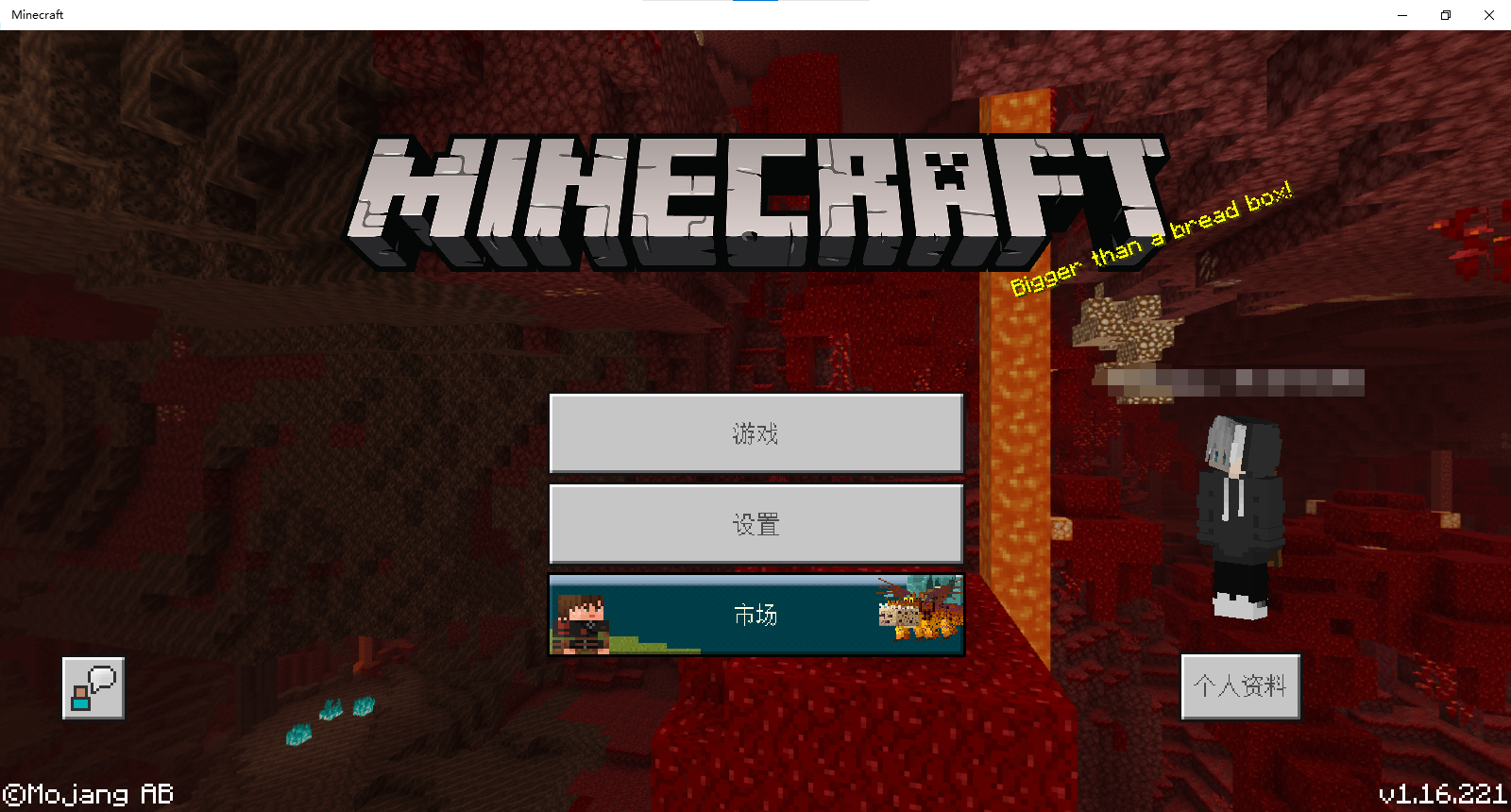
在打开世界,退出世界或不能进入世界时,文字会不显示
一段时间在打开世界,退出世界或不能进入世界时,文字会不显示几秒钟
在打开世界,退出世界或不能进入世界时,文字会
不显示几秒钟在打开世界,退出世界或不能进入世界时,文字会消失几秒钟
抱歉mojang,打扰到您了,我也是进行搜索了,可惜没搜到,希望您能尽快修掉这个bug,感谢!
I have tried many times to finish the 'map room' achievemen,but it
isnotallowed.I thinkmy practiveis right, it may a bug.++Attention: this bug has appeared some years ago and it is fixed.But,recently it has appeared again.
I have tried many times to finish the 'map room' achievemen,but it cannot be done.I think what I do is right, it may a bug. Attention: this bug has appeared some years ago and it is fixed.But,recently it has appeared again.
*Statement:*I know that I am reporting a repeatable bug(
MCPE-95669),cause I want to tell you that this bug really exist on 1.16.2Observed Results:
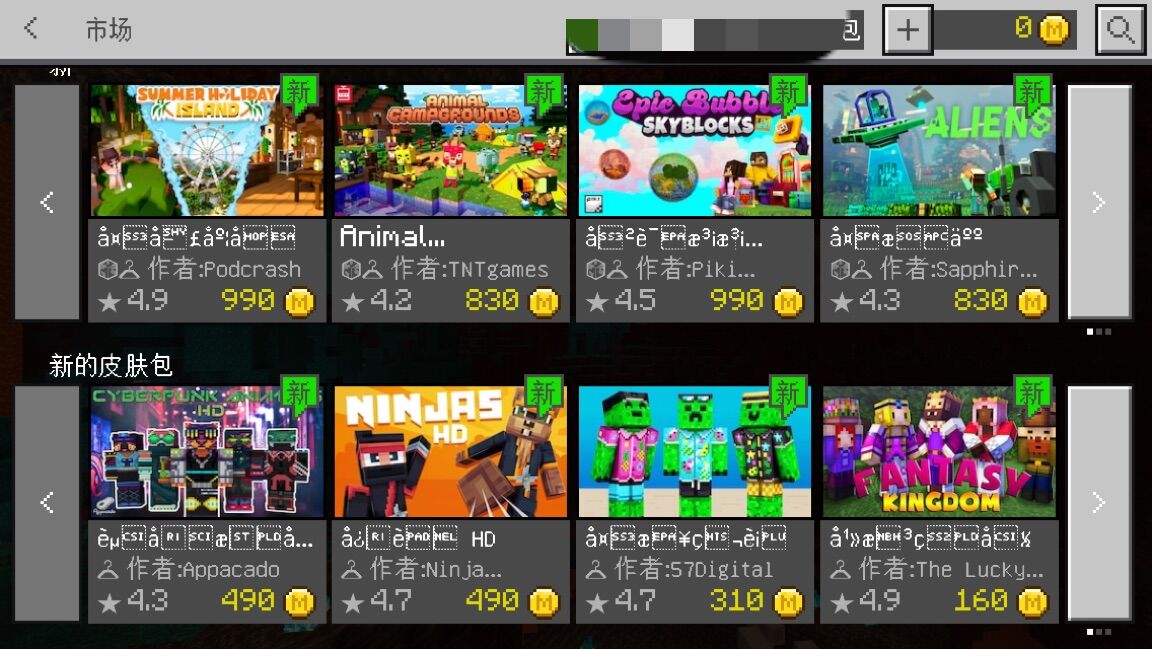
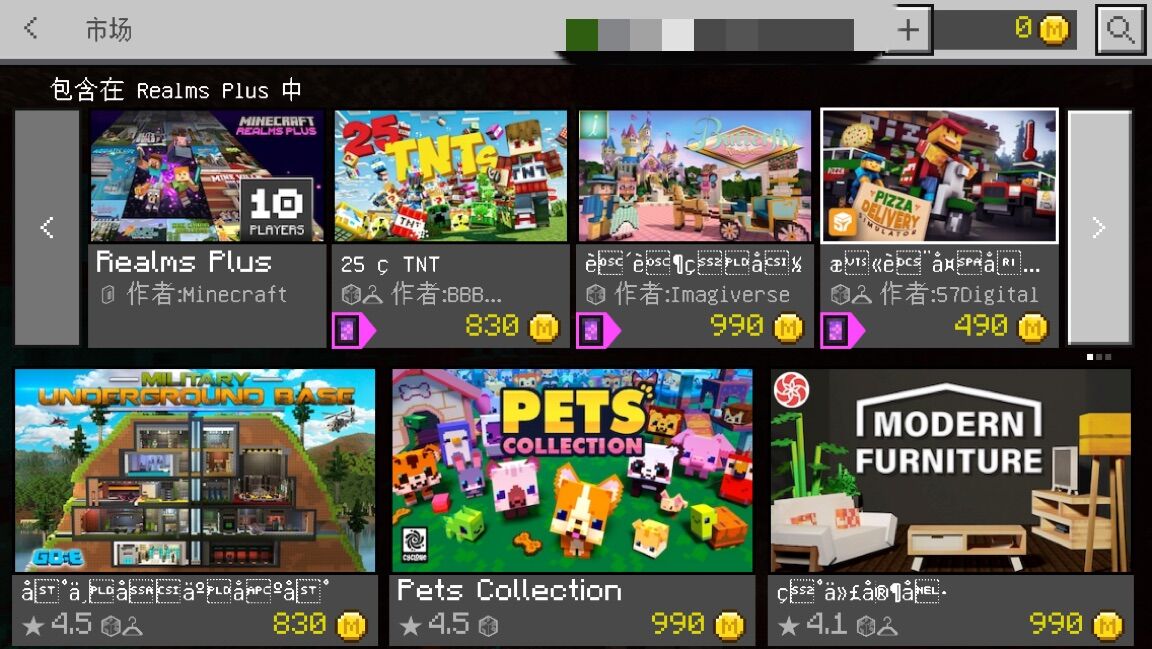
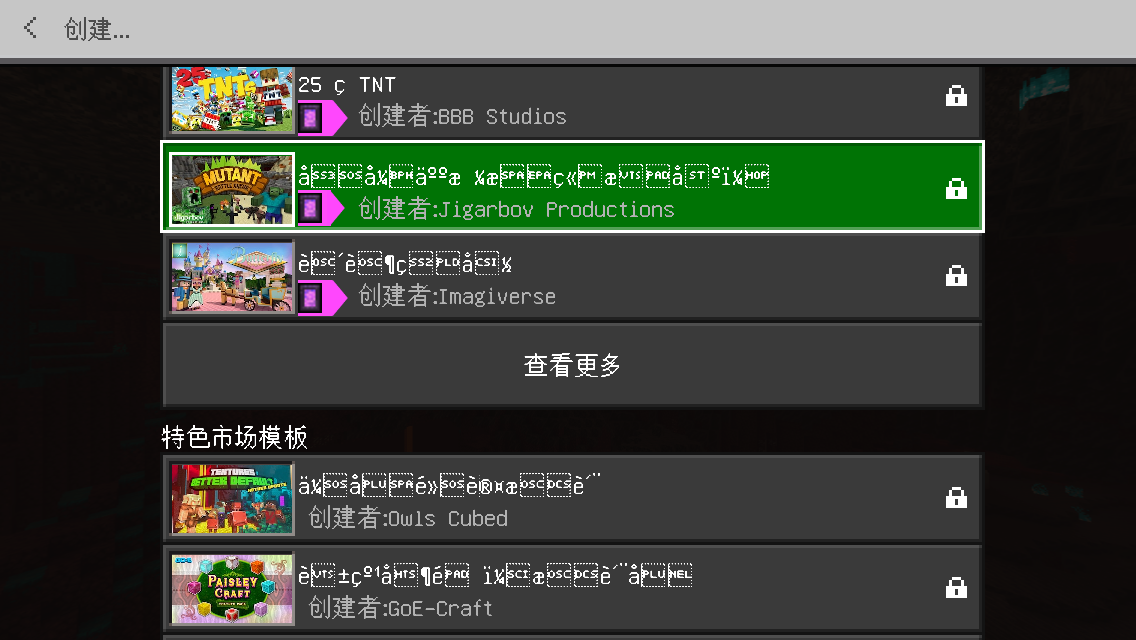
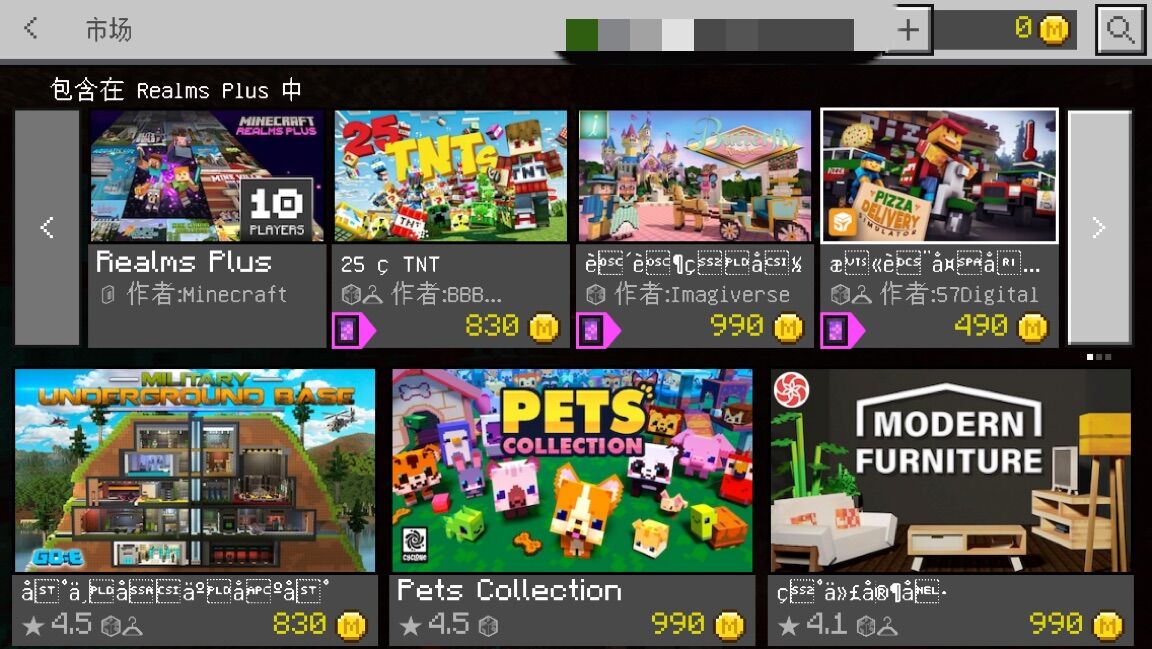
some Chinese word in Minecraft have ben error cord,you can have a try{First: open Minecraft on iOS(1.1.6.2)
Next:go into the setting,go into the language.
Then:change the language of the game to simplified Chinese.
Final:go into the Minecraft marketplace ,you will discover that some Chinese word have been error cord(I don"t know can you understand Chinese,but they are not Chinese!)
}
*Statement:*I know that I am reporting a repeatable bug(
MCPE-95669),cause I want to tell you that this bug really exist on 1.16.2Observed Results:
some Chinese word in Minecraft have ben error cord,you can have a try{First: open Minecraft
on iOS(1.1.6.2)Next:go into the setting,go into the language.
Then:change the language of the game to simplified Chinese.
Final:go into the Minecraft marketplace ,you will discover that some Chinese word have been error cord(I don"t know can you understand Chinese,but they are not Chinese!)
}
*Statement:*I know that I am reporting a repeatable bug(
MCPE-95669),cause I want to tell you that this bug really exist on 1.16.2Observed Results:
some Chinese word in Minecraft have ben error cord,you can have a try{First: open Minecraft(1.16.2) on iOS.
Next:go into the setting,go into the language.
Then:change the language of the game to simplified Chinese.
Final:go into the Minecraft marketplace ,you will discover that some Chinese word have been error cord(I don"t know can you understand Chinese,but they are not Chinese!)
}
*Statement:*I know that I am reporting a repeatable bug(
MCPE-95669),cause I want to tell you that this bug really exist on 1.16.2Observed Results:
some Chinese word in Minecraft have ben error cord,you can have a try{First: open Minecraft(1.16.2) on iOS.
Next:go into the setting,go into the language.
Then:change the language of the game to simplified Chinese.
Final:go into the Minecraft marketplace ,you will discover that some Chinese word have been error cord(I don"t know can you understand Chinese,but they are not Chinese!)
}
*Statement:*I know that I am reporting a repeatable bug(
MCPE-95669),cause I want to tell you that this bug really exist on 1.16.2Observed Results:
{ First: open Minecraft(1.16.2) on iOS. Next:go into the setting,go into the language. Then:change the language of the game to simplified Chinese. Final:go into the Minecraft marketplace ,you will discover that some Chinese word have been error cord(I don"t know can you understand Chinese,but they are not Chinese!) _}
some Chinese word in Minecraft have ben error cord,you can have a try_
*Statement:*I know that I am reporting a repeatable bug(
MCPE-95669),cause I want to tell you that this bug really exist on 1.16.2Observed Results:
{ First: open Minecraft(1.16.2) on iOS. Next:go into the setting,go into the language. Then:change the language of the game to simplified Chinese. Final:go into the Minecraft marketplace ,you will discover that some Chinese word have been error cord(I don"t know can you understand Chinese,but they are not Chinese!)
some Chinese word in Minecraft have ben error cord,you can have a try_}_
*Statement:*I know that I am reporting a repeatable bug(
MCPE-95669),cause I want to tell you that this bug really exist on 1.16.2Observed Results:
{ First: open Minecraft(1.16.2) on iOS. Next:go into the setting,go into the language. Then:change the language of the game to simplified Chinese. Final:go into the Minecraft marketplace ,you will discover that some Chinese word have been error cord(I don"t know can you understand Chinese,but they are not Chinese!) }
some Chinese word in Minecraft have ben error cord,you can have a try_
I met this bug too
The Chinese worlds on WIndows 10 is so strange
When I updated the 1.16.200 version, I found that the simplified Chinese font became very thick. Although this was the case before, it w
as fine when Irestoredit downtothe maximum, but now it can’t be resolved.
Font that should appear:
Wrong font now:
Video with wrong font now: Minecraft 2020-12-12 12-04-18.mp4
When I updated the 1.16.200 version, I found that the simplified Chinese font became very thick. Although this was also the case before, it would be fine after restoring it down and then maximizing it, but now it can’t be resolved.
Font that should appear: !我的世界2020_12_12 12_03_54.png|
Wrong font now: !我的世界2020_12_12 12_03_59.png|
Video with wrong font now: Minecraft 2020-12-12 12-04-18.mp4
When I updated the 1.16.200 version, I found that the simplified Chinese font became very thick. Although this was also the case before, it would be fine after restoring it down and then maximizing it, but now it can’t be resolved.
Font that should appear:!我的世界2020_12_12 12_03_54.png|
Wrong font now:!我的世界2020_12_12 12_03_59.png|
Video with wrong font now: Minecraft 2020-12-12 12-04-18.mp4
When I updated the 1.16.200 version, I found that the simplified Chinese font became very thick. Although this was also the case before, it would be fine after restoring it down and then maximizing it, but now it can’t be resolved.
Font that should appear:我的世界2020_12_12 12_03_54.png|Wrong font now: 我的世界2020_12_12 12_03_59.png|
Video with wrong font now: Minecraft 2020-12-12 12-04-18.mp4When I updated the 1.16.200 version, I found that the simplified Chinese font became very thick. Although this was also the case before, it would be fine after restoring it down and then maximizing it, but now it can’t be resolved.
Font that should appear:
Wrong font now:
Video with wrong font now: Minecraft 2020-12-12 12-04-18.mp4
When I updated the 1.16.200 version, I found that the simplified Chinese font became very thick. Although this was also the case before, it would be fine after restoring it down and then maximizing it, but now it can’t be resolved.
Font that should appear:
Wrong font now:
Video with wrong font now: Minecraft 2020-12-12 12-04-18.mp4When I updated the 1.16.200 version, I found that the simplified Chinese font became very thick. Although this was also the case before, it would be fine after restoring it down and then maximizing it, but now it can’t be resolved.
Video with wrong font now: Minecraft 2020-12-12 12-04-18.mp4
When I updated the 1.16.200 version, I found that the simplified Chinese font became very thick. Although this was
alsothe case before, itwould be fine after restoring it downand then maximizing it, but now it can’t be resolved.
Video with wrong font now: Minecraft 2020-12-12 12-04-18.mp4When I updated the 1.16.200 version, I found that the simplified Chinese font became very thick. . Although this was the case before, it returned to normal after the first restore and then maximized, but now it can’t be resolved.
Video with wrong font now: Minecraft 2020-12-12 12-04-18.mp4
When I updated the 1.16.200 version, I found that the simplified Chinese font became very thick. .
Although this was the case before, it returned to normal afterthe first restoreand then maximized,but now it can’t be resolved.
Video with wrong font now: Minecraft 2020-12-12 12-04-18.mp4When I updated the 1.16.200 version, I found that the simplified Chinese font became very thick. .Although this was the case before, it returned to normal after restoring it down and then maximizing it,but now it can’t be resolved.
Video with wrong font now: Minecraft 2020-12-12 12-04-18.mp4
When I updated the 1.16.200 version, I found that the simplified Chinese font became very thick. .Although this was the case before, it returned to normal after restoring it down and then maximizing it,but now it can’t be resolved.
Video with wrong font now: Minecraft 2020-12-12 12-04-18.mp4When I updated the 1.16.200 version, I found that the simplified Chinese font became very thick. .Although this was the case before, it returned to normal after restoring it down and then maximizing it,but now it can’t be resolved.
State when the font should be correct: Minecraft 2020-12-12 12-19-09.mp4
Video with wrong font now: Minecraft 2020-12-12 12-04-18.mp4
Minecraft 2020_12_12 12_03_54.png
When I updated the 1.16.200 version, I found that the simplified Chinese font became very thick. .Although this was the case before, it returned to normal after restoring it down and then maximizing it,but now it can’t be resolved.
State when the font should be correct: Minecraft 2020-12-12 12-19-09.mp4
Video with wrong font now: Minecraft 2020-12-12 12-04-18.mp4
_emphasized text_note:This error may only occur on some devices
When I updated the 1.16.200 version, I found that the simplified Chinese font became very thick. .Although this was the case before, it returned to normal after restoring it down and then maximizing it,but now it can’t be resolved.
State when the font should be correct: Minecraft 2020-12-12 12-19-09.mp4
Video with wrong font now: Minecraft 2020-12-12 12-04-18.mp4
_emphasized text_note:This error may only occur on some devicesWhen I updated the 1.16.200 version, I found that the simplified Chinese font became very thick. .Although this was the case before, it returned to normal after restoring it down and then maximizing it,but now it can’t be resolved.
State when the font should be correct: Minecraft 2020-12-12 12-19-09.mp4
Video with wrong font now: Minecraft 2020-12-12 12-04-18.mp4
most important note:This error may only occur on some devices
1、The model of the computer experiencing the error is ThinkPad x1carbon 2014
2、The processor of the computer with the error is Intel core i5-4300U CPU@1.90HZ 2.49GHz
3、The resolution of the computer with the error is 1600*900
When I updated the 1.16.200 version, I found that the simplified Chinese font became very thick. .Although this was the case before, it returned to normal after restoring it down and then maximizing it,but now it can’t be resolved.
State when the font should be correct: Minecraft 2020-12-12 12-19-09.mp4
Video with wrong font now: Minecraft 2020-12-12 12-04-18.mp4
most importantnote:This error may only occur on some devices
1、The model of the computer experiencing the error is ThinkPad x1carbon 2014
2、The processor of the computer with the error is Intel core i5-4300U CPU@1.90HZ 2.49GHz
3、The resolution of the computer with the error is 1600*900When I updated the 1.16.200 version, I found that the simplified Chinese font became very thick. .Although this was the case before, it returned to normal after restoring it down and then maximizing it,but now it can’t be resolved.
State when the font should be correct: Minecraft 2020-12-12 12-19-09.mp4
Video with wrong font now: Minecraft 2020-12-12 12-04-18.mp4
most important prompt:This error may only occur on some devices
1、The model of the computer experiencing the error is ThinkPad x1carbon 2014
2、The processor of the computer with the error is Intel core i5-4300U CPU@1.90HZ 2.49GHz
3、The resolution of the computer with the error is 1600*900
When I updated the 1.16.200 version, I found that the simplified Chinese font became very thick. .Although this was the case before, it returned to normal after restoring it down and then maximizing it,but now it can’t be resolved.
State when the font should be correct: Minecraft 2020-12-12 12-19-09.mp4
Video with wrong font now: Minecraft 2020-12-12 12-04-18.mp4
most important prompt:This error may only occur on some devices,The device with the error must meet these conditions:
1、The model of the computer experiencing the error is ThinkPad x1carbon 2014
2、The processor of the computer with the error is Intel core i5-4300U CPU@1.90HZ 2.49GHz
3、The resolution of the computer with the error is 1600*900
When I updated the 1.16.200 version, I found that the simplified Chinese font became very thick. .Although this was the case before, it returned to normal after restoring it down and then maximizing it,but now it can’t be resolved.
State when the font should be correct: Minecraft 2020-12-12 12-19-09.mp4
Video with wrong font now: Minecraft 2020-12-12 12-04-18.mp4
most important prompt:This error may only occur on some devices,The device withthe errormust meet theseconditions:
1、The model of the computer experiencing the error is ThinkPad x1carbon 2014
2、The processor of the computer with the error is Intel core i5-4300U CPU@1.90HZ 2.49GHz
3、The resolution of the computer with the error is 1600*900When I updated the 1.16.200 version, I found that the simplified Chinese font became very thick. .Although this was the case before, it returned to normal after restoring it down and then maximizing it,but now it can’t be resolved.
State when the font should be correct: Minecraft 2020-12-12 12-19-09.mp4
Video with wrong font now: Minecraft 2020-12-12 12-04-18.mp4
most important prompt:This error may only occur on some devices,The device where the error occurs has the following conditions:
1、The model of the computer experiencing the error is ThinkPad x1carbon 2014
2、The processor of the computer with the error is Intel core i5-4300U CPU@1.90HZ 2.49GHz
3、The resolution of the computer with the error is 1600*900
When I updated the 1.16.200 version, I found that the simplified Chinese font became very thick. .Although this was the case before, it returned to normal after restoring it down and then maximizing it,but now it can’t be resolved.
State when the font should be correct: Minecraft 2020-12-12 12-19-09.mp4
Video with wrong font now: Minecraft 2020-12-12 12-04-18.mp4
most important prompt:This error may only occur on some devices,The device where the error occurs has the following conditions:
1、The model of the computer experiencing the error is ThinkPad x1carbon 2014
2、The processor of the computer with the error is Intel core i5-4300U CPU@1.90HZ 2.49GHz
3、The resolution of the computer with the error is 1600*900When I updated the 1.16.200 version, I found that the simplified Chinese font became very thick. .Although this was the case before, it returned to normal after restoring it down and then maximizing it,but now it can’t be resolved.
State when the font should be correct: Minecraft 2020-12-12 12-19-09.mp4
Wrong font now: Minecraft 2020-12-12 12-04-18.mp4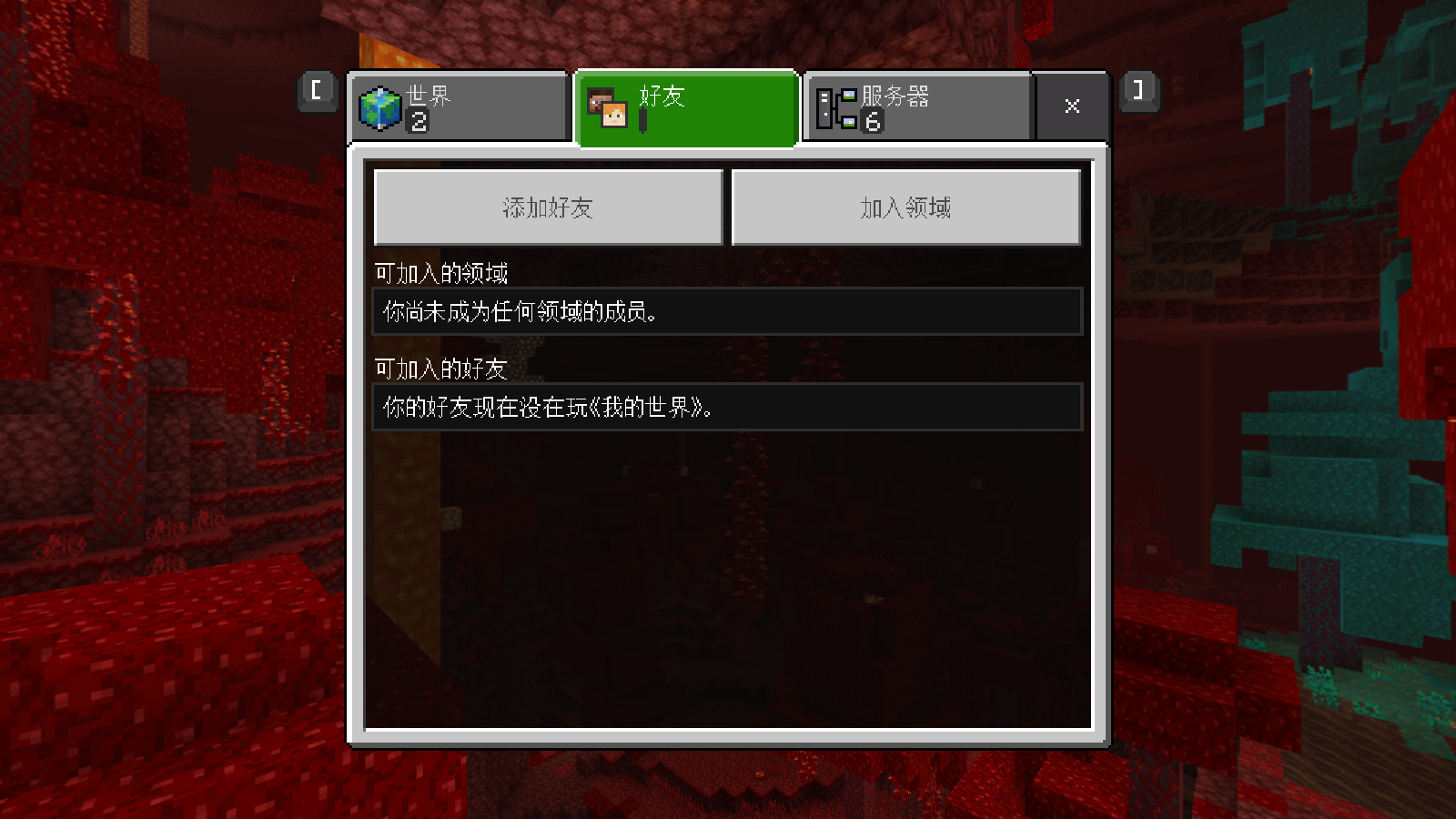
Tips:It is recommended to compare the pictures carefully after zooming in, such as each stroke of "好友,世界,服务器" at the top
most important prompt:This error may only occur on some devices,The device where the error occurs has the following conditions:
1、The model of the computer experiencing the error is ThinkPad x1carbon 2014
2、The processor of the computer with the error is Intel core i5-4300U CPU@1.90HZ 2.49GHz
3、The resolution of the computer with the error is 1600*900
When I updated the 1.16.200 version, I found that the simplified Chinese font became very thick. .Although this was the case before, it returned to normal after restoring it down and then maximizing it,but now it can’t be resolved.
State when the font should be correct: Minecraft 2020-12-12 12-19-09.mp4
Wrong font now: Minecraft 2020-12-12 12-04-18.mp4
Tips:It is recommended to compare the pictures carefully after zooming in, such as each stroke of "好友,世界,服务器" at the top
most important prompt:This error may only occur on some devices,The device where the error occurs has the following conditions:
1、The model of the computer experiencing the error is ThinkPad x1carbon 2014
2、The processor of the computer with the error is Intel core i5-4300U CPU@1.90HZ 2.49GHz
3、The resolution of the computer with the error is 1600*900When I updated the 1.16.200 version, I found that the simplified Chinese font became very thick. .Although this was the case before, it returned to normal after restoring it down and then maximizing it,but now it can’t be resolved.
(State when the font should be correct: Minecraft 2020-12-12 12-19-09.mp4
Wrong font now: Minecraft 2020-12-12 12-04-18.mp4
Tips:It is recommended to compare the pictures carefully after zooming in, such as each stroke of "好友,世界,服务器" at the top)
most important prompt:This error may only occur on some devices,The device where the error occurs has the following conditions:
1、The model of the computer experiencing the error is ThinkPad x1carbon 2014
2、The processor of the computer with the error is Intel core i5-4300U CPU@1.90HZ 2.49GHz
3、The resolution of the computer with the error is 1600*900
When I updated the 1.16.200 version, I found that the simplified Chinese font became very thick. .Although this was the case before, it returned to normal after restoring it down and then maximizing it,but now it can’t be resolved.
(State when the font should be correct: Minecraft 2020-12-12 12-19-09.mp4
Wrong font now: Minecraft 2020-12-12 12-04-18.mp4
Tips:It is recommended to compare the pictures carefully after zooming in, such as each stroke of "好友,世界,服务器"at the top)
most important prompt:This error may only occur on some devices,The device where the error occurs has the following conditions:
1、The model of the computer experiencing the error is ThinkPad x1carbon 2014
2、The processor of the computer with the error is Intel core i5-4300U CPU@1.90HZ 2.49GHz
3、The resolution of the computer with the error is 1600*900When I updated the 1.16.200 version, I found that the simplified Chinese font became very thick. .Although this was the case before, it returned to normal after restoring it down and then maximizing it,but now it can’t be resolved.
(State when the font should be correct:
Minecraft 2020-12-12 12-19-09.mp4
Wrong font now:
Minecraft 2020-12-12 12-04-18.mp4
Tips:It is recommended to compare the pictures carefully after zooming in, such as each stroke of "好友,世界,服务器")
most important prompt:This error may only occur on some devices,The device where the error occurs has the following conditions:
1、The model of the computer experiencing the error is ThinkPad x1carbon 2014
2、The processor of the computer with the error is Intel core i5-4300U CPU@1.90HZ 2.49GHz
3、The resolution of the computer with the error is 1600*900
When I updated the 1.16.200 version, I found that the simplified Chinese font became very thick. .Although this was the case before, it returned to normal after restoring it down and then maximizing it,but now it can’t be resolved.
(State when thefont should be correct:
Minecraft 2020-12-12 12-19-09.mp4
Wrong font now:
Minecraft 2020-12-12 12-04-18.mp4
Tips:It is recommended to compare the pictures carefully after zooming in, such as each stroke of "好友,世界,服务器")
most important prompt:This error may only occur on some devices,The device where the error occurs has the following conditions:
1、The model of the computer experiencing the error is ThinkPad x1carbon 2014
2、The processor of the computer with the error is Intel core i5-4300U CPU@1.90HZ 2.49GHz
3、The resolution of the computer with the error is 1600*900
When I updated the 1.16.200 version, I found that the simplified Chinese font became very thick. .Although this was the case before, it returned to normal after restoring it down and then maximizing it,but now it can’t be resolved.
(font should be correct:
Minecraft 2020-12-12 12-19-09.mp4
Wrong font now:
Minecraft 2020-12-12 12-04-18.mp4
Tips:It is recommended to compare the pictures carefully after zooming in, such as each stroke of "好友,世界,服务器")
most important prompt:This error may only occur on some devices,The device where the error occurs has the following conditions:
1、The model of the computer experiencing the error is ThinkPad x1carbon 2014
2、The processor of the computer with the error is Intel core i5-4300U CPU@1.90HZ 2.49GHz
3、The resolution of the computer with the error is 1600*900When I updated the 1.16.200 version, I found that the simplified Chinese font became very thick. .Although this was the case before, it returned to normal after restoring it down and then maximizing it,but now it can’t be resolved.
(Should be the correct font:
Minecraft 2020-12-12 12-19-09.mp4
Wrong font now:
Minecraft 2020-12-12 12-04-18.mp4
Tips:It is recommended to compare the pictures carefully after zooming in, such as each stroke of "好友,世界,服务器")
most important prompt:This error may only occur on some devices,The device where the error occurs has the following conditions:
1、The model of the computer experiencing the error is ThinkPad x1carbon 2014
2、The processor of the computer with the error is Intel core i5-4300U CPU@1.90HZ 2.49GHz
3、The resolution of the computer with the error is 1600*900
When I updated the 1.16.200 version, I found that the simplified Chinese font became very thick. .Although this was the case before, it returned to normal after restoring it down and then maximizing it,but now it can’t be resolved.
(Should be the correct font:
Minecraft 2020-12-12 12-19-09.mp4
Wrong font now:
Minecraft 2020-12-12 12-04-18.mp4
Tips:It is recommended to compare the pictures carefully after zooming in, such as each stroke of "好友,世界,服务器")
The most important prompt:This error may only occur on some devices,The device where the error occurs has the following conditions:
1、The model of the computer experiencing the error is ThinkPad x1carbon 2014
2、The processor of the computer with the error is Intel core i5-4300U CPU@1.90HZ 2.49GHz
3、The resolution of the computer with the error is 1600*900
When I updated the 1.16.200 version, I found that the simplified Chinese font became very thick. .Although this was the case before, it returned to normal after restoring it down and then maximizing it,but now it can’t be resolved.
(Should be the correct font:
Minecraft 2020-12-12 12-19-09.mp4
Wrong font now:
Minecraft 2020-12-12 12-04-18.mp4
Tips:It is recommended to compare the pictures carefully after zooming in, such as each stroke of "好友,世界,服务器")
The most important prompt:This error may only occur on some devices,The device where the error occurs has the following conditions:
1、The model of the computer experiencing the error is ThinkPad x1carbon 2014
2、The processor of the computer with the error is Intel core i5-4300U CPU@1.90HZ 2.49GHz
3、The resolution of the computer with the error is 1600*900When I updated the 1.16.200 version, I found that the simplified Chinese font became very thick. .Although this was the case before, it returned to normal after restoring it down and then maximizing it,but now it can’t be resolved.
Should be the correct font:
Minecraft 2020-12-12 12-19-09.mp4
Wrong font now:
Minecraft 2020-12-12 12-04-18.mp4
Tips:It is recommended to compare the pictures carefully after zooming in, such as each stroke of "好友,世界,服务器")
The most important prompt:This error may only occur on some devices,The device where the error occurs has the following conditions:
1、The model of the computer experiencing the error is ThinkPad x1carbon 2014
2、The processor of the computer with the error is Intel core i5-4300U CPU@1.90HZ 2.49GHz
3、The resolution of the computer with the error is 1600*900
When I updated the 1.16.200 version, I found that the simplified Chinese font became very thick. .Although this was the case before, it returned to normal after restoring it down and then maximizing it,but now it can’t be resolved.
Should be the correct font:
Minecraft 2020-12-12 12-19-09.mp4
Wrong font now:
Minecraft 2020-12-12 12-04-18.mp4
Tips:It is recommended to compare the pictures carefully after zooming in, such as each stroke of "好友,世界,服务器")
The most important prompt:This error may only occur on some devices,Thedevicewhere the error occurshasthefollowing conditions:
1、The model ofthecomputer experiencing the erroris ThinkPad x1carbon 2014
2、The processor of the computerwith the erroris Intel core i5-4300U CPU@1.90HZ 2.49GHz
3、The resolution of the computerwith the erroris 1600*900When I updated the 1.16.200 version, I found that the simplified Chinese font became very thick. .Although this was the case before, it returned to normal after restoring it down and then maximizing it,but now it can’t be resolved.
Should be the correct font:
Minecraft 2020-12-12 12-19-09.mp4
Wrong font now:
Minecraft 2020-12-12 12-04-18.mp4
Tips:It is recommended to compare the pictures carefully after zooming in, such as each stroke of "好友,世界,服务器")
The most important prompt:This error may only occur on some devices,my device is as follows
1、The model of my compute is ThinkPad x1carbon 2014
2、The processor of the computer is Intel core i5-4300U CPU@1.90HZ 2.49GHz
3、The resolution of the computer is 1600*900
When I updated the 1.16.200 version, I found that the simplified Chinese font became very thick. .Although this was the case before, it returned to normal after restoring it down and then maximizing it,but now it can’t be resolved.
Should be the correct font:
Minecraft 2020-12-12 12-19-09.mp4
Wrong font now:
Minecraft 2020-12-12 12-04-18.mp4
Tips:It is recommended to compare the pictures carefully after zooming in, such as each stroke of "好友,世界,服务器")
The most important prompt:This error may only occur on some devices,my device is as follows
1、The model of my compute is ThinkPad x1carbon 2014
2、The processor of the computer is Intel core i5-4300U CPU@1.90HZ 2.49GHz
3、The resolution of the computer is 1600*900When I updated the 1.16.200 version, I found that the simplified Chinese font became very thick. .Although this was the case before, it returned to normal after restoring it down and then maximizing it,but now it can’t be resolved.
Should be the correct font:
Minecraft 2020-12-12 12-19-09.mp4
Wrong font now:
Minecraft 2020-12-12 12-04-18.mp4
Tips:It is recommended to compare the pictures carefully after zooming in, such as each stroke of "好友,世界,服务器")
The most important prompt:This error may only occur on some devices,my device is as follows
1、My computer model is ThinkPad x1carbon 2014
2、The processor of the computer is Intel core i5-4300U CPU@1.90HZ 2.49GHz
3、The resolution of the computer is 1600*900
When I updated the 1.16.200 version, I found that the simplified Chinese font became very thick. .Although this was the case before, it returned to normal after restoring it down and then maximizing it,but now it can’t be resolved.
Should be the correct font:
Minecraft 2020-12-12 12-19-09.mp4
Wrong font now:
Minecraft 2020-12-12 12-04-18.mp4
Tips:It is recommended to compare the pictures carefully after zooming in, such as each stroke of "好友,世界,服务器")
The most important prompt:This error may only occur on some devices,my device is as follows
1、Mycomputer model is ThinkPad x1carbon 2014
2、The processor of the computer is Intel core i5-4300U CPU@1.90HZ 2.49GHz
3、Theresolutionof the computer is1600*900When I updated the 1.16.200 version, I found that the simplified Chinese font became very thick. .Although this was the case before, it returned to normal after restoring it down and then maximizing it,but now it can’t be resolved.
Should be the correct font:
Minecraft 2020-12-12 12-19-09.mp4
Wrong font now:
Minecraft 2020-12-12 12-04-18.mp4
Tips:It is recommended to compare the pictures carefully after zooming in, such as each stroke of "好友,世界,服务器")
The most important prompt:This error may only occur on some devices,
My equipment is as follows:
1、My computer model is ThinkPad x1carbon 2014
2、The processor of the computer is Intel core i5-4300U CPU@1.90HZ 2.49GHz
3、The resolution of the computer is 1600*900
When I updated the 1.16.200 version, I found that the simplified Chinese font became very thick. .Although this was the case before, it returned to normal after restoring it down and then maximizing it,but now it can’t be resolved.
Should be the correct font:
Minecraft 2020-12-12 12-19-09.mp4
Wrong font now:
Minecraft 2020-12-12 12-04-18.mp4
Tips:It is recommended to compare the pictures carefully after zooming in, such as each stroke of "好友,世界,服务器")
The most important prompt:This error may only occur on some devices,
My equipment is as follows:
1、My computermodelisThinkPad x1carbon 2014
2、The processor of the computer is Intel core i5-4300U CPU@1.90HZ 2.49GHz
3、The resolution of the computer is 1600*900When I updated the 1.16.200 version, I found that the simplified Chinese font became very thick. .Although this was the case before, it returned to normal after restoring it down and then maximizing it,but now it can’t be resolved.
Should be the correct font:
Minecraft 2020-12-12 12-19-09.mp4
Wrong font now:
Minecraft 2020-12-12 12-04-18.mp4
Tips:It is recommended to compare the pictures carefully after zooming in, such as each stroke of "好友,世界,服务器")
The most important prompt:This error may only occur on some devices,
My equipment is as follows:
1、My modle of my computer is ThinkPad x1carbon 2014
2、The processor of the computer is Intel core i5-4300U CPU@1.90HZ 2.49GHz
3、The resolution of the computer is 1600*900
When I updated the 1.16.200 version, I found that the simplified Chinese font became very thick. .Although this was the case before, it returned to normal after restoring it down and then maximizing it,but now it can’t be resolved.
Should be the correct font:
Minecraft 2020-12-12 12-19-09.mp4
Wrong font now:
Minecraft 2020-12-12 12-04-18.mp4
Tips:It is recommended to compare the pictures carefully after zooming in, such as each stroke of "好友,世界,服务器")
The most important prompt:This error may only occur on some devices,
My equipment is as follows:
1、Mymodle of my computer is ThinkPad x1carbon 2014
2、The processor of the computer is Intel core i5-4300U CPU@1.90HZ 2.49GHz
3、The resolution of the computer is 1600*900When I updated the 1.16.200 version, I found that the simplified Chinese font became very thick. .Although this was the case before, it returned to normal after restoring it down and then maximizing it,but now it can’t be resolved.
Should be the correct font:
Minecraft 2020-12-12 12-19-09.mp4
Wrong font now:
Minecraft 2020-12-12 12-04-18.mp4
Tips:It is recommended to compare the pictures carefully after zooming in, such as each stroke of "好友,世界,服务器")
The most important prompt:This error may only occur on some devices,
My equipment is as follows:
1、The modle of my computer is ThinkPad x1carbon 2014
2、The processor of the computer is Intel core i5-4300U CPU@1.90HZ 2.49GHz
3、The resolution of the computer is 1600*900
When I updated the 1.16.200 version, I found that the simplified Chinese font became very thick. .Although this was the case before, it returned to normal after restoring it down and then maximizing it,but now it can’t be resolved.
Should be the correct font:
Minecraft 2020-12-12 12-19-09.mp4
Wrong font now:
Minecraft 2020-12-12 12-04-18.mp4
Tips:It is recommended to compare the pictures carefully after zooming in, such as each stroke of "好友,世界,服务器")
The most important prompt:This error may only occur on some devices,
My equipment is as follows:
1、The modle of my computer is ThinkPad x1carbon 2014
2、The processor of the computer is Intel core i5-4300U CPU@1.90HZ 2.49GHz
3、The resolution of the computeris 1600*900When I updated the 1.16.200 version, I found that the simplified Chinese font became very thick. .Although this was the case before, it returned to normal after restoring it down and then maximizing it,but now it can’t be resolved.
Should be the correct font:
Minecraft 2020-12-12 12-19-09.mp4
Wrong font now:
Minecraft 2020-12-12 12-04-18.mp4
Tips:It is recommended to compare the pictures carefully after zooming in, such as each stroke of "好友,世界,服务器")
The most important prompt:This error may only occur on some devices,
My equipment is as follows:
1、My computer model is ThinkPad x1carbon 2014
2、My computer processor is Intel core i5-4300U CPU@1.90HZ 2.49GHz
3、My computer resolution is 1600*900
When I updated the 1.16.200 version, I found that the simplified Chinese font became very thick. .Although this was the case before, it returned to normal after restoring it down and then maximizing it,but now it can’t be resolved.
Should be the correct font:
Minecraft 2020-12-12 12-19-09.mp4
Wrong font now:
Minecraft 2020-12-12 12-04-18.mp4
Tips:It is recommended to compare the pictures carefully after zooming in, such as each stroke of "好友,世界,服务器")
The most important prompt:This error may only occur on some devices,
My equipment is as follows:
1、My computer model is ThinkPad x1carbon 2014
2、My computer processor is Intel core i5-4300U CPU@1.90HZ 2.49GHz
3、My computer resolution is 1600*900When I updated the 1.16.200 version, I found that the simplified Chinese font became very thick. .Although this was the case before, it returned to normal after restoring it down and then maximizing it,but now it can’t be resolved.
Should be the correct font:
Minecraft 2020-12-12 12-19-09.mp4
Wrong font now:
Minecraft 2020-12-12 12-04-18.mp4
Tips:It is recommended to compare the pictures carefully after zooming in, such as each stroke of "好友,世界,服务器")
The most important prompt:This error may only occur on some devices,
My equipment is as follows:
1、My computer model is ThinkPad x1carbon 2014
2、My computer processor is Intel core i5-4300U CPU@1.90HZ 2.49GHz
3、My computer resolution is 1600x900
When I updated the 1.16.200 version, I found that the simplified Chinese font became very thick. .Although this was the case before, it returned to normal after restoring it down and then maximizing it,but now it can’t be resolved.
Should be the correct font:
Minecraft 2020-12-12 12-19-09.mp4
Wrong font now:
Minecraft 2020-12-12 12-04-18.mp4
Tips:It is recommended to compare the pictures carefully after zooming in,such as eachstrokeof "好友,世界,服务器")
The most important prompt:This error may only occur on some devices,
My equipment is as follows:
1、My computer model is ThinkPad x1carbon 2014
2、My computer processor is Intel core i5-4300U CPU@1.90HZ 2.49GHz
3、My computer resolution is 1600x900When I updated the 1.16.200 version, I found that the simplified Chinese font became very thick. .Although this was the case before, it returned to normal after restoring it down and then maximizing it,but now it can’t be resolved.
Should be the correct font:
Minecraft 2020-12-12 12-19-09.mp4
Wrong font now:
Minecraft 2020-12-12 12-04-18.mp4
Tips:It is recommended to compare the pictures carefully after zooming in, Such as every stroke "世界,好友,服务器" at the top of the screen)
The most important prompt:This error may only occur on some devices,
My equipment is as follows:
1、My computer model is ThinkPad x1carbon 2014
2、My computer processor is Intel core i5-4300U CPU@1.90HZ 2.49GHz
3、My computer resolution is 1600x900
When I updated the 1.16.200 version, I found that the simplified Chinese font became very thick. .Although this was the case before, it returned to normal after restoring it down and then maximizing it,but now it can’t be resolved.
Should be the correct font:
Minecraft 2020-12-12 12-19-09.mp4
Wrong font now:
Minecraft 2020-12-12 12-04-18.mp4
Tips:It is recommended to compare the pictures carefully after zooming in,Such as every stroke"世界,好友,服务器"at the top of the screen)
The most important prompt:This error may only occur on some devices,
My equipment is as follows:
1、My computer model is ThinkPad x1carbon 2014
2、My computer processor is Intel core i5-4300U CPU@1.90HZ 2.49GHz
3、My computer resolution is 1600x900When I updated the 1.16.200 version, I found that the simplified Chinese font became very thick. .Although this was the case before, it returned to normal after restoring it down and then maximizing it,but now it can’t be resolved.
Should be the correct font:
Minecraft 2020-12-12 12-19-09.mp4
Wrong font now:
Minecraft 2020-12-12 12-04-18.mp4
Tips:It is recommended to compare the pictures carefully after zooming in,such as "世界,好友,服务器" every stroke at the top of the screen)
The most important prompt:This error may only occur on some devices,
My equipment is as follows:
1、My computer model is ThinkPad x1carbon 2014
2、My computer processor is Intel core i5-4300U CPU@1.90HZ 2.49GHz
3、My computer resolution is 1600x900
When I updated the 1.16.200 version, I found that the simplified Chinese font became very thick. .Although this was the case before, it returned to normal after restoring it down and then maximizing it,but now it can’t be resolved.
Should be the correct font:
Minecraft 2020-12-12 12-19-09.mp4
Wrong font now:
Minecraft 2020-12-12 12-04-18.mp4
Tips:It is recommended to compare the pictures carefully after zooming in,such as"世界,好友,服务器"every stroke at the top of the screen)
The most important prompt:This error may only occur on some devices,
My equipment is as follows:
1、My computer model is ThinkPad x1carbon 2014
2、My computer processor is Intel core i5-4300U CPU@1.90HZ 2.49GHz
3、My computer resolution is 1600x900When I updated the 1.16.200 version, I found that the simplified Chinese font became very thick. .Although this was the case before, it returned to normal after restoring it down and then maximizing it,but now it can’t be resolved.
Should be the correct font:
Minecraft 2020-12-12 12-19-09.mp4
Wrong font now:
Minecraft 2020-12-12 12-04-18.mp4
Tips:It is recommended to compare the pictures carefully after zooming in,such as every stroke of 世界,好友,服务器" at the top of the screen at the top of the screen)
The most important prompt:This error may only occur on some devices,
My equipment is as follows:
1、My computer model is ThinkPad x1carbon 2014
2、My computer processor is Intel core i5-4300U CPU@1.90HZ 2.49GHz
3、My computer resolution is 1600x900
When I updated the 1.16.200 version, I found that the simplified Chinese font became very thick. .Although this was the case before, it returned to normal after restoring it down and then maximizing it,but now it can’t be resolved.
Should be the correct font:
Minecraft 2020-12-12 12-19-09.mp4
Wrong font now:
Minecraft 2020-12-12 12-04-18.mp4
Tips:It is recommended to compare the pictures carefully after zooming in,such as every stroke of 世界,好友,服务器" at the top of the screenat the top of the screen)
The most important prompt:This error may only occur on some devices,
My equipment is as follows:
1、My computer model is ThinkPad x1carbon 2014
2、My computer processor is Intel core i5-4300U CPU@1.90HZ 2.49GHz
3、My computer resolution is 1600x900
When I updated the 1.16.200 version, I found that the simplified Chinese font became very thick. .Although this was the case before, it returned to normal after restoring it down and then maximizing it,but now it can’t be resolved.
Should be the correct font:
Minecraft 2020-12-12 12-19-09.mp4
Wrong font now:
Minecraft 2020-12-12 12-04-18.mp4
Tips:It is recommended to compare the pictures carefully after zooming in,such as every stroke of “世界,好友,服务器" at the top of the screen )
The most important prompt:This error may only occur on some devices,
My equipment is as follows:
1、My computer model is ThinkPad x1carbon 2014
2、My computer processor is Intel core i5-4300U CPU@1.90HZ 2.49GHz
3、My computer resolution is 1600x900
When I updated the 1.16.200 version, I found that the simplified Chinese font became very thick. .Although this was the case before, it returned to normal after restoring it down and then maximizing it,but now it can’t be resolved.
Should be the correct font:
Minecraft 2020-12-12 12-19-09.mp4
Wrong font now:
Minecraft 2020-12-12 12-04-18.mp4
Tips:It is recommended to compare the pictures carefully after zooming in,such as every stroke of “世界,好友,服务器" at the top of the screen )
The most important prompt:This error may only occur on some devices,
My equipment condition is as follows:
1、My computer model is ThinkPad x1carbon 2014
2、My computer processor is Intel core i5-4300U CPU@1.90HZ 2.49GHz
3、My computer resolution is 1600x900
@[Mod] OcelotOnesie I beg you please come and have a look.This bug is very bad for me.Thank you
Unicodefonts are rendered unevenly/varying thickness
fonts are rendered unevenly/varyingthicknessThe font quality is degraded and thicker
When I updated the 1.16.200 version, I found that the simplified Chinese font became very thick. .Although this was the case before, it returned to normal after restoring it down and then maximizing it,but now it can’t be resolved.
Should be the correct font:
Minecraft 2020-12-12 12-19-09.mp4
Wrong font now:
Minecraft 2020-12-12 12-04-18.mp4
Tips:It is recommended to compare the pictures carefully after zooming in,such as every stroke of “世界,好友,服务器" at the top of the screen )
The most important prompt:This error may only occur on some devices,
My equipment condition is as follows:
1、My computer model is ThinkPad x1carbon 2014
2、My computer processor is Intel core i5-4300U CPU@1.90HZ 2.49GHz
3、My computer resolution is 1600x900
When I updated the 1.16.200 version, I found that the simplified Chinese font became very thick. .Although this was the case before, it returned to normal after restoring it down and then maximizing it,but now it can’t be resolved.
Should be the correct font:
Minecraft 2020-12-12 12-19-09.mp4
Wrong font now:
Minecraft 2020-12-12 12-04-18.mp4
Tips:It is recommended to compare the pictures carefully after zooming in,such as every stroke of “世界,好友,服务器" at the top of the screen )
The most important prompt:This error may only occur on some devices,
My equipment condition is as follows:
1、My computer model is ThinkPad x1carbon 2014
2、My computer processor is Intel core i5-4300U CPU@1.90HZ 2.49GHz
3、My computer resolution is 1600x9001.Observed Results: Since I have updated the 1.16.200 version, I found that the simplified Chinese font became very thick.
2.Expected Results:
3.
When I updated the 1.16.200 version, I found that the simplified Chinese font became very thick. .Although this was the case before, it returned to normal after restoring it down and then maximizing it,but now it can’t be resolved.
Should be the correct font:
Minecraft 2020-12-12 12-19-09.mp4
Wrong font now:
Minecraft 2020-12-12 12-04-18.mp4
Tips:It is recommended to compare the pictures carefully after zooming in,such as every stroke of “世界,好友,服务器" at the top of the screen )
The most important prompt:This error may only occur on some devices,
My equipment condition is as follows:
1、My computer model is ThinkPad x1carbon 2014
2、My computer processor is Intel core i5-4300U CPU@1.90HZ 2.49GHz
3、My computer resolution is 1600x9001.Observed Results: Since I have updated the 1.16.200 version, I found that the simplified Chinese font became very thick.
2.Expected Results:
3.When I updated the 1.16.200 version, I found that the simplified Chinese font became very thick. .Although this was the case before, it returned to normal after restoring it down and then maximizing it,but now it can’t be resolved.
Should be the correct font:
Minecraft 2020-12-12 12-19-09.mp4
Wrong font now:
Minecraft 2020-12-12 12-04-18.mp4
Tips:It is recommended to compare the pictures carefully after zooming in,such as every stroke of “世界,好友,服务器" at the top of the screen )
The most important prompt:This error may only occur on some devices,
My equipment condition is as follows:
1、My computer model is ThinkPad x1carbon 2014
2、My computer processor is Intel core i5-4300U CPU@1.90HZ 2.49GHz
3、My computer resolution is 1600x9001.Observed Results: Since I have updated the 1.16.200 version, I found that the simplified Chinese font became very thick.
2.Expected Results: Simplified Chinese has very thin lines3.
When I updated the 1.16.200 version, I found that the simplified Chinese font became very thick. .Although this was the case before, it returned to normal after restoring it down and then maximizing it,but now it can’t be resolved.
Should be the correct font:
Minecraft 2020-12-12 12-19-09.mp4
Wrong font now:
Minecraft 2020-12-12 12-04-18.mp4
Tips:It is recommended to compare the pictures carefully after zooming in,such as every stroke of “世界,好友,服务器" at the top of the screen )
The most important prompt:This error may only occur on some devices,
My equipment condition is as follows:
1、My computer model is ThinkPad x1carbon 2014
2、My computer processor is Intel core i5-4300U CPU@1.90HZ 2.49GHz
3、My computer resolution is 1600x9001.Observed Results: Since I have updated the 1.16.200 version, I found that the simplified Chinese font became very thick.
2.Expected Results: Simplified Chinese has very thin lines
3.
When I updated the 1.16.200 version, I found that the simplified Chinese font became very thick. .Although this was the case before, it returned to normal after restoring it down and then maximizing it,but now it can’t be resolved.
Should be the correct font:
Minecraft 2020-12-12 12-19-09.mp4
Wrong font now:
Minecraft 2020-12-12 12-04-18.mp4
Tips:It is recommended to compare the pictures carefully after zooming in,such as every stroke of “世界,好友,服务器" at the top of the screen )
The most important prompt:This error may only occur on some devices,
My equipment condition is as follows:
1、My computer model is ThinkPad x1carbon 2014
2、My computer processor is Intel core i5-4300U CPU@1.90HZ 2.49GHz
3、My computer resolution is 1600x9001.Observed Results: Since I have updated the 1.16.200 version, I found that the simplified Chinese font became very thick.
2.Expected Results: Simplified Chinese has very thin lines
3.
When I updated the 1.16.200 version, I found that the simplified Chinese font became very thick. .Although this was the case before, it returned to normal after restoring it down and then maximizing it,but now it can’t be resolved.
Should be the correct font:
Minecraft 2020-12-12 12-19-09.mp4
Wrong font now:
Minecraft 2020-12-12 12-04-18.mp4
Tips:It is recommended to compare the pictures carefully after zooming in,such as every stroke of “世界,好友,服务器" at the top of the screen )
The most important prompt:This error may only occur on some devices,
My equipment condition is as follows:
1、My computer model is ThinkPad x1carbon 2014
2、My computer processor is Intel core i5-4300U CPU@1.90HZ 2.49GHz
3、My computer resolution is 1600x9001.Observed Results: Since I have updated the 1.16.200 version, I found that the simplified Chinese font became very thick.
2.Expected Results:Simplified Chinese has very thin lines
3.
1.Observed Results: _ Since I have updated the 1.16.200 version, I found that the simplified Chinese font became very thick. _
2.Expected Results: Simplified Chinese has very thin lines
3.Postscript:
(1): It is recommended to compare the pictures carefully after zooming in,such as every stroke of “世界,好友,服务器" at the top of the screen )
(2): The most important prompt:This error may only occur on some devices,
_My computer model is ThinkPad x1carbon 2014
My computer processor is Intel core i5-4300U CPU@1.90HZ 2.49GHz
My computer resolution is 1600x900
_
1
.Observed Results: _ Since I have updated the 1.16.200 version, I found that the simplified Chinese font became very thick. _
2.Expected Results:Simplified Chinese has very thin lines
3.Postscript:
(1): It is recommended to compare the pictures carefully after zooming in,such as every stroke of “世界,好友,服务器" at the top of the screen )
(2): The most important prompt:This error may only occur on some devices,
_My computer model is ThinkPad x1carbon 2014
My computer processor is Intel core i5-4300U CPU@1.90HZ 2.49GHz
My computer resolution is 1600x900
_1: Observed Results: _ Since I have updated the 1.16.200 version, I found that the simplified Chinese font became very thick. _
(1):Wrong font now:
2.Expected Results: Simplified Chinese has very thin lines
(1):Should be the correct font:
3.Postscript:
(1): It is recommended to compare the pictures carefully after zooming in,such as every stroke of “世界,好友,服务器" at the top of the screen )
(2): The most important prompt:This error may only occur on some devices,
_My computer model is ThinkPad x1carbon 2014
My computer processor is Intel core i5-4300U CPU@1.90HZ 2.49GHz
My computer resolution is 1600x900
_
1: Observed Results: _ Since I have updated the 1.16.200 version, I found that the simplified Chinese font became very thick. _
(1):Wrong font now:
2.Expected Results: Simplified Chinese has very thin lines
(1):Should be the correct font:
3.Postscript:
(1): It is recommended to compare the pictures carefully after zooming in,such as every stroke of “世界,好友,服务器" at the top of the screen )
(2): The most important prompt:This error may only occur on some devices,
_My computer model is ThinkPad x1carbon 2014
My computer processor is Intel core i5-4300U CPU@1.90HZ 2.49GHz
My computer resolution is 1600x900
_1: Observed Results: _ Since I have updated the 1.16.200 version, I found that the simplified Chinese font became very thick. _
(1):Wrong font now:
2.Expected Results: Simplified Chinese has very thin lines
(1):Should be the correct font:
3.Postscript:
(1): It is recommended to compare the pictures carefully after zooming in,such as every stroke of “世界,好友,服务器" at the top of the screen )
(2): The most important prompt:This error may only occur on some devices,
_ My computer model is ThinkPad x1carbon 2014
My computer processor is Intel core i5-4300U CPU@1.90HZ 2.49GHz
My computer resolution is 1600x900_
1:Observed Results: _ Since I have updated the 1.16.200 version, I found that the simplified Chinese font became very thick. _
(1):Wrong font now:
2.Expected Results: Simplified Chinese has very thin lines(1):Should be the correct font:
3.Postscript:
(1): It is recommended to compare the pictures carefully after zooming in,such as every stroke of “世界,好友,服务器" at the top of the screen )
(2): The most important prompt:This error may only occur on some devices,
_ My computer model is ThinkPad x1carbon 2014
My computer processor is Intel core i5-4300U CPU@1.90HZ 2.49GHz
My computer resolution is 1600x900_Observed Results: _ Since I have updated the 1.16.200 version, I found that the simplified Chinese font became very thick. _
Expected Results: Simplified Chinese has very thin lines
Postscript:
(1): It is recommended to compare the pictures carefully after zooming in,such as every stroke of “世界,好友,服务器" at the top of the screen )
(2): The most important prompt:This error may only occur on some devices,
_ My computer model is ThinkPad x1carbon 2014
My computer processor is Intel core i5-4300U CPU@1.90HZ 2.49GHz
My computer resolution is 1600x900_
Observed Results: _ Since I have updated the 1.16.200 version, I found that the simplified Chinese font became very thick. _
Expected Results:Simplified Chinese has very thin lines
Postscript:
(1): It is recommended to compare the pictures carefully after zooming in,such as every stroke of “世界,好友,服务器" at the top of the screen )
(2): The most important prompt:This error may only occur on some devices,
_My computer model is ThinkPad x1carbon 2014
My computer processor is Intel core i5-4300U CPU@1.90HZ 2.49GHz
My computer resolution is 1600x900_1.Observed Results: _ Since I have updated the 1.16.200 version, I found that the simplified Chinese font became very thick. _
2.Expected Results: Simplified Chinese has very thin lines
3*Postscript*:
(1): It is recommended to compare the pictures carefully after zooming in,such as every stroke of “世界,好友,服务器" at the top of the screen )
(2): _The most important prompt:This error may only occur on some devices,
My computer model is ThinkPad x1carbon 2014
My computer processor is Intel core i5-4300U CPU@1.90HZ 2.49GHz
My computer resolution is 1600x900_
1.Observed Results: _ Since I have updated the 1.16.200 version, I found that the simplified Chinese font became very thick. _
2.Expected Results: Simplified Chinese has very thin lines
3*Postscript*:
(1): It is recommended to compare the pictures carefully after zooming in,such as every stroke of “世界,好友,服务器" at the top of the screen )
(2): _The most important prompt:This error may only occur on some devices,
My computer model is ThinkPad x1carbon 2014
My computer processor is Intel core i5-4300U CPU@1.90HZ 2.49GHz
My computer resolution is 1600x900_
1.Observed Results: _ Since I have updated the 1.16.200 version, I found that the simplified Chinese font became very thick. _
2.Expected Results: Simplified Chinese has very thin lines
3*Postscript:
(1): It is recommended to compare the pictures carefully after zooming in,such as every stroke of “世界,好友,服务器" at the top of the screen )
(2): _The most important prompt:This error may only occur on some devices,
My computer model is ThinkPad x1carbon 2014
My computer processor is Intel core i5-4300U CPU@1.90HZ 2.49GHz
My computer resolution is 1600x900_1.Observed Results: _ Since I have updated the 1.16.200 version, I found that the simplified Chinese font became very thick. _
2.Expected Results: Simplified Chinese has very thin lines
3.Postscript :
(1): It is recommended to compare the pictures carefully after zooming in,such as every stroke of “世界,好友,服务器" at the top of the screen )
(2): _The most important prompt:This error may only occur on some devices,
My computer model is ThinkPad x1carbon 2014
My computer processor is Intel core i5-4300U CPU@1.90HZ 2.49GHz
My computer resolution is 1600x900_
1.Observed Results
: _Since I have updated the 1.16.200 version, I found that the simplified Chinese font became very thick. _
2.Expected Results: Simplified Chinese has very thin lines
3.Postscript:
(1):It is recommended to compare the pictures carefully after zooming in,such as every stroke of “世界,好友,服务器" at the top of the screen)
(2): _The most important prompt:This error may only occur on some devices,
My computer model is ThinkPad x1carbon 2014
My computer processor is Intel core i5-4300U CPU@1.90HZ 2.49GHz
My computer resolution is 1600x900_1.Observed Results: Since I have updated the 1.16.200 version, I found that the simplified Chinese font became very thick.
2.Expected Results: Simplified Chinese has very thin lines
3.Postscript:
(1): I_t is recommended to compare the pictures carefully after zooming in,such as every stroke of “世界,好友,服务器" at the top of the screen_ )
(2): _The most important prompt:This error may only occur on some devices
My computer model is ThinkPad x1carbon 2014
My computer processor is Intel core i5-4300U CPU@1.90HZ 2.49GHz
My computer resolution is 1600x900_
1.Observed Results: Since I have updated the 1.16.200 version, I found that the simplified Chinese font became very thick.
2.Expected Results: Simplified Chinese has very thin lines
3.Postscript:
(1): I_t is recommended to compare the pictures carefully after zooming in,such as every stroke of “世界,好友,服务器" at the top of the screen_)
(2):_The most important prompt:This error may only occur on some devices
My computer model is ThinkPad x1carbon 2014
My computer processor is Intel core i5-4300U CPU@1.90HZ 2.49GHz
My computer resolution is 1600x900_
1.Observed Results: Since I have updated the 1.16.200 version, I found that the simplified Chinese font became very thick.
2.Expected Results: Simplified Chinese has very thin lines
3.Postscript:
(1): It is recommended to compare the pictures carefully after zooming in,such as every stroke of “世界,好友,服务器" at the top of the screen )
(2): The most important prompt:This error may only occur on some devices
My computer model is ThinkPad x1carbon 2014
My computer processor is Intel core i5-4300U CPU@1.90HZ 2.49GHz
My computer resolution is 1600x900
1.Observed Results: Since I have updated the 1.16.200 version, I found that the simplified Chinese font became very thick.
2.Expected Results: Simplified Chinese has very thin lines
3.Postscript:
(1): It is recommended to compare the pictures carefully after zooming in,such as every stroke of “世界,好友,服务器" at the top of the screen )
(2): The most important prompt:This error may only occur on some devices
My computer model is ThinkPad x1carbon 2014
My computer processor is Intel core i5-4300U CPU@1.90HZ 2.49GHz
My computer resolution is 1600x9001.Observed Results: Since I have updated the 1.16.200 version, I found that the simplified Chinese font became very thick.
Picture:
video: [^我的世界 2020-12-12 12-04-18.mp4]2.Expected Results: Simplified Chinese has very thin lines
Picture:
video: [^我的世界 2020-12-12 12-19-09.mp4]3.Postscript:
(1): It is recommended to compare the pictures carefully after zooming in,such as every stroke of “世界,好友,服务器" at the top of the screen )
(2): The most important prompt:This error may only occur on some devices
My computer model is ThinkPad x1carbon 2014
My computer processor is Intel core i5-4300U CPU@1.90HZ 2.49GHz
My computer resolution is 1600x900
1.Observed Results: Since I have updated the 1.16.200 version, I found that the simplified Chinese font became very thick.
Picture:
video:[^我的世界 2020-12-12 12-04-18.mp4]2.Expected Results: Simplified Chinese has very thin lines
Picture:
video:[^我的世界 2020-12-12 12-19-09.mp4]3.Postscript:
(1): It is recommended to compare the pictures carefully after zooming in,such as every stroke of “世界,好友,服务器" at the top of the screen )
(2): The most important prompt:This error may only occur on some devices
My computer model is ThinkPad x1carbon 2014
My computer processor is Intel core i5-4300U CPU@1.90HZ 2.49GHz
My computer resolution is 1600x9001.Observed Results: Since I have updated the 1.16.200 version, I found that the simplified Chinese font became very thick.
Picture:
video:
[^我的世界 2020-12-12 12-04-18.mp4]2.Expected Results: Simplified Chinese has very thin lines
Picture:
video:
[^我的世界 2020-12-12 12-19-09.mp4]3.Postscript:
(1): It is recommended to compare the pictures carefully after zooming in,such as every stroke of “世界,好友,服务器" at the top of the screen )
(2): The most important prompt:This error may only occur on some devices
My computer model is ThinkPad x1carbon 2014
My computer processor is Intel core i5-4300U CPU@1.90HZ 2.49GHz
My computer resolution is 1600x900
1.Observed Results: Since I have updated the 1.16.200 version, I found that the simplified Chinese font quality is degraded and became very thick.
Picture:
video:
[^我的世界 2020-12-12 12-04-18.mp4]2.Expected Results: Simplified Chinese has very thin lines
Picture:
video:
[^我的世界 2020-12-12 12-19-09.mp4]3.Postscript:
(1): It is recommended to compare the pictures carefully after zooming in,such as every stroke of “世界,好友,服务器" at the top of the screen )
(2): The most important prompt:This error may only occur on some devices
My computer model is ThinkPad x1carbon 2014
My computer processor is Intel core i5-4300U CPU@1.90HZ 2.49GHz
My computer resolution is 1600x900
1.Observed Results: Since I have updated the 1.16.200 version, I found that the simplified Chinese font quality is degraded and became very thick.
Picture:
video:
[^我的世界 2020-12-12 12-04-18.mp4]2.Expected Results: Simplified Chinese has very thin lines
Picture:
video:
[^我的世界 2020-12-12 12-19-09.mp4]3.Postscript:
(1): It is recommended to compare the pictures carefully after zooming in,such as every stroke of “世界,好友,服务器" at the top of the screen )
(2): The most important prompt:This error may only occur on some devices
My computer model is ThinkPad x1carbon 2014
My computer processor is Intel core i5-4300U CPU@1.90HZ 2.49GHz
My computer resolution is 1600x9001.Observed Results: Since I have updated the 1.16.200 version, I found that the simplified Chinese font quality is degraded and became very thick.
Picture:
video:
Minecraft 2020-12-12 12-04-18.mp42.Expected Results: Simplified Chinese has very thin lines
Picture:
video:
[^我的世界 2020-12-12 12-19-09.mp4]3.Postscript:
(1): It is recommended to compare the pictures carefully after zooming in,such as every stroke of “世界,好友,服务器" at the top of the screen )
(2): The most important prompt:This error may only occur on some devices
My computer model is ThinkPad x1carbon 2014
My computer processor is Intel core i5-4300U CPU@1.90HZ 2.49GHz
My computer resolution is 1600x900
1.Observed Results: Since I have updated the 1.16.200 version, I found that the simplified Chinese font quality is degraded and became very thick.
Picture:
video:
Minecraft 2020-12-12 12-04-18.mp42.Expected Results: Simplified Chinese has very thin lines
Picture:
video:
[^我的世界 2020-12-12 12-19-09.mp4]3.Postscript:
(1): It is recommended to compare the pictures carefully after zooming in,such as every stroke of “世界,好友,服务器" at the top of the screen )
(2): The most important prompt:This error may only occur on some devices
My computer model is ThinkPad x1carbon 2014
My computer processor is Intel core i5-4300U CPU@1.90HZ 2.49GHz
My computer resolution is 1600x9001.Observed Results: Since I have updated the 1.16.200 version, I found that the simplified Chinese font quality is degraded and became very thick.
Picture:
video:
Minecraft 2020-12-12 12-04-18.mp42.Expected Results: Simplified Chinese has very thin lines
Picture:
video:
Minecraft 2020-12-12 12-19-09.mp43.Postscript:
(1): It is recommended to compare the pictures carefully after zooming in,such as every stroke of “世界,好友,服务器" at the top of the screen )
(2): The most important prompt:This error may only occur on some devices
My computer model is ThinkPad x1carbon 2014
My computer processor is Intel core i5-4300U CPU@1.90HZ 2.49GHz
My computer resolution is 1600x900
1.Observed Results: Since I have updated the 1.16.200 version, I found that the simplified Chinese font quality is degraded ,excessive jagged and became very thick.
Picture:
video:
Minecraft 2020-12-12 12-04-18.mp42.Expected Results: Simplified Chinese has very thin lines
Picture:
video:
Minecraft 2020-12-12 12-19-09.mp43.Postscript:
(1): It is recommended to compare the pictures carefully after zooming in,such as every stroke of “世界,好友,服务器" at the top of the screen )
(2): The most important prompt:This error may only occur on some devices
My computer model is ThinkPad x1carbon 2014
My computer processor is Intel core i5-4300U CPU@1.90HZ 2.49GHz
My computer resolution is 1600x900
1.Observed Results: Since I have updated the 1.16.200 version, I found that the simplified Chinese font quality is degraded
,excessive jagged and became very thick.
Picture:
video:
Minecraft 2020-12-12 12-04-18.mp42.Expected Results: Simplified Chinese has very thin lines
Picture:
video:
Minecraft 2020-12-12 12-19-09.mp43.Postscript:
(1): It is recommended to compare the pictures carefully after zooming in,such as every stroke of “世界,好友,服务器" at the top of the screen )
(2): The most important prompt:This error may only occur on some devices
My computer model is ThinkPad x1carbon 2014
My computer processor is Intel core i5-4300U CPU@1.90HZ 2.49GHz
My computer resolution is 1600x9001.Observed Results: Since I have updated the 1.16.200 version, I found that the simplified Chinese font quality is degraded be excessive jagged and became very thick.
Picture:
video:
Minecraft 2020-12-12 12-04-18.mp42.Expected Results: Simplified Chinese has very thin lines
Picture:
video:
Minecraft 2020-12-12 12-19-09.mp43.Postscript:
(1): It is recommended to compare the pictures carefully after zooming in,such as every stroke of “世界,好友,服务器" at the top of the screen )
(2): The most important prompt:This error may only occur on some devices
My computer model is ThinkPad x1carbon 2014
My computer processor is Intel core i5-4300U CPU@1.90HZ 2.49GHz
My computer resolution is 1600x900
1.Observed Results: Since I have updated the 1.16.200 version, I found that the simplified Chinese font quality is degraded be excessive jagged and became very thick.
Picture:
video:
Minecraft 2020-12-12 12-04-18.mp42.Expected Results: Simplified Chinese has very thin lines
Picture:
video:
Minecraft 2020-12-12 12-19-09.mp43.Postscript:
(1): It is recommended to compare the pictures carefully after zooming in,such as every stroke of “世界,好友,服务器" at the top of the screen )
(2): The most important prompt:This error may only occur on some devices
My computer model is ThinkPad x1carbon 2014
My computer processor is Intel core i5-4300U CPU@1.90HZ 2.49GHz
My computer resolution is 1600x9001.Observed Results: Since I have updated the 1.16.200 version, I found that the simplified Chinese font quality is degraded be excessive jagged and became very thick.
Picture:
video:
Minecraft 2020-12-12 12-04-18.mp42.Expected Results: Simplified Chinese has very thin lines
Picture:
video:
Minecraft 2020-12-12 12-19-09.mp43.Postscript:
(1): It is recommended to compare the pictures carefully after zooming in,such as every stroke of “世界,好友,服务器" at the top of the screen )
(2): The most important prompt:This error may only occur on some devices
My computer model is ThinkPad x1carbon 2014
My computer processor is Intel core i5-4300U CPU@1.90HZ 2.49GHz
My computer resolution is 1600x900
1.Observed Results: Since I have updated the 1.16.200 version, I found that the simplified Chinese font quality is degraded be excessive jagged and became very thick.
Picture:
video:
Minecraft 2020-12-12 12-04-18.mp42.Expected Results: Simplified Chinese has very thin lines
Picture:
video:
Minecraft 2020-12-12 12-19-09.mp43.Postscript:
(1): It is recommended to compare the pictures carefully after zooming in,such as every stroke of “世界,好友,服务器" at the top of the screen )
(2): The most important prompt:This error may only occur onsomedevices
My computer model is ThinkPad x1carbon 2014
My computer processor is Intel core i5-4300U CPU@1.90HZ 2.49GHz
My computer resolution is 1600x9001.Observed Results: Since I have updated the 1.16.200 version, I found that the simplified Chinese font quality is degraded be excessive jagged and became very thick.
Picture:
video:
Minecraft 2020-12-12 12-04-18.mp42.Expected Results: Simplified Chinese has very thin lines
Picture:
video:
Minecraft 2020-12-12 12-19-09.mp43.Postscript:
(1): It is recommended to compare the pictures carefully after zooming in,such as every stroke of “世界,好友,服务器" at the top of the screen )
(2): The most important prompt:This error may only occur on On devices below 1080p(not all)
My computer model is ThinkPad x1carbon 2014
My computer processor is Intel core i5-4300U CPU@1.90HZ 2.49GHz
My computer resolution is 1600x900
1.Observed Results: Since I have updated the 1.16.200 version, I found that the simplified Chinese font quality is degraded be
excessivejagged and became very thick.
Picture:
video:
Minecraft 2020-12-12 12-04-18.mp42.Expected Results: Simplified Chinese has very thin lines
Picture:
video:
Minecraft 2020-12-12 12-19-09.mp43.Postscript:
(1): It is recommended to compare the pictures carefully after zooming in,such as every stroke of “世界,好友,服务器" at the top of the screen )
(2): The most important prompt:This error may only occur on On devices below 1080p(not all)
My computer model is ThinkPad x1carbon 2014
My computer processor is Intel core i5-4300U CPU@1.90HZ 2.49GHz
My computer resolution is 1600x900
1.Observed Results: Since I have updated the 1.16.200 version, I found that the simplified Chinese font quality is degraded be excessive jagged and became very thick.
Picture:
video:
Minecraft 2020-12-12 12-04-18.mp42.Expected Results: Simplified Chinese has very thin lines
Picture:
video:
Minecraft 2020-12-12 12-19-09.mp43.Postscript:
(1): It is recommended to compare the pictures carefully after zooming in,such as every stroke of “世界,好友,服务器" at the top of the screen )
(2): The most important prompt:This error may only occur on On devices below 1080p(not all)
My computer model is ThinkPad x1carbon 2014
My computer processor is Intel core i5-4300U CPU@1.90HZ 2.49GHz
My computer resolution is 1600x900
1.Observed Results: Since I have updated the 1.16.200 version, I found that the simplified Chinese font quality is degraded be excessive jagged and became very thick.
Picture:
video:
Minecraft 2020-12-12 12-04-18.mp42.Expected Results: Simplified Chinese has very thin lines
Picture:
video:
Minecraft 2020-12-12 12-19-09.mp43.Postscript:
(1): It is recommended to compare the pictures carefully after zooming in,such as every stroke of “世界,好友,服务器" at the top of the screen )
(2): The most important prompt:This error may only occur on On devices below 1080p(not all)
My computer model is ThinkPad x1carbon 2014
My computer processor is Intel core i5-4300U CPU@1.90HZ 2.49GHz
My computer resolution is 1600x900
1.Observed Results: Since I have updated the 1.16.200 version, I found that the simplified Chinese font quality is degraded be excessive jagged and became very thick.
Picture:
video:
Minecraft 2020-12-12 12-04-18.mp42.Expected Results: Simplified Chinese font has very thin lines
Picture:
video:
Minecraft 2020-12-12 12-19-09.mp43.Postscript:
(1): It is recommended to compare the pictures carefully after zooming in,such as every stroke of “世界,好友,服务器" at the top of the screen )
(2): The most important prompt:This error may only occur on On devices below 1080p
My computer model is ThinkPad x1carbon 2014
My computer processor is Intel core i5-4300U CPU@1.90HZ 2.49GHz
My computer resolution is 1600x900
1.Observed Results: Since I have updated the 1.16.200 version, I found that the simplified Chinese font quality is degraded, be excessive jagged and became very thick.
Picture:
video:
Minecraft 2020-12-12 12-04-18.mp42.Expected Results: Simplified Chinese font has very thin lines
Picture:
video:
Minecraft 2020-12-12 12-19-09.mp43.Postscript:
(1): It is recommended to compare the pictures carefully after zooming in,such as every stroke of “世界,好友,服务器" at the top of the screen )
(2): The most important prompt:This error may only occur on On devices below 1080p
My computer model is ThinkPad x1carbon 2014
My computer processor is Intel core i5-4300U CPU@1.90HZ 2.49GHz
My computer resolution is 1600x900
1.Observed Results: Since I have updated the 1.16.200 version, I found that the simplified Chinese font quality is degraded,
beexcessive jagged and became very thick.
Picture:
video:
Minecraft 2020-12-12 12-04-18.mp42.Expected Results: Simplified Chinese font has very thin lines
Picture:
video:
Minecraft 2020-12-12 12-19-09.mp43.Postscript:
(1): It is recommended to compare the pictures carefully after zooming in,such as every stroke of “世界,好友,服务器" at the top of the screen )
(2): The most important prompt:This error may only occur on On devices below 1080p
My computer model is ThinkPad x1carbon 2014
My computer processor is Intel core i5-4300U CPU@1.90HZ 2.49GHz
My computer resolution is 1600x9001.Observed Results: Since I have updated the 1.16.200 version, I found that the simplified Chinese font quality is degraded, it is excessive jagged and it became very thick.
Picture:
video:
Minecraft 2020-12-12 12-04-18.mp42.Expected Results: Simplified Chinese font has very thin lines
Picture:
video:
Minecraft 2020-12-12 12-19-09.mp43.Postscript:
(1): It is recommended to compare the pictures carefully after zooming in,such as every stroke of “世界,好友,服务器" at the top of the screen )
(2): The most important prompt:This error may only occur on On devices below 1080p
My computer model is ThinkPad x1carbon 2014
My computer processor is Intel core i5-4300U CPU@1.90HZ 2.49GHz
My computer resolution is 1600x900
1.Observed Results: Since I have updated the 1.16.200 version, I found that the simplified Chinese font quality is degraded,
it is excessive jagged and it became very thick.
Picture:
video:
Minecraft 2020-12-12 12-04-18.mp42.Expected Results: Simplified Chinese font has very thin lines
Picture:
video:
Minecraft 2020-12-12 12-19-09.mp43.Postscript:
(1): It is recommended to compare the pictures carefully after zooming in,such as every stroke of “世界,好友,服务器" at the top of the screen )
(2): The most important prompt:This error may only occur on On devices below 1080p
My computer model is ThinkPad x1carbon 2014
My computer processor is Intel core i5-4300U CPU@1.90HZ 2.49GHz
My computer resolution is 1600x9001.Observed Results: Since I have updated the 1.16.200 version, I found that the simplified Chinese font quality is degraded, It is excessive jagged and it became very thick.
Picture:
video:
Minecraft 2020-12-12 12-04-18.mp42.Expected Results: Simplified Chinese font has very thin lines
Picture:
video:
Minecraft 2020-12-12 12-19-09.mp43.Postscript:
(1): It is recommended to compare the pictures carefully after zooming in,such as every stroke of “世界,好友,服务器" at the top of the screen )
(2): The most important prompt:This error may only occur on On devices below 1080p
My computer model is ThinkPad x1carbon 2014
My computer processor is Intel core i5-4300U CPU@1.90HZ 2.49GHz
My computer resolution is 1600x900
1.Observed Results: Since I have updated the 1.16.200 version, I found that the simplified Chinese font quality is degraded
,It is excessive jagged and it became very thick.
Picture:
video:
Minecraft 2020-12-12 12-04-18.mp42.Expected Results: Simplified Chinese font has very thin lines
Picture:
video:
Minecraft 2020-12-12 12-19-09.mp43.Postscript:
(1): It is recommended to compare the pictures carefully after zooming in,such as every stroke of “世界,好友,服务器" at the top of the screen )
(2): The most important prompt:This error may only occur on On devices below 1080p
My computer model is ThinkPad x1carbon 2014
My computer processor is Intel core i5-4300U CPU@1.90HZ 2.49GHz
My computer resolution is 1600x9001.Observed Results: Since I have updated the 1.16.200 version, I found that the simplified Chinese font quality is degraded. It is excessive jagged and it became very thick.
Picture:
video:
Minecraft 2020-12-12 12-04-18.mp42.Expected Results: Simplified Chinese font has very thin lines
Picture:
video:
Minecraft 2020-12-12 12-19-09.mp43.Postscript:
(1): It is recommended to compare the pictures carefully after zooming in,such as every stroke of “世界,好友,服务器" at the top of the screen )
(2): The most important prompt:This error may only occur on On devices below 1080p
My computer model is ThinkPad x1carbon 2014
My computer processor is Intel core i5-4300U CPU@1.90HZ 2.49GHz
My computer resolution is 1600x900
Congratulations,10 months passed and this bug is fixed in 1.17.30: "Fixed the Noto Sans Smooth font on Windows and Xbox platforms with the Japanese locale to address legibility and usage of correct characters" And if this bug reappears in the future update, i will report here.Thank you
So in 1.17.30 the font quality has been greatly improved.But the font still hasa flaw.Some characters have strange symbols on them, it also appears in 1080p(but it doesn't appear in full-screen 1080p) and it didn't appear on my computer before 1.16.200
Since 1.16.200,I found the Font quality is bad.The lines of the font seem to be thick,this is evident in the Chinese model.
Original font:
Now wrong font: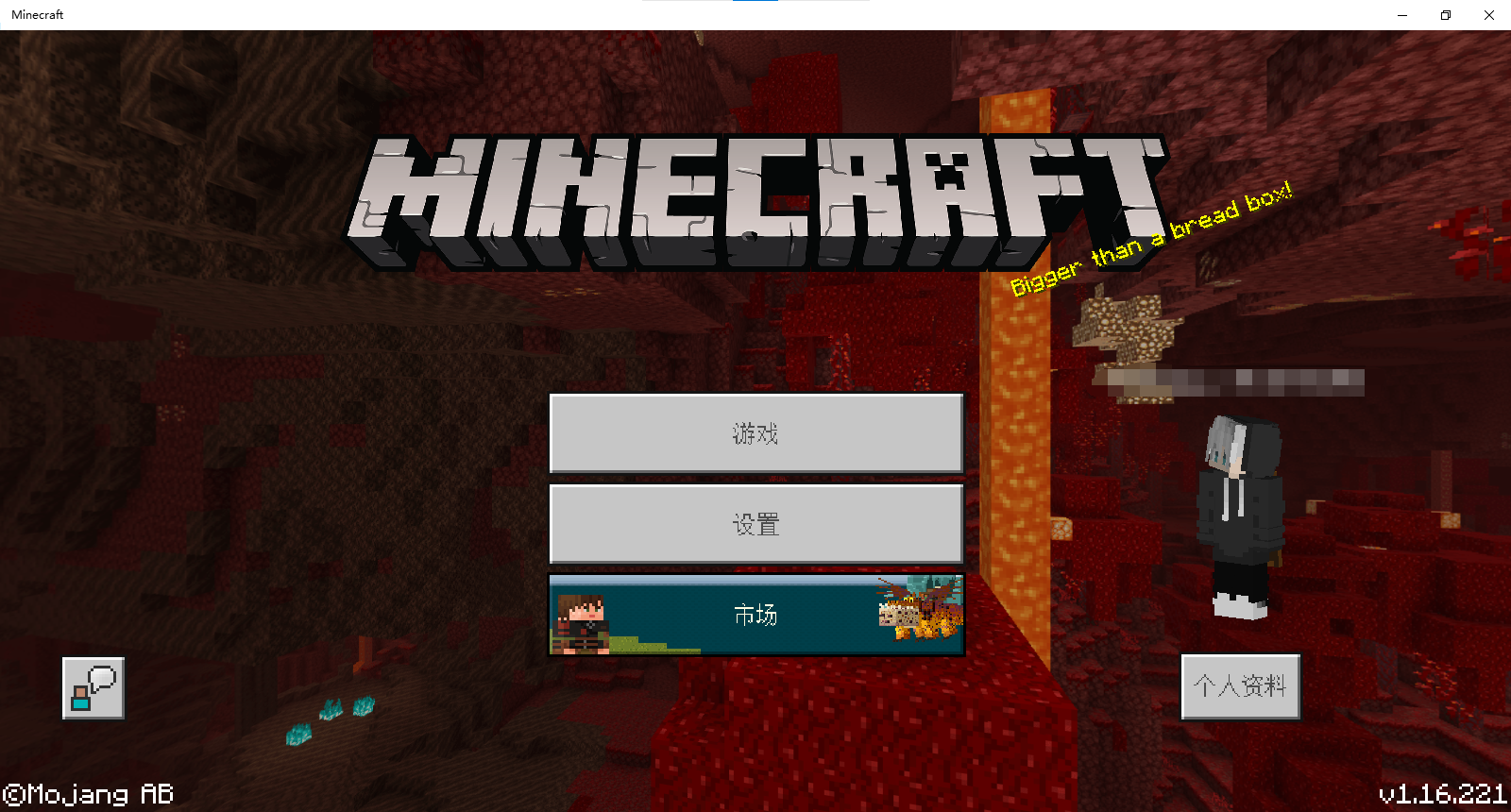
Since 1.16.200,I found the Font quality is bad.The lines of the font seem to be thick,this is evident in the Chinese model.
Original font:
Now wrong font:
Since 1.16.200,I found the Font quality is bad.The lines of the font seem to be thick,this is evident in the Chinese model.
Original font:
Now wrong font:
And my resolution is 720P(1600*900)
When I debug the game window size, I found that when the window size reaches a certain level, the game content will suddenly enlarge, which is not normal. I think this also caused the font of my game to become bolds ( MCPE-110767 ).
please watch the video
1.Observed Results:
2.
3.Observed Results:
(Briefly describe what happens)Expected Results:
(Briefly describe what should happen)If your ticket does not look like the example given here, then it's likely to be closed as incomplete.
This ticket will automatically reopen when you reply.
When I debug the game window size, I found that when the window size reaches a certain level, the game content will suddenly enlarge, which is not normal. I think this also caused the font of my game to become bolds (MCPE-110767).
please watch the video1.Observed Results:
2.
3.Observed Results:
(Briefly describe what happens)Expected Results:
(Briefly describe what should happen)If your ticket does not look like the example given here, then it's likely to be closed as incomplete.
This ticket will automatically reopen when you reply.
When I debug the game window size, I found that when the window size reaches a certain level, the game content will suddenly enlarge, which is not normal. I think this also caused the font of my game to become bolds (MCPE-110767).
please watch the video
1.Observed Results : When I debug the game window size, I found that when the window size reaches a certain level, the game content will suddenly enlarge, which is not normal
2.Expected Results:: The content in the window will grow slowly, not suddenly
3.
When I debug the game window size, I found that when the window size reaches a certain level, the game content will suddenly enlarge, which is not normal
. I think this also caused the font of my game to become bolds (MCPE-110767).
please watch the video
1.Observed Results:When I debug the game window size, I found that when the window size reaches a certain level, the game content will suddenly enlarge, which is not normal
2.Expected Results:: The content in the window will grow slowly, not suddenly3.1.Observed Results : When I debug the game window size, I found that when the window size reaches a certain level, the game content will suddenly enlarge, which is not normal
2.Expected Results:: The content in the window will grow slowly, not suddenly grow more
PS: I think this also caused the font of my game to become bolds (MCPE-110767).
1.Observed Results : When I debug the game window size, I found that when the window size reaches a certain level, the game content will suddenly enlarge
, which is not normal
2.Expected Results:: The content in the window will grow slowly, not suddenly grow more
PS: I think this also caused the font of my game to become bolds (MCPE-110767).
1.Observed Results
:When I debug the game window size, I found that when the window size reaches a certain level, the game content will suddenly enlarge2.Expected Results::The content in the window will grow slowly, not suddenly grow more
PS: I think this also caused the font of my game to become bolds (MCPE-110767).1.Observed Results: _ When I debug the game window size, I found that when the window size reaches a certain level, the game content will suddenly enlarge_
2.Expected Results: The content in the window will grow slowly, not suddenly grow more
post scriptum: I think this also caused the font of my game to become bolds (MCPE-110767). please watch the video
1.Observed Results: _When I debug the game window size, I found that when the window size reaches a certain level, the game content will suddenly enlarge_
2.Expected Results: The content in the window will grow slowly, not suddenly grow more
post scriptum: I think this also caused the font of my game to become bolds (MCPE-110767). please watch the video1.Observed Results: When I debug the game window size, I found that when the window size reaches a certain level, the game content will suddenly enlarge
2.Expected Results: The content in the window will grow slowly, not suddenly grow more
post scriptum: I think this also caused the font of my game to become bolds (MCPE-110767). please watch the video
1.Observed Results: When I debug the game window size, I found that when the window size reaches a certain level, the game content will suddenly enlarge
2.Expected Results: The content in the window will grow slowly, not suddenly growmore
post scriptum: I think this also caused the font of my game to become bolds (MCPE-110767). please watch the video1.Observed Results: When I debug the game window size, I found that when the window size reaches a certain level, the game content will suddenly enlarge
2.Expected Results: The content in the window will grow slowly, not suddenly grow a lot
post scriptum: I think this also caused the font of my game to become bolds (MCPE-110767). please watch the video
1.Observed Results: When I debug the game window size, I found that when the window size reaches a certain level, the game content will suddenly enlarge
2.Expected Results: The content in the window will grow slowly, not suddenly grow a lot
postscriptum: I think this also caused the font of my game to become bolds (MCPE-110767). please watch the video1.Observed Results: When I debug the game window size, I found that when the window size reaches a certain level, the game content will suddenly enlarge
2.Expected Results: The content in the window will grow slowly, not suddenly grow a lot
3.postscript: I think this also caused the font of my game to become bolds (MCPE-110767). please watch the video
1.Observed Results: When I debug the game window size, I found that when the window size reaches a certain level, the game content will suddenly enlarge
2.Expected Results: The content in the window will grow slowly, not suddenly grow a lot
3.postscript: I think this also caused the font of my game to become bolds (MCPE-110767). please watch the video1.Observed Results: When I debug the game window size, I found that when the window size reaches a certain level, the game content will suddenly enlarge
2.Expected Results: The content in the window will grow slowly, not suddenly grow a lot
3.Postscript: I think this also caused the font of my game to become bolds (MCPE-110767). please watch the video
Observed Results:
Since 1.16.200,When I debug the game window size, I found that when the window size reaches a certain level, the game content will suddenly enlargeExpected Results:
The content in the window will grow slowly, not suddenly grow a lotPostscript: I think this also caused the font of my game to become bolds (MCPE-110767). please watch the video.
Observed Results:
Since 1.16.200,When I debug the game window size, I found that when the window size reaches a certain level, the game content will suddenly enlargeExpected Results:
The content in the window will grow slowly, not suddenly grow a lot
Postscript: I think this also caused the font of my game to become bolds (MCPE-110767). please watch the video.Observed Results:
Since 1.16.200,When I debug the game window size, I found that when the window size reaches a certain level, the game content will suddenly enlargeExpected Results:
The content in the window will grow slowly, not suddenly grow a lotPostscript: I think this also caused the font of my game to become bolds (MCPE-110767). please watch the video.
Observed Results:
Since 1.16.200,When I debug the game window size, I found that when the window size reaches a certain level, the game content will suddenly enlargeExpected Results:
The content in the window willgrowslowly, not suddenlygrowa lotPostscript: I think this also caused the font of my game to become bolds (MCPE-110767). please watch the video.
Observed Results:
Since 1.16.200,When I debug the game window size, I found that when the window size reaches a certain level, the game content will suddenly enlargeExpected Results:
The content in the window will increase slowly, not suddenly increase a lotPostscript: I think this also caused the font of my game to become bolds (MCPE-110767). please watch the video.
Observed Results:
Since 1.16.200,When I debug the game window size, I found that when the window size reaches a certain level, the game content will suddenly enlargeExpected Results:
The content in the window will increase slowly, not suddenly increase a lotPostscript:
I think this also caused the font of my game to become bolds (MCPE-110767). please watch the video.Observed Results:
Since 1.16.200,When I debug the game window size, I found that when the window size reaches a certain level, the game content will suddenly enlargeExpected Results:
The content in the window will increase slowly, not suddenly increase a lotPostscript: Please watch the video.
Observed Results:
Since 1.16.200,When I debug the game window size, I found that when the window size reaches a certain level, the game content will suddenly enlargeExpected Results:
The content in the window will increase slowly, not suddenly increase a lotPostscript: Please watch the video. 2021-07-15 12-34-42_Trim.mp4
Tps ups and downssince1.17.40tps changes in 1.17.40
tps changes in 1.17.40Tps changes in 1.17.40
Since i have updated 1.17.40,tps becomes very low.
1:When you are eating food,the hunger bar often refuses to refill,the eating animation plays, but food quantities don't go down and hunger doesn't refill.
2:When you are throwing things away ,it becomes very slow.
3:When you are archering,the arrow also becomes very slow.
And there are many other phenomena...Observed Results :Since i have updated 1.17.40,tps becomes very low. This manifests as the following situation:
+For example : +
1:When you are eating food,the hunger bar often refuses to refill,the eating animation plays, but food quantities don't go down and hunger doesn't refill.
2:When you are throwing things away ,it becomes very slow.
3:When you are archering,the arrow also becomes very slow.
Expected Results:tps is relatively stable,the mod and things are functioning normally
Observed Results :Since i have updated 1.17.40,
tpsbecomes very low. This manifests as the following situation:
+For example : +
1:When you are eating food,the hunger bar often refuses to refill,the eating animation plays, but food quantities don't go down and hunger doesn't refill.
2:When you are throwing things away ,it becomes very slow.
3:When you are archering,the arrow also becomes very slow.
Expected Results:tpsis relatively stable,the mod and things are functioning normallyObserved Results :Since i have updated 1.17.40,TPS becomes very low. This manifests as the following situation:
+For example : +
1:When you are eating food,the hunger bar often refuses to refill,the eating animation plays, but food quantities don't go down and hunger doesn't refill.
2:When you are throwing things away ,it becomes very slow.
3:When you are archering,the arrow also becomes very slow.
Expected Results :TPS is relatively stable,the mod and things are functioning normally
Observed Results:Since i have updated 1.17.40,
TPS becomes very low. This manifests as the following situation:+For example: +1:When you are eating food,the hunger bar often refuses to refill,the eating animation plays, but food quantities don't go down and hunger doesn't refill.2:When you are throwing things away ,it becomes very slow.
3:When you are archering,the arrow also becomes very slow.
Expected Results:TPS is relatively stable,the modand things are functioning normallyObserved Results:Since i have updated 1.17.40,TPS becomes very low. This manifests as the following situation:
For example:
1:When you are eating food,the hunger bar often refuses to refill,the eating animation plays, but food quantities don't go down and hunger doesn't refill.
2:When you are throwing things away ,it becomes very slow.
3_:When you are archering,the arrow also becomes very slow._
Expected Results:TPS is relatively stable,the mob and things are functioning normally
Observed Results:Since i have updated 1.17.40,TPS becomes very low. This manifests as the following situation:
For example:
1:When you are eating food,the hunger bar often refuses to refill,the eating animation plays, but food quantities don't go down and hunger doesn't refill.
2:When you are throwing things away ,it becomes very slow.3_:When you are archering,the arrow also becomes very slow._
Expected Results:TPS is relatively stable,the mob and things are functioning normallyObserved Results:Since i have updated 1.17.40,TPS becomes very low. This manifests as the following situation:
For example:
1:When you are eating food,the hunger bar often refuses to refill,the eating animation plays, but food quantities don't go down and hunger doesn't refill.
2:When you are throwing things away ,it becomes very slow.
3:When you are archering,the arrow also becomes very slow.
Expected Results:TPS is relatively stable,the mob and things are functioning normally
Observed Results:Since i have updated 1.17.40,TPS becomes very low. This manifests as the following situation:
For example:
1:When you are eating food,the hunger bar often refuses to refill,the eating animation plays, but food quantities don't go down and hunger doesn't refill.
2:When you are throwing things away ,it becomes very slow.
3:When you are archering,the arrow also becomes very slow.
Expected Results:TPS is relatively stable,the mob and things are functioning normallyObserved Results:Since i have updated 1.17.40,TPS becomes very low. This manifests as the following situation:
For example:
1:When you are eating food,the hunger bar often refuses to refill,the eating animation plays, but food quantities don't go down and hunger doesn't refill.
2:When you are throwing things away ,it becomes very slow.
3:When you are archering,the arrow also becomes very slow.
Expected Results:TPS is relatively stable,the mob and things are functioning normally
Tps changesin 1.17.40low TPS in 1.17.40
Observed Results:Since i have updated 1.17.40 on Windows 10,TPS becomes very low. This manifests as the following situation:
For example:
1:When you are eating food,the hunger bar often refuses to refill,the eating animation plays, but food quantities don't go down and hunger doesn't refill.
2:When you are throwing things away ,it becomes very slow.
3:When you are archering,the arrow also becomes very slow.
Expected Results:TPS is relatively stable,the mob and things are functioning normally
Observed Results:
Since i have updated 1.17.40 on Windows 10, TPS becomes very low. This manifests as the following situation:
For example:
- When you are eating food, the hunger bar often refuses to refill, the eating animation plays, but food quantities don't go down and hunger doesn't refill.
- When you are throwing things away, it becomes very slow.
- When you are archering, the arrow also becomes very slow.
Expected Results:
TPS is relatively stable, the mob andthings are functioning normallyObserved Results:
Since i have updated 1.17.40 on Windows 10, TPS becomes very low. This manifests as the following situation:
For example:
- When you are eating food, the hunger bar often refuses to refill, the eating animation plays, but food quantities don't go down and hunger doesn't refill.
- When you are throwing things away, it becomes very slow.
- When you are archering, the arrow also becomes very slow.
Expected Results:
TPS is relatively stable, the mob and Items are functioning normally
Observed Results:
Since i have updated 1.17.40 on Windows 10, TPS becomes very low. This manifests as the following situation:
For example:
- When you are eating food, the hunger bar often refuses to refill, the eating animation plays, but food quantities don't go down and hunger doesn't refill.
- When you are throwing things away, it becomes very slow.
- When you are archering, the arrow also becomes very slow.
Expected Results:
TPS is relatively stable, the mob andItems are functioning normallyObserved Results:
Since i have updated 1.17.40 on Windows 10, TPS becomes very low. This manifests as the following situation:
For example:
- When you are eating food, the hunger bar often refuses to refill, the eating animation plays, but food quantities don't go down and hunger doesn't refill.
- When you are throwing things away, it becomes very slow.
- When you are archering, the arrow also becomes very slow.
Expected Results:
TPS is relatively stable, the mob and items are functioning normally
Observed Results:
Since i have updated 1.17.40 on Windows 10, TPS becomes very low. This manifests as the following situation:
For example:
- When you are eating food, the hunger bar often refuses to refill, the eating animation plays, but food quantities don't go down and hunger doesn't refill.
- When you are throwing things away, it becomes very slow.
- When you are archering, the arrow also becomes very slow.
Expected Results:
TPS is relatively stable, the entities,mobs and items are functioning normally
low TPS in 1.17.401.17.40 Entity,mob and item lag
Observed Results:
Since i have updated 1.17.40 on Windows 10,TPSbecomesvery low. This manifests as the following situation:
For example:
- When you are eating food, the hunger bar often refuses to refill, the eating animation plays, but food quantities don't go down and hunger doesn't refill.
- When you are throwing things away, it becomes very slow.
- When you are archering, the arrow also becomes very slow.
Expected Results:
TPS is relatively stable, the entities,mobs and items are functioning normallyObserved Results:
Since i have updated 1.17.40 on Windows 10, the entities,mobs and items have became very lag. This manifests as the following situation:
For example:
- When you are eating food, the hunger bar often refuses to refill, the eating animation plays, but food quantities don't go down and hunger doesn't refill.
- When you are throwing things away, it becomes very slow.
- When you are archering, the arrow also becomes very slow.
Expected Results:
The entities,mobs and items are functioning normally.
Observed Results:
Since i have updated 1.17.40 on Windows 10, the entities,mobs and items have became very lag. This manifests as the following situation:
For example:
- When you are eating food, the hunger bar often refuses to refill, the eating animation plays, but food quantities don't go down and hunger doesn't refill.
- When you are throwing things away, it becomes very slow.
- When you are
archering, the arrow also becomes very slow.Expected Results:
The entities,mobs and items are functioning normally.Observed Results:
Since i have updated 1.17.40 on Windows 10, the entities,mobs and items have became very lag. This manifests as the following situation:
For example:
- When you are eating food, the hunger bar often refuses to refill, the eating animation plays, but food quantities don't go down and hunger doesn't refill.
- When you are throwing things away, it becomes very slow.
- When you are breaking blocks,the blocks drops very slow.
- The mobs move very slow.
Expected Results:
The entities,mobs and items are functioning normally.
Observed Results:
Since i have updated 1.17.40 on Windows 10, the entities,mobs and items have became very lag. This manifests as the following situation:
For example:
- When you are eating food, the hunger bar often refuses to refill, the eating animation plays, but food quantities don't go down and hunger doesn't refill.
- When you are throwing things away, it becomes very slow.
- When you are breaking blocks,the blocks drops very slow.
- The mobs move very slow.
Expected Results:
The entities,mobs and items are functioning normally.Observed Results:
Since i have updated 1.17.40 on Windows 10, the entities,mobs and items have became very lag. This manifests as the following situation:
For example:
- When you are eating food, the hunger bar often refuses to refill, the eating animation plays, but food quantities don't go down and hunger doesn't refill.
- When you are throwing things away, it becomes very slow.
- When you are breaking blocks,the blocks drops very slow.
- The mobs move very slow.
Expected Results:
The entities,mobs and items are functioning normally.
Observed Results:
Since i have updated 1.17.40 on Windows 10, the entities,mobs and items have became very lag. This manifests as the following situation:
For example:
- When you are eating food, the hunger bar often refuses to refill, the eating animation plays, but food quantities don't go down and hunger doesn't refill.
- When you are throwing things away, it becomes very slow.
- When you
arebreakingblocks,the blocks drops very slow.- The mobs move very slow.
Expected Results:
The entities,mobs and items are functioning normally.
Observed Results:
Since i have updated 1.17.40 on Windows 10, the entities,mobs and items have became very lag. This manifests as the following situation:
For example:
- When you are eating food, the hunger bar often refuses to refill, the eating animation plays, but food quantities don't go down and hunger doesn't refill.
- When you are throwing things away, it becomes very slow.
- When you break blocks,the blocks drop
s veryslow.- The mobs move
veryslow.Expected Results:
The entities,mobs and items are functioning normally.Observed Results:
Since i have updated 1.17.40 on Windows 10, the entities,mobs and items have became very lag. This manifests as the following situation:
For example:
- When you are eating food, the hunger bar often refuses to refill, the eating animation plays, but food quantities don't go down and hunger doesn't refill.
- When you are throwing things away, it becomes very slow.
- When you break blocks,the blocks drop slowly.
- The mobs move slowly.
Expected Results:
The entities,mobs and items are functioning normally.
Observed Results:
Since i have updated 1.17.40 on Windows 10, the entities,mobs and items have became very lag. This manifests as the following situation:
For example:
- When you are eating food, the hunger bar often refuses to refill, the eating animation plays, but food quantities don't go down and hunger doesn't refill.
- When you are throwing things away, it becomes very slow.
- When you br
eakblocks,the blocks drop slowly.- The mobs move slowly.
Expected Results:
The entities,mobs and items are functioning normally.Observed Results:
Since i have updated 1.17.40 on Windows 10, the entities,mobs and items have became very lag. This manifests as the following situation:
For example:
- When you are eating food, the hunger bar often refuses to refill, the eating animation plays, but food quantities don't go down and hunger doesn't refill.
- When you are throwing things away, it becomes very slow.
- When you broke blocks,the blocks drop slowly.
- The mobs move slowly.
Expected Results:
The entities,mobs and items are functioning normally.
Sorry,mojang,I have already searched,but I didn't find the ‘
MCPE-60043’ ,I am sorry about that.Please fix this bug as quickly as you could,thnk you a lot!I'm sure it's not a small problem,so I think can you report this bug to mojang to let them fix this bug in next edition and not fix it in the Beta edition
Yes ,I met this problem too.My game time also stay at the 340 hours.But I have not met this problem two week ago,So I think is this a bug or it's Xbox's problem,because our problems happens time are not same.
I cannot finish this achievement on the iOS version1.14.60.
退出世界重新进入
I want to say that this bug is really exist on 1.16.2 @ [Mojang] Mega_Spud (Jay Wells)
Observed Results:
some Chinese word in Minecraft have ben error cord,you can have a try{
First: open Minecraft(1.16.2) on iOS.
Next:go into the setting,go into the language.
Then:change the language of the game to simplified Chinese.
Final:go into the Minecraft marketplace ,you will discover that some Chinese word have been error cord(I don"t know can you understand Chinese,but they are not Chinese!)
}
my problem is more terribly than you.Please come and see my bug MCPE-110767
My computer’s keyboard delay is also very serious in version 1.16.221
oh dear,this bug is not fixed in 1.17.0.Plaz add it to the affects version
@Skaijie I donnot know does it fix,I donnot play beta edition,so i can only wait. thanks fo your reminding
So in 1.17.30,this bug is fixed on my computer,but I don't know what happened to the others.If this bug reappears on my computer,I will report here.Thank you
this bug has happened on my computer since i updated 1.17.40, please fix it,i donnot know whether it is about lag issue
I met the same problem.However,this bug is the problem of the low Tps.So please see my bug report:
MCPE-145848Since i have updated 1.17.40,I encountered this bug and I reported this bug immediately (
MCPE-145848)But mojang didnot replay anything till now. I have looked up all the reports about this bug and vote for them(They are repeated reports and mojang did not attach them to a bug report)It seems that mojang team isn't care of this question and i cannot play minecraft.That is badThis bug has also appeared on my computer(Windows 10 2004) since 1.17.40.The entities,items and mobs are very lag. For example if I break a block,the block will drop very slow and the mobs ,entities cannot move as a normal speed. I cannot play minecraft because of this bug. So please fix as quick as you can.
This bug still apears in 1.18/1.18.1/1.18.2. Entities still lag seriously.
『The world』Unable to render embedded object: File (時間が停止) not found.