 Req001
- Req001
- JIRAUSER531695
- Europe/Stockholm
- Yes
- No
 BDS-7724
![[Mojang] CornerHard](../../../data/avatars/users/10122.svg)
 MCPE-147872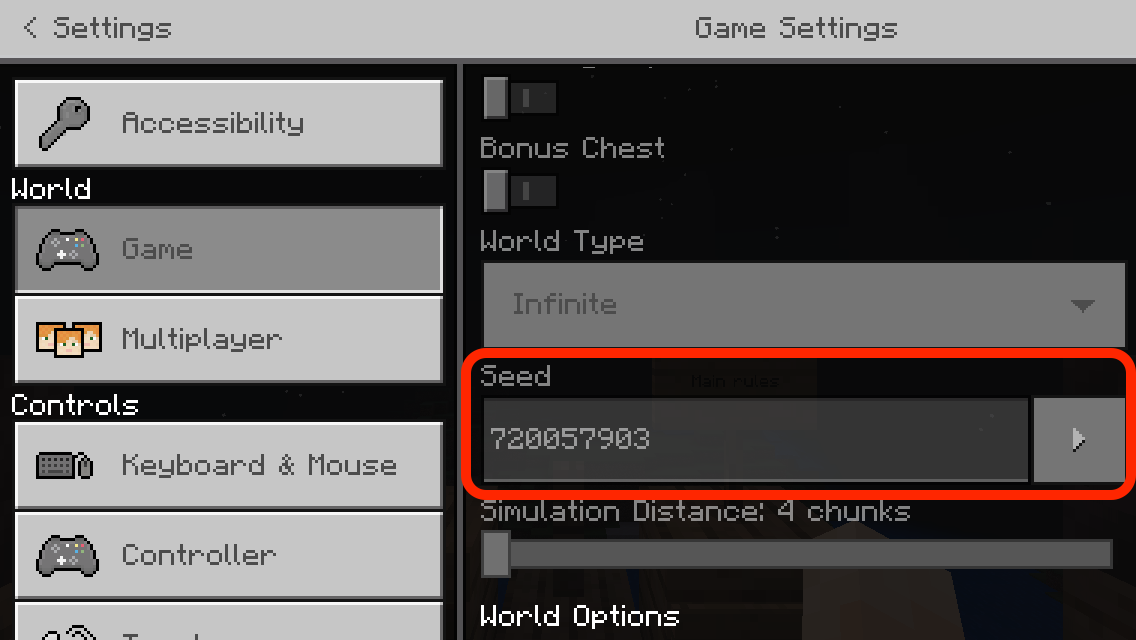





Apparently after 1.16.210.05 it started happening again. Many players on my server complain about being teleported to random locations when going through portal. They don’t need to eat to trigger this bug, it doesn’t happen every time but randomly. The distances are sometimes up to 100k blocks away from correct destination.
- On iPhone 13mini or equivalent disable WiFi
- Open Minecraft app, login to your Microsoft account
- Go to servers tab and try to connect to any server
what happens
a pop-up message appears:
It appears you unable to connect to your network, please check your connection.the app won’t connect to the server
what should happen
the app connects to a server
additional info
The marketplace works fine, connect to servers over WiFi works fine.
- On iPhone 13mini or equivalent disable WiFi
- Open Minecraft app, login to your Microsoft account
- Go to servers tab and try to connect to any server
what happens
a pop-up message appears:
It appears you unable to connect to your network, please check your connection.the app won’t connect to the server
what should happen
the app connects to a server
additional info
The marketplace works fine, connect to servers over WiFi works fine.
tested on O2 cellular network (UK, GiffGaff)
- On iPhone 13mini or equivalent disable WiFi
- Open Minecraft app, login to your Microsoft account
- Go to servers tab and try to connect to any server
what happens
a pop-up message appears:
It appears you unable to connect to your network, please check your connection.the app won’t connect to the server
what should happen
the app connects to a server
additional info
The marketplace works fine, connect to servers over WiFi works fine.
tested on O2 cellular network (UK, GiffGaff)
to reproduce
- On iPhone 13mini or equivalent disable WiFi
- Open Minecraft app, login to your Microsoft account
- Go to servers tab and try to connect to any server
what happens
a pop-up message appears:
It appears you unable to connect to your network, please check your connection.the app won’t connect to the server
what should happen
the app connects to a server
additional info
The marketplace works fine, connect to servers over WiFi works fine.
tested on O2 cellular network (UK, GiffGaff)
to reproduce
- On iPhone 13mini or equivalent disable WiFi
- Open Minecraft app, login to your Microsoft account
- Go to servers tab and try to connect to any server
what happens
a pop-up message appears:
It appears you unable to connect to your network, please check your connection.the app won’t connect to the server
what should happen
the app connects to a server
additional info
The marketplace works fine, connect to servers over WiFi works fine.
tested on O2 cellular network (UK, GiffGaff)
to reproduce
- On iPhone 13mini or equivalent disable WiFi
- Open Minecraft app, login to your Microsoft account
- Go to servers tab and try to connect to any server
what happens
a pop-up message appears:
It appears you are unable to connect to your network, please check your connection.the app won’t connect to the server
what should happen
the app connects to a server
additional info
The marketplace works fine, connect to servers over WiFi works fine.
tested on O2 cellular network (UK, GiffGaff)
to reproduce
- On iPhone 13mini or equivalent disable WiFi
- Open Minecraft app, login to your Microsoft account
- Go to servers tab and try to connect to any server
what happens
a pop-up message appears:
It appears you are unable to connect to your network, please check your connection.the app won’t connect to
theserver
what should happen
the app connects to a server
additional info
The marketplace works fine, connect to servers over WiFi works fine.
tested on O2 cellular network (UK, GiffGaff)
to reproduce
- On iPhone 13mini or equivalent disable WiFi
- Open Minecraft app, login to your Microsoft account
- Go to servers tab and try to connect to any server
what happens
a pop-up message appears:
It appears you are unable to connect to your network, please check your connection.the app won’t connect to any server
what should happen
the app connects to a server
additional info
The marketplace works fine, connect to servers over WiFi works fine.
tested on O2 cellular network (UK, GiffGaff)
I am experiencing a similar issue in 1.16.1.02.
I am posting it here as it seems to be an old issue. Please let me know if you’d prefer me to create a new ticket with the current version.
I was able to create ticking areas in all dimensions. There is an dimension argument that you can pass to the command, its not properly documented, though.
I’m having exact same problem, please find description in standardised format below.
Summary
Unable to join LAN games on PS4, a PS+ advert is blocking the access.
Steps to reproduce...
What I expect should happen...
I’m connecting to my Local Server and the party begins
What actually happened...
PS+ subscription advert appears. Unable to connect to local server
How this impacts BDS
I can't play my local server
Note
Prior 1.14.210 I was able to play my server.
I had to launch PS4 via Remote Play (from another computer on my LAN) and then lunch the game from there.
There was no Login to Microsoft button, though, but instead game would sign me up automatically.
After 1.14.210 There is a button ‘Login to PSN network’ which doesn’t seem to work when i click on it.
Apparently after 1.16.210.05 it started happening again. Many players on my Custom Bedrock Server complain about being teleported to random locations when going through portal. They don’t need to eat to trigger this bug, it doesn’t happen every time but randomly. The distances are sometimes up to 100k blocks away from correct destination.
It happens on my Dedicated Bedrock Server too.
Same thing happens on my Dedicated Server after updating to 1.16.210.05
I have this issue hunting my survival world. Basically people are afraid to play and are dropping off the server.
I’ve got about 7 months old world on my server and there are plenty of portals. some of them are like 250k blocks from world origin so the distances are quite significant when you end up in the wrong location.
It affects 1.16.210.06 as well
Happens totally random. Sometimes a portal works as it should other time it is not.
My world is over 7 months old and has lot of portals.
world seed: 720057903
I'm running a vanilla, linux server. My world has never been tempered with in any world editor. It has some cursed chunks that kick out a player when they go there, but we just simply fenced the area and avoid going there. But this portal thing is big. It’s impossible to tell where you end up so using portals is useless at this point. No nether access basically. It affects the End Portal as well.
I just quickly created a random, local world on my ps4 and couldn’t reproduce the bug. I tried the realms as well but there is no creative mode and I haven’t obtained obsidian yet .
.
here are some examples:
https://youtu.be/P3IP-T8rfdM
https://youtu.be/ilELbwDFcrA
join our Discord if u r interested in following up on our struggle lol: https://discord.gg/wmwG8p5
I have experienced it as well in my 1.16.210.06 world on custom server (linux). World is over 7 months old.
I have created end portal in creative mode and once I jumped into it the coords in The End matched exactly the ones from the Overworld.
Second time I tried the usual end portal, the one we've discovered playing Survival on the same world, and it worked fine. So again as with the Nether portals, the bug happens randomly.
world seed: 720057903
I don’t wanna rush conclusions but since 1.16.220.02 we haven't experienced the issue anymore!
On top of that my 8 months world has never been running so smoothly before!! No lag whatsoever.
BIG TY Mojang devs!
I suspect the portal bug might have been happening due to the server overload (which in my case is evident as running my server on an old MacMini lol) and since there was a significant improvement in performance the bug hasn’t had a chance to appear yet.
Yea It definitely happens more when the server / device is under the load. I mean ever since the 1.16.221 came out we definitely see it less often but only because 221 has a lot of performance improvement vs previous patch so our server is working much smoother in general.
But when the server is slow due to CPU, RAM or IO overload then it happens a lot. Peeps are getting stranded in random locations, often die loosing all their stuff.
Same problem here. A server running 1.16.221.01. When server under heavy load the player gets damage when still on 'Generating World’ after getting through a Nether portal. If player dies, which often happens, it is very hard or impossible to retrieve the items as player don’t know where they are.
@Zizzy zizzy
“Failed successfully”. I laughed so hard that I spelt my coffee, luckily not on the keyboard.
I’ve been running a Bedrock server in Docker for about a year and suddenly started having the port ‘0’ issue. (bds v 1.17.1.01)
After reading this I’ve set-up my server.properties
SERVER_PORT_V6: “disable”
Fails perfectly!
Any chance of getting an idea when that will be resolved?
happens on ios (just got a new phone lmao 🤣) my custom server works fine via friends on localhost
Bedrock server 1.17.41.01 iOS 15.0
I experience this issue with not being able to join servers including featured servers and my self-hosted at home server which is normally available over the internet.
What is also strange I am able to join my server when I’m on local network with it at home.
iOS 15.0 my Bedrock Server ver 1.17.41.01
Turns out that app has had the mobile network disabled. It is not obvious and the error message isn’t giving any clues.
in-game Settings > Profile > scroll to ‘Use cellular data’ and turn it on