 ÞeSheepMan
- SheepCoIndustries
- JIRAUSER650526
- America/Los_Angeles
- Yes
- No
 MCPE-130350

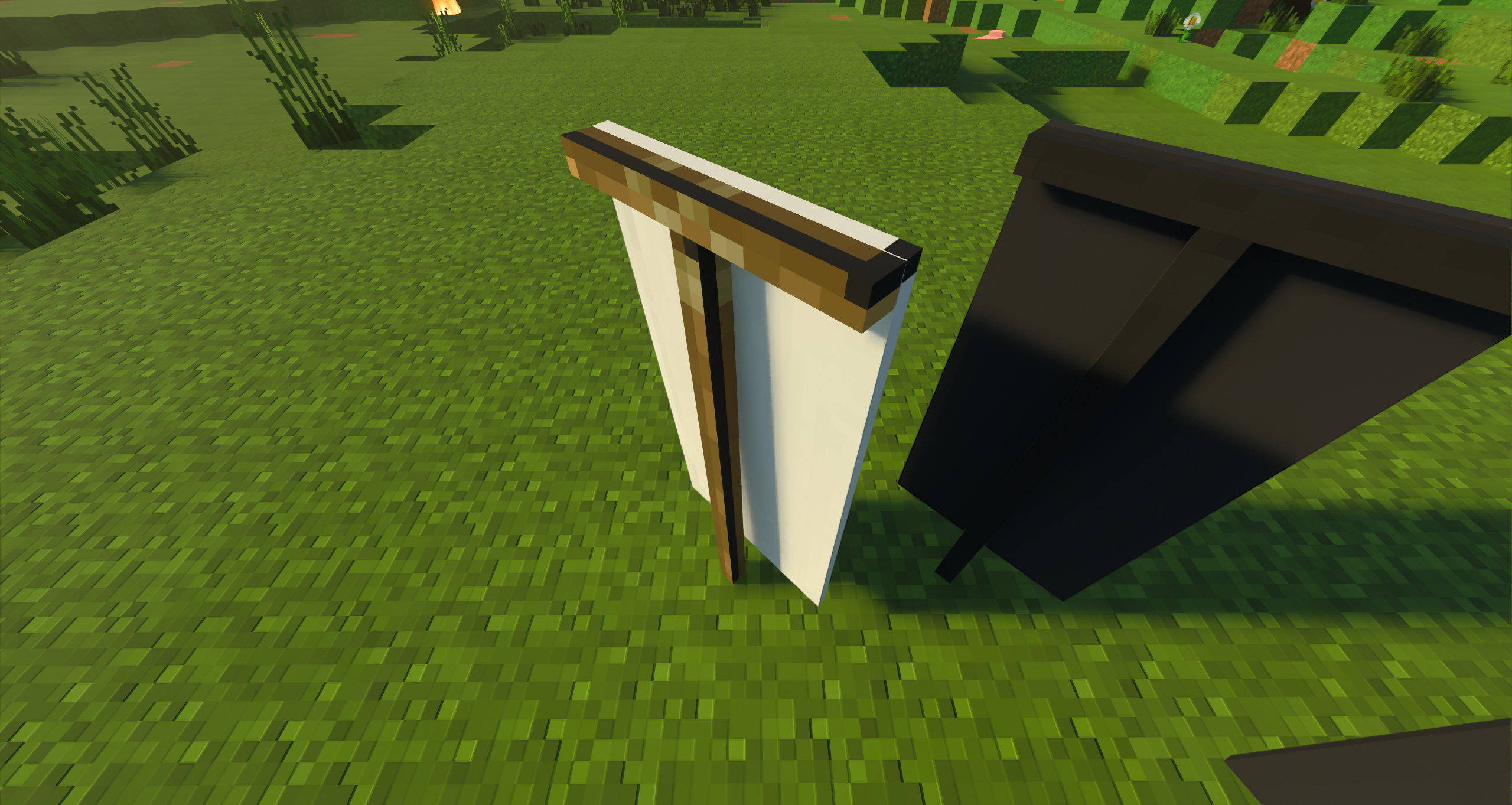



When placing or holding a banner, the model does not render with patterns except for a small darker border around the left and top edge with a black pixel in the corner. This also applies to banners without patterns and the ominous banner.
The wood texture for the "stand" only renders on ominous banners but is a bit offwith a black line.
Although I do usually use a custom RTX pack, usinganofficial NVIDIA packs creates the same issue.When placing or holding a banner, the model does not render with patterns except for a small darker border around the left and top edge with a black pixel in the corner. This also applies to banners without patterns and the ominous banner. The wood texture for the "stand" only renders on ominous banners but is a bit off with a black line. Although I do usually use a custom RTX pack, using an official NVIDIA packs creates the same issue.
Steps to Reproduce:
1. Download the example addon below
2. Install it how you would install all other addons (click on it for windows 10)
3. Create a new world
4. Activate resource pack
5. Load world
6. Place ominous banner, plain banner, and a banner with a pattern
7. Toggle on Ray-Tracing
8. Observer resultsObserved Results:
Placing the banner with Ray-Tracing on breaks the banner texture to some sort of default texture.
Expected Results:
Placing the banner with Ray-Tracing on should load the banner as it would without Ray-Tracing.
When placing or holding a banner, the model does not render with patterns except for a small darker border around the left and top edge with a black pixel in the corner. This also applies to banners without patterns and the ominous banner. The wood texture for the "stand" only renders on ominous banners but is a bit off with a black line. Although I do usually use a custom RTX pack, using an official NVIDIA packs creates the same issue.
Steps to Reproduce:
1. Download the example addon below
2. Install it how you would install all other addons (click on it for windows 10)
3. Create a new world
4. Activate resource pack
5. Load world
6. Place ominous banner, plain banner, and a banner with a pattern
7. Toggle on Ray-Tracing
8. ObserverresultsObserved Results:
Placing the banner with Ray-Tracing on breaks the banner texture to some sort of default texture.
Expected Results:
Placing the banner with Ray-Tracing on should load the banner as it would without Ray-Tracing.
"minecraft:wearable" overrides the "minecraft:max_stack_size" component to 1. Makes it difficult to replicate the features of stackable blocks like the skulls, heads, and carved pumpkin.
Note: Holiday Creator Features are required for "minecraft:wearable" (in format versions before 1.20.20)
Step to Reproduce
Download the included pack
Create a new world
Apply the pack
Enter the world
Observe the item "sci:wearable_stackable_item"'s inability to stack
I can confirm that this bug also affects 1.19.0 and the 1.19.2 hotfix.
Still affecting every official release up to this point.
Still affects 1.19.51.
Still affecting every official release up to this point.
This report is not a duplicate of 115559 as that report focuses on query.cardinal_facing_2d and block_placer. Whereas this report focuses on query.block_face as block_placer does not recognize block_face.
This works? I'm still having issues working with this bug
Although they're similar bugs and I had at first agreed with the resolution reasoning, I can confirm 115559 is fixed and this bug (164303) continues to affect the game.
Still affects 1.20
Still affects 1.21.2
Still affects 1.21.2
Still affect version 1.21.2
This can still be tested as it states "Note: Holiday Creator Features are required for "minecraft:wearable" (in format versions before 1.20.20)". Just ignore the fact that HCF was required when this post was made