Banner patterns don't render with RTX enabled
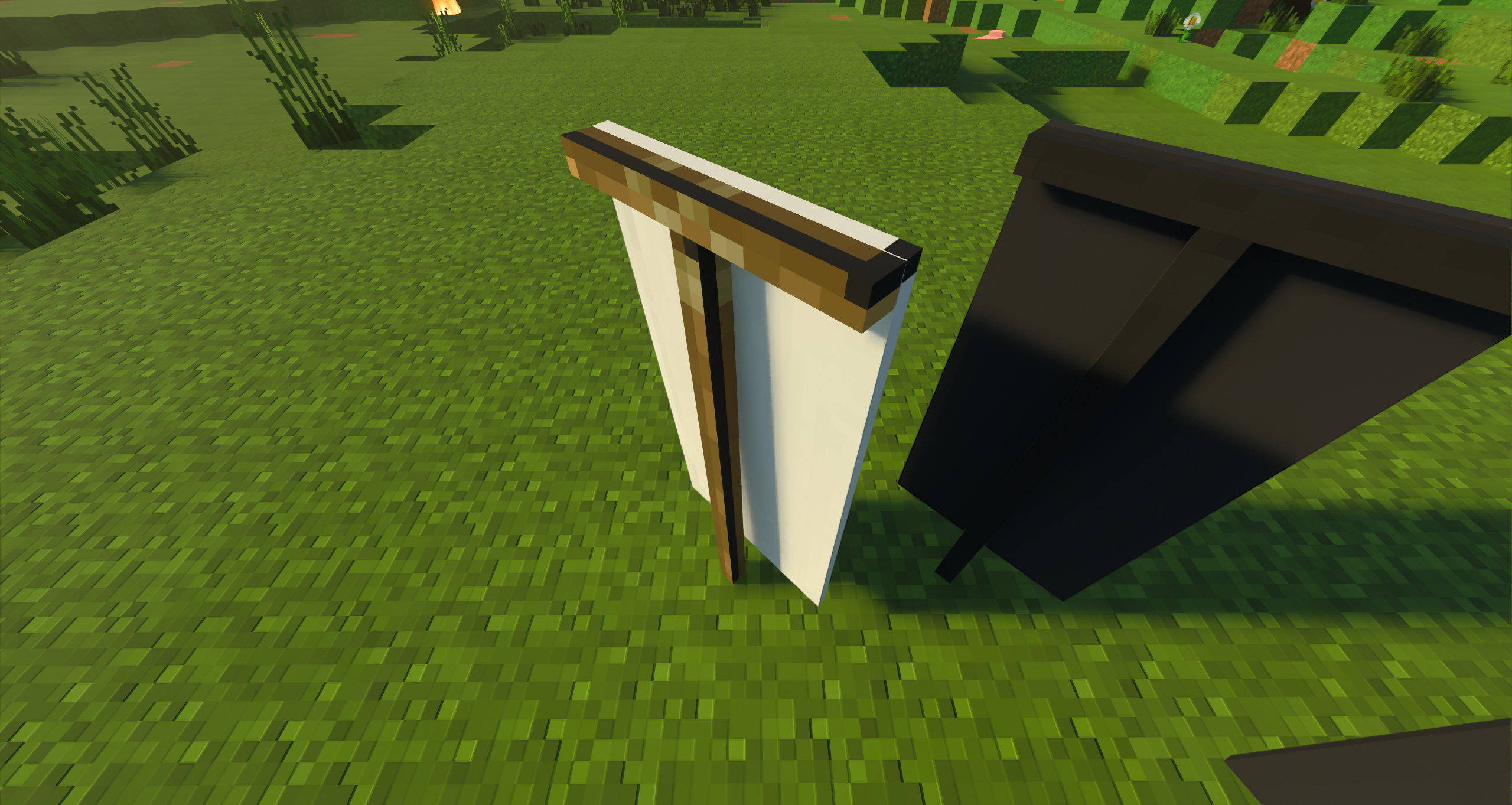
When placing or holding a banner, the model does not render with patterns except for a small darker border around the left and top edge with a black pixel in the corner. This also applies to banners without patterns and the ominous banner. The wood texture for the "stand" only renders on ominous banners but is a bit off with a black line. Although I do usually use a custom RTX pack, using an official NVIDIA packs creates the same issue.
Steps to Reproduce:
1. Download the example addon below
2. Install it how you would install all other addons (click on it for windows 10)
3. Create a new world
4. Activate resource pack
5. Load world
6. Place ominous banner, plain banner, and a banner with a pattern
7. Toggle on Ray-Tracing
8. Observe results
Observed Results:
Placing the banner with Ray-Tracing on breaks the banner texture to some sort of default texture.
Expected Results:
Placing the banner with Ray-Tracing on should load the banner as it would without Ray-Tracing.
Linked Issues
is duplicated by7
 MCPE-142874Illager Banner is White after placingDuplicateMCPE-150887Illager Banner Texture white in RTXDuplicateMCPE-151769Banner designs longer appear when using RTXDuplicateMCPE-158809Custom Banners Don’t Appear with RTX OnDuplicateMCPE-166802Flag pattern disappears when RTX is enabledDuplicateMCPE-174514Banners with RTXDuplicateMCPE-184382Banner Textures don't work on RTX Duplicate




- Unresolved
 ÞeSheepMan
- 99
- 47
- Confirmed
- 450554 461772
- Windows
- Windows 10
- RTX raytracing
1.21.50.24 Preview - 1.21.50
1.21.50.24 Preview 1.20.30.22 Preview 1.17.40.21 Beta 1.17.0 1.18.2 Hotfix 1.19.0 1.19.2 Hotfix 1.19.30 1.19.41 1.19.51 1.19.73 1.19.80 1.19.81 Hotfix 1.20.0 1.20.1 Hotfix 1.20.12 Hotfix 1.20.15 Hotfix 1.20.50.23 Preview 1.20.50.24 Preview 1.20.41 Hotfix 1.20.51 Hotfix 1.20.73 Hotfix 1.21.0 1.21.2 Hotfix 1.21.30 1.21.31 Hotfix 1.21.40 1.21.41 Hotfix 1.21.50
Created Issue:
Minecraft Bedrock banner patterns don't render with RTX enabled
When placing or holding a banner, the model does not render with patterns except for a small darker border around the left and top edge with a black pixel in the corner. This also applies to banners without patterns and the ominous banner.
The wood texture for the "stand" only renders on ominous banners but is a bit off with a black line.
Although I do usually use a custom RTX pack, using an official NVIDIA packs creates the same issue.
Attachments4
- Unresolved
- Open
- Unconfirmed
- Windows
- Windows 10
- 1.17.0

![[Mod] OcelotOnesie](../../../data/avatars/users/43220.png)
is duplicated by
![[Bot] Arisa](../../../data/avatars/users/43007.png)

Minecraft 12_15_2021 6_21_35 PM.png
is duplicated by
Minecraft Bedrock banner patterns don't render with RTX enabledBanner patterns don't render with RTX enabled
is duplicated by
When placing or holding a banner, the model does not render with patterns except for a small darker border around the left and top edge with a black pixel in the corner. This also applies to banners without patterns and the ominous banner.
The wood texture for the "stand" only renders on ominous banners but is a bit offwith a black line.
Although I do usually use a custom RTX pack, usinganofficial NVIDIA packs creates the same issue.When placing or holding a banner, the model does not render with patterns except for a small darker border around the left and top edge with a black pixel in the corner. This also applies to banners without patterns and the ominous banner. The wood texture for the "stand" only renders on ominous banners but is a bit off with a black line. Although I do usually use a custom RTX pack, using an official NVIDIA packs creates the same issue.
Steps to Reproduce:
1. Download the example addon below
2. Install it how you would install all other addons (click on it for windows 10)
3. Create a new world
4. Activate resource pack
5. Load world
6. Place ominous banner, plain banner, and a banner with a pattern
7. Toggle on Ray-Tracing
8. Observer resultsObserved Results:
Placing the banner with Ray-Tracing on breaks the banner texture to some sort of default texture.
Expected Results:
Placing the banner with Ray-Tracing on should load the banner as it would without Ray-Tracing.
is duplicated by
![[Helper] lillybeacon](../../../data/avatars/users/93893.png)
When placing or holding a banner, the model does not render with patterns except for a small darker border around the left and top edge with a black pixel in the corner. This also applies to banners without patterns and the ominous banner. The wood texture for the "stand" only renders on ominous banners but is a bit off with a black line. Although I do usually use a custom RTX pack, using an official NVIDIA packs creates the same issue.
Steps to Reproduce:
1. Download the example addon below
2. Install it how you would install all other addons (click on it for windows 10)
3. Create a new world
4. Activate resource pack
5. Load world
6. Place ominous banner, plain banner, and a banner with a pattern
7. Toggle on Ray-Tracing
8. ObserverresultsObserved Results:
Placing the banner with Ray-Tracing on breaks the banner texture to some sort of default texture.
Expected Results:
Placing the banner with Ray-Tracing on should load the banner as it would without Ray-Tracing.
![[MCQA] Bartłomiej Słodkowski](../../../data/avatars/users/18941.svg)
is duplicated by
is duplicated by
![[Mod] Greymagic27](../../../data/avatars/users/92875.png)
relates to
![[MCPE Mod] Celesian](../../../data/avatars/users/81635.png)
![[Mod] Jarl-Penguin](../../../data/avatars/users/92849.png)
is duplicated by
This continues to be an issue as of 1.17.0. I see this myself, and MCPE-130350 duplicates this issue. When are we going to see some movement on this?
Thank you for your report!
We're tracking this issue in MCPE-130350, so this ticket is being resolved and linked as a duplicate.
If you would like to add a vote and any extra information to the main ticket it would be appreciated.
If you haven't already, you might like to make use of the search feature to see if the issue has already been mentioned.
Quick Links:
📓 Bug Tracker Guidelines – 💬 Community Support – 📧 Mojang Support
📓 Project Summary – ✍️ Feedback and Suggestions – 📖 Game Wiki
Thank you for your report!
We're tracking this issue in MCPE-130350, so this ticket is being resolved and linked as a duplicate.
If you would like to add a vote and any extra information to the main ticket it would be appreciated.
If you haven't already, you might like to make use of the search feature to see if the issue has already been mentioned.
Quick Links:
📓 Bug Tracker Guidelines – 💬 Community Support – 📧 Mojang Support
📓 Project Summary – ✍️ Feedback and Suggestions – 📖 Game Wiki
Duplicate of MCPE-130350. Please do not create duplicate reports for issues when you already know the original posting for this issue.
Thank you for your report!
We're tracking this issue in MCPE-130350, so this ticket is being resolved and linked as a duplicate.
If you would like to add a vote and any extra information to the main ticket it would be appreciated.
If you haven't already, you might like to make use of the search feature to see if the issue has already been mentioned.
Quick Links:
📓 Bug Tracker Guidelines – 📧 Mojang Support
📓 Project Summary – ✍️ Feedback and Suggestions – 📖 Game Wiki
Thank you for your report!
We're tracking this issue in MCPE-130350, so this ticket is being resolved and linked as a duplicate.
If you would like to add a vote and any extra information to the main ticket it would be appreciated.
If you haven't already, you might like to make use of the search feature to see if the issue has already been mentioned.
Quick Links:
📓 Bug Tracker Guidelines – 💬 Community Support – 📧 Mojang Support
📓 Project Summary – ✍️ Feedback and Suggestions – 📖 Game Wiki

Duplicate of MCPE-130350
Thank you for your report!
We're tracking this issue in MCPE-130350, so this ticket is being resolved and linked as a duplicate.
If you would like to add a vote and any extra information to the main ticket it would be appreciated.
If you haven't already, you might like to make use of the search feature to see if the issue has already been mentioned.
Quick Links:
📓 Bug Tracker Guidelines – 💬 Community Support – 📧 Mojang Support
📓 Project Summary – ✍️ Feedback and Suggestions – 📖 Game Wiki
– I am a bot. This action was performed automatically! The ticket was resolved by one of our moderators, and I left this message to give more information to you.
This issue may be related to a similar issue in RTX, MCPE-130350
Thank you for your report!
However, this issue is Invalid.
Please put only one bug report in each ticket. It is very difficult to keep track of bugs when they are not in their own tickets.
However, please review the Bug Tracker Guidelines before creating new reports. Be sure to search for an existing issue as it is likely to have already been reported. The issue with banner textures in RTX is tracked in MCPE-130350. The others may have been reported also.
Quick Links:
📓 Bug Tracker Guidelines – 💬 Community Support – 📧 Mojang Support
📓 Project Summary – ✍️ Feedback and Suggestions – 📖 Game Wiki
Relates to MCPE-133050, MCPE-130350 and MCPE-110152, all of which are active issues in the latest version of the game.
Duplicate of MCPE-130350
Also still having this issue as of 1.17.40.
There are so many issues with RTX, it really sucks that the experience isn't polished at all.
I wish they actually did something about bugs instead of just locking the threads and pretending the problems don't exist.
This issue is already being internally tracked as indicated by the ADO number(s). Please vote for issues that you prioritize; otherwise, these issues are put off until later, with more critical issues being focused on first.
This issue has been going on for over a year. Is there any intent to fix this?
Affects 1.19.10
In 3 different packs I have tested, all of them have 2 earths near the top on them regardless of pattern.
All banners other than plain colors have not worked since the initial beta release to the current 1.19.31. This is one of the most glaring bugs with RTX right now, as there is no way for a player to even temporarily resolve the problem for themselves.
Really hoping this gets resolved... still not resolved as of v1.19.51
Bug is present in 1.20.1
I also have this same issue, I have tried a few different RTX texture packs and all of them have the same problem.
I also have the same problem, banners appear as the solid base color. I have tried many different rtx resource packs, but all yield the same result.
Hello, it would be wonderful if this issue could be fixed sometime soon, as I really enjoy using RTX on my Realm. Unfortunately, I love banners as well and use them extensively in my base 😅 The fact that they render as a solid color while using RTX bugs me honestly more than it should. But as an adult man with a career, I have no doubt that there's plenty of issues on your teams' plate and I understand that these things take time. Thank you for all that y'all do, the vanilla game is simply amazing (as always) and I'm excited to see where RTX, PBR render dragon and the game itself goes in the next few years. Take care - Tone
still broken in v1.20.51 (almost 3 years later)
This really needs attention. its been years, please. 1.20.60
Still broken, version 1.20.73
1.21.0 still broken
I am from the community that really likes to be able to use the banners and I recently acquired my new graphics card, I would appreciate it if you could solve this
Still seeing this issue
Affects 1.21.50.