 SR5798
- SR5798
- JIRAUSER644765
- Europe/Stockholm
- Yes
- No
 MCPE-143790
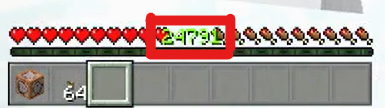







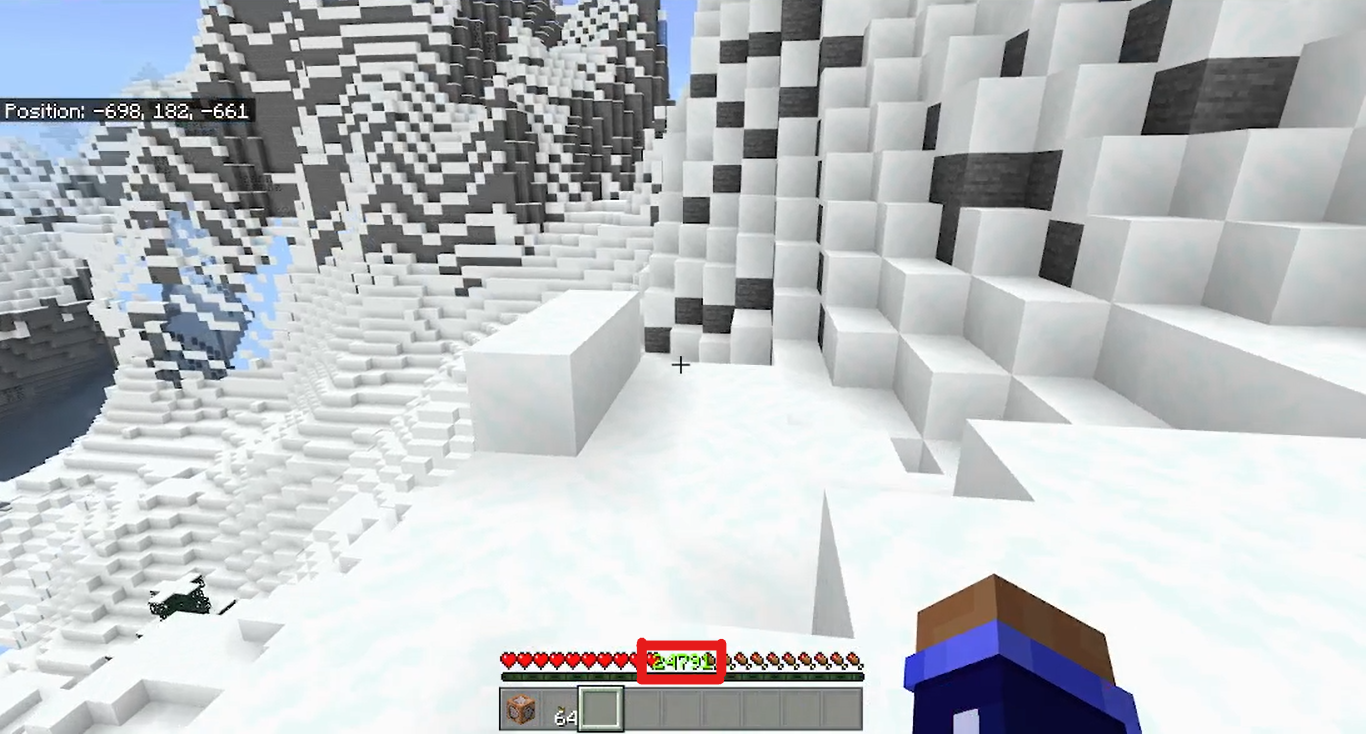
When you have like 10,000+ levels , the XP level overlaps the health and hunger bar . (The XP level is not scaled properly )
This only happens when you play with the UI set to classic UI(Default UI for Windows 10) because in pocket UI, health and hunger bars at the top right and left corners.
To recreate this, go to settings > video > UI > set to classic (If alredy in classic, skip this step)> join/create world > /xp 20735L @simage-2021-09-18-12-43-42-408.png

When you have like 10,000+ levels , the XP level overlaps the health and hunger bar . (The XP level is not scaled properly )
This only happens when you play with the UI set to classic UI (Default UI for Windows 10) because in pocket UI, health and hunger bars at the top right and left corners.
To recreate this, go to settings > video > UI > set to classic (If alredy in classic, skip this step)> join/create world > /xp 20735L @s
image-2021-09-18-12-43-42-408.png
When you have like 10,000+ levels , the XP level overlaps the health and hunger bar . (The XP level is not scaled properly )
This only happens when you play with the UI set to classic UI (Default UI for Windows 10) because in pocket UI, health and hunger bars at the top right and left corners.
To recreate this, go to settings > video > UI > set to classic (If alredy in classic, skip this step)> join/create world > /xp 20735L @s
When you have like 10,000+ levels , the XP level overlaps the health and hunger bar . (The XP level is not scaled properly )
This only happens when you play with the UI set to classic UI (Default UI for Windows 10) because in pocket UI, health and hunger bars at the top right and left corners.
To recreate this, go to settings > video > UI > set to classic (If alredy in classic, skip this step)> join/create world > /xp 20735L @sIssue :
When you have like 10,000+ levels , the XP level overlaps the health and hunger bar . (The XP level is not scaled properly )
When/how it happens :
This only happens when you play with the UI set to classic UI (Default UI for Windows 10) because in pocket UI, health and hunger bars at the top right and left corners.To recreate this :
go to settings > video > UI > set to classic (If alredy in classic, skip this step)> join/create world > /xp 20735L @s
Issue :
When you have like 10,000+ levels, the XP level overlaps the health and hunger bar. (The XP level is not scaled properly)When/how it happens :
This only happens when you play with the UI set to classic UI (Default UI for Windows 10) because in pocket UI, health and hunger bars at the top right and left corners.
To recreate this :go to settings > video > UI > set to classic (If alredy in classic, skip this step)> join/create world > /xp 20735L @s
Issue : When you have like 10,000+ levels, the XP level overlaps the health and hunger bar. (The XP level is not scaled properly)
When/how it happens :
This only happens when you play with the UI set to classic UI (Default UI for Windows 10) because in pocket UI, health and hunger bars at the top right and left corners.To recreate this :
go to settings > video > UI > set to classic (If alredy in classic, skip this step)> join/create world > /xp 20735L @s
screenshot-1.png
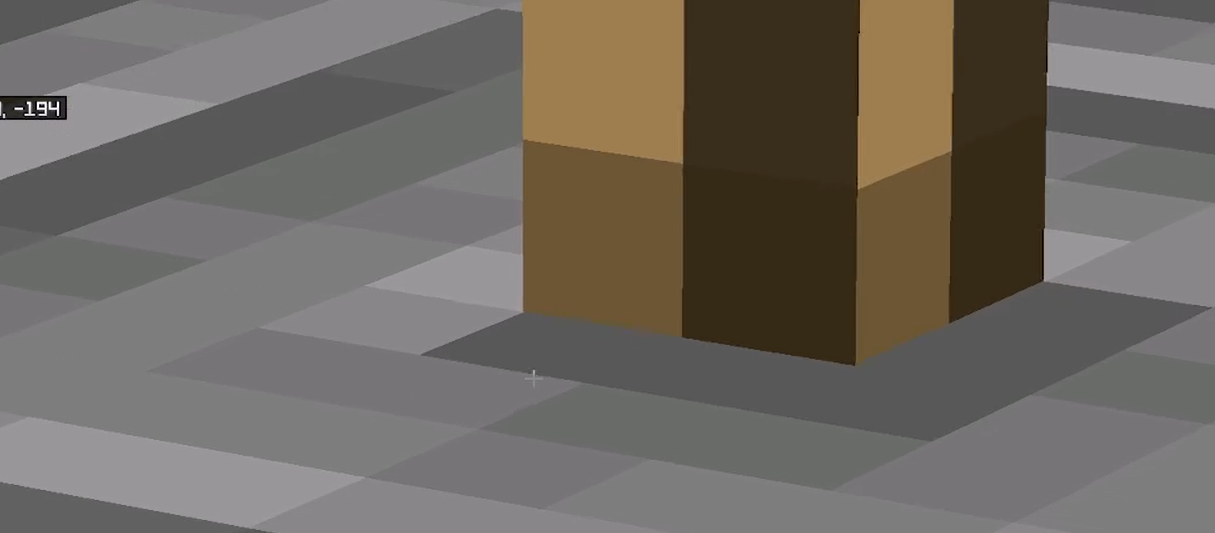
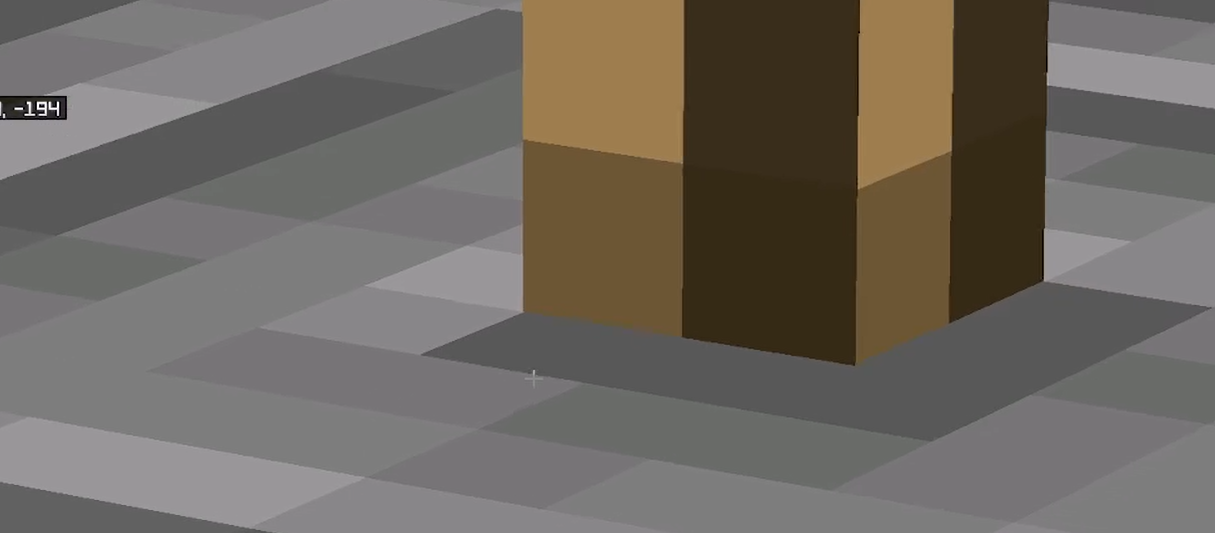
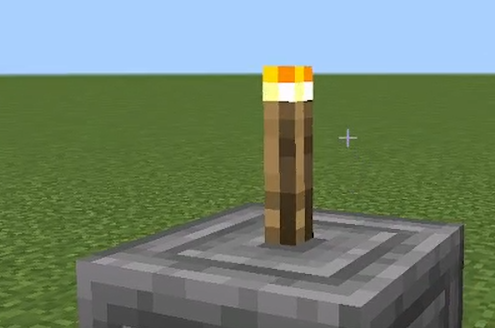
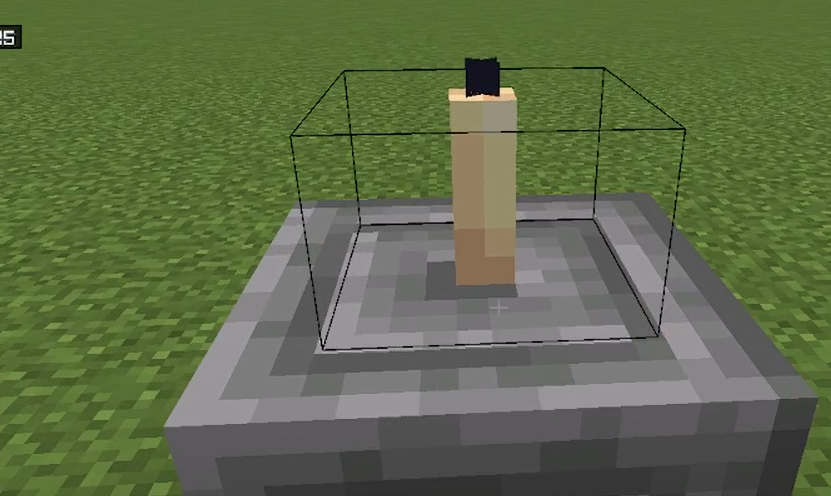
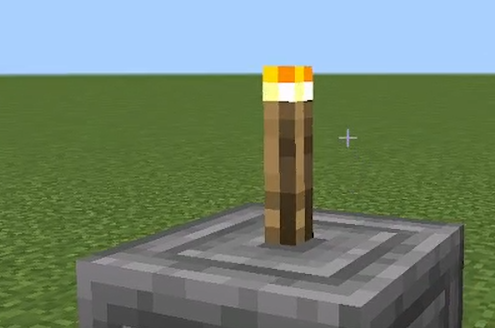
Some Non-Solid blocks are off-set on Chiseled Stone Bricks
How to recreatePlace a Non-Solid block like torch or iron bars on a Chiseled Stone Brick
[^2021-10-06 15-18-10.mkv]
IssueSome Non-Solid blocks are off-set on Chiseled Stone Bricks
How to recreatePlace a Non-Solid block like torch or iron bars on a Chiseled Stone Brick
[^2021-10-06 15-18-10.mkv]
IssueSome Non-Solid blocks are off-set on Chiseled Stone Bricks
How to recreatePlace a Non-Solid block like torch or iron bars on a Chiseled Stone Brick
 Issue
IssueSome Non-Solid blocks are off-set on Chiseled Stone Bricks
How to recreatePlace a Non-Solid block like torch or iron bars on a Chiseled Stone Brick
UI Scale modifier setting is not visible when not in full screen mode (Windows 10/Windows 11) [FIXED]
UI Scale modifier setting is not visible when not in full screen mode (Windows 10/Windows 11) [FIXED]UI Scale modifier setting is not visible when not in full screen mode (Windows 10/Windows 11) [RESOLVED]
Issue :Parrots don't stop dancing even if the music ends.
How to reproduce? :1. Summon/spawn/find a parrot 2. Tame the parrot with seeds and make the parrot sit 3. Get and place a jukebox 4. Get any music disc of your choice and right-click/tap the jukebox to play the disc 5. Wait for the music to end 6. The parrot doesn't stop dancing even after the music stops playing (Do not disturb/kill the parrot while the music is playing or after the music stops playing because doing so will make the parrot stop dancing)
Expected result :The parrot must stop dancing after the music ends.Attachment details :Here, in this attachment, the music (PigSteps) ends at 0:25 but the parrot stilldances till the disc was removed.
Issue :Parrots don't stop dancing even if the music ends.
How to reproduce? :1. Summon/spawn/find a parrot 2. Tame the parrot with seeds and make the parrot sit 3. Get and place a jukebox 4. Get any music disc of your choice and right-click/tap the jukebox to play the disc 5. Wait for the music to end 6. The parrot doesn't stop dancing even after the music stops playing (Do not disturb/kill the parrot while the music is playing or after the music stops playing because doing so will make the parrot stop dancing)
Expected result :The parrot must stop dancing after the music ends.Attachment details :Here, in this attachment, the music (PigSteps) ends at 0:25 but the parrot still dances till the disc was removed.
Issue :Parrots don't stop dancing even if the music ends.
How to reproduce? :1. Summon/spawn/find a parrot 2. Tame the parrot with seeds and make the parrot sit 3. Get and place a jukebox 4. Get any music disc of your choice and right-click/tap the jukebox to play the disc 5. Wait for the music to end 6. The parrot doesn't stop dancing even after the music stops playing(Do not disturb/kill the parrot while the music is playing or after the music stops playing because doing so will make the parrot stop dancing)
Expected result :The parrot must stop dancing after the music ends.Attachment details :Here, in this attachment, the music (PigSteps) ends at 0:25 but the parrot still dances till the disc was removed.
Issue :Parrots don't stop dancing even if the music ends.
How to reproduce? :1. Summon/spawn/find a parrot 2. Tame the parrot with seeds and make the parrot sit 3. Get and place a jukebox 4. Get any music disc of your choice and right-click/tap the jukebox to play the disc 5. Wait for the music to end 6. The parrot doesn't stop dancing even after the music stops playing (Do not disturb/kill the parrot while the music is playing or after the music stops playing because doing so will make the parrot stop dancing)
Expected result :The parrot must stop dancing after the music ends.Attachment details :Here, in this attachment, the music (PigSteps) ends at 0:25 but the parrot still dances till the disc was removed.
Issue :Parrots don't stop dancing even if the music ends.
How to reproduce? :1. Summon/spawn/find a parrot 2. Tame the parrot with seeds and make the parrot sit 3. Get and place a jukebox 4. Get any music disc of your choice and right-click/tap the jukebox to play the disc 5. Wait for the music to end 6. The parrot doesn't stop dancing even after the music stops playing (Do not disturb/kill the parrot while the music is playing or after the musicstops playing because doing so will make the parrot stop dancing)
Expected result :The parrot must stop dancing after the music ends.Attachment details :Here, in this attachment, the music (PigSteps) ends at 0:25 but the parrot still dances till the disc was removed.
Issue :Parrots don't stop dancing even if the music ends.
How to reproduce? :1. Summon/spawn/find a parrot 2. Tame the parrot with seeds and make the parrot sit 3. Get and place a jukebox 4. Get any music disc of your choice and right-click/tap the jukebox to play the disc 5. Wait for the music to end 6. The parrot doesn't stop dancing even after the music stops playing (Do not disturb/kill the parrot while the music is playing or after the music stops playing because doing so will make the parrot stop dancing)
Expected result :The parrot must stop dancing after the music ends.Attachment details :Here, in this attachment, the music (PigSteps) ends at 0:25 but the parrot still dances till the disc was removed.
Issue :Parrots don't stop dancing even if the music ends.
How to reproduce? :1. Summon/spawn/find a parrot 2. Tame the parrot with seeds and make the parrot sit 3. Get and place a jukebox 4. Get any music disc of your choice and right-click/tap the jukebox to play the disc 5. Wait for the music to end 6. The parrot doesn't stop dancing even after the music stops playing (Do not disturb/kill the parrot while the music is playing or after the music stops playing because doing so will make the parrot stop dancing)
Expected result :The parrot must stop dancing after the music ends.Attachment details :Here, in this attachment, the music (PigSteps) ends at 0:25 but the parrot still dances till the disc was removed.
[Expirimental] River generation is broken[Experimental] River generation is broken
Issue :
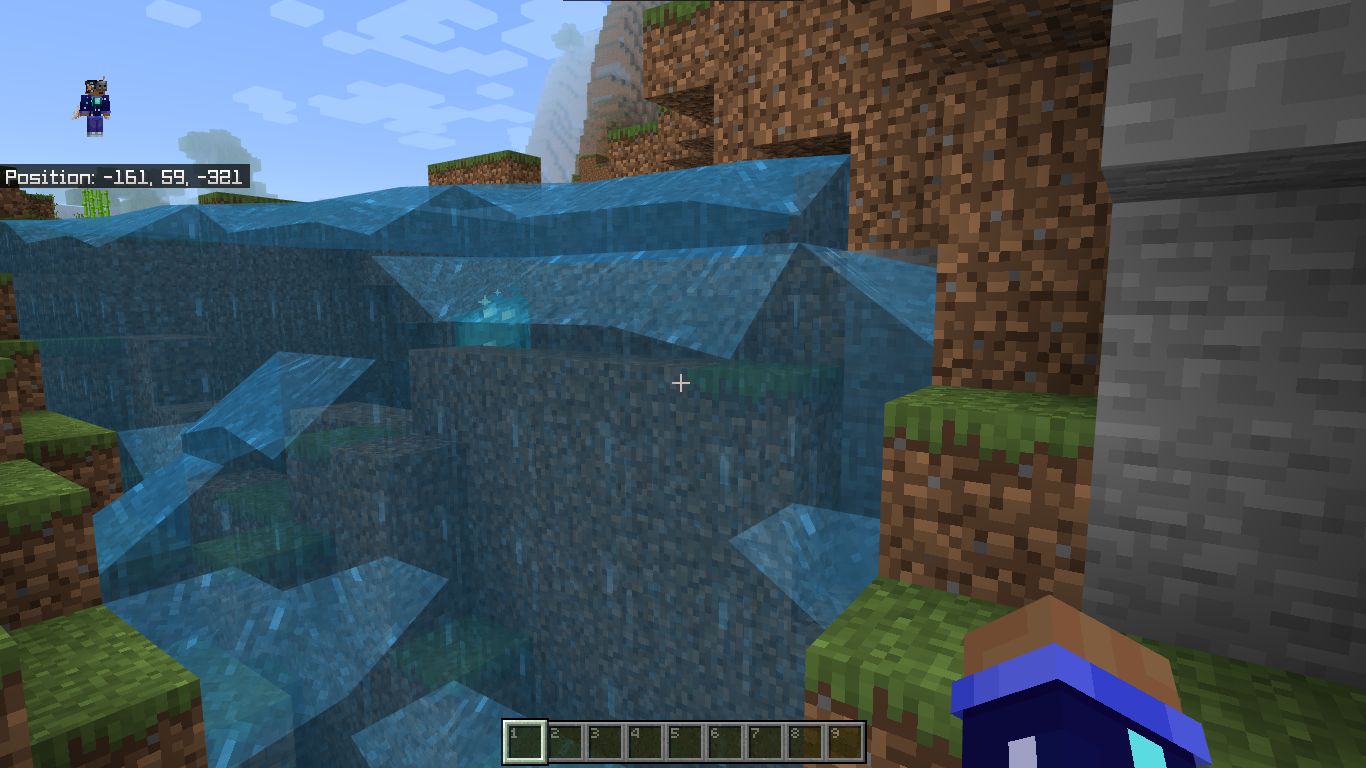
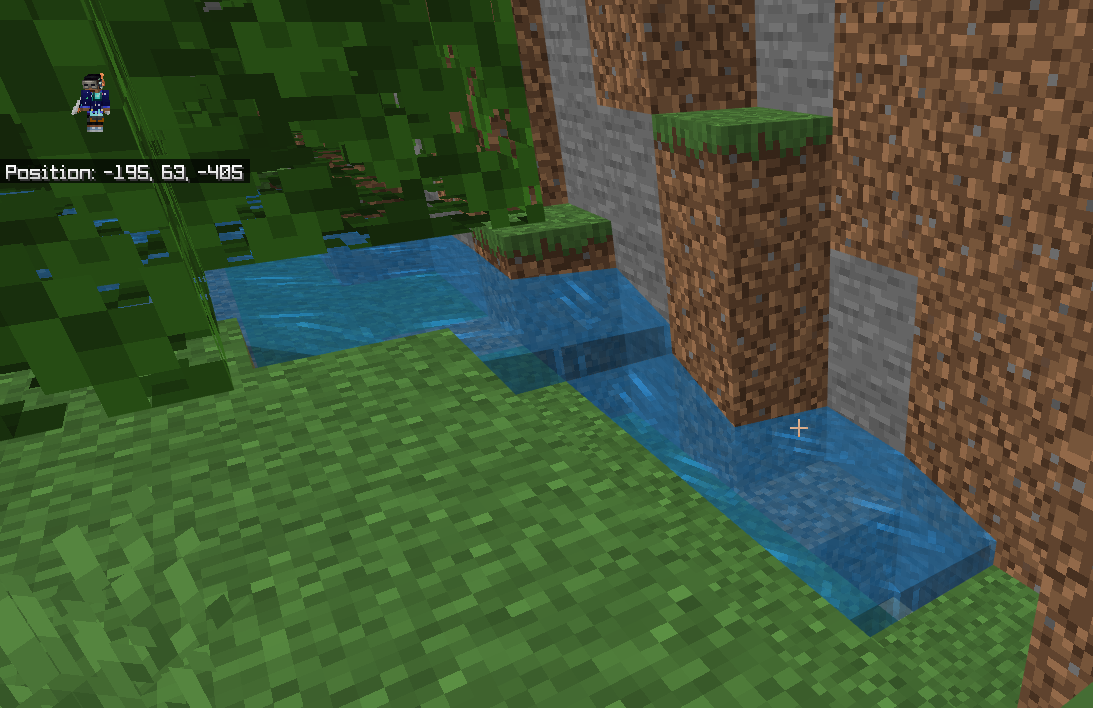
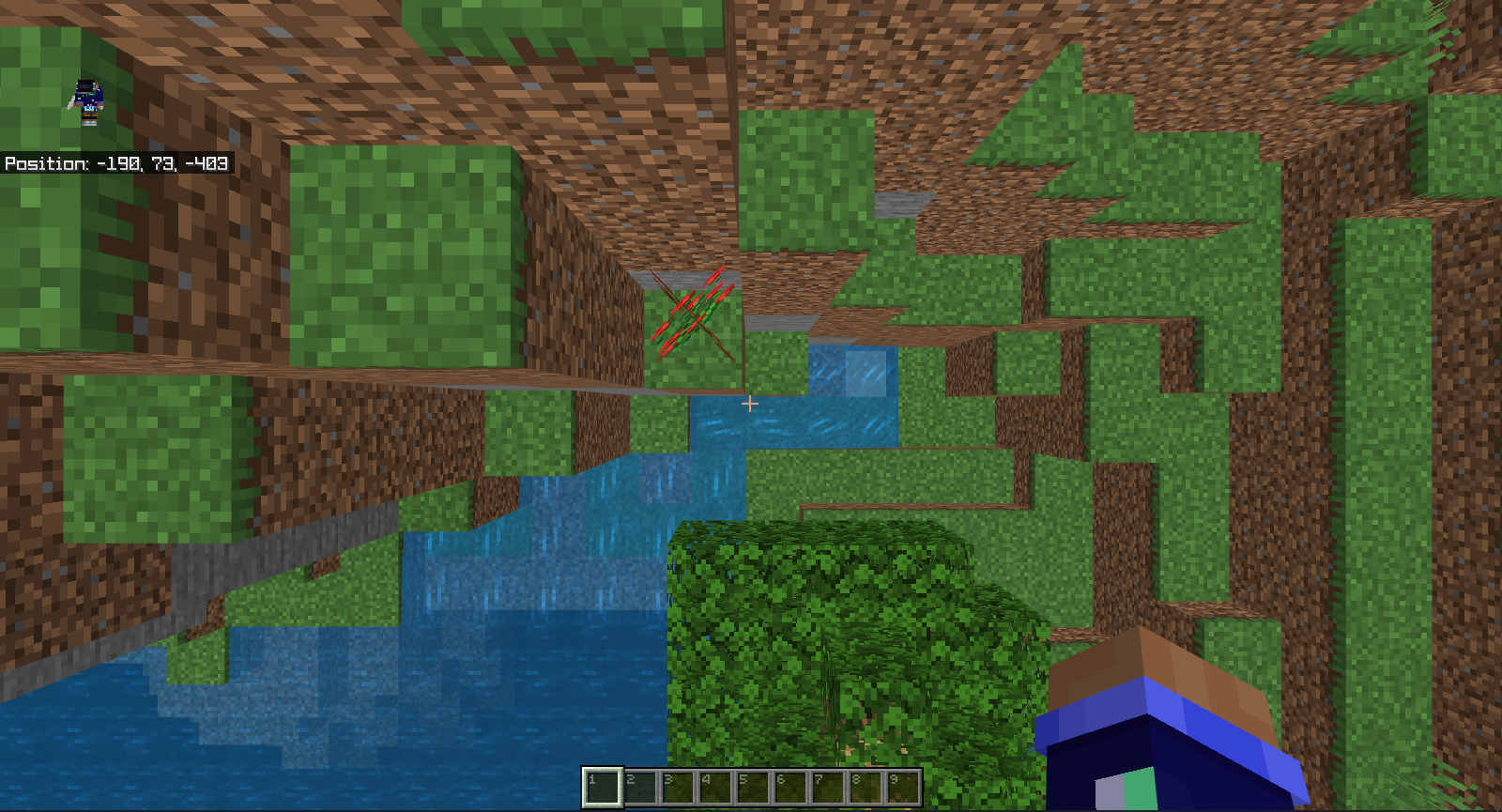
River generation is broken. Water does not cover/fill the entire river
How to reproduce :
1. Create a new world with the following game settings :
Seed: 1920910235
Enable caves & cliffs experiment
2. Create the world and teleport to -185 58 -335
3. You'll find a river that's not entirely filled with waterObserved result :
The river is not entirely filledExpected result :
The river is entirely filled with water
Seed1920910235
Coordinates-185 58 -335
Issue :
River generation is broken.Water does not cover/fill the entire river
How to reproduce :
1. Create a new world with the following game settings :
Seed: 1920910235
Enable caves & cliffs experiment
2. Create the world and teleport to -185 58 -335
3. You'll find a river that's not entirely filled with waterObserved result :
The river is not entirely filledExpected result :
The river is entirely filled with water
Seed1920910235
Coordinates-185 58 -335
[Experimental]River generation is broken[Experimental] Water does not cover/fill the entire river
[Experimental] Water does not cover/fill the entire river[Caves & Clifs Experiment] Water does not cover/fill the entire river
[Caves & Clifs Experiment]Water does not cover/fill the entire river
Issue :
Water does not cover/fill the entire river
How to reproduce :
1. Create a new world with the following game settings :
Seed: 1920910235
Enable caves & cliffs experiment
2. Create the world and teleport to -18558 -335
3. You'll find a river that's not entirely filled with waterObserved result :
The river is not entirely filledExpected result :
The river is entirely filled with water
Seed1920910235
Coordinates-1
8558 -335
Issue :
Water does not cover/fill the entire river
How to reproduce :
1. Create a new world with the following game settings :
Seed: 1920910235
Enable caves & cliffs experiment
2. Create the world and teleport to -195 63 -405
3. You'll find a river that's not entirely filled with waterObserved result :
The river is not entirely filledExpected result :
The river is entirely filled with water
Seed1920910235
Coordinates-195 63 -405
Relates to
MCPE-144671
Relates to
MCPE-144671andMCPE-144672
Same with Minecraft for windows 10 edition.
Minecraft Windows 10 Edition runs on The Render Dragon Rendering Engine and currently, Render Dragon does not support 3rd party community shaders. Any community shaders previously used on Minecraft for Windows 10 may not run on a Render Dragon version of the game.
Also, this bug report will not be considered as a bug as it's intended.
There is already a feedback post and you can vote for it here.
Additional Info:
How to reproduce:
1. Summon/spawn/find a parrot
2. Tame the parrot with seeds and make the parrot sit
3. Get and place a jukebox
4. Get any music disc of your choice and right-click/tap the jukebox to play the disc
5. Wait for the music to end
6. The parrot doesn't stop dancing even after the music stops playing (Do not disturb/kill the parrot while the music is playing or after the music stops playing because doing so will make the parrot stop dancing)
Expected result:
The parrot must stop dancing after the music ends.
Observed result:
The parrot doesn't stop dancing even after the music ended.
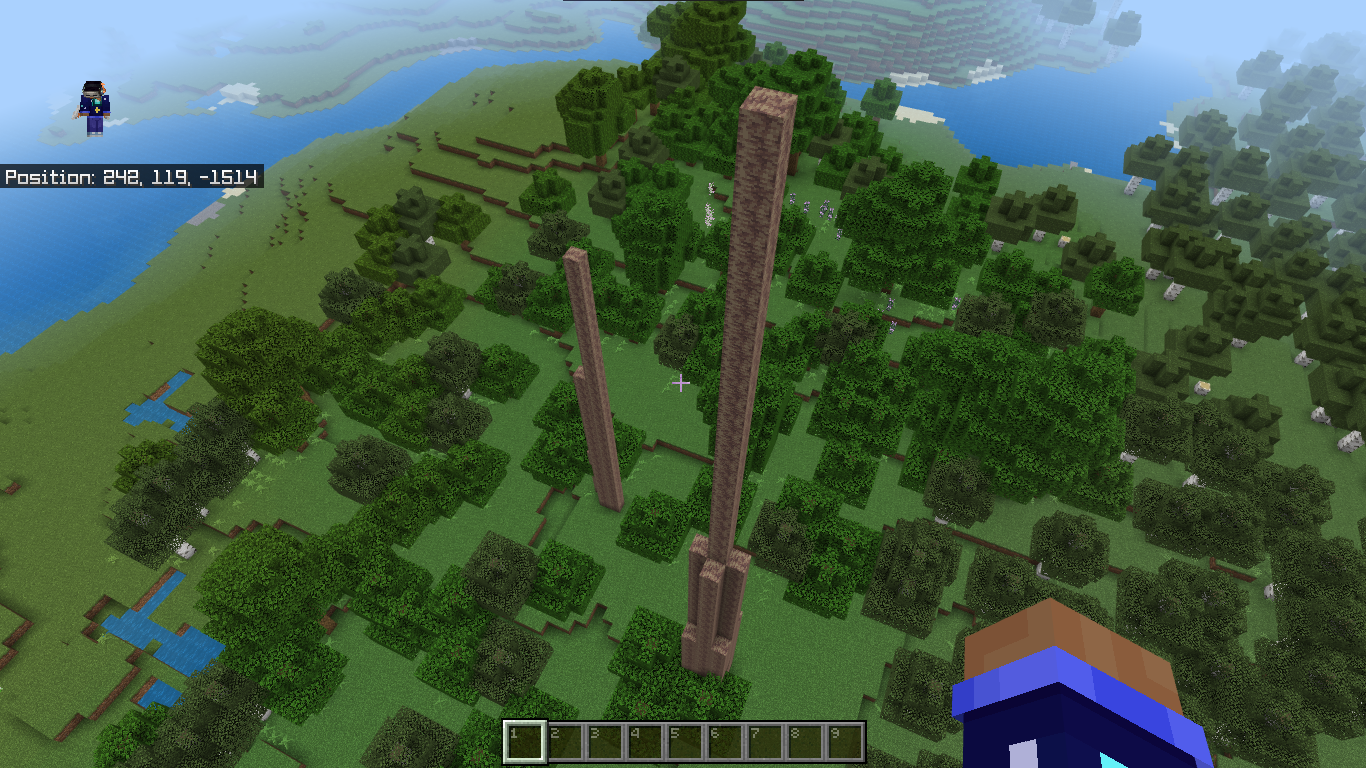
Additional seed:
S - 1669320484
C - 235 87 -1511
Additional info :
This sidebar was also available in 1.17.30 but in 1.17.41 it's been removed.
Try using a different file explorer like Google files.
Relates to
MCPE-143378Try using a file explorer like Google files or Z Achiver
I also experienced it, when I try to use fill, and when it covers more than your render distance, it will show an error. Try to increase your render distance.
Try to increase your render distance.
The issue is not entirely fixed. The issue is not there at the mentioned above cords currently but the issue is still there in another location.


V-1.18.2
This issue still persists. I'm able to reproduce the bug in the latest version of Minecraft (1.19.81).