Render distance decreased again
Please only comment if you have new information.
Please do not add "me too" comments to this (or any other confirmed) issue.
The best way you can indicate that an issue is important to you is to vote for it.
Repetitive comments may be deleted to reduce clutter.
My cell phone is being analyzed to see if the Dragon render will work and I don't know if it's because of that but my chuncks went down before it was 13 now the maximum is 7 I hope you put it And I wanted you to re-add my 13 chunks please bye.
Linked Issues
is duplicated by22
 MC-243603Render distance limit from 28 to 9??Duplicate
 MCPE-147890Return my 12 render chunksDuplicateMCPE-149242My chunk limit was reduced a bit too muchDuplicateMCPE-149291More render distant for P.E.DuplicateMCPE-149464My max render distance before 1.18.0 on my iPad Air 3 was 32 chunks but now it is 10 CHUNKS!!!DuplicateMCPE-149465My iPad Air 3 render distance before 1.18 was 32 chunks and that was the max and 1.18 the max is 10 chunks pls fix asapDuplicateMCPE-1495081.18 Render distance reduced on Xbox one x, why?DuplicateMCPE-149524Significant decrease in rendering distanceDuplicateMCPE-149704Max render distance decreased after updateDuplicateMCPE-149726They lowered the chunk display options to just 13 when they could be more beforeDuplicateMCPE-149761<The creator of this issue has attempted to delete it but has not been able to do so.>DuplicateMCPE-149876Render distance won't go higher than 9DuplicateMCPE-150271Delay bug and moreDuplicateMCPE-150321Render distance stuck on 16 after 1.18DuplicateMCPE-150361Render Distance DuplicateMCPE-151030Render Distance limited to 5, 6 or 7 on mainstream+premium ARM Snapdragons.DuplicateMCPE-151306The render distance settings have been limited in 1.18DuplicateMCPE-156378Render distanceDuplicateMCPE-157227iOS render distance is limited and performance is significantly worseDuplicateMCPE-158027My render distance is so low DuplicateMCPE-158608Minecraft took some of my chunks.Duplicate
 REALMS-10432Render distance is to lowDuplicate



Created Issue:
Chunks decreased again
My cell phone is being analyzed to see if the Dragon render will work and I don't know if it's because of that but my chuncks went down before it was 13 now the maximum is 7 I hope you put it And I wanted you to re-add my 13 chunks please bye.
- Unresolved
- Open
- Unconfirmed
- Android
- Android 10
- 1.17.40.20 Beta
![[Mod] OcelotOnesie](../../../data/avatars/users/43220.png)
Chunksdecreased again
![[Mod] GoldenHelmet](../../../data/avatars/users/18951.svg)
is duplicated by
is duplicated by
clones
MCPE-141341 → REALMS-9213REALMS-9213 → MCPE-143378![[Helper] lillybeacon](../../../data/avatars/users/93893.png)
is duplicated by
![[Bot] Arisa](../../../data/avatars/users/43007.png)
is duplicated by
is duplicated by
is duplicated by
is duplicated by
is duplicated by
is duplicated by
is duplicated by
is duplicated by
is duplicated by
is duplicated by
is duplicated by
is duplicated by
is duplicated by
blocks
NotePlease only comment if you have new information.
Please do not add "me too" comments to this (or any other confirmed) issue.
The best way you can indicate that an issue is important to you is to vote for it.
Repetitive comments may be deleted to reduce clutter.My cell phone is being analyzed to see if the Dragon render will work and I don't know if it's because of that but my chuncks went down before it was 13 now the maximum is 7 I hope you put it And I wanted you to re-add my 13 chunks please bye.
NotePlease only comment if you have new information.
Please do not add "me too" comments to this (or any other confirmed) issue.
The best way you can indicate that an issue is important to you is to vote for it.
Repetitive comments may be deleted to reduce clutter.My cell phone is being analyzed to see if the Dragon render will work and I don't know if it's because of that but my chuncks went down before it was 13 now the maximum is 7 I hope you put it And I wanted you to re-add my 13 chunks please bye.
![[Mod] tryashtar](../../../data/avatars/users/41963.png)

I'm pretty sure my max render distance on my iPad was at least 24. Now I'm limited to 9. Makes the new Caves and Cliffs a little hard to appreciate.

Still an issue on version 1.18.12

Can confirm in 1.18.31.
is duplicated by
is duplicated by
is duplicated by
is duplicated by
is duplicated by
![[Mod] EVGENSYPERPRO](../../../data/avatars/users/92853.png)
GamerPro08 (玩家專業版 08) Do not add unhelpful comments to other reports, such as the ones you added to MCPE-141341 and MCPE-141343. Please read the Bug Tracker Guidelines & FAQ before making further comments. Failure to follow these rules may result in account termination.
Thank you for your report!
We're tracking this issue in MCPE-143378, so this ticket is being resolved and linked as a duplicate.
If you would like to add a vote and any extra information to the main ticket it would be appreciated.
If you haven't already, you might like to make use of the search feature to see if the issue has already been mentioned.
Quick Links:
📓 Bug Tracker Guidelines – 💬 Community Support – 📧 Mojang Support
📓 Project Summary – ✍️ Feedback and Suggestions – 📖 Game Wiki
– I am a bot. This action was performed automatically! The ticket was resolved by one of our moderators, and I left this message to give more information to you.
Thank you for your report!
We're tracking this issue in MCPE-143378, so this ticket is being resolved and linked as a duplicate.
If you would like to add a vote and any extra information to the main ticket it would be appreciated.
If you haven't already, you might like to make use of the search feature to see if the issue has already been mentioned.
Quick Links:
📓 Bug Tracker Guidelines – 💬 Community Support – 📧 Mojang Support
📓 Project Summary – ✍️ Feedback and Suggestions – 📖 Game Wiki
– I am a bot. This action was performed automatically! The ticket was resolved by one of our moderators, and I left this message to give more information to you.
Thank you for your report!
We're tracking this issue in MCPE-143378, so this ticket is being resolved and linked as a duplicate.
If you would like to add a vote and any extra information to the main ticket it would be appreciated.
If you haven't already, you might like to make use of the search feature to see if the issue has already been mentioned.
Quick Links:
📓 Bug Tracker Guidelines – 💬 Community Support – 📧 Mojang Support
📓 Project Summary – ✍️ Feedback and Suggestions – 📖 Game Wiki
– I am a bot. This action was performed automatically! The ticket was resolved by one of our moderators, and I left this message to give more information to you.

Relates to MCPE-143378
Thank you for your report!
We're tracking this issue in MCPE-143378, so this ticket is being resolved and linked as a duplicate.
If you would like to add a vote and any extra information to the main ticket it would be appreciated.
If you haven't already, you might like to make use of the search feature to see if the issue has already been mentioned.
Quick Links:
📓 Bug Tracker Guidelines – 💬 Community Support – 📧 Mojang Support
📓 Project Summary – ✍️ Feedback and Suggestions – 📖 Game Wiki
– I am a bot. This action was performed automatically! The ticket was resolved by one of our moderators, and I left this message to give more information to you.
Thank you for your report!
We're tracking this issue in MCPE-143378, so this ticket is being resolved and linked as a duplicate.
If you would like to add a vote and any extra information to the main ticket it would be appreciated.
If you haven't already, you might like to make use of the search feature to see if the issue has already been mentioned.
Quick Links:
📓 Bug Tracker Guidelines – 💬 Community Support – 📧 Mojang Support
📓 Project Summary – ✍️ Feedback and Suggestions – 📖 Game Wiki
– I am a bot. This action was performed automatically! The ticket was resolved by one of our moderators, and I left this message to give more information to you.
Thank you for your report!
We're tracking this issue in MCPE-143378, so this ticket is being resolved and linked as a duplicate.
If you would like to add a vote and any extra information to the main ticket it would be appreciated.
If you haven't already, you might like to make use of the search feature to see if the issue has already been mentioned.
Quick Links:
📓 Bug Tracker Guidelines – 💬 Community Support – 📧 Mojang Support
📓 Project Summary – ✍️ Feedback and Suggestions – 📖 Game Wiki
– I am a bot. This action was performed automatically! The ticket was resolved by one of our moderators, and I left this message to give more information to you.
Duplicate of MCPE-143378.
Thank you for your report!
We're tracking this issue in MCPE-143378, so this ticket is being resolved and linked as a duplicate.
If you would like to add a vote and any extra information to the main ticket it would be appreciated.
If you haven't already, you might like to make use of the search feature to see if the issue has already been mentioned.
Quick Links:
📓 Bug Tracker Guidelines – 💬 Community Support – 📧 Mojang Support
📓 Project Summary – ✍️ Feedback and Suggestions – 📖 Game Wiki
– I am a bot. This action was performed automatically! The ticket was resolved by one of our moderators, and I left this message to give more information to you.
Thank you for your report!
We're tracking this issue in MCPE-143378, so this ticket is being resolved and linked as a duplicate.
If you would like to add a vote and any extra information to the main ticket it would be appreciated.
If you haven't already, you might like to make use of the search feature to see if the issue has already been mentioned.
Quick Links:
📓 Bug Tracker Guidelines – 💬 Community Support – 📧 Mojang Support
📓 Project Summary – ✍️ Feedback and Suggestions – 📖 Game Wiki
– I am a bot. This action was performed automatically! The ticket was resolved by one of our moderators, and I left this message to give more information to you.
Thank you for your report!
We're tracking this issue in MCPE-143378, so this ticket is being resolved and linked as a duplicate.
If you would like to add a vote and any extra information to the main ticket it would be appreciated.
If you haven't already, you might like to make use of the search feature to see if the issue has already been mentioned.
Quick Links:
📓 Bug Tracker Guidelines – 💬 Community Support – 📧 Mojang Support
📓 Project Summary – ✍️ Feedback and Suggestions – 📖 Game Wiki
– I am a bot. This action was performed automatically! The ticket was resolved by one of our moderators, and I left this message to give more information to you.
Thank you for your report!
We're tracking this issue in MCPE-143378, so this ticket is being resolved and linked as a duplicate.
If you would like to add a vote and any extra information to the main ticket it would be appreciated.
If you haven't already, you might like to make use of the search feature to see if the issue has already been mentioned.
Quick Links:
📓 Bug Tracker Guidelines – 💬 Community Support – 📧 Mojang Support
📓 Project Summary – ✍️ Feedback and Suggestions – 📖 Game Wiki
Thank you for your report!
We're tracking this issue in MCPE-143378, so this ticket is being resolved and linked as a duplicate.
If you would like to add a vote and any extra information to the main ticket it would be appreciated.
If you haven't already, you might like to make use of the search feature to see if the issue has already been mentioned.
Quick Links:
📓 Bug Tracker Guidelines – 💬 Community Support – 📧 Mojang Support
📓 Project Summary – ✍️ Feedback and Suggestions – 📖 Game Wiki
– I am a bot. This action was performed automatically! The ticket was resolved by one of our moderators, and I left this message to give more information to you.
Thank you for your report!
We're tracking this issue in MCPE-143378, so this ticket is being resolved and linked as a duplicate.
If you would like to add a vote and any extra information to the main ticket it would be appreciated.
If you haven't already, you might like to make use of the search feature to see if the issue has already been mentioned.
Quick Links:
📓 Bug Tracker Guidelines – 💬 Community Support – 📧 Mojang Support
📓 Project Summary – ✍️ Feedback and Suggestions – 📖 Game Wiki
– I am a bot. This action was performed automatically! The ticket was resolved by one of our moderators, and I left this message to give more information to you.
Thank you for your report!
We're tracking this issue in MCPE-143378 and MCPE-149214, so this ticket is being resolved and linked as a duplicate.
If you would like to add a vote and any extra information to the main ticket it would be appreciated.
If you haven't already, you might like to make use of the search feature to see if the issue has already been mentioned.
Quick Links:
📓 Bug Tracker Guidelines – 💬 Community Support – 📧 Mojang Support
📓 Project Summary – ✍️ Feedback and Suggestions – 📖 Game Wiki
– I am a bot. This action was performed automatically! The ticket was resolved by one of our moderators, and I left this message to give more information to you.
Thank you for your report!
We're tracking this issue in MCPE-143378, so this ticket is being resolved and linked as a duplicate.
If you would like to add a vote and any extra information to the main ticket it would be appreciated.
If you haven't already, you might like to make use of the search feature to see if the issue has already been mentioned.
Quick Links:
📓 Bug Tracker Guidelines – 💬 Community Support – 📧 Mojang Support
📓 Project Summary – ✍️ Feedback and Suggestions – 📖 Game Wiki
Thank you for your report!
We're tracking this issue in MCPE-143378, so this ticket is being resolved and linked as a duplicate.
If you would like to add a vote and any extra information to the main ticket it would be appreciated.
If you haven't already, you might like to make use of the search feature to see if the issue has already been mentioned.
Quick Links:
📓 Bug Tracker Guidelines – 💬 Community Support – 📧 Mojang Support
📓 Project Summary – ✍️ Feedback and Suggestions – 📖 Game Wiki
– I am a bot. This action was performed automatically! The ticket was resolved by one of our moderators, and I left this message to give more information to you.
Thank you for your report!
We're tracking this issue in MCPE-143378, so this ticket is being resolved and linked as a duplicate.
If you would like to add a vote and any extra information to the main ticket it would be appreciated.
If you haven't already, you might like to make use of the search feature to see if the issue has already been mentioned.
Quick Links:
📓 Bug Tracker Guidelines – 💬 Community Support – 📧 Mojang Support
📓 Project Summary – ✍️ Feedback and Suggestions – 📖 Game Wiki
– I am a bot. This action was performed automatically! The ticket was resolved by one of our moderators, and I left this message to give more information to you.
Thank you for your report!
We're tracking this issue in MCPE-143378, so this ticket is being resolved and linked as a duplicate.
If you would like to add a vote and any extra information to the main ticket it would be appreciated.
If you haven't already, you might like to make use of the search feature to see if the issue has already been mentioned.
Quick Links:
📓 Bug Tracker Guidelines – 💬 Community Support – 📧 Mojang Support
📓 Project Summary – ✍️ Feedback and Suggestions – 📖 Game Wiki
Thank you for your report!
We're tracking this issue in MCPE-143378, so this ticket is being resolved and linked as a duplicate.
If you would like to add a vote and any extra information to the main ticket it would be appreciated.
If you haven't already, you might like to make use of the search feature to see if the issue has already been mentioned.
Quick Links:
📓 Bug Tracker Guidelines – 💬 Community Support – 📧 Mojang Support
📓 Project Summary – ✍️ Feedback and Suggestions – 📖 Game Wiki
– I am a bot. This action was performed automatically! The ticket was resolved by one of our moderators, and I left this message to give more information to you.
Can confirm. After I have updated to 1.19 the game was (and is) unplayable. (Before 1.18 I had a render distance of 32 chunks. Everything worked fine. In 1.18 i only had a render distance of 10 chunks. Relates to MCPE-143378. Everything worked fine. (I also used an app to set my render distance to 32 chunks and everything worked fine. Minecraft > games > com.mojang > minecraftpe > options. Set gfx_viewdistance to 512.) Now the game is unplayable even with 5 chunks of render distance. The game freezes for like 30 seconds whenever I use commands.
Thank you for your report!
We're tracking this issue in MCPE-143378 and MCPE-156737, so this ticket is being resolved and linked as a duplicate.
If you would like to add a vote and any extra information to the main ticket it would be appreciated.
If you haven't already, you might like to make use of the search feature to see if the issue has already been mentioned.
Quick Links:
📓 Bug Tracker Guidelines – 💬 Community Support – 📧 Mojang Support
📓 Project Summary – ✍️ Feedback and Suggestions – 📖 Game Wiki
– I am a bot. This action was performed automatically! The ticket was resolved by one of our moderators, and I left this message to give more information to you.
Thank you for your report!
We're tracking this issue in MCPE-143378, so this ticket is being resolved and linked as a duplicate.
If you would like to add a vote and any extra information to the main ticket it would be appreciated.
If you haven't already, you might like to make use of the search feature to see if the issue has already been mentioned.
Quick Links:
📓 Bug Tracker Guidelines – 💬 Community Support – 📧 Mojang Support
📓 Project Summary – ✍️ Feedback and Suggestions – 📖 Game Wiki
Thank you for your report!
We're tracking this issue in MCPE-143378, so this ticket is being resolved and linked as a duplicate.
If you would like to add a vote and any extra information to the main ticket it would be appreciated.
If you haven't already, you might like to make use of the search feature to see if the issue has already been mentioned.
Quick Links:
📓 Bug Tracker Guidelines – 💬 Community Support – 📧 Mojang Support
📓 Project Summary – ✍️ Feedback and Suggestions – 📖 Game Wiki – 📖 FAQs
– I am a bot. This action was performed automatically! The ticket was resolved by one of our moderators, and I left this message to give more information to you.
Thank you for your report!
We're tracking this issue in MCPE-143378, so this ticket is being resolved and linked as a duplicate.
If you would like to add a vote and any extra information to the main ticket it would be appreciated.
If you haven't already, you might like to make use of the search feature to see if the issue has already been mentioned.
Quick Links:
📓 Bug Tracker Guidelines – 💬 Community Support – 📧 Mojang Support
📓 Project Summary – ✍️ Feedback and Suggestions – 📖 Game Wiki
– I am a bot. This action was performed automatically! The ticket was resolved by one of our moderators, and I left this message to give more information to you.
Mine went from 24 to 12, 2 updates ago and then back to 24. The current update has limited it to 16. Getting very frustrating, I assume its to prevent us from making the game run too poorly. I get that, but as someone who wants to experience larger render distance of the mountains and isn't too picky about frame rate in single player games it would be nice if they let us choose. Perhaps what would work better would be if the default render distance is capped at the recommended limit, but there is an advanced graphics option setting which allows more adventurous players who aren't expecting perfect stability to turn it up, similar to java edition. My PC is capped at 56 chunks and its very jaring being capped to a lower max, even if I just want to see the view of what's ahead briefly. I'd love it if the devs added the option to let us just type in a render distance and test it, so they wouldn't choose our minimum or maximum. I'd really like to see the mountains at least 32 chunks on my phone, even if it lags a bit.
My render distance was 16 to 8
Resolving temporarily as Awaiting Response. Did you update the game from a previous version or was it a fresh install?
This ticket will reopen automatically when you reply.
I updated the game from a previous version and my render distance dropped from 64 to 20.
Me was from 32 to 9 chunks
I updated the game recently and had my render distance decreased from about 20 chunks to only 9. I know it’s meant to help devices run better, but I find it’s near impossible to enjoy the new caves and mountains if you can’t see them at all. I would use Felix Sauce’s idea and allow players to increase the render distance beyond their device’s limit. Just add a strict warning so people know the risk.
my render distance was 20 and it was now 12.
My tablet render distance went from 16 to 6. But my computer increased... my computer went from 44 to 71!
I Have Link To Fix!
https://www.google.com.au/url?sa=t&rct=j&q=&esrc=s&source=web&cd=&ved=2ahUKEwiSrK7fscP0AhUQTWwGHYrLBI0QwqsBegQIBBAB&url=https%3A%2F%2Fwww.youtube.com%2Fwatch%3Fv%3D_NjB_PeJblM&usg=AOvVaw0-9NE0Hl9qnm9hs77-uj-F
on mcpe 1.18 it will say the max then +
Here is the image
https://drive.google.com/file/d/1Ysw9C3lde4D3FP7-usZnWHryI7Wgfcw-/view?usp=drivesdk
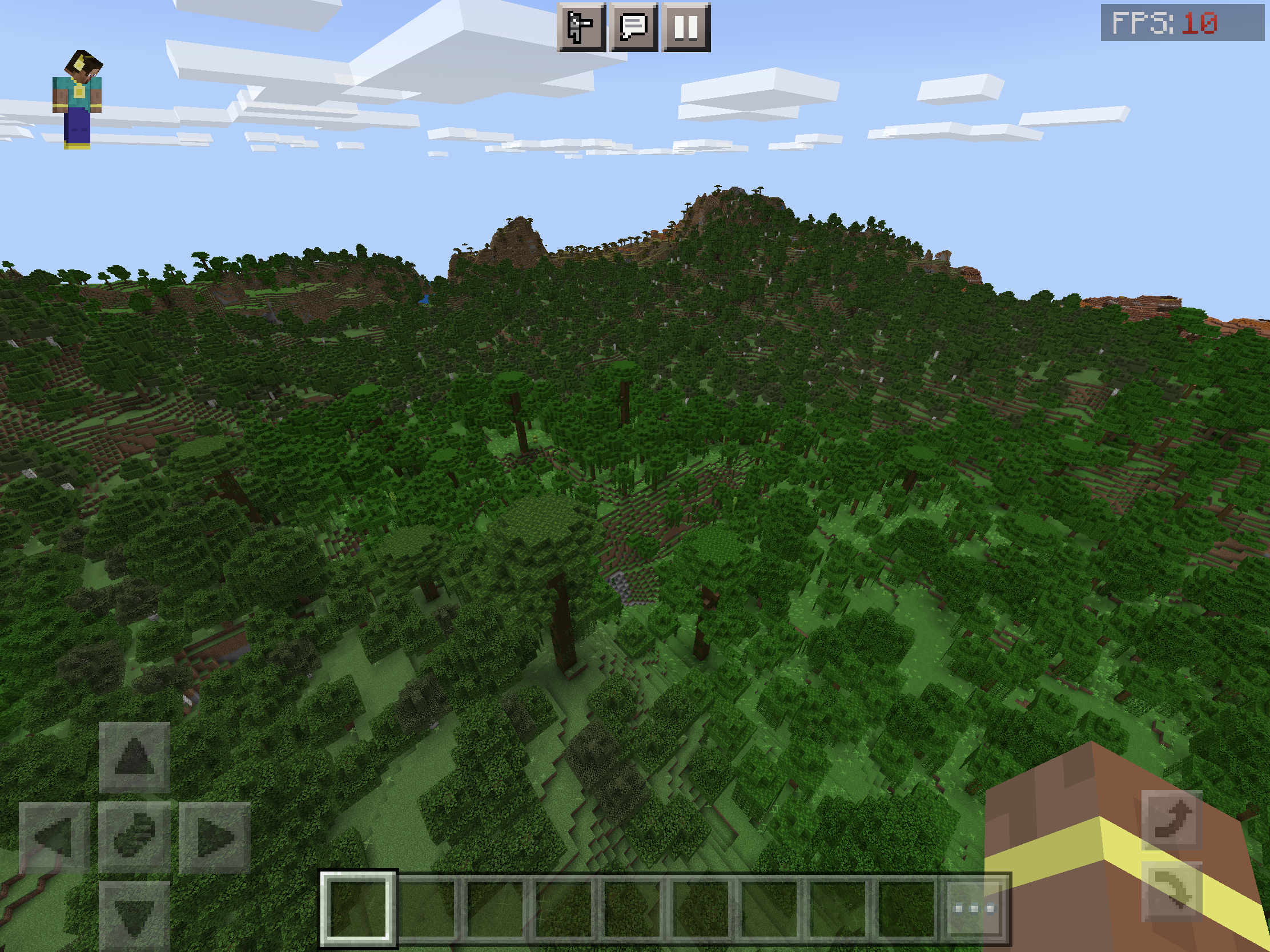
Mine went from maximum 40 chunks to a new maximum of 9 chunks on iPad Pro 10.5 inch 2017. This is overly aggressive as the game is consistently performant on 30 chunks (60 FPS), starts to falter on 32 chunks (50 FPS), and on occasion becomes unplayable to most (10 FPS).
Note that my observations are based on worst-case-scenario in 1.18 where the player is in the sky, looking at a vast expanse of trees filling the entire scene. In more ideal scenarios, even 40 chunks is performant. This should remain the limit IMO, as it well-matches the in-game description’s warnings of possible performance issues.
I’m speculating here, but I’m thinking 1.18 takes the maximum RAM available as face value (the old one was RAM based, idk about CPU/GPU). This value is highly deceiving on certain devices, like the 10.5 iPad Pro, with only 4GB of RAM, however providing excellent performance on 30 chunks render distances, and decent FPS on 40 chunks
1st image depicts worst-case-scenario on 32 chunks, 2nd image depicts worst-case-scenario on 40 chunks (should be upper limit IMO, it matches in-game warning as performance varies from excellent to poor)
Xbox One X went from 22 to 18. What makes this really annoying is the fact that they did this in update 1.16.200 in 2020. my Xbox One S went from 22 to 14. I'm seeing a pattern here in which we will keep loosing chunks until it's unplayable. there is a feedback post on Minecraft Feedback to potentially stop this from happening again. https://feedback.minecraft.net/hc/en-us/community/posts/4404439332621-Universal-Render-Distance-Limit-On-All-Bedrock-Platforms-
My max render distance on my iPhone went from 32 chunks to 10 chunks. Just yesterday with version 1.17 I had it running perfectly fine at 24 chunks.
I have been building a massive city for the past 5+ years and now it is not even worth continuing because I can hardly see it. This is ridiculous.
I have an iPhone 8 that used to be able to easily render 16 chunks before the update with C&C experimental features and a simulation distance of 6 chunks. Same thing happened to me. I have a fire tablet which has 1/10 the processing power and can handle 10 chunks. Both give me a consistent 12–30 fps, so I feel sad and annoyed because of the limit and compelled to make the argument that there isn't much reason behind it. The update makes worlds feel smaller to me rather than bigger. The processor in my phone could easily run Java edition. It more than meets minimum requirements. So could an iPhone SE (1st generation) which also meets JE minimum requirements. I bet my phone could render 20 chunks without the limit.
A link to a video of my pushing my device (an iPhone 8) to the limit, detonating 10,646 blocks of TNT: It wasn't able to record properly, but the game started running smoothly as soon as I killed all items.
https://drive.google.com/file/d/1V77x4_WzYh80DsLoCDR6qz5wx7NUiAPz/view?usp=drivesdk
I wonder if this has something to do with the switch version of MC
Can’t even see the mountains half the time on a new iPad Air until you are right next to them. Render distance is set to 13 chunks which according to Minecraft can cause performance issues. I have had zero problems with gameplay. The render distance is less than half of what it was prior to 1.18. Unacceptable; not nearly as fun to play. I think we should be able to try higher render distances, then if our devices can’t handle it, we can decide to turn it down on our own. Shouldn’t have to have a gamer pc to be able to get a half ways decent render distance. The decrease in render distance was overkill.
I have played for years on my iPad Pro, even my old iPad Air and never had a problem with seeing my world with it set for higher distance. As you can imagine I’ve spent a long time on my world with builds etc. However now after updating to 18.1, I get a message telling me I can’t set it above 6!! 😳 This is so disappointing.. for me it took all the pleasure out of playing because I can no longer see anything but fog. I turned off fancy graphics… same problem. I don’t know what can be done but surely I’m not the only IOS iPad player with this problem.
Same for me - MC only lets me pick 5, 6 or 7 render distance on my Windows Snapdragons. I used to play with RD set to 24 on my Surface Pro X (SQ1) and 18 on my Snapdragon 850.
But on my puny little Celeron N4020, MC defaults to render distance 10, and lets me override to 30!? Minecraft is unplayable on this device on any setting. But the Surface Pro X cranks out a really decent experience, even while serving other players. Makes no sense at all to limit on powerful devices, but not to on better calculators...
Please let me override the suggested/default RD.
same on win 10 64x, game prompted me with several nagging popups to go down to a completely ridiculous 10 when 16 perfomed perfectly fine?
Still an issue on 1.18.2, using an iPad Air 4 and the game options only lets me go up to a view distance of 13 and simulation distance of 8, before it could go much higher, I’m currently using a view distance of 18 chunks and game runs perfectly with no stutters or lag
Still an issue on the Preview 1.18.20.22 version
Still an issue on version 1.18.10
I’m on an IPad Pro 10.5” running iOS 15.4, and Bedrock 1.18.12. I can only raise my render distance to 9, and it’s recommending 6 chunks. Hard to appreciate the huge caves and mountains when I can’t see them. In 1.17, I was able to set my render distance to 24 or higher.
Can confirm in 1.18.31. My render distance went down from 32 to 10 chunks.
Affects 1.19.0
On 1.19.1 I can confirm this problem. My surface pro x is only allowed a render distance of 5,6, or 7. On a device as powerful or capable as the Pro X, this shouldn't be a problem. Hitching and stuttering is also bad even on recommended RD
i saw in my email that someone said that this "isn't an issue". The game says that any render distance of 9 chunks or above could cause lag and issues, I am at a render distance of 21 and am not experiencing any lag or instability. and my Ipad is kinda old.
I also saw that comment in a email, but can't see it here now for some reason.
In any case: I just installed MC on a CELERON N3710 (Braswell!).
The default setting on this stone age heap of junk is 10 chunks and 4x Anti-Aliasing. 🤪
Fun fact: at 10 chunks and 1x AA, the performance isn't even that bad - it's playable.
But my Pro X (SQ1) is limited to 7? Which has a GPU that is 10x more powerful than the 3710?
Heck, even my mid-range Snapdragon 850 Windows PC has 4-5x the GPU power of the 3710...
So if the limitations are intentional, they make NO sense at all.
To me, it looks like someone at Mojang simply programmed a check for "mobile" processors in the broadest sense and slammed a hard limit on them that users can't override.
Trying to enforce a good gaming experience this way WILL FAIL.
Dear Mojang, the solution is simple, go ahead and set defaults you think make sense, but let us change them in ways we want - just like any other decent game out there lets folks tweak graphics settings for every person's own best experience.
Thanks!
Affects 1.19.10. Before 1.18 everything was normal. Render distance: 32 chunks. Now i can only set my render distance to 10 chunks.
Still having this problem in v 1.19.31. My maximum render distance is still 9 chunks, which makes it hard to appreciate the new world generation.
iPad Pro 10.5” running iOS 15.7.
Folks, 1.19.51 STILL shows this issue, which was opened 1,5 years ago with no progress.
While we're not supposed to spam tickets with needless comments, you'll have to accept mobile players are getting impatient - especially considering the obviously unnecessary and inconsistent render distance limit.
Celeron N3710 + 4x AA = 10 chunks with decent performance, and up 30 chunks possible
iPad PRO = 9 chunks
Snapdragon 8cx Gen 3 = 7 chunks !?
How is it that potatoes can render further than much more powerful, high-end devices such as iPad PRO and Surface Pro X (SQ1) and Surface Pro 9 (SQ3)?
Please fix this - shouldn't be hard. Just remove the limit, that's all.
Thanks!
Is this still an issue for you?