 Tooster
- T3sT3ro
- t3st3ro
- Europe/Stockholm
- Yes
- No
 MC-176696
 Normal




The following problem might be subjective and depend on other software and hardware (but shouldn't).
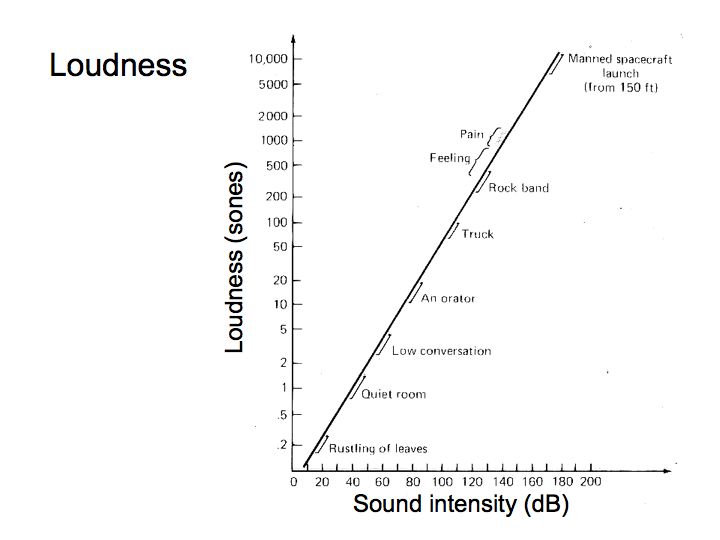
So to the problem: Minecraft seems to have a linear model of sound intensity. And I'm not talking about directional/distant sounds. In the real world, the perception of sound(sones) is logarithmically proportional to the intensity of sound(dB)(attached plot). A general rule of thumb would be: to make something sound 2x louder, we must increase the power by about a factor of 10. After some testing it occured to me, that the sound volume sliders don't really seem to change the perceived sound by their value. To illustrate: place a jukebox, stand next to it and play a music disc, then change the setting for jukebox/noteblock volume from 100% to 50%. It doesn't really sound like "2x quieter", does it? Maybe like ~80% the starting volume. What seems to be actually "2x quiter" is value ~7%. Not something I would expect. Why is it annoying? First of all: try setting the volume to 1% - still pretty easy to hear. Second: I don't want to meddle in windows sound mixer each time I want to change the volume in game.
In conclusion: test it (and maybe other aspects of sound in game like MC-71552), check if it occurs to you as it occurs to me (and by check I mean ask others about their opinion and collect the data from many people) and give feedback.
And
herethe dB to sones(perceived loudness) graph:
The following problem might be subjective and depend on other software and hardware (but shouldn't).
So to the problem: Minecraft seems to have a linear model of sound intensity. And I'm not talking about directional/distant sounds. In the real world, the perception of sound(sones) is logarithmically proportional to the intensity of sound(dB)(attached plot). A general rule of thumb would be: to make something sound 2x louder, we must increase the power by about a factor of 10. After some testing it occured to me, that the sound volume sliders don't really seem to change the perceived sound by their value. To illustrate: place a jukebox, stand next to it and play a music disc, then change the setting for jukebox/noteblock volume from 100% to 50%. It doesn't really sound like "2x quieter", does it? Maybe like ~80% the starting volume. What seems to be actually "2x quiter" is value ~7%. Not something I would expect. Why is it annoying? First of all: try setting the volume to 1% - still pretty easy to hear. Second: I don't want to meddle in windows sound mixer each time I want to change the volume in game.
In conclusion: test it (and maybe other aspects of sound in game like MC-71552), check if it occurs to you as it occurs to me (and by check I mean ask others about their opinion and collect the data from many people) and give feedback.
And in attachments the dB to sones(perceived loudness) graph:
Redstone wire behaves differently in the setup from the attached picture. The case with green concrete is working as expected while the orange one is an unexpected behavior. Tested along both x and z axis.
In both cases the redstone on green/orange concrete has power 1 and is oriented towards the torch. In green case the torch is disabled as expected, but in orange case, where the orange block is strong powered the torch does not turn off (even if the torch block is updated). Turning the redstone on orange block into dot by destroying redstone on yellow block with torch disables the redstone as intended. Turning it into redstone dot by placing the opaque block above it (blue concrete in second attachment) will BUD the torch. Placing the redstone on the pink concrete as in the third attached picture fixes the problem.
Also happens in 1.14.4
@Edit After some research it seems to be a duplicate of
MC-176696
Redstone wire behaves differently in the setup from the attached picture. The case with green concrete is working as expected while the orange one is an unexpected behavior. Tested along both x and z axis.
In both cases the redstone on green/orange concrete has power 1 and is oriented towards the torch. In green case the torch is disabled as expected, but in orange case, where the orange block is strong powered the torch does not turn off (even if the torch block is updated). Turning the redstone on orange block into dot by destroying redstone on yellow block with torch disables the redstone as intended. Turning it into redstone dot by placing the opaque block above it (blue concrete in second attachment) will BUD the torch. Placing the redstone on the pink concrete as in the third attached picture fixes the problem.
Also happens in 1.14.4
@Edit After some research it seems to be a duplicate of
MC-176696Redstone wire behaves differently in the setup from the attached picture. The case with green concrete is working as expected while the orange one is an unexpected behavior. Tested along both x and z axis.
In both cases the redstone on green/orange concrete has power 1 and is oriented towards the torch. In green case the torch is disabled as expected, but in orange case, where the orange block is strong powered the torch does not turn off (even if the torch block is updated). Turning the redstone on orange block into dot by destroying redstone on yellow block with torch disables the redstone as intended. Turning it into redstone dot by placing the opaque block above it (blue concrete in second attachment) will BUD the torch. Placing the redstone on the pink concrete as in the third attached picture fixes the problem.
Also happens in 1.14.4
@Edit After some research it seems to be a duplicate of
MC-8645@Edit2 Seems to be resolved in 20w18a
Redstone wire behaves differently in the setup from the attached picture. The case with green concrete is working as expected while the orange one is an unexpected behavior. Tested along both x and z axis.
In both cases the redstone on green/orange concrete has power 1 and is oriented towards the torch. In green case the torch is disabled as expected, but in orange case, where the orange block is strong powered the torch does not turn off (even if the torch block is updated). Turning the redstone on orange block into dot by destroying redstone on yellow block with torch disables the redstone as intended. Turning it into redstone dot by placing the opaque block above it (blue concrete in second attachment) will BUD the torch. Placing the redstone on the pink concrete as in the third attached picture fixes the problem.
Also happens in 1.14.4
@Edit After some research it seems to be a duplicate of
MC-8645@Edit2 Seems to be resolved in 20w18a
Redstone wire behaves differently in the setup from the attached picture. The case with green concrete is working as expected while the orange one is an unexpected behavior. Tested along both x and z axis.
In both cases the redstone on green/orange concrete has power 1 and is oriented towards the torch. In green case the torch is disabled as expected, but in orange case, where the orange block is strong powered the torch does not turn off (even if the torch block is updated). Turning the redstone on orange block into dot by destroying redstone on yellow block with torch disables the redstone as intended. Turning it into redstone dot by placing the opaque block above it (blue concrete in second attachment) will BUD the torch. Placing the redstone on the pink concrete as in the third attached picture fixes the problem.
Also happens in 1.14.4
@Edit After some research it seems to be a duplicate of
MC-8645@Edit2 Seems to be resolved in 20w18a
Has some improper key and pointer capturing on Linux. Here are examples of usability issues:
- Can't take screenshots under Ubuntu 22.04 with the system's gnome screenshot tool. Either PrintScreen key is completely captured (thus not triggering Ubuntu's screenshot utility) or unity pauses, opens the pause menu and loses focus without opening screeshot tool
- When using Ubuntu's "Auto hide Dock", rotating quickly to the left (moving muse quickly left) in the game causes the dock to reappear, even though there is no cursor visible.
- While debugging minecraft, for example when debugging mods, minecraft grabs exclusive use of a cursor, and doesn't give it up. This causes the issue such as https://github.com/minecraft-dev/MinecraftDev/issues/132.
- Trying to press the Activity shortcut (windows/super key) does nothing when the game isn't paused.
Based on the following video:
https://youtu.be/Rt_hy6FF_P4?si=8JOcj_Cb2Akf0aZa&t=1064It seems like the azalea sapling has 4 collision boxes for the crown, where 1 would suffice. Similar issues seem to be present for other blocks such as hoppers, anvils and cauldrons.
still happens in 1.15.2.
and 20w18a
! Seems to be resolved in 20w18a.
affects 1.16.2-pre1
Confirmed, can reproduce on 1.16.2-pre1. (It may be a copy of

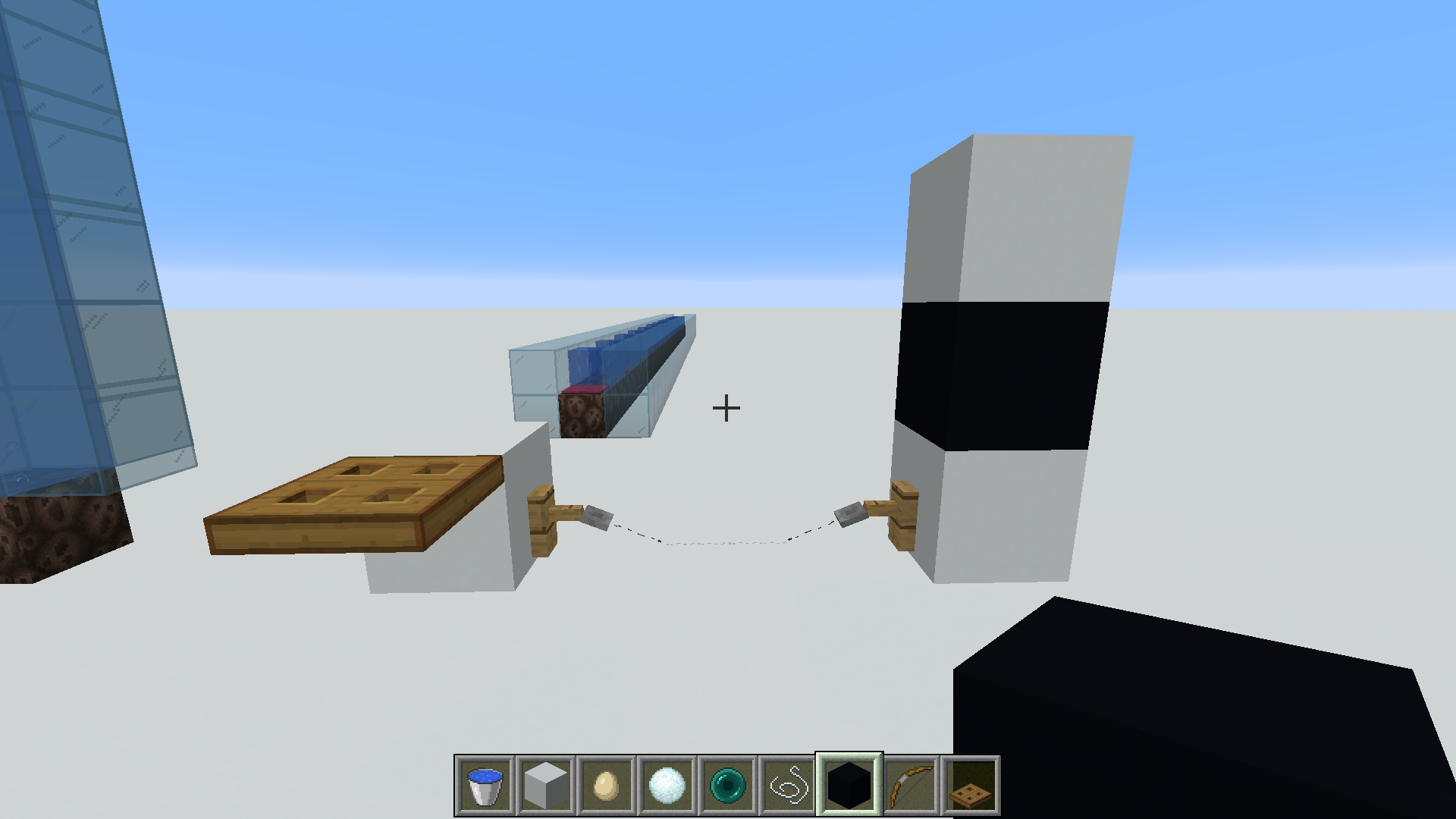
MC-92875, but sometimes even bigger items such as arrows flying at relatively lower velocities don't get registerd). The easiest method to replicate is to create a 1-long floating tripwire contraption and throw snowballs/eggs/pearls straight down(or slightly angled). It's relatively easy to trigger this bug, when throwing from >2 blocks above. Try to move a little up or down. Here is my setup to reproduce (Aiming at the farther edge):Valid hack but not a solution to the problem.
It's also (still) present on Linux unfortunately :/ Realoding with F3+T works as a workaround... but that's not something I'd like to do. Is there a corresponding ticket for Linux?
I'm running PulseAudio (default on Ubuntu 20.04).
dock setup is "auto hide dock" set to ON and "panel mode" set to OFF (it displays a floating-dock). Remember, that you also need a native gnome "screenshot" keybind bound to "PrintScreen" (I'm not sure what do you mean by "don't have setup for dock"?).