Game fails to switch the audio output from one device to another after the game has started (from title screen)
This ticket includes switching between all types of audio devices, not just headphones.
To work around the issue, you can manually reload sounds (and all other resources) with F3+T.
The game fails to switch audio outputs, meaning that headphones cannot start or stop being used after game start.
After the game start, plugging in the headphones should have audio going through the headphones. Unplugging them should have audio going through the speakers (Unless, the default speakers say otherwise).
After plugging (or unplugging) headphones, no sound can be heard because the sound is still going to the jack. (or still not going to the jack. The Computer OS detects the headphones muting the speakers, which is normal operation)
Reproduction steps
No audio through headphones
- Start minecraft with no headphones in headphone jack*
- Plug headphones into headphone jack* (title screen or in-game)
*Headphones can be typical audio jack or USB
No audio through speakers
- Start minecraft with headphones in headphone jack*
- Unplug headphones from headphone jack* (title screen or in-game)
*Headphones can be typical audio jack or USB
I'm unaware if this problem can be caused from the launcher.
Workaround
See LWJGL forum post:
In the meantime, you could try fixing this with a virtual audio device. I'm not sure what's available on Linux/PulseAudio, but it's certainly possible on Windows. You create a virtual audio device and configure it as the default. It's what Minecraft/OpenAL Soft will use to output audio. Then you configure the virtual device to forward any audio to the real audio device of your choice. You should then be able to change the downstream device, on the fly, without breaking Minecraft/OpenAL Soft.
Suggested fix
See LWJGL forum post:
What could be done to resolve this? Suggestions:

- Minecraft regularly queries alcGetInteger(device, ALC_CONNECTED), via the ALC_EXT_disconnect extension. If it returns ALC_FALSE, it automatically recreates the audio context.
- Minecraft regularly queries alcGetString(NULL, ALC_DEFAULT_ALL_DEVICES_SPECIFIER). This returns a string that describes the default audio device. If it changes, it automatically recreates the audio context.
- Minecraft queries ALC_ALL_DEVICES_SPECIFIER (also regularly updates it) and displays the list of available audio devices. Instead of changing the default audio device from the OS settings, users can change the audio device used by Minecraft itself. This is the simplest and most robust solution. I don't remember a PC game that doesn't have such an option in its audio settings.
Environment
Windows 7 Home Premium x64
Linked Issues
is duplicated by96
 MC-19443Switching default sound output device while having Minecraft open doesn't change sound output until launcher restart.InvalidMC-25528Minecraft does not allow output of audio to change device..DuplicateMC-26748No sound in usb headset on LinuxDuplicateMC-37397Switching sound devices results in no sound until MC restarts.DuplicateMC-44971Sound does not work when switching audio ouptutDuplicateMC-49786Sound output doesn't update when changing playback deviceDuplicateMC-56067Minecraft Does not update to default audio deviceDuplicateMC-58737Sound does not work when changing default sound devicesDuplicateMC-58820Default playback device does not update if changed while Minecraft is runningDuplicateMC-64258Must restart Minecraft if plugging in headphones to hear soundDuplicateMC-67753Game requires restart when connecting USB audio device.DuplicateMC-70760Doesn't change audio outputDuplicateMC-79960Music Stops Playing DuplicateMC-106407Audio sometimes doesn't workDuplicateMC-112308Can't play sound when I plug off my earphones and plug in it againDuplicateMC-127865Standard audio device change gets ignoredDuplicateMC-135302Changing output device in Windows doesn't switch sound in Minecraft DuplicateMC-141760Sounds need to be reloaded if the audio output changesDuplicateMC-145480Audio doesnt switch inputDuplicateMC-149678Has no sound after changing the output deviceDuplicateMC-149815Sounds will not play upon disconnecting and then reconnecting an audio device.DuplicateMC-150159sound not workigDuplicateMC-150573Sound lost when changing outputDuplicateMC-154333sound gets off when changing audio output deviceDuplicateMC-156296Sounds not transferring to headphones if plugged in during game-sessionDuplicateMC-156640Sound turning offDuplicateMC-161623No sound after connecting to Bluetooth EarbudsDuplicateMC-166158Taking out audio devices and plugging them back in will cause the sound to be disabled DuplicateMC-167366can't hear music or soundDuplicateMC-167493No audio in 1.15DuplicateMC-172621Audio stops working after audio devices are changedDuplicateMC-173698Minecraft stops outputting sounds after I connect a new audio device.DuplicateMC-175659No Sound After Computer SleepsDuplicateMC-176347Sounds don't workDuplicateMC-178597Sound problemsDuplicateMC-180869Audio output not changingDuplicateMC-182237Headphones won't workDuplicateMC-182373Sound IssueDuplicateMC-182425Sound stops after PC comes back from SleepDuplicateMC-184716No Sound after switching audio device on WindowsDuplicateMC-185507Audio IssuesDuplicateMC-187596Does not respect changing system audio output device while running (Linux)DuplicateMC-188305Invalid sound behaviour when changed sound output deviceDuplicateMC-188312Audio does not switch to/from USB audio adapter when said adapter is plugged in/unplugged.DuplicateMC-191502Sound doesnt switches if I switch my sound deviceDuplicateMC-192860Sound bound to one output deviceDuplicateMC-193259Minecraft Audio doesn't play if speakers or headphones are disconnected and reconnected DuplicateMC-194571Fails to Update Audio DevicesDuplicateMC-197728PLEASE FIX ITDuplicateMC-198058No sound after re-connecting deviceDuplicateMC-198262When an audio input is changedDuplicateMC-198757Minecraft audio output is not changing when changing system outputDuplicateMC-200031Sound disappears when turning off, then on bluetooth speakers/headphonesDuplicateMC-200333No Sound When Audio Device Gets SwitchedDuplicateMC-201176Minecraft's Default Audio Device Not Able To Be Changed While RunningDuplicateMC-201258False audio when switching output devices in same session.DuplicateMC-201581Unable to change Minecraft audio device in game or OSDuplicateMC-202915Audio output switchDuplicateMC-203030Audio does not switch to headphones on after game was started with speakers attached.DuplicateMC-203156Connecting a bluetooth headset after the game has already been launched causes no sound to be outputDuplicateMC-203525A audio source problemDuplicateMC-205470Re-entering the game after locking the screen will make all sounds disappearDuplicateMC-207128The sound doesn't work when changing output devices.DuplicateMC-208007If you disconnect Bluetooth headphones from your computer, Minecraft doesn't make any sound, unless you close it then reopen it DuplicateMC-208773When a audio switches sound is mutedDuplicateMC-210431Minecraft sound doesn't output to USB Bluetooth headset when headset connects while Minecraft is already runningDuplicateMC-213692Sound cuts off eventuallyDuplicateMC-2145801.16.5 Audio BugDuplicateMC-214948Headphone Audio IssueDuplicateMC-215476Game audio not playing through external speakersDuplicateMC-216066Headphones/headsets problemDuplicateMC-222906audio stops when reconnecting headphonesDuplicateMC-222908Minecraft Audio Device Update bugDuplicateMC-224449Audio device switch causes no sound.DuplicateMC-225293cant hear game when wired headset is unpluggedDuplicateMC-226356Sound ProblemsDuplicateMC-227304Audio does not switch from headphones to speaker audio if unplugged an vice versaDuplicateMC-228082Audio not going throughDuplicateMC-229266Sound doesn't work, after headphones or sound device get unpluggedDuplicateMC-230141Audio does not switch from headphones to speaker audio if unplugged an vice versaDuplicateMC-232430SoundDuplicateMC-233510audio stops working after changing default output from speakers to headphones and vice versa DuplicateMC-233552Minecraft sound does not change when a new output device is selected.DuplicateMC-234070Minecraft goes silent when Bluetooth headphones switch offDuplicateMC-235268audio doesnt work when new output is connectedDuplicateMC-235597Audio stops working if you change/remove your audio outputDuplicateMC-235737Audio is completely gone when an audio source is not available, EXCEPT WHEN THE GAME IS RESTARTEDDuplicateMC-236011No audio after exiting sleep modeDuplicateMC-236187Sound stops playing when output changedDuplicateMC-236282Game sound desn't update when connecting earphones.DuplicateMC-237041Headphones won't work unless you reopen Minecraft:JavaEdition on computerDuplicateMC-238335Randomly or when I unplug my headset and plug it back in no matter what i try the game refuses to play any sounds.DuplicateMC-240996game sound stops workingDuplicateMC-242409Doesn't connect to latest deviceDuplicateMC-242410It doesn't play any soundDuplicateMC-242417No Sound After Removing HeadphonesDuplicate
Created Issue:
Game fails to switch the audio output from headphones to speakers or speakers to headphones after the game has started (from title screen)
The game fails to switch audio outputs, meaning that headphones cannot start or stop being used after game start.
After the game start, plugging in the headphones should have audio going through the headphones. Unplugging them should have audio going through the speakers (Unless, the default speakers say otherwise).
After plugging (or unplugging) headphones, no sound can be heard because the sound is still going to the jack. (or still not going to the jack. The Computer OS detects the headphones muting the speakers, which is normal operation)
Steps to Reproduce (no audio through headphones):
1. Start minecraft with no headphones in headphone jack*
2. Plug headphones into headphone jack* (title screen or in-game)
*Headphones can be typical audio jack or USBSteps to Reproduce (no audio through speakers):
1. Start minecraft with headphones in headphone jack*
2. Unplug headphones from headphone jack* (title screen or in-game)
*Headphones can be typical audio jack or USBI'm unaware if this problem can be caused from the launcher.
Environment
Windows 7 Home Premium x64
Linked Issues
is duplicated by1
TRASH-36343

is duplicated by
Game fails to switch the audio output fromheadphones to speakers or speakers to headphonesafter the game has started (from title screen)Game fails to switch the audio output from one device to another after the game has started (from title screen)
Moderator NoteThis ticket includes switching between all types of audio devices, not just headphones.
The game fails to switch audio outputs, meaning that headphones cannot start or stop being used after game start.
After the game start, plugging in the headphones should have audio going through the headphones. Unplugging them should have audio going through the speakers (Unless, the default speakers say otherwise).
After plugging (or unplugging) headphones, no sound can be heard because the sound is still going to the jack. (or still not going to the jack. The Computer OS detects the headphones muting the speakers, which is normal operation)
Steps to Reproduce (no audio through headphones):
1. Start minecraft with no headphones in headphone jack*
2. Plug headphones into headphone jack* (title screen or in-game)
*Headphones can be typical audio jack or USBSteps to Reproduce (no audio through speakers):
1. Start minecraft with headphones in headphone jack*
2. Unplug headphones from headphone jack* (title screen or in-game)
*Headphones can be typical audio jack or USBI'm unaware if this problem can be caused from the launcher.
is duplicated by

is duplicated by
![[Mojang] Searge (Michael Stoyke)](../../../data/assets/gravatar/searge.png) [Mojang] Searge (Michael Stoyke)
[Mojang] Searge (Michael Stoyke)![[Mod] Torabi](../../../data/assets/gravatar/torabi.png)

is duplicated by
![[Mod] Pokechu22](../../../data/avatars/users/92931.png)
Moderator NoteThis ticket includes switching between all types of audio devices, not just headphones.
To work around the issue, you can manually reload sounds (and all other resources) with F3+T.
The game fails to switch audio outputs, meaning that headphones cannot start or stop being used after game start.
After the game start, plugging in the headphones should have audio going through the headphones. Unplugging them should have audio going through the speakers (Unless, the default speakers say otherwise).
After plugging (or unplugging) headphones, no sound can be heard because the sound is still going to the jack. (or still not going to the jack. The Computer OS detects the headphones muting the speakers, which is normal operation)
Steps to Reproduce (no audio through headphones):
1. Start minecraft with no headphones in headphone jack*
2. Plug headphones into headphone jack* (title screen or in-game)
*Headphones can be typical audio jack or USBSteps to Reproduce (no audio through speakers):
1. Start minecraft with headphones in headphone jack*
2. Unplug headphones from headphone jack* (title screen or in-game)
*Headphones can be typical audio jack or USBI'm unaware if this problem can be caused from the launcher.
is duplicated by
duplicates
duplicates
relates to
![[Mod] violine1101](../../../data/avatars/users/92858.png)
is duplicated by
is duplicated by
is duplicated by
is duplicated by
![[Mod] Asteraoth](../../../data/avatars/users/92886.png)
is duplicated by
is duplicated by
![[Mod] Urielsalis](../../../data/assets/gravatar/urielsalis.jpeg)
is duplicated by
is duplicated by
is duplicated by
is duplicated by
is duplicated by
is duplicated by
![[Mod] tryashtar](../../../data/avatars/users/41963.png)
is duplicated by
is duplicated by
is duplicated by
is duplicated by
![[Bot] Arisa](../../../data/avatars/users/43007.png)
is duplicated by
is duplicated by
is duplicated by

is duplicated by
is duplicated by
![[Mod] NeunEinser](../../../data/avatars/users/39263.png)
is duplicated by
is duplicated by
is duplicated by
is duplicated by
is duplicated by
is duplicated by
is duplicated by
is duplicated by
is duplicated by
is duplicated by
is duplicated by
is duplicated by
is duplicated by
is duplicated by
![[Mojang] Adrian Östergård](../../../data/assets/gravatar/nighter.jpeg) [Mojang] Searge (Michael Stoyke)
[Mojang] Searge (Michael Stoyke) Normal
![[Mod] Chandler](../../../data/assets/gravatar/triwonder81.png)
is duplicated by
is duplicated by
![[Mod] SPGoding](../../../data/avatars/users/44622.png)
Windows 7 Home Premium x64
Windows 7 Home Premium x64
is duplicated by
![[Mod] Greymagic27](../../../data/avatars/users/92875.png)
is duplicated by
is duplicated by
is duplicated by
is duplicated by
is duplicated by
![[Mod] Michael Wobst](../../../data/avatars/users/37868.png)
is duplicated by
is duplicated by

Moderator NoteThis ticket includes switching between all types of audio devices, not just headphones.
To work around the issue, you can manually reload sounds (and all other resources) with F3+T.
The game fails to switch audio outputs, meaning that headphones cannot start or stop being used after game start.
After the game start, plugging in the headphones should have audio going through the headphones. Unplugging them should have audio going through the speakers (Unless, the default speakers say otherwise).
After plugging (or unplugging) headphones, no sound can be heard because the sound is still going to the jack. (or still not going to the jack. The Computer OS detects the headphones muting the speakers, which is normal operation)
Steps to Reproduce (no audio through headphones):
1. Start minecraft with no headphones in headphone jack*
2. Plug headphones into headphone jack* (title screen or in-game)
*Headphones can be typical audio jack or USBSteps to Reproduce (no audio through speakers):
1. Start minecraft with headphones in headphone jack*
2. Unplug headphones from headphone jack* (title screen or in-game)
*Headphones can be typical audio jack or USBI'm unaware if this problem can be caused from the launcher.
Moderator NoteThis ticket includes switching between all types of audio devices, not just headphones.
To work around the issue, you can manually reload sounds (and all other resources) with F3+T.
The game fails to switch audio outputs, meaning that headphones cannot start or stop being used after game start.
After the game start, plugging in the headphones should have audio going through the headphones. Unplugging them should have audio going through the speakers (Unless, the default speakers say otherwise).
After plugging (or unplugging) headphones, no sound can be heard because the sound is still going to the jack. (or still not going to the jack. The Computer OS detects the headphones muting the speakers, which is normal operation)
Reproduction steps
No audio through headphones
- Start minecraft with no headphones in headphone jack*
- Plug headphones into headphone jack* (title screen or in-game)
*Headphones can be typical audio jack or USB
No audio through speakers
- Start minecraft with headphones in headphone jack*
- Unplug headphones from headphone jack* (title screen or in-game)
*Headphones can be typical audio jack or USB
I'm unaware if this problem can be caused from the launcher.
Workaround
See LWJGL forum post:
In the meantime, you could try fixing this with a virtual audio device. I'm not sure what's available on Linux/PulseAudio, but it's certainly possible on Windows. You create a virtual audio device and configure it as the default. It's what Minecraft/OpenAL Soft will use to output audio. Then you configure the virtual device to forward any audio to the real audio device of your choice. You should then be able to change the downstream device, on the fly, without breaking Minecraft/OpenAL Soft.
Suggested fix
See LWJGL forum post:
What could be done to resolve this? Suggestions:
- Minecraft regularly queries alcGetInteger(device, ALC_CONNECTED), via the ALC_EXT_disconnect extension. If it returns ALC_FALSE, it automatically recreates the audio context.
- Minecraft regularly queries alcGetString(NULL, ALC_DEFAULT_ALL_DEVICES_SPECIFIER). This returns a string that describes the default audio device. If it changes, it automatically recreates the audio context.
- Minecraft queries ALC_ALL_DEVICES_SPECIFIER (also regularly updates it) and displays the list of available audio devices. Instead of changing the default audio device from the OS settings, users can change the audio device used by Minecraft itself. This is the simplest and most robust solution. I don't remember a PC game that doesn't have such an option in its audio settings.
is duplicated by
is duplicated by
is duplicated by
is duplicated by
is duplicated by
is duplicated by
is duplicated by
is duplicated by
is duplicated by
is duplicated by

is duplicated by
is duplicated by
![[Mod] OcelotOnesie](../../../data/avatars/users/43220.png)
is duplicated by
is duplicated by
is duplicated by
is duplicated by
is duplicated by
is duplicated by
is duplicated by
is duplicated by
is duplicated by
is duplicated by
is duplicated by
is duplicated by
is duplicated by
is duplicated by
is duplicated by
![[Mod] Neko](../../../data/avatars/users/92901.png)
is duplicated by
![[Bot] Piston](../../../data/avatars/users/31202.png)
is duplicated by
is duplicated by
![[Mod] Les3awe](../../../data/avatars/users/79847.png)
relates to
relates to
relates to
is duplicated by
is duplicated by
is duplicated by
Duplicate of MC-44055. This is known behavior. You can work around it by reloading resources (F3+T).
Duplicate of MC-44055
Duplicate of MC-44055
Duplicate of MC-44055. You can use F3+T as a workaround.
Duplicate of MC-44055
Duplicates MC-44055 (won't fix). Look at the mod notice for a workaround of the problem.
Thank you for your report!
We're actually already tracking this issue in MC-44055, so I resolved and linked this ticket as a duplicate.
If you would like to add a vote and any extra information to the main ticket it would be appreciated.
If you haven't already, you might like to make use of the search feature in the future to see if the issue has already been reported.
Quick Links:
📓 Issue Guidelines – 💬 Community Support – 📧 Customer Support – 📖 Game Wiki
The game won't register new audio devices until you restart the game, see MC-44055.
Thank you for your report!
We're actually already tracking this issue in MC-44055, so I resolved and linked this ticket as a duplicate.
However, that ticket has already been resolved. That means that this is not considered a bug and won't be fixed. Please do not leave a comment on the linked ticket.
If you haven't already, you might like to make use of the search feature in the future to see if the issue has already been reported.
Quick Links:
📓 Issue Guidelines – 💬 Community Support – 📧 Customer Support – 📖 Game Wiki
Thank you for your report!
We're actually already tracking this issue in MC-44055, so I resolved and linked this ticket as a duplicate.
However, that ticket has already been resolved. That means that this is not considered a bug and won't be fixed. Please do not leave a comment on the linked ticket.
If you haven't already, you might like to make use of the search feature in the future to see if the issue has already been reported.
Quick Links:
📓 Issue Guidelines – 💬 Community Support – 📧 Customer Support – 📖 Game Wiki
Thank you for your report!
We're actually already tracking this issue in MC-44055, so I resolved and linked this ticket as a duplicate.
However, that ticket has already been resolved. That means that this is not considered a bug and won't be fixed. Please do not leave a comment on the linked ticket.
If you haven't already, you might like to make use of the search feature in the future to see if the issue has already been reported.
Quick Links:
📓 Issue Guidelines – 💬 Community Support – 📧 Customer Support – 📖 Game Wiki
Thank you for your report!
We're actually already tracking this issue in MC-44055, so I resolved and linked this ticket as a duplicate.
However, that ticket has already been resolved. That means that this is not considered a bug and won't be fixed. Please do not leave a comment on the linked ticket.
If you haven't already, you might like to make use of the search feature in the future to see if the issue has already been reported.
Quick Links:
📓 Issue Guidelines – 💬 Community Support – 📧 Customer Support – 📖 Game Wiki
Thank you for your report!
We're actually already tracking this issue in MC-44055, so I resolved and linked this ticket as a duplicate.
If you would like to add a vote and any extra information to the main ticket it would be appreciated.
If you haven't already, you might like to make use of the search feature in the future to see if the issue has already been reported.
Quick Links:
📓 Issue Guidelines – 💬 Community Support – 📧 Customer Support – 📖 Game Wiki
Thank you for your report!
We're actually already tracking this issue in MC-44055, so I resolved and linked this ticket as a duplicate.
However, that ticket has already been resolved. That means that this is not considered a bug and won't be fixed. Please do not leave a comment on the linked ticket.
If you haven't already, you might like to make use of the search feature in the future to see if the issue has already been reported.
Quick Links:
📓 Issue Guidelines – 💬 Community Support – 📧 Customer Support – 📖 Game Wiki
Make sure that your audio device is plugged and working before you start Minecraft, so that it can properly register it when it launches. Minecraft is unable to change the audio device while the game is running, see MC-44055. If you have further issues, it is probably a technical problem on your side. Contact Community Support for help.
Quick Links:
📓 Issue Guidelines – 💬 Community Support – 📧 Customer Support – ✍️ Feedback and Suggestions – 📖 Game Wiki
Thank you for your report!
We're actually already tracking this issue in MC-44055, so I resolved and linked this ticket as a duplicate.
However, that ticket has already been resolved. That means that this is not considered a bug and won't be fixed. Please do not leave a comment on the linked ticket.
If you haven't already, you might like to make use of the search feature in the future to see if the issue has already been reported.
Quick Links:
📓 Issue Guidelines – 💬 Community Support – 📧 Customer Support – ✍️ Feedback and Suggestions – 📖 Game Wiki
Thank you for your report!
We're actually already tracking this issue in MC-44055, so I resolved and linked this ticket as a duplicate.
However, that ticket has already been resolved. That means that this is not considered a bug and won't be fixed. Please do not leave a comment on the linked ticket.
If you haven't already, you might like to make use of the search feature in the future to see if the issue has already been reported.
Quick Links:
📓 Issue Guidelines – 💬 Community Support – 📧 Customer Support – ✍️ Feedback and Suggestions – 📖 Game Wiki
Thank you for your report!
However, this issue is a Duplicate of MC-44055.
Please use the search function in the future to prevent duplicate reports.
Quick Links:
📓 Issue Guidelines – 💬 Community Support – 📧 Customer Support – 📖 Game Wiki
Duplicate of MC-44055 - switching between audio sources is not supported by the game fully - you need to reload the resources to make it work (F3+T).
Quick Links:
📓 Issue Guidelines – 💬 Community Support – 📧 Customer Support – ✍️ Feedback and Suggestions – 📖 Game Wiki
![[Mod] j_p_smith](../../../data/avatars/users/92851.png)
Duplicate of MC-44055.
Yes, see MC-44055.
You can fix it by doing F3+T to reload all resources.
Correct, MC-44055.
This will not be fixed, or is unfixable, see MC-44055.
This will not or cannot be fixed, see MC-44055.

Thank you for your report!
However, we are already tracking this issue, and this report is a Duplicate of MC-44055, which has been marked as Won't Fix - while this behaviour is not desirable, the developers have said that they will not or cannot fix it.
Please use the search function in the future to prevent duplicate reports.
Quick Links:
📓 Issue Guidelines – 🛠 Community Support – 📧 Customer Support – ✍️ Feedback and Suggestions – 📖 Game Wiki
💬 Mojira Subreddit – 💬 Mojira Discord
See MC-44055, Use Ctrl+T.
Thank you for your report!
However, we are already tracking this issue, and this report is a Duplicate of MC-44055, which has been marked as Won't Fix - while this behaviour is not desirable, the developers have said that they will not or cannot fix it.
Please use the search function in the future to prevent duplicate reports.
Quick Links:
📓 Issue Guidelines – 🛠 Community Support – 📧 Customer Support – ✍️ Feedback and Suggestions – 📖 Game Wiki
💬 Mojira Subreddit – 💬 Mojira Discord
Thank you for your report!
We're tracking this issue as MC-44055, so this ticket is being resolved and linked as a duplicate.
That ticket has already been resolved as Won't Fix, which means this is considered a bug but won't be fixed. The description of that ticket or the comments might explain the rationale. Please do not leave a comment on the linked ticket.
If you haven't already, you might like to make use of the search feature to see if the issue has already been mentioned.
Quick Links:
📓 Issue Guidelines – 💬 Community Support – 📧 Customer Support – ✍️ Feedback and Suggestions – 📖 Game Wiki
Duplicate of MC-44055 which is marked as Won't Fix
Thank you for your report!
However, we are already tracking this issue, and this report is a Duplicate of MC-44055, which has been marked as Won't Fix - while this behaviour is not desirable, the developers have said that they will not or cannot fix it.
Please use the search function in the future to prevent duplicate reports.
Quick Links:
📓 Issue Guidelines – 🛠 Community Support – 📧 Customer Support – ✍️ Feedback and Suggestions – 📖 Game Wiki
💬 Mojira Subreddit – 💬 Mojira Discord
Thank you for your report!
However, we are already tracking this issue, and this report is a Duplicate of MC-44055, which has been marked as Won't Fix - while this behaviour is not desirable, the developers have said that they will not or cannot fix it.
Please use the search function in the future to prevent duplicate reports.
Quick Links:
📓 Issue Guidelines – 🛠 Community Support – 📧 Customer Support – ✍️ Feedback and Suggestions – 📖 Game Wiki
💬 Mojira Subreddit – 💬 Mojira Discord
Thank you for your report!
However, we are already tracking this issue, and this report is a Duplicate of MC-44055, which has been marked as Won't Fix - while this behaviour is not desirable, the developers have said that they will not or cannot fix it.
Please use the search function in the future to prevent duplicate reports.
Quick Links:
📓 Issue Guidelines – 🛠 Community Support – 📧 Customer Support – ✍️ Feedback and Suggestions – 📖 Game Wiki
💬 Mojira Subreddit – 💬 Mojira Discord
Thank you for your report!
However, we are already tracking this issue, and this report is a Duplicate of MC-44055, which has been marked as Won't Fix - while this behaviour is not desirable, the developers have said that they will not or cannot fix it.
Just use F3+T.
Please use the search function in the future to prevent duplicate reports.
Quick Links:
📓 Issue Guidelines – 🛠 Community Support – 📧 Customer Support – ✍️ Feedback and Suggestions – 📖 Game Wiki
💬 Mojira Subreddit – 💬 Mojira Discord
Thank you for your report!
However, we are already tracking this issue, and this report is a Duplicate of MC-44055, which is a report that has not been resolved yet.
If you want, you can upvote the parent ticket, and enable watching to receive any updates about it - if you believe you have any information that may be important for this issue, please leave a comment on the parent. Please also use the search function in the future to prevent duplicate reports.
Quick Links:
📓 Issue Guidelines – 🛠 Community Support – 📧 Customer Support – ✍️ Feedback and Suggestions – 📖 Game Wiki
💬 Mojira Subreddit – 💬 Mojira Discord
Thank you for your report!
However, we are already tracking this issue, and this report is a Duplicate of MC-44055, which is a report that has not been resolved yet.
If you want, you can upvote the parent ticket, and enable watching to receive any updates about it - if you believe you have any information that may be important for this issue, please leave a comment on the parent. Please also use the search function in the future to prevent duplicate reports.
Quick Links:
📓 Issue Guidelines – 🛠 Community Support – 📧 Customer Support – ✍️ Feedback and Suggestions – 📖 Game Wiki
💬 Mojira Subreddit – 💬 Mojira Discord
I am unable to change my audio device for Minecraft on Linux Mint 19.3. I expect this issue will affect other OS, as per the bugs I will reference, however I am reporting what I am testing on.
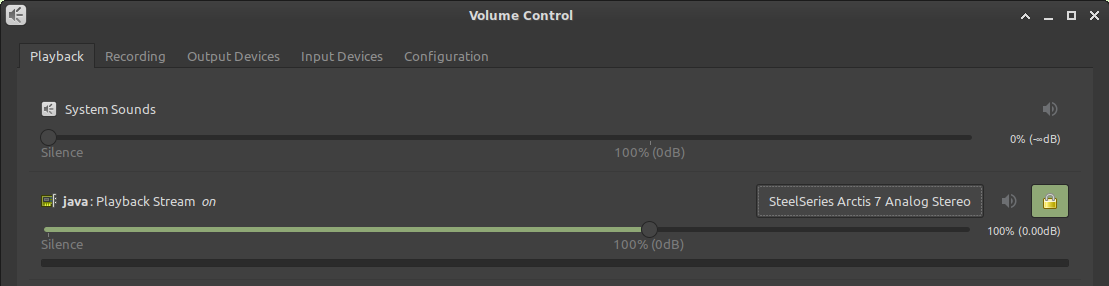
When I go to Volume Control, I have the dropdown menu for audio devices, but selecting any of them does nothing.
See this forum thread for more details on the troubleshooting I've performed: https://forums.linuxmint.com/viewtopic.php?f=47&t=331982&p=1898021
According to MC-26748 and MC-25528, this was previously reported in 2013 as an LWJGL issue and was not pursued. The workaround in MC-26748 of downgrading the LWJGL version to 2.8.0 isn't an acceptable solution, as the 2.x stream of this library ended in 2015.
I raised this via the LWJGL forums. Please see this thread for feedback from LWJGL developers: http://forum.lwjgl.org/index.php?topic=7081.0:
What could be done to resolve this? Suggestions: - Minecraft regularly queries alcGetInteger(device, ALC_CONNECTED), via the ALC_EXT_disconnect extension. If it returns ALC_FALSE, it automatically recreates the audio context. - Minecraft regularly queries alcGetString(NULL, ALC_DEFAULT_ALL_DEVICES_SPECIFIER). This returns a string that describes the default audio device. If it changes, it automatically recreates the audio context. - Minecraft queries ALC_ALL_DEVICES_SPECIFIER (also regularly updates it) and displays the list of available audio devices. Instead of changing the default audio device from the OS settings, users can change the audio device used by Minecraft itself. This is the simplest and most robust solution. I don't remember a PC game that doesn't have such an option in its audio settings.
MC-44055 is still open as unresolved since 2014. There is a mod comment that it was resolved as "Won't Fix" as F3+T is an acceptable workaround. Please note that in this scenario you are unable to change the audio device in the OS to force an update through F3+T.
Requesting the following:
1. Confirmation that the issue is with Minecraft Java Edition integration either with OpenAL Soft or LWJGL. Issue should be reproduced and confirmed where the problem exists, and a fix developed. This issue has persisted since 2013.
2. Feature Enhancement Request to have Minecraft Java Edition allow the user to use a "Default" audio device, or specify the audio device in the game client.
3. Feature Enhancement Request to have Minecraft Java Edition be able to change the audio device without having to use F3+T to reload resource packs. Please revisit MC-44055 for this request, as it is still open.
You mentioned it in your report already: This is a duplicate of MC-44055, which was recently reopened by a developer.
Please put them into a comment on MC-44055.

Thank you for your report!
However, we are already tracking this issue, and this report is a Duplicate of MC-44055, which is a report that has not been resolved yet.
If you want, you can upvote the parent ticket, and enable watching to receive any updates about it - if you believe you have any information that may be important for this issue, please leave a comment on the parent. Please also use the search function in the future to prevent duplicate reports.
Quick Links:
📓 Issue Guidelines – 🛠 Community Support – 📧 Customer Support – ✍️ Feedback and Suggestions – 📖 Game Wiki
💬 Mojira Subreddit – 💬 Mojira Discord
Thank you for your report!
However, we are already tracking this issue, and this report is a Duplicate of MC-44055, which is a report that has not been resolved yet.
If you want, you can upvote the parent ticket, and enable watching to receive any updates about it - if you believe you have any information that may be important for this issue, please leave a comment on the parent. Please also use the search function in the future to prevent duplicate reports.
Quick Links:
📓 Issue Guidelines – 🛠 Community Support – 📧 Customer Support – ✍️ Feedback and Suggestions – 📖 Game Wiki
💬 Mojira Subreddit – 💬 Mojira Discord
Thank you for your report!
We're tracking this issue in MC-44055, so this ticket is being resolved and linked as a duplicate.
If you would like to add a vote and any extra information to the main ticket it would be appreciated.
If you haven't already, you might like to make use of the search feature to see if the issue has already been mentioned.
Quick Links:
📓 Bug Tracker Guidelines – 💬 Community Support – 📧 Mojang Support
📓 Project Summary – ✍️ Feedback and Suggestions – 📖 Game Wiki
Thank you for your report!
We're tracking this issue in MC-44055, so this ticket is being resolved and linked as a duplicate.
If you would like to add a vote and any extra information to the main ticket it would be appreciated.
If you haven't already, you might like to make use of the search feature to see if the issue has already been mentioned.
Quick Links:
📓 Bug Tracker Guidelines – 💬 Community Support – 📧 Mojang Support
📓 Project Summary – ✍️ Feedback and Suggestions – 📖 Game Wiki
![[Mod] Avoma](../../../data/avatars/users/86198.png)
Hey there!
This issue has already been reported before and is a duplicate of MC-44055. Just to let you know, this report was later marked as Won't Fix. Visit the report for further details.
![[Mod] markderickson](../../../data/avatars/users/18946.svg)
Hello! Does MC-44055 describe your issue?
Hey there!
This issue has already been reported before and is a duplicate of MC-44055. Just to let you know, this report was later marked as Won't Fix. Visit the report for further details.
Thank you for your report!
We're tracking this issue in MC-44055, so this ticket is being resolved and linked as a duplicate.
If you would like to add a vote and any extra information to the main ticket it would be appreciated.
If you haven't already, you might like to make use of the search feature to see if the issue has already been mentioned.
Quick Links:
📓 Bug Tracker Guidelines – 💬 Community Support – 📧 Mojang Support
📓 Project Summary – ✍️ Feedback and Suggestions – 📖 Game Wiki
Did you change your audio output device while Minecraft was running? Does it work properly after restarting? Does MC-44055 describe your issue?
Does MC-44055 describe the issue you are experiencing here?
This is most likely a windows issue, and not something Mojang can solve. Please see MC-44055 for possible workarounds.
Thank you for your report!
We're tracking this issue in MC-44055, so this ticket is being resolved and linked as a duplicate.
If you would like to add a vote and any extra information to the main ticket it would be appreciated.
If you haven't already, you might like to make use of the search feature to see if the issue has already been mentioned.
Quick Links:
📓 Bug Tracker Guidelines – 💬 Community Support – 📧 Mojang Support
📓 Project Summary – ✍️ Feedback and Suggestions – 📖 Game Wiki
Thank you for your report!
We're tracking this issue in MC-44055, so this ticket is being resolved and linked as a duplicate.
If you would like to add a vote and any extra information to the main ticket it would be appreciated.
If you haven't already, you might like to make use of the search feature to see if the issue has already been mentioned.
Quick Links:
📓 Bug Tracker Guidelines – 💬 Community Support – 📧 Mojang Support
📓 Project Summary – ✍️ Feedback and Suggestions – 📖 Game Wiki
Thank you for your report!
We're tracking this issue in MC-44055, so this ticket is being resolved and linked as a duplicate.
If you would like to add a vote and any extra information to the main ticket it would be appreciated.
If you haven't already, you might like to make use of the search feature to see if the issue has already been mentioned.
Quick Links:
📓 Bug Tracker Guidelines – 💬 Community Support – 📧 Mojang Support
📓 Project Summary – ✍️ Feedback and Suggestions – 📖 Game Wiki
Thank you for your report!
We're tracking this issue in MC-44055, so this ticket is being resolved and linked as a duplicate.
If you would like to add a vote and any extra information to the main ticket it would be appreciated.
If you haven't already, you might like to make use of the search feature to see if the issue has already been mentioned.
Quick Links:
📓 Bug Tracker Guidelines – 💬 Community Support – 📧 Mojang Support
📓 Project Summary – ✍️ Feedback and Suggestions – 📖 Game Wiki
Thank you for your report!
We're tracking this issue in MC-44055, so this ticket is being resolved and linked as a duplicate.
If you would like to add a vote and any extra information to the main ticket it would be appreciated.
If you haven't already, you might like to make use of the search feature to see if the issue has already been mentioned.
Quick Links:
📓 Bug Tracker Guidelines – 💬 Community Support – 📧 Mojang Support
📓 Project Summary – ✍️ Feedback and Suggestions – 📖 Game Wiki
Thank you for your report!
We're tracking this issue in MC-44055, so this ticket is being resolved and linked as a duplicate.
If you would like to add a vote and any extra information to the main ticket it would be appreciated.
If you haven't already, you might like to make use of the search feature to see if the issue has already been mentioned.
Quick Links:
📓 Bug Tracker Guidelines – 💬 Community Support – 📧 Mojang Support
📓 Project Summary – ✍️ Feedback and Suggestions – 📖 Game Wiki
– I am a bot. This action was performed automatically! Please report any issues on Discord or Reddit
Thank you for your report!
We're tracking this issue in MC-44055, so this ticket is being resolved and linked as a duplicate.
If you would like to add a vote and any extra information to the main ticket it would be appreciated.
If you haven't already, you might like to make use of the search feature to see if the issue has already been mentioned.
Quick Links:
📓 Bug Tracker Guidelines – 💬 Community Support – 📧 Mojang Support
📓 Project Summary – ✍️ Feedback and Suggestions – 📖 Game Wiki
– I am a bot. This action was performed automatically! Please report any issues on Discord or Reddit
Does MC-44055 describe your issue?
Duplicate of MC-44055.
Thank you for your report!
We're tracking this issue in MC-44055, so this ticket is being resolved and linked as a duplicate.
If you would like to add a vote and any extra information to the main ticket it would be appreciated.
If you haven't already, you might like to make use of the search feature to see if the issue has already been mentioned.
Quick Links:
📓 Bug Tracker Guidelines – 💬 Community Support – 📧 Mojang Support
📓 Project Summary – ✍️ Feedback and Suggestions – 📖 Game Wiki
– I am a bot. This action was performed automatically! Please report any issues on Discord or Reddit
Most likely a duplicate of MC-44055.
Thank you for your report!
We're tracking this issue in MC-44055, so this ticket is being resolved and linked as a duplicate.
If you would like to add a vote and any extra information to the main ticket it would be appreciated.
If you haven't already, you might like to make use of the search feature to see if the issue has already been mentioned.
Quick Links:
📓 Bug Tracker Guidelines – 💬 Community Support – 📧 Mojang Support
📓 Project Summary – ✍️ Feedback and Suggestions – 📖 Game Wiki
Duplicate of MC-44055.
Thank you for your report!
We're tracking this issue in MC-44055, so this ticket is being resolved and linked as a duplicate.
If you would like to add a vote and any extra information to the main ticket it would be appreciated.
If you haven't already, you might like to make use of the search feature to see if the issue has already been mentioned.
Quick Links:
📓 Bug Tracker Guidelines – 💬 Community Support – 📧 Mojang Support
📓 Project Summary – ✍️ Feedback and Suggestions – 📖 Game Wiki
– I am a bot. This action was performed automatically! If you think it was incorrect, please notify us on Discord or Reddit
Thank you for your report!
We're tracking this issue in MC-44055, so this ticket is being resolved and linked as a duplicate.
If you would like to add a vote and any extra information to the main ticket it would be appreciated.
If you haven't already, you might like to make use of the search feature to see if the issue has already been mentioned.
Quick Links:
📓 Bug Tracker Guidelines – 💬 Community Support – 📧 Mojang Support
📓 Project Summary – ✍️ Feedback and Suggestions – 📖 Game Wiki
Thank you for your report!
We're tracking this issue in MC-44055, so this ticket is being resolved and linked as a duplicate.
If you would like to add a vote and any extra information to the main ticket it would be appreciated.
If you haven't already, you might like to make use of the search feature to see if the issue has already been mentioned.
Quick Links:
📓 Bug Tracker Guidelines – 💬 Community Support – 📧 Mojang Support
📓 Project Summary – ✍️ Feedback and Suggestions – 📖 Game Wiki
– I am a bot. This action was performed automatically! If you think it was incorrect, please notify us on Discord or Reddit
Does MC-44055 describe your issue?
Thank you for your report!
We're tracking this issue in MC-44055, so this ticket is being resolved and linked as a duplicate.
If you would like to add a vote and any extra information to the main ticket it would be appreciated.
If you haven't already, you might like to make use of the search feature to see if the issue has already been mentioned.
Quick Links:
📓 Bug Tracker Guidelines – 💬 Community Support – 📧 Mojang Support
📓 Project Summary – ✍️ Feedback and Suggestions – 📖 Game Wiki
Thank you for your report!
We're tracking this issue in MC-44055, so this ticket is being resolved and linked as a duplicate.
If you would like to add a vote and any extra information to the main ticket it would be appreciated.
If you haven't already, you might like to make use of the search feature to see if the issue has already been mentioned.
Quick Links:
📓 Bug Tracker Guidelines – 💬 Community Support – 📧 Mojang Support
📓 Project Summary – ✍️ Feedback and Suggestions – 📖 Game Wiki
Did you happen to switch audio output devices? (MC-44055)

Does MC-44055 fix the problem? Please read moderator note.
Duplicate of MC-44055.
Thank you for your report!
We're tracking this issue in MC-44055, so this ticket is being resolved and linked as a duplicate.
If you would like to add a vote and any extra information to the main ticket it would be appreciated.
If you haven't already, you might like to make use of the search feature to see if the issue has already been mentioned.
Quick Links:
📓 Bug Tracker Guidelines – 💬 Community Support – 📧 Mojang Support
📓 Project Summary – ✍️ Feedback and Suggestions – 📖 Game Wiki
– I am a bot. This action was performed automatically! The ticket was resolved by one of our moderators, and I left this message to give more information to you.
Switching audio output devices whilst the game is running will cause sound not to be heard until you relaunch the game. (MC-44055)
Hey there! This is a duplicate of MC-44055.
Duplicate of MC-44055.
Thank you for your report!
We're tracking this issue in MC-44055, so this ticket is being resolved and linked as a duplicate.
If you would like to add a vote and any extra information to the main ticket it would be appreciated.
If you haven't already, you might like to make use of the search feature to see if the issue has already been mentioned.
Quick Links:
📓 Bug Tracker Guidelines – 💬 Community Support – 📧 Mojang Support
📓 Project Summary – ✍️ Feedback and Suggestions – 📖 Game Wiki
– I am a bot. This action was performed automatically! The ticket was resolved by one of our moderators, and I left this message to give more information to you.
Thank you for your report!
We're tracking this issue in MC-44055, so this ticket is being resolved and linked as a duplicate.
If you would like to add a vote and any extra information to the main ticket it would be appreciated.
If you haven't already, you might like to make use of the search feature to see if the issue has already been mentioned.
Quick Links:
📓 Bug Tracker Guidelines – 💬 Community Support – 📧 Mojang Support
📓 Project Summary – ✍️ Feedback and Suggestions – 📖 Game Wiki
– I am a bot. This action was performed automatically! The ticket was resolved by one of our moderators, and I left this message to give more information to you.
Duplicate of MC-44055. 
Does MC-44055 describe your problem? I don't have much information to go on so that's my best guess.
Thank you for your report!
We're tracking this issue in MC-44055, so this ticket is being resolved and linked as a duplicate.
If you would like to add a vote and any extra information to the main ticket it would be appreciated.
If you haven't already, you might like to make use of the search feature to see if the issue has already been mentioned.
Quick Links:
📓 Bug Tracker Guidelines – 💬 Community Support – 📧 Mojang Support
📓 Project Summary – ✍️ Feedback and Suggestions – 📖 Game Wiki
– I am a bot. This action was performed automatically! The ticket was resolved by one of our moderators, and I left this message to give more information to you.
Duplicates MC-44055
Does MC-44055 describe your issue?
Duplicate of MC-44055.
Thank you for your report!
We're tracking this issue in MC-44055, so this ticket is being resolved and linked as a duplicate.
If you would like to add a vote and any extra information to the main ticket it would be appreciated.
If you haven't already, you might like to make use of the search feature to see if the issue has already been mentioned.
Quick Links:
📓 Bug Tracker Guidelines – 💬 Community Support – 📧 Mojang Support
📓 Project Summary – ✍️ Feedback and Suggestions – 📖 Game Wiki
– I am a bot. This action was performed automatically! The ticket was resolved by one of our moderators, and I left this message to give more information to you.

Duplicate of MC-44055.
Thank you for your report!
We're tracking this issue in MC-44055, so this ticket is being resolved and linked as a duplicate.
If you would like to add a vote and any extra information to the main ticket it would be appreciated.
If you haven't already, you might like to make use of the search feature to see if the issue has already been mentioned.
Quick Links:
📓 Bug Tracker Guidelines – 💬 Community Support – 📧 Mojang Support
📓 Project Summary – ✍️ Feedback and Suggestions – 📖 Game Wiki
– I am a bot. This action was performed automatically! The ticket was resolved by one of our moderators, and I left this message to give more information to you.
Duplicate of MC-44055.
Thank you for your report!
We're tracking this issue in MC-44055, so this ticket is being resolved and linked as a duplicate.
If you would like to add a vote and any extra information to the main ticket it would be appreciated.
If you haven't already, you might like to make use of the search feature to see if the issue has already been mentioned.
Quick Links:
📓 Bug Tracker Guidelines – 💬 Community Support – 📧 Mojang Support
📓 Project Summary – ✍️ Feedback and Suggestions – 📖 Game Wiki
– I am a bot. This action was performed automatically! The ticket was resolved by one of our moderators, and I left this message to give more information to you.
![[Mod] ampolive](../../../data/avatars/users/18949.svg)
Duplicate of MC-44055.
Thank you for your report!
We're tracking this issue in MC-44055, so this ticket is being resolved and linked as a duplicate.
If you would like to add a vote and any extra information to the main ticket it would be appreciated.
If you haven't already, you might like to make use of the search feature to see if the issue has already been mentioned.
Quick Links:
📓 Bug Tracker Guidelines – 💬 Community Support – 📧 Mojang Support
📓 Project Summary – ✍️ Feedback and Suggestions – 📖 Game Wiki
– I am a bot. This action was performed automatically! The ticket was resolved by one of our moderators, and I left this message to give more information to you.
Thank you for your report!
We're tracking this issue in MC-44055, so this ticket is being resolved and linked as a duplicate.
If you would like to add a vote and any extra information to the main ticket it would be appreciated.
If you haven't already, you might like to make use of the search feature to see if the issue has already been mentioned.
Quick Links:
📓 Bug Tracker Guidelines – 💬 Community Support – 📧 Mojang Support
📓 Project Summary – ✍️ Feedback and Suggestions – 📖 Game Wiki
– I am a bot. This action was performed automatically! The ticket was resolved by one of our moderators, and I left this message to give more information to you.
Thank you for your report!
We're tracking this issue in MC-44055, so this ticket is being resolved and linked as a duplicate.
If you would like to add a vote and any extra information to the main ticket it would be appreciated.
If you haven't already, you might like to make use of the search feature to see if the issue has already been mentioned.
Quick Links:
📓 Bug Tracker Guidelines – 💬 Community Support – 📧 Mojang Support
📓 Project Summary – ✍️ Feedback and Suggestions – 📖 Game Wiki
Does MC-44055 describe your issue?
Try the workaround in MC-44055.
Thank you for your report!
We're tracking this issue in MC-44055, so this ticket is being resolved and linked as a duplicate.
That ticket has already been resolved as Fixed. Please check the Fix Version/s field in that ticket to see in which version this behavior was or will be fixed.
If you haven't already, you might like to make use of the search feature to see if the issue has already been mentioned.
Quick Links:
📓 Bug Tracker Guidelines – 💬 Community Support – 📧 Mojang Support
📓 Project Summary – ✍️ Feedback and Suggestions – 📖 Game Wiki
– I am a bot. This action was performed automatically! The ticket was resolved by one of our moderators, and I left this message to give more information to you.
Duplicates MC-44055
Thank you for your report!
We're tracking this issue in MC-44055, so this ticket is being resolved and linked as a duplicate.
That ticket has already been resolved as Fixed. Please check the Fix Version/s field in that ticket to see in which version this behavior was or will be fixed.
If you haven't already, you might like to make use of the search feature to see if the issue has already been mentioned.
Quick Links:
📓 Bug Tracker Guidelines – 💬 Community Support – 📧 Mojang Support
📓 Project Summary – ✍️ Feedback and Suggestions – 📖 Game Wiki
– I am a bot. This action was performed automatically! The ticket was resolved by one of our moderators, and I left this message to give more information to you.
Duplicates MC-44055
Thank you for your report!
We're tracking this issue in MC-44055, so this ticket is being resolved and linked as a duplicate.
That ticket has already been resolved as Fixed. Please check the Fix Version/s field in that ticket to see in which version this behavior was or will be fixed.
If you haven't already, you might like to make use of the search feature to see if the issue has already been mentioned.
Quick Links:
📓 Bug Tracker Guidelines – 💬 Community Support – 📧 Mojang Support
📓 Project Summary – ✍️ Feedback and Suggestions – 📖 Game Wiki
– I am a bot. This action was performed automatically! The ticket was resolved by one of our moderators, and I left this message to give more information to you.

Thank you for your report!
We're tracking this issue in MC-44055, so this ticket is being resolved and linked as a duplicate.
That ticket has already been resolved as Fixed. Please check the Fix Version/s field in that ticket to see in which version this behavior was or will be fixed.
If you haven't already, you might like to make use of the search feature to see if the issue has already been mentioned.
Quick Links:
📓 Bug Tracker Guidelines – 💬 Community Support – 📧 Mojang Support
📓 Project Summary – ✍️ Feedback and Suggestions – 📖 Game Wiki
Thank you for your report!
We're tracking this issue in MC-44055, so this ticket is being resolved and linked as a duplicate.
That ticket has already been resolved as Fixed. Please check the Fix Version/s field in that ticket to see in which version this behavior was or will be fixed.
If you haven't already, you might like to make use of the search feature to see if the issue has already been mentioned.
Quick Links:
📓 Bug Tracker Guidelines – 💬 Community Support – 📧 Mojang Support
📓 Project Summary – ✍️ Feedback and Suggestions – 📖 Game Wiki
Thank you for your report!
We're tracking this issue in MC-44055, so this ticket is being resolved and linked as a duplicate.
That ticket has already been resolved as Fixed. Please check the Fix Version/s field in that ticket to see in which version this behavior was or will be fixed.
If you haven't already, you might like to make use of the search feature to see if the issue has already been mentioned.
Quick Links:
📓 Bug Tracker Guidelines – 💬 Community Support – 📧 Mojang Support
📓 Project Summary – ✍️ Feedback and Suggestions – 📖 Game Wiki
MC-44055 reincarnated!
I attempted to reproduce this behavior but was unsuccessful; this issue was fixed in 21w38a as per MC-44055. May I ask whether the problem persists outside of Minecraft? If it doesn't, could you please provide the given audio output device you're experiencing this issue with? Additionally, any extra details regarding the problem here would be greatly appreciated. Thanks in advance.
This issue is being temporarily closed as Awaiting Response. Once the requested information has been delivered, the report will be reopened automatically.
Quick Links:
📓 Bug Tracker Guidelines – 💬 Community Support – 📧 Mojang Support
📓 Project Summary – ✍️ Feedback and Suggestions – 📖 Game Wiki
I don't think this is a Minecraft problem, as this is something that either the OS, the Drivers, or the sound library the game is using (paulscode?) should handle. I'm leaning towards the sound library, myself.
@Carl I think you are right about the sound library. The way MC is written I believe due to supporting so many OSes that MC does not support audio switching within Windows. I think it grabs control of the audio device at startup.
I suspect this may working as intended but the ability to switch without restarting would be nice.
Pressing F3+S should reset the sound system.
SOLUTION: CHANGE RESOURCE PACK. MINECRAFT CHANGES DEFAULT SOUNDCARD AS WELL WHEN DOING IT.
are they never going to fix this?
@Rosenberg Please don't caps
For now, hold F3+T to reload resource pack while in game to temporarily fix audio
This doesn't solve the issue when playing with large modpacks.
Tried F3+T and the resourcepack didn't reload even after 20 minutes.
This is not a solution.
Large modpacks are not supported by Mojang.
If I understand it correctly, this ticket has been resolved as "Won't Fix" since fixing this would cause more technical issues than it's worth fixing, seeing as this can just be fixed by restarting the game or reloading resources (which takes maybe up to 10 seconds in vanilla). Most people don't change audio output device too often while playing Minecraft.
It is moderately annoying that there no longer is a way to reload just the sound engine without reloading all other assets (which was at one point possible with F3+S), but that still is a feature request and not a bug (and I suspect that the separate way of reloading them was removed due to some kind of dependency issue and isn't just something that can be immediately re-added).
At this time Minecraft Java appears to be the ONLY audio application / game that I have that has this issue, I am surprised this is classed as a feature request and not a bug. Simply trying to switch to a call on a bluetooth headset will trigger this issue.
I'm with David... Every other app on my computer can do it, why does Mojang think they're different.
Nah, it happens with Wurm too (Java based) – both their online MMO and Unlimited releases.
We also had this issue at Sven Co-op, which uses Firelight's FMODEX for sound. Turns out we had to implement a listener for a "device change" event, then completely re-initialise the sound output.
It's almost always games it happens with though, as it takes additional effort to reset sound engines at the middle of runtime. Other applications get around the problem because they just offload their sound output to a built-in provider from the OS, like DirectSound, which handles these events for the app at a lower level. That makes it kinda on the fence as to whether its a genuine bug or feature request, because a specific implementation has to be worked out to resolve this.
(Not saying I don't want it resolved though. )
)
I am having this bug as well, but I found that pressing F3+T (Fn+F3+T on some computers) usually fixes it. It's the shortcut to reload the ressource pack, so be prepared for a bit of a lag spike for a few seconds!
Just here to confirm that F3 + T works like a charm to get the input working again. There is a waiting period as it reloads textures but it beats closing and reopening the entire client. Thanks to Nicolas for figuring out a workaround until Mojang decides not to give up on important issues anymore!
Also I can confirm that it affects version 20w21a, and will likely affect all versions to come, which isn't surprising.
I'm switching between two Bluetooth headsets (when one dies I swap it with the second one). And every time I switch the game sounds are gone. This is a little bit frustrating having to relaunch the game because of such an issue (thanks for the F3+T tip, I didn't know that). Especially a system that only has 3Gb of RAM and barely manages to handle Minecraft at all.
Workaround of F3+T does not work on Linux Mint 19.3 XFCE Edition. I am unable to change the audio device for Minecraft in the OS normally to be able to reload it through the game. See
MC-201581for more details.Also see
MC-201581for more technical details. This isn't an issue with Java or LWJGL. Please see this thread for feedback from LWJGL developers: http://forum.lwjgl.org/index.php?topic=7081.0. Please confirm if this is an issue with the OpenAL Soft implementation.This bug should be fixed to allow Minecraft to properly respect OS level changes to the sound output without a resource pack reload being required, as this workaround isn't always possible.
Also, can a Feature Enhancement be logged to have Minecraft Java Edition allow the user to use a "Default" audio device, as well as manually specify the audio device in the game client, as many other games do? I am unable to log this.
I would like to request to ownership this report
I thought I was a problem of my computer. Huh.
I am having a repeatable error with sound. If I lock the computer and/or turn off the HDMI monitor (sound output), sound does NOT resume with the game.
I also have the issue with HDMI sound output not working for MC after computer wakes up from sleep.
It's 2021... why is this still an issue?
In the next snapshot you will be able to change the device that the game uses for audio. For some I think this is a solution, but I'm considering it a workaround for now and will leave this issue open until the game can detect and switch automatically. <3
Bit of a problem with Windows, as well. for even Windows sounds, you have to switch back to proper output after sleepmode.
So, yah, still a problem in 2021 ;P (Not only a minecraft problem... but, hopefully a solution is on it's way)
It's also (still) present on Linux unfortunately :/ Realoding with F3+T works as a workaround... but that's not something I'd like to do. Is there a corresponding ticket for Linux?
I am not expecting this issue on Linux. What audio backend are you using? (PulseAudio/Pipewire iirc)
I'm running PulseAudio (default on Ubuntu 20.04).
I don't have sound in minecraft
Sennheizer hd560s + behringer 204hd