 Blaze dutkowsky
- Tactical8778
- tactical8778
- Europe/Stockholm
- Yes
- No
 MCPE-29074
When I went back to the world that I recently uploaded to realms it was reset back to when I first started playing the world on the new minecraft. All progress lost. Another possible reason what caused this is that right before I loaded it up I went on the old XB1E version. I didnt load up any worlds, just went to the world list....
Luckily I downloaded the realm version that I uploaded earlier and everything was fine.....Please figure out what is causing this and fix it im not truing to lose progress next time after maybe playing for months.
-When I went back to the world that I recently uploaded to realms it was reset back to when I first started playing the world on the new minecraft. All progress lost. Another possible reason what caused this is that right before I loaded it up I went on the old XB1E version. I didnt load up any worlds, just went to the world list....
Luckily I downloaded the realm version that I uploaded earlier and everything was fine.....Please figure out what is causing this and fix it im not truing to lose progress next time after maybe playing for months.-
__________________________________________________
Edit: Ok, I have been troubleshooting this issue all night, testing what happens in all different kinds of scenarios and pinpointed the exact cause of this and also found out the problem was not what I thought it was at first....So, this occurs whenever you join someone else's realm, or a server. You go and load up your converted world that you've been working on and you happen to load up your pre-converted position, inventory, and enderchest. So pretty much it reverts back your player data. BUT, the world edits are untouched and are saved including chests from the last time you played.
So, now that your with your old player data you can fix this and go back to your current player data that goes along with your world by simply restarting the game. Once restarted load up the same world that your old player seemed to be in and it turns back to your normal player and its like nothing got affected...
Also you wherever you save the old player it will be in that spot the next time it messes up and you join a realm or server again. Leading to believe there are two seperate player saves along with your world.So, in conclusion there seems to be two player save datas that go along with your world when it is converted. But, the world data stays the same no matter what. And what triggers this is joining anything multiplayer. And the way to fix it is to just restart the game.
It would be great if this annoyance would be fixed (just dont remove the new, correct player data that corresponds with the world). At least it isn't as bad as I initially thought it was and there is no data loss.
-When I went back to the world that I recently uploaded to realms it was reset back to when I first started playing the world on the new minecraft. All progress lost. Another possible reason what caused this is that right before I loaded it up I went on the old XB1E version. I didnt load up any worlds, just went to the world list....
Luckily I downloaded the realm version that I uploaded earlier and everything was fine.....Please figure out what is causing this and fix it im not truing to lose progress next time after maybe playing for months.-
__________________________________________________
Edit: Ok, I have been troubleshooting this issue all night, testing what happens in all different kinds of scenarios and pinpointed the exact cause of this and also found out the problem was not what I thought it was at first....So, this occurs whenever you join someone else's realm, or a server. You go and load up your converted world that you've been working on and you happen to load up your pre-converted position, inventory, and enderchest. So pretty much it reverts back your player data. BUT, the world edits are untouched and are saved including chests from the last time you played.
So, now that your with your old player data you can fix this and go back to your current player data that goes along with your world by simply restarting the game. Once restarted load up the same world that your old player seemed to be in and it turns back to your normal player and its like nothing got affected...
Also you wherever you save the old player it will be in that spot the next time it messes up and you join a realm or server again. Leading to believe there are two seperate player saves along with your world.So, in conclusion there seems to be two player save datas that go along with your world when it is converted. But, the world data stays the same no matter what. And what triggers this is joining anything multiplayer. And the way to fix it is to just restart the game.
It would be great if this annoyance would be fixed (just dont remove the new, correct player data that corresponds with the world). At least it isn't as bad as I initially thought it was and there is no data loss.
^-When I went back to the world that I recently uploaded to realms it was reset back to when I first started playing the world on the new minecraft. All progress lost. Another possible reason what caused this is that right before I loaded it up I went on the old XB1E version. I didnt load up any worlds, just went to the world list....
Luckily I downloaded the realm version that I uploaded earlier and everything was fine.....-^Please figure out what is causing this and fix it im not truing to lose progress next time after maybe playing for months.--
___________________________________________
Edit: Ok, I have been troubleshooting this issue all night, testing what happens in all different kinds of scenarios and pinpointed the exact cause of this and also found out the problem was not what I thought it was at first....So, this occurs whenever you join someone else's realm, or a server. You go and load up your converted world that you've been working on and you happen to load up your pre-converted position, inventory, and enderchest. So pretty much it reverts back your player data. BUT, the world edits are untouched and are saved including chests from the last time you played.
So, now that your with your old player data you can fix this and go back to your current player data that goes along with your world by simply restarting the game. Once restarted load up the same world that your old player seemed to be in and it turns back to your normal player and its like nothing got affected...
Also you wherever you save the old player it will be in that spot the next time it messes up and you join a realm or server again. Leading to believe there are two seperate player saves along with your world.So, in conclusion there seems to be two player save datas that go along with your world when it is converted. But, the world data stays the same no matter what. And what triggers this is joining anything multiplayer. And the way to fix it is to just restart the game.
It would be great if this annoyance would be fixed (just dont remove the new, correct player data that corresponds with the world). At least it isn't as bad as I initially thought it was and there is no data loss.
Converted Worldsave resettoXB1E progressConverted Worlds contain two player datas
Converted XB1E Worlds contain two player datas
^-When I went back to the world that I recently uploaded to realms it was reset back to when I first started playing the world on the new minecraft. All progress lost. Another possible reason what caused this is that right before I loaded it up I went on the old XB1E version. I didnt load up any worlds, just went to the world list....
Luckily I downloaded the realm version that I uploaded earlier and everything was fine.....-^Please figure out what is causing this and fix it im not truing to lose progress next time after maybe playing for months.--
___________________________________________
Edit: Ok, I have been troubleshooting this issue all night, testing what happens in all different kinds of scenarios and pinpointed the exact cause of this and also found out the problem was not what I thought it was at first....So, this occurs whenever you join someone else's realm, or a server. You go and load up your converted world that you've been working on and you happen to load up your pre-converted position, inventory, and enderchest. So pretty much it reverts back your player data. BUT, the world edits are untouched and are saved including chests from the last time you played.
So, now that your with your old player data you can fix this and go back to your current player data that goes along with your world by simply restarting the game. Once restarted load up the same world that your old player seemed to be in and it turns back to your normal player and its like nothing got affected...
Alsoyouwherever you save the old player it will be in that spot the next time it messes up and you join a realm or server again. Leading to believe there are two seperate player saves along with your world.So, in conclusion there seems to be two player save datas that go along with your world when it is converted. But, the world data stays the same no matter what. And what triggers this is joining anything multiplayer. And the way to fix it is to just restart the game.
It would be great if this annoyance would be fixed (just dont remove the new, correct player data that corresponds with the world). At least it isn't as bad as I initially thought it was and there is no data loss.
^-When I went back to the world that I recently uploaded to realms it was reset back to when I first started playing the world on the new minecraft. All progress lost. Another possible reason what caused this is that right before I loaded it up I went on the old XB1E version. I didnt load up any worlds, just went to the world list....
Luckily I downloaded the realm version that I uploaded earlier and everything was fine.....-^Please figure out what is causing this and fix it im not truing to lose progress next time after maybe playing for months.--
___________________________________________
Edit: Ok, I have been troubleshooting this issue all night, testing what happens in all different kinds of scenarios and pinpointed the exact cause of this and also found out the problem was not what I thought it was at first....So, this occurs whenever you join someone else's realm, or a server. You go and load up your converted world that you've been working on and you happen to load up your pre-converted position, inventory, and enderchest. So pretty much it reverts back your player data. BUT, the world edits are untouched and are saved including chests from the last time you played.
So, now that your with your old player data you can fix this and go back to your current player data that goes along with your world by simply restarting the game. Once restarted load up the same world that your old player seemed to be in and it turns back to your normal player and its like nothing got affected...
Also wherever you save the old player at it will be in that spot the next time it messes up and you join a realm or server again. Leading to believe there are two seperate player saves along with your world.So, in conclusion there seems to be two player save datas that go along with your world when it is converted. But, the world data stays the same no matter what. And what triggers this is joining anything multiplayer. And the way to fix it is to just restart the game.
It would be great if this annoyance would be fixed (just dont remove the new, correct player data that corresponds with the world). At least it isn't as bad as I initially thought it was and there is no data loss.
^-When I went back to the world that I recently uploaded to realms it was reset back to when I first started playing the world on the new minecraft. All progress lost. Another possible reason what caused this is that right before I loaded it up I went on the old XB1E version. I didnt load up any worlds, just went to the world list....
Luckily I downloaded the realm version that I uploaded earlier and everything was fine.....-^Please figure out what is causing this and fix it im not truing to lose progress next time after maybe playing for months.--
___________________________________________
Edit: Ok, I have been troubleshooting this issue all night, testing what happens in all different kinds of scenarios and pinpointed the exact cause of this and also found out the problem was not what I thought it was at first....So, this occurs whenever you join someone else's realm, or a server. You go and load up your converted world that you've been working on and you happen to load up your pre-converted position, inventory, and enderchest. So pretty much it reverts back your player data. BUT, the world edits are untouched and are saved including chests from the last time you played.
So, now that your with your old player data you can fix this and go back to your current player data that goes along with your world by simply restarting the game. Once restarted load up the same world that your old player seemed to be in and it turns back to your normal player and its like nothing got affected...
Also wherever you save the old player at it will be in that spot the next time it messes up and you join a realm or server again. Leading to believe there are two seperate player saves along with your world.So, in conclusion there seems to be two player save datas that go along with your world when it is converted. But, the world data stays the same no matter what. And what triggers this is joining any
thing multiplayer.And the way to fix it is to just restart the game.It would be great if this annoyance would be fixed (just dont remove the new, correct player data that corresponds with the world). At least it isn't as bad as I initially thought it was and there is no data loss.
^-When I went back to the world that I recently uploaded to realms it was reset back to when I first started playing the world on the new minecraft. All progress lost. Another possible reason what caused this is that right before I loaded it up I went on the old XB1E version. I didnt load up any worlds, just went to the world list....
Luckily I downloaded the realm version that I uploaded earlier and everything was fine.....-^Please figure out what is causing this and fix it im not truing to lose progress next time after maybe playing for months.--
___________________________________________
Edit: Ok, I have been troubleshooting this issue all night, testing what happens in all different kinds of scenarios and pinpointed the exact cause of this and also found out the problem was not what I thought it was at first....So, this occurs whenever you join someone else's realm, or a server. You go and load up your converted world that you've been working on and you happen to load up your pre-converted position, inventory, and enderchest. So pretty much it reverts back your player data. BUT, the world edits are untouched and are saved including chests from the last time you played.
So, now that your with your old player data you can fix this and go back to your current player data that goes along with your world by simply restarting the game. Once restarted load up the same world that your old player seemed to be in and it turns back to your normal player and its like nothing got affected...
Also wherever you save the old player at it will be in that spot the next time it messes up and you join a realm or server again. Leading to believe there are two seperate player saves along with your world.So, in conclusion there seems to be two player save datas that go along with your world when it is converted. But, the world data stays the same no matter what. And what triggers this is joining any realm or server. (Joining Xbox Live Multiplayer worlds do not affect this.) And the way to fix it is to just restart the game.
It would be great if this annoyance would be fixed (just dont remove the new, correct player data that corresponds with the world). At least it isn't as bad as I initially thought it was and there is no data loss.
Converted XB1EWorlds contain two player datas
After converting my world I went on horseback and explored out to the new infinite world size. Once I got close to the old barrier world size my game crashed. So I loaded back up the world when I loaded my h
prse was gone. I explored out to the newly generated chunks, everything generated alright and correctly. So I go back to my base/spawn mad that my fast horse disappeared when all of a sudden I instantly mounted my same horse back. (I have a clip of this)
So recently I walked on foot out kinda far, leaving my horse back home with no armor. And then all of a sudden the horse was instantly mounted by me 20 blocks away, *with armor,*when I left him very far away without armor. Thinking my horse duplicated I went back to my house with the armored version thinking the real version would be there without armor. When I got back he wasn't there and I was just left with one horse and duplicated armor. (I left the old armor in the chest)Please fix this it is a nuicance to crash and randomly have my horse appear everywhere. It seem as if there is saved version of the horse when the game crashed and when I got out to a certain area i teleport on the saddle.
Video:
https://1drv.ms/v/s!AvjuhqNgHL2jiQLWhF2GUkguLYln(This is a converted world that failed to convert until the 1.2.5 update)
After converting my world I went on horseback and explored out to the new infinite world size. Once I got close to the old barrier world size my game crashed. So I loaded back up the world when I loaded my horse was gone. I explored out to the newly generated chunks, everything generated alright and correctly. So I go back to my base/spawn mad that my fast horse disappeared when all of a sudden I instantly mounted my same horse back. (I have a clip of this)
So recently I walked on foot out kinda far, leaving my horse back home with no armor. And then all of a sudden the horse was instantly mounted by me 20 blocks away, *with armor*when I left him very far away without armor. Thinking my horse duplicated I went back to my house with the armored version thinking the real version would be there without armor. When I got back he wasn't there and I was just left with one horse and duplicated armor. (I left the old armor in the chest)Please fix this it is a nuicance to crash and randomly have my horse appear everywhere. It seem as if there is saved version of the horse when the game crashed and when I got out to a certain area i teleport on the saddle.
Video:
https://1drv.ms/v/s!AvjuhqNgHL2jiQLWhF2GUkguLYln(This is a converted world that failed to convert until the 1.2.5 update)
After converting my world I went on horseback and explored out to the new infinite world size. Once I got close to the old barrier world size my game crashed. So I loaded back up the world when I loaded my horse was gone. I explored out to the newly generated chunks, everything generated alright and correctly. So I go back to my base/spawn mad that my fast horse disappeared when all of a sudden I instantly mounted my same horse back. (I have a clip of this)
So recently I walked on foot out kinda far, leaving my horse back home with no armor. And then all of a sudden the horse was instantly mounted by me 20 blocks away,*with armor*when I left him very far away without armor. Thinking my horse duplicated I went back to my house with the armored version thinking the real version would be there without armor. When I got back he wasn't there and I was just left with one horse and duplicated armor. (I left the old armor in the chest)Please fix this it is a nuicance to crash and randomly have my horse appear everywhere. It seem as if there is saved version of the horse when the game crashed and when I got out to a certain area i teleport on the saddle.
Video:
https://1drv.ms/v/s!AvjuhqNgHL2jiQLWhF2GUkguLYln(This is a converted world that failed to convert until the 1.2.5 update)
Xbox One X Players Can't Join my World (Fixed by the 1.4.2 update)
Xbox One X Players Can't Join my World (Fixed by the 1.4.2update)Xbox One X Players Can't Join my World (Fixed by the 1.4.2 hotfix)
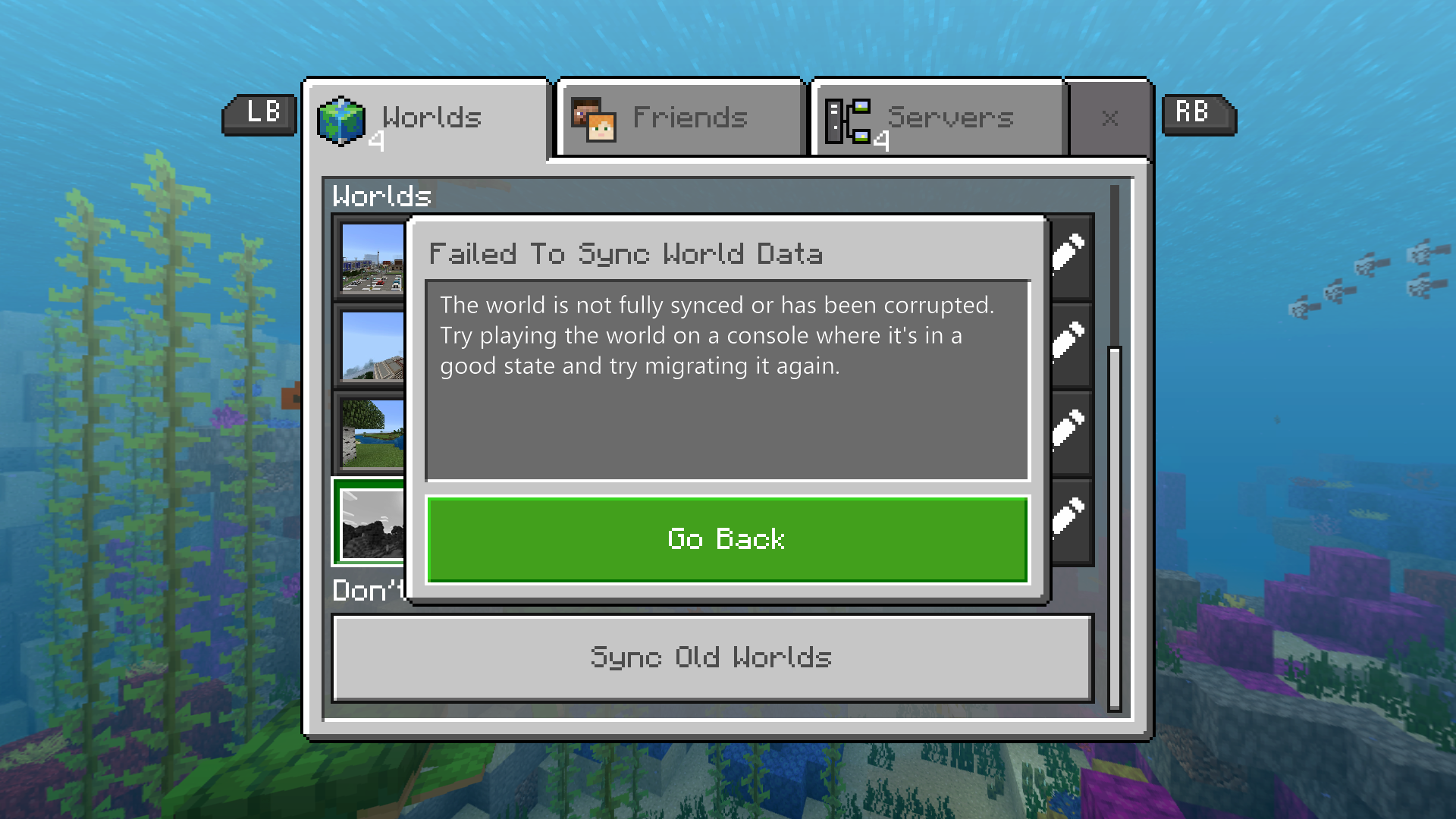
I have never had a world corrupt until this update. It's a large converted Xbox One Edition world that got corrupted after the world file surpassed 300mb. I try and load up the world and it crashes the game and when I get back on it
saysthe world is corrupted woth a grey default thumbnail and the world file at 524mb.I've never seen this before and is not an isolated occurrence. An Xbox Club im in had 2 other players post screenshots of the error message stating their world of 3 years is corrupted.
I have never had a world corrupt until this update. It's a large converted Xbox One Edition world that got corrupted after the world file surpassed 300mb after exploring and generating new chunks. I try and load up the world and it crashes the game and when I get back on it I get an error message saying the world is corrupted with a grey default thumbnail and the world file at 524mb.
I've never seen this before and is not an isolated occurrence. An Xbox Club im in just had 2 other players post screenshots of the same error message stating their world of 3 years is corrupted.
![[Mojang] Mega_Spud (Jay Wells)](../../../data/avatars/users/92696.png)
Blaze dutkowsky Can you please provide the receipt number for the world you uploaded?
I can't continue to play the new minecraft if everything in my world is overwritten with new, regenerated chunks.
Its literally the only world I play and work on and if its ruined ill never be playing the new version unless world conversion of large worlds are fixed.
How is this still not fixed even after the recent bug fix????
Im so tired of still playing the xbox one edition just to play my world.
Same, years of hard work and can't even convert it to the official version....
If my world is dead then so is Minecraft for me.
Still not a single chunk fixed for me.....
There's so much time and work into this world. Not exaggerating close to 1000hours probably, maybe even more. A massive, real-sized medieval city with legit architecture replaced entirely by a barren, snowy tundra.
I already tried to convert for maybe the 12th time this last Sunday. Every time I try the conversion I delete the last failed converted world and attempt to convert the same world again. I was thinking I missed the tiny hotfix update after 1.2.3 but I dont think so because I even reinstalled the game to make sure I had the lastest update.
Yes, I've even joined the 1.2.3 beta and attempted to convert the world on that beta. And the chunks were still replaced. I then uploaded sent the world to mojang pressing Y on that same beta.
I'll consider sending my world testing receipt but I would guess i'd get a generic response.
Next failed world conversion I do I'll post before and after pics. Xbox one edition vs Bedrock edition
Just posted up a before and after of another failed conversion tonight.
Xbox One Edition vs. Bedrock Edition
https://bugs.mojang.com/secure/attachment/149554/instasize_171025224250.png
Not too mention while playing on the converted world my entire xbox guide crashes forcing me too do a hard restart.
Receipt Code:
2017/10/07/16:41:17-99df9909-82e4-c4d-5-bcd8-2c9913f42198
I could also send a picture of it if necessary.
So any feedback on my world?
When do you think it will be fixed for me or if ever?
Will the next update fix more problems with this bug and when will the next update come out?
I tried another conversion again last night.
This time I saved right outside of the massive area where chunks are being regenerated before conversion. Once I loaded up after conversion the same exact area was replaced. But this time 5 seconds into loading up the failed converted world my entire xbox crashed and turned itself off.
What is causing this?
The amount of chests? The amount of items in chests?
There are many chests scattered throughout the affected area In buildings and they're all filled to the brim.
Signs? Banners? Misc.
I've placed and removed many sign, banners, armor stands, chests, etc. Within the affected area.
The amount of time spent with specific chunks loaded in your world?
Because I've noticed the chunks being regenerated are the same chunks, relative to the draw distance, that I've spent the most time loaded in my world.
The amount of blocks replaced, and modified in those chunks?
My city is massive and pretty much almost every block in one chunk was modified in some way including the underground with a massive sewer network below all of the buildings.
I could specify with more screenshots exactly where the cutoff point is with regenerated chunks, show where most of the chests are, etc., anything.
@Mega_Spud any word on the sent in world with the receipt, is my world specifically, being looked into at all? What do you think could be the problem?
Im giving this problem up to the 1.3 update and if my world isn't fixed im calling it a bust and giving up on all the countless hours of progress made on this world.
By moving the world spawn that disables achievements even after moving to bedrock, right?
My world is all survival and I'll wait and try that only if it's still not fixed after 1.3 as a last solution.
Do you know if removing chests and item have been reported to work?
And do you think this issue could be impossible to fix due to the new engine and how these worlds would act on the new bedrock engine?
I'll try again today with the new beta build and tell you how it goes and also upload the world with the receipt if it fails again.
Did you try anything differently to make it eventually work?
Or just convert...load....delete....and repeat?
On beta build for 1.2.5
First conversion failed
Second conversion failed and sent it into Minecraft and got a receipt.
Third conversion refused to even start and crashed the game and stuck me on a black screen forcing me to restart the console....
Why is my world getting the worst of this?
Edit: So I tried for like the 15th time, it failed everytime while at the same time glitching my console up like 4 times and finally gave up when it randomly turned off and killed my console....
Receipt: 2017/11/01/19:41:20-897bff95-490d-ba7-3-a9f4-00c6f834312e
I have 3 copies of my world and all of them I've tried in the past and they all regenerate new terrain/fail.
Somebody with an xbox one x try and convert their previously failed world.
Im not about to pay $500 just to convert my world, so dumb.
But, at least it could be fixed for the people with X's.
I could see them not fixing it and just telling people to convert it on an xbox one x instead. And the bedrock version being only stable on the One X people on the old ones stay on the console version, and one x's go on the bedrock version. Considering the new minecraft is still buggy on the old consoles.
I hope that doesn't happen, this bug and the entire game needs to be fixed for everyone on all Xbox Ones.
I just tried to convert my world once again on the 1.2.6.2 beta build and it took nearly 3 hours.....
Once it got to 60% it sped up like 10x and once it finally got to 95% the conversion failed and my xbox "exploded". So now I just wasted three hours of my life and my world still is not on the bedrock edition. But, I guess its getting somewhere since it took a lot longer to convert. Honestly I think my world is just incompatible with the new minecraft....
Receipt: 2017/11/14/01:22:17-6eef317e-f2e7-bc9b-eafe-ac568c52403a
If the small problems that you have mentioned after converting are fixed will you convert again or will you just keep this successfully converted world?
MINE FINALLY CONVERTED SUCCESSFULLY
No lag or any problems so far, the world successfully converted over 100% intact. After so long this has finally been fixed.
Thank you Mojang for fixing this difficult bug and having my world on the official minecraft. Thank you everyone in the bug tracker for helping me and helping squash this bug.
The new 1.2.5 update fixed it.
My world didn't convert with the over with the same file size and everything is intact for me and no chunks regenerated.
And Erik, yours is a different issue -
MCPE-25344https://bugs.mojang.com/browse/MCPE-25344
I always figured the world sizes were compressed on the new engine.
Yep, All of this sums up exactly what happening to me except it will only load up the correct player data if I restart the game entirely and then load the world up once restarted.
Note: Joining xbox live friend's worlds will not cause this bug.
I can confirm this big has been fixed for me with the 1.2.6 update.....
I can now join realms and servers and then start up my personal world without any problems.
Thank you Mojang for keeping up on the bugs and hopefully by the 1.3 update the new Minecraft can run as smoothly as the Xbox One Edition, if not better.
This issue has been mostly fixed.
The issue that your having can be found here:
MCPE-25344I'm playing on my world with this bug not loading any chunks for my world doesn't corrupt. But, im still getting the crashes sometimes when exiting the world.
So my question is, will my world be cursed with this bug even after it gets fixed since I've been playing on it and saving it with this bug active?
BTW, my world was started on the Xbox One Edition and is ~295m. And corrupted when it crashed after saving and quitting after exploring generating new chunks and the world file size surpassing 300mb
FYI, I had a realms backup of my world that's how im still playing on it after corrupting.
On the 1.5.3 update, I exited my world, tried loading it back up, and my game crashed......
Have you uploaded that world from Windows 10?
Because, I have uploaded mine from the base Xbox One and can download it back on the same Xbox. (Maybe only affects the One X) But, im getting the bug and can't download it on Android. I Have not tried it yet on Windows 10 (as I do not own Win 10) and im speculating it might not work. It might only be downloadable on the platform that it was originally uploaded from.
My world is also 709.4MB on the World select and 700.6 on the Realms backup. My Android has 3.4GB of free space.
Also, when I downloaded the world in the past on previous versions on Android the 680MB world was increased to about 950MB not fully synced. And sometimes on the Xbox One when the world doesn't fully sync after loading up the game it displays the size as 1.1GB. This could have something to do with this bug maybe?
Edit: Try a wired internet connection on your Xbox if your not wired already. Downloading might be working for me on Xbox because im wired and a wired connection might effect the download.
I heard about this issue going on for about a year now, but my world is now getting the same error when venturing away from the center of my world. My world is only around 1GB. 986MB right now. And I have around 23GB on the drive I have Minecraft installed.
my world is now getting the same error when venturing away from the center of my world.
Only ever had this problem on 1.13.0
My world is only around 1GB. 986MB right now. And I have around 23GB on the drive I have Minecraft installed.
https://www.dropbox.com/s/d9q17wlb5iofyv1/World%20Backup.zip?dl=0
Just started happening to my world for the first time 1.13.0 update.
https://www.dropbox.com/s/d9q17wlb5iofyv1/World%20Backup.zip?dl=0
Is it safe to still play on a world affected by this?
Like after this bug is fixed should we continue on a backup of the world before the 1.13.0 update?
In other words, is a world affected forever if it gets this bug?
That explains why I am put back 100 blocks away from where I was traveling after loading up the world again after a crash.
And thanks for the method on preventing the world from crashing.
It is a good point to make that nobody with this bug will be able to try out any of the new content in the latest updates in their world due to them having to load new chunks. sad...
I can't even play my solo world either due to my world also being effected by this bug :'(
Yes, confirmed! Just got done exploring out from the center of my world after the update and not a single crash or message saying im out of storage space. Traveled out 6000 blocks+ and even loaded some new chunks increasing my world size past 1GB ; even finding bees for the first time in my world. All without any issues of any sort.