 theerapak
- theerapak
- theerapak
- Asia/Bangkok
- Yes
- No
 MC-52184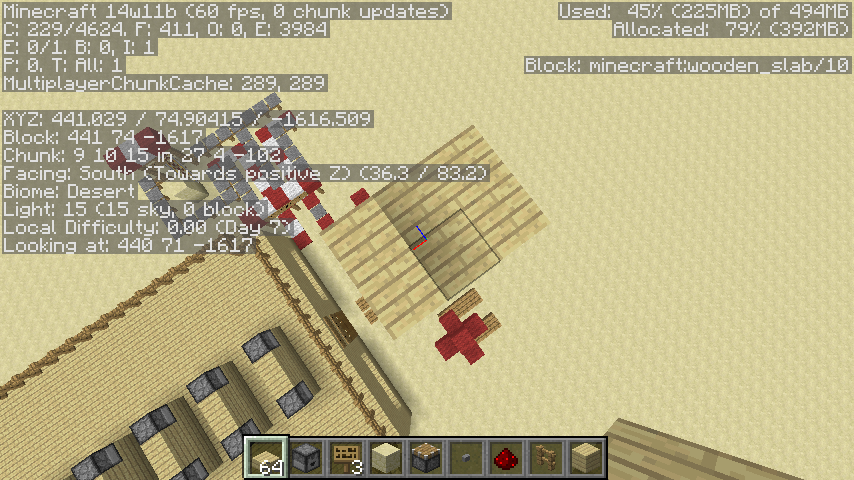





What I expected to happen was...:
When I build the block update detector (in picture) piston will stay in that and block don't disapearWhat actually happened was...:
piston is disapear and come back.disapear and come back...Steps to Reproduce:
1. build that block update detector
2. start it and watch ,you will see sometime piston disapearor watch this
http://www.youtube.com/watch?v=1du3yywmflg
What I expected to happen was...:
When I build the block update detector (in picture) piston will stay in that and block don't disappearWhat actually happened was...:
piston is disappear and come back.disappear and come back...Steps to Reproduce:
1. build that block update detector
2. start it and watch ,you will see sometime piston disapearor watch this
http://www.youtube.com/watch?v=1du3yywmflg
What I expected to happen was...:
When I build the block update detector (in picture) piston will stay in that and block don't disappearWhat actually happened was...:
piston is disappear and come back.disappear and come back...Steps to Reproduce:
1. build that block update detector
2. start it and watch ,you will see sometime piston disappearor watch this
http://www.youtube.com/watch?v=1du3yywmflg
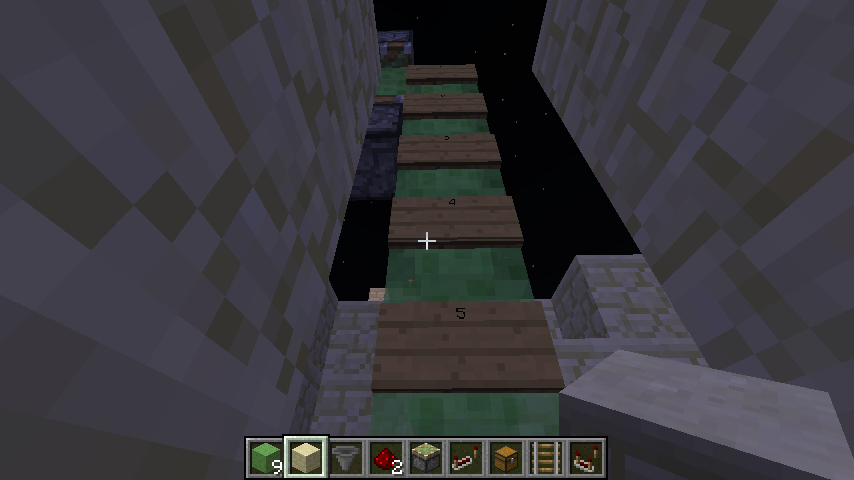
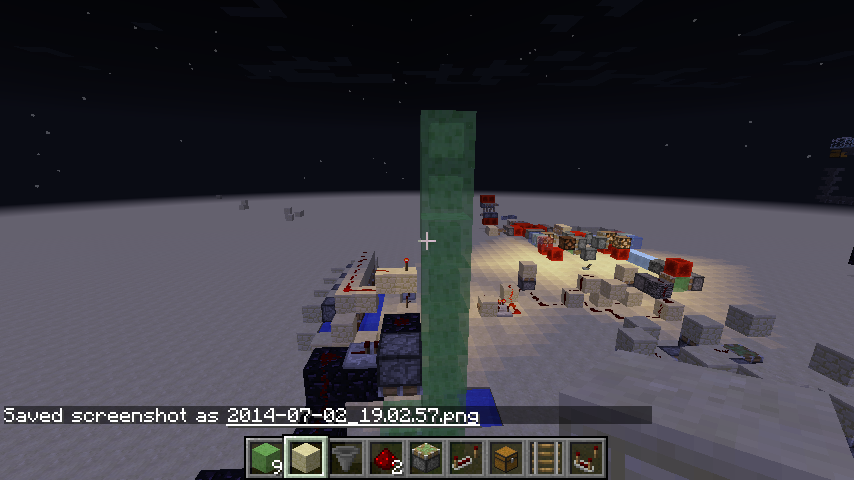
bug 1:slime block duplication
what I expect
slime block will not duplicate if you make up and down stacknote:this stack is connect to up and down slime block in less than 1 second
what it was
slime block is duplicatebug 2:if you jump onto slime block that duplicated it will hurt you and you will jump higher than usual
what I expect
if you jump on slime block that duplicated it won't hurt youwhat it was
if you jump on slime block that duplicated it will hurt youbug 3:if you quit that world and reopen that slime block will disapear
what I expect
slime block will stay at thatwhat it was
it change to air!see at http://youtu.be/FHtzMbEB5G0
bug 1:slime block duplication
what I expect
slime block will not duplicate if you make up and down stacknote 1:this stack is connect to up and down slime block in less than 1 second. see in youtube
what it was
slime block is duplicatebug 2:if you jump onto slime block that duplicated it will hurt you and you will jump higher than usual
what I expect
if you jump on slime block that duplicated it won't hurt youwhat it was
if you jump on slime block that duplicated it will hurt youbug 3:if you quit that world and reopen that slime block will disapear
what I expect
slime block will stay at thatwhat it was
it change to air!see at http://youtu.be/FHtzMbEB5G0
bug 1:slime block duplication
what I expect
slime block will not duplicate if you make up and down stacknote
1:this stack is connect to up and down slime block in less than 1 second. see in youtubewhat it was
slime block is duplicatebug 2:if you jump onto slime block that duplicated it will hurt you and you will jump higher than usual
what I expect
if you jump on slime block that duplicated it won't hurt youwhat it was
if you jump on slime block that duplicated it will hurt youbug 3:if you quit that world and reopen that slime block will disapear
what I expect
slime block will stay at that
what it was
it change to air!see at http://youtu.be/FHtzMbEB5G0
bug 1:slime block duplication
what I expect
slime block will not duplicate if you make up and down stack like in 2014-07-02_18.57.18.png 2014-07-02_19.01.04.png 2014-07-02_19.01.08.png not _thumb_68854.pngnote :this stack is connect to up and down slime block in less than 1 second. see in youtube
what it was
slime block is duplicate 2014-07-02_19.03.01.png 2014-07-02_19.03.04.pngbug 2:if you jump onto slime block that duplicated it will hurt you and you will jump higher than usual
what I expect
if you jump on slime block that duplicated it won't hurt youwhat it was
if you jump on slime block that duplicated it will hurt you
note : see in youtubebug 3:if you quit that world and reopen that slime block will disapear
what I expect
slime block will stay at thatwhat it was
it change to air!
note : see in youtubesee at http://youtu.be/FHtzMbEB5G0
update 1:note 1
using /blockdata command to set dispenser to have tnt amount to negative value will fire 1 tnt and set the item to 0
how to reproduce it:
{slot:0b,id:"minecraft:tnt",Count:-1b}
step 1: set a dispenser
step 2: made a very fast clock and wire it to dispenser (not a command block clock one)
step 3: stop the clock
step 4: set on the dispenser and type following command
/blockdata ~ ~-1 ~ {Items:[0:],id:"trap",Lock:""}
step 5: start the clock and you will see the problems
using /blockdata command to set dispenser to have tnt amount to negative value will fire 1 tnt and set the item to 0
how to reproduce it:
step 1: set a dispenser
step 2: made a very fast clock and wire it to dispenser (not a command block clock one)
step 3: stop the clock
step 4: set on the dispenser and type following command
/blockdata ~ ~-1 ~ {Items:[0:
{slot:0b,id:"minecraft:tnt",Count:-1b}],id:"trap",Lock:""}
step 5: start the clock and you will see the problemsusing /blockdata command to set dispenser to have tnt amount to negative value will fire 1 tnt and set the item to 0
how to reproduce it:
step 1: set a dispenser
step 2: made a very fast clock and wire it to dispenser (not a command block clock one)
step 3: stop the clock
step 4: set on the dispenser and type following command/blockdata ~ ~-1 ~ {Items:[0:
{slot:0b,id:"minecraft:tnt",Count:-1b}],id:"trap",Lock:""}
step 5: start the clock and you will see the problems
using /blockdata command to set dispenser to have tnt amount to negative value will fire 1 tnt and set the item to 0
how to reproduce it:
step 1: set a dispenser
step 2: made a very fast clock and wire it to dispenser (not a command block clock one)
step 3: stop the clock
step 4: set on the dispenser and type following command/blockdata ~ ~-1 ~ {Items:[0:
{slot:0b,id:"minecraft:tnt",Count:-1b}],id:"trap",Lock:""}
step 5: start the clock and you will see the problemsusing /blockdata command to set dispenser to have tnt amount to negative value will fire 1 tnt and set the item to 0
how to reproduce it:
step 1: set a dispenser
step 2: made a very fast clock and wire it to dispenser (not a command block clock one)
step 3: stop the clock
step 4: set on the dispenser and type following command/blockdata ~ ~-1 ~ {Items:[0:
{slot:0b,id:"minecraft:tnt",Count:-1b}],id:"trap",Lock:""}
or just copy it from cmd.txt file
step 5: start the clock and you will see the problems
using /blockdata command to set dispenser to have tnt amount to negative value will fire 1 tnt and set the item to 0
how to reproduce it:
step 1: set a dispenser
step 2: made a very fast clock and wire it to dispenser (not a command block clock one-that will be too fast so the dispenser can shoot once)
step 3: stop the clock
step 4: set on the dispenser and type following command/blockdata ~ ~-1 ~ {Items:[0:
{slot:0b,id:"minecraft:tnt",Count:-1b}],id:"trap",Lock:""}
or just copy it from cmd.txt file
step 5: start the clock and you will see the problems
Windows 8
Java 1.8.0_31 (32bit)Windows 8
Java 1.8.0_31 (64 bit)
Windows 8 (not 8.1)
Java 1.8.0_31 (64 bit)
using /blockdata command to set dispenser to have tnt amount to negative value will fire 1 tnt and set the item to 0
how to reproduce it:
step1: set a dispenser
step2: made a very fast clock and wire it to dispenser (not a command block clock one-that will be too fast so the dispenser can shoot once)
step3: stop the clock
step4: set on the dispenser and type following command/blockdata ~ ~-1 ~ {Items:[0:
{slot:0b,id:"minecraft:tnt",Count:-1b}],id:"trap",Lock:""}
or just copy it from cmd.txt file
step
5: start the clock and you will see the problemsusing /blockdata command to set dispenser to have tnt amount to negative value will fire 1 tnt and set the item to 0
how to reproduce it:
step 1: make a new world (cheat is enabled!) or just use your world that have cheat enabled
step 2: set a dispenser
step 3: made a very fast clock and wire it to dispenser (not a command block clock one-that will be too fast so the dispenser can shoot once)
step 4: stop the clock
step 5: set on the dispenser and type following command/blockdata ~ ~-1 ~ {Items:[0:
{slot:0b,id:"minecraft:tnt",Count:-1b}],id:"trap",Lock:""}
or just copy it from cmd.txt file
step 6: start the clock and you will see the problems
using /blockdata command to set dispenser to have tnt amount to negative value will fire 1 tnt and set the item count to 0
using /blockdata command to set dispenser to have tnt amount to negative value will fire 1 tnt and set the item to 0
how to reproduce it:
step 1: make a new world (cheat is enabled!) or just use your world that have cheat enabled
step 2: set a dispenser
step 3: made a very fast clock and wire it to dispenser (not a command block clock one-that will be too fast so the dispenser can shoot once)
step 4: stop the clock
step 5: set on the dispenser and type following command/blockdata ~ ~-1 ~ {Items:[0:
{slot:0b,id:"minecraft:tnt",Count:-1b}],id:"trap",Lock:""}
or
just copy itfrom cmd.txtfile
step 6: start the clock and you will see the problemsusing /blockdata command to set dispenser to have tnt amount to negative value will fire 1 tnt and set the item to 0
(I'm not sure about other item fire out of dispenser , but this problem isfound when I want to use my trap
how to reproduce it:
step 1: make a new world (cheat is enabled!) or just use your world that have cheat enabled
step 2: set a dispenser
step 3: made a very fast clock and wire it to dispenser (not a command block clock one-that will be too fast so the dispenser can shoot once)
step 4: stop the clock
step 5: set on the dispenser and type following command/blockdata ~ ~-1 ~ {Items:[0:
{slot:0b,id:"minecraft:tnt",Count:-1b}],id:"trap",Lock:""}
or just copy it from cmd.txt file (it's the command to set the tnt in 1st slot to -1 , I'm not sure about other slot)
step 6: start the clock and you will see the problems
test if it occur to all negative value :
{slot:0b,id:"minecraft:tnt",Count:-1b}
in step 5 change command from
/blockdata ~ ~-1 ~ {Items:[0:],id:"trap",Lock:""}
to
/blockdata ~ ~-1 ~ {Items:[0:
{slot:0b,id:"minecraft:tnt",Count:<other negative integer>b}],id:"trap",Lock:""}
(be sure to change the <other negative integer> to negative integer!)
or you can copy 2nd command from cmd2.txt
(again ,be sure to change the <other negative integer> to negative integer!)
Windows 8 (not 8.1)
Java 1.8.0_31 (64 bit)using cmd.exe and type java -version get
Microsoft Windows [Version 6.2.9200]
(c) 2012 Microsoft Corporation. All rights reserved.C:\Users\USER>java -version
java version "1.8.0_31"
Java(TM) SE Runtime Environment (build 1.8.0_31-b13)
Java HotSpot(TM) 64-Bit Server VM (build 25.31-b07, mixed mode)C:\Users\USER>
Windows 8 (not 8.1)
Java 1.8.0_31 (64 bit)using cmd.exe and type java -version get
Microsoft Windows [Version 6.2.9200]
(c) 2012 Microsoft Corporation. All rights reserved.C:\Users\USER>java -version
java version "1.8.0_31"
Java(TM) SE Runtime Environment (build 1.8.0_31-b13)
Java HotSpot(TM) 64-Bit Server VM (build 25.31-b07, mixed mode)C:\Users\USER>
Windows 8 (not 8.1)
Java 1.8.0_31 (64 bit)using cmd.exe and type java -version get
Microsoft Windows [Version 6.2.9200]
(c) 2012 Microsoft Corporation. All rights reserved.C:\Users\USER>java -version
java version "1.8.0_31"
Java(TM) SE Runtime Environment (build 1.8.0_31-b13)
Java HotSpot(TM) 64-Bit Server VM (build 25.31-b07, mixed mode)C:\Users\USER>
Windows 8 (not 8.1)
Java 1.8.0_31 (64 bit)using cmd.exe and type java -version get
Microsoft Windows [Version 6.2.9200]
(c) 2012 Microsoft Corporation. All rights reserved.C:\Users\USER>java -version
java version "1.8.0_31"
Java(TM) SE Runtime Environment (build 1.8.0_31-b13)
Java HotSpot(TM) 64-Bit Server VM (build 25.31-b07, mixed mode)C:\Users\USER>
using cmd.exe and type java -version get
Microsoft Windows [Version 6.2.9200]
(c) 2012 Microsoft Corporation. All rights reserved.C:\Users\USER>java -version
java version "1.8.0_31"
Java(TM) SE Runtime Environment (build 1.8.0_31-b13)
Java HotSpot(TM) 64-Bit Server VM (build 25.31-b07, mixed mode)C:\Users\USER>
Detail about computer (Control Panel\All Control Panel Items\Performance Information and Tools
an click View and print detailed performance and system information)get:
using cmd.exe and type java -version get
Microsoft Windows [Version 6.2.9200]
(c) 2012 Microsoft Corporation. All rights reserved.C:\Users\USER>java -version
java version "1.8.0_31"
Java(TM) SE Runtime Environment (build 1.8.0_31-b13)
Java HotSpot(TM) 64-Bit Server VM (build 25.31-b07, mixed mode)C:\Users\USER>
Detail about computer (Control Panel\All Control Panel Items\Performance Information and Tools
an click View and print detailed performance and system information)get:Windows 8 Single Language
System
--------------------------------------------------------------------------------Manufacturer ASUSTeK COMPUTER INC.
Model K46CM
Total amount of system memory 4.00 GB RAM
System type 64-bit operating system
Number of processor cores 2Storage
--------------------------------------------------------------------------------Total size of hard disk(s) 445 GB
Disk partition (C88 GB Free (295 GB Total)
Media drive (E
Disk partition (HGraphics
--------------------------------------------------------------------------------Display adapter type Intel(R) HD Graphics 4000
Total available graphics memory 1664 MB
Dedicated graphics memory 32 MB
Dedicated system memory 0 MB
Shared system memory 1632 MB
Display adapter driver version 9.17.10.2828
Primary monitor resolution 1366x768
DirectX version DirectX 11 or betterNetwork
--------------------------------------------------------------------------------Network Adapter Qualcomm Atheros AR9485WB-EG Wireless Network Adapter
Network Adapter Realtek PCIe GBE Family Controller
Network Adapter Microsoft Wi-Fi Direct Virtual Adapter
Network Adapter Bluetooth Device (Personal Area Network)
Network Adapter Microsoft Hosted Network Virtual Adapter
using cmd.exe and type java -version get
Microsoft Windows [Version 6.2.9200]
(c) 2012 Microsoft Corporation. All rights reserved.C:\Users\USER>java -version
java version "1.8.0_31"
Java(TM) SE Runtime Environment (build 1.8.0_31-b13)
Java HotSpot(TM) 64-Bit Server VM (build 25.31-b07, mixed mode)C:\Users\USER>
Detail about computer (Control Panel\All Control Panel Items\Performance Information and Tools
an click View and print detailed performance and system information)get:Windows 8 Single Language
System
--------------------------------------------------------------------------------Manufacturer ASUSTeK COMPUTER INC.
Model K46CM
Total amount of system memory 4.00 GB RAM
System type 64-bit operating system
Number of processor cores 2Storage
--------------------------------------------------------------------------------Total size of hard disk(s) 445 GB
Disk partition (C
Media drive (E
Disk partition (HGraphics
--------------------------------------------------------------------------------Display adapter type Intel(R) HD Graphics 4000
Total available graphics memory 1664 MB
Dedicated graphics memory 32 MB
Dedicated system memory 0 MB
Shared system memory 1632 MB
Display adapter driver version 9.17.10.2828
Primary monitor resolution 1366x768
DirectX version DirectX 11 or betterNetwork
--------------------------------------------------------------------------------Network Adapter Qualcomm Atheros AR9485WB-EG Wireless Network Adapter
Network Adapter Realtek PCIe GBE Family Controller
Network Adapter Microsoft Wi-Fi Direct Virtual Adapter
Network Adapter Bluetooth Device (Personal Area Network)
Network Adapter Microsoft Hosted Network Virtual Adapterusing cmd.exe and type java -version get
Microsoft Windows [Version 6.2.9200]
(c) 2012 Microsoft Corporation. All rights reserved.C:\Users\USER>java -version
java version "1.8.0_31"
Java(TM) SE Runtime Environment (build 1.8.0_31-b13)
Java HotSpot(TM) 64-Bit Server VM (build 25.31-b07, mixed mode)C:\Users\USER>
-----------------------------------------------------------------------------------------------------------------------------
Detail about computer (Control Panel\All Control Panel Items\Performance Information and Tools
an click View and print detailed performance and system information)get:Component Details Subscore
Processor Intel(R) Core(TM) i7-3517U CPU @ 1.90GHz 7.1
Memory (RAM) 4.00 GB 5.9
Graphics Intel(R) HD Graphics 4000 4.8
Gaming graphics 1664 MB Total available graphics memory 6.5
Primary hard disk 88GB Free (295GB Total) 5.9
score
Base score : Determined by lowest subscore 4.8Windows 8 Single Language
System
--------------------------------------------------------------------------------Manufacturer ASUSTeK COMPUTER INC.
Model K46CM
Total amount of system memory 4.00 GB RAM
System type 64-bit operating system
Number of processor cores 2Storage
--------------------------------------------------------------------------------Total size of hard disk(s) 445 GB
Disk partition (C
Media drive (E
Disk partition (HGraphics
--------------------------------------------------------------------------------Display adapter type Intel(R) HD Graphics 4000
Total available graphics memory 1664 MB
Dedicated graphics memory 32 MB
Dedicated system memory 0 MB
Shared system memory 1632 MB
Display adapter driver version 9.17.10.2828
Primary monitor resolution 1366x768
DirectX version DirectX 11 or betterNetwork
--------------------------------------------------------------------------------Network Adapter Qualcomm Atheros AR9485WB-EG Wireless Network Adapter
Network Adapter Realtek PCIe GBE Family Controller
Network Adapter Microsoft Wi-Fi Direct Virtual Adapter
Network Adapter Bluetooth Device (Personal Area Network)
Network Adapter Microsoft Hosted Network Virtual Adapter
using cmd.exe and type java -version get
Microsoft Windows [Version 6.2.9200]
(c) 2012 Microsoft Corporation. All rights reserved.C:\Users\USER>java -version
java version "1.8.0_31"
Java(TM) SE Runtime Environment (build 1.8.0_31-b13)
Java HotSpot(TM) 64-Bit Server VM (build 25.31-b07, mixed mode)C:\Users\USER>
-----------------------------------------------------------------------------------------------------------------------------
Detail about computer (Control Panel\All Control Panel Items\Performance Information and Tools
and click View and print detailed performance and system information)get:Component Details Subscore
Processor Intel(R) Core(TM) i7-3517U CPU @ 1.90GHz 7.1
Memory (RAM) 4.00 GB 5.9
Graphics Intel(R) HD Graphics 4000 4.8
Gaming graphics 1664 MB Total available graphics memory 6.5
Primary hard disk 88GB Free (295GB Total) 5.9
score
Base score : Determined by lowest subscore 4.8Windows 8 Single Language
System
--------------------------------------------------------------------------------Manufacturer ASUSTeK COMPUTER INC.
Model K46CM
Total amount of system memory 4.00 GB RAM
System type 64-bit operating system
Number of processor cores 2Storage
--------------------------------------------------------------------------------Total size of hard disk(s) 445 GB
Disk partition (C
Media drive (E
Disk partition (HGraphics
--------------------------------------------------------------------------------Display adapter type Intel(R) HD Graphics 4000
Total available graphics memory 1664 MB
Dedicated graphics memory 32 MB
Dedicated system memory 0 MB
Shared system memory 1632 MB
Display adapter driver version 9.17.10.2828
Primary monitor resolution 1366x768
DirectX version DirectX 11 or betterNetwork
--------------------------------------------------------------------------------Network Adapter Qualcomm Atheros AR9485WB-EG Wireless Network Adapter
Network Adapter Realtek PCIe GBE Family Controller
Network Adapter Microsoft Wi-Fi Direct Virtual Adapter
Network Adapter Bluetooth Device (Personal Area Network)
Network Adapter Microsoft Hosted Network Virtual Adapter
using cmd.exe and type java -version get
Microsoft Windows [Version 6.2.9200]
(c) 2012 Microsoft Corporation. All rights reserved.C:\Users\USER>java -version
java version "1.8.0_31"
Java(TM) SE Runtime Environment (build 1.8.0_31-b13)
Java HotSpot(TM) 64-Bit Server VM (build 25.31-b07, mixed mode)C:\Users\USER>
-----------------------------------------------------------------------------------------------------------------------------
Detail about computer (Control Panel\All Control Panel Items\Performance Information and Tools
and click View and print detailed performance and system information)get:Component Details Subscore
Processor Intel(R) Core(TM) i7-3517U CPU @ 1.90GHz 7.1
Memory (RAM) 4.00 GB 5.9
Graphics Intel(R) HD Graphics 4000 4.8
Gaming graphics 1664 MB Total available graphics memory 6.5
Primary hard disk 88GB Free (295GB Total) 5.9
score
Base score : Determined by lowest subscore 4.8Windows 8 Single Language
System
--------------------------------------------------------------------------------Manufacturer ASUSTeK COMPUTER INC.
Model K46CM
Total amount of system memory 4.00 GB RAM
System type 64-bit operating system
Number of processor cores 2Storage
--------------------------------------------------------------------------------Total size of hard disk(s) 445 GB
Disk partition (C
Media drive (E
Disk partition (HGraphics
--------------------------------------------------------------------------------Display adapter type Intel(R) HD Graphics 4000
Total available graphics memory 1664 MB
Dedicated graphics memory 32 MB
Dedicated system memory 0 MB
Shared system memory 1632 MB
Display adapter driver version 9.17.10.2828
Primary monitor resolution 1366x768
DirectX version DirectX 11 or betterNetwork
--------------------------------------------------------------------------------Network Adapter Qualcomm Atheros AR9485WB-EG Wireless Network Adapter
Network Adapter Realtek PCIe GBE Family Controller
Network Adapter Microsoft Wi-Fi Direct Virtual Adapter
Network Adapter Bluetooth Device (Personal Area Network)
Network Adapter Microsoft Hosted Network Virtual Adapterusing cmd.exe and type java -version get
Microsoft Windows [Version 6.2.9200]
(c) 2012 Microsoft Corporation. All rights reserved.C:\Users\USER>java -version
java version "1.8.0_31"
Java(TM) SE Runtime Environment (build 1.8.0_31-b13)
Java HotSpot(TM) 64-Bit Server VM (build 25.31-b07, mixed mode)C:\Users\USER>
-----------------------------------------------------------------------------------------------------------------------------
Detail about computer (Control Panel\All Control Panel Items\Performance Information and Tools
and click View and print detailed performance and system information)get:Component Details Subscore
Processor Intel(R) Core(TM) i7-3517U CPU @ 1.90GHz 7.1
Memory (RAM) 4.00 GB 5.9
Graphics Intel(R) HD Graphics 4000 4.8
Gaming graphics 1664 MB Total available graphics memory 6.5
Primary hard disk 88GB Free (295GB Total) 5.9
score
Base score : Determined by lowest subscore 4.8Windows 8 Single Language
System
--------------------------------------------------------------------------------Manufacturer ASUSTeK COMPUTER INC.
Model K46CM
Total amount of system memory 4.00 GB RAM
System type 64-bit operating system
Number of processor cores 2Storage
--------------------------------------------------------------------------------Total size of hard disk(s) 445 GB
Disk partition (C: ) 88 GB Free (295 GB Total)
Media drive (E: ) CD/DVD
Disk partition (H: ) 143 GB Free (150 GB Total)Graphics
--------------------------------------------------------------------------------Display adapter type Intel(R) HD Graphics 4000
Total available graphics memory 1664 MB
Dedicated graphics memory 32 MB
Dedicated system memory 0 MB
Shared system memory 1632 MB
Display adapter driver version 9.17.10.2828
Primary monitor resolution 1366x768
DirectX version DirectX 11 or betterNetwork
--------------------------------------------------------------------------------Network Adapter Qualcomm Atheros AR9485WB-EG Wireless Network Adapter
Network Adapter Realtek PCIe GBE Family Controller
Network Adapter Microsoft Wi-Fi Direct Virtual Adapter
Network Adapter Bluetooth Device (Personal Area Network)
Network Adapter Microsoft Hosted Network Virtual Adapter
using /blockdata command to set dispenser to have tnt amount to negative value will fire 1 tnt and set the item to 0
(I'm not sure about other item fire out of dispenser , but this problem isfound when I want to use my trap)
how to reproduce it:
step 1: make a new world (cheat is enabled!) or just use your world that have cheat enabled
step 2: set a dispenser
step 3: made a very fast clock and wire it to dispenser (not a command block clock one-that will be too fast so the dispenser can shoot once)
step 4: stop the clock
step 5: set on the dispenser and type following command/blockdata ~ ~-1 ~ {Items:[0:
{slot:0b,id:"minecraft:tnt",Count:-1b}],id:"trap",Lock:""}
or just copy it from cmd.txt file (it's the command to set the tnt in 1st slot to -1 , I'm not sure about other slot)
step 6: start the clock and you will see the problems
test if it occur to all negative value :
{slot:0b,id:"minecraft:tnt",Count:-1b}
in step 5 change command from
/blockdata ~ ~-1 ~ {Items:[0:],id:"trap",Lock:""}
to
/blockdata ~ ~-1 ~ {Items:[0:
{slot:0b,id:"minecraft:tnt",Count:<other negative integer>b}],id:"trap",Lock:""}
(be sure to change the <other negative integer> to negative integer!)
or you can copy 2nd command from cmd2.txt
(again ,be sure to change the <other negative integer> to negative integer!)
using /blockdata command to set dispenser to have tnt amount to negative value will fire 1 tnt and set the item to 0
(I'm not sure about other item fire out of dispenser , but this problem isfound when I want to use my trap)
how to reproduce it:
step 1: make a new world (cheat is enabled!) or just use your world that have cheat enabled
step 2: set a dispenser
step 3: made a very fast clock and wire it to dispenser (not a command block clock one-that will be too fast so the dispenser can shoot once)
step 4: stop the clock
step 5: set on the dispenser and type following command/blockdata ~ ~-1 ~ {Items:[0:
{slot:0b,id:"minecraft:tnt",Count:-1b}],id:"trap",Lock:""}
or just copy it from cmd.txt file (it's the command to set the tnt in 1st slot to -1 , I'm not sure about other slot)
step 6: start the clock and you will see the problems
test if it occur to all negative value :
{slot:0b,id:"minecraft:tnt",Count:-1b}
in step 5 change command from
/blockdata ~ ~-1 ~ {Items:[0:],id:"trap",Lock:""}
to
/blockdata ~ ~-1 ~ {Items:[0:
{slot:0b,id:"minecraft:tnt",Count:<other negative integer>b}],id:"trap",Lock:""}
(be sure to change the <other negative integer> to negative integer!)
or you can copy 2nd command from cmd2.txt
(again ,be sure to change the <other negative integer> to negative integer!)
using /blockdata command to set dispenser to have tnt amount to negative value will fire 1 tnt and set the amount of item to 0
(I'm not sure about other item fire out of dispenser , but this problem isfound when I want to use my trap)
What I expected to happen was...:
using /blockdata command to set dispenser to have tnt amount to negative value will continue to fire tnt and set the amount from item to -2,-3,-4,...
using /blockdata command to set dispenser to have tnt amount to negative value will fire 1 tnt and set the amount of item to 0how to reproduce it:
step 1: make a new world (cheat is enabled!) or just use your world that have cheat enabled
step 2: set a dispenser
step 3: made a very fast clock and wire it to dispenser (not a command block clock one-that will be too fast so the dispenser can shoot once)
step 4: stop the clock
step 5: set on the dispenser and type following command/blockdata ~ ~-1 ~ {Items:[0:
{slot:0b,id:"minecraft:tnt",Count:-1b}],id:"trap",Lock:""}
or just copy it from cmd.txt file (it's the command to set the tnt in 1st slot to -1 , I'm not sure about other slot)
step 6: start the clock and you will see the problems
test if it occur to all negative value :
{slot:0b,id:"minecraft:tnt",Count:-1b}
in step 5 change command from
/blockdata ~ ~-1 ~ {Items:[0:],id:"trap",Lock:""}
to
/blockdata ~ ~-1 ~ {Items:[0:
{slot:0b,id:"minecraft:tnt",Count:<other negative integer>b}],id:"trap",Lock:""}
(be sure to change the <other negative integer> to negative integer!)
or you can copy 2nd command from cmd2.txt
(again ,be sure to change the <other negative integer> to negative integer!)
using cmd.exe and type java -version get
Microsoft Windows [Version 6.2.9200]
(c) 2012 Microsoft Corporation. All rights reserved.C:\Users\USER>java -version
java version "1.8.0_31"
Java(TM) SE Runtime Environment (build 1.8.0_31-b13)
Java HotSpot(TM) 64-Bit Server VM (build 25.31-b07, mixed mode)C:\Users\USER>
-----------------------------------------------------------------------------------------------------------------------------
Detail about computer (Control Panel\All Control Panel Items\Performance Information and Tools
and click View and print detailed performance and system information)get:Component Details Subscore
Processor Intel(R) Core(TM) i7-3517U CPU @ 1.90GHz 7.1
Memory (RAM) 4.00 GB 5.9
Graphics Intel(R) HD Graphics 4000 4.8
Gaming graphics 1664 MB Total available graphics memory 6.5
Primary hard disk 88GB Free (295GB Total) 5.9
score
Base score : Determined by lowest subscore 4.8Windows 8 Single Language
System
--------------------------------------------------------------------------------Manufacturer ASUSTeK COMPUTER INC.
Model K46CM
Total amount of system memory 4.00 GB RAM
System type 64-bit operating system
Number of processor cores 2Storage
--------------------------------------------------------------------------------Total size of hard disk(s) 445 GB
Disk partition (C: ) 88 GB Free (295 GB Total)
Media drive (E: ) CD/DVD
Disk partition (H: ) 143 GB Free (150 GB Total)Graphics
--------------------------------------------------------------------------------Display adapter type Intel(R) HD Graphics 4000
Total available graphics memory 1664 MB
Dedicated graphics memory 32 MB
Dedicated system memory 0 MB
Shared system memory 1632 MB
Display adapter driver version 9.17.10.2828
Primary monitor resolution 1366x768
DirectX version DirectX 11 or betterNetwork
--------------------------------------------------------------------------------Network Adapter Qualcomm Atheros AR9485WB-EG Wireless Network Adapter
Network Adapter Realtek PCIe GBE Family Controller
Network Adapter Microsoft Wi-Fi Direct Virtual Adapter
Network Adapter Bluetooth Device (Personal Area Network)
Network Adapter Microsoft Hosted Network Virtual Adapter
using cmd.exe and type java -version get
Microsoft Windows [Version 6.2.9200]
(c) 2012 Microsoft Corporation. All rights reserved.C:\Users\USER>java -version
java version "1.8.0_31"
Java(TM) SE Runtime Environment (build 1.8.0_31-b13)
Java HotSpot(TM) 64-Bit Server VM (build 25.31-b07, mixed mode)C:\Users\USER>
------------------------------------------------------------------------
Detail about computer (Control Panel\All Control Panel Items\Performance Information and Tools
and click View and print detailed performance and system information)get:Component Details Subscore
Processor Intel(R) Core(TM) i7-3517U CPU @ 1.90GHz 7.1
Memory (RAM) 4.00 GB 5.9
Graphics Intel(R) HD Graphics 4000 4.8
Gaming graphics 1664 MB Total available graphics memory 6.5
Primary hard disk 88GB Free (295GB Total) 5.9
score
Base score : Determined by lowest subscore 4.8Windows 8 Single Language
System
--------------------------------------------------------------------------------Manufacturer ASUSTeK COMPUTER INC.
Model K46CM
Total amount of system memory 4.00 GB RAM
System type 64-bit operating system
Number of processor cores 2Storage
--------------------------------------------------------------------------------Total size of hard disk(s) 445 GB
Disk partition (C: ) 88 GB Free (295 GB Total)
Media drive (E: ) CD/DVD
Disk partition (H: ) 143 GB Free (150 GB Total)Graphics
--------------------------------------------------------------------------------Display adapter type Intel(R) HD Graphics 4000
Total available graphics memory 1664 MB
Dedicated graphics memory 32 MB
Dedicated system memory 0 MB
Shared system memory 1632 MB
Display adapter driver version 9.17.10.2828
Primary monitor resolution 1366x768
DirectX version DirectX 11 or betterNetwork
--------------------------------------------------------------------------------Network Adapter Qualcomm Atheros AR9485WB-EG Wireless Network Adapter
Network Adapter Realtek PCIe GBE Family Controller
Network Adapter Microsoft Wi-Fi Direct Virtual Adapter
Network Adapter Bluetooth Device (Personal Area Network)
Network Adapter Microsoft Hosted Network Virtual Adapter
still in 14w11b
I say " piston disappear " not say "it's block update detector"
I know it's block update detector but sometime piston and slime block disappear .
so I report this because moving piston is disappear not it's block update detector.
not at same. my machine is slime block going up and down and not broke redstone but his report wasn't broke his redstone
so this is not duplicate.