Detector Rail switches junction before Minecart passes detector (happens only with minecarts of certain speed)
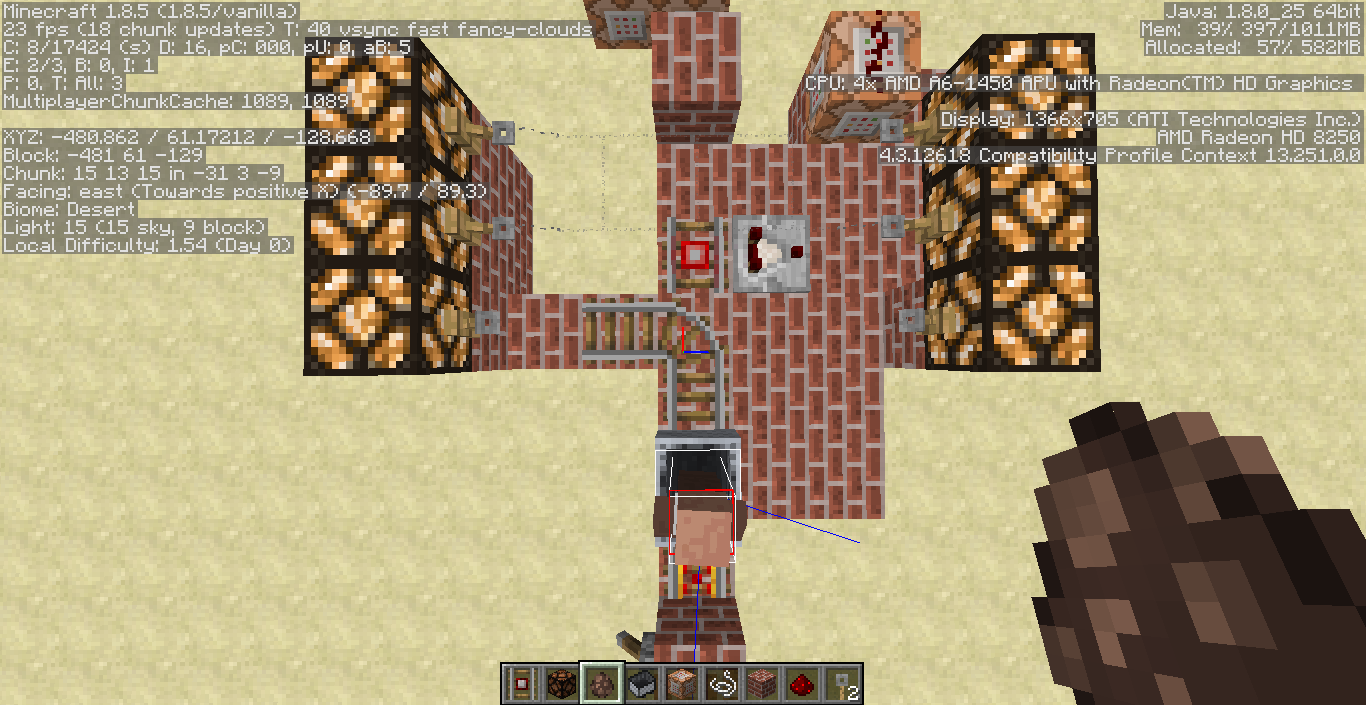
If you have a detector rail it can affect rails directly connected to it. A powered rail for example is powered and a curved rail can change orientation. Imagine now to have a t-junction setup like in
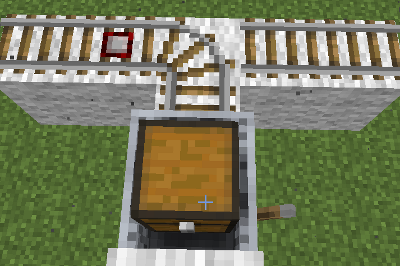
The detector rail is on the left and passing it will cause the curved rail to change orientation. We start our cart not from the detector, but from where the rail is bend to. After starting the cart it goes into the bend and before leaving it, the detector will react. This causes a flicker in which the cart and the rail change orientation several times to then finally settle in the right-side position as in 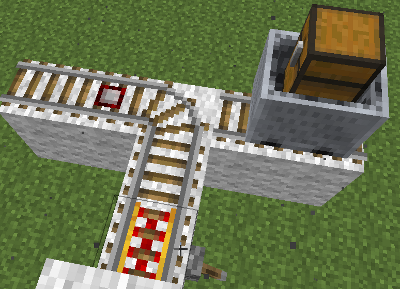
This basically means the detector rail caused a change of orientation for the bend rail before the minecart was even standing on it.
I assume that the signaling goes by this: If the cart, would in a next step touch the detector rail, it fires. Since the rail is then bending in another direction there is an update as the minecart will now not go over the rail, causing another oriantation change. This then causes the detector to fire again going back to the situation in the beginning. The reason why this does not cause an endless loop is that each action takes one tick. Depending on the speed of the cart you will see a longer or shorter flicker then.
What I expected was that the cart will go to the left, not the right as it actually did.
Code analysis by FX - PR0CESS can be found in this comment.
- Fixed in 16w02a? Using the setup described in start.png, the minecart sometimes "bounces" off the rail and goes backwards.
- Half-fixed
 for 1.9.1-pre3.
- Slow-moving minecarts will go the correct way, while fast moving minecarts will bounce back?!
- Confirmed for 1.9-pre1. It seems to be affected by the speed of the minecart as well. Fast and slow minecarts don't trigger it, but minecarts with a medium-ish speed do.
Linked Issues
is duplicated by9
 MC-9082Detector rails still triggering junction changes prematurelyDuplicateMC-30516Detector rail incorrect timingsDuplicateMC-87698Detector Rail powering a Activator Rail to derail don't work one wayDuplicateMC-98697Detector rails are not precise at allDuplicateMC-116908Minecart activates detector rail before reaching it.DuplicateMC-177665Chest and Hopper Minecarts trigger detector rails too earlyDuplicateMC-187776The detector rail is activated before the mine cart passes over it.DuplicateMC-230498Detector rail detects before cart reaches it.DuplicateMC-280038detector rail minecart bugDuplicate




- Unresolved
![[Mod] markderickson](../../../data/avatars/users/18946.svg) [Mod] markderickson
[Mod] markderickson Jochen Theodorou
- 90
- 34
- Confirmed
 Normal
- Platform
- Minecart
- minecart
1.4.2 - 25w05a
1.4.2 1.4.5 1.4.6 1.4.7 13w05b 13w09a 13w09b 1.5 13w11a 1.5.1 1.5.2 13w18c 13w19a 1.6.2 1.6.4 13w38b 13w38c 13w39a 1.7.1 1.7.2 13w47e 13w48a 13w48b 1.7.3 1.7.4 14w02c 14w03b 14w04a 14w04b 14w05b 14w06a 14w06b 1.7.5 14w11b 1.7.9 14w17a 14w18a 14w20a 14w20b 14w21b 1.7.10 14w27b 14w30b 14w30c 14w32a 14w32b 14w32c 14w32d 14w33a 1.8 1.8.1-pre2 1.8.1-pre3 1.8.1 1.8.3 1.8.4 1.8.5 1.8.7 1.8.8 15w35e 15w44b 1.8.9 15w51b 16w02a 1.9-pre1 1.9 1.9.1-pre3 1.9.2 1.9.3-pre3 1.9.4 16w20a 16w21a 16w21b 1.10-pre1 1.10-pre2 1.10 1.10.1 1.10.2 16w32a 16w32b 16w33a 16w35a 16w40a 16w41a 16w44a 1.11-pre1 1.11.2 17w06a 1.12.1 18w50a 1.14-pre1 1.14-pre5 1.14.1 1.14.2-pre1 1.14.2-pre2 1.14.2-pre3 1.14.2 1.14.3-pre2 1.14.3-pre3 1.14.4-pre3 1.14.4 19w35a 1.15.2 20w07a 20w14a 1.16-pre2 1.16-pre5 1.16-rc1 1.16 1.16.1 20w28a 20w29a 20w30a 1.16.2-pre1 1.16.2-pre2 1.16.2-pre3 1.16.2-rc1 1.16.2-rc2 1.16.2 1.16.3-rc1 1.16.3 1.16.4-pre1 1.16.4-pre2 1.16.4-rc1 1.16.4 20w45a 20w46a 20w48a 20w49a 20w51a 21w03a 1.16.5 21w05a 21w05b 21w06a 21w07a 21w08b 21w10a 21w11a 21w13a 21w14a 21w20a 1.17 1.17.1 21w39a 21w42a 1.18-pre5 1.18 1.18.1 22w03a 22w06a 22w14a 22w18a 1.19.1-pre5 1.19.2 1.19.3 23w03a 23w04a 23w05a 23w06a 1.19.4 1.20.1 1.20.2-pre2 23w51b 24w40a 1.21.3 1.21.4 25w05a
Created Issue:
Detector Rail switches junktion before cart passes detector
If you have a detector rail it can affect rails directly connected to it. A powered rail for example is powered and a curved rail can change orientation. Imagine now to have a t-junction setup like in
The detector rail is on the left and passing it will cause the curved rail to change orientation. we start our cart from the detector, but from where the rail is bend to. After starting the cart it goes into the bend and before leaving it, the detector will react. This causes a flicker in which the cart and the rail change orientation several times to then finally settle in the right-side position as in
This basically means the detector rail caused a change of orientation for the bend rail before the minecart was even standing on it.I assume that the signaling goes by this: If the cart, would in a next step touch the detector rail, it fires. Since the rail is then bending in another direction there is an update as the minecart will now not go over the rail, causing another oriantation change. This then causes the detector to fire again going back to the situation in the beginning. The reason why this does not cause an endless loop is that each action takes one tick. Depending on the speed of the cart you will see a longer or shorter flicker then.
What I expected was that the cart will go to the left, not the right as it actually did.
Environment
Ubuntu 64bit
Linked Issues
is duplicated by1
TRASH-460
Attachments2
start.png

If you have a detector rail it can affect rails directly connected to it. A powered rail for example is powered and a curved rail can change orientation. Imagine now to have a t-junction setup like in
The detector rail is on the left and passing it will cause the curved rail to change orientation. we start our cart from the detector, but from where the rail is bend to. After starting the cart it goes into the bend and before leaving it, the detector will react. This causes a flicker in which the cart and the rail change orientation several times to then finally settle in the right-side position as in
This basically means the detector rail caused a change of orientation for the bend rail before the minecart was even standing on it.I assume that the signaling goes by this: If the cart, would in a next step touch the detector rail, it fires. Since the rail is then bending in another direction there is an update as the minecart will now not go over the rail, causing another oriantation change. This then causes the detector to fire again going back to the situation in the beginning. The reason why this does not cause an endless loop is that each action takes one tick. Depending on the speed of the cart you will see a longer or shorter flicker then.
What I expected was that the cart will go to the left, not the right as it actually did.
If you have a detector rail it can affect rails directly connected to it. A powered rail for example is powered and a curved rail can change orientation. Imagine now to have a t-junction setup like in
The detector rail is on the left and passing it will cause the curved rail to change orientation. we start our cart from the detector, but from where the rail is bend to. After starting the cart it goes into the bend and before leaving it, the detector will react. This causes a flicker in which the cart and the rail change orientation several times to then finally settle in the right-side position as in
This basically means the detector rail caused a change of orientation for the bend rail before the minecart was even standing on it.I assume that the signaling goes by this: If the cart, would in a next step touch the detector rail, it fires. Since the rail is then bending in another direction there is an update as the minecart will now not go over the rail, causing another oriantation change. This then causes the detector to fire again going back to the situation in the beginning. The reason why this does not cause an endless loop is that each action takes one tick. Depending on the speed of the cart you will see a longer or shorter flicker then.
What I expected was that the cart will go to the left, not the right as it actually did.
If you have a detector rail it can affect rails directly connected to it. A powered rail for example is powered and a curved rail can change orientation. Imagine now to have a t-junction setup like in
The detector rail is on the left and passing it will cause the curved rail to change orientation. we start our cart from the detector, but from where the rail is bend to. After starting the cart it goes into the bend and before leaving it, the detector will react. This causes a flicker in which the cart and the rail change orientation several times to then finally settle in the right-side position as in
This basically means the detector rail caused a change of orientation for the bend rail before the minecart was even standing on it.I assume that the signaling goes by this: If the cart, would in a next step touch the detector rail, it fires. Since the rail is then bending in another direction there is an update as the minecart will now not go over the rail, causing another oriantation change. This then causes the detector to fire again going back to the situation in the beginning. The reason why this does not cause an endless loop is that each action takes one tick. Depending on the speed of the cart you will see a longer or shorter flicker then.
What I expected was that the cart will go to the left, not the right as it actually did.
If you have a detector rail it can affect rails directly connected to it. A powered rail for example is powered and a curved rail can change orientation. Imagine now to have a t-junction setup like in
The detector rail is on the left and passing it will cause the curved rail to change orientation. we start our cart from the detector, but from where the rail is bend to. After starting the cart it goes into the bend and before leaving it, the detector will react. This causes a flicker in which the cart and the rail change orientation several times to then finally settle in the right-side position as in
This basically means the detector rail caused a change of orientation for the bend rail before the minecart was even standing on it.I assume that the signaling goes by this: If the cart, would in a next step touch the detector rail, it fires. Since the rail is then bending in another direction there is an update as the minecart will now not go over the rail, causing another oriantation change. This then causes the detector to fire again going back to the situation in the beginning. The reason why this does not cause an endless loop is that each action takes one tick. Depending on the speed of the cart you will see a longer or shorter flicker then.
What I expected was that the cart will go to the left, not the right as it actually did.
If you have a detector rail it can affect rails directly connected to it. A powered rail for example is powered and a curved rail can change orientation. Imagine now to have a t-junction setup like in
The detector rail is on the left and passing it will cause the curved rail to change orientation. we start our cart from the detector, but from where the rail is bend to. After starting the cart it goes into the bend and before leaving it, the detector will react. This causes a flicker in which the cart and the rail change orientation several times to then finally settle in the right-side position as in
This basically means the detector rail caused a change of orientation for the bend rail before the minecart was even standing on it.I assume that the signaling goes by this: If the cart, would in a next step touch the detector rail, it fires. Since the rail is then bending in another direction there is an update as the minecart will now not go over the rail, causing another oriantation change. This then causes the detector to fire again going back to the situation in the beginning. The reason why this does not cause an endless loop is that each action takes one tick. Depending on the speed of the cart you will see a longer or shorter flicker then.
What I expected was that the cart will go to the left, not the right as it actually did.
If you have a detector rail it can affect rails directly connected to it. A powered rail for example is powered and a curved rail can change orientation. Imagine now to have a t-junction setup like in
The detector rail is on the left and passing it will cause the curved rail to change orientation. we start our cart from the detector, but from where the rail is bend to. After starting the cart it goes into the bend and before leaving it, the detector will react. This causes a flicker in which the cart and the rail change orientation several times to then finally settle in the right-side position as in
This basically means the detector rail caused a change of orientation for the bend rail before the minecart was even standing on it.I assume that the signaling goes by this: If the cart, would in a next step touch the detector rail, it fires. Since the rail is then bending in another direction there is an update as the minecart will now not go over the rail, causing another oriantation change. This then causes the detector to fire again going back to the situation in the beginning. The reason why this does not cause an endless loop is that each action takes one tick. Depending on the speed of the cart you will see a longer or shorter flicker then.
What I expected was that the cart will go to the left, not the right as it actually did.
If you have a detector rail it can affect rails directly connected to it. A powered rail for example is powered and a curved rail can change orientation. Imagine now to have a t-junction setup like in
The detector rail is on the left and passing it will cause the curved rail to change orientation.we start our cart from the detector, but from where the rail is bend to. After starting the cart it goes into the bend and before leaving it, the detector will react. This causes a flicker in which the cart and the rail change orientation several times to then finally settle in the right-side position as in
This basically means the detector rail caused a change of orientation for the bend rail before the minecart was even standing on it.I assume that the signaling goes by this: If the cart, would in a next step touch the detector rail, it fires. Since the rail is then bending in another direction there is an update as the minecart will now not go over the rail, causing another oriantation change. This then causes the detector to fire again going back to the situation in the beginning. The reason why this does not cause an endless loop is that each action takes one tick. Depending on the speed of the cart you will see a longer or shorter flicker then.
What I expected was that the cart will go to the left, not the right as it actually did.
If you have a detector rail it can affect rails directly connected to it. A powered rail for example is powered and a curved rail can change orientation. Imagine now to have a t-junction setup like in
The detector rail is on the left and passing it will cause the curved rail to change orientation. We start our cart not from the detector, but from where the rail is bend to. After starting the cart it goes into the bend and before leaving it, the detector will react. This causes a flicker in which the cart and the rail change orientation several times to then finally settle in the right-side position as in
This basically means the detector rail caused a change of orientation for the bend rail before the minecart was even standing on it.I assume that the signaling goes by this: If the cart, would in a next step touch the detector rail, it fires. Since the rail is then bending in another direction there is an update as the minecart will now not go over the rail, causing another oriantation change. This then causes the detector to fire again going back to the situation in the beginning. The reason why this does not cause an endless loop is that each action takes one tick. Depending on the speed of the cart you will see a longer or shorter flicker then.
What I expected was that the cart will go to the left, not the right as it actually did.


Detector Rail switches junktion before cart passes detectorDetector Rail switches junction before Minecart passes detector
is duplicated by

is duplicated by
is duplicated by
is duplicated by
![[Mod] CubeTheThird](../../../data/assets/gravatar/cubethethird.jpeg)
![[Mod] Ezekiel (ezfe)](../../../data/assets/gravatar/ezekielelin.jpeg)
![[Mod] Torabi](../../../data/assets/gravatar/torabi.png)
is duplicated by
is duplicated by
Detector Rail switches junction before Minecart passes detector (happens only with minecarts of certain speed)
If you have a detector rail it can affect rails directly connected to it. A powered rail for example is powered and a curved rail can change orientation. Imagine now to have a t-junction setup like in
The detector rail is on the left and passing it will cause the curved rail to change orientation. We start our cart not from the detector, but from where the rail is bend to. After starting the cart it goes into the bend and before leaving it, the detector will react. This causes a flicker in which the cart and the rail change orientation several times to then finally settle in the right-side position as in
This basically means the detector rail caused a change of orientation for the bend rail before the minecart was even standing on it.I assume that the signaling goes by this: If the cart, would in a next step touch the detector rail, it fires. Since the rail is then bending in another direction there is an update as the minecart will now not go over the rail, causing another oriantation change. This then causes the detector to fire again going back to the situation in the beginning. The reason why this does not cause an endless loop is that each action takes one tick. Depending on the speed of the cart you will see a longer or shorter flicker then.
What I expected was that the cart will go to the left, not the right as it actually did.
- Fixed in 16w02a? Using the setup described in start.png, the minecart sometimes "bounces" off the rail and goes backwards.
- Half-fixed
- Slow-moving minecarts will go the correct way, while fast moving minecarts will bounce back?!
- Confirmed for 1.9-pre1. It seems to be affected by the speed of the minecart as well. Fast and slow minecarts don't trigger it, but minecarts with a medium-ish speed do.
If you have a detector rail it can affect rails directly connected to it. A powered rail for example is powered and a curved rail can change orientation. Imagine now to have a t-junction setup like in
The detector rail is on the left and passing it will cause the curved rail to change orientation. We start our cart not from the detector, but from where the rail is bend to. After starting the cart it goes into the bend and before leaving it, the detector will react. This causes a flicker in which the cart and the rail change orientation several times to then finally settle in the right-side position as in
This basically means the detector rail caused a change of orientation for the bend rail before the minecart was even standing on it.I assume that the signaling goes by this: If the cart, would in a next step touch the detector rail, it fires. Since the rail is then bending in another direction there is an update as the minecart will now not go over the rail, causing another oriantation change. This then causes the detector to fire again going back to the situation in the beginning. The reason why this does not cause an endless loop is that each action takes one tick. Depending on the speed of the cart you will see a longer or shorter flicker then.
What I expected was that the cart will go to the left, not the right as it actually did.
- Fixed in 16w02a? Using the setup described in start.png, the minecart sometimes "bounces" off the rail and goes backwards.
- Half-fixed
- Slow-moving minecarts will go the correct way, while fast moving minecarts will bounce back?!
- Confirmed for 1.9-pre1. It seems to be affected by the speed of the minecart as well. Fast and slow minecarts don't trigger it, but minecarts with a medium-ish speed do.
If you have a detector rail it can affect rails directly connected to it. A powered rail for example is powered and a curved rail can change orientation. Imagine now to have a t-junction setup like in
The detector rail is on the left and passing it will cause the curved rail to change orientation. We start our cart not from the detector, but from where the rail is bend to. After starting the cart it goes into the bend and before leaving it, the detector will react. This causes a flicker in which the cart and the rail change orientation several times to then finally settle in the right-side position as in
This basically means the detector rail caused a change of orientation for the bend rail before the minecart was even standing on it.I assume that the signaling goes by this: If the cart, would in a next step touch the detector rail, it fires. Since the rail is then bending in another direction there is an update as the minecart will now not go over the rail, causing another oriantation change. This then causes the detector to fire again going back to the situation in the beginning. The reason why this does not cause an endless loop is that each action takes one tick. Depending on the speed of the cart you will see a longer or shorter flicker then.
What I expected was that the cart will go to the left, not the right as it actually did.
- Fixed in 16w02a? Using the setup described in start.png, the minecart sometimes "bounces" off the rail and goes backwards.
- Half-fixed
- Slow-moving minecarts will go the correct way, while fast moving minecarts will bounce back?!
- Confirmed for 1.9-pre1. It seems to be affected by the speed of the minecart as well. Fast and slow minecarts don't trigger it, but minecarts with a medium-ish speed do.


![[Mod] Neko](../../../data/avatars/users/92901.png)
is duplicated by
![[Mod] tryashtar](../../../data/avatars/users/41963.png)

![[Mod] Urielsalis](../../../data/assets/gravatar/urielsalis.jpeg)
![[Mojang] Nathan Adams](../../../data/assets/gravatar/dinnerbone.png)
![[Mod] violine1101](../../../data/avatars/users/92858.png)
![[Mod] Sonicwave](../../../data/avatars/users/94627.png)
![[Helper] Johnibur](../../../data/avatars/users/28381.png)
![[Mod] Pokechu22](../../../data/avatars/users/92931.png)
![[Mod] Greymagic27](../../../data/avatars/users/92875.png)
![[Mod] Michael Wobst](../../../data/avatars/users/37868.png)
is duplicated by
![[Bot] Arisa](../../../data/avatars/users/43007.png)
![[Mod] NeunEinser](../../../data/avatars/users/39263.png)
![[Mojang] slicedlime](../../../data/assets/gravatar/slicedlime.jpeg) Normal
Normal
is duplicated by

is duplicated by
Still an issue as of 1.18.1
If you have a detector rail it can affect rails directly connected to it. A powered rail for example is powered and a curved rail can change orientation. Imagine now to have a t-junction setup like in
The detector rail is on the left and passing it will cause the curved rail to change orientation. We start our cart not from the detector, but from where the rail is bend to. After starting the cart it goes into the bend and before leaving it, the detector will react. This causes a flicker in which the cart and the rail change orientation several times to then finally settle in the right-side position as in
This basically means the detector rail caused a change of orientation for the bend rail before the minecart was even standing on it.I assume that the signaling goes by this: If the cart, would in a next step touch the detector rail, it fires. Since the rail is then bending in another direction there is an update as the minecart will now not go over the rail, causing another oriantation change. This then causes the detector to fire again going back to the situation in the beginning. The reason why this does not cause an endless loop is that each action takes one tick. Depending on the speed of the cart you will see a longer or shorter flicker then.
What I expected was that the cart will go to the left, not the right as it actually did.
Code analysis by FX - PR0CESS can be found in this comment.
- Fixed in 16w02a? Using the setup described in start.png, the minecart sometimes "bounces" off the rail and goes backwards.
- Half-fixed
- Slow-moving minecarts will go the correct way, while fast moving minecarts will bounce back?!
- Confirmed for 1.9-pre1. It seems to be affected by the speed of the minecart as well. Fast and slow minecarts don't trigger it, but minecarts with a medium-ish speed do.
![[Mod] ampolive](../../../data/avatars/users/18949.svg)
![[Mod] j_p_smith](../../../data/avatars/users/92851.png)
is duplicated by
Duplicate of MC-868, please use the search function to see if your bug has already been submitted. Currently over 51% of tickets are being closed as duplicate.
Here's some other crazy behaviour related to this.
What you would expect from block descriptions on the Wiki:
The Minecart should travel East from the starting point then turn right.
What you would expect from MC-868:
The Minecart should travel East from the starting point, activate the detector rail around the corner then go left.
What actually happens:
Insanity ensues! Watch the video: https://youtu.be/HCrlaovpXuk
This bug is THREE YEARS OLD. Very soon, Mojang are going to have to pack this bug up and send if off to school it's so old.
I try to build a train station, where incoming players get ejected by detector rails powering activator rails. (see screenshot 1)
This mechanic should work only from one way (incoming from right) and allow player to ride unaffected over the rails coming from the left direction.
But the minecart shakes too, if it rides over the activator rails first and then over the detector rail.
If the cart's position is half over the activator and half over the detector (coming from left) the cart shakes. To early in my opinion.
Can this be fixed? So that the detector only powers rails in front of it?
Edit: The only workaround, is a delay between detection and derailing, to work from only one direction (screenshot 2).
Sorry if this was reported already: I searched and it is similar to MC-868
Looks like MC-868, though with the minecart moving in the opposite direction
Ok, prepare for something... Could please a mod mark the versions for every bug I tell you here? That would be nice.
I have a world set up for fast bug testing. That means that going into each bug report and saying "Confirmed for 1.10.1" is way more work than actually testing it. So I want to confirm for 1.10.1 with this comment:
MC-4, MC-9, MC-14, MC-87, MC-112, MC-201, MC-212, MC-234, MC-258, MC-460, MC-577, MC-667, MC-679, MC-696, MC-697, MC-849, MC-868, MC-926, MC-957, MC-997, MC-1040, MC-1127, MC-1133, MC-1168, MC-1207, MC-1218, MC-1297, MC-1390, MC-1429, MC-1530, MC-1531, MC-1538, MC-1541, MC-1555, MC-1578, MC-1673, MC-1685, MC-1691, MC-1981 and MC-2023.
All of these are tested in 1.10.1. For some others I have additional information:
MC-711 not testable with my setup because of a crash that's new in 1.10.1.
MC-779: At least some appear outside, didn't test all. What's sure is that no general solution got introduced.
Confirmed MC-1511 for stone button, lever, torch, redstone dust, normal rail, end rod, tripwire hook, ladder and flower pot. Others are untested.
Confirmed MC-1874 for chest, brewing stand, enchanting table and flower pot. Others are untested. It's apparent that there isn't a general solution here either.

All five types of minecart activated the detector rail for me too early (on '4'). However the chest and hopper minecart behaved inconsistently with the others. They would jump to '6' and go upward, the other three types of minecart would continue down along '5'. Tested in 1.16 Release Candidate 1. Does this duplicate MC-868 in that case? or is the inconsistency between minecart behavior a new bug?
Edit: Tested with Command block Minecart, also went downward.
Thank you for your report!
We're tracking this issue in MC-868, so this ticket is being resolved and linked as a duplicate.
If you would like to add a vote and any extra information to the main ticket it would be appreciated.
If you haven't already, you might like to make use of the search feature to see if the issue has already been mentioned.
Quick Links:
📓 Issue Guidelines – 💬 Community Support – 📧 Customer Support – ✍️ Feedback and Suggestions – 📖 Game Wiki
Relates to MC-868
Hi! This looks to be a duplicate of MC-868.
Does MC-868 describe your issue?
Thank you for your report!
We're tracking this issue in MC-868, so this ticket is being resolved and linked as a duplicate.
If you would like to add a vote and any extra information to the main ticket it would be appreciated.
If you haven't already, you might like to make use of the search feature to see if the issue has already been mentioned.
Quick Links:
📓 Bug Tracker Guidelines – 💬 Community Support – 📧 Mojang Support
📓 Project Summary – ✍️ Feedback and Suggestions – 📖 Game Wiki
– I am a bot. This action was performed automatically! If you think it was incorrect, please notify us on Discord or Reddit

Thank you for your report!
We're tracking this issue in MC-868, so this ticket is being resolved and linked as a duplicate.
If you would like to add a vote and any extra information to the main ticket it would be appreciated.
If you haven't already, you might like to make use of the search feature to see if the issue has already been mentioned.
Quick Links:
📓 Bug Tracker Guidelines – 💬 Community Support – 📧 Mojang Support (Technical Issues) – 📧 Microsoft Support (Account Issues)
📓 Project Summary – ✍️ Feedback and Suggestions – 📖 Game Wiki
– I am a bot. This action was performed automatically! The ticket was resolved by one of our moderators, and I left this message to give more information to you.
added smalelr images
Confirmed in 1.4.5.
really annoying bug. Hope that get fixed in 1.5 =)
I hope that this screencast show the problem from another angle.
This is the way it should be working (the cart drives to north):
http://www.screencast.com/users/kitharo/folders/Default/media/2c44b0a6-6681-47c6-b4bc-f8b441507bc1
(creative)
Same construction but with another orientation:
http://www.screencast.com/users/kitharo/folders/Default/media/7914ba35-8176-48e1-8fa5-4e30d72d1f11
Here you can see the the detection isn't work correctly: http://www.screencast.com/users/kitharo/folders/Default/media/789f3c14-e9ae-4bb9-9fe2-e2b400a40ef4
(creative)
There was nothing special build.
I hope this helps to fix the problem & describes what is reported above.
Can somebody check that please otherwise i will create a new task.
Also Snapshot 13w01b has these bug.
EDIT: looks like the orientation is important to fix the bug
This seems to be similar to an issue I am having, I will try a diagram
B----------
r---------C............X
............I
............I
............I
............I
............I
.........A.I
OK basically a cart coming from A should trip the corner r from C to B then reset and it does, but when the cart returns from B the corner flips again sending the cart to A - There is no detector rail on the B line. I have just made the B C into a loop and what is happening is the cart coming to the corner from C trips the corner towards B but for some reason the cart takes the corner to A anyway. Bug seems to be - if one line has a detector rail ALL lines to the T junction behave like they have one. If you add a rail above the r the detector rail stops working.
Watch this new video I made with Ezvid:
http://youtu.be/fvHlh8mEFEU
Affects 13w09b.
Still ain't fixed as of 13w10b. Bawwwww.
1.5.2pre is still affected.
13w19a still has got it and it's getting annoying.
I managed to catch the moment when the actual bug happens - Fourth picture. Then it happens again in the Fifth picture while the previous detector rail is still active.
bug still happens in 1.6.1
Is this still a concern in the current Minecraft version 1.6.4 / Launcher version 1.2.5 ? If so, please update the affected versions in order to best aid Mojang ensuring bugs are still valid in the latest releases/pre-releases.
13w39a confirmed to still have this.
I can confirm this in 1.7.2, 13w47e, and 13w48a. (I discovered it in 13w47e, checked it again in the last stable version to see if it was a snapshot version bug, and then came here to see if it was already reported - and then downloaded 13w48a and tested there.)
And 13w48b too.
I've attached a world/save that shows the bug.
And 1.7.4 can be added to the list. (I forgot to check for this in the intermediary version, but I'm guessing it was to be found there as well.)
Yes, it is as valid as has ever been.
Still present in 14w06b.
still in 14w11b
Valid for 14w17a
Still valid for 14w20b
As frustrating as this is, it must be a damn pickle to have gone over two years without resolution. Is it related to the minecart hitbox size?
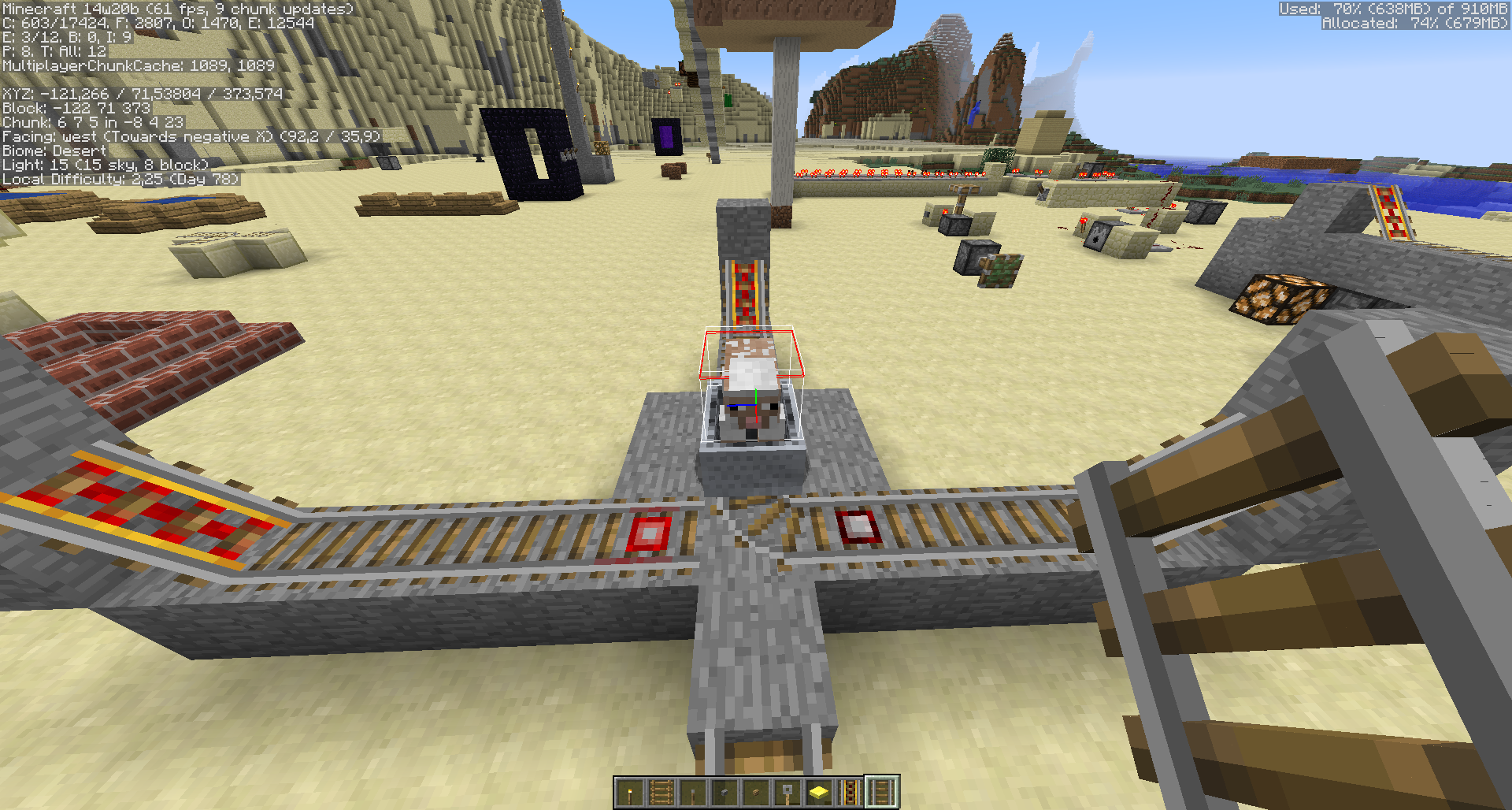
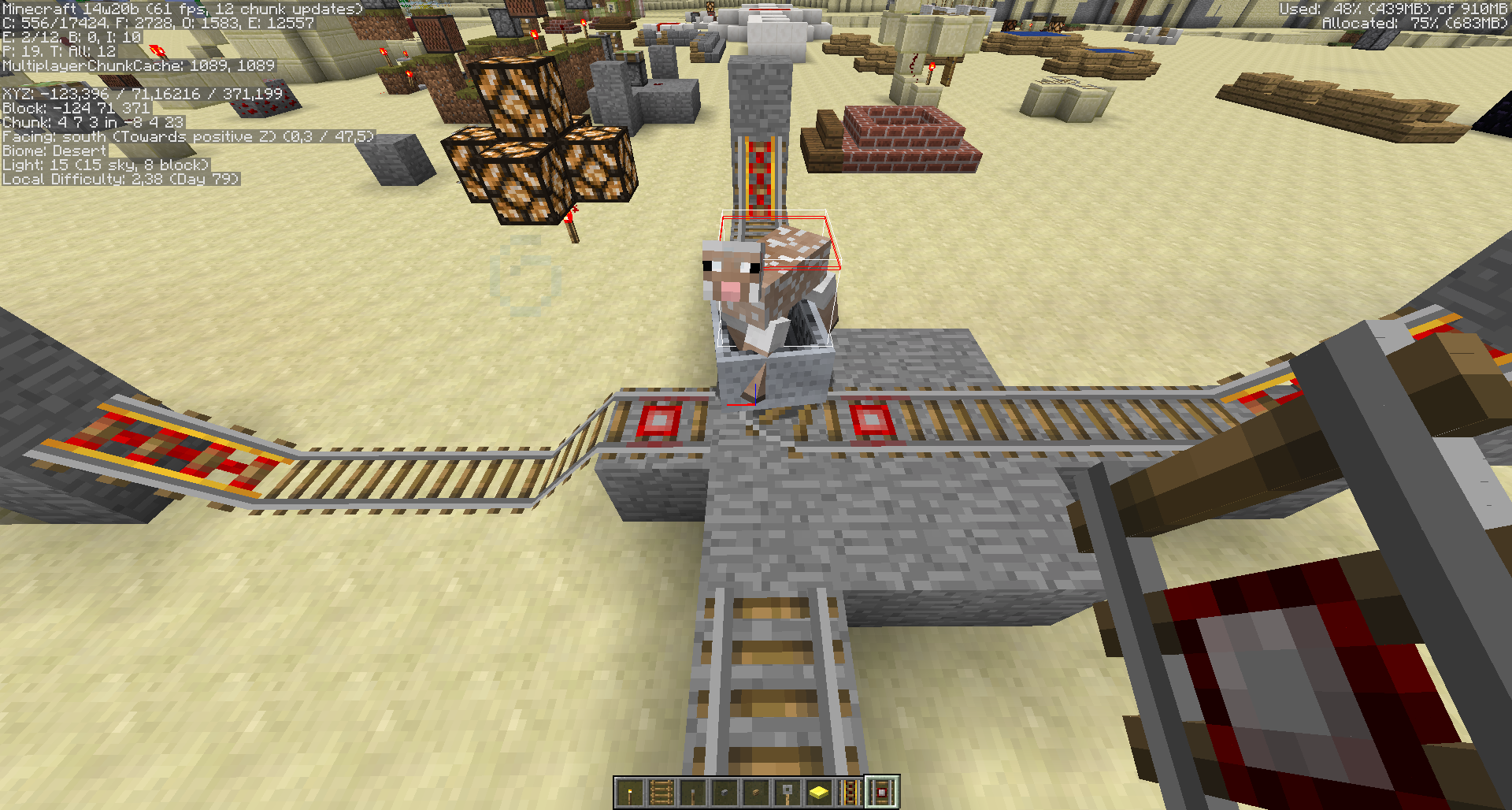
I guess not. Additionally, my test sheep refused to pass junction in first setup.
So, what happens here:
1. I put a minecart on the south-facing track and provide the junction with two detector rails on southern and northern tracks. Junction assumed its natural south-western orientation.
2. I pull the cart. Cart passes the detector for the first time. Junction assumes innatural north-western orientation.
3. Cart passes the junction straight north (which is normal), returns back, presses the detector to the right and successfully goes west.
4. Cart approaches the junction. Southern (leftmost) detector activates, junction assumes innatural position due to this, then for some reason minecart bumps back west with all the momentum it previously had.
Apparently
a) for some reason it is definitely tested whether the minecart can pass the junction towards the active detector. I suppose such check happens at least twice: right before the detector activates when the junction is approached by minecart (true) and then again after it toggles the junction (false).
b) the detector that will become active first is chosen directionally (e.g. there is currently no way for junction to store and reuse some unrelated data like "last active signal source", "last known minecart direction" or "what does the sheep say" here)
And here, if we rotate our setup to the south, both detectors become active and the minecart can go to the right and back.
OP, can we get 14w21b added to the affected version field please?
kbk, yeah the directionality of it suggests it's bug-like, if not an outright code bug. It's likely going to be very hard to fix, which would suggest it's going to languish, unresolved, for some time yet.
Still valid for 14w27b.
Still in 30c.
Starting to sound like a broken record today, but this is still valid as of 14w33a
Confirmed for 1.8/1.8.1-pre2. Can probably be fixed by only making the center of its hitbox interact with the detector rail, instead of the entire hitbox.
Confirmed for 1.8 pre-release 3.
Confirmed for 1.8.4 stable.
If this setup counts, confirmed for Vanilla 1.8.5.

Here's some other crazy behaviour related to this.
What you would expect from block descriptions on the Wiki:
The Minecart should travel East from the starting point then turn right.
What you would expect from MC-868:
The Minecart should travel East from the starting point, activate the detector rail around the corner then go left.
What actually happens:
Insanity ensues! Watch the video: https://youtu.be/HCrlaovpXuk
This bug is THREE YEARS OLD. Very soon, Mojang are going to have to pack this bug up and send if off to school it's so old.
Confirmed in 1.8.7 on OS X Mavericks, with Java 8 update 51. This happens no matter what speed the minecart's traveling at.
Confirmed for 15w44b.
Confirmed for 1.8.9 and 15w51b. Happens about 80% of the time.
Fixed in 16w02a? Using the setup described in start.png, the minecart sometimes "bounces" off the rail and goes backwards.
Not fixed. Still an issue in 16w02a.
Confirmed for 1.9-pre1. It seems to be affected by the speed of the minecart as well. Fast and slow minecarts don't trigger it, but minecarts with a medium-ish speed do.
Half-fixed(?) for 1.9.1-pre3.
Slow-moving minecarts will go the correct way, while fast moving minecarts will bounce back?!
Confirmed for 1.9.3-pre3.
PS. In the description, James Daves should be changed to James (inactive) "[~James549]".
Confirmed for 1.9.4.
Confirmed for 16w20a.
Confirmed for 16w21a.
Confirmed for 16w21b. (At this point, the bug is the fact that minecarts will bounce back in the example.)
Confirmed for 1.10-pre1.
Confirmed for 1.10-pre2. (Slow moving minecarts will initially appear to move the incorrect way, then they will start to move the correct way.)
Confirmed for 1.10. I still managed to get the minecart to go the incorrect way!
Confirmed for 1.10.1.
Confirmed for 1.10.2.
This might help to visualize the behavior...
https://youtu.be/2UhbmKqR82g
Also, confirmed for Minecraft 1.10.2
Confirmed for 1.12; this is quite an annoying bug that really messes with simple minecart junctions.
I think this could be easily solved by changing the AABB used for detection of minecarts in BlockRailDetector#getDetectionBox (using the Forge names for things); there already seems to be a variable, f, which defines how much the block pos is shrunken for the AABB, but it's not actually used; using that and adjusting it to something a bit larger (so, a smaller AABB) would probably do the trick, as it seems checking the middle 60% of the block is still too much margin.
Alternatively, the World#getEntitiesWithinAABB method (or, down the line, the AxisAlignedBB#intersects method) could have an overloaded option that takes an "adjustment" float argument and adjusts the entity's bounding box during intersection testing.
Either should work; I'd say the first option is easier, though.
Can confirm for MC 1.12.1.
This issue is different now. The minecart doesn't go in the other direction of the junction, but instead it goes backwards. If it bounces back to the junction again, it goes the other direction of course.
Would be nice to have it finally fixed, in 1.14.


This happens in 1.13 and all the recent snapshot versions. Tested again on 1.14 Pre-Release 5:
Still in MC 1.14.1
Still in MC 1.14.2 Pre-2
Also, in Environment it says Ubuntu. Windows (10) should be added as well.
Happens in 1.14.2-Pre-Release 3
Still in 1.14.3 Pre-Release 2
Mojang, please. This really makes it impossible to do any cool rail systems and is in the game already for so long.
1.14.4 Pre-3 - still there.
This still affects 1.15 snapshots.
Still exists in 1.16 Pre-5.
Affects 1.16 Release Candidate 1
Cannot reproduce in 20w45a. Fixed?
I can. Are you using the setup from the pictured embedded into the description?
This bug is still present as of 1.16.3, its making my T-junctions impossible to use
Can confirm in 21w05b.
Affects 1.17
Affects 1.17.1
This effect is also visible when a cart passes nearby a detector rail. The detector rail fires when the cart will not even drive over it
Can confirm for 22w18a
The issue is not due to how big the collision box of the detector rail is, as mentioned before. Since changing the collision box will also affect command block minecarts & inventory minecarts, which is a big deal.
The issue is due to how the detector rail functions. When an entity collides with a detector rail, it looks for carts touching itself, we simply need to tell it not to activate unless the minecart is in the block.
Code Analysis (Yarn - 22w18a)
Suggested Fix:
Working Fix
Now I will mention why this should not be fixed xD
When changing this code you run into an issue with client rendering. Due to the client using interpolation, the client will render the minecart as if it's turning and then put it in the right place. So that issue should be solved first... which is not an easy issue to fix.
Can confirm in 1.19.3
Can confirm in 23w03a
Can confirm in 23w04a
As the original author of this issue I just wanted to say hello. It is 10 years now, I still play Minecraft. I am not complaining, I see no need to rush to fix this.
Can confirm in 23w05a
Can confirm in 23w06a
Can confirm in 1.20.1
Can confirm for 1.21.3
dang this is the oldest open ticket in java mc, wow