 Tyson VanOverhill
- tyson.vanover
- tyson.vanover@gmail.com
- America/Los_Angeles
- Yes
- No
 MCPE-26871

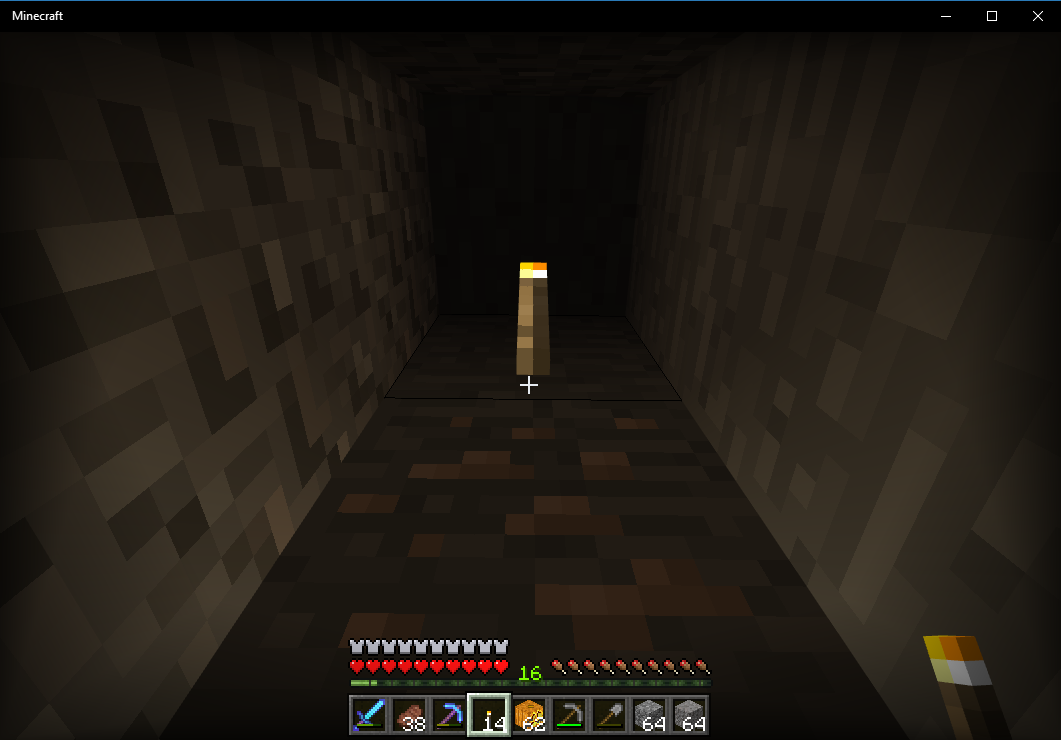


Previous to the 1.2.1.1 Jack o'lanterns and torches in my realm would light blocks 4 blocks away before they would darken with shadow. Now it seems to have dropped to two blocks. Corridors that were well lit now are darkened with shadow.
Previous to the 1.2.1.1 Jack o'lanterns and torches in my realm would light blocks 4 blocks away before they would darken with shadow. Now it seems to have dropped to two blocks. Corridors that were well lit now are darkened with shadow. The attached screenshot is 8 blocks above bedrock and Brightness 100
Previous to the 1.2.1.1 Jack o'lanterns and torches in my realm would light blocks 4 blocks away before they would darken with shadow. Now it seems to have dropped to two blocks. Corridors that were well lit now are darkened with shadow. The attached screenshot
is8 blocks above bedrock and Brightness 100Previous to the 1.2.1.1 Jack o'lanterns and torches in my realm would light blocks 4 blocks away before they would darken with shadow. Now it seems to have dropped to two blocks. Corridors that were well lit now are darkened with shadow. The attached screenshots are 8 blocks above bedrock and Brightness 100
Previous to the 1.2.1.1 Jack o'lanterns and torches in my realm would light blocks 4 blocks away before they would darken with shadow. Now it seems to have dropped to two blocks. Corridors that were well lit now are darkened with shadow. The attached screenshots are 8 blocks above bedrock
andBrightness 100Previous to the 1.2.1.1 Jack o'lanterns and torches in my realm would light blocks 4 blocks away before they would darken with shadow. Now it seems to have dropped to two blocks. Corridors that were well lit now are darkened with shadow. The attached screenshots are 8 blocks above bedrock, Brightness 100, and Smooth Lighting on
After launching and closing the win 10 app successfully a few times it will stall on the Mojang splash screen for about 3 minutes then crash.
I could not find a TWinUI log under Applications and Services -> Microsoft -> Windows
- <Event xmlns="http://schemas.microsoft.com/win/2004/08/events/event">
- <System>
<Provider Name="Microsoft-Windows-Immersive-Shell" Guid=" {315A8872-923E-4EA2-9889-33CD4754BF64}" />
{9BD8C3AA-37F2-0002-DCC7-F19BF237D301}
<EventID>5973</EventID>
<Version>0</Version>
<Level>2</Level>
<Task>5973</Task>
<Opcode>0</Opcode>
<Keywords>0x2000000000000000</Keywords>
<TimeCreated SystemTime="2017-09-28T23:07:02.261576900Z" />
<EventRecordID>17733</EventRecordID>
<Correlation ActivityID="" />
<Execution ProcessID="5552" ThreadID="1068" />
<Channel>Application</Channel>
<Computer>RRI-SF-67.PSU.DS.PDX.EDU</Computer>
<Security UserID="S-1-5-21-1708537768-823518204-1801674531-97000" />
</System>- <EventData>
<Data Name="AppId">Microsoft.MinecraftUWP_8wekyb3d8bbwe!App</Data>
<Data Name="ErrorCode">-2144927141</Data>
</EventData>
</Event>
After launching and closing the win 10 app successfully a few times it will stall on the Mojang splash screen for about 3 minutes then crash. After that the app will not successfully run until a full reboot.
I could not find a TWinUI log under Applications and Services -> Microsoft -> Windows
- <Event xmlns="http://schemas.microsoft.com/win/2004/08/events/event">
- <System>
<Provider Name="Microsoft-Windows-Immersive-Shell" Guid=" {315A8872-923E-4EA2-9889-33CD4754BF64}" />
{9BD8C3AA-37F2-0002-DCC7-F19BF237D301}
<EventID>5973</EventID>
<Version>0</Version>
<Level>2</Level>
<Task>5973</Task>
<Opcode>0</Opcode>
<Keywords>0x2000000000000000</Keywords>
<TimeCreated SystemTime="2017-09-28T23:07:02.261576900Z" />
<EventRecordID>17733</EventRecordID>
<Correlation ActivityID="" />
<Execution ProcessID="5552" ThreadID="1068" />
<Channel>Application</Channel>
<Computer>RRI-SF-67.PSU.DS.PDX.EDU</Computer>
<Security UserID="S-1-5-21-1708537768-823518204-1801674531-97000" />
</System>- <EventData>
<Data Name="AppId">Microsoft.MinecraftUWP_8wekyb3d8bbwe!App</Data>
<Data Name="ErrorCode">-2144927141</Data>
</EventData>
</Event>
After launching and closing the win 10 app successfully a few times it will stall on the Mojang splash screen for about 3 minutes then crash. After that the app will not successfully run until a full reboot.
From the error Log:
Activation of app Microsoft.MinecraftUWP_8wekyb3d8bbwe!App failed with error: The app didn't start. See the Microsoft-Windows-TWinUI/Operational log for additional information.I could not find a TWinUI log under Applications and Services -> Microsoft -> Windows
- <Event xmlns="http://schemas.microsoft.com/win/2004/08/events/event">
- <System>
<Provider Name="Microsoft-Windows-Immersive-Shell" Guid=" {315A8872-923E-4EA2-9889-33CD4754BF64}" />
{9BD8C3AA-37F2-0002-DCC7-F19BF237D301}
<EventID>5973</EventID>
<Version>0</Version>
<Level>2</Level>
<Task>5973</Task>
<Opcode>0</Opcode>
<Keywords>0x2000000000000000</Keywords>
<TimeCreated SystemTime="2017-09-28T23:07:02.261576900Z" />
<EventRecordID>17733</EventRecordID>
<Correlation ActivityID="" />
<Execution ProcessID="5552" ThreadID="1068" />
<Channel>Application</Channel>
<Computer>RRI-SF-67.PSU.DS.PDX.EDU</Computer>
<Security UserID="S-1-5-21-1708537768-823518204-1801674531-97000" />
</System>- <EventData>
<Data Name="AppId">Microsoft.MinecraftUWP_8wekyb3d8bbwe!App</Data>
<Data Name="ErrorCode">-2144927141</Data>
</EventData>
</Event>
After launching and closing the win 10 app successfully a few times it will stall on the Mojang splash screen for about 3 minutes then crash. After that the app will not successfully run until a full reboot.
From the error Log:
Activation of app Microsoft.MinecraftUWP_8wekyb3d8bbwe!App failed with error: The app didn't start. See the Microsoft-Windows-TWinUI/Operational log for additional information.I could not find a TWinUI log under Applications and Services -> Microsoft -> Windows
- <Event xmlns="http://schemas.microsoft.com/win/2004/08/events/event">
- <System>
<Provider Name="Microsoft-Windows-Immersive-Shell" Guid=" {315A8872-923E-4EA2-9889-33CD4754BF64}" />
{9BD8C3AA-37F2-0002-DCC7-F19BF237D301}
<EventID>5973</EventID>
<Version>0</Version>
<Level>2</Level>
<Task>5973</Task>
<Opcode>0</Opcode>
<Keywords>0x2000000000000000</Keywords>
<TimeCreated SystemTime="2017-09-28T23:07:02.261576900Z" />
<EventRecordID>17733</EventRecordID>
<Correlation ActivityID="" />
<Execution ProcessID="5552" ThreadID="1068" />
<Channel>Application</Channel>
<Computer>RRI-SF-67.PSU.DS.PDX.EDU</Computer>
<Security UserID="S-1-5-21-1708537768-823518204-1801674531-97000" />
</System>- <EventData>
<Data Name="AppId">Microsoft.MinecraftUWP_8wekyb3d8bbwe!App</Data>
<Data Name="ErrorCode">-2144927141</Data>
</EventData>
</Event>After launching and closing the win 10 app successfully a few times it will stall on the Mojang splash screen for about 3 minutes then crash. After that the app will not successfully run until a full reboot.
From the error Log:
Activation of app Microsoft.MinecraftUWP_8wekyb3d8bbwe!App failed with error: The app didn't start. See the Microsoft-Windows-TWinUI/Operational log for additional information.I could not find a TWinUI log under Applications and Services -> Microsoft -> Windows
- <Event xmlns="http://schemas.microsoft.com/win/2004/08/events/event">
- <System>
  <Provider Name="Microsoft-Windows-Immersive-Shell" Guid="{315A8872-923E-4EA2-9889-33CD4754BF64}" />
  <EventID>5973</EventID>
  <Version>0</Version>
  <Level>2</Level>
  <Task>5973</Task>
  <Opcode>0</Opcode>
  <Keywords>0x2000000000000000</Keywords>
  <TimeCreated SystemTime="2017-09-28T23:07:02.261576900Z" />
  <EventRecordID>17733</EventRecordID>
  <Correlation ActivityID="{9BD8C3AA-37F2-0002-DCC7-F19BF237D301}" />
  <Execution ProcessID="5552" ThreadID="1068" />
  <Channel>Application</Channel>
  <Computer>RRI-SF-67.PSU.DS.PDX.EDU</Computer>
  <Security UserID="S-1-5-21-1708537768-823518204-1801674531-97000" />
  </System>
- <EventData>
  <Data Name="AppId">Microsoft.MinecraftUWP_8wekyb3d8bbwe!App</Data>
  <Data Name="ErrorCode">-2144927141</Data>
  </EventData>
  </Event>
After launching and closing the win 10 app successfully a few times it will stall on the Mojang splash screen for about 3 minutes then crash. After that the app will not successfully run until a full reboot.
From the error Log:
Activation of app Microsoft.MinecraftUWP_8wekyb3d8bbwe!App failed with error: The app didn't start. See the Microsoft-Windows-TWinUI/Operational log for additional information.I could not find a TWinUI log under Applications and Services -> Microsoft -> Windows
- <Event xmlns="http://schemas.microsoft.com/win/2004/08/events/event"> - <System> <Provider Name="Microsoft-Windows-Immersive-Shell" Guid="{315A8872-923E-4EA2-9889-33CD4754BF64}" /> <EventID>5973</EventID> <Version>0</Version> <Level>2</Level> <Task>5973</Task> <Opcode>0</Opcode> <Keywords>0x2000000000000000</Keywords> <TimeCreated SystemTime="2017-09-28T23:07:02.261576900Z" /> <EventRecordID>17733</EventRecordID> <Correlation ActivityID="{9BD8C3AA-37F2-0002-DCC7-F19BF237D301}" /> <Execution ProcessID="5552" ThreadID="1068" /> <Channel>Application</Channel> <Computer>RRI-SF-67.PSU.DS.PDX.EDU</Computer> <Security UserID="S-1-5-21-1708537768-823518204-1801674531-97000" /> </System> - <EventData> <Data Name="AppId">Microsoft.MinecraftUWP_8wekyb3d8bbwe!App</Data> <Data Name="ErrorCode">-2144927141</Data> </EventData> </Event>After launching and closing the win 10 app successfully a few times it will stall on the Mojang splash screen for about 3 minutes then crash. After that the app will not successfully run until a full reboot.
From the error Log:
Activation of app Microsoft.MinecraftUWP_8wekyb3d8bbwe!App failed with error: The app didn't start. See the Microsoft-Windows-TWinUI/Operational log for additional information.- <Event xmlns="http://schemas.microsoft.com/win/2004/08/events/event"> - <System> <Provider Name="Microsoft-Windows-Immersive-Shell" Guid="{315A8872-923E-4EA2-9889-33CD4754BF64}" /> <EventID>5973</EventID> <Version>0</Version> <Level>2</Level> <Task>5973</Task> <Opcode>0</Opcode> <Keywords>0x2000000000000000</Keywords> <TimeCreated SystemTime="2017-09-28T23:07:02.261576900Z" /> <EventRecordID>17733</EventRecordID> <Correlation ActivityID="{9BD8C3AA-37F2-0002-DCC7-F19BF237D301}" /> <Execution ProcessID="5552" ThreadID="1068" /> <Channel>Application</Channel> <Computer>RRI-SF-67.PSU.DS.PDX.EDU</Computer> <Security UserID="S-1-5-21-1708537768-823518204-1801674531-97000" /> </System> - <EventData> <Data Name="AppId">Microsoft.MinecraftUWP_8wekyb3d8bbwe!App</Data> <Data Name="ErrorCode">-2144927141</Data> </EventData> </Event> - <Event xmlns="http://schemas.microsoft.com/win/2004/08/events/event"> - <System> <Provider Name="Microsoft-Windows-Immersive-Shell" Guid="{315A8872-923E-4EA2-9889-33CD4754BF64}" /> <EventID>5990</EventID> <Version>0</Version> <Level>2</Level> <Task>5961</Task> <Opcode>0</Opcode> <Keywords>0x4000000000000000</Keywords> <TimeCreated SystemTime="2017-09-28T23:07:02.257784500Z" /> <EventRecordID>2999</EventRecordID> <Correlation ActivityID="{9BD8C3AA-37F2-0002-DCC7-F19BF237D301}" /> <Execution ProcessID="5552" ThreadID="1068" /> <Channel>Microsoft-Windows-TWinUI/Operational</Channel> <Computer>RRI-SF-67.PSU.DS.PDX.EDU</Computer> <Security UserID="S-1-5-21-1708537768-823518204-1801674531-97000" /> </System> - <EventData> <Data Name="AppId">Microsoft.MinecraftUWP_8wekyb3d8bbwe!App</Data> <Data Name="ContractId">Windows.Launch</Data> <Data Name="ErrorCode">-2146959355</Data> </EventData> </Event> - <Event xmlns="http://schemas.microsoft.com/win/2004/08/events/event"> - <System> <Provider Name="Microsoft-Windows-Immersive-Shell" Guid="{315A8872-923E-4EA2-9889-33CD4754BF64}" /> <EventID>5961</EventID> <Version>0</Version> <Level>2</Level> <Task>5961</Task> <Opcode>0</Opcode> <Keywords>0x4000000000000000</Keywords> <TimeCreated SystemTime="2017-09-28T23:07:02.261540300Z" /> <EventRecordID>3000</EventRecordID> <Correlation ActivityID="{9BD8C3AA-37F2-0002-DCC7-F19BF237D301}" /> <Execution ProcessID="5552" ThreadID="1068" /> <Channel>Microsoft-Windows-TWinUI/Operational</Channel> <Computer>RRI-SF-67.PSU.DS.PDX.EDU</Computer> <Security UserID="S-1-5-21-1708537768-823518204-1801674531-97000" /> </System> - <EventData> <Data Name="AppId">Microsoft.MinecraftUWP_8wekyb3d8bbwe!App</Data> <Data Name="ContractId">Windows.Launch</Data> <Data Name="ErrorCode">-2144927141</Data> </EventData> </Event> - <Event xmlns="http://schemas.microsoft.com/win/2004/08/events/event"> - <System> <Provider Name="Microsoft-Windows-Immersive-Shell" Guid="{315A8872-923E-4EA2-9889-33CD4754BF64}" /> <EventID>5985</EventID> <Version>0</Version> <Level>2</Level> <Task>5961</Task> <Opcode>0</Opcode> <Keywords>0x4000000000000000</Keywords> <TimeCreated SystemTime="2017-09-28T23:07:02.276244200Z" /> <EventRecordID>3001</EventRecordID> <Correlation /> <Execution ProcessID="5552" ThreadID="1068" /> <Channel>Microsoft-Windows-TWinUI/Operational</Channel> <Computer>RRI-SF-67.PSU.DS.PDX.EDU</Computer> <Security UserID="S-1-5-21-1708537768-823518204-1801674531-97000" /> </System> - <EventData> <Data Name="AppId">Microsoft.MinecraftUWP_8wekyb3d8bbwe!App</Data> <Data Name="ContractId">Windows.Launch</Data> <Data Name="ErrorCode">-2144927141</Data> </EventData> </Event>
After launching and closing the win 10 app successfully a few times it will stall on the Mojang splash screen for about 3 minutes then crash. After that the app will not successfully run until a full reboot.
From the error Log:
Activation of app Microsoft.MinecraftUWP_8wekyb3d8bbwe!App failed with error: The app didn't start. See the Microsoft-Windows-TWinUI/Operational log for additional information.I grabbed the xml versions of the log in Windows Logs -> Applications and the 3 logs in the Microsoft-Windows-TWinUI/Operational log that occurred at the same time.
- <Event xmlns="http://schemas.microsoft.com/win/2004/08/events/event">
- <System>
  <Provider Name="Microsoft-Windows-Immersive-Shell" Guid="{315A8872-923E-4EA2-9889-33CD4754BF64}" />
  <EventID>5973</EventID>
  <Version>0</Version>
  <Level>2</Level>
  <Task>5973</Task>
  <Opcode>0</Opcode>
  <Keywords>0x2000000000000000</Keywords>
  <TimeCreated SystemTime="2017-09-28T23:07:02.261576900Z" />
  <EventRecordID>17733</EventRecordID>
  <Correlation ActivityID="{9BD8C3AA-37F2-0002-DCC7-F19BF237D301}" />
  <Execution ProcessID="5552" ThreadID="1068" />
  <Channel>Application</Channel>
  <Computer>RRI-SF-67.PSU.DS.PDX.EDU</Computer>
  <Security UserID="S-1-5-21-1708537768-823518204-1801674531-97000" />
  </System>
- <EventData>
  <Data Name="AppId">Microsoft.MinecraftUWP_8wekyb3d8bbwe!App</Data>
  <Data Name="ErrorCode">-2144927141</Data>
  </EventData>
  </Event>

- <Event xmlns="http://schemas.microsoft.com/win/2004/08/events/event">
- <System>
  <Provider Name="Microsoft-Windows-Immersive-Shell" Guid="{315A8872-923E-4EA2-9889-33CD4754BF64}" />
  <EventID>5990</EventID>
  <Version>0</Version>
  <Level>2</Level>
  <Task>5961</Task>
  <Opcode>0</Opcode>
  <Keywords>0x4000000000000000</Keywords>
  <TimeCreated SystemTime="2017-09-28T23:07:02.257784500Z" />
  <EventRecordID>2999</EventRecordID>
  <Correlation ActivityID="{9BD8C3AA-37F2-0002-DCC7-F19BF237D301}" />
  <Execution ProcessID="5552" ThreadID="1068" />
  <Channel>Microsoft-Windows-TWinUI/Operational</Channel>
  <Computer>RRI-SF-67.PSU.DS.PDX.EDU</Computer>
  <Security UserID="S-1-5-21-1708537768-823518204-1801674531-97000" />
  </System>
- <EventData>
  <Data Name="AppId">Microsoft.MinecraftUWP_8wekyb3d8bbwe!App</Data>
  <Data Name="ContractId">Windows.Launch</Data>
  <Data Name="ErrorCode">-2146959355</Data>
  </EventData>
  </Event>

- <Event xmlns="http://schemas.microsoft.com/win/2004/08/events/event">
- <System>
  <Provider Name="Microsoft-Windows-Immersive-Shell" Guid="{315A8872-923E-4EA2-9889-33CD4754BF64}" />
  <EventID>5961</EventID>
  <Version>0</Version>
  <Level>2</Level>
  <Task>5961</Task>
  <Opcode>0</Opcode>
  <Keywords>0x4000000000000000</Keywords>
  <TimeCreated SystemTime="2017-09-28T23:07:02.261540300Z" />
  <EventRecordID>3000</EventRecordID>
  <Correlation ActivityID="{9BD8C3AA-37F2-0002-DCC7-F19BF237D301}" />
  <Execution ProcessID="5552" ThreadID="1068" />
  <Channel>Microsoft-Windows-TWinUI/Operational</Channel>
  <Computer>RRI-SF-67.PSU.DS.PDX.EDU</Computer>
  <Security UserID="S-1-5-21-1708537768-823518204-1801674531-97000" />
  </System>
- <EventData>
  <Data Name="AppId">Microsoft.MinecraftUWP_8wekyb3d8bbwe!App</Data>
  <Data Name="ContractId">Windows.Launch</Data>
  <Data Name="ErrorCode">-2144927141</Data>
  </EventData>
  </Event>

- <Event xmlns="http://schemas.microsoft.com/win/2004/08/events/event">
- <System>
  <Provider Name="Microsoft-Windows-Immersive-Shell" Guid="{315A8872-923E-4EA2-9889-33CD4754BF64}" />
  <EventID>5985</EventID>
  <Version>0</Version>
  <Level>2</Level>
  <Task>5961</Task>
  <Opcode>0</Opcode>
  <Keywords>0x4000000000000000</Keywords>
  <TimeCreated SystemTime="2017-09-28T23:07:02.276244200Z" />
  <EventRecordID>3001</EventRecordID>
  <Correlation />
  <Execution ProcessID="5552" ThreadID="1068" />
  <Channel>Microsoft-Windows-TWinUI/Operational</Channel>
  <Computer>RRI-SF-67.PSU.DS.PDX.EDU</Computer>
  <Security UserID="S-1-5-21-1708537768-823518204-1801674531-97000" />
  </System>
- <EventData>
  <Data Name="AppId">Microsoft.MinecraftUWP_8wekyb3d8bbwe!App</Data>
  <Data Name="ContractId">Windows.Launch</Data>
  <Data Name="ErrorCode">-2144927141</Data>
  </EventData>
  </Event>