 MinecraftBugs
- UdinBahrudin
- JIRAUSER666150
- Asia/Jakarta
- Yes
- No
 MCPE-135150
 REALMS-10937


 WEB-5290



16262542290223503566921939767460.jpg
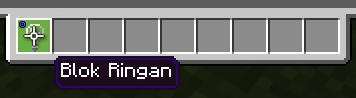
The light block translate is wrong.
It's not "Blok Ringan" it must be "Blok Cahaya"
Please fix this
Thanks.
The light block translate is wrong.
It's not "Blok Ringan" it must be "Blok Cahaya".
Please fix this issue, Mojang Studios.
- Thanks.
Bahasa IndonesiatranslationmistakeBahasa Indonesia Translation Mistake / Light Block
The light block translate is wrong.
It's not
"Blok Ringan"it must be"Blok Cahaya".
Please fix thisissue, Mojang Studios.
- Thanks.
__
Observed Results:
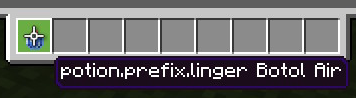
Splash Water Bottle: potion.prefix.grenade Botol Air
Lingering Water Bottle: potion.prefix.linger Botol Air
Light Block: Blok Ringan__
Expected Results:
Splash Water Bottle: Percikan Botol Air
Lingering Water Bottle: Ramuan Bertahan
Light Block: Blok Cahaya__
Steps to Reproduce:
1. Change language to Bahasa Indonesia in settings
2. Get this item using command or get it from inventory:Light Block: /give @p light_block
Lingering Water Bottle: /give @p lingering_potion
Splash Water Bottle: /give @p splash_potion
Bahasa Indonesia Translation Mistake / Light BlockTranslation Errors in Bahasa Indonesia (Indonesian)
I changed the language to English (US) and the bug didn't appear, looks like it doesn't affect all languages. It affects in all languages in Beta.
I'm using version 1.17.32
I changed the language to English (US) and the bug didn't appear, looks like it doesn't affect all languages. It affects in all languages in Beta.
I'm using version 1.17.32
I changed the language to English (US) and the bug doesn't appear, it doesn't seem to affect all languages. This affects all languages if in Beta.
I'm using version 1.17.32
I changed the language to English (US) and the bug doesn't appear, it doesn't seem to affect all languages. This affects all languages if in Beta.
*I'm using version 1.17.32
Translation Errors in Bahasa Indonesia (Indonesian) And Splash And Linger Water Bottle Item Name
Translation Errors in Bahasa Indonesia (Indonesian) And Splash And Linger Water Bottle Item NameTranslation Errors in Bahasa Indonesia (Indonesian) And Splash And Linger Water Bottle Item Naming Bug
Translation Errors in Bahasa Indonesia (Indonesian)AndSplash And Linger Water Bottle Item Naming BugTranslation Errors in Bahasa Indonesia (Indonesian), Splash And Linger Water Bottle Item Naming Bug
Translation Errors in Bahasa Indonesia(Indonesian), Splash And Linger Water Bottle Item Naming Bug
Translation Errorsin Bahasa Indonesia, Splash And Linger Water Bottle Item Naming Bug
TranslationError in Bahasa Indonesia, SplashAnd Linger Water BottleItemNamingBug
__
Observed Results:
Splash Water Bottle: potion.prefix.grenade Botol Air
Lingering Water Bottle: potion.prefix.linger Botol Air
Light Block: Blok Ringan__
Expected Results:
Splash Water Bottle: Percikan Botol Air
Lingering Water Bottle: Ramuan Bertahan
Light Block: Blok Cahaya__
Steps to Reproduce:
1. Change language to Bahasa Indonesia in settings
2. Get this item using command or get it from inventory:Light Block: /give @p light_block
Lingering Water Bottle: /give @p lingering_potion
Splash Water Bottle: /give @p splash_potionObserved Results:
Splash Water Bottle: potion.prefix.grenade Botol Air
Lingering Water Bottle: potion.prefix.linger Botol Air
Light Block: Blok RinganExpected Results:
Splash Water Bottle: Percikan Botol Air
Lingering Water Bottle: Ramuan Bertahan
Light Block: Blok CahayaSteps to Reproduce:
1. Change language to Bahasa Indonesia in settings
2. Get this item using command or get it from inventory:Light Block: /give @p light_block
Lingering Water Bottle: /give @p lingering_potion
Splash Water Bottle: /give @p splash_potion
Observed Results:
Splash Water Bottle: potion.prefix.grenade Botol Air
Lingering Water Bottle: potion.prefix.linger Botol Air
Light Block: Blok Ringan
Expected Results:
Splash Water Bottle: Percikan Botol Air
Lingering Water Bottle: Ramuan Bertahan
Light Block: Blok Cahaya
Steps to Reproduce:
1. Change language to Bahasa Indonesia in settings
2. Get this item using command or get it from inventory:Light Block: /give @p light_block
Lingering Water Bottle: /give @p lingering_potion
Splash Water Bottle: /give @p splash_potion__
Observed Results:
Splash Water Bottle: potion.prefix.grenade Botol Air
Lingering Water Bottle: potion.prefix.linger Botol Air
Light Block: Blok Ringan__
Expected Results:
Splash Water Bottle: Percikan Botol Air
Lingering Water Bottle: Ramuan Bertahan
Light Block: Blok Cahaya__
Steps to Reproduce:
1. Change language to Bahasa Indonesia in settings
2. Get this item using command or get it from inventory:Light Block: /give @p light_block
Lingering Water Bottle: /give @p lingering_potion
Splash Water Bottle: /give @p splash_potion
Translation errors in Bahasa Indonesia, Splash and Linger Water Bottle item naming bug
__
Observed Results:
Splash Water Bottle: potion.prefix.grenade Botol Air
Lingering Water Bottle: potion.prefix.linger Botol Air
Light Block: Blok Ringan__
Expected Results:
Splash Water Bottle: Percikan Botol Air
Lingering Water Bottle: Ramuan Bertahan
Light Block: Blok Cahaya__
Steps to Reproduce:
1. Change language to Bahasa Indonesia in settings
2. Get this item using command or get it from inventory:Light Block: /give @p light_block
Lingering Water Bottle: /give @p lingering_potion
Splash Water Bottle: /give @p splash_potion

__
Observed Results:
Splash Water Bottle: potion.prefix.grenade Botol Air
Lingering Water Bottle: potion.prefix.linger Botol Air
Light Block: Blok Ringan__
Expected Results:
Splash Water Bottle: Percikan Botol Air
Lingering Water Bottle: Ramuan Bertahan
Light Block: Blok Cahaya__
Steps to Reproduce:
1. Change language to Bahasa Indonesia in settings
2. Get this item using command or get it from inventory:Light Block: /give @p light_block
Lingering Water Bottle: /give @p lingering_potion
Splash Water Bottle: /give @p splash_potion
__
Observed Results:
Splash Water Bottle: potion.prefix.grenade Botol Air
Lingering Water Bottle: potion.prefix.linger Botol Air
Light Block: Blok Ringan__
Expected Results:
Splash Water Bottle: Percikan Botol Air
Lingering Water Bottle: Ramuan Bertahan
Light Block: Blok Cahaya__
Steps to Reproduce:
1. Change language to Bahasa Indonesia in settings
2. Get this item using command or get it from inventory:Light Block: /give @p light_block
Lingering Water Bottle: /give @p lingering_potion
Splash Water Bottle: /give @p splash_potion
__
Observed Results:
Splash Water Bottle: potion.prefix.grenade Botol Air
Lingering Water Bottle: potion.prefix.linger Botol Air
Light Block: Blok Ringan__
Expected Results:
Splash Water Bottle: Percikan Botol Air
Lingering Water Bottle: Ramuan Bertahan
Light Block: Blok Cahaya__
Steps to Reproduce:
1. Change language to Bahasa Indonesia in settings
2. Get this item using command or get it from inventory:Light Block: /give @p light_block
Lingering Water Bottle: /give @p lingering_potion
Splash Water Bottle: /give @p splash_potion
Translation errors in Bahasa Indonesia, Splash and Linger Water Bottleitemnaming bugTranslation errors in Bahasa Indonesia, Splash Water Bottle and Linger Water Bottle naming bug
Translation errorsin Bahasa Indonesia, Splash Water Bottle and Linger Water Bottle naming bug
Translationerrorin Bahasa Indonesia, Splash Water Bottle and Linger Water Bottle naming bugInaccurate translation in Bahasa Indonesia, Splash Water Bottle and Linger Water Bottle naming bug
Inaccurate translation in Bahasa Indonesia, SplashWater Bottleand Linger Water Bottle naming bug
Inaccurate translation in Bahasa Indonesia, Splash and Linger Water Bottle namingbugInaccurate translation in Bahasa Indonesia, Splash and Linger Water Bottle naming error
__
Observed Results:
Splash Water Bottle: potion.prefix.grenade Botol Air
Lingering Water Bottle: potion.prefix.linger Botol Air
Light Block: Blok Ringan__
Expected Results:
Splash Water Bottle: Percikan Botol Air
Lingering Water Bottle: Ramuan Bertahan
Light Block: Blok Cahaya__
Steps to Reproduce:
1. Change language to Bahasa Indonesia in settings
2. Get this item using command or get it from inventory:Light Block: /give @p light_block
Lingering Water Bottle: /give @p lingering_potion
Splash Water Bottle: /give @p splash_potion
__
Observed Results:
Splash Water Bottle: potion.prefix.grenade Botol Air
Lingering Water Bottle: potion.prefix.linger Botol Air
Light Block: Blok Ringan__
Expected Results:
Splash Water Bottle: Percikan Botol Air
Lingering Water Bottle: Ramuan Bertahan
Light Block: Blok Cahaya__
Steps to Reproduce:
1. Change language to Bahasa Indonesia in settings
2. Get this item using command or get it from inventory:Light Block: /give @p light_block
Lingering Water Bottle: /give @p lingering_potion
Splash Water Bottle: /give @p splash_potion
__
Observed Results:
Splash Water Bottle: potion.prefix.grenade Botol Air
Lingering Water Bottle: potion.prefix.linger Botol Air
Light Block: Blok Ringan__
Expected Results:
Splash Water Bottle: Percikan Botol Air
Lingering Water Bottle: Ramuan Bertahan
Light Block: Blok Cahaya__
Steps to Reproduce:
1. Change language to Bahasa Indonesia in settings
2. Get this item using command or get it from inventory:Light Block:
/give @p light_block
Lingering Water Bottle: /give @p lingering_potion
Splash Water Bottle: /give @p splash_potion
__
Observed Results:
Light Block: Blok Ringan
Lingering Water Bottle: potion.prefix.linger Botol Air
Splash Water Bottle: potion.prefix.grenade Botol Air
__
Expected Results:
Splash Water Bottle: Percikan Botol Air
Lingering Water Bottle: Ramuan Bertahan
Light Block: Blok Cahaya__
Steps to Reproduce:
1. Change language to Bahasa Indonesia in settings
2. Get this item: Light Block, Lingering Water Bottle,
Splash Water Bottle
__
Observed Results:
Light Block: Blok Ringan
Lingering Water Bottle: potion.prefix.linger Botol Air
Splash Water Bottle: potion.prefix.grenade Botol Air
__
Expected Results:
Splash Water Bottle: Percikan Botol Air
Lingering Water Bottle: Ramuan Bertahan
Light Block: Blok Cahaya__
Steps to Reproduce:
1. Change language to Bahasa Indonesia in settings
2. Get this item: Light Block, Lingering Water Bottle,
Splash Water Bottle
__
Observed Results:
Light Block: Blok Ringan
Lingering Water Bottle: potion.prefix.linger Botol Air
Splash Water Bottle: potion.prefix.grenade Botol Air__
Expected Results:
Light Block: Blok Cahaya
Lingering Water Bottle: _+Ramuan Bertahan
Splash Water Bottle: Percikan Botol Air+___
Steps to Reproduce:
1. Change language to Bahasa Indonesia in settings
2. Get this item: Light Block, Lingering Water Bottle,
Splash Water Bottle
__
Observed Results:
Light Block: Blok Ringan
Lingering Water Bottle: potion.prefix.linger Botol Air
Splash Water Bottle: potion.prefix.grenade Botol Air__
Expected Results:
Light Block: Blok Cahaya
Lingering Water Bottle:_+Ramuan Bertahan
Splash Water Bottle:Percikan Botol Air+___
Steps to Reproduce:
1. Change language to Bahasa Indonesia in settings
2. Get this item: Light Block, Lingering Water Bottle,
Splash Water Bottle
__
Observed Results:
Light Block: Blok Ringan
Lingering Water Bottle: potion.prefix.linger Botol Air
Splash Water Bottle: potion.prefix.grenade Botol Air__
Expected Results:
Light Block: Blok Cahaya
Lingering Water Bottle: Ramuan Bertahan
Splash Water Bottle: Percikan Botol Air__
Steps to Reproduce:
1. Change language to Bahasa Indonesia in settings
2. Get this item: Light Block, Lingering Water Bottle,
Splash Water Bottle
Inaccurate translation in Bahasa Indonesiafor Light Block150 - Inaccurate translation in Bahasa Indonesia, Splash and Linger Water Bottle naming error
150 -Inaccurate translation in Bahasa Indonesia, Splash and Linger Water Bottle naming error
__
Observed Results:
Light Block:Blok Ringan__
Expected Results:
Light Block: Blok Cahaya__
Steps to Reproduce:
1. Change language to Bahasa Indonesia in settings
2. Get this item: Light Block
__
Observed Results:
Light Block: Blok Ringan
Lingering Water Bottle: potion.prefix.linger Botol Air
Splash Water Bottle: potion.prefix.grenade Botol Air__
Expected Results:
Light Block: Blok Cahaya__
Steps to Reproduce:
1. Change language to Bahasa Indonesia in settings
2. Get this item: Light Block
__
Observed Results:
Light Block: Blok Ringan
Lingering Water Bottle: potion.prefix.linger Botol Air
Splash Water Bottle: potion.prefix.grenade Botol Air__
Expected Results:
Light Block: Blok Cahaya__
Steps to Reproduce:
1. Change language to Bahasa Indonesia in settings
2. Get this item: Light Block
*__*
Observed Results:
Light Block: Blok Ringan
Lingering Water Bottle: potion.prefix.linger Botol Air
Splash Water Bottle: potion.prefix.grenade Botol Air
__
Expected Results:
Light Block: Blok Cahaya__
Steps to Reproduce:
1. Change language to Bahasa Indonesia in settings
2. Get this item: Light Block
*__*
Observed Results:
Light Block: Blok Ringan
Lingering Water Bottle: potion.prefix.linger Botol Air
Splash Water Bottle: potion.prefix.grenade Botol Air
__
Expected Results:
Light Block: Blok Cahaya__
Steps to Reproduce:
1. Change language to Bahasa Indonesia in settings
2. Get this item: Light Block
__
Observed Results:
Light Block: Blok Ringan
Lingering Water Bottle: potion.prefix.linger Botol Air
Splash Water Bottle: potion.prefix.grenade Botol Air__
Expected Results:
Light Block: Blok Cahaya__
Steps to Reproduce:
1. Change language to Bahasa Indonesia in settings
2. Get this item: Light Block
__
Observed Results:
Light Block: Blok Ringan
Lingering Water Bottle: potion.prefix.linger Botol Air
Splash Water Bottle: potion.prefix.grenade Botol Air
__
Expected Results:
Light Block: Blok Cahaya__
Steps to Reproduce:
1. Change language to Bahasa Indonesia in settings
2. Get this item: Light Block
__
Observed Results:
Light Block: Blok Ringan
Lingering Water Bottle: potion.prefix.linger Botol Air
Splash Water Bottle: potion.prefix.grenade Botol Air__
Expected Results:
Light Block: Blok Cahaya
Lingering Water Bottle: Botol Air
Splash Water Bottle: Percikan Botol Air__
Steps to Reproduce:
1. Change language to Bahasa Indonesia in settings
2. Get this item: Light Block
__
Observed Results:
Light Block: Blok Ringan
Lingering Water Bottle: potion.prefix.linger Botol Air
Splash Water Bottle: potion.prefix.grenade Botol Air__
Expected Results:
Light Block: Blok Cahaya
Lingering Water Bottle:Botol Air
Splash Water Bottle: Percikan Botol Air__
Steps to Reproduce:
1. Change language to Bahasa Indonesia in settings
2. Get this item:Light Block
__
Observed Results:
Light Block: Blok Ringan
Lingering Water Bottle: potion.prefix.linger Botol Air
Splash Water Bottle: potion.prefix.grenade Botol Air__
Expected Results:
Light Block: Blok Cahaya
Lingering Water Bottle: Ramuan Bertahan
Splash Water Bottle: Percikan Botol Air__
Steps to Reproduce:
1. Change language to Bahasa Indonesia in settings
2. Get this item: __
Observed Results:
Light Block: Blok Ringan
Lingering Water Bottle: potion.prefix.linger Botol Air
Splash Water Bottle: potion.prefix.grenade Botol Air
__
Observed Results:
Light Block: Blok Ringan
Lingering Water Bottle: potion.prefix.linger Botol Air
Splash Water Bottle: potion.prefix.grenade Botol Air__
Expected Results:
Light Block: Blok Cahaya
Lingering Water Bottle: Ramuan Bertahan
Splash Water Bottle: Percikan Botol Air__
Steps to Reproduce:
1. Change language to Bahasa Indonesia in settings
2. Get this item: __
Observed Results:
Light Block: Blok Ringan
Lingering Water Bottle: potion.prefix.linger Botol Air
Splash Water Bottle: potion.prefix.grenade Botol Air
__
Observed Results:
Light Block: Blok Ringan
Lingering Water Bottle: potion.prefix.linger Botol Air
Splash Water Bottle: potion.prefix.grenade Botol Air__
Expected Results:
Light Block: Blok Cahaya
Lingering Water Bottle: Ramuan Bertahan
Splash Water Bottle: Percikan Botol Air__
Steps to Reproduce:
1. Change language to Bahasa Indonesia in settings
2. Get this item: Light Block, Lingering Water Bottle,
Splash Water Bottle
Inaccurate translation in Bahasa Indonesia, Splash and Linger Water Bottle naming errors
__
Observed Results:
Light Block: Blok Ringan
Lingering Water Bottle: potion.prefix.linger Botol Air
Splash Water Bottle: potion.prefix.grenade Botol Air__
Expected Results:
Light Block: Blok Cahaya
Lingering Water Bottle: Ramuan Bertahan
Splash Water Bottle: Percikan Botol Air__
Steps to Reproduce:
1. Change language to Bahasa Indonesia in settings
2. Get this item: Light Block, Lingering Water Bottle,
Splash Water BottleObserved Results:
Light Block: Blok Ringan
Lingering Water Bottle: potion.prefix.linger Botol Air
Splash Water Bottle: potion.prefix.grenade Botol AirExpected Results:
Light Block: Blok Cahaya
Lingering Water Bottle: Ramuan Bertahan
Splash Water Bottle: Percikan Botol AirSteps to Reproduce:
1. Change language to Bahasa Indonesia in settings
2. Get this item: Light Block, Lingering Water Bottle,
Splash Water Bottle
Hi, [Mod] EVGENSYPERPRO
I changed the language to English (US) and the bug doesn't appear, it doesn't seem to affect all languages. This affects all languages if in Beta.*I'm using version 1.17.32
Taking flower fromFlower PotbugFlower Pot Bug
__
Observed Result:
When taking flower from the Flower Pot
the flower is still in the Flower Pot.__
Expected Result:
When take flower from Flower Pot
the Flower Pot should be empty.__
Steps to Reproduce:
1. Place flower on the Flower Pot
2. Change gamemode to survival mode
3. Take flower from the flower pot
__
Observed Result:
When taking flower from the Flower Pot
the flower is still in the Flower Pot.__
Expected Result:
When take flower from Flower Pot
the Flower Pot should be empty.__
Steps to Reproduce:
1. Place flower on the Flower Pot
2. Change gamemode to survival mode
3. Take flower from the flower pot
__
Observed Result:
When taking flower from the Flower Pot
the flower is still in the Flower Pot.__
Expected Result:
When take flower from Flower Pot
the Flower Pot should be empty.__
Steps to Reproduce:
1. Place flower on the Flower Pot
2. Change gamemode to survival mode
3. Take flower from the flower pot
__
Observed Result:
When taking flower from the Flower Pot
the flower is still in the Flower Pot.__
Expected Result:
When take flower from Flower Pot
the Flower Pot should be empty.__
Steps to Reproduce:
1. Place flower on the Flower Pot
2. Change gamemode to survival mode
3. Take flower from the flower pot

__
Observed Result:
When taking flower from the Flower Pot
the flower is still in the Flower Pot.__
Expected Result:
When take flower from Flower Pot
the Flower Pot should be empty.__
Steps to Reproduce:
1. Place flower on the Flower Pot
2. Change gamemode to survival mode
3. Take flower from the flower pot
__
Observed Result:
When taking flower from the Flower Pot
the flower is still in the Flower Pot.__
Expected Result:
When take flower from Flower Pot
the Flower Pot should be empty.__
Steps to Reproduce:
1. Place flower on the Flower Pot
2. Change gamemode to survival mode
3. Take flower from the flower pot
__
Observed Result:
When taking flower from the Flower Pot
the flower is still in the Flower Pot.__
Expected Result:
When take flower from Flower Pot
the Flower Pot should be empty.__
Steps to Reproduce:
1. Place flower on the Flower Pot
2. Change gamemode to survival mode
3. Take flower from the flower pot
__
Observed Result:
When taking flower from the Flower Pot
the flower is still in the Flower Pot.__
Expected Result:
When take flower from Flower Pot
the Flower Pot should be empty.__
Steps to Reproduce:
1. Place flower on the Flower Pot
2. Change gamemode to survival mode
3. Take flower from the flower pot
__
Observed Result:
When taking flower from the Flower Pot
the flower is still in the Flower Pot.__
Expected Result:
When take flower from Flower Pot
the Flower Pot should be empty.__
Steps to Reproduce:
1. Place flower on the Flower Pot
2. Change gamemode to survival mode
3. Take flower from the flower pot
Flower Pot BugTaking flower from the Flower Pot causes visual glitch
__
Observed Result:
When taking flower from the Flower Pot
the flower is still in the Flower Pot.__
Expected Result:
When take flower from Flower Pot
the Flower Pot should be empty.__
Steps to Reproduce:
1. Place flower on the Flower Pot
2. Change gamemode to survival mode
3. Take flower from the flower pot
__
Observed Result:
When taking flower from the Flower Pot
the flower is still in the Flower Pot.__
Expected Result:
When take flower from Flower Pot
the Flower Pot should be empty.__
Steps to Reproduce:
1. Place flower on the Flower Pot
2. Change gamemode to survival mode
3. Take flower from the flower pot
__
Observed Result:
When taking flower from the Flower Pot
the flower is still in the Flower Pot.__
Expected Result:
When take flower from Flower Pot
the Flower Pot should be empty.__
Steps to Reproduce:
1. Place flower on the Flower Pot
2. Change gamemode to survival mode
3. Take flower from the flower pot
__
Observed Result:
When taking flower from the Flower Pot
the flower is still in the Flower Pot.__
Expected Result:
When take flower from Flower Pot
the Flower Pot should be empty.__
Steps to Reproduce:
1. Place flower on the Flower Pot
2. Change gamemode to survival mode
3. Take flower from the flower pot
__
Observed Result:
When taking flower from the Flower Pot
the flower is still in the Flower Pot.__
Expected Result:
When take flower from Flower Pot
the Flower Pot should be empty.__
Steps to Reproduce:
1. Place flower on the Flower Pot
2. Change gamemode to survival mode
3. Take flower from the flower pot
__
Observed Result:
When taking flower from the Flower Pot
the flower is still in the Flower Pot.__
Expected Result:
When take flower from Flower Pot
the Flower Pot should be empty.__
Steps to Reproduce:
1. Place flower on the Flower Pot
2. Change gamemode to survival mode
3. Take flower from the flower pot
__
Observed Result:
When taking flower from the Flower Pot
the flower is still in the Flower Pot.__
Expected Result:
When take flower from Flower Pot
the Flower Pot should be empty.__
Steps to Reproduce:
1. Place flower on the Flower Pot
2. Change gamemode to survival mode
3. Take flower from the flower pot
__
Observed Result:
When taking flower from the Flower Pot
the flower is still in the Flower Pot.__
Expected Result:
When take flower from Flower Pot
the Flower Pot should be empty.__
Steps to Reproduce:
1. Place flower on the Flower Pot
2. Change gamemode to survival mode
3. Take flower from the flower pot
__
Observed Result:
When taking flower from the Flower Pot,
the flower is still in the Flower Pot.__
Expected Result:
When take flower from Flower Pot
the Flower Pot should be empty.__
Steps to Reproduce:
1. Place flower on the Flower Pot
2. Change gamemode to survival mode
3. Take flower from the flower pot
__
Observed Result:
When taking flower from the Flower Pot,
the flower is still in the Flower Pot.__
Expected Result:
When takeflower from Flower Pot
the Flower Pot should be empty.__
Steps to Reproduce:
1. Place flower on the Flower Pot
2. Change gamemode to survival mode
3. Take flower from the flower pot
__
Observed Result:
When taking flower from the Flower Pot,
the flower is still in the Flower Pot.__
Expected Result:
When taking flower from Flower Pot
the Flower Pot should be empty.__
Steps to Reproduce:
1. Place flower on the Flower Pot
2. Change gamemode to survival mode
3. Take flower from the flower pot
__
Observed Result:
When taking flower from the Flower Pot,
the flower is still in the Flower Pot.__
Expected Result:
When taking flower from Flower Pot,
the Flower Pot should be empty.__
Steps to Reproduce:
1. Place flower on the Flower Pot
2. Change gamemode to survival mode
3. Take flower from the flower pot
__
Observed Result:
When taking flower from the Flower Pot,
the flower is still in the Flower Pot.__
Expected Result:
When taking flower from Flower Pot,
the Flower Pot should be empty.__
Steps to Reproduce:
1. Place flower on the Flower Pot
2. Change gamemode to survival mode
3. Take flower from the flower pot
__
Observed Result:
When taking flower from the Flower Pot,
the flower is still in the Flower Pot.__
Expected Result:
When taking flower from Flower Pot,
the Flower Pot should be empty.__
Steps to Reproduce:
1. Place flower on the Flower Pot
2. Change gamemode to survival mode
3. Take flower from the flower pot
__
Observed Result:
When taking flower from the Flower Pot,
the flower is still in the Flower Pot.__
Expected Result:
When taking flower from Flower Pot,
the Flower Pot should be empty.__
Steps to Reproduce:
1. Place flower on the Flower Pot
2. Change gamemode to survival mode
3. Take flower from the flower pot
__
Observed Result:
When taking flower from the Flower Pot,
the flower is still in the Flower Pot.__
Expected Result:
When taking flower from Flower Pot,
the Flower Pot should be empty.__
Steps to Reproduce:
1. Place flower on the Flower Pot
2. Change gamemode to survival mode
3. Take flower from the flower pot
__
Observed Result:
When taking flower from the Flower Pot,
the flower is still in the Flower Pot.__
Expected Result:
When taking flower from Flower Pot,
the Flower Pot should be empty.__
Steps to Reproduce:
1. Place flower on the Flower Pot
2. Change gamemode to survival mode
3. Take flower from the flower pot
__
Observed Result:
When taking flower from the Flower Pot,
the flower is still in the Flower Pot.__
Expected Result:
When taking flower from Flower Pot,
the Flower Pot should be empty.__
Steps to Reproduce:
1. Place flower on the Flower Pot
2. Change gamemode to survival mode
3. Take flower from the flower pot
__
Observed Result:
When taking flower from the Flower Pot,
the flower is still in the Flower Pot.__
Expected Result:
When taking flower from Flower Pot,
the Flower Pot should be empty.__
Steps to Reproduce:
1. Place flower on the Flower Pot
2. Change gamemode to survival mode
3. Take flower from the flower pot
__
Observed Result:
When taking flower from the Flower Pot,
the flower is still in the Flower Pot.__
Expected Result:
When taking flower from Flower Pot,
the Flower Pot should be empty.__
Steps to Reproduce:
1. Place flower on the Flower Pot
2. Change gamemode to survival mode
3. Take flower from the flower pot
__
Observed Result:
When taking flower from the Flower Pot,
the flower is still in the Flower Pot.__
Expected Result:
When taking flower from Flower Pot,
the Flower Pot should be empty.__
Steps to Reproduce:
1. Place flower on the Flower Pot
2. Change gamemode to survival mode
3. Take flower from the flower pot
__
Observed Result:
When taking flower from the Flower Pot,
the flower is still in the Flower Pot.__
Expected Result:
When taking flower from Flower Pot,
the Flower Pot should be empty.__
Steps to Reproduce:
1. Place flower on the Flower Pot
2. Change gamemode to survival mode
3. Take flower from the flower pot
__
Observed Result:
When taking flower from the Flower Pot,
the flower is still in the Flower Pot.__
Expected Result:
When taking flower from Flower Pot,
the Flower Pot should be empty.__
Steps to Reproduce:
1. Place flower on the Flower Pot
2. Change gamemode to survival mode
3. Take flower from the flower pot
__
Observed Result:
When taking flower from the Flower Pot,
the flower is still in the Flower Pot.__
Expected Result:
When taking flower from Flower Pot,
the Flower Pot should be empty.__
Steps to Reproduce:
1. Place flower on the Flower Pot
2. Change gamemode to survival mode
3. Take flower from the flower pot
TakingflowerfromtheFlower Potcauses visual glitchTaking a plant from a Flower Pot would result in the plant still being rendered
__
Observed Result:
When taking flower from the Flower Pot,
the flower is still in the Flower Pot.__
Expected Result:
When taking flower from Flower Pot,
the Flower Pot should be empty.__
Steps to Reproduce:
1. Place flower on the Flower Pot
2. Change gamemode to survival mode
3. Take flower from the flower pot
Observed Result:
When taking flower from the Flower Pot,
the flower is still in the Flower Pot.Expected Result:
When taking flower from Flower Pot,
the Flower Pot should be empty.Steps to Reproduce:
1. Place flower on the Flower Pot
2. Change gamemode to survival mode
3. Take flower from the flower potObserved Result:
When taking flower from the Flower Pot,
the flower is still in the Flower Pot.Expected Result:
When taking flower from Flower Pot,
the Flower Pot should be empty.Steps to Reproduce:
1. Place flower on the Flower Pot
2. Change gamemode to survival mode
3. Take flower from the flower pot
Observed Result:
When taking flower from the Flower Pot,
the flower is still in the Flower Pot.Expected Result:
When taking flower from Flower Pot,
the Flower Pot should be empty.Steps to Reproduce:
1. Place flower on the Flower Pot
2. Change gamemode to survival mode
3. Take flower from the flower pot
Add /en-us/ in the link.
__
Observed Result:
The Woodland Mansion get cut off.
__
Expected Result:
The Woodland Mansion shouldn't be cut off.
__
Steps to Reproduce:
*1.* Create a new world using "robot" seed in 1.17
2. Update Minecraft to 1.18
3. Go to this coordinate: 2889 (y=?) 1674
__
Observed Result:
The Woodland Mansion get cut off. __
Expected Result:
The Woodland Mansion shouldn't be cut off.
__
Steps to Reproduce:
1. Create a new world using "robot" seed in 1.17
2. Update Minecraft to 1.18
3. Go to this coordinate: 2889 (y=?) 1674
__
Observed Result:
The Woodland Mansion get cut off.__
Expected Result:
The Woodland Mansion shouldn't be cut off.
__
Steps to Reproduce:
1. Create a new world using "robot" seed in 1.17
2. Update Minecraft to 1.18
3. Go to this coordinate: 2889 (y=?) 1674
__
Observed Result:
The Woodland Mansion get cut off.
__
Expected Result:
The Woodland Mansion shouldn't be cut off.
__
Steps to Reproduce:
1. Create a new world using "robot" seed in 1.17
2. Update Minecraft to 1.18
3. Go to this coordinate: 2889 (y=?) 1674
__
Observed Result:The Woodland Mansion get cut off.
__
Expected Result:
The Woodland Mansion shouldn't be cut off.
__
Steps to Reproduce:
1. Create a new world using "robot" seed in 1.17
2. Update Minecraft to 1.18
3. Go to this coordinate: 2889 (y=?) 1674
__
Observed Result:
The Woodland Mansion get cut off.
__
Expected Result:
The Woodland Mansion shouldn't be cut off.
__
Steps to Reproduce:
1. Create a new world using "robot" seed in 1.17
2. Update Minecraft to 1.18
3. Go to this coordinate: 2889 (y=?) 1674
__
Observed Result:The Woodland Mansion get cut off.
__
Expected Result:The Woodland Mansion shouldn't be cut off.
__
Steps to Reproduce:
1. Create a new world using "robot" seed in 1.17
2. Update Minecraft to 1.18
3. Go to this coordinate: 2889 (y=?) 1674
__
Observed Result:
The Woodland Mansion get cut off.
__
Expected Result:
The Woodland Mansion shouldn't be cut off.
__
Steps to Reproduce:
1. Create a new world using "robot" seed in 1.17
2. Update Minecraft to 1.18
3. Go to this coordinate: 2889 (y=?) 1674
Woodland MansionsCut Off
Woodland MansionCutOffWoodland Mansion get cut off
__
Observed Result:
The Woodland Mansion get cut off.
__
Expected Result:
The Woodland Mansion shouldn't be cut off.
__
Steps to Reproduce:
1. Create a new world using "robot" seed in 1.17
2. Update Minecraft to 1.18
3. Go to this coordinate: 2889 (y=?) 1674
__
Observed Result:
The Woodland Mansion gets cut off.
__
Expected Result:
The Woodland Mansion shouldn't be cut off.
__
Steps to Reproduce:
1. Create a new world using "robot" seed in 1.17
2. Update Minecraft to 1.18
3. Go to this coordinate: 2889 (y=?) 1674
Woodland Mansion gets cut off
__
Observed Result:
The Woodland Mansion gets cut off.
__
Expected Result:
The Woodland Mansion shouldn't be cut off.
__
Steps to Reproduce:
1. Create a new world using"robot"seed in 1.17
2. Update Minecraft to 1.18
3. Go to this coordinate: 2889 (y=?) 1674
__
Observed Result:
The Woodland Mansion gets cut off.
__
Expected Result:
The Woodland Mansion shouldn't be cut off.
__
Steps to Reproduce:
1. Create a new world using this seed in 1.17
Seed: robot (no uppercase)
2. Update Minecraft to 1.18
3. Go to this coordinate: 2889 (y=?) 1674
__
Observed Result:
The Woodland Mansion gets cut off.
__
Expected Result:
The Woodland Mansion shouldn't be cut off.
__
Steps to Reproduce:
1. Create a new world using this seed in Minecraft 1.17
Seed: robot (no uppercase)
2. Update Minecraft to 1.18
3. Go to this coordinate: 2889 (y=?) 1674
__
Observed Result:
The Woodland Mansion gets cut off.
__
Expected Result:
The Woodland Mansion shouldn't be cut off.
__
Steps to Reproduce:
1. Create a new world using this seed in Minecraft 1.17
Seed: robot (no uppercase)
2. Update Minecraft to 1.18
3. Go to this coordinate: 2889 (y=?) 1674
__
Observed Result:
The Woodland Mansion gets cut off.
__
Expected Result:
The Woodland Mansion shouldn't be cut off.
__
Steps to Reproduce:
1. Create a new world using this seed in Minecraft 1.17
Seed: robot (no uppercase)
2. Update Minecraft to 1.18
3. Go to this coordinate: 2889 (y=?) 1674
__
Observed Result:
The Woodland Mansion gets cut off.
__
Expected Result:
The Woodland Mansion shouldn't be cut off.
__
Steps to Reproduce:
1. Create a new world using this seed in Minecraft 1.17
Seed: robot (no uppercase)
2. Update Minecraft to 1.18
3. Go to this coordinate: 2889 (y=?) 1674
__
Observed Result:
The Woodland Mansion gets cut off.
__
Expected Result:
The Woodland Mansion shouldn't be cut off.
__
Steps to Reproduce:
1. Create a new world using this seed in Minecraft 1.17
Seed: robot (no uppercase)
2. Update Minecraft to 1.18
3. Go to this coordinate: 2889 (y=?) 1674
__
Observed Result:
The Woodland Mansion gets cut off.
__
Expected Result:
The Woodland Mansion shouldn't be cut off.
__
Steps to Reproduce:
1. Create a new world using this seed in Minecraft 1.17
Seed: robot (no uppercase)
2. Update Minecraft to 1.18
3. Go to this coordinate: 2889 (y=?) 1674
__
Observed Result:
The Woodland Mansion gets cut off.
__
Expected Result:
The Woodland Mansion shouldn't be cut off.
__
Steps to Reproduce:
1. Create a new world using this seed in Minecraft 1.17
Seed: robot (no uppercase)
2. Update Minecraft to 1.18
3. Go to this coordinate: 2889 (y=?) 1674
__
Observed Result:
The Woodland Mansion gets cut off.
__
Expected Result:
The Woodland Mansion shouldn't be cut off.
__
Steps to Reproduce:
1. Create a new world using this seed in Minecraft 1.17
Seed: robot (no uppercase)
2. Update Minecraft to 1.18
3. Go to this coordinate: 2889 (y=?) 1674
__
Observed Result:
The Woodland Mansion gets cut off.
__
Expected Result:
The Woodland Mansion shouldn't be cut off.
__
Steps to Reproduce:
1. Create a new world using this seed in Minecraft 1.17
Seed: robot (no uppercase)
2. Update Minecraft to 1.18
3. Go to this coordinate: 2889 (y=?) 1674
__
Observed Result:
The Woodland Mansion gets cut off.
__
Expected Result:
The Woodland Mansion shouldn't be cut off.
__
Steps to Reproduce:
1. Create a new world using this seed in Minecraft 1.17
Seed: robot (no uppercase)
2. Update Minecraft to 1.18
3. Go to this coordinate: 2889 (y=?) 1674
__
Observed Result:
The Woodland Mansion gets cut off.
__
Expected Result:
The Woodland Mansion shouldn't be cut off.
__
Steps to Reproduce:
1. Create a new world using this seed in Minecraft 1.17
Seed: robot (no uppercase)
2. Update Minecraft to 1.18
3. Go to this coordinate: 2889 (y=?)1674
__
Observed Result:
The Woodland Mansion gets cut off.
__
Expected Result:
The Woodland Mansion shouldn't be cut off.
__
Steps to Reproduce:
1. Create a new world using this seed in Minecraft 1.17
Seed: robot (no uppercase)
2. Update Minecraft to 1.18
3. Go to this coordinate: 2889 (y=?) 1674
__
Observed Result:
The Woodland Mansion gets cut off.
__
Expected Result:
The Woodland Mansion shouldn't be cut off.
__
Steps to Reproduce:
1. Create a new world using this seed in Minecraft 1.17
Seed: robot (no uppercase)
2. Update Minecraft to 1.18
3.Goto this coordinate:2889(y=?)1674
__
Observed Result:
The Woodland Mansion gets cut off.
__
Expected Result:
The Woodland Mansion shouldn't be cut off.
__
Steps to Reproduce:
1. Create a new world using this seed in Minecraft 1.17
Seed: robot (no uppercase)
2. Update Minecraft to 1.18
3. Teleport to this coordinate: 2889 (y=?) 1674
__
Observed Result:
The Woodland Mansion gets cut off.
__
Expected Result:
The Woodland Mansion shouldn't be cut off.
__
Steps to Reproduce:
1. Create a new world using this seed in Minecraft 1.17
Seed: robot (no uppercase)
2. Update Minecraft to 1.18
3.Teleportto this coordinate: 2889 (y=?) 1674
__
Observed Result:
The Woodland Mansion gets cut off.
__
Expected Result:
The Woodland Mansion shouldn't be cut off.
__
Steps to Reproduce:
1. Create a new world using this seed in Minecraft 1.17
Seed: robot (no uppercase)
2. Update Minecraft to 1.18
3. Go to this coordinate: 2889 (y=?) 1674
__
Observed Result:The Woodland Mansion gets cut off.
__
Expected Result:
The Woodland Mansion shouldn't be cut off.
__
Steps to Reproduce:
1. Create a new world using this seed in Minecraft 1.17
Seed: robot (no uppercase)
2. Update Minecraft to 1.18
3. Go to this coordinate: 2889 (y=?) 1674
__
Observed Result:
The Woodland Mansion gets cut off.
__
Expected Result:
The Woodland Mansion shouldn't be cut off.
__
Steps to Reproduce:
1. Create a new world using this seed in Minecraft 1.17
Seed: robot (no uppercase)
2. Update Minecraft to 1.18
3. Go to this coordinate: 2889 (y=?) 1674
__
Observed Result:The Woodland Mansion gets cut off.
__
Expected Result:
The Woodland Mansion shouldn't be cut off.
__
Steps to Reproduce:
1. Create a new world using this seed in Minecraft 1.17
Seed: robot (no uppercase)
2. Update Minecraft to 1.18
3. Go to this coordinate: 2889 (y=?) 1674
__
Observed Result:
The Woodland Mansion gets cut off.
__
Expected Result:
The Woodland Mansion shouldn't be cut off.
__
Steps to Reproduce:
1. Create a new world using this seed in Minecraft 1.17
Seed: robot (no uppercase)
2. Update Minecraft to 1.18
3. Go to this coordinate: 2889 (y=?) 1674
__
Observed Result:
The Woodland Mansion gets cut off.
__
Expected Result:
The Woodland Mansion shouldn't be cut off.
__
Steps to Reproduce:
1. Create a new world using this seed in Minecraft 1.17
Seed: robot (no uppercase)
2. Update Minecraft to 1.18
3. Go to this coordinate: 2889 (y=?) 1674
__
Observed Result:
The Woodland Mansion gets cut off.
__
Expected Result:
The Woodland Mansion shouldn't be cut off.
__
Steps to Reproduce:
1. Create a new world using this seed in Minecraft 1.17
Seed: robot (no uppercase)
2. Update Minecraft to 1.18
3. Go to this coordinate: 2889 (y=?) 1674
__
Observed Result:
The Woodland Mansion gets cut off.
__
Expected Result:
The Woodland Mansion shouldn't be cut off.
__
Steps to Reproduce:
1.Create a new world using this seed in Minecraft 1.17
Seed: robot (no uppercase)
2. Update Minecraft to 1.18
3. Go to this coordinate: 2889 (y=?) 1674
__
Observed Result:
The Woodland Mansion gets cut off.
__
Expected Result:
The Woodland Mansion shouldn't be cut off.
__
Steps to Reproduce:
1. Create a new world using this seed in Minecraft 1.17
Seed: robot (no uppercase)
2. Update Minecraft to 1.18
3. Go to this coordinate: 2889 (y=?) 1674
__
Observed Result:
The Woodland Mansion gets cut off.
__
Expected Result:
The Woodland Mansion shouldn't be cut off.
__
Steps to Reproduce:
1. Create a new world using this seed in Minecraft 1.17
Seed: robot(no uppercase)
2. Update Minecraft to 1.18
3. Go to this coordinate: 2889 (y=?) 1674
__
Observed Result:
The Woodland Mansion gets cut off.
__
Expected Result:
The Woodland Mansion shouldn't be cut off.
__
Steps to Reproduce:
1. Create a new world using this seed in Minecraft 1.17
Seed: robot (no uppercase)
2. Update Minecraft to 1.18
3. Go to this coordinate: 2889 (y=?) 1674
__
Observed Result:
The Woodland Mansion gets cut off.
__
Expected Result:
The Woodland Mansion shouldn't be cut off.
__
Steps to Reproduce:
1. Create a new world using this seed in Minecraft 1.17Seed: robot (no uppercase)
2. Update Minecraft to 1.18
3. Go to this coordinate: 2889 (y=?) 1674
__
Observed Result:
The Woodland Mansion gets cut off.
__
Expected Result:
The Woodland Mansion shouldn't be cut off.
__
Steps to Reproduce:
1. Create a new world using this seed in Minecraft 1.17
*Seed: robot (no uppercase)*
2. Update Minecraft to 1.18
3. Go to this coordinate: 2889 (y=?) 1674
__
Observed Result:
The Woodland Mansion gets cut off.
__
Expected Result:
The Woodland Mansion shouldn't be cut off.
__
Steps to Reproduce:
1. Create a new world using this seed in Minecraft 1.17
*Seed: robot (no uppercase)*
2. Update Minecraft to 1.18
3. Go to this coordinate: 2889 (y=?) 1674
__
Observed Result:
The Woodland Mansion gets cut off.
__
Expected Result:
The Woodland Mansion shouldn't be cut off.
__
Steps to Reproduce:
1. Create a new world using this seed in Minecraft 1.17
Seed: robot (no uppercase)
**2. Update Minecraft to 1.18
**3. Go to this coordinate: 2889 (y=?) 1674
__
Observed Result:
The Woodland Mansion gets cut off.
__
Expected Result:
The Woodland Mansion shouldn't be cut off.
__
Steps to Reproduce:
1. Create a new world using this seed in Minecraft 1.17
Seed: robot (no uppercase)
**2. Update Minecraft to 1.18
**3. Go to this coordinate: 2889 (y=?) 1674
__
Observed Result:
The Woodland Mansion gets cut off.
__
Expected Result:
The Woodland Mansion shouldn't be cut off.
__
Steps to Reproduce:
1. Create a new world using this seed in Minecraft 1.17
Seed: robot (no uppercase)2. Update Minecraft to 1.18
3. Go to this coordinate: 2889 (y=?) 1674
__
Observed Result:
The Woodland Mansion gets cut off.
__
Expected Result:
The Woodland Mansion shouldn't be cut off.
__
Steps to Reproduce:
1. Create a new world using this seed in Minecraft 1.17
Seed: robot (no uppercase)2. Update Minecraft to 1.18
3. Go to this coordinate: 2889 (y=?) 1674
__
Observed Result:
The Woodland Mansion gets cut off.
__
Expected Result:
The Woodland Mansion shouldn't be cut off.
__
Steps to Reproduce:
1. Create a new world using this seed in Minecraft 1.17
Seed: robot (no uppercase)2. Update Minecraft to 1.18
3. Go to this coordinate: 2889 (y=?) 1674
Blending existing world error in Minecraft 1.18
__
Observed Result:
The Woodland Mansion gets cut off.
__
Expected Result:
The Woodland Mansion shouldn't be cut off.
__
Steps to Reproduce:
1. Create a new world using this seed in Minecraft 1.17
Seed: robot (no uppercase)2. Update Minecraft to 1.18
3. Go to this coordinate: 2889 (y=?) 1674
Blending existing world error in Minecraft 1.18
__
Observed Result:
The Woodland Mansion gets cut off.
__
Expected Result:
The Woodland Mansion shouldn't be cut off.
__
Steps to Reproduce:
1. Create a new world using this seed in Minecraft 1.17
Seed: robot (no uppercase)2. Update Minecraft to 1.18
3. Go to this coordinate: 2889 (y=?) 1674
Blending existing world error in Minecraft 1.18
__
Observed Result:
The Woodland Mansion gets cut off.
__
Expected Result:
The Woodland Mansion shouldn't be cut off.
__
Steps to Reproduce:
1. Create a new world using this seed in Minecraft 1.17
Seed: robot (no uppercase)2. Update Minecraft to 1.18
3. Go to this coordinate: 2889 (y=?) 1674
Blending existing world error in Minecraft 1.18
__
Observed Result:
The Woodland Mansion gets cut off.
__
Expected Result:
The Woodland Mansion shouldn't be cut off.
__
Steps to Reproduce:
1. Create a new world using this seed in Minecraft 1.17
Seed: robot (no uppercase)2. Update Minecraft to 1.18
3. Go to this coordinate: 2889 (y=?) 1674
Blending existing world error in Minecraft 1.18
__
Observed Result:
The Woodland Mansion gets cut off.
__
Expected Result:
The Woodland Mansion shouldn't be cut off.
__
Steps to Reproduce:
1. Create a new world using this seed in Minecraft 1.17
Seed: robot (no uppercase)2. Update Minecraft to 1.18
3. Go to this coordinate: 2889 (y=?) 1674
Blending existing world error in Minecraft 1.18
__
Observed Result:
The Woodland Mansion gets cut off.
__
Expected Result:
The Woodland Mansion shouldn't be cut off.
__
Steps to Reproduce:
1. Create a new world using this seed in Minecraft 1.17
Seed: robot (no uppercase)2. Update Minecraft to 1.18
3. Go to this coordinate: 2889 (y=?) 1674
Blending existing world error in Minecraft 1.18__
Observed Result:
The Woodland Mansion gets cut off.
__
Expected Result:
The Woodland Mansion shouldn't be cut off.
__
Steps to Reproduce:
1. Create a new world using this seed in Minecraft 1.17
Seed: robot (no uppercase)2. Update Minecraft to 1.18
3. Go to this coordinate: 2889 (y=?) 1674
Seed: robot Coordinate: 2889
__
Observed Result:
The Woodland Mansion gets cut off.
__
Expected Result:
The Woodland Mansion shouldn't be cut off.
__
Steps to Reproduce:
1. Create a new world using this seed in Minecraft 1.17
Seed: robot (no uppercase)2. Update Minecraft to 1.18
3. Go to this coordinate: 2889 (y=?) 1674
Seed: robot
Coordinate: 2889__
Observed Result:
The Woodland Mansion gets cut off.
__
Expected Result:
The Woodland Mansion shouldn't be cut off.
__
Steps to Reproduce:
1. Create a new world using this seed in Minecraft 1.17
Seed: robot (no uppercase)2. Update Minecraft to 1.18
3. Go to this coordinate: 2889 (y=?) 1674
Seed: robot
Coordinate: 2889, 64, 1674
World size: 127 MB__
Observed Result:
The Woodland Mansion gets cut off.
__
Expected Result:
The Woodland Mansion shouldn't be cut off.
__
Steps to Reproduce:
1. Create a new world using this seed in Minecraft 1.17
Seed: robot (no uppercase)2. Update Minecraft to 1.18
3. Go to this coordinate: 2889 (y=?) 1674
Seed: robot
Coordinate: 2889, 64, 1674
World size: 127 MB__
Observed Result:
The Woodland Mansion gets cut off.
__
Expected Result:
The Woodland Mansion shouldn't be cut off.
__
Steps to Reproduce:
1. Create a new world using this seed in Minecraft 1.17
Seed: robot (no uppercase)2. Update Minecraft to 1.18
3. Go to this coordinate: 2889 (y=?) 1674
Seed: robot
Coordinate: 2889, 64, 1674
World size: 127 MB (megabytes)__
Observed Result:
The Woodland Mansion gets cut off.
__
Expected Result:
The Woodland Mansion shouldn't be cut off.
__
Steps to Reproduce:
1. Create a new world using this seed in Minecraft 1.17
Seed: robot (no uppercase)2. Update Minecraft to 1.18
3. Go to this coordinate: 2889 (y=?) 1674
Seed: robot
Coordinate: 2889, 64, 1674
World size: 127 MB (megabytes)__
Observed Result:
The Woodland Mansion gets cut off.
__
Expected Result:
The Woodland Mansion shouldn't be cut off.
__
Steps to Reproduce:
1. Create a new world using this seed in Minecraft 1.17
Seed: robot (no uppercase)2. Update Minecraft to 1.18
3. Go to this coordinate: 2889 (y=?) 1674
Seed: robot
Coordinate: 2889, 64, 1674__
Observed Result:
The Woodland Mansion gets cut off.
__
Expected Result:
The Woodland Mansion shouldn't be cut off.
__
Steps to Reproduce:
1. Create a new world using this seed in Minecraft 1.17
Seed: robot (no uppercase)2. Update Minecraft to 1.18
3. Go to this coordinate: 2889 (y=?) 1674
Seed: robot
Coordinate: 2889, 64, 1674__
Observed Result:
The woodland mansion gets cut off.
__
Expected Result:
The woodland mansion shouldn't be cut off.
__
Steps to Reproduce:
1. Create a new world using this seed in Minecraft 1.17
Seed: robot (no uppercase)2. Update Minecraft to 1.18
3. Go to this coordinate: 2889 (y=?) 1674
Woodland MansiongetscutoffWoodland Mansion Gets Cut Off
Seed: robot
Coordinate: 2889, 64, 1674__
Observed Result:
The woodland mansion gets cut off.
__
Expected Result:
The woodland mansion shouldn't be cut off.
__
Steps to Reproduce:
1. Create a new world using this seed in Minecraft 1.17
Seed: robot (no uppercase)2. Update Minecraft to 1.18
3. Go to this coordinate: 2889 (y=?) 1674
Seed: robot
Coordinate: 2889, 64, 1674__
Observed Result:
The woodland mansion gets cut off.
__
Expected Result:
The woodland mansion shouldn't be cut off.
__
Steps to Reproduce:
1. Create a new world using this seed in Minecraft 1.17
Seed: robot (no uppercase)2. Update Minecraft to 1.18
3. Go to this coordinate: 2889 (y=?) 1674
Seed: robot
Coordinate: 2889, 64, 1674__
Observed Result:
The woodland mansion gets cut off.
__
Expected Result:
The woodland mansion shouldn't be cut off.
__
Steps to Reproduce:
1. Create a new world using this seed in Minecraft 1.17
Seed: robot (no uppercase)
2. Update Minecraft to 1.18
3. Go to this coordinate: 2889 (y=?) 1674
Seed: robot
Coordinate: 2889, 64, 1674__
Observed Result:
The woodland mansion gets cut off.
__
Expected Result:
The woodland mansion shouldn't be cut off.
__
Steps to Reproduce:
1. Create a new world using robot seed in Minecraft 1.17
2. Create an explored chunks3. Update Minecraft to 1.18
4. Go to this coordinate: 2889 (y=?) 1674
Seed: robot
Coordinate: 2889, 64, 1674__
Observed Result:
The woodland mansion gets cut off.
__
Expected Result:
The woodland mansion shouldn't be cut off.
__
Steps to Reproduce:
1.Create a new world using robot seed in Minecraft 1.17
2.Create an explored chunks3. Update Minecraft to 1.18
4.Go to this coordinate: 2889 (y=?) 1674
Seed: robot
Coordinate: 2889, 64, 1674__
Observed Result:
The woodland mansion gets cut off.
__
Expected Result:
The woodland mansion shouldn't be cut off.
__
Steps to Reproduce:
1. Create a new world using robot seed in Minecraft 1.17
2. Create an explored chunks in the beach
3. Update Minecraft to 1.18
4. Go to this coordinate: 2889 (y=?) 1674
Seed: robot
Coordinate: 2889, 64, 1674__
Observed Result:
The woodland mansion gets cut off.
__
Expected Result:
The woodland mansion shouldn't be cut off.
__
Steps to Reproduce:
1. Create a new world using robot seed in Minecraft 1.17
2. Create an explored chunks inthe beach
3. Update Minecraft to 1.18
4. Go to this coordinate: 2889 (y=?) 1674
Seed: robot
Coordinate: 2889, 64, 1674__
Observed Result:
The woodland mansion gets cut off.
__
Expected Result:
The woodland mansion shouldn't be cut off.
__
Steps to Reproduce:
1. Create a new world using robot seed in Minecraft 1.17
2. Create an explored chunks in 2889 64 1674 coordinate
3. Update Minecraft to 1.18
4. Go to this coordinate: 2889 (y=?) 1674
Seed: robot
Coordinate: 2889, 64, 1674__
Observed Result:
The woodland mansion gets cut off.
__
Expected Result:
The woodland mansion shouldn't be cut off.
__
Steps to Reproduce:
1. Create a new world using robot seed in Minecraft 1.17
2. Create an explored chunks in 2889 64 1674 coordinate
3. Update Minecraft to 1.18
4. Go to this coordinate: 2889(y=?)1674
Seed: robot
Coordinate: 2889, 64, 1674__
Observed Result:
The woodland mansion gets cut off.
__
Expected Result:
The woodland mansion shouldn't be cut off.
__
Steps to Reproduce:
1. Create a new world using robot seed in Minecraft 1.17
2. Create an explored chunks in 2889 64 1674 coordinate
3. Update Minecraft to 1.18
4. Go again to this coordinate: 2889 64 1674
Seed: robot
Coordinate: 2889, 64, 1674__
Observed Result:
The woodland mansion gets cut off.
__
Expected Result:
The woodland mansion shouldn't be cut off.
__
Steps to Reproduce:
1. Create a new world using robot seed in Minecraft 1.17
2. Create an explored chunks in 2889 64 1674 coordinate
3. Update Minecraft to 1.18
4. Go again to thiscoordinate: 2889 64 1674
Seed: robot
Coordinate: 2889, 64, 1674__
Observed Result:
The woodland mansion gets cut off.
__
Expected Result:
The woodland mansion shouldn't be cut off.
__
Steps to Reproduce:
1. Create a new world using robot seed in Minecraft 1.17
2. Create an explored chunks in 2889 64 1674 coordinate
3. Update Minecraft to 1.18
4. Go again to these coordinate: 2889 64 1674
Seed: robot
Coordinate: 2889, 64, 1674__
Observed Result:
The woodland mansion gets cut off.
__
Expected Result:
The woodland mansion shouldn't be cut off.
__
Steps to Reproduce:
1. Create a new world using robot seed in Minecraft 1.17
2. Create an explored chunks in 2889 64 1674 coordinate
3. Update Minecraft to 1.18
4. Go again to thesecoordinate: 2889 64 1674
Seed: robot
Coordinate: 2889, 64, 1674__
Observed Result:
The woodland mansion gets cut off.
__
Expected Result:
The woodland mansion shouldn't be cut off.
__
Steps to Reproduce:
1. Create a new world using robot seed in Minecraft 1.17
2. Create an explored chunks in position 2889 64 1674
3. Update Minecraft to 1.18
4. Go again to these position: 2889 64 1674
Seed: robot
Coordinate: 2889, 64, 1674__
Observed Result:
The woodland mansion gets cut off.
__
Expected Result:
The woodland mansion shouldn't be cut off.
__
Steps to Reproduce:
1. Create a new world using robot seed in Minecraft 1.17
2. Create an explored chunksin position 2889 64 1674
3. Update Minecraft to 1.18
4. Go again to these position: 2889 64 1674
Seed: robot
Coordinate: 2889, 64, 1674__
Observed Result:
The woodland mansion gets cut off.
__
Expected Result:
The woodland mansion shouldn't be cut off.
__
Steps to Reproduce:
1. Create a new world using robot seed in Minecraft 1.17
2. Create an explored chunk in position 2889 64 1674
3. Update Minecraft to 1.18
4. Go again to these position: 2889 64 1674
Seed: robot
Coordinate: 2889, 64, 1674__
Observed Result:
The woodland mansion gets cut off.
__
Expected Result:
The woodland mansion shouldn't be cut off.
__
Steps to Reproduce:
1. Create a new world using "robot" seed in Minecraft 1.17
**2. Create an explored chunk by teleporting
to this position "2889 64 1674"
**3. {}Download and open Amulet
4. Teleport to "2889 64 1674" in Amulet and select the chunk,
after that click "Delete Unselected Chunk"Note: Do not open the world until the world is updated to 1.18
{}
4. Update Minecraft to 1.18
Seed: robot
Coordinate: 2889, 64, 1674__
Observed Result:
The woodland mansion gets cut off.
__
Expected Result:
The woodland mansion shouldn't be cut off.
__
Steps to Reproduce:
1. Create a new world using "robot" seed in Minecraft 1.17
**2. Create an explored chunk by teleporting
to this position "2889 64 1674"
**3. {}Download and open Amulet
4. Teleport to "2889 64 1674" in Amulet and select the chunk,
after that click "Delete Unselected Chunk"Note: Do not open the world until the world is updated to 1.18
{}
4. Update Minecraft to 1.18
Seed: robot
Coordinate: 2889, 64, 1674__
Observed Result:
The woodland mansion gets cut off.
__
Expected Result:
The woodland mansion shouldn't be cut off.
__
Steps to Reproduce:
1. Create a new world using "robot" seed in Minecraft 1.172. Create an explored chunk by teleporting
to this position "2889 64 1674"3. Download and open Amulet
4. Teleport to "2889 64 1674" in Amulet and select the chunk,
after that click "Delete Unselected Chunk"Note: Do not open the world until the world is updated to 1.18
4. Update Minecraft to 1.18
Seed: robot
Coordinate: 2889, 64, 1674__
Observed Result:
The woodland mansion gets cut off.
__
Expected Result:
The woodland mansion shouldn't be cut off.
__
Steps to Reproduce:
1. Create a new world using "robot" seed in Minecraft 1.172. Create an explored chunk by teleporting
to this position "2889 64 1674"3. Download and open Amulet
4. Teleport to "2889 64 1674" in Amulet and select the chunk,
after that click "Delete Unselected Chunk"Note: Do not open the world until the world is updated to 1.18
4. Update Minecraft to 1.18
Seed: robot
Coordinate: 2889, 64, 1674__
Observed Result:
The woodland mansion gets cut off.
**__
Expected Result:
The woodland mansion shouldn't be cut off.
{} __
Steps to Reproduce:
1. Create a new world using "robot" seed in Minecraft 1.172. Create an explored chunk by teleporting
to this position "2889 64 1674"3. Download and open Amulet
4. Teleport to "2889 64 1674" in Amulet and select the chunk,
after that click "Delete Unselected Chunk"Note: Do not open the world until the world is updated to 1.18
4. Update Minecraft to 1.18
Seed: robot
Coordinate: 2889, 64, 1674__
Observed Result:
The woodland mansion gets cut off.
**__
Expected Result:
The woodland mansion shouldn't be cut off.
{}__
Steps to Reproduce:
1. Create a new world using "robot" seed in Minecraft 1.172. Create an explored chunk by teleporting
to this position "2889 64 1674"3. Download and open Amulet
4. Teleport to "2889 64 1674" in Amulet and select the chunk,
after that click "Delete Unselected Chunk"Note: Do not open the world until the world is updated to 1.18
4. Update Minecraft to 1.18
Seed: robot
Coordinate: 2889, 64, 1674__
Observed Result:
The woodland mansion gets cut off.__
Expected Result:
The woodland mansion shouldn't be cut off.
{}__
Steps to Reproduce:
1. Create a new world using "robot" seed in Minecraft 1.172. Create an explored chunk by teleporting
to this position "2889 64 1674"3. Download and open Amulet
4. Teleport to "2889 64 1674" in Amulet and select the chunk,
after that click "Delete Unselected Chunk"Note: Do not open the world until the world is updated to 1.18
4. Update Minecraft to 1.18
Seed: robot
Coordinate: 2889, 64, 1674__
Observed Result:
The woodland mansion gets cut off.__
Expected Result:
The woodland mansion shouldn't be cut off.
__
Steps to Reproduce:
1. Create a new world using "robot" seed in Minecraft 1.172. Create an explored chunk by teleporting
to this position "2889 64 1674"3. Download and open Amulet
4. Teleport to "2889 64 1674" in Amulet and select the chunk,
after that click "Delete Unselected Chunk"Note: Do not open the world until the world is updated to 1.18
4. Update Minecraft to 1.18
Seed: robot
Coordinate: 2889, 64, 1674__
Observed Result:
The woodland mansion gets cut off.__
Expected Result:
The woodland mansion shouldn't be cut off.
__
Steps to Reproduce:
1. Create a new world using "robot" seed in Minecraft 1.172. Create an explored chunk by teleporting
to this position "2889 64 1674"3. Download and open Amulet
4. Teleport to "2889 64 1674" in Amulet and select the chunk,
after that click "Delete Unselected Chunk"Note: Do not open the world until the world is updated to 1.18
4. Update Minecraft to 1.18
Seed: robot
Coordinate: 2889, 64, 1674__
Observed Result:
The woodland mansion gets cut off.__
Expected Result:
The woodland mansion shouldn't be cut off.__
Steps to Reproduce:
1. Create a new world using "robot" seed in Minecraft 1.172. Create an explored chunk by teleporting
to this position "2889 64 1674"3. Download and open Amulet
4. Teleport to "2889 64 1674" in Amulet and select the chunk,
after that click "Delete Unselected Chunk"Note: Do not open the world until the world is updated to 1.18
4. Update Minecraft to 1.18
*Screenshot taken from Minecraft (BE)
on Nintendo Switch__
Observed Result:
The woodland mansion gets cut off.__
Expected Result:
The woodland mansion shouldn't be cut off.__
Steps to Reproduce:
1. Create a new world using "robot" seed in Minecraft 1.172. Create an explored chunk by teleporting
to this position "2889 64 1674"3. Download and open Amulet
4. Teleport to "2889 64 1674" in Amulet and select the chunk,
after that click "Delete Unselected Chunk"Note: Do not open the world until the world is updated to 1.18
4. Update Minecraft to 1.18
Woodland Mansion And Other Structures Gets Cut Off
Woodland MansionAnd Other Structures Gets Cut OffWoodland Mansion and Other Structures Gets Cut Off
Woodland Mansion andOtherStructuresGetsCutOffWoodland Mansion and other structures gets cut off
*Screenshot taken from Minecraft (BE)
on Nintendo Switch__
Observed Result:
The woodland mansion gets cut off.__
Expected Result:
The woodland mansion shouldn't be cut off.__
Steps to Reproduce:
1. Create a new world using "robot" seed in Minecraft 1.172. Create an explored chunk by teleporting
to this position "2889 64 1674"3. Download and open Amulet
4. Teleport to "2889 64 1674" in Amulet and select the chunk,
after that click "Delete Unselected Chunk"Note: Do not open the world until the world is updated to 1.18
4. Update Minecraft to 1.18
{}Screenshot taken from Minecraft (BE){*}
on Nintendo Switch__
Observed Result:
The woodland mansion gets cut off.__
Expected Result:
The woodland mansion shouldn't be cut off.__
Steps to Reproduce:
1. Create a new world using "robot" seed in Minecraft 1.172. Create an explored chunk by teleporting
to this position "2889 64 1674"3. Download and open Amulet
4. Teleport to "2889 64 1674" in Amulet and select the chunk,
after that click "Delete Unselected Chunk"Note: Do not open the world until the world is updated to 1.18
4. Update Minecraft to 1.18
{}Screenshot taken from Minecraft (BE){*}
on Nintendo Switch__
Observed Result:
The woodland mansion gets cut off.__
Expected Result:
The woodland mansion shouldn't be cut off.__
Steps to Reproduce:
1. Create a new world using "robot" seed in Minecraft 1.172. Create an explored chunk by teleporting
to this position "2889 64 1674"3. Download and open Amulet
4. Teleport to "2889 64 1674" in Amulet and select the chunk,
after that click "Delete Unselected Chunk"Note: Do not open the world until the world is updated to 1.18
4. Update Minecraft to 1.18
*Screenshot taken from Minecraft (BE)
on Nintendo Switch__
Observed Result:
The woodland mansion gets cut off.__
Expected Result:
The woodland mansion shouldn't be cut off.__
Steps to Reproduce:
1. Create a new world using "robot" seed in Minecraft 1.172. Create an explored chunk by teleporting
to this position "2889 64 1674"3. Download and open Amulet
4. Teleport to "2889 64 1674" in Amulet and select the chunk,
after that click "Delete Unselected Chunk"Note: Do not open the world until the world is updated to 1.18
4. Update Minecraft to 1.18
*Screenshot taken from Minecraft (BE)
on Nintendo Switch__
Observed Result:
Thewoodlandmansion gets cut off.__
Expected Result:
Thewoodlandmansion shouldn't be cut off.__
Steps to Reproduce:
1. Create a new world using "robot" seed in Minecraft 1.172. Create an explored chunk by teleporting
to this position "2889 64 1674"3. Download and open Amulet
4. Teleport to "2889 64 1674" in Amulet and select the chunk,
after that click "Delete Unselected Chunk"Note: Do not open the world until the world is updated to 1.18
4. Update Minecraft to 1.18
*Screenshot taken from Minecraft (BE)
on Nintendo Switch__
Observed Result:
The Woodland Mansion gets cut off.__
Expected Result:
The Woodland Mansion shouldn't be cut off.__
Steps to Reproduce:
1. Create a new world using "robot" seed in Minecraft 1.172. Create an explored chunk by teleporting
to this position "2889 64 1674"3. Download and open Amulet
4. Teleport to "2889 64 1674" in Amulet and select the chunk,
after that click "Delete Unselected Chunk"Note: Do not open the world until the world is updated to 1.18
4. Update Minecraft to 1.18
*Screenshot taken from Minecraft (BE)
on Nintendo Switch__
Observed Result:
The Woodland Mansion gets cut off.__
Expected Result:
The Woodland Mansion shouldn't be cut off.__
Steps to Reproduce:
1. Create a new world using "robot" seed in Minecraft 1.172. Create an explored chunk by teleporting
to this position "2889 64 1674"3. Download and open Amulet
4. Teleport to "2889
641674" in Amulet and select the chunk,
after that click "Delete Unselected Chunk"Note: Do not open the world until the world is updated to 1.18
4. Update Minecraft to 1.18
*Screenshot taken from Minecraft (BE)
on Nintendo Switch__
Observed Result:
The Woodland Mansion gets cut off.__
Expected Result:
The Woodland Mansion shouldn't be cut off.__
Steps to Reproduce:
1. Create a new world using "robot" seed in Minecraft 1.172. Create an explored chunk by teleporting
to this position "2889, 64, 1674"3. Download and open Amulet
4. Teleport to "2889, 300, 1674" in Amulet and select the chunk,
after that click "Delete Unselected Chunk"Note: Do not open the world until the world is updated to 1.18
4. Update Minecraft to 1.18
*Screenshot taken from Minecraft (BE)
on Nintendo Switch__
Observed Result:
The Woodland Mansion gets cut off.__
Expected Result:
The Woodland Mansion shouldn't be cut off.__
Steps to Reproduce:
1. Create a new world using "robot" seed in Minecraft 1.172. Create an explored chunk by teleporting
to this position "2889, 64, 1674"3. Download and open Amulet
4. Teleport to "2889, 300, 1674" in Amulet and select the chunk,
after that click "Delete Unselected Chunk"Note: Do not open the world until the world is updated to 1.18
4. Update Minecraft to 1.18
*Screenshot taken from Minecraft (BE)
on Nintendo Switch__
Observed Result:
The Woodland Mansion gets cut off.__
Expected Result:
The Woodland Mansion shouldn't be cut off.__
Steps to Reproduce:
1. Create a new world using "robot" seed in Minecraft 1.172. Create an explored chunk by teleporting
to this position "2889, 64, 1674"3. Download and open Amulet
4. Teleport to "2889, 300, 1674" in Amulet and select the chunk,
after that click "Delete Unselected Chunk"Note: Do not open the world until the world is updated to 1.18
5. Update Minecraft to 1.18
*Screenshot taken from Minecraft (BE)
on Nintendo Switch__
Observed Result:
The Woodland Mansion gets cut off.__
Expected Result:
The Woodland Mansion shouldn't be cut off.__
Steps to Reproduce:
1. Create a new world using "robot" seedin Minecraft 1.172. Create an explored chunk by teleporting
tothis position "2889, 64, 1674"3. Download and open Amulet
4. Teleport to "2889, 300, 1674" in Amulet and
select the chunk,
after that click "Delete Unselected Chunk"Note: Do not open the world
until the world is updated to 1.185.
Update Minecraft to 1.18
**Screenshot taken from Minecraft
on Nintendo Switch*__
Observed Result:
The Woodland Mansion gets cut off.__
Expected Result:
The Woodland Mansion shouldn't be cut off.__
Steps to Reproduce:
1. Create a new world using "robot" seed
in Minecraft 1.17 (or more but not 1.18)2. Create an explored chunk by teleporting to
this position "2889, 64, 1674"3. Download and open Amulet
4. Teleport to "2889, 300, 1674" in Amulet and
select the chunk, after that click "Delete Unselected Chunk"Note: Do not open the world until the world is updated
to 1.18, the Mansion will not generate5. Update Minecraft to 1.18
*
*Screenshot taken from Minecraft
on Nintendo Switch*__
Observed Result:
The Woodland Mansion gets cut off.__
Expected Result:
The Woodland Mansion shouldn't be cut off.__
Steps to Reproduce:
1. Create a new world using "robot" seed
in Minecraft 1.17 (or more but not 1.18)2. Create an explored chunk by teleporting to
this position "2889, 64, 1674"3. Download and open Amulet
4. Teleport to "2889, 300, 1674" in Amulet and
select the chunk, after that click "Delete Unselected Chunk"Note: Do not open the world until the world is updated
to 1.18, the Mansion will not generate5. Update Minecraft to 1.18
*Screenshot taken from Minecraft
on Nintendo Switch__
Observed Result:
The Woodland Mansion gets cut off.__
Expected Result:
The Woodland Mansion shouldn't be cut off.__
Steps to Reproduce:
1. Create a new world using "robot" seed
in Minecraft 1.17 (or more but not 1.18)2. Create an explored chunk by teleporting to
this position "2889, 64, 1674"3. Download and open Amulet
4. Teleport to "2889, 300, 1674" in Amulet and
select the chunk, after that click "Delete Unselected Chunk"Note: Do not open the world until the world is updated
to 1.18, the Mansion will not generate5. Update Minecraft to 1.18
*Screenshot taken from Minecraft
onNintendo Switch__
Observed Result:
The Woodland Mansion gets cut off.__
Expected Result:
The Woodland Mansion shouldn't be cut off.__
Steps to Reproduce:
1. Create a new world using "robot" seed
in Minecraft 1.17 (or more but not 1.18)2. Create an explored chunk by teleporting to
this position "2889, 64, 1674"3. Download and open Amulet
4. Teleport to "2889, 300, 1674" in Amulet and
select the chunk, after that click "Delete Unselected Chunk"Note: Do not open the world until the world is updated
to 1.18, the Mansion will not generate5. Update Minecraft to 1.18
{}Screenshot taken from Minecraft (BE){*}
played in Nintendo Switch__
Observed Result:
The Woodland Mansion gets cut off.__
Expected Result:
The Woodland Mansion shouldn't be cut off.__
Steps to Reproduce:
1. Create a new world using "robot" seed
in Minecraft 1.17 (or more but not 1.18)2. Create an explored chunk by teleporting to
this position "2889, 64, 1674"3. Download and open Amulet
4. Teleport to "2889, 300, 1674" in Amulet and
select the chunk, after that click "Delete Unselected Chunk"Note: Do not open the world until the world is updated
to 1.18, the Mansion will not generate5. Update Minecraft to 1.18
{
}Screenshot taken from Minecraft (BE){*}
played in Nintendo Switch__
Observed Result:
The Woodland Mansion gets cut off.__
Expected Result:
The Woodland Mansion shouldn't be cut off.__
Steps to Reproduce:
1. Create a new world using "robot" seed
in Minecraft 1.17 (or more but not 1.18)2. Create an explored chunk by teleporting to
this position "2889, 64, 1674"3. Download and open Amulet
4. Teleport to "2889, 300, 1674" in Amulet and
select the chunk, after that click "Delete Unselected Chunk"Note: Do not open the world until the world is updated
to 1.18, the Mansion will not generate5. Update Minecraft to 1.18
{}Screenshot taken from Minecraft (BE)
played in Nintendo Switch__
Observed Result:
The Woodland Mansion gets cut off.__
Expected Result:
The Woodland Mansion shouldn't be cut off.__
Steps to Reproduce:
1. Create a new world using "robot" seed
in Minecraft 1.17 (or more but not 1.18)2. Create an explored chunk by teleporting to
this position "2889, 64, 1674"3. Download and open Amulet
4. Teleport to "2889, 300, 1674" in Amulet and
select the chunk, after that click "Delete Unselected Chunk"Note: Do not open the world until the world is updated
to 1.18, the Mansion will not generate5. Update Minecraft to 1.18
{
}Screenshot takenfromMinecraft (BE)
played in Nintendo Switch__
Observed Result:
The Woodland Mansion gets cut off.__
Expected Result:
The Woodland Mansion shouldn't be cut off.__
Steps to Reproduce:
1. Create a new world using "robot" seed
in Minecraft 1.17 (or more but not 1.18)2. Create an explored chunk by teleporting to
this position "2889, 64, 1674"3. Download and open Amulet
4. Teleport to "2889, 300, 1674" in Amulet and
select the chunk, after that click "Delete Unselected Chunk"Note: Do not open the world until the world is updated
to 1.18, the Mansion will not generate5. Update Minecraft to 1.18
*Screenshot taken on Minecraft (BE)
played in Nintendo Switch__
Observed Result:
The Woodland Mansion gets cut off.__
Expected Result:
The Woodland Mansion shouldn't be cut off.__
Steps to Reproduce:
1. Create a new world using "robot" seed
in Minecraft 1.17 (or more but not 1.18)2. Create an explored chunk by teleporting to
this position "2889, 64, 1674"3. Download and open Amulet
4. Teleport to "2889, 300, 1674" in Amulet and
select the chunk, after that click "Delete Unselected Chunk"Note: Do not open the world until the world is updated
to 1.18, the Mansion will not generate5. Update Minecraft to 1.18
*Screenshot taken on Minecraft (BE)
played in Nintendo Switch__
Observed Result:
The Woodland Mansion gets cut off.__
Expected Result:
The Woodland Mansion shouldn't be cut off.__
Steps to Reproduce:
1. Create a new world using "robot" seed
in Minecraft 1.17 (or more but not 1.18)2. Create an explored chunk by teleporting to
this position "2889, 64, 1674"3. Download and open Amulet
4. Teleport to "2889, 300, 1674" in Amulet and
select the chunk, after that click "Delete Unselected Chunk"Note: Do not open the world until the world is updated
to 1.18, the Mansion will not generate5. Update Minecraft to 1.18
{}Screenshot taken on Minecraft (BE){*}
played in Nintendo Switch__
Observed Result:
The Woodland Mansion gets cut off.__
Expected Result:
The Woodland Mansion shouldn't be cut off.__
Steps to Reproduce:
1. Create a new world using "robot" seed
in Minecraft 1.17 (or more but not 1.18)2. Create an explored chunk by teleporting to
this position "2889, 64, 1674"3. Download and open Amulet
4. Teleport to "2889, 300, 1674" in Amulet and
select the chunk, after that click "Delete Unselected Chunk"
Note: Do not open the world until the world is updated
to 1.18, the Mansion will not generate5. Update Minecraft to 1.18
{}Screenshot taken on Minecraft (BE){*}
played in Nintendo Switch__
Observed Result:
The Woodland Mansion gets cut off.__
Expected Result:
The Woodland Mansion shouldn't be cut off.__
Steps to Reproduce:
1. Create a new world using "robot" seed
in Minecraft 1.17 (or more but not 1.18)2. Create an explored chunk by teleporting to
this position "2889, 64, 1674"3. Download and open Amulet
4. Teleport to "2889, 300, 1674" in Amulet and
select the chunk, after that click "Delete Unselected Chunk"
Note: Do not open the world until the world is updated
to 1.18, the Mansion will not generate5. Update Minecraft to 1.18
{}Screenshot taken on Minecraft (BE){*}
played in Nintendo Switch__
Observed Result:
The Woodland Mansion gets cut off.__
Expected Result:
The Woodland Mansion shouldn't be cut off.__
Steps to Reproduce:
1. Create a new world using "robot" seed
in Minecraft 1.17 (or more but not 1.18)2. Create an explored chunk by teleporting to
this position "2889, 64, 1674"3. Download and open Amulet
4. Teleport to "2889, 300, 1674" in Amulet and
select the chunk, after that click "Delete Unselected Chunk"
Note: Do not open the world until the world is updated
to 1.18, the Mansion will not generate5. Update Minecraft to 1.18
{}Screenshot taken on Minecraft (BE){*}
played in Nintendo Switch__
Observed Result:
The Woodland Mansion gets cut off.__
Expected Result:
The Woodland Mansion shouldn't be cut off.__
Steps to Reproduce:
1. Create a new world using "robot" seed
in Minecraft 1.17 (or more but not 1.18)2. Create an explored chunk by teleporting to
this position "2889, 64, 1674"3. Download and open Amulet
4. Teleport to "2889, 300, 1674" in Amulet and
select the chunk, after that click "Delete Unselected Chunk"
Note: Do not open the world until the world is updated
to 1.18, the Mansion will not generate5. Update Minecraft to 1.18
{}Screenshot taken on Minecraft (BE){*}
played in Nintendo Switch__
Observed Result:
The Woodland Mansion gets cut off.__
Expected Result:
The Woodland Mansion shouldn't be cut off.__
Steps to Reproduce:
1. Create a new world using "robot" seed
in Minecraft 1.17 (or more but not 1.18)2. Create an explored chunk by teleporting to
this position "2889, 64, 1674"3. Download and open Amulet
4. Teleport to "2889, 300, 1674" in Amulet and
select the chunk, after that click "Delete Unselected Chunk"
Note: Do not open the world until the world is updated
to 1.18, the Mansion will not generate5. Update Minecraft to 1.18
{}Screenshot taken on Minecraft (BE){*}
played in Nintendo Switch__
Observed Result:
The Woodland Mansion gets cut off.__
Expected Result:
The Woodland Mansion shouldn't be cut off.__
Steps to Reproduce:
1. Create a new world using "robot" seed
in Minecraft 1.17 (or more but not 1.18)2. Create an explored chunk by teleporting to
this position "2889, 64, 1674"3. Download and open Amulet
4. Teleport to "2889, 300, 1674" in Amulet and
select the chunk, after that click "Delete Unselected Chunk"
Note: Do not open the world until the world is updated
to 1.18, the Mansion will not generate5. Update Minecraft to 1.18
Screenshot taken on Minecraft (BE)
played in Nintendo Switch__
Observed Result:
The Woodland Mansion gets cut off.__
Expected Result:
The Woodland Mansion shouldn't be cut off.__
Steps to Reproduce:
1. Create a new world using "robot" seed
in Minecraft 1.17 (or more but not 1.18)2. Create an explored chunk by teleporting to
this position "2889, 64, 1674"3. Download and open Amulet
4. Teleport to "2889, 300, 1674" in Amulet and
select the chunk, after that click "Delete Unselected Chunk"
Note: Do not open the world until the world is updated
to 1.18, the Mansion will not generate5. Update Minecraft to 1.18
Screenshot taken on Minecraft (BE)
played in Nintendo Switch__
Observed Result:
The Woodland Mansion gets cut off.__
Expected Result:
The Woodland Mansion shouldn't be cut off.__
Steps to Reproduce:
1. Create a new world using "robot" seed
in Minecraft 1.17 (or more but not 1.18)2. Create an explored chunk by teleporting to
this position "2889, 64, 1674"3. Download and open Amulet
4. Teleport to "2889, 300, 1674" in Amulet and
select the chunk, after that click "DeleteUnselectedChunk"
Note: Do not open the world until the world is updated
to 1.18, the Mansion will not generate5. Update Minecraft to 1.18
Screenshot taken on Minecraft (BE)
played in Nintendo Switch__
Observed Result:
The Woodland Mansion gets cut off.__
Expected Result:
The Woodland Mansion shouldn't be cut off.__
Steps to Reproduce:
1. Create a new world using "robot" seed
in Minecraft 1.17 (or more but not 1.18)2. Create an explored chunk by teleporting to
this position "2889, 64, 1674"3. Download and open Amulet
4. Teleport to "2889, 300, 1674" in Amulet and
select the chunk, after that click "Delete Chunks"
Note: Do not open the world until the world is updated
to 1.18, the Mansion will not generate5. Update Minecraft to 1.18
Woodland Mansion and other structures getscut offWoodland Mansion and other structures gets smeared
Screenshot taken on Minecraft (BE)
played in Nintendo Switch__
Observed Result:
The Woodland Mansion gets cut off.__
Expected Result:
The Woodland Mansion shouldn't be cut off.__
Steps to Reproduce:
1. Create a new world using "robot" seed
in Minecraft 1.17(or more but not 1.18)2.
Create an exploredchunk by teleporting to
this position "2889, 64, 1674"3. Download and open Amulet
4. Teleport to "2889, 300, 1674" in Amulet and
select the chunk, after that click "Delete Chunks"
Note: Do not open the world until the world is updated
to 1.18, the Mansion will not generate5. Update Minecraft to 1.18
Screenshot taken on Minecraft (BE)
played in Nintendo Switch__
Observed Result:
The Woodland Mansion gets cut off.__
Expected Result:
The Woodland Mansion shouldn't be cut off.__
Steps to Reproduce:
1. Create a new world using "robot" seed
in Minecraft 1.172. Generate chunks by teleporting to
this position "2889, 64, 1674"3. Download and open Amulet
4. Teleport to "2889, 300, 1674" in Amulet and
select the chunk, after that click "Delete Chunks"
Note: Do not open the world until the world is updated
to 1.18, the Mansion will not generate5. Update Minecraft to 1.18
Screenshot taken on Minecraft (BE)
played in Nintendo Switch__
Observed Result:
The Woodland Mansion gets cut off.__
Expected Result:
The Woodland Mansion shouldn't be cut off.__
Steps to Reproduce:
1. Create a new world using "robot" seed
in Minecraft 1.172. Generate chunks by teleporting to
this position "2889, 64, 1674"3. Download and open Amulet
4. Teleport to "2889, 300, 1674" in Amulet and
select the chunk, after that click "Delete Chunks"
Note: Do not open the world until the world is updated
to 1.18, the Mansion will not generate5. Update Minecraft to 1.18
Screenshot
taken on Minecraft (BE)
played in Nintendo Switch__
Observed Result:
The Woodland Mansion gets cut off.__
Expected Result:
The Woodland Mansion shouldn't be cut off.__
Steps to Reproduce:
1. Create a new world using "robot" seed
in Minecraft 1.172. Generate chunks by teleporting to
this position "2889, 64, 1674"3. Download and open Amulet
4. Teleport to "2889, 300, 1674" in Amulet and
select the chunk, after that click "Delete Chunks"5. Update Minecraft to 1.18
Screenshot
__
Observed Result:
The Woodland Mansion gets cut off.__
Expected Result:
The Woodland Mansion shouldn't be cut off.__
Steps to Reproduce:
1. Create a new world using "robot" seed
in Minecraft 1.172. Generate chunks by teleporting to
this position "2889, 64, 1674"3. Download and open Amulet
4. Teleport to "2889, 300, 1674" in Amulet and
select the chunk, after that click "Delete Chunks"5. Update Minecraft to 1.18
XP doesn't collect after using an anvil.
Observed result:
XP doesn't collect.Expected result:
XP should collect.How to reproduce:
- Place an item in the anvil
- Rename, repair, or enchant the item
- Get
anXPXP doesn't collect after using an anvil.
Observed result:
XP doesn't collect.Expected result:
XP should collect.How to reproduce:
- Get XP
- Place an anvil
- Place an item in the anvil
- Rename, repair, or enchant the item
- Get XP
XP doesn't collect after using an anvil.
Observed result:
XP doesn't collect.Expected result:
XP should collect.How to reproduce:
- Get XP
- Place an anvil
- Place an item in the anvil
- Rename, repair, or enchant the item
- Get XP again
XP doesn't collect after using an anvil.
Observed result:
XP doesn't collect.Expected result:
XP should collect.How to reproduce:
- Get XP;
- Place an anvil;
- Place an item in the anvil;
- Rename, repair, or enchant the item;
- Get XP again.
XP doesn't collect after using an anvil.
Observed result:
XP doesn't collect.Expected result:
XP should collect.How to reproduce:
- Get enough XP;
- Place an anvil;
- Place an item in the anvil;
- Rename, repair, or enchant the item;
- Get XP again.
XP doesn't collect after using an anvil.
Observed result:
XP doesn't collect.Expected result:
XP should collect.How to reproduce:
- Get enough XP;
- Place an anvil;
- Place an item in the anvil;
- Rename, repair, or enchant the item;
- Get XP again.
__
Observed result:
XP doesn't collect.__
Expected result:
XP should collect.__
How to reproduce:
- Get enough XP;
- Place an anvil;
- Place an item in the anvil;
- Rename, repair, or enchant the item;
- Get XP again.
__
Observed result:
XP doesn't collect.__
Expected result:
XP should collect.__
How to reproduce:
- Get enough XP;
- Place an anvil;
- Place an item in the anvil;
- Rename, repair, or enchant the item;
- Get XP again.
*__
Video:
[^realms_xp_bug.mp4]
*{} __
Observed result:
XP doesn't collect.__
Expected result:
XP should collect.__
How to reproduce:
- Get enough XP;
- Place an anvil;
- Place an item in the anvil;
- Rename, repair, or enchant the item;
- Get XP again.
*__Video:
[^realms_xp_bug.mp4]
*{}__
Observed result:
XP doesn't collect.__
Expected result:
XP should collect.__
How to reproduce:
- Get enough XP;
- Place an anvil;
- Place an item in the anvil;
- Rename, repair, or enchant the item;
- Get XP again.
__
Video:
[^realms_xp_bug.mp4]__
Observed result:
XP doesn't collect.__
Expected result:
XP should collect.__
How to reproduce:
- Get enough XP;
- Place an anvil;
- Place an item in the anvil;
- Rename, repair, or enchant the item;
- Get XP again.
__
Video:
[^realms_xp_bug.mp4]__
Observed result:
XP doesn't collect.__
Expected result:
XP should collect.__
How to reproduce:
- Get enough XP;
- Place an anvil;
- Place an item in the anvil;
- Rename, repair, or enchant the item;
- Get XP again.
__
Video:
[^realms_xp_bug.mp4]__
Observed result:
XP doesn't collect.__
Expected result:
XP should collect.__
How to reproduce:
- Get enough XP;
- Place an anvil;
- Place an item in the anvil;
- Rename, repair, or enchant the item;
- Get XP again.
The only way to fix this bug is to kill yourself.
The only way to work around this bug is to die.
__
Video:
[^realms_xp_bug.mp4]__
Observed result:
XP doesn'tcollect.__
Expected result:
XP shouldcollect.__
How to reproduce:
- Get enough XP;
- Place an anvil;
- Place an item in the anvil;
- Rename, repair, or enchant the item;
- Get XP again.
__
Video:
[^realms_xp_bug.mp4]__
Observed result:
XP doesn't increase.__
Expected result:
XP should increase.__
How to reproduce:
- Get enough XP;
- Place an anvil;
- Place an item in the anvil;
- Rename, repair, or enchant the item;
- Get XP again.
XP Doesn'tCollectAfter Using an AnvilXP Doesn't Increase After Using an Anvil
__
Video:
[^realms_xp_bug.mp4]__
Observed result:
XP doesn't increase.__
Expected result:
XP should've increased.__
How to reproduce:
- Get enough XP;
- Place an anvil;
- Place an item in the anvil;
- Rename, repair, or enchant the item;
- Get XP again.
__
Video:
[^realms_xp_bug.mp4]__
Observed result:
XP bar doesn't increase.__
Expected result:
XP bar should've increased.__
How to reproduce:
- Get enough XP;
- Place an anvil;
- Place an item in the anvil;
- Rename, repair, or enchant the item;
- Get XP again.
XP Bar Doesn't Increase After Using an Anvil
__
Video:
[^realms_xp_bug.mp4]__
Observed result:
XP bar doesn't increase.__
Expected result:
XP bar should've increased.__
How to reproduce:
Get enough XP;Place an anvil;Place an item in the anvil;Rename, repair, or enchant the item;Get XP again.__
Video:
[^realms_xp_bug.mp4]__
Observed result:
XP bar doesn't increase.__
Expected result:
XP bar should've increased.__
How to reproduce:
- get enough XP;
- place an anvil;
- place an item in the anvil;
- rename, repair, or enchant the item;
- get XP again.
XP Bar Doesn't Increase After Using an AnvilScreenshot Issue
ShieldScreenshot Issue
__
Video:
[^realms_xp_bug.mp4]__
Observed result:
XP bar doesn't increase.__
Expected result:
XP bar should've increased.__
How to reproduce:
- get enough XP;
- place an anvil;
- place an item in the anvil;
- rename, repair, or enchant the item;
- get XP again.
__
Observed result:
.__
Expected result:
.__
How to reproduce:
.
ShieldScreenshot IssueS
SScreenshot Has Distortion at the Top of the Screen
Minecraft: Bedrock Edition on Nintendo Switch gamecard version
Minecraft: Bedrock Edition on Nintendo Switch
gamecard version
__
Observed result:
.__
Expected result:
.__
How to reproduce:
.__
Observed result:Screenshot has distortion above the image.__
Expected result:
There should be no distortion above the image.__
How to reproduce: {}
- create a Realms server;
- open the Realms server and take a screenshot;
- press the "Share" button.
__
Observed result:Screenshot has distortion above the image.__
Expected result:
There should be no distortion above the image.__
How to reproduce:{}
- create a Realms server;
- open the Realms server and take a screenshot;
- press the "Share" button.
__
Observed result:Screenshot has distortion above the image.__
Expected result:
There should be no distortion above the image.__
How to reproduce:
- create a Realms server;
- open the Realms server and take a screenshot.
__
Observed result:Screenshot has distortion above the image.__
Expected result:There should be no distortion above the image.__
How to reproduce:
- create a Realms server;
- open the Realms server and take a screenshot.
__
Observed result:screenshot has distortion above the image.__
Expected result:there should be no distortion above the image.__
How to reproduce:
- create a Realms server;
- open the Realms server and take a screenshot.
__
Observed result:screenshot has distortion above the image.__
Expected result:there should be no distortion above theimage.__
How to reproduce:
- create a Realms server;
- open the Realms server and take a screenshot.
__
Observed result:
screenshot has a distortion above the screenshot.__
Expected result:
there should be no distortion above the screenshot.__
How to reproduce:
- create a Realms server;
- open the Realms server and take a screenshot.
__
Observed result:
screenshot has a distortion above the screenshot.__
Expected result:
there should be no distortion above the screenshot.__
How to reproduce:
- create a Realms server;
- open the Realms server and take a screenshot.
__
Observed result:
there is a distortion above the screenshot.__
Expected result:
there should be no distortion above the screenshot.__
How to reproduce:
- create a Realms server;
- open the Realms server and take a screenshot.
Screenshot Has Distortion at the Top ofthe ScreenThere Is a Distortion Above the Screenshot
Observed result:
there is a distortion above the screenshot.Expected result:
there should be no distortion above the screenshot.How to reproduce:
- create a Realms server;
- open the Realms server and take a screenshot.
__
Observed result:
There is a distortion above the screenshot.__
Expected result:
There should be no distortion above the screenshot.__
How to reproduce:
- create a Realms server;
- open the Realms server and take a screenshot.
__
Observed result:
There is a distortion above the screenshot.__
Expected result:
There should be no distortion above the screenshot.__
How to reproduce:
- create a Realms server;
- open the Realms server and take a screenshot.
__
Observed result:
There is a distortion above the screenshot.__
Expected result:
There should be no distortion above the screenshot.__
How to reproduce:
- create a Realms server;
- open the Realms server and take a screenshot.
There Is a Distortion Above the Realm Feed Screenshot
__
Observed result:
There is a distortion above the Realm Feed screenshot.__
Expected result:
There should be no distortion above the Realm Feed screenshot.__
How to reproduce:
- create a Realms server;
- open the Realms server and take a screenshot.
There Is a Distortion Above the Realms Feed Screenshot
__
Observed result:
There is a distortion above the Realms Feed screenshot.__
Expected result:
There should be no distortion above the Realms Feed screenshot.__
How to reproduce:
- create a Realms server;
- open the Realms server and take a screenshot.
Observed result:
There is a distortion above the Realms Feed screenshot.Expected result:
There should be no distortion above the Realms Feed screenshot.How to reproduce:
- create a Realms server;
- open the Realms server and take a screenshot.
Observed result:
There is a distortion above the Realms Feed screenshot.Expected result:
There should be no distortion above the Realms Feed screenshot.How to reproduce:
- create a Realms server;
- open the Realms server and take a screenshot.
Observed result:
There is a distortion above the Realms Feed screenshot.Expected result:
There should be no distortion above the Realms Feed screenshot.How to reproduce:
- create a Realms server;
- open the Realms server and take a screenshot.
Observed result:
There is a distortion above the Realms Feed screenshot.Expected result:
There should be no distortion above the Realms Feed screenshot.How to reproduce:
- create a Realms server;
- open the Realms server and take a screenshot.
Minecraft Help
Submit a request here:
https://help.minecraft.net/hc/en-us/requests/new