 Christopher Weck
- uuuuuh_28
- JIRAUSER537938
- America/New_York
- Yes
- No
 MCPE-95662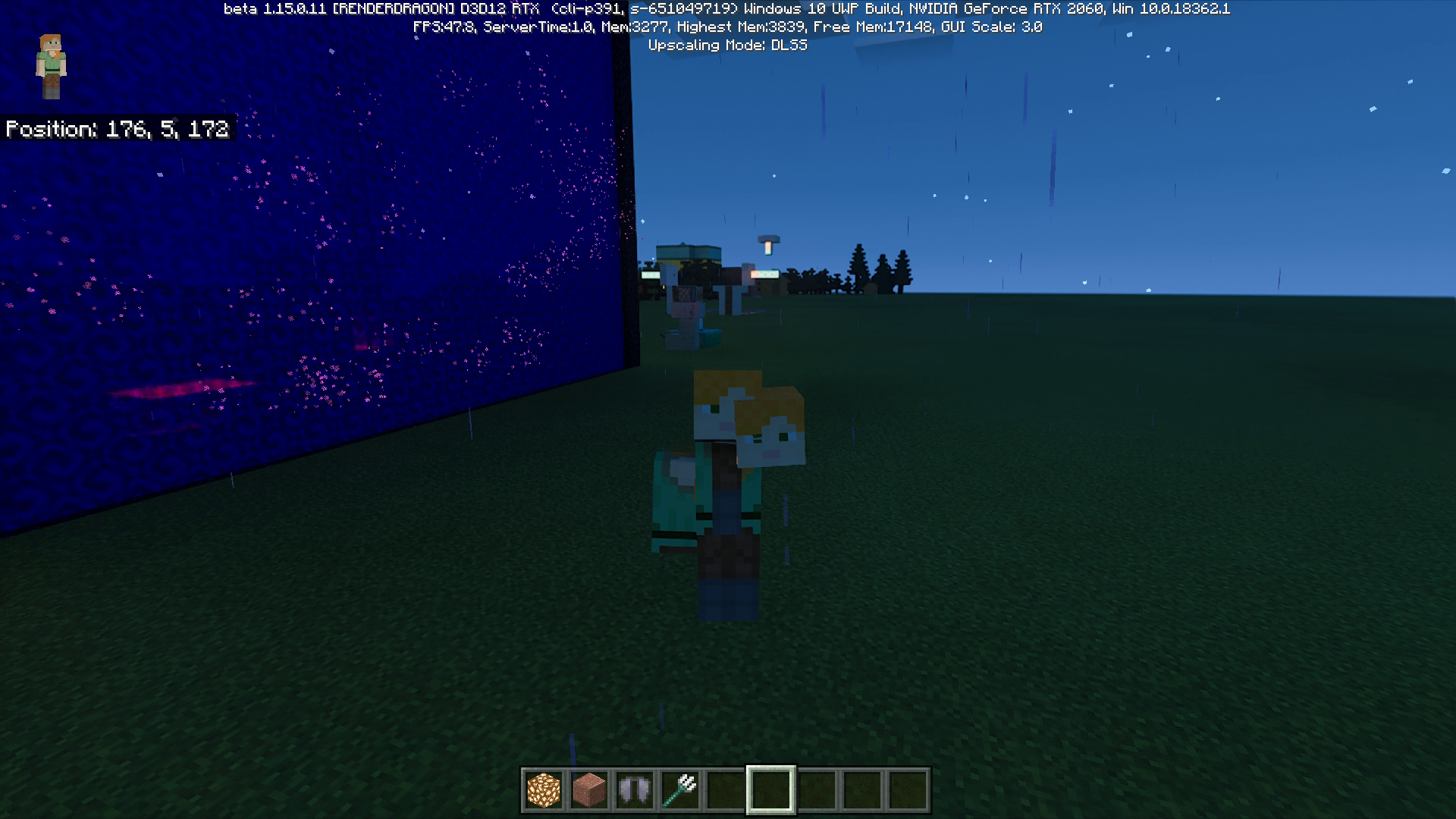

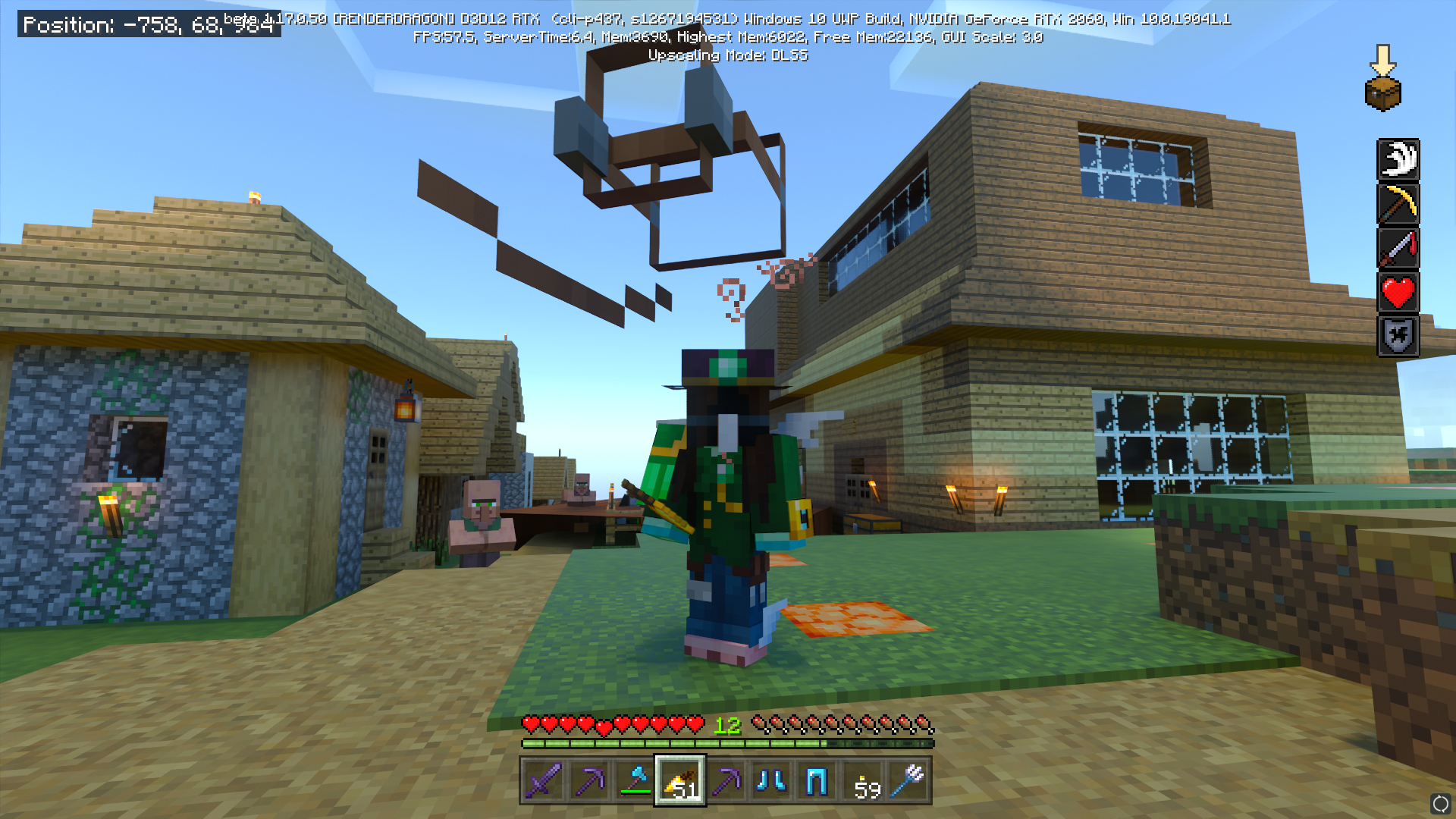
When RTX is on, pressing alt-tab in full screen mode sometimes makes the player's body parts change. Turning RTX on and off doesn't fix the issue but pressing alt-tab again does. I remember having this glitch occur with a trident but I can't seem to replicate it again.
Steps to reproduce:
1. Make sure fullscreen and RTX is on
2. Minimize the Minecraft window and reopen it, pressing alt-tab is easiestObserved Results:
There's a chance that some of the player's body parts switch around (head, torso, arms, and legs switch). This doesn't always happen and seems random.
Expected Results:
The players' model is the same as before.All my drivers are up to date and I used the most recent RTX world to test again. This does happen to other players' models but they can't see it.
GeForce RTX 2060
Intel Core i7-9750H CPU @ 2.60GHz
Steps to reproduce:
1. Make sure fullscreen and RTX is on
2. Minimize the Minecraft window and reopen it, pressing alt-tab is easiestObserved Results:
There's a chance that some of the player's body parts switch around (head, torso, arms, and legs switch). This doesn't always happen and seems random.
Expected Results:
The players' model is the same as before.All my drivers are up to date and I used the most recent RTX world to test again. This does happen to other players'
models but they can't see it.GeForce RTX 2060
Intel Core i7-9750H CPU @ 2.60GHzSteps to reproduce:
1. Make sure fullscreen and RTX is on
2. Minimize the Minecraft window and reopen it, pressing alt-tab is easiestObserved Results:
There's a chance that some of the player's body parts switch around (head, torso, arms, and legs switch). This doesn't always happen and seems random.
Expected Results:
The players' model is the same as before.All my drivers are up to date and I used the most recent RTX world to test again. This does happen to other players' characters on multiplayer but it doesn't appear the same on their screen.
GeForce RTX 2060
Intel Core i7-9750H CPU @ 2.60GHz
Steps to reproduce:
1. Make sure fullscreen and RTX is on
2. Minimize the Minecraft window and reopen it, pressing alt-tab is easiestObserved Results:
There's a chance that some of theplayer's body parts switch around (head, torso, arms,andlegs switch). This doesn't always happen and seems random.
Expected Results:
Theplayers' model is the same as before.All my drivers are up to date and I used the most recent RTX world to test again. This does happen to other players' characters on multiplayer but it doesn't appear the same on their screen.
GeForce RTX 2060
Intel Core i7-9750H CPU @ 2.60GHzSteps to reproduce:
1. Make sure fullscreen and RTX is on
2. Minimize the Minecraft window and reopen it, pressing alt-tab is easiestObserved Results:
There's a chance that some of the entities body parts switch around (head, torso, arms, legs etc. switch). This doesn't always happen and seems random. With the most recent update, it appears that the size can differ too.
Expected Results:
The entities' model is the same as before.All my drivers are up to date and I used the most recent RTX world to test again. This does happen to other players' characters on multiplayer but it doesn't appear the same on their screen.
GeForce RTX 2060
Intel Core i7-9750H CPU @ 2.60GHz
Screenshot (10).png
Steps to reproduce:
1. Make sure fullscreen and RTX is on
2. Minimize the Minecraft window and reopen it, pressing alt-tab is easiestObserved Results:
There's a chance that some of the entities body parts switch around (head, torso, arms, legs etc. switch). This doesn't always happen and seems random. With the most recent update, it appears that the size can differ too.
Expected Results:
The entities' model is the same as before.All my drivers are up to date and I used the most recent RTX world to test again. This does happen to other players' characters on multiplayer but it doesn't appear the same on their screen.
GeForce RTX 2060
Intel Core i7-9750H CPU @ 2.60GHzSteps to reproduce:
1. Make sure fullscreen and RTX is on
2. Minimize the Minecraft window and reopen it, pressing alt-tab twice is easiestObserved Results:
There's a chance that some of the entities body parts switch around (head, torso, arms, legs etc. switch). This doesn't always happen and seems random. With the most recent update, it appears that the size can differ too.
Expected Results:
The entities' model is the same as before.All my drivers are up to date and I used the most recent RTX world to test again. This does happen to other players' characters on multiplayer but it doesn't appear the same on their screen. The reason the obsidian on 'Screenshot (16)' looks like that is because of MCPE-106294
GeForce RTX 2060
Intel Core i7-9750H CPU @ 2.60GHz
Alt-Tabbingcauses body parts to switch aroundReloading Minecraft causes body parts to switch around
Steps to reproduce:
1. Make sure fullscreen and RTX is on
2. Minimize the Minecraft window and reopen it, pressing alt-tab twice is easiestObserved Results:
There's a chance that some of the entities body parts switch around (head, torso, arms, legs etc. switch). This doesn't always happen and seems random. With the most recent update, it appears that the size can differ too.
Expected Results:
The entities' model is the same as before.
All my drivers are up to date and I used the most recent RTX world to test again.This does happen to other players' characters on multiplayer but it doesn't appear the same on their screen. The reason the obsidian on 'Screenshot (16)' looks likethatis because ofMCPE-106294GeForce RTX 2060
Intel Core i7-9750H CPU @ 2.60GHzSteps to reproduce:
1. Make sure fullscreen and RTX is on
2. Minimize the Minecraft window and reopen it, pressing alt-tab twice is easiestObserved Results:
There's a chance that some of the entities body parts switch around (head, torso, arms, legs etc. switch). This doesn't always happen and seems random. With the most recent update, it appears that the size can differ too.
Expected Results:
The entities' model is the same as before.This does happen to other players' characters on multiplayer but it doesn't appear the same on their screen. This can happen to other players if they leave render distance and enter it again, but mobs do not do this in singleplayer worlds. The reason the obsidian on 'Screenshot (16)' looks like strange is because of this bug.
GeForce RTX 2060
Intel Core i7-9750H CPU @ 2.60GHz
Reloading Minecraft mobs causes their body parts to switch around
Steps to reproduce:
1. Make sure fullscreen and RTX is on
2. Minimize the Minecraft window and reopen it, pressing alt-tab twice is easiestObserved Results:
There's a chance that some of the entities body parts switch around (head, torso, arms, legs etc. switch). This doesn't always happen and seems random.With the most recent update, it appears that the size can differtoo.
Expected Results:
The entities' model is the same as before.This does happen to other players' characters on multiplayer but it doesn't appear the same on their screen. This can happen to other players if they leave render distance and enter it again, but mobs do not do this in singleplayer worlds. The reason the obsidian on 'Screenshot (16)' looks like strange is because of this bug.
GeForce RTX 2060
Intel Core i7-9750H CPU @ 2.60GHzSteps to reproduce:
1. Make sure fullscreen and RTX is on
2. Minimize the Minecraft window and reopen it, pressing alt-tab twice is easiestObserved Results:
There's a chance that some of the entities body parts switch around (head, torso, arms, legs etc. switch). This doesn't always happen and seems random. It also appears that certain entities can change sizes too.
Expected Results:
The entities' model is the same as before.This does happen to other players on multiplayer but it doesn't appear the same on their screen. This can happen to other players if they leave render distance and enter it again, but mobs do not do this in singleplayer worlds.
GeForce RTX 2060
Intel Core i7-9750H CPU @ 2.60GHz