 MCPE-95662
Reloading Minecraft mobs causes their body parts to switch around
Steps to reproduce:
- Make sure fullscreen and RTX is on
- Minimize the Minecraft window and reopen it, pressing alt-tab twice is easiest
Observed Results:
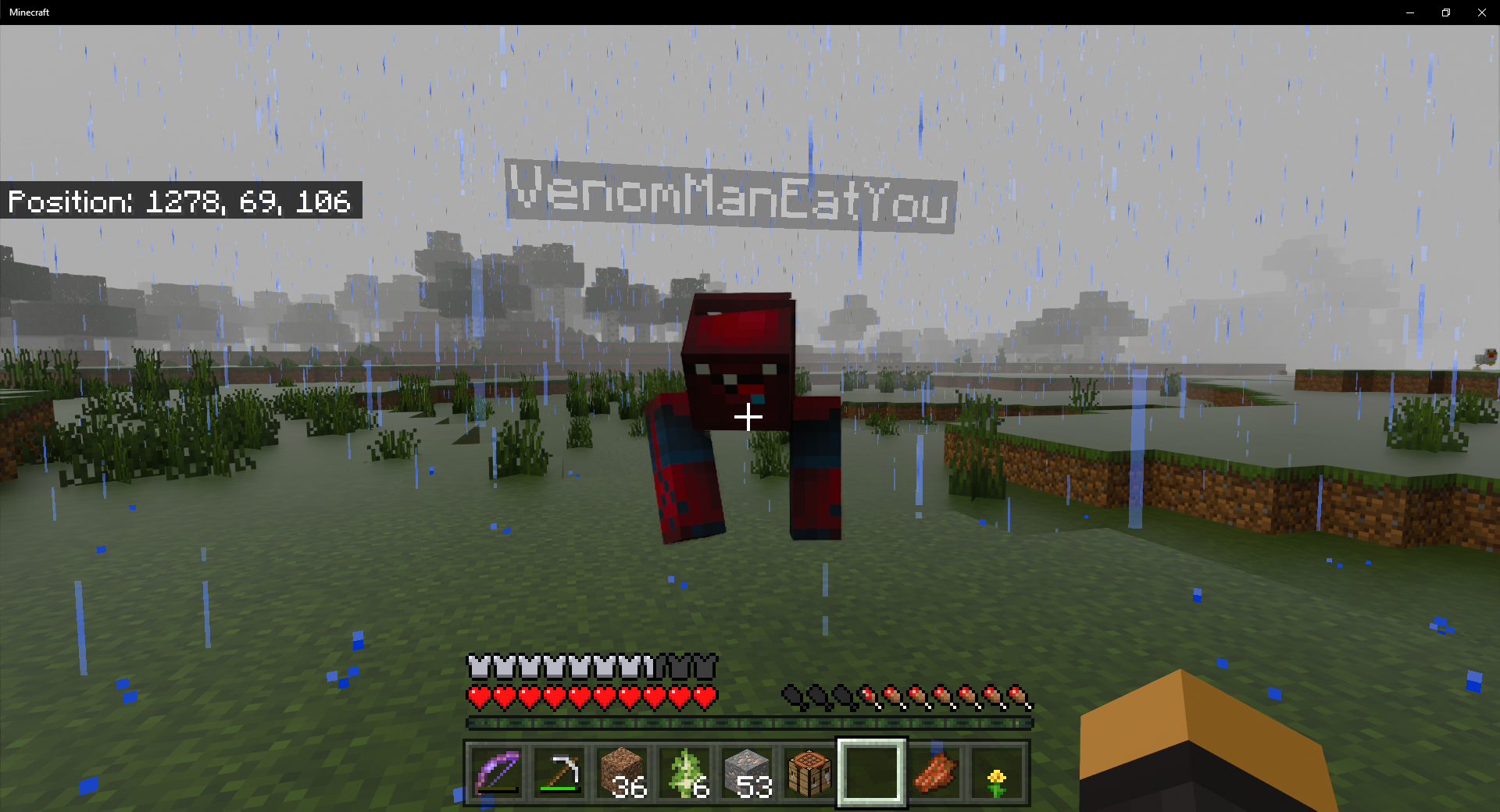
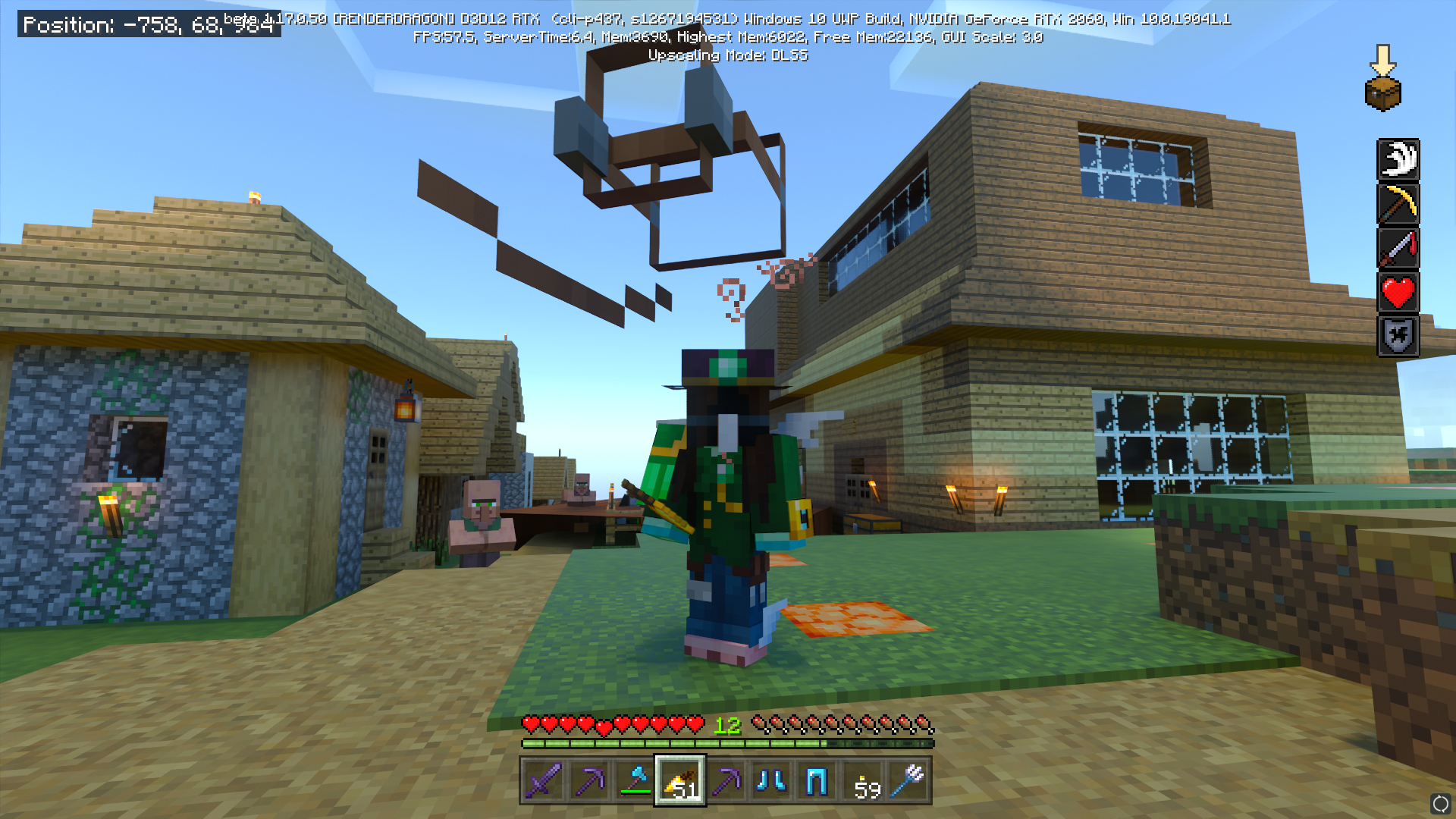
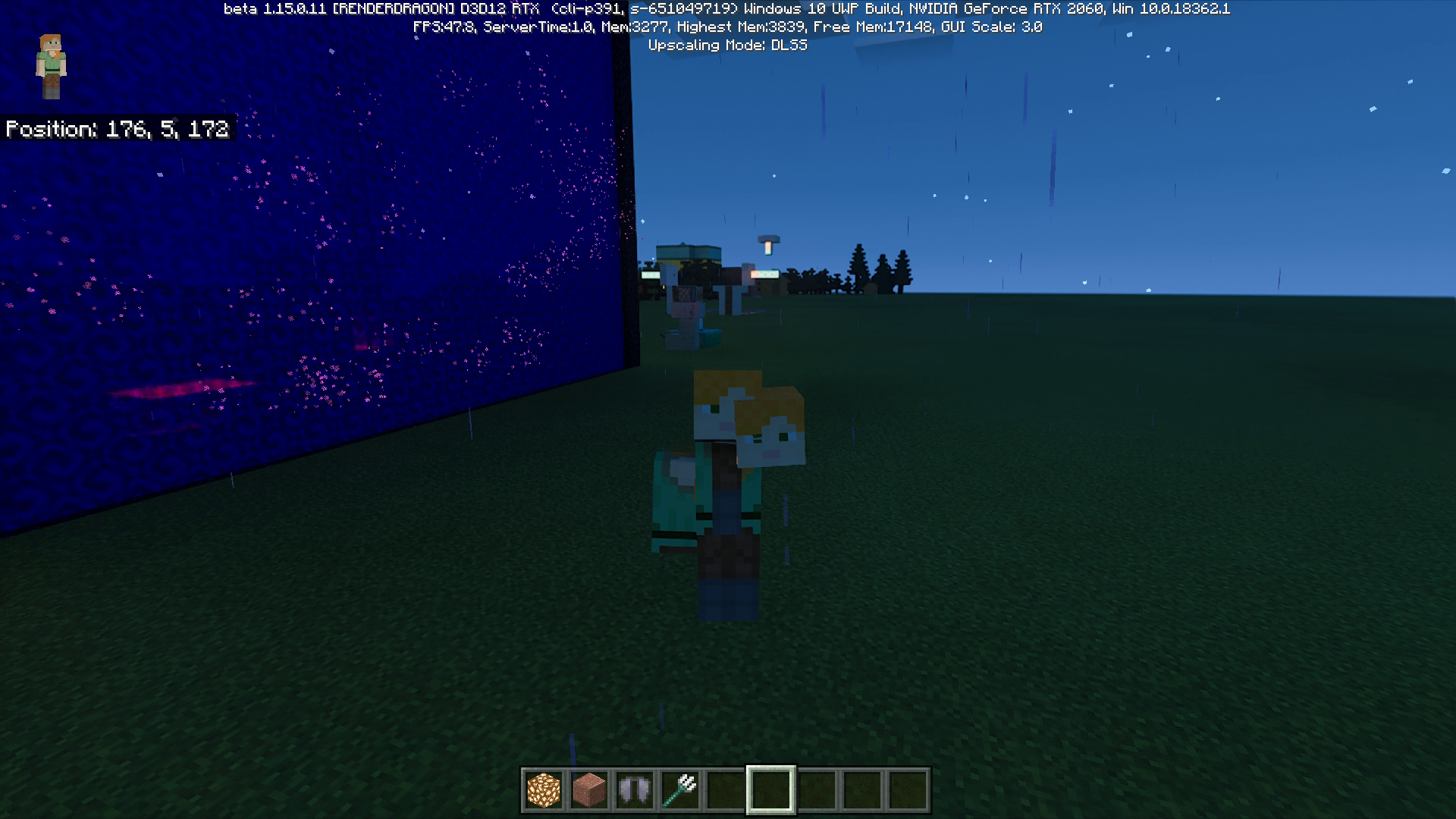
There's a chance that some of the entities body parts switch around (head, torso, arms, legs etc. switch). This doesn't always happen and seems random. It also appears that certain entities can change sizes too.
Expected Results:
The entities' model is the same as before.
This does happen to other players on multiplayer but it doesn't appear the same on their screen. This can happen to other players if they leave render distance and enter it again, but mobs do not do this in singleplayer worlds.
GeForce RTX 2060
Intel Core i7-9750H CPU @ 2.60GHz
Linked Issues
is duplicated by5




Created Issue:
Alt-Tabbing causes body parts to switch around
When RTX is on, pressing alt-tab in full screen mode sometimes makes the player's body parts change. Turning RTX on and off doesn't fix the issue but pressing alt-tab again does. I remember having this glitch occur with a trident but I can't seem to replicate it again.
Attachments2
vlcsnap-2020-08-12-00h39m58s398.png
![[Mojang] Mega_Spud (Jay Wells)](../../../data/avatars/users/92696.png)
When RTX is on, pressing alt-tab in full screen mode sometimes makes the player's body parts change. Turning RTX on and off doesn't fix the issue but pressing alt-tab again does. I remember having this glitch occur with a trident but I can't seem to replicate it again.
Steps to reproduce:
1. Make sure fullscreen and RTX is on
2. Minimize the Minecraft window and reopen it, pressing alt-tab is easiestObserved Results:
There's a chance that some of the player's body parts switch around (head, torso, arms, and legs switch). This doesn't always happen and seems random.
Expected Results:
The players' model is the same as before.All my drivers are up to date and I used the most recent RTX world to test again. This does happen to other players' models but they can't see it.
GeForce RTX 2060
Intel Core i7-9750H CPU @ 2.60GHz
![[Bot] Arisa](../../../data/avatars/users/43007.png)
Steps to reproduce:
1. Make sure fullscreen and RTX is on
2. Minimize the Minecraft window and reopen it, pressing alt-tab is easiestObserved Results:
There's a chance that some of the player's body parts switch around (head, torso, arms, and legs switch). This doesn't always happen and seems random.
Expected Results:
The players' model is the same as before.All my drivers are up to date and I used the most recent RTX world to test again. This does happen to other players'
models but they can't see it.GeForce RTX 2060
Intel Core i7-9750H CPU @ 2.60GHzSteps to reproduce:
1. Make sure fullscreen and RTX is on
2. Minimize the Minecraft window and reopen it, pressing alt-tab is easiestObserved Results:
There's a chance that some of the player's body parts switch around (head, torso, arms, and legs switch). This doesn't always happen and seems random.
Expected Results:
The players' model is the same as before.All my drivers are up to date and I used the most recent RTX world to test again. This does happen to other players' characters on multiplayer but it doesn't appear the same on their screen.
GeForce RTX 2060
Intel Core i7-9750H CPU @ 2.60GHz
Steps to reproduce:
1. Make sure fullscreen and RTX is on
2. Minimize the Minecraft window and reopen it, pressing alt-tab is easiestObserved Results:
There's a chance that some of theplayer's body parts switch around (head, torso, arms,andlegs switch). This doesn't always happen and seems random.
Expected Results:
Theplayers' model is the same as before.All my drivers are up to date and I used the most recent RTX world to test again. This does happen to other players' characters on multiplayer but it doesn't appear the same on their screen.
GeForce RTX 2060
Intel Core i7-9750H CPU @ 2.60GHzSteps to reproduce:
1. Make sure fullscreen and RTX is on
2. Minimize the Minecraft window and reopen it, pressing alt-tab is easiestObserved Results:
There's a chance that some of the entities body parts switch around (head, torso, arms, legs etc. switch). This doesn't always happen and seems random. With the most recent update, it appears that the size can differ too.
Expected Results:
The entities' model is the same as before.All my drivers are up to date and I used the most recent RTX world to test again. This does happen to other players' characters on multiplayer but it doesn't appear the same on their screen.
GeForce RTX 2060
Intel Core i7-9750H CPU @ 2.60GHz
Steps to reproduce:
1. Make sure fullscreen and RTX is on
2. Minimize the Minecraft window and reopen it, pressing alt-tab is easiestObserved Results:
There's a chance that some of the entities body parts switch around (head, torso, arms, legs etc. switch). This doesn't always happen and seems random. With the most recent update, it appears that the size can differ too.
Expected Results:
The entities' model is the same as before.All my drivers are up to date and I used the most recent RTX world to test again. This does happen to other players' characters on multiplayer but it doesn't appear the same on their screen.
GeForce RTX 2060
Intel Core i7-9750H CPU @ 2.60GHzSteps to reproduce:
1. Make sure fullscreen and RTX is on
2. Minimize the Minecraft window and reopen it, pressing alt-tab twice is easiestObserved Results:
There's a chance that some of the entities body parts switch around (head, torso, arms, legs etc. switch). This doesn't always happen and seems random. With the most recent update, it appears that the size can differ too.
Expected Results:
The entities' model is the same as before.All my drivers are up to date and I used the most recent RTX world to test again. This does happen to other players' characters on multiplayer but it doesn't appear the same on their screen. The reason the obsidian on 'Screenshot (16)' looks like that is because of MCPE-106294
GeForce RTX 2060
Intel Core i7-9750H CPU @ 2.60GHz
Alt-Tabbingcauses body parts to switch aroundReloading Minecraft causes body parts to switch around
Steps to reproduce:
1. Make sure fullscreen and RTX is on
2. Minimize the Minecraft window and reopen it, pressing alt-tab twice is easiestObserved Results:
There's a chance that some of the entities body parts switch around (head, torso, arms, legs etc. switch). This doesn't always happen and seems random. With the most recent update, it appears that the size can differ too.
Expected Results:
The entities' model is the same as before.
All my drivers are up to date and I used the most recent RTX world to test again.This does happen to other players' characters on multiplayer but it doesn't appear the same on their screen. The reason the obsidian on 'Screenshot (16)' looks likethatis because ofMCPE-106294GeForce RTX 2060
Intel Core i7-9750H CPU @ 2.60GHzSteps to reproduce:
1. Make sure fullscreen and RTX is on
2. Minimize the Minecraft window and reopen it, pressing alt-tab twice is easiestObserved Results:
There's a chance that some of the entities body parts switch around (head, torso, arms, legs etc. switch). This doesn't always happen and seems random. With the most recent update, it appears that the size can differ too.
Expected Results:
The entities' model is the same as before.This does happen to other players' characters on multiplayer but it doesn't appear the same on their screen. This can happen to other players if they leave render distance and enter it again, but mobs do not do this in singleplayer worlds. The reason the obsidian on 'Screenshot (16)' looks like strange is because of this bug.
GeForce RTX 2060
Intel Core i7-9750H CPU @ 2.60GHz
Reloading Minecraft mobs causes their body parts to switch around
Steps to reproduce:
1. Make sure fullscreen and RTX is on
2. Minimize the Minecraft window and reopen it, pressing alt-tab twice is easiestObserved Results:
There's a chance that some of the entities body parts switch around (head, torso, arms, legs etc. switch). This doesn't always happen and seems random.With the most recent update, it appears that the size can differtoo.
Expected Results:
The entities' model is the same as before.This does happen to other players' characters on multiplayer but it doesn't appear the same on their screen. This can happen to other players if they leave render distance and enter it again, but mobs do not do this in singleplayer worlds. The reason the obsidian on 'Screenshot (16)' looks like strange is because of this bug.
GeForce RTX 2060
Intel Core i7-9750H CPU @ 2.60GHzSteps to reproduce:
1. Make sure fullscreen and RTX is on
2. Minimize the Minecraft window and reopen it, pressing alt-tab twice is easiestObserved Results:
There's a chance that some of the entities body parts switch around (head, torso, arms, legs etc. switch). This doesn't always happen and seems random. It also appears that certain entities can change sizes too.
Expected Results:
The entities' model is the same as before.This does happen to other players on multiplayer but it doesn't appear the same on their screen. This can happen to other players if they leave render distance and enter it again, but mobs do not do this in singleplayer worlds.
GeForce RTX 2060
Intel Core i7-9750H CPU @ 2.60GHz
![[Mod] OcelotOnesie](../../../data/avatars/users/43220.png)
is duplicated by
is duplicated by
is duplicated by
relates to
![[MCQA] Kinga Izdebska](../../../data/avatars/users/18949.svg)
is duplicated by
is duplicated by
Steps to reproduce:
1. Make sure fullscreen and RTX is on
2. Minimize the Minecraft window and reopen it, pressing alt-tab twice is easiestObserved Results:
There's a chance that some of the entities body parts switch around (head, torso, arms, legs etc. switch). This doesn't always happen and seems random. It also appears that certain entities can change sizes too.Expected Results:
The entities' model is the same as before.This does happen to other players on multiplayer but it doesn't appear the same on their screen. This can happen to other players if they leave render distance and enter it again, but mobs do not do this in singleplayer worlds.
GeForce RTX 2060
Intel Core i7-9750H CPU @ 2.60GHzSteps to reproduce:
- Make sure fullscreen and RTX is on
- Minimize the Minecraft window and reopen it, pressing alt-tab twice is easiest
Observed Results:
There's a chance that some of the entities body parts switch around (head, torso, arms, legs etc. switch). This doesn't always happen and seems random. It also appears that certain entities can change sizes too.Expected Results:
The entities' model is the same as before.This does happen to other players on multiplayer but it doesn't appear the same on their screen. This can happen to other players if they leave render distance and enter it again, but mobs do not do this in singleplayer worlds.
GeForce RTX 2060
Intel Core i7-9750H CPU @ 2.60GHz
![[Helper] lillybeacon](../../../data/avatars/users/93893.png)
![[Mod] Jarl-Penguin](../../../data/avatars/users/92849.png)
Thank you for your report!
We're actually already tracking this issue at MCPE-95662, so I will resolve and link this ticket as a duplicate.
If you would like to add a vote and any extra information to the main ticket it would be appreciated.
If you haven't already, you might like to make use of the search feature to see if the issue has already been mentioned.
Quick Links:
📓 Bug Tracker Guidelines – 💬 Community Support – 📧 Mojang Support
📓 Project Summary – ✍️ Feedback and Suggestions – 📖 Game Wiki
Thank you for your report!
We're tracking this issue in MCPE-95662, so this ticket is being resolved and linked as a duplicate.
If you would like to add a vote and any extra information to the main ticket it would be appreciated.
If you haven't already, you might like to make use of the search feature to see if the issue has already been mentioned.
Quick Links:
📓 Bug Tracker Guidelines – 💬 Community Support – 📧 Mojang Support
📓 Project Summary – ✍️ Feedback and Suggestions – 📖 Game Wiki
Thank you for your report!
We're tracking this issue in MCPE-95662, so this ticket is being resolved and linked as a duplicate.
If you would like to add a vote and any extra information to the main ticket it would be appreciated.
If you haven't already, you might like to make use of the search feature to see if the issue has already been mentioned.
Quick Links:
📓 Bug Tracker Guidelines – 💬 Community Support – 📧 Mojang Support
📓 Project Summary – ✍️ Feedback and Suggestions – 📖 Game Wiki
Thank you for your report!
We're tracking this issue in MCPE-95662, so this ticket is being resolved and linked as a duplicate.
If you would like to add a vote and any extra information to the main ticket it would be appreciated.
If you haven't already, you might like to make use of the search feature to see if the issue has already been mentioned.
Quick Links:
📓 Bug Tracker Guidelines – 💬 Community Support – 📧 Mojang Support
📓 Project Summary – ✍️ Feedback and Suggestions – 📖 Game Wiki
Thank you for your report!
We're tracking this issue in MCPE-95662, so this ticket is being resolved and linked as a duplicate.
If you would like to add a vote and any extra information to the main ticket it would be appreciated.
If you haven't already, you might like to make use of the search feature to see if the issue has already been mentioned.
Quick Links:
📓 Bug Tracker Guidelines – 💬 Community Support – 📧 Mojang Support
📓 Project Summary – ✍️ Feedback and Suggestions – 📖 Game Wiki
– I am a bot. This action was performed automatically! If you think it was incorrect, please notify us on Discord or Reddit
Is this still an issue in the latest RTX Beta version?
This issue was reported in an earlier RTX beta build, but has been temporarily closed as Awaiting Response
Several improvements and fixes have been made to the Minecraft with RTX beta for Windows 10. Be sure to check out the Known Issues List and Frequently Asked Questions for the latest details, as these issues do not need to be reported here.
If you would still like to report a bug, please make sure that you have checked that your system and graphics drivers are up to date. Also, please make sure that any packs you are using are valid and up to date. (You might need to check the Marketplace for the very latest updates.)
After that please update the affected version of this ticket, and make sure that the description above contains clear steps to reproduce the issue, like so:
You might like to also include any relevant information about your system specs.
This ticket will automatically reopen when you reply.
Quick Links:
📓 Issue Guidelines – 💬 Mojang Support – 📧 Suggestions – 📖 Minecraft Wiki
i would like to add my left leg and arm disappeared in a server and i was on mc bedrock on a windows 10 this only ever happened in servers and thats in the 1.16.100 version
i can confirm this is still happening in 1.16.201. and it happens with all 5 RTX packs I have used.
Affects beta 1.18.20.21
Yep, This is still an issue, it seems to happen randomly after playing multiplayer for while... certain parts of skins get placed in random places on the player's body
Game version 1.18.10
in 1.19.73 it is still a problem to get it to happen load an rtx pack USE A PERSONA SKIN open the skin menu (wait a sec or 2 ) . if you repeat it fix itself and it cycles.