 Zai_yu_you
- Zai_yu_you
- JIRAUSER660862
- Asia/Shanghai
- Yes
- No
 MCPE-133660
 MC-269747
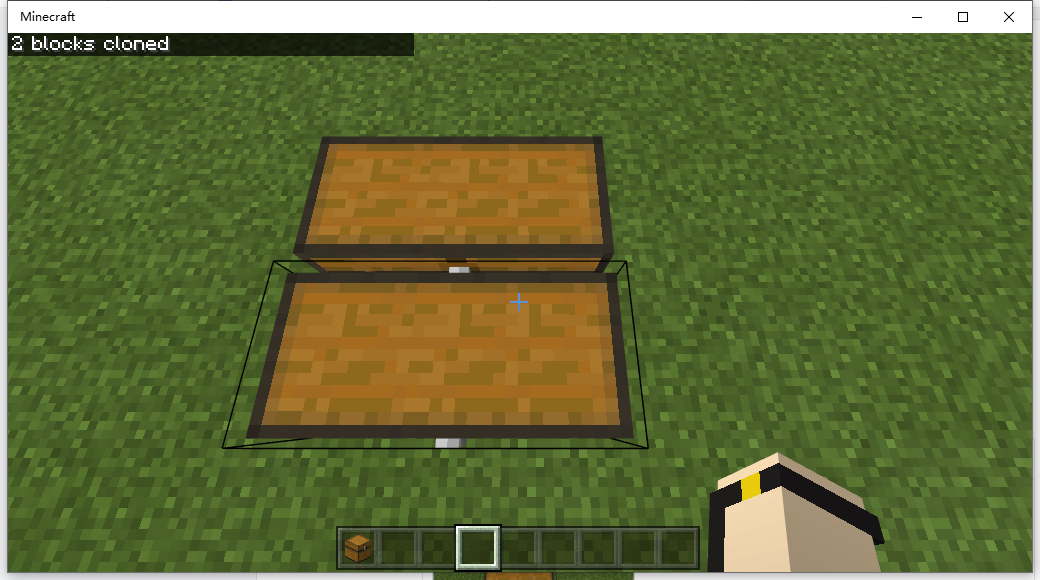






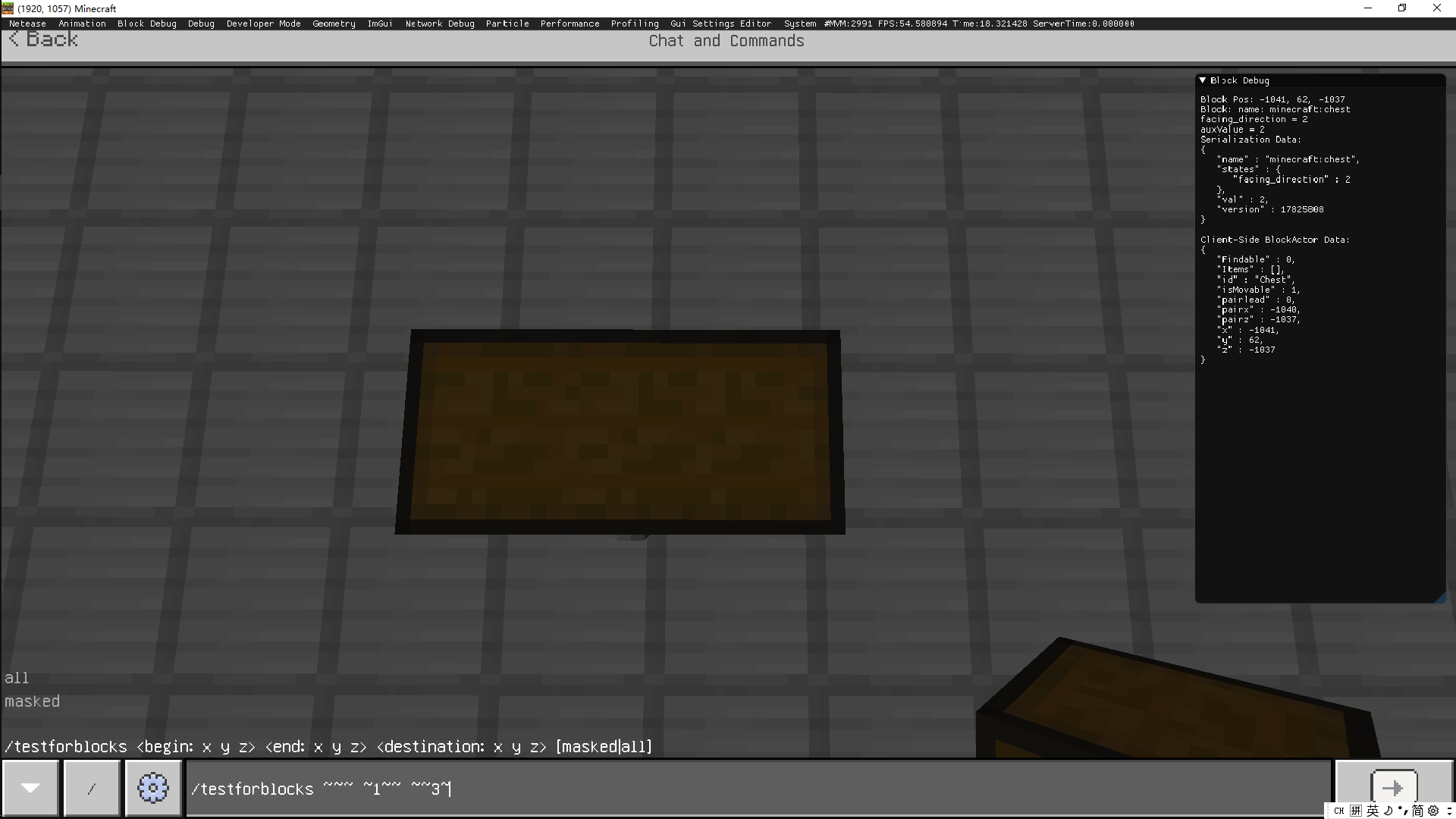







步骤1:我放了一个大箱子
Step2:Run command "/clone ~~~ 1~ ~~~1"
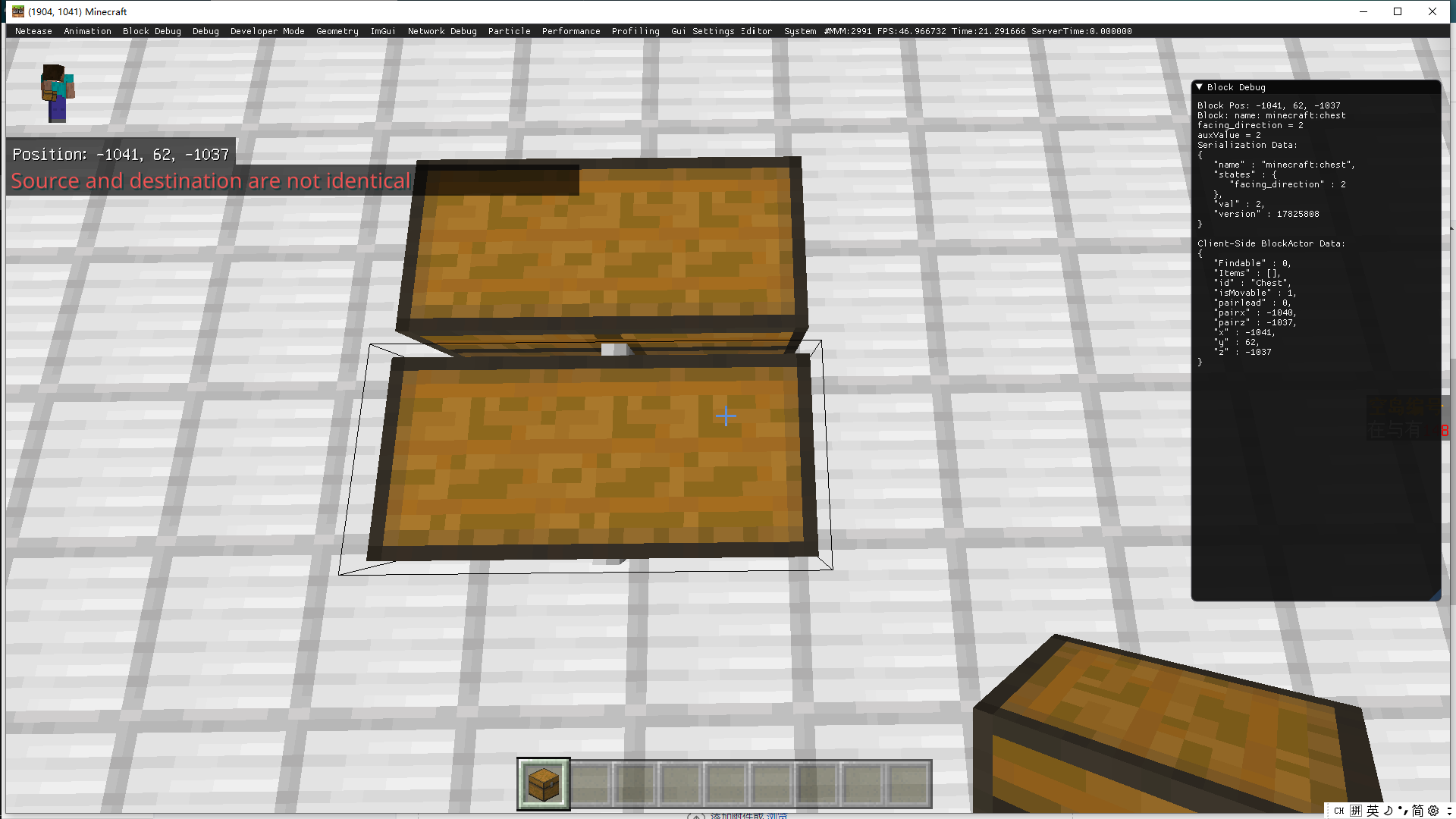
Step3:Run command "/testforblocks ~~~ 1~ ~~~1"
then feedback shows they are not identical !
步骤1:我放了一个大箱子
Step2:Run command "/clone ~~~ 1~ ~~~1"
Step3:Run command "/testforblocks ~~~ 1~ ~~~1"
then feedback shows they are not identical !
Other try in developer version
步骤1:我放了一个大箱子
Step2:Run command "/clone ~~~ 1~ ~~~1"
Step3:Run command "/testforblocks
~~~ 1~ ~~~1"then feedback shows they are not identical !
Other try in developer version
步骤1:我放了一个大箱子
Step2:Run command "/clone ~~~ 1~ ~~~1"
Step3:Run command "/testforblocks ~~~ 1~ ~~~1 "
then feedback shows they are not identical !
Other try in developer version:
BUT,when I do this:
then run “/testforblocks ~~~ ~~1 ~~3”
The feedback shows they are identical now!
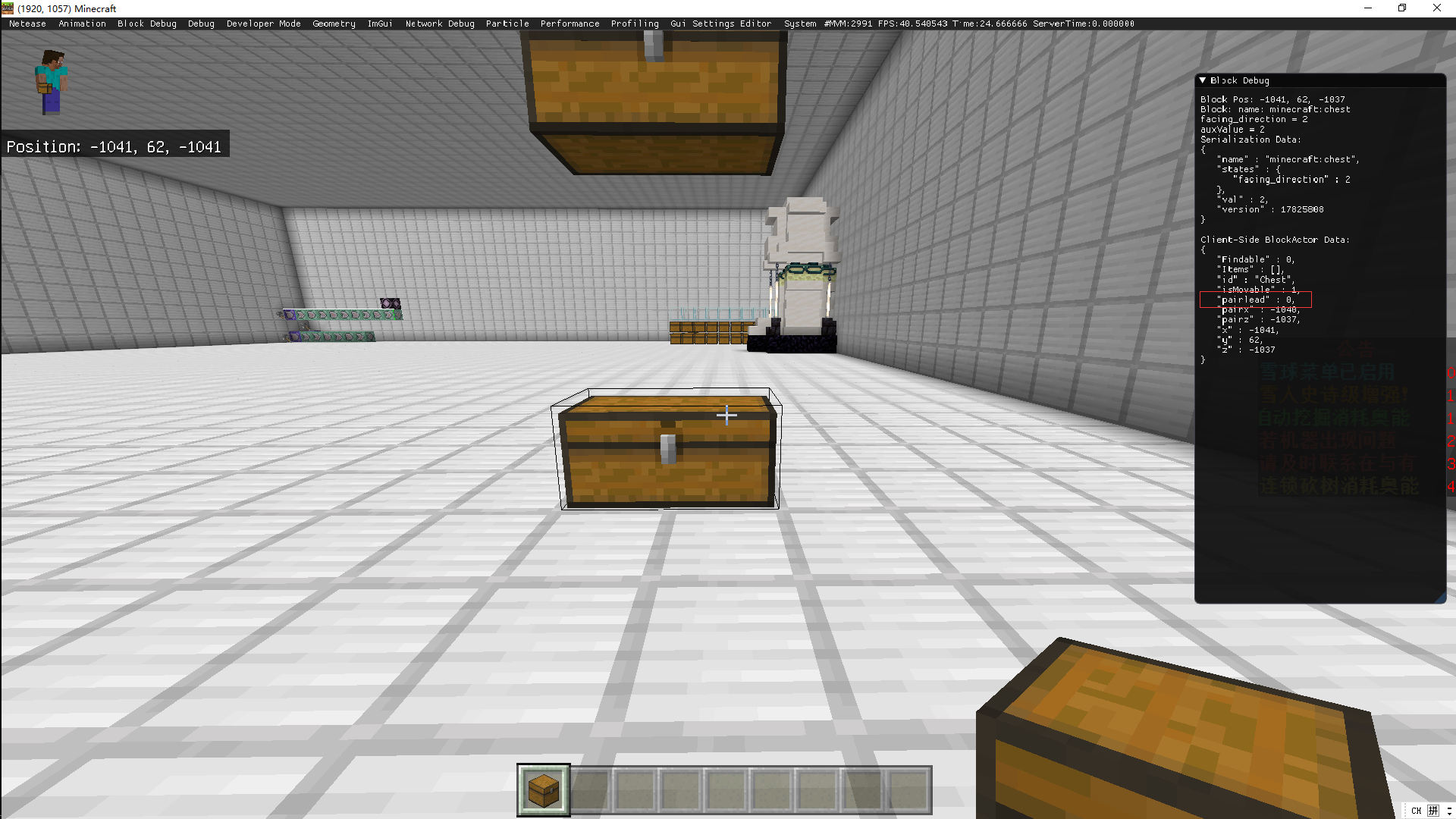
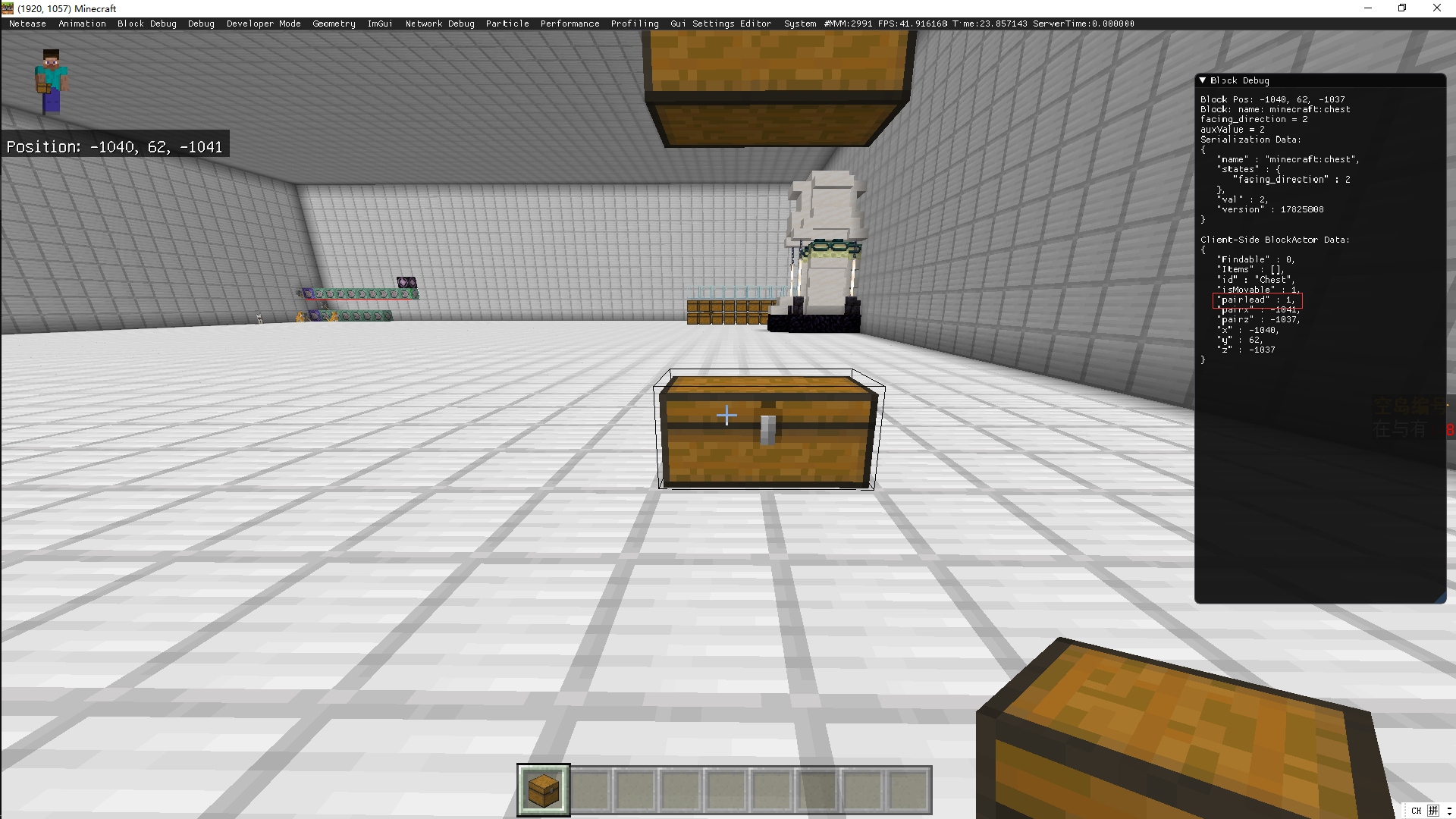
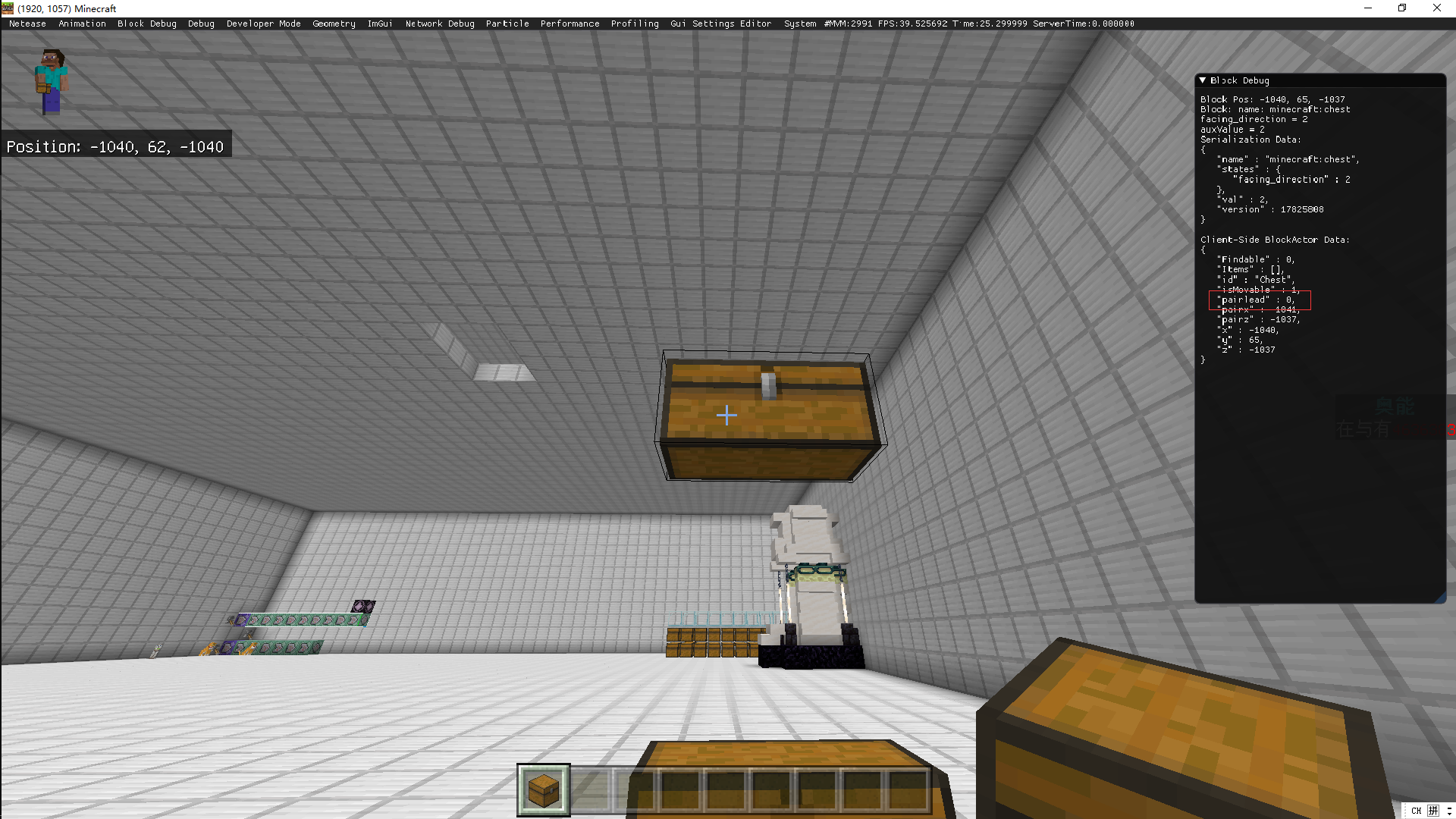
To compareed the block debug window,I infer when the command(testforblocks) runs ,it might contrasted the “pairx” and “pairz”,under these circumstances if the tow large chests‘ position x and z are same ,command testforblocks run successfully.BUT,if their position x and z are not same ,it cause the “pairx”and “pairz” are not identical ,the result shows the command runs abnormally.
步骤1:我放了一个大箱子
Step2:Run command "/clone ~~~ 1~ ~~~1"
Step3:Run command "/testforblocks ~~~ 1~ ~~~1 "
then feedback shows they are not identical !
Other try in developer version:
BUT,when I do this:
then run “/testforblocks ~~~ ~~1 ~~3”
The feedback shows they are identical now!
To compareed the block debug window,I infer when the command(testforblocks) runs ,it might contrasted the “pairx” and “pairz”,under these circumstances if the tow large chests‘ position x and z are same ,command testforblocks run successfully.BUT,if their position x and z are not same ,it cause the “pairx”and “pairz” are not identical ,the result shows the command runs abnormally.
步骤1:我放了一个大箱子
Step2:Run command "/clone ~~~ 1~ ~~~1"
Step3:Run command "/testforblocks ~~~ 1~ ~~~1 "
then feedback shows they are not identical !
Other try in developer version:
BUT,when I do this:
then run “/testforblocks ~~~ ~~1 ~~3”
The feedback shows they are identical now!
To compareed the block debug window,I infer when the command(testforblocks) runs ,it might contrasted the “pairx” and “pairz”,so if the tow large chests‘ position x and z are same ,command testforblocks run successfully.BUT,if their position x and z are not same ,it cause the “pairx”and “pairz” are not identical ,the result shows the command runs abnormally.
BUT ,WHEN I DESTORY AND PLACE THE CHEST AGAIN BUT CLONE (it makes the "pairlead"blockdata not same)
、
"pairlead"blockdata situations:
0 1
1 0
then I run testforblocks
They are not identical AGAIN!
Suggested solutions:
When testforblocks runs ,make sure ignore the “pairx”, “pairz”and "pairlead" blockdata 。
步骤1:我放了一个大箱子
Step2:Run command "/clone ~~~ 1~ ~~~1"
Step3:Run command "/testforblocks ~~~ 1~ ~~~1 "
then feedback shows they are not identical !
Other tr
yin developer version:
BUT,when I do this:
then run “/testforblocks ~~~ ~~1 ~~3”
The feedback shows they are identical now!
To compareed the block debug window,I infer when the command(testforblocks) runs ,it might contrasted the “pairx” and “pairz”,so if the tow large chests‘ position x and z are same ,command testforblocks run successfully.BUT,if their position x and z are not same ,it cause the “pairx”and “pairz” are not identical ,the result shows the command runs abnormally.
BUT ,WHEN I DESTORY AND PLACE THE CHEST AGAIN BUT CLONE (it makes the "pairlead"blockdata not same)
"pairlead"blockdata situations:
0 1
1 0
then I run testforblocks
They are not identical AGAIN!
Suggested solutions:
When testforblocks runs ,make sure ignore the “pairx”, “pairz”and "pairlead" blockdata 。
步骤1:我放了一个大箱子
Step2:Run command "/clone ~~~ 1~ ~~~1"
Step3:Run command "/testforblocks ~~~ 1~ ~~~1 "
then feedback shows they are not identical !
Other trials in developer version:
BUT,when I do this:
then run “/testforblocks ~~~ ~~1 ~~3”
The feedback shows they are identical now!
To compareed the block debug window,I infer when the command(testforblocks) runs ,it might contrasted the “pairx” and “pairz”,so if the tow large chests‘ position x and z are same ,command testforblocks run successfully.BUT,if their position x and z are not same ,it cause the “pairx”and “pairz” are not identical ,the result shows the command runs abnormally.
BUT ,WHEN I DESTORY AND PLACE THE CHEST AGAIN BUT CLONE (it makes the "pairlead"blockdata not same)
"pairlead"blockdata situations:
0 1
1 0
then I run testforblocks
They are not identical AGAIN!
Suggested solutions:
When testforblocks runs ,make sure ignore the “pairx”, “pairz”and "pairlead" blockdata 。
步骤1:我放了一个大箱子
Step2:Run command "/clone ~~~ 1~ ~~~1"
Step3:Run command "/testforblocks ~~~ 1~ ~~~1 "
then feedback shows they are not identical !
Other trials in developer version:
BUT,when I do this:
then run “/testforblocks ~~
~ ~~1 ~~3”
The feedback shows they are identical now!
To compareed the block debug window,I infer when the command(testforblocks) runs ,it might contrasted the “pairx” and “pairz”,so if the tow large chests‘ position x and z are same ,command testforblocks run successfully.BUT,if their position x and z are not same ,it cause the “pairx”and “pairz” are not identical ,the result shows the command runs abnormally.
BUT ,WHEN I DESTORY AND PLACE THE CHEST AGAIN BUT CLONE (it makes the "pairlead"blockdata not same)
"pairlead"blockdata situations:
0 1
1 0
then I run testforblocks
They are not identical AGAIN!
Suggested solutions:
When testforblocks runs ,make sure ignore the “pairx”, “pairz”and "pairlead" blockdata 。
步骤1:我放了一个大箱子
Step2:Run command "/clone ~~~ 1~ ~~~1"
Step3:Run command "/testforblocks ~~~ 1~ ~~~1 "
then feedback shows they are not identical !
Other trials in developer version:
BUT,when I run “/clone ~~ ~1 ~~3":
then run “/testforblocks ~~ ~1 ~~3”
The feedback shows they are identical now!
To compareed the block debug window,I infer when the command(testforblocks) runs ,it might contrasted the “pairx” and “pairz”,so if the tow large chests‘ position x and z are same ,command testforblocks run successfully.BUT,if their position x and z are not same ,it cause the “pairx”and “pairz” are not identical ,the result shows the command runs abnormally.
BUT ,WHEN I DESTORY AND PLACE THE CHEST AGAIN BUT CLONE (it makes the "pairlead"blockdata not same)
"pairlead"blockdata situations:
0 1
1 0
then I run testforblocks
They are not identical AGAIN!
Suggested solutions:
When testforblocks runs ,make sure ignore the “pairx”, “pairz”and "pairlead" blockdata 。
步骤1:我放了一个大箱子
Step2:Run command "/clone ~~~ 1~ ~~
~1"
Step3:Run command "/testforblocks
~~~ 1~ ~~~1 "then feedback shows they are not identical !
Other trials in developer version:
BUT,when I run “/clone ~~
~1 ~~3":
then run “/testforblocks ~~
~1 ~~3”
The feedback shows they are identical now!
To compareed the block debug window,I infer when the command(testforblocks) runs ,it might contrasted the “pairx” and “pairz”,so if the tow large chests‘ position x and z are same ,command testforblocks run successfully.BUT,if their position x and z are not same ,it cause the “pairx”and “pairz” are not identical ,the result shows the command runs abnormally.
BUT ,W
HEN I DESTORY AND PLACE THE CHEST AGAIN BUT CLONE (itmakes the "pairlead"blockdatanot same)
"pairlead"blockdata situations:
0 1
1 0
then I run testforblocks
They are not identical AGAIN!
Suggested solutions:
When testforblocks runs ,make sure
ignorethe “pairx”, “pairz”and "pairlead" blockdata。
步骤1:我放了一个大箱子
Step2:Run command "/clone ~~~~ 1~ ~~1"
Step3:Run command "/testforblocks ~~~~ 1~ ~~1"
then feedback shows they are not identical !
Other trials in developer version:
BUT,when I run “/clone ~~~~ ~~1 ~~3~":
then run “/testforblocks ~~~~ ~~1 ~~3~”
The feedback shows they are identical now!
To compareed the block debug window,I infer when the command(testforblocks) runs ,it might contrasted the “pairx” and “pairz”,so if the tow large chests‘ position x and z are same ,command testforblocks run successfully.BUT,if their position x and z are not same ,it cause the “pairx”and “pairz” are not identical ,the result shows the command runs abnormally.
BUT ,When i destroyed a block one of a large chest then place a chest back ,which makes the "pairlead" blockdata changed.
"pairlead"blockdata situations:
0 1
1 0
then I run testforblocks
They are not identical AGAIN!
Suggested solutions:
When testforblocks runs ,make sure the “pairx”, “pairz”and "pairlead" blockdata are ignored.**
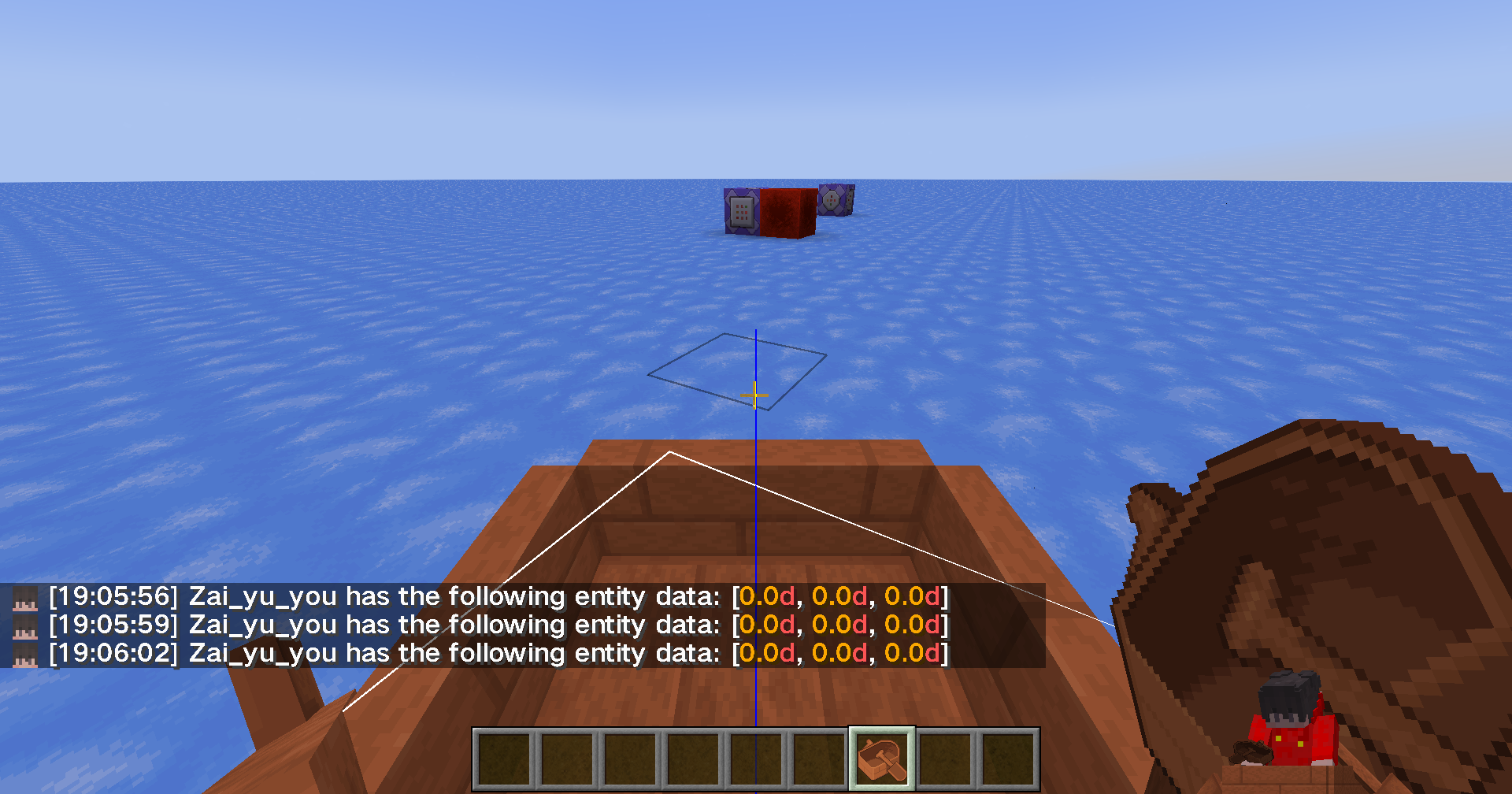
The sidebar scores display the entities' Motion[0] value by working always command
"execute as @e[type=boat] store result score @s motion_x run data get entity @s Motion[0] 1000""motion_x " is a scoreboard here is the gen-command for it.
"scoreboard objectives add motion_x dummy "实体动量x""At first, I thought it was my command's fault. But when I installed the mod to dispaly the speed of the boat, I tried to use data get command when the boat was sliding, but the value was still 0
When i left the boat and push it to slide,the Motions' values are normal.
The sidebar scores display the entities' Motion[0] value by working always command
"execute as @e[type=boat] store result score @s motion_x run data get entity @s Motion[0] 1000""motion_x " is a scoreboard here is the gen-command for it.
"scoreboard objectives add motion_x dummy "实体动量x""At first, I thought it was my command's fault. But when I installed the mod to dispaly the speed of the boat, I tried to use data get command when the boat was sliding, but the value was still 0
When i left the boat and push it to slide,the Motions' values are normal.
The sidebar scores display the entities' Motion[0] value by working always command
"execute as @e[type=boat] store result score @s motion_x run data get entity @s Motion[0] 1000""motion_x " is a scoreboard here is the gen-command for it.
"scoreboard objectives add motion_x dummy "实体动量x""At first, I thought it was my command's fault. But when I installed the mod to dispaly the speed of the boat, I tried to use data get command when the boat was sliding, but the value was still 0
When I left the boat and push it to slide,the Motions' values are normal.

The sidebar scores display the entities' Motion[0] value by working always command
"execute as @e[type=boat] store result score @s motion_x run data get entity @s Motion[0] 1000""motion_x " is a scoreboard here is the gen-command for it.
"scoreboard objectives add motion_x dummy "实体动量x""At first, I thought it was my command's fault. But when I installed the mod to dispaly the speed of the boat, I tried to use data get command when the boat was sliding, but the value was still 0
When I left the boat and push it to slide,the Motions' values are normal.
The sidebar scores display the entities' Motion[0] value by working always command
"execute as @e[type=boat] store result score @s motion_x run data get entity @s Motion[0] 1000""motion_x " is a scoreboard here is the gen-command for it.
"scoreboard objectives add motion_x dummy "实体动量x""At first, I thought it was my command's fault. But when I installed the mod to dispaly the speed of the boat, I tried to use data get command when the boat was sliding, but the value was still 0
When I left the boat and push it to slide,the Motions' values are normal.
image-2023-08-01-14-42-52-211.png
The sidebar scores display the entities' Motion[0] value by working always command
"execute as @e[type=boat] store result score @s motion_x run data get entity @s Motion[0] 1000""motion_x " is a scoreboard here is the gen-command for it.
"scoreboard objectives add motion_x dummy "实体动量x""At first, I thought it was my command's fault. But when I installed the mod to dispaly the speed of the boat, I tried to use data get command when the boat was sliding, but the value was still 0
When I left the boat and push it to slide,the Motions' values are normal.
Even if I try to use "/ data get the entity @ s RootVehicle. Entity. The Motion" to get players to ride the momentum of the entities is 0
The sidebar scores display the entities' Motion[0] value by working always command
"execute as @e[type=boat] store result score @s motion_x run data get entity @s Motion[0] 1000""motion_x " is a scoreboard here is the gen-command for it.
"scoreboard objectives add motion_x dummy "实体动量x""At first, I thought it was my command's fault. But when I installed the mod to dispaly the speed of the boat, I tried to use data get command when the boat was sliding, but the value was still 0
When I left the boat and push it to slide,the Motions' values are normal.
Even if I try to use "/ data get
theentity @s RootVehicle.Entity.TheMotion" to get players to ride the momentumof the entities is 0
The sidebar scores display the entities' Motion[0] value by working always command
"execute as @e[type=boat] store result score @s motion_x run data get entity @s Motion[0] 1000""motion_x " is a scoreboard here is the gen-command for it.
"scoreboard objectives add motion_x dummy "实体动量x""At first, I thought it was my command's fault. But when I installed the mod to dispaly the speed of the boat, I tried to use data get command when the boat was sliding, but the value was still 0
When I left the boat and push it to slide,the Motions' values are normal.
Even if I try to use "/ data get entity @s RootVehicle.Entity. Motion" to get players to ride the motion of the entities is alwyas 0
The advancement:
{\"translate\": \"item.kaleidos.base.container.barrel_half\",\"italic\":false}
{
"criteria": {
"requirement": {
"trigger": "minecraft:placed_block",
"conditions": {
"location": [
{
"condition": "minecraft:location_check",
"predicate": {
"block": {
"blocks": "minecraft:barrel",
"nbt": "{CustomName:''}"
{
}
}
}
]
}
}
},
"rewards":"function": "kaleidos:behave/barrel_full/place/place"}}
The function(kaleidos:behave/barrel_full/place/place):
say 1The gamescreen
The function(kaleidos:behave/barrel_full/place/place):
say 1The advancement:
{\"translate\": \"item.kaleidos.base.container.barrel_half\",\"italic\":false}
{
"criteria": {
"requirement": {
"trigger": "minecraft:placed_block",
"conditions": {
"location": [
{
"condition": "minecraft:location_check",
"predicate": {
"block": {
"blocks": "minecraft:barrel",
"nbt": "{CustomName:''}"
{ "function": "kaleidos:behave/barrel_full/place/place" }
}
}
}
]
}
}
},
"rewards":}
The gamescreen(function did NOT work)
The other advancement (Use OtherNations'Charactor as CustomName):
{\"text\":\"木盆\",\"italic\":false}
**
{
"parent":"kaleidos:interactions",
"criteria": {
"requirement": {
"trigger": "minecraft:placed_block",
"conditions": {
"location": [
{
"condition": "minecraft:location_check",
"predicate": {
"block": {
"blocks": "minecraft:barrel",
"nbt": "{CustomName:''}"
{ "function": "kaleidos:behave/barrel_full/place/place" }
}
}
}
]
}
}
},
"rewards":}
The gamescreen(function worked)
The function(kaleidos:behave/barrel_full/place/place):
say 1The advancement:
{\"translate\": \"item.kaleidos.base.container.barrel_half\",\"italic\":false}
{
"criteria": {
"requirement": {
"trigger": "minecraft:placed_block",
"conditions": {
"location": [
{
"condition": "minecraft:location_check",
"predicate": {
"block": {
"blocks": "minecraft:barrel",
"nbt": "{CustomName:''}"
{ "function": "kaleidos:behave/barrel_full/place/place" }
}
}
}
]
}
}
},
"rewards":}
The gamescreen(function did NOT work)
The other advancement (Use OtherNations'Charactor as CustomName):
{\"text\":\"木盆\",\"italic\":false}
**
{
"parent":"kaleidos:interactions",
"criteria": {
"requirement": {
"trigger": "minecraft:placed_block",
"conditions": {
"location": [
{
"condition": "minecraft:location_check",
"predicate": {
"block": {
"blocks": "minecraft:barrel",
"nbt": "{CustomName:''}"
{
}
}
}
]
}
}
},
"rewards":"function": "kaleidos:behave/barrel_full/place/place"}}
The gamescreen(function worked)
The function(kaleidos:behave/barrel_full/place/place):
say 1The advancement:
{\"translate\": \"item.kaleidos.base.container.barrel_half\",\"italic\":false}
{
"criteria": {
"requirement": {
"trigger": "minecraft:placed_block",
"conditions": {
"location": [
{
"condition": "minecraft:location_check",
"predicate": {
"block": {
"blocks": "minecraft:barrel",
"nbt": "{CustomName:''}"
{ "function": "kaleidos:behave/barrel_full/place/place" }
}
}
}
]
}
}
},
"rewards":}
The gamescreen(function did NOT work)
The other advancement (Use OtherNations'Charactor as CustomName):
{\"text\":\"木盆\",\"italic\":false}
**
{
"parent":"kaleidos:interactions",
"criteria": {
"requirement": {
"trigger": "minecraft:placed_block",
"conditions": {
"location": [
{
"condition": "minecraft:location_check",
"predicate": {
"block": {
"blocks": "minecraft:barrel",
"nbt": "{CustomName:''}"
{ "function": "kaleidos:behave/barrel_full/place/place" }
}
}
}
]
}
}
},
"rewards":}
The gamescreen(function worked)
The function(kaleidos:behave/barrel_full/place/place):
say 1The advancement:
{\"translate\": \"item.kaleidos.base.container.barrel_half\",\"italic\":false}
{
"criteria": {
"requirement": {
"trigger": "minecraft:placed_block",
"conditions": {
"location": [
{
"condition": "minecraft:location_check",
"predicate": {
"block": {
"blocks": "minecraft:barrel",
"nbt": "{CustomName:''}"
{ "function": "kaleidos:behave/barrel_full/place/place" }
}
}
}
]
}
}
},
"rewards":}
The gamescreen(function did NOT work)
The other advancement (Use OtherNations'Charactor as CustomName):
{\"text\":\"木盆\",\"italic\":false}
**
{
"parent":"kaleidos:interactions",
"criteria": {
"requirement": {
"trigger": "minecraft:placed_block",
"conditions": {
"location": [
{
"condition": "minecraft:location_check",
"predicate": {
"block": {
"blocks": "minecraft:barrel",
"nbt": "{CustomName:''}"
{ "function": "kaleidos:behave/barrel_full/place/place" }
}
}
}
]
}
}
},
"rewards":}
The gamescreen(function worked)
Advancements' conditions.location unable to parse nbt.CustomName with translate or english characters field correctly
Recipes file:
The recipes ingame:
Recipes file:
The recipes ingame:

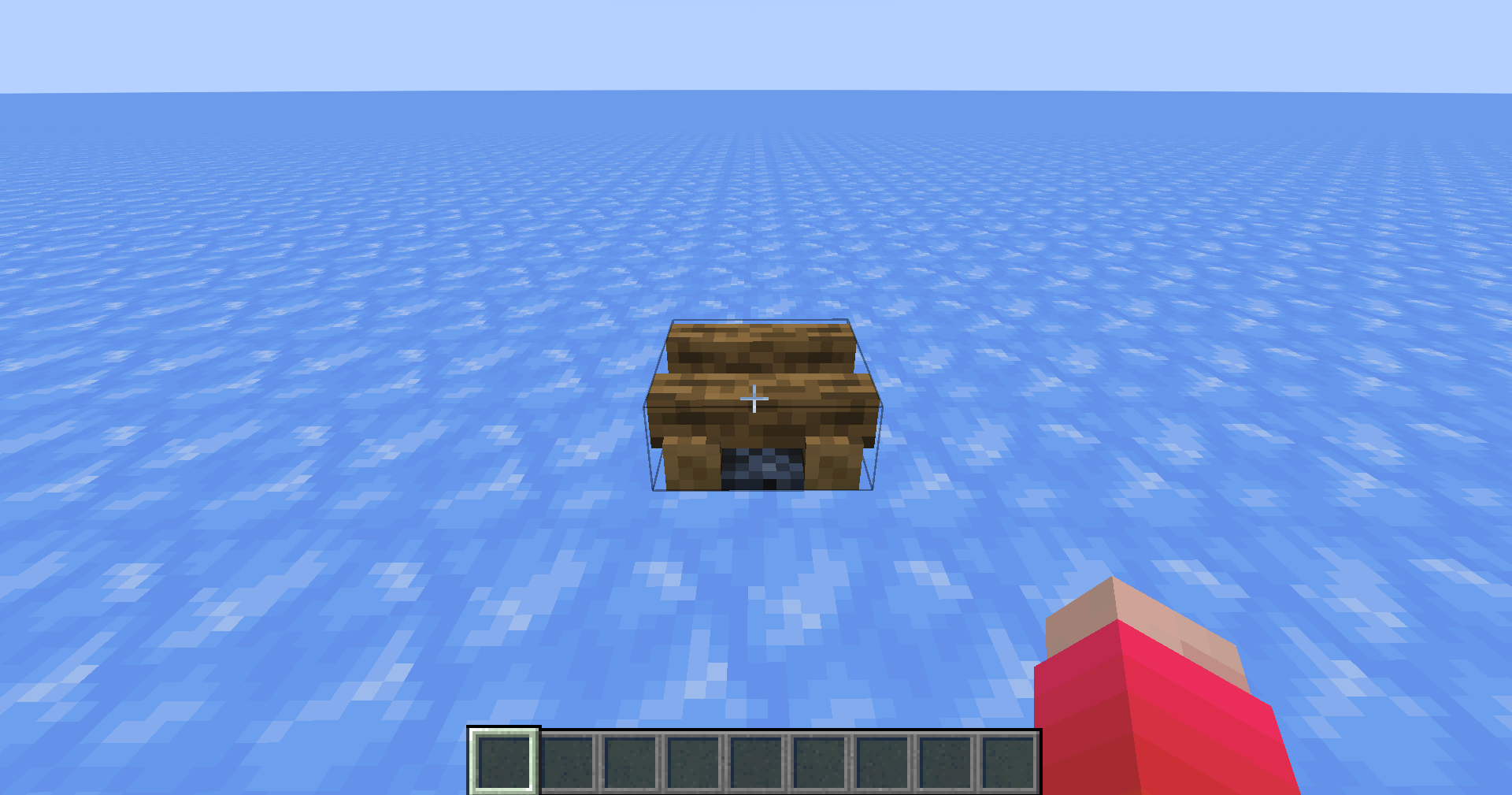
First,I putted a noraml sign then writton something on it
Ctrl + Picked and I put the sign with NBT on it
I put another sign with NBT on it and I rewrote the text
I Ctrl + Picked this rewritten sign then I put the rewrote sign with NBT on it
Okay ,the rewrote texts gone.
First,I putted a noraml sign then write something on it
Ctrl + Picked and I put the sign with NBT on it.The block data is different from the original
I put another sign with NBT on it and I rewrote the text.The block data like a tragedy.
I Ctrl + Picked this rewritten sign then I put the rewrote sign with NBT on it.Okay ,the rewritten texts gone.
First,I putted a noraml sign then write something on it
Ctrl + Picked and I put the sign with NBT on it.The block data is different from the original
I putanothersign with NBT on it and I rewrote the text.The block data like a tragedy.
I Ctrl + Picked this rewritten sign then I put the rewrote sign with NBT on it.Okay ,the rewritten texts gone.
First,I putted a noraml sign then write something on it
Ctrl + Picked and I put the sign with NBT on it.The block data is different from the original
I put the same sign with NBT on it and I rewrote the text.The block data like a tragedy.
I Ctrl + Picked this rewritten sign then I put the rewrote sign with NBT on it.Okay ,the rewritten texts gone.
First,I putted a noraml sign then write something on it
Ctrl + Picked and I put the sign with NBT on it.The block data is different from the original
I put the same sign with NBT on it and I rewrote the text.The block data like a tragedy.
I Ctrl + Picked this rewritten sign then I put the rewrote sign with NBT on it.Okay ,the rewritten texts gone.
Ctrl + Pick Block from signblocks are broken
Tested as an issue after the archive was upgraded to a snapshot version, and did not reappear with the same datapack in a newly created world

Tested as an issue after the archive was upgraded to a snapshot version, and did not reappear with the same datapack in a newly created world

