 Stephan Manhalter
- zugai
- zugai
- Europe/Stockholm
- Yes
- No
 MC-1290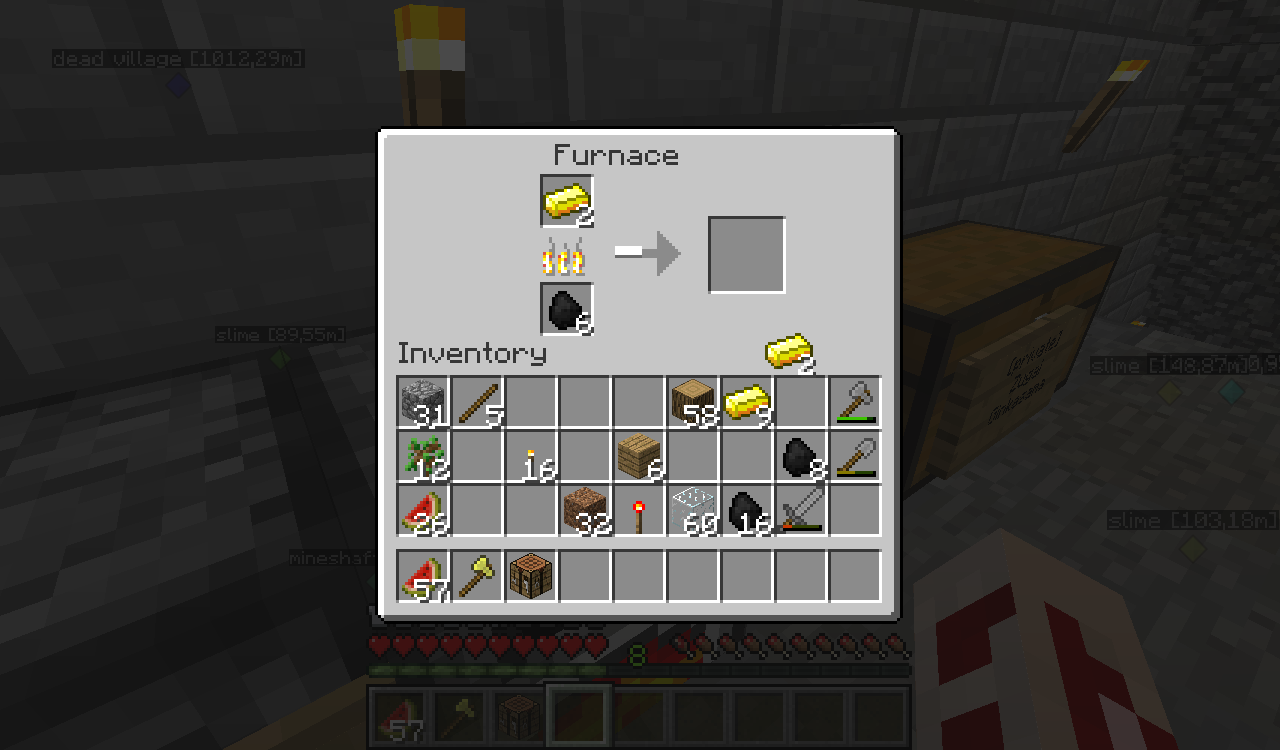


What I expected to happen was...:
If I break a torch on the wall, the torch should break while the block behind should stay.What actually happened was...:
On rare occassions the block behind the torch would break too (if the block would be mineable by hand it drops as item, else it vanishes, might depend on the tool you wield)Steps to Reproduce:
1. Happened on a 1.4.2 multiplayer server, doesn't seem to occurr in singleplayer, can't tell if it's caused by main client or from plugins.
2. Place a torch or any other instant breakable item (redstone torch, netherwart, didn't see it happen with others yet) on a block (stonebrick, grass, dirt, stone, soulsand)
3. Break the torch in a way that the block behind/beneath is in thecrosshair as soon teh torch comes off.
4. Since it's a rare occassion it might take a while (after logging in I harvested almost 3 stacks of netherwarts to have it happen once)
What I expected to happen was...:
If I take out an item of the product slot in teh furnace I should get the items (and ev. exp) and nothing else should happen.What actually happened was...:
If I take them out they also replace the material slot icon (no duping)Steps to Reproduce:
1. Start smelting an ore or other smeltable material
2. If the smelting progress bar is full (not reset to 0 yet) take out the items on the product side
3. You will see the same icon for the items you took out appearing at the material side instead of the ore/smeltable material
4 if you leave the furnace interface, or take out the material the icon will revert to the original.What I expected to happen was...:
If I take out an item of the product slot in the furnace I should get the items (and ev. exp) and nothing else should happen.What actually happened was...:
If I take them out they also replace the material slot icon (no duping)Steps to Reproduce:
1. Start smelting an ore or other smeltable material
2. If the smelting progress bar is full (not reset to 0 yet) take out the items on the product side
3. You will see the same icon for the items you took out appearing at the material side instead of the ore/smeltable material
4 if you leave the furnace interface, or take out the material the icon will revert to the original.
What I expected to happen was...:
If I take out an item of the product slot in the furnace I should get the items (and ev. exp) and nothing else should happen.What actually happened was...:
If I take them out they also replace the material slot icon (no duping)Steps to Reproduce:
1. Start smelting an ore or other smeltable material
2. If the smelting progress bar is full (not reset to 0 yet) take out the items on the product side
3. You will see the same icon for the items you took out appearing at the material side instead of the ore/smeltable material (not tested in singleplayer yet)
4 if you leave the furnace interface, or take out the material the icon will revert to the original.
Under certain circumstances (I basically threw random items from creative mode into my hotbar, including the unnamed leash/bayball)the numbers for itemcounts would either flicker (the white part of the number and the exp bar as a whole would vanish for a few frames) or they would change color to green, blue or red for a few frames. I'm running at about 60 fps, with normal render distance (tiny render distance seems to reduce flickering, but not totally get rid of it)
Never ever had similar grafical issues with Minecraft.When I put the unnamed items (leash/hayball) into my hotbar, the numbers for itemcounts would either flicker (the white part of the number and the exp bar as a whole would vanish for a few frames) or they would change color to green, blue or red for a few frames. I'm running at about 60 fps, with normal render distance (tiny render distance seems to reduce flickering, but not totally get rid of it)
Never ever had similar grafical issues with Minecraft.
Got to add that the carrots/potatoes will be consumed, but don't refill your hunger.
Tested on own pure vanilla server and seems it is not affected (at least the one I run on my own machine.)
As addition:
The server that is affected runs various plugins like mcmmo and timber which might eventually be the cause.
I'll investigate a bit more.
Jake, does the server have any plugins?
Found some time to test it again, but wouldn't happen on a local hosted game or in singleplayer, so another glitch that might be caused by bukkit or serverlag, sorry to waste your time D:
Still valid for 13w16a. Caleb F's solution might be the most efficient, since squids won't be able to jump out of water on their own anyway (and squidfarms where they need to drop out of water would still work) But just like the hostile mob AI was updated there might be an update for neutral/friendly mob AI sometime so they actively avoid dangers (except some other influence, like hunting/following the player has higher priority)
Tried to look for it, but "redstoneblock" didn't yield any compareable results.
Still applies to 13w17a.
Additionally note that you need to mine the bottom face of the block and the particles only stay black for a short amount of time.
(There seems to be no difference if there is a block above, or just air.) Also only affects opaque blocks.
Not quite a dupe, since the screenshot additionally shows a diffrent bobber behaviour. Especially when cast down into the water, the bobber will float up in the air..
Works even for deeper blocks ~10 blocks below the surface.
Reproduced in Vanilla using a spawnegg and the /tp command.
Yes, as of 1.8.1 this bug still exists.