 MC-102543
Everything related to structure blocks is black
What I expected to happen was:
The tooltip of the structure blocks should be white and the border lines of the structure area should be red, green, blue and white. Also, if I enable "Show invisible blocks", air blocks should be blue and structure voids should be red.
What actually happened was:
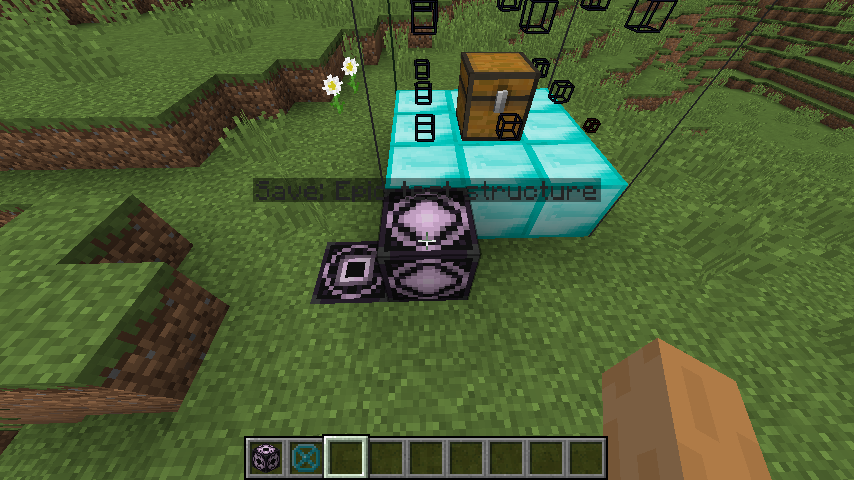
The tooltip of the structure blocks is in a black or gray-ish color. The border lines, as well as the air blocks and structure voids if I enable "Show invisible blocks" are black.
Steps to reproduce:
- Place a structure block, set it to Save mode, and set the structure name.
- Create a random structure containing some air blocks and some structure voids.
- Select that structure using the structure block.
- Activate "Show invisible blocks" in the interface of the structure block.
- Et voilà – everything is black.
Attachments:
- black_structure_block_tooltip.png – Tooltip of a Save structure block which is in a gray-ish color and not really well readable
- black_structure_void.png – A test structure with "Show invisible blocks" enabled, focusing on a structure void
About this report:
I searched for other reports about this, but couldn't find any. I'm really sorry if I missed one. Might relate to lava being blood.
Environment
Windows 10 Build 10586.318 x64
Intel Core i7-3770 CPU @ 3.40 GHz
NVIDIA GeForce GT 640 (driver version 10.18.13.5382)
Linked Issues
is duplicated by1
![[Mod] violine1101](../../../data/avatars/users/92858.png)

Created Issue:
Everything related to structure blocks is black
What I expected to happen was:
The tooltip of the structure blocks should be white and the border lines of the structure area should be red, green, blue and white. Also, if I enable "Show invisible blocks", air blocks should be blue and structure voids should be red.
What actually happened was:
The tooltip of the structure blocks is in a black or gray-ish color. The border lines, as well as the air blocks and structure voids if I enable "Show invisible blocks" are black.
Steps to reproduce:
- Place a structure block, set it to Save mode, and set the structure name.
- Create a random structure containing some air blocks and some structure voids.
- Select that structure using the structure block.
- Activate "Show invisible blocks" in the interface of the structure block.
- Et voilà – everything is black.
Attachments:
- black_structure_block_tooltip.png – Tooltip of a Save structure block which is in a gray-ish color and not really well readable
- black_structure_void.png – A test structure with "Show invisible blocks" enabled, focusing on a structure void
About this report:
I searched for other reports about this, but couldn't find any. I'm really sorry if I missed one. Might relate to lava being blood.
Environment
Windows 10 Build 10586.318 x64
Intel Core i7-3770 CPU @ 3.40 GHz
NVIDIA GeForce GT 640 (driver version 10.18.13.5382)
Attachments2
![[Mod] redstonehelper](../../../data/avatars/users/10122.svg)
is duplicated by
![[Mojang] Searge (Michael Stoyke)](../../../data/assets/gravatar/searge.png) [Mojang] Searge (Michael Stoyke)
[Mojang] Searge (Michael Stoyke)![[Mod] Michael Wobst](../../../data/avatars/users/37868.png)
Wow I was suppose to report this but thanks for reporting!