 MC-107359
You can replace loot tables and advancements, but not structure files
You can replace the default loot tables by adding the files in
world/data/loot_tables/minecraft/
but you can't replace the structures by adding the files in
world/structures/
world/structures/minecraft/
world/data/structures/
world/data/structures/minecraft/
Steps to reproduce:
- Download the base_floor.nbt attached.
- Put the file in
world/structures/endcity/
world/structures/minecraft/endcity/
world/data/structures/endcity/
world/data/structures/minecraft/endcity/
- Open the game now.
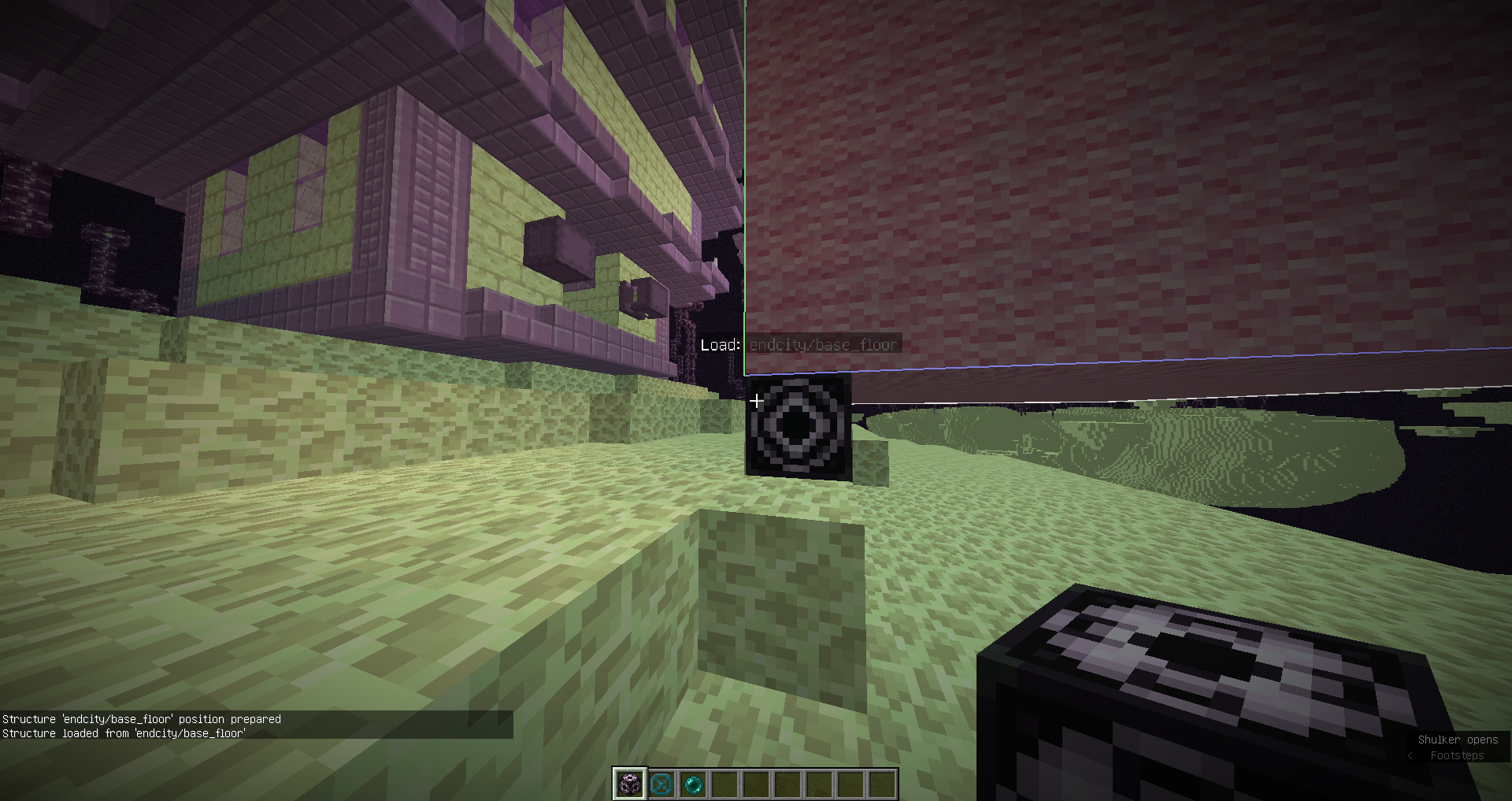
- Test by loading the structure using a structure block.
- See a bunch of pink wool.

- Search for a natural end city that has not been generated before.
- See that the base floor is still the normal structure.
Note: the attached file is even the same dimensions as the default file.


Created Issue:
You can replace loot tables, but not structure files
You can replace the default loot tables by adding the files in
world/data/loot_tables/minecraft/but you can't replace the structures by adding the files in
world/structures/Steps to reproduce:
- Download the base_florr.nbt attached.
- Put the file in
world/structures/endcity/(it's the same path as in the jar)
- Open the game now.
- Test by loading the structure using a structure block.
- See a bunch of pink wool.
- Search for a natural end city that has not been generated before.
- See that the base floor is still the normal structure.
Note: the attached file is even the same dimensions as the default file.
Attachments2
You can replace the default loot tables by adding the files in
world/data/loot_tables/minecraft/but you can't replace the structures by adding the files in
world/structures/Steps to reproduce:
- Download the base_florr.nbt attached.
- Put the file in
world/structures/endcity/(it's the same path as in the jar)
- Open the game now.
- Test by loading the structure using a structure block.
- See a bunch of pink wool.
- Search for a natural end city that has not been generated before.
- See that the base floor is still the normal structure.
Note: the attached file is even the same dimensions as the default file.
You can replace the default loot tables by adding the files in
world/data/loot_tables/minecraft/but you can't replace the structures by adding the files in
world/structures/or
world/structures/minecraft/Steps to reproduce:
- Download the base_florr.nbt attached.
- Put the file in both
world/structures/endcity/and
world/structures/minecraft/endcity/(it's the same path as in the jar)
- Open the game now.
- Test by loading the structure using a structure block.
- See a bunch of pink wool.
- Search for a natural end city that has not been generated before.
- See that the base floor is still the normal structure.
Note: the attached file is even the same dimensions as the default file.

You can replace the default loot tables by adding the files in
world/data/loot_tables/minecraft/but you can't replace the structures by adding the files in
world/structures/or
world/structures/minecraft/Steps to reproduce:
- Download the base_flo
rr.nbt attached.- Put the file in both
world/structures/endcity/and
world/structures/minecraft/endcity/(it's the same path as in the jar)
- Open the game now.
- Test by loading the structure using a structure block.
- See a bunch of pink wool.
- Search for a natural end city that has not been generated before.
- See that the base floor is still the normal structure.
Note: the attached file is even the same dimensions as the default file.
You can replace the default loot tables by adding the files in
world/data/loot_tables/minecraft/but you can't replace the structures by adding the files in
world/structures/or
world/structures/minecraft/Steps to reproduce:
- Download the base_floor.nbt attached.
- Put the file in both
world/structures/endcity/and
world/structures/minecraft/endcity/(it's the same path as in the jar)
- Open the game now.
- Test by loading the structure using a structure block.
- See a bunch of pink wool.
- Search for a natural end city that has not been generated before.
- See that the base floor is still the normal structure.
Note: the attached file is even the same dimensions as the default file.

You can replace the default loot tables by adding the files in
world/data/loot_tables/minecraft/but you can't replace the structures by adding the files in
world/structures/or
world/structures/minecraft/Steps to reproduce:
- Download the base_floor.nbt attached.
- Put the file in
bothworld/structures/endcity/and
world/structures/minecraft/endcity/(it's the same path as in the jar)
- Open the game now.
- Test by loading the structure using a structure block.
- See a bunch of pink wool.
- Search for a natural end city that has not been generated before.
- See that the base floor is still the normal structure.
Note: the attached file is even the same dimensions as the default file.
You can replace the default loot tables by adding the files in
world/data/loot_tables/minecraft/but you can't replace the structures by adding the files in
world/structures/ world/structures/minecraft/ world/data/structures/ world/data/structures/minecraft/Steps to reproduce:
- Download the base_floor.nbt attached.
- Put the file in
world/structures/endcity/ world/structures/minecraft/endcity/ world/data/structures/endcity/ world/data/structures/minecraft/endcity/- Open the game now.
- Test by loading the structure using a structure block.
- See a bunch of pink wool.
- Search for a natural end city that has not been generated before.
- See that the base floor is still the normal structure.
Note: the attached file is even the same dimensions as the default file.
![[Mod] Michael Wobst](../../../data/avatars/users/37868.png)
You can replace loot tables and advancements, but not structure files
![[Mod] tryashtar](../../../data/avatars/users/41963.png)

![[Mod] Neko](../../../data/avatars/users/92901.png)
It may be better to put them in the data-folder (world/data/structures/) like the loot tables, so that you can't override them by a mistake.
SetantaLP If you put it in the exact same folder with the exact name, it's safe to assume you want to overwrite it, the same happens with the loot tables, same name and folder path results in it getting used instead.
Yea, but I mean that you may overwrite the structure-file by a mistake, when you want to save a structure and the file it is placed in folder where your saved structures are stored. If you placed it in the data-folder, this won't happen, and it also fits together with the loot tables.
If you name it exactly the same, then you most likely did that on purpose, same with loot tables, so changing that makes it inconsistent.
Yea, but I think it would be more consistent to place structure-files, that should override the ones from the assets folder, inside the data-folder as inside the structure-folder, where minecraft stores the structures-files you can load/save with the structure-block