 MC-122190
When using key with AltGr-function that is binded to open the chat, it will open the chat, and when you type a symbol, it will type it with an extra symbol created using the AltGr-function of the binded key
(Well, that's a mouth full)
For this issue, you will need a keyboard that has a 3-character key that expects another key press afterwards. If you don't have one available, please see the attached image and skip to the example in instruction 3.
INSTRUCTIONS:
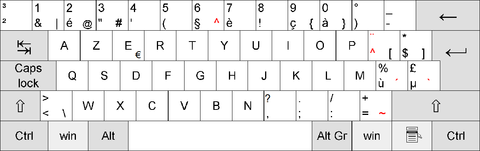
1. Bind the key for opening the chat (with or without the '/' pre-added) to a 3-character key with an AltGr functionality which expects another keypress. For example, see the image and notice the button with the symbols "+ = ~". Set it to that if possible.
2. Press AltGr + <The binded key that you just set>.
3. Note: The chat will open with or not with a slash and everything seems normal, untill you press any key. It will type the symbol created by using the AltGr-function of the binded key. For example: (note the image), we bind the "+ = ~"-key to the "OPEN-CHAT"-function, then we press AltGr + "+ = ~"-key. It will open the chat for us, but when we type a diffrent symbol (like 'H') it will type '~H' in the chat.
It is quiete a small minor bug that isn't really important at all since not a lot of people will be pressing AltGr and a 3-function key at the same time.
I also want to note that the AltGr functionality of a key can also be triggered by pressing Ctrl and Alt at the same time. AltGr is essentially just a shortcut for it. This also means that the bug also appears when pressing Ctrl + Alt instead of AltGr with a 3-character key.
With 'a 3-character key that expects another key press afterwards', I mean a key like '+ = ~'. When pressed with AltGr or Ctrl + Alt, it will try to type the tilda, but before it does, it waits for another key input. When another key is pressed, it will try to combine the two. This will result in 'ã' being made if that key was 'a' or 'tilda f' if that key was 'f'. A key like '* $ ]' doesn't make the bug appear, because no other key input is expected.
I hope you kind of understood what I just said. Have a great day!
Environment
Windows 10 Home
Processor: Intel(R) Core(TM) i5-5200U CPU @ 2.20GHz 2.20 GHz [x64]
Java 1.8.0_25
Attachments1

Created Issue:
Chat types using extra input function when pressing ALTGR + Chat-Key
Sorry if there is some bad English in there i'm Dutch
It is hard to say what i mean, so i'm just gotta place some instructions.
Please use for example an AZERTY-layout (Belgium), this will ensure you have a 3-function key with ALTGR on it. If you don't got one check the image and skip to the example of instruction 3.INSTRUCTIONS:
1. Set your hotkey for opening the chat (or chat with typed '/') to a 3-symbol key with ALTGR function as a third one. For example, see image and note button with symbols "+ = ~", set it to that if possible.
2. Press ALTGR + <The binded key that you just set>
3. Note: The chat will open with or not with a slash and everything seems normal, untill you press a key. It will type the symbol created by using ALTGR + third function of the binded key. Example: (note the image), we bind the "+ = ~"-key to the "OPEN-CHAT"-function, then we press ALTGR + "+ = ~"-key. It will open the chat for us, but when we type a diffrent symbol (like 'H') it will type '~H' in the chat.
It is hard to explain, but it's a bug that is'nt that obvious, but it still needs attention.
I hope you understood what i just said, have a great day!Environment
Vanilla Minecraft version (see list ^)
(Singleplayer, multiplayer not tested - but probably affected aswell)Windows 10 Home
Processor: Intel(R) Core(TM) i5-5200U CPU @ 2.20GHz 2.20 GHz [x64]
Attachments1

Chat types using extra input function when pressing ALTGR + Chat-KeyWhen using key with ALTGR-Function, and binded to open the chat, it will open the chat, and when you type a symbol, it will type it with the key[ALTGR-function]
When using key with ALTGR-Function, and binded to open the chat, it will open the chat, and when you type a symbol, it will type it withthe key[ALTGR-function]When using key with ALTGR-Function, and binded to open the chat, it will open the chat, and when you type a symbol, it will type it with a symbol created using the ALTGR-function of the binded key
When using key with ALTGR-Function, and binded to open the chat, it will open the chat, and when you type a symbol, it will type it with an extra symbol created using the ALTGR-function of the binded key
Sorry if there is some bad English in
therei'm DutchIt is hard to say what i mean, so i'm just gotta place some instructions.
Please use for example an AZERTY-layout (Belgium), this will ensure you have a 3-function key with ALTGR on it. If you don't got one check the image and skip to the example of instruction 3.INSTRUCTIONS:
1. Set your hotkey for opening the chat (or chat with typed '/') to a 3-symbol key with ALTGR function as a third one. For example, see image and note button with symbols "+ = ~", set it to that if possible.
2. Press ALTGR + <The binded key that you just set>
3. Note: The chat will open with or not with a slash and everything seems normal, untill you press a key. It will type the symbol created by using ALTGR + third function of the binded key. Example: (note the image), we bind the "+ = ~"-key to the "OPEN-CHAT"-function, then we press ALTGR + "+ = ~"-key. It will open the chat for us, but when we type a diffrent symbol (like 'H') it will type '~H' in the chat.
It is hard to explain, but it's a bug that is'nt that obvious, but it still needs attention.
I hope you understood what i just said, have a great day!Sorry if there is some bad English in here. I'm Dutch
It is hard to say what i mean, so i'm just gotta place some instructions.
Please use for example an AZERTY-layout (Belgium), this will ensure you have a 3-function key with ALTGR on it. If you don't got one check the image and skip to the example of instruction 3.INSTRUCTIONS:
1. Set your hotkey for opening the chat (or chat with typed '/') to a 3-symbol key with ALTGR function as a third one. For example, see image and note button with symbols "+ = ~", set it to that if possible.
2. Press ALTGR + <The binded key that you just set>
3. Note: The chat will open with or not with a slash and everything seems normal, untill you press a key. It will type the symbol created by using ALTGR + third function of the binded key. Example: (note the image), we bind the "+ = ~"-key to the "OPEN-CHAT"-function, then we press ALTGR + "+ = ~"-key. It will open the chat for us, but when we type a diffrent symbol (like 'H') it will type '~H' in the chat.
It is hard to explain, but it's a bug that is'nt that obvious, but it still needs attention.
I hope you understood what i just said, have a great day!
Sorry if there is some bad English in here. I'm Dutch
It is hard to say what i mean, so i'm just gotta place some instructions.
Please use for example an AZERTY-layout (Belgium), this will ensure you have a 3-function key with ALTGR on it. If you don't got one check the image and skip to the example of instruction 3.INSTRUCTIONS:
1.
Set your hotkey for opening the chat (or chat with typed '/') to a 3-symbol key with ALTGR function as a third one. For example, see image and note button with symbols "+ = ~", set it to that if possible.2. Press ALTGR + <The binded key that you just set>
3. Note: The chat will open with or not with a slash and everything seems normal, untill you press a key. It will type the symbol created by using ALTGR + third function of the binded key. Example: (note the image), we bind the "+ = ~"-key to the "OPEN-CHAT"-function, then we press ALTGR + "+ = ~"-key. It will open the chat for us, but when we type a diffrent symbol (like 'H') it will type '~H' in the chat.
It is hard to explain, but it's a bug that is'nt that obvious, but it still needs attention.
I hope you understood what i just said, have a great day!Sorry if there is some bad English in here. I'm Dutch
It is hard to say what i mean, so i'm just gotta place some instructions.
Please use for example an AZERTY-layout (Belgium), this will ensure you have a 3-function key with ALTGR on it. If you don't got one check the image and skip to the example of instruction 3.INSTRUCTIONS:
1. Bind the key for opening the chat (or chat with typed '/') to a 3-symbol key with ALTGR function as a third one. For example, see image and note button with symbols "+ = ~", set it to that if possible.
2. Press ALTGR + <The binded key that you just set>
3. Note: The chat will open with or not with a slash and everything seems normal, untill you press a key. It will type the symbol created by using ALTGR + third function of the binded key. Example: (note the image), we bind the "+ = ~"-key to the "OPEN-CHAT"-function, then we press ALTGR + "+ = ~"-key. It will open the chat for us, but when we type a diffrent symbol (like 'H') it will type '~H' in the chat.
It is hard to explain, but it's a bug that is'nt that obvious, but it still needs attention.
I hope you understood what i just said, have a great day!
Sorry if there is some bad English in here. I'm Dutch
It is hard to say what i mean, so i'm just gotta place some instructions.
Please use for example an AZERTY-layout (Belgium), this will ensure you have a 3-function key with ALTGR on it. If you don't got one check the image and skip to the example of instruction 3.INSTRUCTIONS:
1. Bind the key for opening the chat (or chat with typed '/') to a 3-symbol key with ALTGR function as a third one. For example, see image and note button with symbols "+ = ~", set it to that if possible.
2. Press ALTGR + <The binded key that you just set>
3. Note: The chat will open with or not with a slash and everything seems normal, untill you press a key. It will type the symbol created by using ALTGR
+ third function of the binded key.Example: (note the image), we bind the "+ = ~"-key to the "OPEN-CHAT"-function, then we press ALTGR + "+ = ~"-key. It will open the chat for us, but when we type a diffrent symbol (like 'H') it will type '~H' in the chat.It is hard to explain, but it's a bug that is'nt that obvious, but it still needs attention.
I hope you understood what i just said, have a great day!Sorry if there is some bad English in here. I'm Dutch
It is hard to say what i mean, so i'm just gotta place some instructions.
Please use for example an AZERTY-layout (Belgium), this will ensure you have a 3-function key with ALTGR on it. If you don't got one check the image and skip to the example of instruction 3.INSTRUCTIONS:
1. Bind the key for opening the chat (or chat with typed '/') to a 3-symbol key with ALTGR function as a third one. For example, see image and note button with symbols "+ = ~", set it to that if possible.
2. Press ALTGR + <The binded key that you just set>
3. Note: The chat will open with or not with a slash and everything seems normal, untill you press a key. It will type the symbol created by using the ALTGR-function of the binded key*Example:* (note the image), we bind the "+ = ~"-key to the "OPEN-CHAT"-function, then we press ALTGR + "+ = ~"-key. It will open the chat for us, but when we type a diffrent symbol (like 'H') it will type '~H' in the chat.
It is hard to explain, but it's a bug that is'nt that obvious, but it still needs attention.
I hope you understood what i just said, have a great day!
Sorry if there is some bad English in here. I'm Dutch
It is hard to say what i mean, so i'm just gotta place some instructions.
Please use for example an AZERTY-layout (Belgium), this will ensure you have a 3-function key with ALTGR on it. If you don't got one check the image and skip to the example of instruction 3.INSTRUCTIONS:
1. Bind the key for opening the chat (or chat with typed '/') to a 3-symbol key with ALTGR function as a third one. For example, see image and note button with symbols "+ = ~", set it to that if possible.
2. Press ALTGR + <The binded key that you just set>
3. Note: The chat will open with or not with a slash and everything seems normal, untill you press a key. It will type the symbol created by using the ALTGR-function of the binded key
*Example:* (note the image), we bind the "+ = ~"-key to the "OPEN-CHAT"-function, then we press ALTGR + "+ = ~"-key. It will open the chat for us, but when we type a diffrent symbol (like 'H') it will type '~H' in the chat.It is hard to explain, but it's a bug that is'nt that obvious, but it still needs attention.
I hope you understood what i just said, have a great day!Sorry if there is some bad English in here. I'm Dutch
It is hard to say what i mean, so i'm just gotta place some instructions.
Please use for example an AZERTY-layout (Belgium), this will ensure you have a 3-function key with ALTGR on it. If you don't got one check the image and skip to the example of instruction 3.INSTRUCTIONS:
1. Bind the key for opening the chat (or chat with typed '/') to a 3-symbol key with ALTGR function as a third one. For example, see image and note button with symbols "+ = ~", set it to that if possible.
2. Press ALTGR + <The binded key that you just set>
3. Note: The chat will open with or not with a slash and everything seems normal, untill you press a key. It will type the symbol created by using the ALTGR-function of the binded key. Example: (note the image), we bind the "+ = ~"-key to the "OPEN-CHAT"-function, then we press ALTGR + "+ = ~"-key. It will open the chat for us, but when we type a diffrent symbol (like 'H') it will type '~H' in the chat.
It is hard to explain, but it's a bug that is'nt that obvious, but it still needs attention.
I hope you understood what i just said, have a great day!
(Well, that's a mouth full)
Sorry if there is some bad English in here. I'm DutchIt is hard to say what i mean, so i'm just gotta place some instructions.
Please use for example an AZERTY-layout (Belgium), this will ensure you have a 3-function key with ALTGR on it. If you don't got one check the image and skip to the example of instruction 3.INSTRUCTIONS:
1. Bind the key for opening the chat (or chat with typed '/') to a 3-symbol key with ALTGR function as a third one. For example, see image and note button with symbols "+ = ~", set it to that if possible.
2. Press ALTGR + <The binded key that you just set>
3. Note: The chat will open with or not with a slash and everything seems normal, untill you press a key. It will type the symbol created by using the ALTGR-function of the binded key. Example: (note the image), we bind the "+ = ~"-key to the "OPEN-CHAT"-function, then we press ALTGR + "+ = ~"-key. It will open the chat for us, but when we type a diffrent symbol (like 'H') it will type '~H' in the chat.
It is hard to explain, but it's a bug that is'nt that obvious, but it still needs attention.
I hope you understood what i just said, have a great day!
(Well, that's a mouth full)
Sorry if there is some bad English in here. I'm DutchIt is hard to say what i mean, so i'm just gotta place some instructions.
Please use for example an AZERTY-layout (Belgium), this will ensure you have a 3-function key with ALTGR onit. If you don't got one check the image and skip to the example of instruction 3.INSTRUCTIONS:
1. Bind the key for opening the chat (or chat with typed '/') to a 3-symbol key with ALTGR function as a third one. For example, see image and note button with symbols "+ = ~", set it to that if possible.
2. Press ALTGR + <The binded key that you just set>
3. Note: The chat will open with or not with a slash and everything seems normal, untill you press a key. It will type the symbol created by using the ALTGR-function of the binded key. Example: (note the image), we bind the "+ = ~"-key to the "OPEN-CHAT"-function, then we press ALTGR + "+ = ~"-key. It will open the chat for us, but when we type a diffrent symbol (like 'H') it will type '~H' in the chat.
It is hard to explain, but it's a bug that is'nt that obvious, but it still needs attention.
I hope you understood what i just said, have a great day!(Well, that's a mouth full)
Sorry if there is some bad English in here. I'm DutchIt is hard to say what i mean, so i'm just gotta place some instructions.
Please use for example an AZERTY-layout (Belgium), this will ensure you have a 3-function key with ALTGR on the keyboard. If you don't got one check the image and skip to the example of instruction 3.INSTRUCTIONS:
1. Bind the key for opening the chat (or chat with typed '/') to a 3-symbol key with ALTGR function as a third one. For example, see image and note button with symbols "+ = ~", set it to that if possible.
2. Press ALTGR + <The binded key that you just set>
3. Note: The chat will open with or not with a slash and everything seems normal, untill you press a key. It will type the symbol created by using the ALTGR-function of the binded key. Example: (note the image), we bind the "+ = ~"-key to the "OPEN-CHAT"-function, then we press ALTGR + "+ = ~"-key. It will open the chat for us, but when we type a diffrent symbol (like 'H') it will type '~H' in the chat.
It is hard to explain, but it's a bug that is'nt that obvious, but it still needs attention.
I hope you understood what i just said, have a great day!
Vanilla Minecraft version (see list ^)
(Singleplayer, multiplayer not tested - but probably affected aswell)Windows 10 Home
Processor: Intel(R) Core(TM) i5-5200U CPU @ 2.20GHz 2.20 GHz [x64]
Java 1.8.0_25
When using key with ALTGR-Function, andbinded to open the chat, it will open the chat, and when you type a symbol, it will type it with an extra symbol created using the ALTGR-function of the binded keyWhen using key with ALTGR-Function that is binded to open the chat, it will open the chat, and when you type a symbol, it will type it with an extra symbol created using the ALTGR-function of the binded key
(Well, that's a mouth full)
Sorry if there is some bad English in here. I'm DutchIt is hard to say what i mean, so i'm just gotta place some instructions.
Please use for example an AZERTY-layout (Belgium), this will ensure you have a 3-function key with ALTGRon the keyboard. If you don't got one check the image and skip to the example of instruction 3.INSTRUCTIONS:
1. Bind the key for opening the chat (or chat with typed '/') to a 3-symbol key with ALTGR function as a third one. For example, see image and note button with symbols "+ = ~", set it to that if possible.
2. Press A
LTGR+ <The binded key that you just set>3. Note: The chat will open with or not with a slash and everything seems normal, untill you press a key. It will type the symbol created by using the A
LTGR-function of the binded key. Example: (note the image), we bind the "+ = ~"-key to the "OPEN-CHAT"-function, then we press ALTGR+ "+ = ~"-key. It will open the chat for us, but when we type a diffrent symbol (like 'H') it will type '~H' in the chat.It is hard to explain, but it's a bug that is'nt that obvious, but it still needs attention.
I hope you understood what i just said, have a great day!(Well, that's a mouth full)
Sorry if there is some bad English in here. I'm DutchIt is hard to say what i mean, so i'm just gotta place some instructions.
Please use for example an AZERTY-layout (Belgium), this will ensure you have a 3-function key with AltGr on the keyboard. If you don't got one check the image and skip to the example of instruction 3.INSTRUCTIONS:
1. Bind the key for opening the chat (or chat with typed '/') to a 3-symbol key with ALTGR function as a third one. For example, see image and note button with symbols "+ = ~", set it to that if possible.
2. Press AltGr + <The binded key that you just set>
3. Note: The chat will open with or not with a slash and everything seems normal, untill you press a key. It will type the symbol created by using the AltGr-function of the binded key. Example: (note the image), we bind the "+ = ~"-key to the "OPEN-CHAT"-function, then we press AltGr + "+ = ~"-key. It will open the chat for us, but when we type a diffrent symbol (like 'H') it will type '~H' in the chat.
It is hard to explain, but it's a bug that is'nt that obvious, but it still needs attention.
I hope you understood what i just said, have a great day!
When using key with ALTGR-Function that is binded to open the chat, it will open the chat, and when you type a symbol, it will type it with an extra symbol created using the ALTGR-function of the binded keyWhen using key with AltGr-Function that is binded to open the chat, it will open the chat, and when you type a symbol, it will type it with an extra symbol created using the AltGr-function of the binded key
When using key with AltGr-Function that is binded to open the chat, it will open the chat, and when you type a symbol, it will type it with an extra symbol created using the AltGr-function of the binded keyWhen using key with AltGr-function that is binded to open the chat, it will open the chat, and when you type a symbol, it will type it with an extra symbol created using the AltGr-function of the binded key

Vanilla Minecraft version (see list ^)
(Singleplayer, multiplayer not tested - but probably affected aswell)Windows 10 Home
Processor: Intel(R) Core(TM) i5-5200U CPU @ 2.20GHz 2.20 GHz [x64]
Java 1.8.0_25
(Well, that's a mouth full)
Sorry if there is some bad English in here. I'm DutchIt is hard to say what i mean, so i'm just go
ttaplace some instructions.
Please use for example an AZERTY-layout (Belgium), this will ensure you have a 3-function key with AltGr on the keyboard. If you don't got one check the image and skip to the example of instruction 3.INSTRUCTIONS:
1. Bind the key for opening the chat (or chat with typed '/') to a 3-symbol key with ALTGR function as a third one. For example, see image and note button with symbols "+ = ~", set it to that if possible.
2. Press AltGr + <The binded key that you just set>
3. Note: The chat will open with or not with a slash and everything seems normal, untill you press a key. It will type the symbol created by using the AltGr-function of the binded key. Example: (note the image), we bind the "+ = ~"-key to the "OPEN-CHAT"-function, then we press AltGr + "+ = ~"-key. It will open the chat for us, but when we type a diffrent symbol (like 'H') it will type '~H' in the chat.
It is hard to explain, but it's a bug that is'nt that obvious, but it still needs attention.
I hope you understood what i just said, have a great day!(Well, that's a mouth full)
Sorry if there is some bad English in here. I'm DutchIt is hard to say what i mean, so i'm just going to place some instructions.
Please use for example an AZERTY-layout (Belgium), this will ensure you have a 3-function key with AltGr on the keyboard. If you don't got one check the image and skip to the example of instruction 3.INSTRUCTIONS:
1. Bind the key for opening the chat (or chat with typed '/') to a 3-symbol key with ALTGR function as a third one. For example, see image and note button with symbols "+ = ~", set it to that if possible.
2. Press AltGr + <The binded key that you just set>
3. Note: The chat will open with or not with a slash and everything seems normal, untill you press a key. It will type the symbol created by using the AltGr-function of the binded key. Example: (note the image), we bind the "+ = ~"-key to the "OPEN-CHAT"-function, then we press AltGr + "+ = ~"-key. It will open the chat for us, but when we type a diffrent symbol (like 'H') it will type '~H' in the chat.
It is hard to explain, but it's a bug that is'nt that obvious, but it still needs attention.
I hope you understood what i just said, have a great day!
(Well, that's a mouth full)
Sorry if there is some bad English in here. I'm DutchIt is hard to say what i mean, so i'm just going to
placesome instructions.
Please use for example an AZERTY-layout (Belgium), this will ensure you have a 3-function key with AltGr on the keyboard. If you don't got one check the image and skip to the example of instruction 3.INSTRUCTIONS:
1. Bind the key for opening the chat (or chat with typed '/') to a 3-symbol key with ALTGR function as a third one. For example, see image and note button with symbols "+ = ~", set it to that if possible.
2. Press AltGr + <The binded key that you just set>
3. Note: The chat will open with or not with a slash and everything seems normal, untill you press a key. It will type the symbol created by using the AltGr-function of the binded key. Example: (note the image), we bind the "+ = ~"-key to the "OPEN-CHAT"-function, then we press AltGr + "+ = ~"-key. It will open the chat for us, but when we type a diffrent symbol (like 'H') it will type '~H' in the chat.
It is hard to explain, but it's a bug that is'nt that obvious, but it still needs attention.
I hope you understood what i just said, have a great day!(Well, that's a mouth full)
Sorry if there is some bad English in here. I'm DutchIt is hard to say what i mean, so i'm just going to set some instructions.
Please use for example an AZERTY-layout (Belgium), this will ensure you have a 3-function key with AltGr on the keyboard. If you don't got one check the image and skip to the example of instruction 3.INSTRUCTIONS:
1. Bind the key for opening the chat (or chat with typed '/') to a 3-symbol key with ALTGR function as a third one. For example, see image and note button with symbols "+ = ~", set it to that if possible.
2. Press AltGr + <The binded key that you just set>
3. Note: The chat will open with or not with a slash and everything seems normal, untill you press a key. It will type the symbol created by using the AltGr-function of the binded key. Example: (note the image), we bind the "+ = ~"-key to the "OPEN-CHAT"-function, then we press AltGr + "+ = ~"-key. It will open the chat for us, but when we type a diffrent symbol (like 'H') it will type '~H' in the chat.
It is hard to explain, but it's a bug that is'nt that obvious, but it still needs attention.
I hope you understood what i just said, have a great day!
(Well, that's a mouth full)
Sorry if there is some bad English in here. I'm DutchIt is hard to say what i mean, so i'm just going to set some instructions.
Please use for example an AZERTY-layout (Belgium), this will ensure you have a 3-function key with AltGr on the keyboard. If youdon't got one check the image and skip to the example of instruction 3.INSTRUCTIONS:
1. Bind the key for opening the chat (or chat with typed '/') to a 3-symbol key with ALTGR function as a third one. For example, see image and note button with symbols "+ = ~", set it to that if possible.2. Press AltGr + <The binded key that you just set>
3. Note: The chat will open with or not with a slash and everything seems normal, untill you press a key. It will type the symbol created by using the AltGr-function of the binded key. Example: (note the image), we bind the "+ = ~"-key to the "OPEN-CHAT"-function, then we press AltGr + "+ = ~"-key. It will open the chat for us, but when we type a diffrent symbol (like 'H') it will type '~H' in the chat.
It is hard to explain, but it's a bug that is'nt that obvious, but it still needs attention.
I hope you understood what i just said, have a great day!(Well, that's a mouth full)
Sorry if there is some bad English in here. I'm DutchIt is hard to say what i mean, so i'm just going to set some instructions.
Please use for example an AZERTY-layout (Belgium), this will ensure you have a 3-function key with AltGr on the keyboard. If you haven't got one check the image and skip to the example of instruction 3.INSTRUCTIONS:
1. Bind the key for opening the chat (or chat with typed '/') to a 3-symbol key with ALTGR function as a third one. For example, see image and note button with symbols "+ = ~", set it to that if possible.
2. Press AltGr + <The binded key that you just set>
3. Note: The chat will open with or not with a slash and everything seems normal, untill you press a key. It will type the symbol created by using the AltGr-function of the binded key. Example: (note the image), we bind the "+ = ~"-key to the "OPEN-CHAT"-function, then we press AltGr + "+ = ~"-key. It will open the chat for us, but when we type a diffrent symbol (like 'H') it will type '~H' in the chat.
It is hard to explain, but it's a bug that is'nt that obvious, but it still needs attention.
I hope you understood what i just said, have a great day!
(Well, that's a mouth full)
Sorry if there is some bad English in here. I'm DutchIt is hard to say what i mean, so i'm just going to set some instructions.
Please use for example an AZERTY-layout (Belgium), this will ensure you have a 3-function key with AltGr on the keyboard. If you haven't got one check the image and skip to the example of instruction 3.INSTRUCTIONS:
1. Bind the key for opening the chat (or chat with typed '/') to a 3-symbol key with ALTGR function as a third one. For example, see image and note button with symbols "+ = ~", set it to that if possible.
2. Press AltGr + <The binded key that you just set>
3. Note: The chat will open with or not with a slash and everything seems normal, untill you press a key. It will type the symbol created by using the AltGr-function of the binded key. Example: (note the image), we bind the "+ = ~"-key to the "OPEN-CHAT"-function, then we press AltGr + "+ = ~"-key. It will open the chat for us, but when we type a diffrent symbol (like 'H') it will type '~H' in the chat.
It is hard to explain, but it's a bug that is
'nt that obvious, but it still needs attention.
I hope you understood what i just said, have a great day!(Well, that's a mouth full)
Sorry if there is some bad English in here. I'm DutchIt is hard to say what i mean, so i'm just going to set some instructions.
Please use for example an AZERTY-layout (Belgium), this will ensure you have a 3-function key with AltGr on the keyboard. If you haven't got one check the image and skip to the example of instruction 3.INSTRUCTIONS:
1. Bind the key for opening the chat (or chat with typed '/') to a 3-symbol key with ALTGR function as a third one. For example, see image and note button with symbols "+ = ~", set it to that if possible.
2. Press AltGr + <The binded key that you just set>
3. Note: The chat will open with or not with a slash and everything seems normal, untill you press a key. It will type the symbol created by using the AltGr-function of the binded key. Example: (note the image), we bind the "+ = ~"-key to the "OPEN-CHAT"-function, then we press AltGr + "+ = ~"-key. It will open the chat for us, but when we type a diffrent symbol (like 'H') it will type '~H' in the chat.
It is hard to explain, but it's a bug that isn't that obvious, but it still needs attention.
I hope you understood what i just said, have a great day!
(Well, that's a mouth full)
Sorry if there is some bad English in here. I'm DutchIt is hard to say what
imean, soi'm just going to set some instructions.
Please use for example an AZERTY-layout (Belgium), this will ensure you have a 3-function key with AltGr on the keyboard. If you haven't got one check the image and skip to the example of instruction 3.INSTRUCTIONS:
1. Bind the key for opening the chat (or chat with typed '/') to a 3-symbol key with ALTGR function as a third one. For example, see image and note button with symbols "+ = ~", set it to that if possible.
2. Press AltGr + <The binded key that you just set>
3. Note: The chat will open with or not with a slash and everything seems normal, untill you press a key. It will type the symbol created by using the AltGr-function of the binded key. Example: (note the image), we bind the "+ = ~"-key to the "OPEN-CHAT"-function, then we press AltGr + "+ = ~"-key. It will open the chat for us, but when we type a diffrent symbol (like 'H') it will type '~H' in the chat.
It is hard to explain, but it's a bug that isn't that obvious, but it still needs attention.
I hope you understood whatijust said, have a great day!(Well, that's a mouth full)
Sorry if there is some bad English in here. I'm DutchIt is hard to say what I mean, so I'm just going to set some instructions.
Please use for example an AZERTY-layout (Belgium), this will ensure you have a 3-function key with AltGr on the keyboard. If you haven't got one check the image and skip to the example of instruction 3.INSTRUCTIONS:
1. Bind the key for opening the chat (or chat with typed '/') to a 3-symbol key with ALTGR function as a third one. For example, see image and note button with symbols "+ = ~", set it to that if possible.
2. Press AltGr + <The binded key that you just set>
3. Note: The chat will open with or not with a slash and everything seems normal, untill you press a key. It will type the symbol created by using the AltGr-function of the binded key. Example: (note the image), we bind the "+ = ~"-key to the "OPEN-CHAT"-function, then we press AltGr + "+ = ~"-key. It will open the chat for us, but when we type a diffrent symbol (like 'H') it will type '~H' in the chat.
It is hard to explain, but it's a bug that isn't that obvious, but it still needs attention.
I hope you understood what I just said. Have a great day!
![[Mojang] Nathan Adams](../../../data/assets/gravatar/dinnerbone.png)
![[Mod] Michael Wobst](../../../data/avatars/users/37868.png)
![[Bot] Arisa](../../../data/assets/gravatar/mustek2.png)
(Well, that's a mouth full)
Sorry if there is some bad English in here. I'm DutchIt is hard to say what I mean, so I'm just going to set some instructions.
Please use for example an AZERTY-layout (Belgium), this will ensure you have a 3-function key with AltGr on the keyboard. If you haven't got one check the image and skip to the example of instruction 3.INSTRUCTIONS:
1. Bind the key for opening the chat (
or chat with typed '/') to a 3-symbol key withALTGRfunctionas a third one. For example, see image and note button with symbols "+ = ~", set it to that if possible.2. Press AltGr + <The binded key that you just set>
3. Note: The chat will open with or not with a slash and everything seems normal, untill you press a key. It will type the symbol created by using the AltGr-function of the binded key. Example: (note the image), we bind the "+ = ~"-key to the "OPEN-CHAT"-function, then we press AltGr + "+ = ~"-key. It will open the chat for us, but when we type a diffrent symbol (like 'H') it will type '~H' in the chat.
I
t is hard to explain, but it's a bug that isn't that obvious, but it stillneeds attention.
I hope you understood what I just said. Have a great day!(Well, that's a mouth full)
For this issue, you will need a keyboard that has a 3-function key with AltGr on the keyboard. If you don't have one available, please see check the attached image and skip to the example in instruction 3.
INSTRUCTIONS:
1. Bind the key for opening the chat (with or without the '/' pre-added) to a 3-symbol key with an AltGr functionality. For example, see the image and notice the button with the symbols "+ = ~". Set it to that if possible.
2. Press AltGr + <The binded key that you just set>.
3. Note: The chat will open with or not with a slash and everything seems normal, untill you press any key. It will type the symbol created by using the AltGr-function of the binded key. Example: (note the image), we bind the "+ = ~"-key to the "OPEN-CHAT"-function, then we press AltGr + "+ = ~"-key. It will open the chat for us, but when we type a diffrent symbol (like 'H') it will type '~H' in the chat.
It is quiete a small minor bug that isn't really important at all since not a lot of people will be pressing AltGr and a 3-function key at the same time.
I also want to note that the AltGr functionality can also be triggered by pressing Ctrl and Alt at the same time. AltGr is essentially just a shortcut for it...
I hope you still understood what I just said. Have a great day!
(Well, that's a mouth full)
For this issue, you will need a keyboard that has a 3-function key with AltGr on the keyboard. If you don't have one available, please see check the attached image and skip to the example in instruction 3.INSTRUCTIONS:
1. Bind the key for opening the chat (with or without the '/' pre-added) to a 3-symbol key with an AltGr functionality. For example, see the image and notice the button with the symbols "+ = ~". Set it to that if possible.
2. Press AltGr + <The binded key that you just set>.
3. Note: The chat will open with or not with a slash and everything seems normal, untill you press any key. It will type the symbol created by using the AltGr-function of the binded key. Example: (note the image), we bind the "+ = ~"-key to the "OPEN-CHAT"-function, then we press AltGr + "+ = ~"-key. It will open the chat for us, but when we type a diffrent symbol (like 'H') it will type '~H' in the chat.
It is quiete a small minor bug that isn't really important at all since not a lot of people will be pressing AltGr and a 3-function key at the same time.
I also want to note that the AltGr functionality can also be triggered by pressing Ctrl and Alt at the same time. AltGr is essentially just a shortcut for it...
I hope you still understood what I just said. Have a great day!(Well, that's a mouth full)
For this issue, you will need a keyboard that has a 3-function key with AltGr on the keyboard. If you don't have one available, please see check the attached image and skip to the example in instruction 3.
INSTRUCTIONS:
1. Bind the key for opening the chat (with or without the '/' pre-added) to a 3-symbol key with an AltGr functionality. For example, see the image and notice the button with the symbols "+ = ~". Set it to that if possible.
2. Press AltGr + <The binded key that you just set>.
3. Note: The chat will open with or not with a slash and everything seems normal, untill you press any key. It will type the symbol created by using the AltGr-function of the binded key. Example: (note the image), we bind the "+ = ~"-key to the "OPEN-CHAT"-function, then we press AltGr + "+ = ~"-key. It will open the chat for us, but when we type a diffrent symbol (like 'H') it will type '~H' in the chat.
It is quiete a small minor bug that isn't really important at all since not a lot of people will be pressing AltGr and a 3-function key at the same time.
I also want to note that the AltGr functionality of a key can also be triggered by pressing Ctrl and Alt at the same time. AltGr is essentially just a shortcut for it. This also means that the bug also appears when pressing Ctrl + Alt instead of AltGr with a 3-functional key.
I hope you kind of understood what I just said. Have a great day!
(Well, that's a mouth full)
For this issue, you will need a keyboard that has a 3-function key
with AltGr on the keyboard. If you don't have one available, please see check the attached image and skip to the example in instruction 3.INSTRUCTIONS:
1. Bind the key for opening the chat (with or without the '/' pre-added) to a 3-symbol key with an AltGr functionality. For example, see the image and notice the button with the symbols "+ = ~". Set it to that if possible.
2. Press AltGr + <The binded key that you just set>.
3. Note: The chat will open with or not with a slash and everything seems normal, untill you press any key. It will type the symbol created by using the AltGr-function of the binded key. Example: (note the image), we bind the "+ = ~"-key to the "OPEN-CHAT"-function, then we press AltGr + "+ = ~"-key. It will open the chat for us, but when we type a diffrent symbol (like 'H') it will type '~H' in the chat.
It is quiete a small minor bug that isn't really important at all since not a lot of people will be pressing AltGr and a 3-function key at the same time.
I also want to note that the AltGr functionality of a key can also be triggered by pressing Ctrl and Alt at the same time. AltGr is essentially just a shortcut for it. This also means that the bug also appears when pressing Ctrl + Alt instead of AltGr with a 3-functional key.
I hope you kind of understood what I just said. Have a great day!
(Well, that's a mouth full)
For this issue, you will need a keyboard that has a 3-function key. If you don't have one available, please see
checkthe attached image and skip to the example in instruction 3.INSTRUCTIONS:
1. Bind the key for opening the chat (with or without the '/' pre-added) to a 3-symbol key with an AltGr functionality. For example, see the image and notice the button with the symbols "+ = ~". Set it to that if possible.
2. Press AltGr + <The binded key that you just set>.
3. Note: The chat will open with or not with a slash and everything seems normal, untill you press any key. It will type the symbol created by using the AltGr-function of the binded key.
Example: (note the image), we bind the "+ = ~"-key to the "OPEN-CHAT"-function, then we press AltGr + "+ = ~"-key. It will open the chat for us, but when we type a diffrent symbol (like 'H') it will type '~H' in the chat.It is quiete a small minor bug that isn't really important at all since not a lot of people will be pressing AltGr and a 3-function key at the same time.
I also want to note that the AltGr functionality of a key can also be triggered by pressing Ctrl and Alt at the same time. AltGr is essentially just a shortcut for it. This also means that the bug also appears when pressing Ctrl + Alt instead of AltGr with a 3-functional key.
I hope you kind of understood what I just said. Have a great day!
(Well, that's a mouth full)
For this issue, you will need a keyboard that has a 3-function key. If you don't have one available, please see the attached image and skip to the example in instruction 3.
INSTRUCTIONS:
1. Bind the key for opening the chat (with or without the '/' pre-added) to a 3-symbol key with an AltGr functionality. For example, see the image and notice the button with the symbols "+ = ~". Set it to that if possible.
2. Press AltGr + <The binded key that you just set>.
3. Note: The chat will open with or not with a slash and everything seems normal, untill you press any key. It will type the symbol created by using the AltGr-function of the binded key. For example: (note the image), we bind the "+ = ~"-key to the "OPEN-CHAT"-function, then we press AltGr + "+ = ~"-key. It will open the chat for us, but when we type a diffrent symbol (like 'H') it will type '~H' in the chat.
It is quiete a small minor bug that isn't really important at all since not a lot of people will be pressing AltGr and a 3-function key at the same time.
I also want to note that the AltGr functionality of a key can also be triggered by pressing Ctrl and Alt at the same time. AltGr is essentially just a shortcut for it. This also means that the bug also appears when pressing Ctrl + Alt instead of AltGr with a 3-functional key.
I hope you kind of understood what I just said. Have a great day!
(Well, that's a mouth full)
For this issue, you will need a keyboard that has a 3-
function key. If you don't have one available, please see the attached image and skip to the example in instruction 3.INSTRUCTIONS:
1. Bind the key for opening the chat (with or without the '/' pre-added) to a 3-
symbolkey with an AltGr functionality. For example, see the image and notice the button with the symbols "+ = ~". Set it to that if possible.2. Press AltGr + <The binded key that you just set>.
3. Note: The chat will open with or not with a slash and everything seems normal, untill you press any key. It will type the symbol created by using the AltGr-function of the binded key. For example: (note the image), we bind the "+ = ~"-key to the "OPEN-CHAT"-function, then we press AltGr + "+ = ~"-key. It will open the chat for us, but when we type a diffrent symbol (like 'H') it will type '~H' in the chat.
It is quiete a small minor bug that isn't really important at all since not a lot of people will be pressing AltGr and a 3-function key at the same time.
I also want to note that the AltGr functionality of a key can also be triggered by pressing Ctrl and Alt at the same time. AltGr is essentially just a shortcut for it. This also means that the bug also appears when pressing Ctrl + Alt instead of AltGr with a 3-
functionalkey.I hope you kind of understood what I just said. Have a great day!
(Well, that's a mouth full)
For this issue, you will need a keyboard that has a 3-character key that expects another key press afterwards. If you don't have one available, please see the attached image and skip to the example in instruction 3.
INSTRUCTIONS:
1. Bind the key for opening the chat (with or without the '/' pre-added) to a 3-character key with an AltGr functionality which expects another keypress. For example, see the image and notice the button with the symbols "+ = ~". Set it to that if possible.
2. Press AltGr + <The binded key that you just set>.
3. Note: The chat will open with or not with a slash and everything seems normal, untill you press any key. It will type the symbol created by using the AltGr-function of the binded key. For example: (note the image), we bind the "+ = ~"-key to the "OPEN-CHAT"-function, then we press AltGr + "+ = ~"-key. It will open the chat for us, but when we type a diffrent symbol (like 'H') it will type '~H' in the chat.
It is quiete a small minor bug that isn't really important at all since not a lot of people will be pressing AltGr and a 3-function key at the same time.
I also want to note that the AltGr functionality of a key can also be triggered by pressing Ctrl and Alt at the same time. AltGr is essentially just a shortcut for it. This also means that the bug also appears when pressing Ctrl + Alt instead of AltGr with a 3-character key.
With 'a 3-character key that expects another key press afterwards', I mean a key like '+ = ~'. When pressed with AltGr or Ctrl + Alt, it will try to type the tilda, but before it does, it waits for another key input. When another key is pressed, it will try to combine the two. This will result in 'ã' being made if that key was 'a' or 'tilda f' if that key was 'f'. A key like '* $ ]' doesn't make the bug appear, because no other key input is expected.
I hope you kind of understood what I just said. Have a great day!

Please check if that's still an issue for you in the latest 1.14.4 stable release or the latest 1.15 development snapshot.
Thanks for notifying me, I wasn't paying attention to the bugtracker at all and didn't update the issue to report the latest snapshots and stable releases as affected.
The bug does still apear to be in the game, both in 1.14.4 and 19w37a. I've updated the issue.
I do believe that this bug doesn't really interfere with most players, because not a lot of people will be pressing 'AltGr' and their chat-key at the same time. This means that the priority should be pretty low.
Does MC-127862 describe your issue?
No. The key doesn't really get locked, but I've just thought about something. It only works with keys that expect another key press afterwards.
Let me explain: (EDIT: I replaced all occurences of ' ~ ' with 'TILDA', since Mojira likes to mess up the comment)
When pressing AltGr + '+ = TILDA', it activates a keyboard event where it expects you to press another key after that. AltGr + '+ = TILDA' will try to type 'TILDA' , but before it does it, it waits for a different input. For example when this key is followed by an 'a', it will create 'ã', but if it is followed by a key that doesn't support it, it will type that key followed by 'TILDA', meaning it will type 'TILDA f' if pressing 'f' after AltGr + '+ = TILDA' is pressed.
So the key '* $ ]' will not have any problem with this. If you bind your chatkey to that and press AltGr (or Ctrl + Alt) with it, it will open the chat with no problem, because it will not wait for a key press after the fact.
I will edit my issue to make it more specific.
Ah, so it's an issue with dead keys (those which are marked red in your image). Gotcha.
I am unable to reproduce this in 20w29a, had to dig out my German keyboard to test it. Has this been fixed for you as well?