 MC-19046
Textures by Ores,Oreblock,emerald and Diamond have placeholder texture
i found the Bug:
By animated ores,emerald,diamond and ironblock...
is a placeholder texture.
Environment
Put your operating system (Windows 7, Windows XP, OSX) and Java version if you know it here
Linked Issues




Created Issue:
Textures by Ores,Oreblock,emerald and Diamond have placeholder texture
i found the Bug:
By animated ores,emerald,diamond and ironblock...
is a placeholder texture.Environment
Put your operating system (Windows 7, Windows XP, OSX) and Java version if you know it here
Attachments1

duplicates
@ Th3F4114n0n3
i can send a link to my download link to my texturepack
you must converted the texturepack
and one quetion speak you german
http://www.mediafire.com/download/wd9s1o1n0u6dj7d
![[Mod] Ezekiel (ezfe)](../../../data/assets/gravatar/ezekielelin.jpeg)
Please attach your resource pack, and more specifically, your mcmeta files.
We had a long discussion on MC-19046 and it ended up being a mistake in the mcmeta file, even though the file was thought to be correct, instead of an actual bug.
If you want a texture to be animated, you have to have a ".mcmeta" file (copy the existing "water" one) named after the file you want animated (e.g. bedrock.png.mcmeta for animated bedrock).
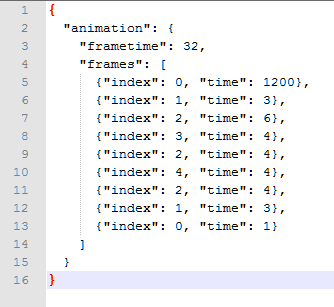
Inside the file (open it with a text editor like Notepad), it should look like this:
If you have a the mcmeta files make sure the animation is in the attached screen shots (animation.png) format or you will get the same issue:
Yes this is html format so missing any bracket or even a comma can result in the textures doing this
I did everything what you said and it still does not works only
Was this issue apparent immidiatly after you converted your resource pack or did it just show up? You may have to recomplile your Resourse pack if it was immidiate.
what is immidiatly,immidiate and recomplile
Emerald_ore.png show the Emerlad_ore.mcmeta help me D:
Two things:
1) Does it work without the further specifications (I.E, will the animation work without designating how quickly the frames move?) It might be an issue with that.
2) Can you show us the actual images? There might be a mistake with the frames themselves.
i can you send my texture pack and you can convert the texturepack then you can see
@Madison Borzan
Your first post... "what is immidiatly,immidiate and recomplile".... immidiatly and immidiate as in directly after, recompile is a term for unpacking and re-packaging the files components. (be aware I am not an english teacher and I may have completely butchered the actual spelling of those words).
Your second post... if you recompiled it and it did this then something went wrong with your running the Texturender.jar either the first time or the second. You'll definitely have to re-run it.
your third post... if you can attach it to this bug report, I'll see what I can do
@Neospector
First question, the "Frametime: 32," in my image, I have yet to find a use as I've set this arbritraily and it doesn't seem to affect anything, although if I remove it, the animation fails and I either get a static texture or the purple and black box textures issue.
Second Question, It checks your smallest factor in the image for the resolution (i.e. 32x160 will make your frames 32x32 each) and in this it doesn't care if your frames are scewed... it'll still attempt to render the animation, even if it means that your image throughout the animation seems cut cut or lop sided
At the same time... looking at the image you attached... if thats supposed to be mcmeta file, it is not writen correctly so your animation will fail
you must have "frametime" in it or it'll becomes purple and black textures (see above post inresponse to Neospector)
(tallgrass.zip attached file)
This is a proper animated texture format (both image and mcmeta).
Use Notepad++ to edit or view the mcmeta as it'll look nicer to the eye.
If any information is missing from your mcmeta file thats in mine, then your related animated texture will turn purple and black
what make the frametime ?
just make it the total amount of time your animation needs to complete... I stated before though that it doesn't seem to really affect much either way and can be tweaked a needed.
I have an animation that ocurrs once every 5 minutes and lasts 3 seconds. Whether I set it to 32 or 10000 it doesn't seem to make a difference
Basically just cut and paste the text from my mcmeta file in the zip folder and past it into yours, then adjust how many frames and there time to what you need/have in your texture.
{"index": x, "time": y}adding:
,
where x is the frame you need (starting with 0) and y is its time
that all go not
If you can get it so I can download the texture pack I'll dowload it and run it and see if I have any issue.
Also put your animated textures and there mcmeta files into a zip file and attached it to this report... let me take a look at them and see if I see something.
Th3F4114n0n3: It really doesn't work? Huh. That might be because I was working with such huge files (it wasn't my pack to begin with, I was just adding sound to it, the images are a little over 2000 frames long).
But, yes, it would be useful to have the pack in question.
you are must conerted the texture pack
Link:http://www.mediafire.com/download/wd9s1o1n0u6dj7d/DefaultAnimation_for_1.5.2.zip
It has to do with the frames and timing. I removed specifications for iron ore and emerald block's timing and it worked just fine, although fast.
See attached "Animated.png" screenshot.
I'm afraid I can't help you personally beyond identifying the problem here; I don't know how to work with the specifications in animations that well.
I can't tell... Looking at the gold block it worked fine and there doesn't seem to be a real difference between it and iron other than the order of its animation... the best I can tell is that there is a timing issue off or theres a space or something in the wrong place that can't easily be seen.
Even replacing it with a code I know works is having issues... it possible that there is something wrong with the conversion all together or theres something interfereing with this... I can't help but notice the Golden Furnaces and am wondering if this texture pack was setup with a mod in mind and something in the way the original files were set up for 1.5.2 is messing with its conversion.
@ Neospector
can you show me what have you make with Iron_ore.png.mcmeta
Attached as IronOre.gif
Like I said, my priority was making it work, not timing it.
i have it !!Unable to render embedded object: File (The converter have a frame has written too much into the file) not found.!!I AM HAPPY