 MC-226157
Attempting to lock compasses to lodestones in spawn protection causes a desync
The Bug:
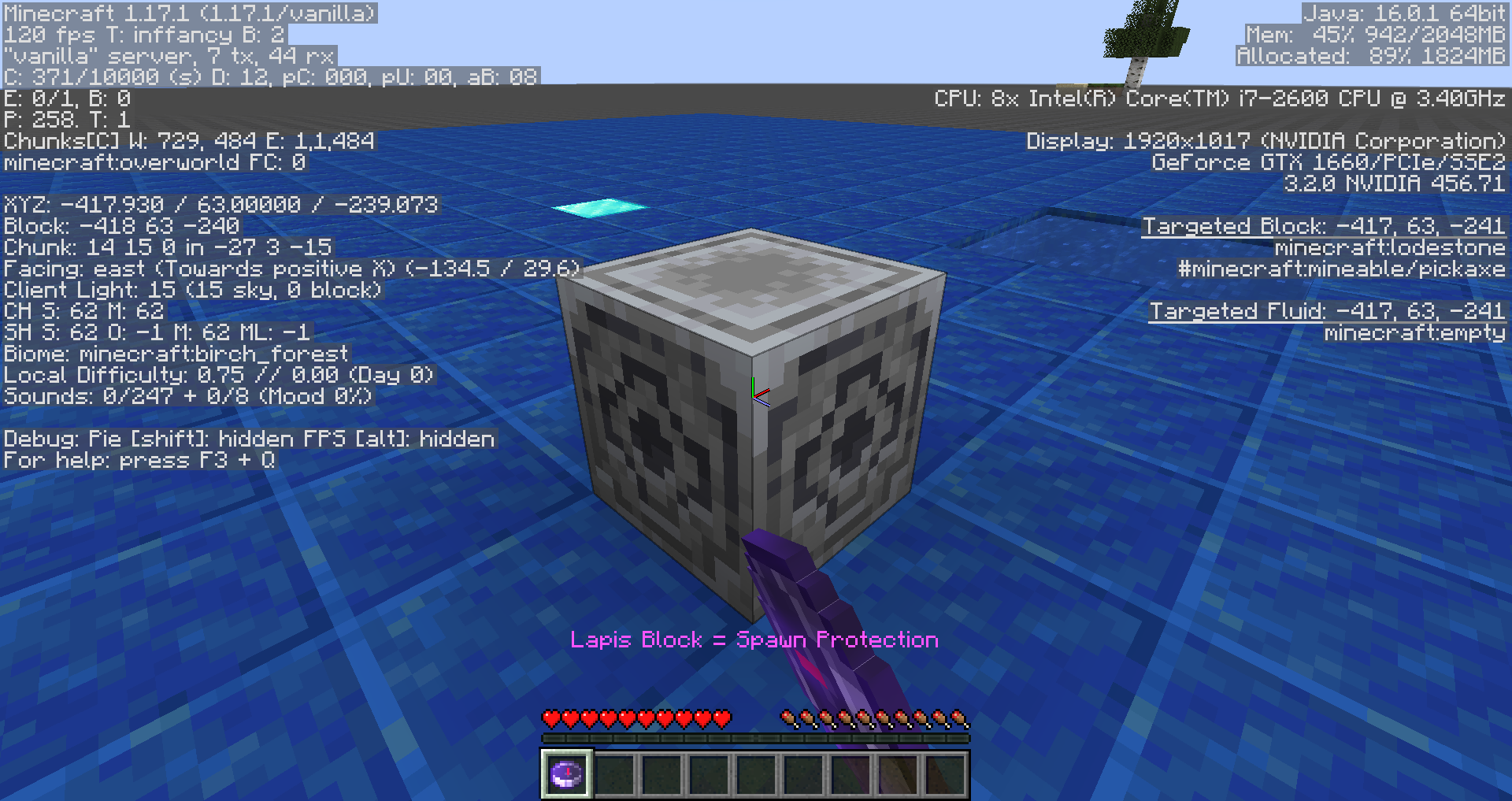
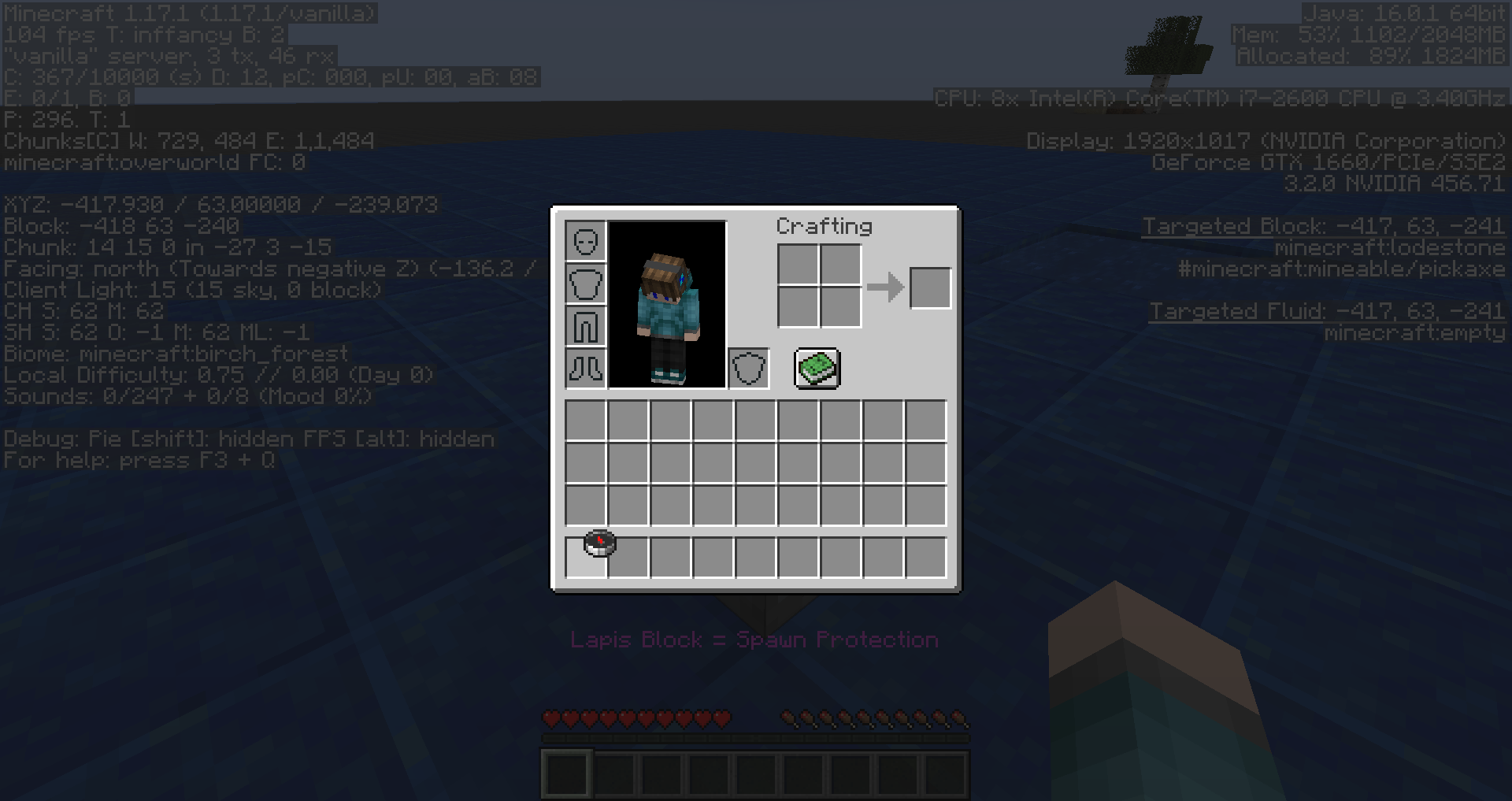
When attempting to lock a compass to a lodestone in spawn protection, the action succeeds client-side but fails server-side, causing a desync.
Steps to Reproduce:
- Start a server, join it, give operator permissions to yourself, and switch into creative mode.
- Set the world spawn to your current location and summon a lodestone nearby by using the commands provided below.
/setworldspawn ~ ~ ~
/setblock ~2 ~ ~ minecraft:lodestone
- Obtain a compass.
- Switch into survival mode, remove your operator permissions, and grant anyone else with them in order to activate spawn protection.
- Attempt to lock the compass to the lodestone, and once you've done this, reload into the world to see if this action was successful.
- Take note as to whether or not attempting to lock compasses to lodestones in spawn protection causes a desync.
Observed Behavior:
The action succeeds client-side but fails server-side, causing a desync.
Expected Behavior:
No desync would occur.
Linked Issues
 Important
![[Mod] Avoma](../../../data/avatars/users/86198.png)

Created Issue:
Attempting to lock a compass to a lodestone in spawn protection causes a desync
The Bug:
Attempting to lock a compass to a lodestone in spawn protection causes a desync.
Steps to Reproduce:
- Start a server and join it.
- Give operator permissions to yourself.
- Set the world spawn to your current location.
- Place down a lodestone.
- Obtain a compass.
- Switch into survival mode.
- Remove your operator permissions.
- Give operator permissions to any person other than yourself.
- Attempt to lock the compass to the lodestone (right-click).
→Notice how the compass turns into a lodestone compass and it seems that the action was successful, however, it wasn't.
- Click on the space in your inventory where the lodestone compass is.
→Information:
When attempting to lock a compass to a lodestone in spawn protection, the action succeeds client-side but fails server-side, causing a desync.
![[Mod] Chandler](../../../data/assets/gravatar/triwonder81.png)
![[Mod] Michael Wobst](../../../data/avatars/users/37868.png)
relates to
The Bug:
Attempting to lock a compass to a lodestone in spawn protection causes a desync.
Steps to Reproduce:
- Start a server and join it.
- Give operator permissions to yourself.
- Set the world spawn to your current location.
- Place down a lodestone.
- Obtain a compass.
- Switch into survival mode.
- Remove your operator permissions.
- Give operator permissions to any person other than yourself.
- Attempt to lock the compass to the lodestone (right-click).
→- Click on the space in your inventory where the lodestone compass is.
→Information:
When attempting to lock a compass to a lodestone in spawn protection, the action succeeds client-side but fails server-side, causing a desync.
The Bug:
Attempting to lock a compass to a lodestone in spawn protection causes a desync.
Steps to Reproduce:
- Start a server and join it.
- Give operator permissions to yourself.
- Set the world spawn to your current location.
- Place down a lodestone.
- Obtain a compass.
- Switch into survival mode.
- Remove your operator permissions.
- Give operator permissions to any person other than yourself.
- Attempt to lock the compass to the lodestone (right-click).
- →
- Click on the space in your inventory where the lodestone compass is.
- →
Information:
When attempting to lock a compass to a lodestone in spawn protection, the action succeeds client-side but fails server-side, causing a desync.
The Bug:
Attempting to lock a compass to a lodestone in spawn protection causes a desync.
Steps to Reproduce:
- Start a server and join it.
- Give operator permissions to yourself.
- Set the world spawn to your current location.
- Place down a lodestone.
- Obtain a compass.
- Switch into survival mode.
- Remove your operator permissions.
- Give operator permissions to any person other than yourself.
- Attempt to lock the compass to the lodestone (right-click).
- →
- Click on the space in your inventory where the lodestone compass is.
- →
Information:
When attemptingto lock a compass to a lodestone in spawn protection, the action succeeds client-side but fails server-side, causing a desync.The Bug:
Attempting to lock a compass to a lodestone in spawn protection causes a desync.
When attempting to lock a compass to a lodestone in spawn protection, the action succeeds client-side but fails server-side, causing a desync.
Steps to Reproduce:
- Start a server and join it.
- Give operator permissions to yourself.
- Set the world spawn to your current location.
- Place down a lodestone.
- Obtain a compass.
- Switch into survival mode.
- Remove your operator permissions.
- Give operator permissions to any person other than yourself.
- Attempt to lock the compass to the lodestone (right-click).
- →
- Click on the space in your inventory where the lodestone compass is.
- →
Expected Behavior:
The expected behavior would be that no desync would occur when attempting to lock a compass to a lodestone in spawn protection.
The Bug:
Attempting to lock a compass to a lodestone in spawn protection causes a desync.
When attempting to lock a compass to a lodestone in spawn protection, the action succeeds client-side but fails server-side, causing a desync.
Steps to Reproduce:
- Start a server and join it.
- Give operator permissions to yourself.
- Set the world spawn to your current location.
- Place down a lodestone.
- Obtain a compass.
- Switch into survival mode.
- Remove your operator permissions.
- Give operator permissions to any person other than yourself.
- Attempt to lock the compass to the lodestone (right-click).
- →
- Click on the space in your inventory where the lodestone compass is.
- →
Expected Behavior:
The expected behavior would be that no desync would occur when attempting to lock a compass to a lodestone in spawn protection.The Bug:
Attempting to lock a compass to a lodestone in spawn protection causes a desync.
When attempting to lock a compass to a lodestone in spawn protection, the action succeeds client-side but fails server-side, causing a desync.
Steps to Reproduce:
- Start a server and join it.
- Give operator permissions to yourself.
- Set the world spawn to your current location.
- Place down a lodestone.
- Obtain a compass.
- Switch into survival mode.
- Remove your operator permissions.
- Give operator permissions to any person other than yourself.
- Attempt to lock the compass to the lodestone (right-click).
- →
- Click on the space in your inventory where the lodestone compass is.
- →
Observed Behavior:
Attempting to lock a compass to a lodestone in spawn protection causes a desync.
Expected Behavior:
Attempting to lock a compass to a lodestone in spawn protection would not cause a desync.
The Bug:
Attempting to lock
acompass toalodestone in spawn protection causesadesync.When attempting to lock a compass to a lodestone in spawn protection, the action succeeds client-side but fails server-side, causing a desync.
Steps to Reproduce:
- Start a server and join it.
- Give operator permissions to yourself.
- Set the world spawn to your current location.
- Place down a lodestone.
- Obtain a compass.
- Switch into survival mode.
- Remove your operator permissions.
- Give operator permissions to any person other than yourself.
- Attempt to lock the compass to the lodestone (right-click).
- →
- Click on the space in your inventory where the lodestone compass is.
- →
Observed Behavior:
Attempting to lock
acompass toalodestone in spawn protection causesadesync.Expected Behavior:
Attempting to lock
acompass toalodestone in spawn protection would not causeadesync.The Bug:
Attempting to lock compasses to lodestones in spawn protection causes desyncs.
When attempting to lock a compass to a lodestone in spawn protection, the action succeeds client-side but fails server-side, causing a desync.
Steps to Reproduce:
- Start a server and join it.
- Give operator permissions to yourself.
- Set the world spawn to your current location.
- Place down a lodestone.
- Obtain a compass.
- Switch into survival mode.
- Remove your operator permissions.
- Give operator permissions to any person other than yourself.
- Attempt to lock the compass to the lodestone (right-click).
- →
- Click on the space in your inventory where the lodestone compass is.
- →
Observed Behavior:
Attempting to lock compasses to lodestones in spawn protection causes desyncs.
Expected Behavior:
Attempting to lock compasses to lodestones in spawn protection would not cause desyncs.
Attempting to lockacompass toalodestone in spawn protection causesadesyncAttempting to lock compasses to lodestones in spawn protection causes desyncs
The Bug:
Attempting to lock compasses to lodestones in spawn protection causes desync
s.When attempting
to lock a compass to a lodestone in spawn protection, the action succeeds client-side but fails server-side, causing a desync.Steps to Reproduce:
- Start a server and join it.
- Give operator permissions to yourself.
- Set the world spawn to your current location.
- Place down a lodestone.
- Obtain a compass.
- Switch into survival mode.
- Remove your operator permissions.
- Give operator permissions to any person other than yourself.
- Attempt to lock the compass to the lodestone (right-click).
- →
Click on the space in your inventory where the lodestone compass is.- →
Observed Behavior:
Attempting to lock compasses to lodestones in spawn protection causesdesyncs.Expected Behavior:
Attempting to lock compasses to lodestones in spawn protection would not cause desyncs.
The Bug:
Attempting to lock compasses to lodestones in spawn protection causes a desync.
When attempting to lock a compass to a lodestone in spawn protection, the action succeeds client-side but fails server-side, causing a desync.
Steps to Reproduce:
- Start a server, join it, give operator permissions to yourself, and switch into creative mode.
- Set the world spawn to your current location and summon a lodestone nearby.
- Obtain a compass and switch into survival mode.
- Remove your operator permissions, and grant anyone else with them in order to activate spawn protection.
- Attempt to lock the compass to the lodestone, and once you've done this, reload into the world to see if this action was successful.
- Take note as to whether or not attempting to lock compasses to lodestones in spawn protection causes a desync.
Observed Behavior:
The action succeeds client-side but fails server-side, causing a desync.
Expected Behavior:
No desync would occur.
Attempting to lock compasses to lodestones in spawn protection causes desyncsAttempting to lock compasses to lodestones in spawn protection causes a desync
The Bug:
Attempting to lock compassesto lodestonesin spawn protectioncausesa desync.When attempting to lock a compass to a lodestone in spawn protection, the action succeeds client-side but fails server-side, causing a desync.
Steps to Reproduce:
- Start a server, join it, give operator permissions to yourself, and switch into creative mode.
- Set the world spawn to your current location and summon a lodestone nearby.
- Obtain a compass and switch into survival mode.
- Remove your operator permissions, and grant anyone else with them in order to activate spawn protection.
- Attempt to lock the compass to the lodestone, and once you've done this, reload into the world to see if this action was successful.
- Take note as to whether or not attempting to lock compasses to lodestones in spawn protection causes a desync.
Observed Behavior:
The action succeeds client-side but fails server-side, causing a desync.
Expected Behavior:
No desync would occur.
The Bug:
When attempting to lock a compass to a lodestone in spawn protection, the action succeeds client-side but fails server-side, causing a desync.
Steps to Reproduce:
- Start a server, join it, give operator permissions to yourself, and switch into creative mode.
- Set the world spawn to your current location and summon a lodestone nearby.
- Obtain a compass and switch into survival mode.
- Remove your operator permissions, and grant anyone else with them in order to activate spawn protection.
- Attempt to lock the compass to the lodestone, and once you've done this, reload into the world to see if this action was successful.
- Take note as to whether or not attempting to lock compasses to lodestones in spawn protection causes a desync.
Observed Behavior:
The action succeeds client-side but fails server-side, causing a desync.
Expected Behavior:
No desync would occur.
![[Mod] ampolive](../../../data/avatars/users/18949.svg)
The Bug:
When attempting to lock a compass to a lodestone in spawn protection, the action succeeds client-side but fails server-side, causing a desync.
Steps to Reproduce:
- Start a server, join it, give operator permissions to yourself, and switch into creative mode.
- Set the world spawn to your current location and summon a lodestone nearby.
- Obtain a compass
and switch into survival mode.Remove your operator permissions, and grant anyone else with them in order to activate spawn protection.- Attempt to lock the compass to the lodestone, and once you've done this, reload into the world to see if this action was successful.
- Take note as to whether or not attempting to lock compasses to lodestones in spawn protection causes a desync.
Observed Behavior:
The action succeeds client-side but fails server-side, causing a desync.
Expected Behavior:
No desync would occur.
The Bug:
When attempting to lock a compass to a lodestone in spawn protection, the action succeeds client-side but fails server-side, causing a desync.
Steps to Reproduce:
- Start a server, join it, give operator permissions to yourself, and switch into creative mode.
- Set the world spawn to your current location and summon a lodestone nearby by using the commands provided below.
/setworldspawn ~ ~ ~/setblock ~2 ~ ~ minecraft:lodestone- Obtain a compass.
- Switch into survival mode, remove your operator permissions, and grant anyone else with them in order to activate spawn protection.
- Attempt to lock the compass to the lodestone, and once you've done this, reload into the world to see if this action was successful.
- Take note as to whether or not attempting to lock compasses to lodestones in spawn protection causes a desync.
Observed Behavior:
The action succeeds client-side but fails server-side, causing a desync.
Expected Behavior:
No desync would occur.
Probably duplicates MC-99075
I wouldn't say that this is a duplicate of MC-99075 since this is a block interaction and not a block placement. See MC-225587, for example.