 MC-240441
Minecraft worlds don't save properly
The Bug:
The world is not saved
Steps to Reproduce:
- Launch any version of Minecraft Java
- Create a new world
- Save and quit the world
Observed Behavior:
The world is not saved.
Expected Behavior:
The world is saved.
Environment
Windows 11 Insider
Linked Issues
is duplicated by1




Created Issue:
Lost inventory and position after SAVING and rejoin
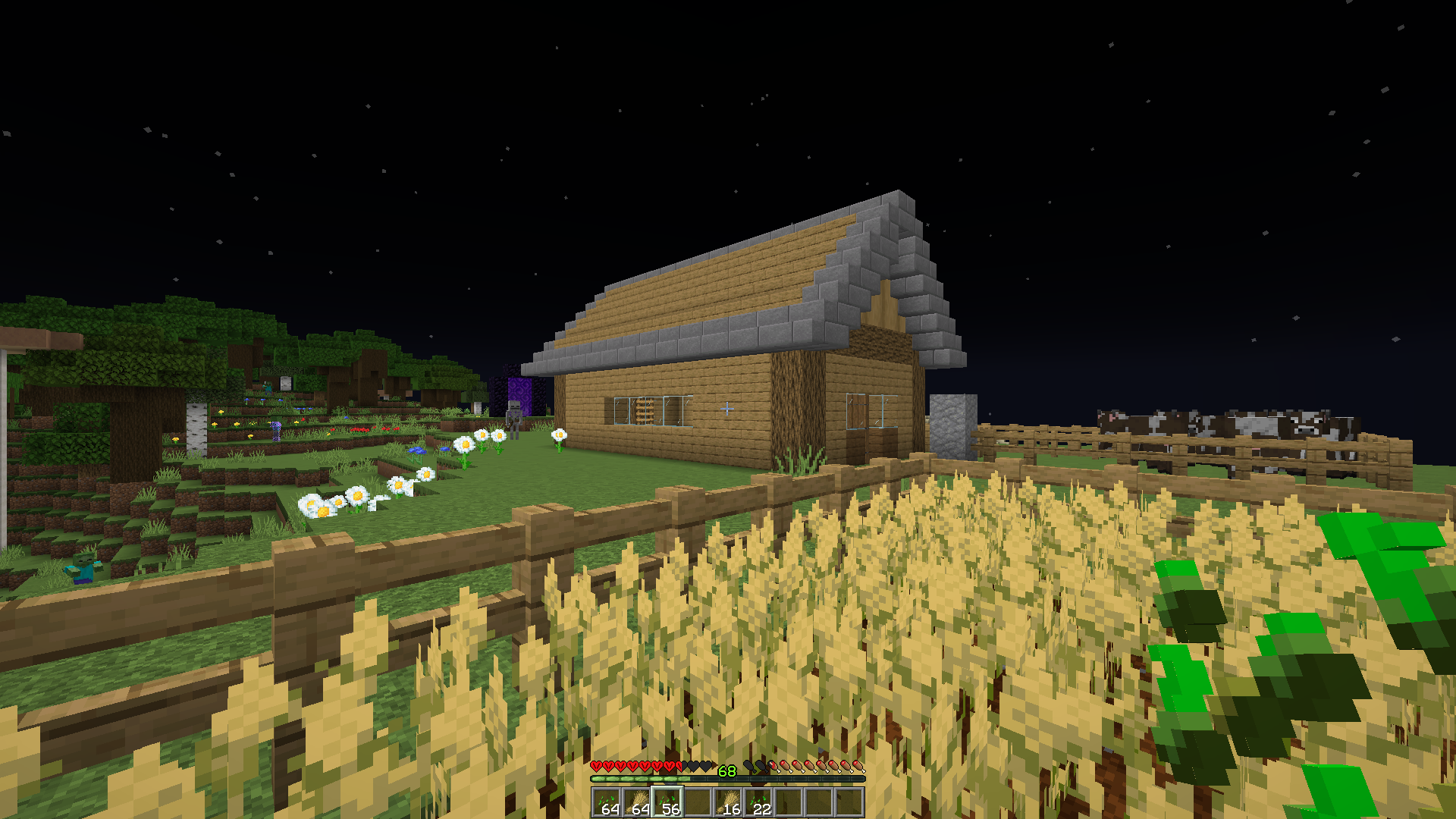
Hello i have a hardcore survival world and made a lot of stuff (netherite ect...) I put it in my chests and reconnected so i was with 0 stuff on me in my wheat farm. Next, i taken my netherite armor and every thing and made a room, i disconnected and RECONNECTED and now All my stuff have benn replaced by the state colored in blue in the text BUT my room was there so i don't think its a problem bc i don't saved AND YES MY ENGLISH IS NOT REALLY GOOD.
the screenshot is my hotbar when i connect (solo and hotbar is my only stuff) and the pos i am in my world
Attachments1
Hello i have a hardcore survival world and made a lot of stuff (netherite ect...) I put it in my chests and reconnected so i was with 0 stuff on me in my wheat farm. Next, i taken my netherite armor and every thing and made a room, i disconnected and RECONNECTED and now All my stuff have benn replaced by the state colored in blue in the text BUT my room was there so i don't think its a problem bc i don't saved AND YES MY ENGLISH IS NOT REALLY GOOD.
the screenshot is my hotbar when i connect (solo and hotbar is my only stuff) and the pos i am in my world
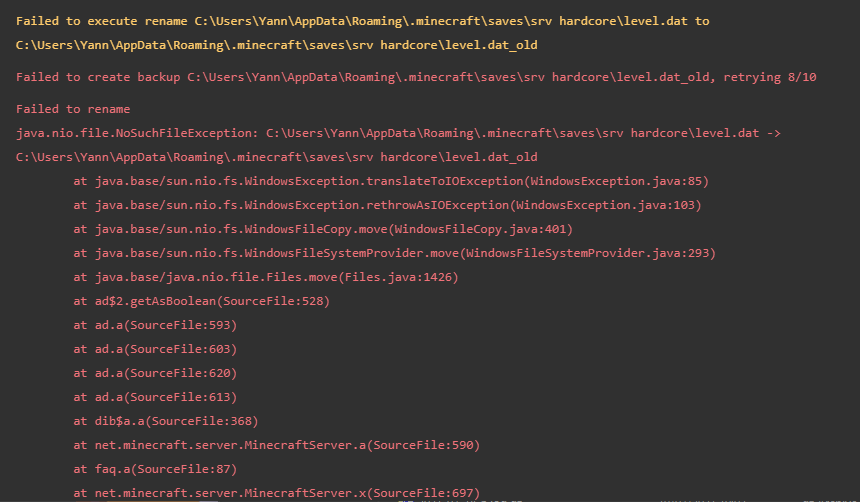
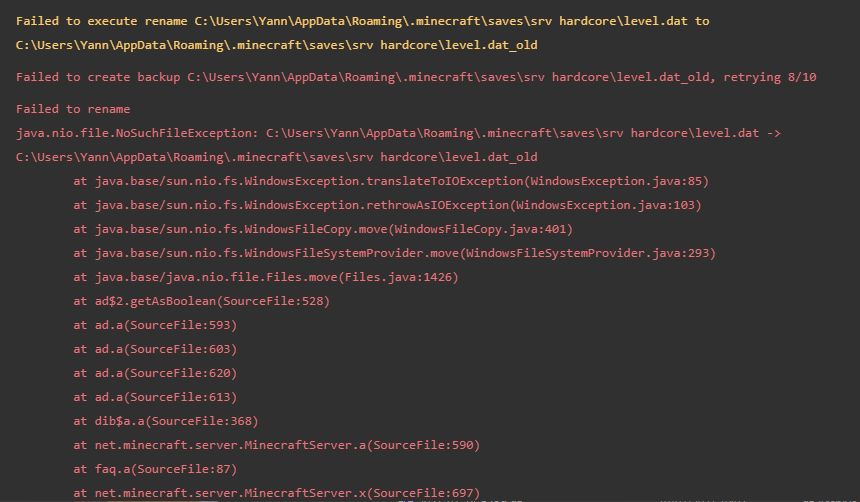
edit : checked the log. a lot of error anyone can help me read ?
(Minecraft world dont save everyting)Lost inventory and position after SAVING and rejoin
![[Mod] Neko](../../../data/avatars/users/92901.png)
is duplicated by
Hello i have a hardcore survival world and made a lot of stuff (netherite ect...) I put it in my chests and reconnected so i was with 0 stuff on me in my wheat farm. Next, i taken my netherite armor and every thing and made a room, i disconnected and RECONNECTED and now All my stuff have benn replaced by the state colored in blue in the text BUT my room was there so i don't think its a problem bc i don't saved AND YES MY ENGLISH IS NOT REALLY GOOD.
the screenshot is my hotbar when i connect (solo and hotbar is my only stuff) and the pos i am in my world
edit : checked the log. a lot of error anyone can help me read ?
The Bug:
The world is not saved
Steps to Reproduce:
- Launch any version of Minecraft Java
- Create a new world
- Save and quit the world
Observed Behavior:
The world is not saved.
Expected Behavior:
The world is saved.
![[Bot] Arisa](../../../data/avatars/users/43007.png)
(Minecraft world dont saveeveryting)Lost inventory and position after SAVING and rejoinMinecraft world doesn't save properly
Minecraft world doesn't save properlyMinecraft worlds don't save properly
![[Mod] bemoty](../../../data/avatars/users/50554.png)

Thank you for your report!
We're tracking this issue in MC-240441, so this ticket is being resolved and linked as a duplicate.
If you would like to add a vote and any extra information to the main ticket it would be appreciated.
If you haven't already, you might like to make use of the search feature to see if the issue has already been mentioned.
Quick Links:
📓 Bug Tracker Guidelines – 💬 Community Support – 📧 Mojang Support
📓 Project Summary – ✍️ Feedback and Suggestions – 📖 Game Wiki
– I am a bot. This action was performed automatically! The ticket was resolved by one of our moderators, and I left this message to give more information to you.
The problem is in the name of level.dat Minecraft saves level.dat with numbers after the name level (example: level-1213141.dat) When opening the world, it looks for the level file, and there is a bunch of level files with numbers. It's the same with playerdata. The game does not find a profile and creates a new one. Also with numbers.

You can fix saving.
Rename the last saved levelxxxxx.dat to level.dat
This will help until the next save, you need to repeat the procedure before starting.
Thank you, it worked but i didint needed to have the last save ... because it wasent theright one. to find the right one i used NBTExplorer. Thanks. Please how we mark as resolved or if I cant please anyone mark it as reesolved
edit : do i need to make that everytime ? (when its save like in esc menu i have this)
This is not a solution to the problem.
The solution to the problem will be when the developers fix it.
And until it is fixed ... Yes, it must be done every time.
This applies not only to hardcore, this is a problem with all versions of Minecraft Java from the new launcher.
P.S. I have a suspicion that this problem is only on Windows 11
Now it should be done properly.
The Bug:
The world is not saved
Steps to Reproduce:
Observed Behavior:
The world is not saved.
Expected Behavior:
The world is saved.
I can confirm that I have all these problems. But the thing is that on the old launcher it saves properly, but it does NOT save properly on the new launcher. Level.dat has a ton of numbers at the end of it when saving with the new launcher. No numbers when saving with the old.
Yes, on the new launcher, everything is going bad ( i installed the new launcher bc i have xbox game pass so i need it to have second account)
and mojang HAVE to fix this launcher beacause its really problematic for anyone having this launcher ( i willl test your theory that its only on win 11 bc i dualboot win 10 / 11)
You are right, the problem is only on win 11
– I am a bot. This action was performed automatically! If you think it was incorrect, please notify us on Discord or Reddit
Is this still an issue for you in the latest release/snapshot?