 MC-253742
The chat scroll bar overlaps the colored indicators used to show the trust status of messages
The Bug:
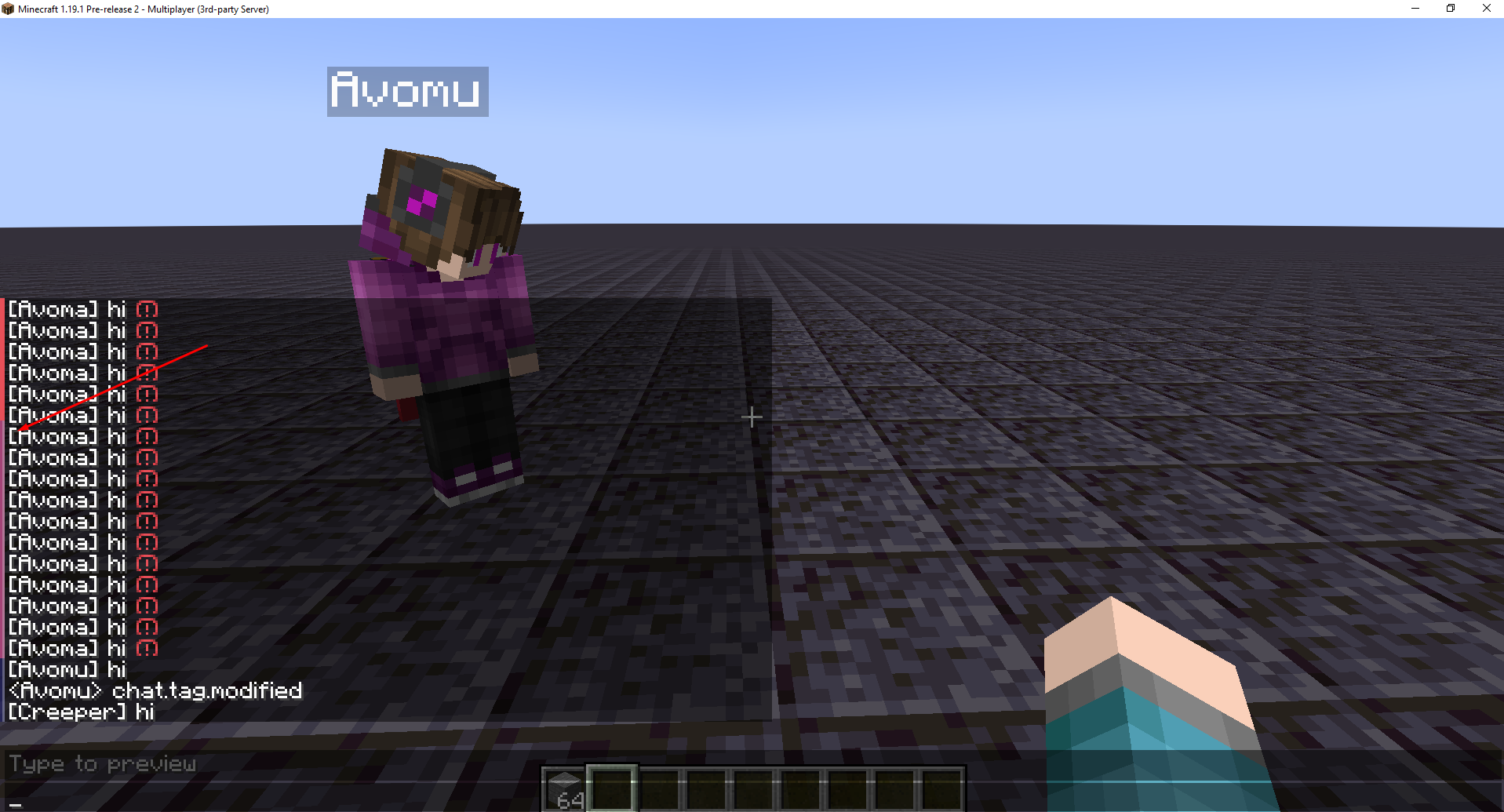
The chat scroll bar overlaps the colored indicators used to show the trust status of messages.
Steps to Reproduce:
- Start and join a server.
- Send lots of messages in chat that aren't secure or have been modified by the server until the scroll bar appears.
- Take note as to whether or not the chat scroll bar overlaps the colored indicators used to show the trust status of messages.
Observed Behavior:
The chat scroll bar overlaps the colored indicators used to show the trust status of messages.
Expected Behavior:
The chat scroll bar would not overlap the colored indicators used to show the trust status of messages.
Attachments1
![[Mod] Avoma](../../../data/avatars/users/86198.png)
Created Issue:
Colored indicators used to show the trust status of messages overlaps the chat scroll bar
The Bug:
The chat scroll bar overlaps the colored indicators used to show the trust status of messages.
Steps to Reproduce:
- Start and join a server.
- Send lots of messages in chat that aren't secure or have been modified by the server until the scroll bar appears.
- Take note as to whether or not the chat scroll bar overlaps the colored indicators used to show the trust status of messages.
Observed Behavior:
The chat scroll bar overlaps the colored indicators used to show the trust status of messages.
Expected Behavior:
The chat scroll bar would not overlap the colored indicators used to show the trust status of messages.
Colored indicators used to show the trust status of messagesoverlaps the chat scroll barThe chat scroll bar overlaps the colored indicators used to show the trust status of messages
![[Mod] markderickson](../../../data/avatars/users/18946.svg)
![[Mojang] Moesh](../../../data/avatars/users/10122.svg)
![[Mojang] eowyn36](../../../data/avatars/users/18935.svg) [Mojang] eowyn36
[Mojang] eowyn36![[Bot] Piston](../../../data/avatars/users/31202.png)
 Low
LowThe Bug:
The chat scroll bar's new position looks notably confusing for players mainly when text background opacity is disabled.
In 1.19.1 Pre-release 3, the chat scroll bar was moved to the right side of the chat UI. This change was very likely made due to the fix of MC-253742 and because of its new positioning, it looks really out of place when the chat UI is open whilst having text background opacity disabled.
Due to the scroll bar not being positioned directly next to text within the chat UI, it confuses the player as it's not immediately clear to them that the scroll bar itself, is in fact a scroll bar, and not some random shape appearing around the middle of players' screen when the chat UI is open. Having it positioned directly next to text just like it was in prior versions, is more convenient as it initially implies that it isn't some random shape and is in fact a scroll bar.
Steps to Reproduce:
- Ensure that you have text background opacity disabled in your accessibility settings.
- Type multiple messages in chat until the chat scroll bar appears.
- Look at the position of the scroll bar.
- Take note as to whether or not the chat scroll bar's new position looks notably confusing for players when text background opacity is disabled.
Observed Behavior:
The chat scroll bar's new position looks notably confusing for players as it's not immediately clear to them that the scroll bar itself, is in fact a scroll bar.
Expected Behavior:
The chat scroll bar would be moved back to the left side of the screen, and the colored indicators used to show the trust status of messages would be moved elsewhere.