OS X Fullscreen is not supported
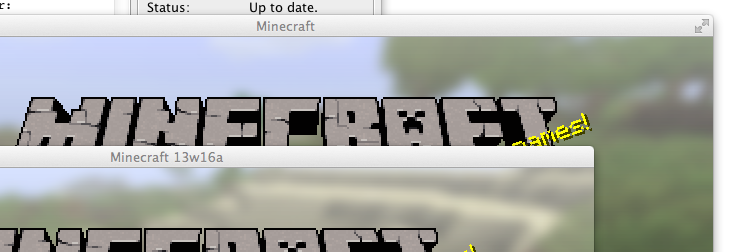
While using the new launcher, Minecraft no longer supports the use of Mac OS-X's built-in fullscreen feature which worked flawlessly on prior versions and was highly preferred by myself over the game's own( as it grants much more freedom of multitasking, allows me to reach other programs without rebooting the game's render engine, and increases game performance by isolating the render in a separate desktop space).
Environment
Mac OS-X 10.8.3, Latest Apple Java, OpenGL 2.1
Linked Issues
is duplicated by5
 MC-26096native fullscreen in OS XDuplicateMC-26201Use OSX native fullscreen modeDuplicate
 MCL-55Fullscreen for OSX? (Not a bug, but a feature request for the new launcher)DuplicateMCL-320Fullscreen does not co-operate with OS X's fullscreen app switchingDuplicateMCL-655Game client no longer allows OS X full screenDuplicate
Attachments1

Created Issue:
Fullscreen removed
While using the new launcher, Minecraft no longer supports the use of Mac OS-X's built-in fullscreen feature which worked flawlessly on prior versions and was highly preferred by myself over the game's own( as it grants much more freedom of multitasking, allows me to reach other programs without rebooting the game's render engine, and increases game performance by isolating the render in a separate desktop space).
Environment
Mac OS-X 10.8.3, Latest Apple Java, OpenGL 2.1
Attachments1
- Unresolved
- Open
- Unconfirmed
- 13w16a FullScreen Mac
- 13w16a
 MC-13749 → MCL-171
![[Mod] Ezekiel (ezfe)](../../../data/assets/gravatar/ezekielelin.jpeg)
FullscreenremovedFullscreen Not Supported Correctly

is duplicated by
![[Mojang] Grum (Erik Broes)](../../../data/assets/gravatar/grum.png)
FullscreenNotSupportedCorrectlyosx fake-fullscreen not supported correctly
is duplicated by
is duplicated by


is duplicated by
osx fake-fullscreen not supportedcorrectlyOS X Fullscreen is not supported
![[Mod] Torabi](../../../data/assets/gravatar/torabi.png)
Duplicate of MC-26102, please use the search function to see if your bug has already been submitted. Currently over 58% of tickets are being closed as duplicate.
Duplicate of MC-26102, please use the search function to see if your bug has already been submitted. Currently over 58% of tickets are being resolved as duplicate.
LWJGL does not currently support OS X native fullscreen.
You might want to comment on the linked thread about your solution.
Which fullscreen is not working? just maximizing the window? It works fine here
I'm referring to the fullscreen function in Mac OS-X versions 10.7 and newer, where any compatible window can be brought into its own desktop space as a fullscreen application. The screenshot included with the post shows 1.5's window with the fullscreen button present and a snapshot where it is missing. I can also confirm that it is still missing in the latest snapshot (13w18b).
It's probably just some little variable somewhere in the window protocols.
Grum, Feed The Beast adds a feature which allows you to use OS X fullscreen. It works perfectly. The FN+ALT F11 does break many conventions and is very un-intuitive. It is common procedure to support this in a Mac app.
And now the question is how, give some more details. How would one even go into this 'for one screen only fullscreen state' ?
This is an LWGL issue which cannot be resolved by Mojang.
Mind elaborating? Is it because LWGJL was updated for 1.6 or the new launcher? IIRC that shouldn't change a thing. This should be fixable.
@Grum: On OS X, the Minecraft client (the old one :I) should have two arrows in the top right allowing the user to put it into a 300% better native fullscreen.
Just found out that the latest LWJGL version fixes this—now it's resolvable my Mojang.
Really annoying to quit Minecraft every time I want to use Chrome considering I only have 20 MB allocated to MC.
Just 20 MB :O, I keep at least 4096 for minecraft.
Regarding fullscreen, I will look into it.
If LWGL truly does support it, it is probably because Mojang requested support.LWGL does not currently support OS X native fullscreenAlright then; thanks for the update.
http://lwjgl.org/forum/index.php?topic=4671.0
So it looks like this may become an option again in the future.
I would greatly appreciate some kind of tabs being kept on this.
As someone who must use fullscreen but must also multitask, this is a very important feature to me.
I am keeping "tabs" on this and can report 13w36b seems to half-implement it.
You can, for instance, open notification center, but minecraft exits fullscreen.
You can also go into mission control, but the entire screen is black rendering it useless.
Lastly, you can go to other window pages, but they don't receive keyboard input.
This is fixed in 13w47a
worked fine for me.